Libraries
By: Lori Warren
w979053@usm.edu
Using Online Databases
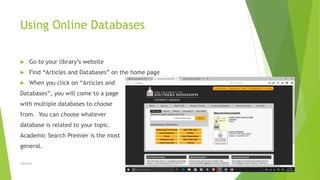
 Go to your library’s website
 Find “Articles and Databases” on the home page
 When you click on “Articles and
Databases”, you will come to a page
with multiple databases to choose
from. You can choose whatever
database is related to your topic.
Academic Search Premier is the most
general.
11/3/2016Libraries 2
11/3/2016Libraries 3
Searching for Books
 Go to your library’s Website.
 Go to the Search Box and type in the title of the book you are looking for.
 What will come up are some different options (paperback, hardback, e-book,
etc.) of that title.
 Choose which book you are looking for.
 When you have clicked on your choice, a call number should come up.
 You use the call number to find the book in the library.
11/3/2016Libraries 4
11/3/2016Libraries 5
Using Microfilm
 First, open the glass plate.
 Insert microfilm onto left spindle.
 Thread film through rollers until it reaches right spindle.
 Close glass plate.
 Focus and adjust the film by using the knobs.
11/3/2016Libraries 6
11/3/2016Libraries 7
Difference between using a library and
using online sources (benefits of library)
 Library
 You can find EVERYTHING you need
for a certain topic.
 Printers and different tools already
available.
 Quiet place to work.
 If you have kids, it’s a good place
to take them while you work.
 Online
 You can find what you need, but
have no one to help you if you
cannot find what you are looking
for.
 Maybe you do not have a printer, or
your printer does not work. You do
not own a copier.
11/3/2016Libraries 8
11/3/2016Libraries 9
Thank you for your attention!
Questions?
11/3/2016Libraries 10

Libraries

  • 1.
  • 2.
    Using Online Databases Go to your library’s website  Find “Articles and Databases” on the home page  When you click on “Articles and Databases”, you will come to a page with multiple databases to choose from. You can choose whatever database is related to your topic. Academic Search Premier is the most general. 11/3/2016Libraries 2
  • 3.
  • 4.
    Searching for Books Go to your library’s Website.  Go to the Search Box and type in the title of the book you are looking for.  What will come up are some different options (paperback, hardback, e-book, etc.) of that title.  Choose which book you are looking for.  When you have clicked on your choice, a call number should come up.  You use the call number to find the book in the library. 11/3/2016Libraries 4
  • 5.
  • 6.
    Using Microfilm  First,open the glass plate.  Insert microfilm onto left spindle.  Thread film through rollers until it reaches right spindle.  Close glass plate.  Focus and adjust the film by using the knobs. 11/3/2016Libraries 6
  • 7.
  • 8.
    Difference between usinga library and using online sources (benefits of library)  Library  You can find EVERYTHING you need for a certain topic.  Printers and different tools already available.  Quiet place to work.  If you have kids, it’s a good place to take them while you work.  Online  You can find what you need, but have no one to help you if you cannot find what you are looking for.  Maybe you do not have a printer, or your printer does not work. You do not own a copier. 11/3/2016Libraries 8
  • 9.
  • 10.
    Thank you foryour attention! Questions? 11/3/2016Libraries 10