Let’s play with Symfony2
Noël GUILBERT
Symfony2 introduced a lot a new features,
             let’s discover some of them:

• Dependency Injection Container
• The form framework
• Doctrine2 integration
Dependency Injection Container

• Dependency Injection Container
  –a way to organize dependencies
  –Define services
       services:
        zend.translator:
         class: User
         arguments: [@user.storage]
        user.storage:
          class: SessionStorage
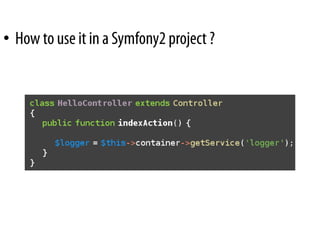
• How to use it in a Symfony2 project ?
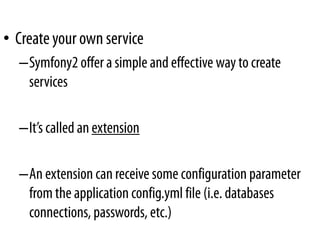
• Create your own service
  –Symfony2 offer a simple and effective way to create
   services

  –It’s called an extension

  –An extension can receive some configuration parameter
   from the application config.yml file (i.e. databases
   connections, passwords, etc.)
• Create your own service
  –Define your services:
   # src/Bundle/TwitterBundle/Resources/config/user.yml
   parameters:
     twitter.username: ~
     twitter.password: ~

   services:
    twitter:
     class: Twitter
     arguments: [%twitter.username%, %twitter.password%]
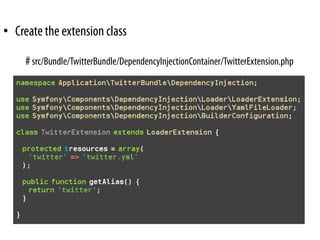
• Create the extension class

     # src/Bundle/TwitterBundle/DependencyInjectionContainer/TwitterExtension.php
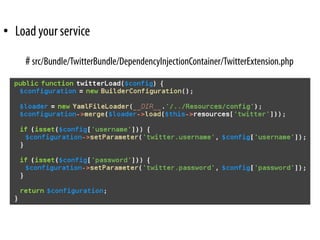
• Load your service

    # src/Bundle/TwitterBundle/DependencyInjectionContainer/TwitterExtension.php
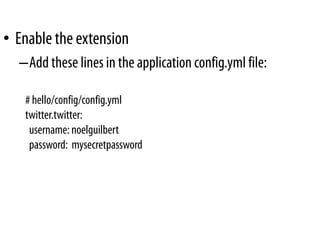
• Enable the extension
  –Add these lines in the application config.yml file:

   # hello/config/config.yml
   twitter.twitter:
    username: noelguilbert
    password: mysecretpassword
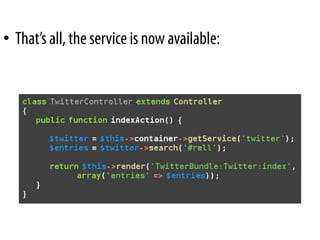
• That’s all, the service is now available:
The Form Framework


• A brand new piece of code
• A layer on top of the domain models
• Allows you to easily create HTML forms
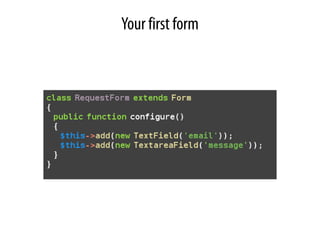
Your first form
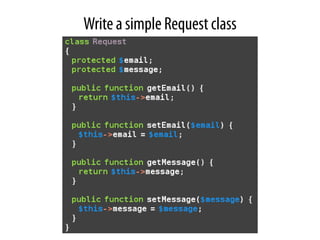
Write a simple Request class
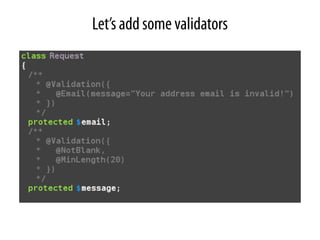
Let’s add some validators
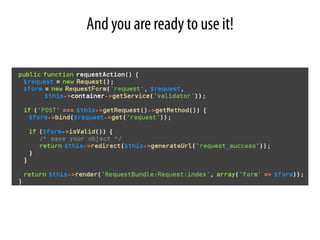
And you are ready to use it!
Doctrine 2 integration

• Fully integrated:
  – DBAL
  – ORM
  – MongoDb mapper
  – Migrations
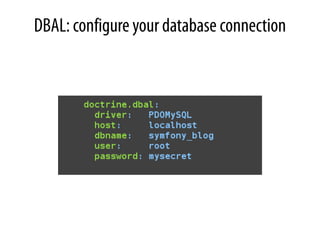
DBAL: configure your database connection
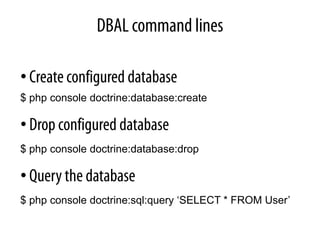
DBAL command lines

• Create configured database
$ php console doctrine:database:create

• Drop configured database
$ php console doctrine:database:drop

• Query the database
$ php console doctrine:sql:query ‘SELECT * FROM User’
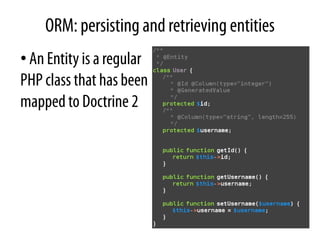
ORM: persisting and retrieving entities
• An Entity is a regular
PHP class that has been
mapped to Doctrine 2
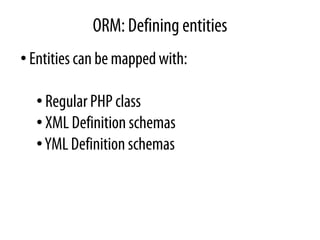
ORM: Defining entities
• Entities can be mapped with:

  • Regular PHP class
  • XML Definition schemas
  • YML Definition schemas
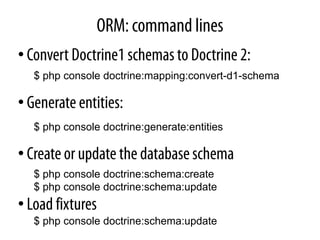
ORM: command lines
• Convert Doctrine1 schemas to Doctrine 2:
   $ php console doctrine:mapping:convert-d1-schema

• Generate entities:
   $ php console doctrine:generate:entities

• Create or update the database schema
   $ php console doctrine:schema:create
   $ php console doctrine:schema:update
• Load fixtures
   $ php console doctrine:schema:update
What’s next ?
Questions?
                         Noël GUILBERT
                    noel.guilbert@sensio.com

                           Sensio S.A.
                  92-98, boulevard Victor Hugo
                      92 115 Clichy Cedex
                            FRANCE
                     Tél. : +33 1 40 99 80 80

www.sensiolabs.com - www.symfony-project.org - www.noelguilbert.com

Lets play with Symfony2

  • 1.
    Let’s play withSymfony2 Noël GUILBERT
  • 2.
    Symfony2 introduced alot a new features, let’s discover some of them: • Dependency Injection Container • The form framework • Doctrine2 integration
  • 3.
    Dependency Injection Container •Dependency Injection Container –a way to organize dependencies –Define services services: zend.translator: class: User arguments: [@user.storage] user.storage: class: SessionStorage
  • 4.
    • How touse it in a Symfony2 project ?
  • 5.
    • Create yourown service –Symfony2 offer a simple and effective way to create services –It’s called an extension –An extension can receive some configuration parameter from the application config.yml file (i.e. databases connections, passwords, etc.)
  • 6.
    • Create yourown service –Define your services: # src/Bundle/TwitterBundle/Resources/config/user.yml parameters: twitter.username: ~ twitter.password: ~ services: twitter: class: Twitter arguments: [%twitter.username%, %twitter.password%]
  • 7.
    • Create theextension class # src/Bundle/TwitterBundle/DependencyInjectionContainer/TwitterExtension.php
  • 8.
    • Load yourservice # src/Bundle/TwitterBundle/DependencyInjectionContainer/TwitterExtension.php
  • 9.
    • Enable theextension –Add these lines in the application config.yml file: # hello/config/config.yml twitter.twitter: username: noelguilbert password: mysecretpassword
  • 10.
    • That’s all,the service is now available:
  • 11.
    The Form Framework •A brand new piece of code • A layer on top of the domain models • Allows you to easily create HTML forms
  • 12.
  • 13.
    Write a simpleRequest class
  • 14.
    Let’s add somevalidators
  • 15.
    And you areready to use it!
  • 16.
    Doctrine 2 integration •Fully integrated: – DBAL – ORM – MongoDb mapper – Migrations
  • 17.
    DBAL: configure yourdatabase connection
  • 18.
    DBAL command lines •Create configured database $ php console doctrine:database:create • Drop configured database $ php console doctrine:database:drop • Query the database $ php console doctrine:sql:query ‘SELECT * FROM User’
  • 19.
    ORM: persisting andretrieving entities • An Entity is a regular PHP class that has been mapped to Doctrine 2
  • 20.
    ORM: Defining entities •Entities can be mapped with: • Regular PHP class • XML Definition schemas • YML Definition schemas
  • 21.
    ORM: command lines •Convert Doctrine1 schemas to Doctrine 2: $ php console doctrine:mapping:convert-d1-schema • Generate entities: $ php console doctrine:generate:entities • Create or update the database schema $ php console doctrine:schema:create $ php console doctrine:schema:update • Load fixtures $ php console doctrine:schema:update
  • 22.
  • 23.
    Questions? Noël GUILBERT noel.guilbert@sensio.com Sensio S.A. 92-98, boulevard Victor Hugo 92 115 Clichy Cedex FRANCE Tél. : +33 1 40 99 80 80 www.sensiolabs.com - www.symfony-project.org - www.noelguilbert.com