Lesson 1
Introduction
â—Ź Understand the concepts of block-based coding
â—Ź Understand basic coding concepts and language
â—Ź Understand how a sequence/algorithm works
By the end of this lesson, you will…
Learning Objectives
What is “coding”?
What do you think “coding”
means?
Lesson 1
Write down what coding means to
you and where it appears in your
life.
Coding == Problem Solving
Writing code is a tool to solve
problems!
Lesson 1
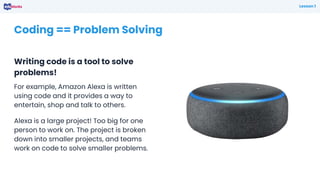
For example, Amazon Alexa is written
using code and it provides a way to
entertain, shop and talk to others.
Alexa is a large project! Too big for one
person to work on. The project is broken
down into smaller projects, and teams
work on code to solve smaller problems.
Coding Concepts
Every coding language uses the
same key coding concepts!
Lesson 1
Selection
Using logical tests to change the flow
of the sequence
Sequence
The instructions for our code
Iteration
Using loops to repeat sequences of code
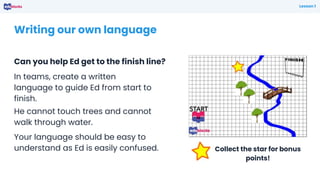
Writing our own language
Can you help Ed get to the finish line?
Lesson 1
In teams, create a written
language to guide Ed from start to
finish.
He cannot touch trees and cannot
walk through water.
Your language should be easy to
understand as Ed is easily confused. Collect the star for bonus
points!
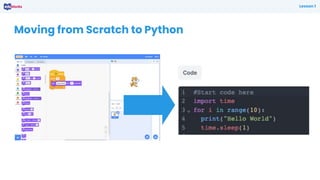
Moving from Scratch to Python
Lesson 1
What is EduBlocks?
Lesson 1
EduBlocks is a free application available
online at edublocks.org
It was started by a 12 year-old student
who wanted to help others learn how to
code.
We can write code in pure Python or
HTML, or code for use with the micro:bit,
Raspberry Pi and Adafruit CircuitPython
controller boards.
It runs in the browser like Scratch and
works on all operating systems
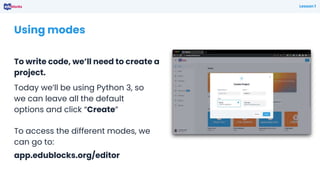
Using modes
To write code, we’ll need to create a
project.
Lesson 1
Today we’ll be using Python 3, so
we can leave all the default
options and click “Create”
To access the different modes, we
can go to:
app.edublocks.org/editor
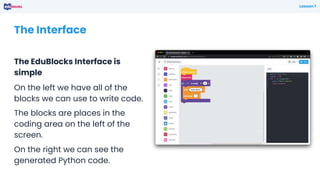
The Interface
The EduBlocks Interface is
simple
Lesson 1
On the left we have all of the
blocks we can use to write code.
The blocks are places in the
coding area on the left of the
screen.
On the right we can see the
generated Python code.
Building a sequence of code
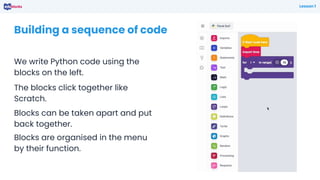
We write Python code using the
blocks on the left.
Lesson 1
The blocks click together like
Scratch.
Blocks can be taken apart and put
back together.
Blocks are organised in the menu
by their function.
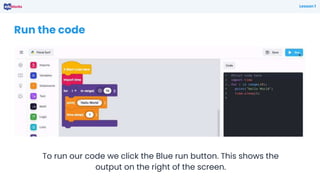
Run the code
To run our code we click the Blue run button. This shows the
output on the right of the screen.
Lesson 1
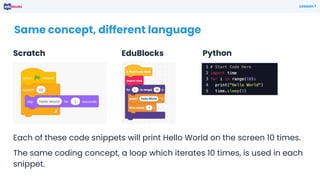
Same concept, different language
EduBlocks
Lesson 1
Each of these code snippets will print Hello World on the screen 10 times.
The same coding concept, a loop which iterates 10 times, is used in each
snippet.
Scratch Python
• Coding concepts are shared across many different languages.
• Block languages are ideal for introducing coding.
• Computers require clear instructions to work correctly.
What have we learnt?
Plenary
Next Lesson
Next lesson, we will use
EduBlocks to create graphics
with Turtle
Plenary

Lesson 1.pptxxxxxxxxxxxxxxxxxxxxxxxxxxxxxxxxxxx

  • 1.
  • 2.
    ● Understand theconcepts of block-based coding ● Understand basic coding concepts and language ● Understand how a sequence/algorithm works By the end of this lesson, you will… Learning Objectives
  • 3.
    What is “coding”? Whatdo you think “coding” means? Lesson 1 Write down what coding means to you and where it appears in your life.
  • 4.
    Coding == ProblemSolving Writing code is a tool to solve problems! Lesson 1 For example, Amazon Alexa is written using code and it provides a way to entertain, shop and talk to others. Alexa is a large project! Too big for one person to work on. The project is broken down into smaller projects, and teams work on code to solve smaller problems.
  • 5.
    Coding Concepts Every codinglanguage uses the same key coding concepts! Lesson 1 Selection Using logical tests to change the flow of the sequence Sequence The instructions for our code Iteration Using loops to repeat sequences of code
  • 6.
    Writing our ownlanguage Can you help Ed get to the finish line? Lesson 1 In teams, create a written language to guide Ed from start to finish. He cannot touch trees and cannot walk through water. Your language should be easy to understand as Ed is easily confused. Collect the star for bonus points!
  • 7.
    Moving from Scratchto Python Lesson 1
  • 8.
    What is EduBlocks? Lesson1 EduBlocks is a free application available online at edublocks.org It was started by a 12 year-old student who wanted to help others learn how to code. We can write code in pure Python or HTML, or code for use with the micro:bit, Raspberry Pi and Adafruit CircuitPython controller boards. It runs in the browser like Scratch and works on all operating systems
  • 9.
    Using modes To writecode, we’ll need to create a project. Lesson 1 Today we’ll be using Python 3, so we can leave all the default options and click “Create” To access the different modes, we can go to: app.edublocks.org/editor
  • 10.
    The Interface The EduBlocksInterface is simple Lesson 1 On the left we have all of the blocks we can use to write code. The blocks are places in the coding area on the left of the screen. On the right we can see the generated Python code.
  • 11.
    Building a sequenceof code We write Python code using the blocks on the left. Lesson 1 The blocks click together like Scratch. Blocks can be taken apart and put back together. Blocks are organised in the menu by their function.
  • 12.
    Run the code Torun our code we click the Blue run button. This shows the output on the right of the screen. Lesson 1
  • 13.
    Same concept, differentlanguage EduBlocks Lesson 1 Each of these code snippets will print Hello World on the screen 10 times. The same coding concept, a loop which iterates 10 times, is used in each snippet. Scratch Python
  • 14.
    • Coding conceptsare shared across many different languages. • Block languages are ideal for introducing coding. • Computers require clear instructions to work correctly. What have we learnt? Plenary
  • 15.
    Next Lesson Next lesson,we will use EduBlocks to create graphics with Turtle Plenary