Copyright  Oracle Corporation, 1998. All rights reserved.
7
Multiple-Column Subqueries
7-2 Copyright  Oracle Corporation, 1998. All rights reserved.
Objectives
After completing this lesson, you should
be able to do the following:
• Write a multiple-column subquery
• Describe and explain the behavior of
subqueries when null values are
retrieved
• Write a subquery in a FROM clause
7-3 Copyright  Oracle Corporation, 1998. All rights reserved.
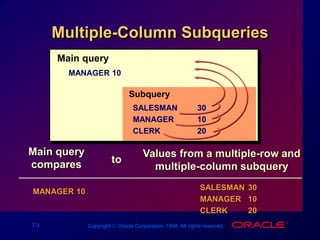
Multiple-Column Subqueries
Main query
MANAGER 10
Subquery
SALESMAN 30
MANAGER 10
CLERK 20
Main query
compares
MANAGER 10
Values from a multiple-row and
multiple-column subquery
SALESMAN 30
MANAGER 10
CLERK 20
to
7-4 Copyright  Oracle Corporation, 1998. All rights reserved.
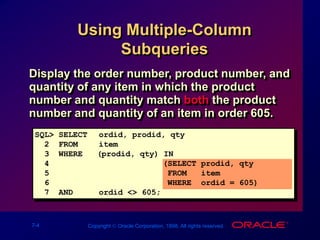
Using Multiple-Column
Subqueries
Display the order number, product number, and
quantity of any item in which the product
number and quantity match both the product
number and quantity of an item in order 605.
SQL> SELECT ordid, prodid, qty
2 FROM item
3 WHERE (prodid, qty) IN
4 (SELECT prodid, qty
5 FROM item
6 WHERE ordid = 605)
7 AND ordid <> 605;
7-6 Copyright  Oracle Corporation, 1998. All rights reserved.
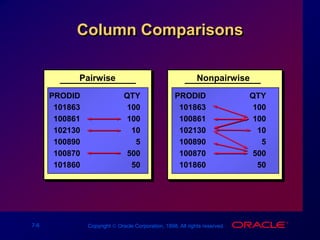
Column Comparisons
Pairwise
PRODID QTY
101863 100
100861 100
102130 10
100890 5
100870 500
101860 50
Nonpairwise
PRODID QTY
101863 100
100861 100
102130 10
100890 5
100870 500
101860 50
7-7 Copyright  Oracle Corporation, 1998. All rights reserved.
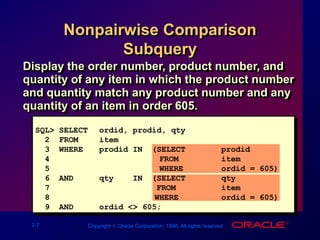
Nonpairwise Comparison
Subquery
SQL> SELECT ordid, prodid, qty
2 FROM item
3 WHERE prodid IN (SELECT prodid
4 FROM item
5 WHERE ordid = 605)
6 AND qty IN (SELECT qty
7 FROM item
8 WHERE ordid = 605)
9 AND ordid <> 605;
Display the order number, product number, and
quantity of any item in which the product number
and quantity match any product number and any
quantity of an item in order 605.
7-8 Copyright  Oracle Corporation, 1998. All rights reserved.
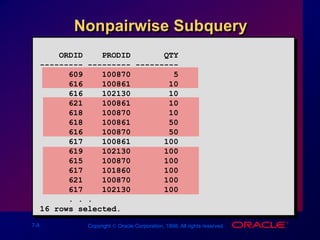
Nonpairwise Subquery
ORDID PRODID QTY
--------- --------- ---------
609 100870 5
616 100861 10
616 102130 10
621 100861 10
618 100870 10
618 100861 50
616 100870 50
617 100861 100
619 102130 100
615 100870 100
617 101860 100
621 100870 100
617 102130 100
. . .
16 rows selected.
7-9 Copyright  Oracle Corporation, 1998. All rights reserved.
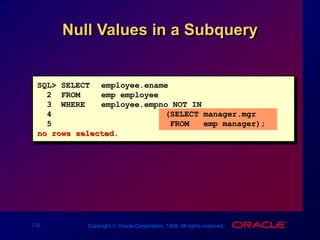
Null Values in a Subquery
SQL> SELECT employee.ename
2 FROM emp employee
3 WHERE employee.empno NOT IN
4 (SELECT manager.mgr
5 FROM emp manager);
no rows selected.
7-10 Copyright  Oracle Corporation, 1998. All rights reserved.
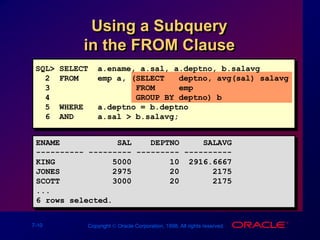
Using a Subquery
in the FROM Clause
ENAME SAL DEPTNO SALAVG
---------- --------- --------- ----------
KING 5000 10 2916.6667
JONES 2975 20 2175
SCOTT 3000 20 2175
...
6 rows selected.
SQL> SELECT a.ename, a.sal, a.deptno, b.salavg
2 FROM emp a, (SELECT deptno, avg(sal) salavg
3 FROM emp
4 GROUP BY deptno) b
5 WHERE a.deptno = b.deptno
6 AND a.sal > b.salavg;
7-11 Copyright  Oracle Corporation, 1998. All rights reserved.
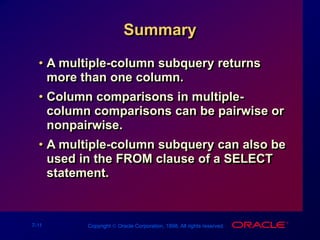
Summary
• A multiple-column subquery returns
more than one column.
• Column comparisons in multiple-
column comparisons can be pairwise or
nonpairwise.
• A multiple-column subquery can also be
used in the FROM clause of a SELECT
statement.

Les07- Multiple-Column Subqueries.ppt

  • 1.
    Copyright  OracleCorporation, 1998. All rights reserved. 7 Multiple-Column Subqueries
  • 2.
    7-2 Copyright Oracle Corporation, 1998. All rights reserved. Objectives After completing this lesson, you should be able to do the following: • Write a multiple-column subquery • Describe and explain the behavior of subqueries when null values are retrieved • Write a subquery in a FROM clause
  • 3.
    7-3 Copyright Oracle Corporation, 1998. All rights reserved. Multiple-Column Subqueries Main query MANAGER 10 Subquery SALESMAN 30 MANAGER 10 CLERK 20 Main query compares MANAGER 10 Values from a multiple-row and multiple-column subquery SALESMAN 30 MANAGER 10 CLERK 20 to
  • 4.
    7-4 Copyright Oracle Corporation, 1998. All rights reserved. Using Multiple-Column Subqueries Display the order number, product number, and quantity of any item in which the product number and quantity match both the product number and quantity of an item in order 605. SQL> SELECT ordid, prodid, qty 2 FROM item 3 WHERE (prodid, qty) IN 4 (SELECT prodid, qty 5 FROM item 6 WHERE ordid = 605) 7 AND ordid <> 605;
  • 5.
    7-6 Copyright Oracle Corporation, 1998. All rights reserved. Column Comparisons Pairwise PRODID QTY 101863 100 100861 100 102130 10 100890 5 100870 500 101860 50 Nonpairwise PRODID QTY 101863 100 100861 100 102130 10 100890 5 100870 500 101860 50
  • 6.
    7-7 Copyright Oracle Corporation, 1998. All rights reserved. Nonpairwise Comparison Subquery SQL> SELECT ordid, prodid, qty 2 FROM item 3 WHERE prodid IN (SELECT prodid 4 FROM item 5 WHERE ordid = 605) 6 AND qty IN (SELECT qty 7 FROM item 8 WHERE ordid = 605) 9 AND ordid <> 605; Display the order number, product number, and quantity of any item in which the product number and quantity match any product number and any quantity of an item in order 605.
  • 7.
    7-8 Copyright Oracle Corporation, 1998. All rights reserved. Nonpairwise Subquery ORDID PRODID QTY --------- --------- --------- 609 100870 5 616 100861 10 616 102130 10 621 100861 10 618 100870 10 618 100861 50 616 100870 50 617 100861 100 619 102130 100 615 100870 100 617 101860 100 621 100870 100 617 102130 100 . . . 16 rows selected.
  • 8.
    7-9 Copyright Oracle Corporation, 1998. All rights reserved. Null Values in a Subquery SQL> SELECT employee.ename 2 FROM emp employee 3 WHERE employee.empno NOT IN 4 (SELECT manager.mgr 5 FROM emp manager); no rows selected.
  • 9.
    7-10 Copyright Oracle Corporation, 1998. All rights reserved. Using a Subquery in the FROM Clause ENAME SAL DEPTNO SALAVG ---------- --------- --------- ---------- KING 5000 10 2916.6667 JONES 2975 20 2175 SCOTT 3000 20 2175 ... 6 rows selected. SQL> SELECT a.ename, a.sal, a.deptno, b.salavg 2 FROM emp a, (SELECT deptno, avg(sal) salavg 3 FROM emp 4 GROUP BY deptno) b 5 WHERE a.deptno = b.deptno 6 AND a.sal > b.salavg;
  • 10.
    7-11 Copyright Oracle Corporation, 1998. All rights reserved. Summary • A multiple-column subquery returns more than one column. • Column comparisons in multiple- column comparisons can be pairwise or nonpairwise. • A multiple-column subquery can also be used in the FROM clause of a SELECT statement.