MASTER SPAS ® OWNER’S MANUAL
MASTER SPAS OWNER’S MANUAL

Welcome To Ultimate Relaxation!
Thank you for choosing your new spa built by Master Spas. Please read the entire Owner’s Manual
before installing and using your spa. The goal of this manual is to provide you with safety and
operational information plus some tips that will help you enjoy your spa to its fullest.
At the time of print, this manual is accurate in its information. Master Spas reserves the right
to change or improve its product without prior notice. To check on updates or for other information,
please visit www.masterspas.com and follow the links to the customer service section.


Record Of Ownership

Name ������������������������������������������������������������������������������������
    �

Address�����������������������������������������������������������������������������������

City _________________________________________________________ State ______ Zip��������������

Phone # (______)________-__________ Date Purchased ______ /______ /_______

Model _________________________________ Serial # �������������������������������������������
                                                �

Dealer Name ������������������������������������������������������������������������������

Service Tech Rep���������������������������������������������������������������������������


Serial Number Location
The serial number for your spa is located in the filter area, on the spa system pack, or on the listing
plate on the skirting. It is a seven digit number. Ex. 1045900


                                          6927 Lincoln Parkway
                                        Fort Wayne, Indiana 46804
                                              800-860-7727
                                          www.masterspas.com


DO NOT DIVE.                                         1
TABLE OF CONTENTS
Important Safety Instructions
	 All Spa Models, Personal Safety���������������������������������������������������������������������������������������������������� 3-10
Glossary of Spa Terminology������������������������������������������������������������������������������������������������������������ 11-15
Installation
Electrical Installation Requirements������������������������������������������������������������������������������������������������������� 16
	 Wiring Schematic���������������������������������������������������������������������������������������������������������������������������� 17
	 Site Preparation / General Guidelines����������������������������������������������������������������������������������������������� 18
	 Installation Instructions��������������������������������������������������������������������������������������������������������������� 19-20
Water Chemistry Terms�������������������������������������������������������������������������������������������������������������������� 21-22
Spa Water Maintenance -
Legend Series and Down East Spas
	 ECO PUR™ Information�������������������������������������������������������������������������������������������������������������������� 23
	 Water Quality Maintenance Start-Up����������������������������������������������������������������������������������������������� 24
	 Advantages of ECO PUR™���������������������������������������������������������������������������������������������������������������� 25
	 Water Quality Maintenance Schedule - ECO PUR™��������������������������������������������������������������������������� 26
Spa Water Maintenance - Non ECO PUR™
	 Spa Water Maintenance Start-Up���������������������������������������������������������������������������������������������������� 27
	 Spa Water Maintenance Schedule���������������������������������������������������������������������������������������������� 28-29
Water Maintenance Trouble-Shooting Guide������������������������������������������������������������������������������������������ 30
Why Chemicals are Important in a Spa��������������������������������������������������������������������������������������������������� 31
Maintenance Recommendations������������������������������������������������������������������������������������������������������� 32-33
Winterizing Your Spa����������������������������������������������������������������������������������������������������������������������������� 34
Master Spas Legend Series
	 Specifications����������������������������������������������������������������������������������������������������������������������������������� 35
	 Controls������������������������������������������������������������������������������������������������������������������������������������� 36-40
	 Diagnostic Messages������������������������������������������������������������������������������������������������������������������ 41-42
	 Periodic Reminder Messages������������������������������������������������������������������������������������������������������������ 42
Master Spas - Legend Series - LSX 557
	 Controls������������������������������������������������������������������������������������������������������������������������������������� 43-44
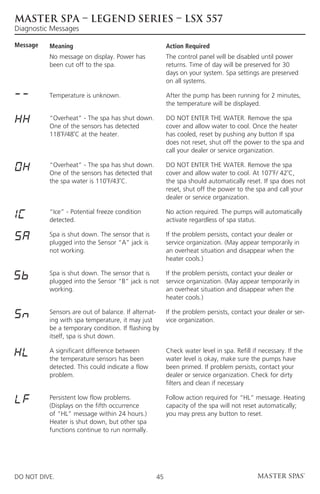
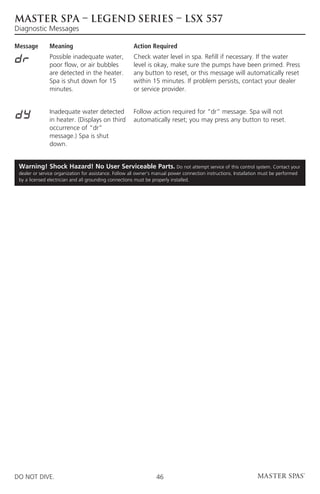
	 Diagnostic Messages������������������������������������������������������������������������������������������������������������������ 45-46
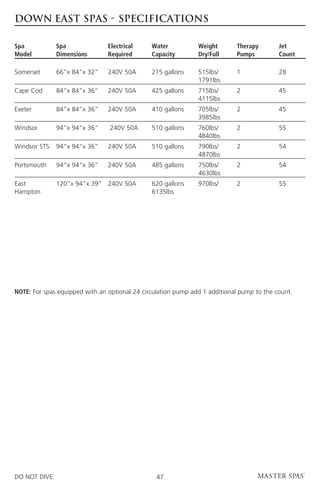
Down East Spas Specifications�������������������������������������������������������������������������������������������������������������� 47
Down East
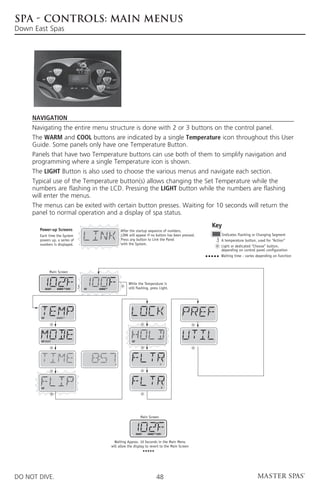
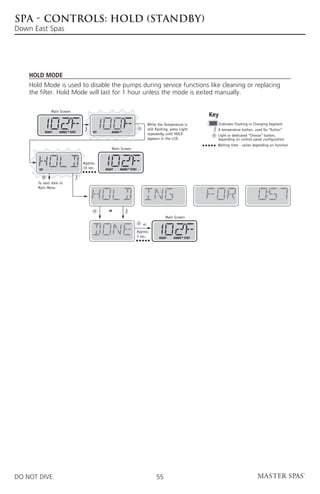
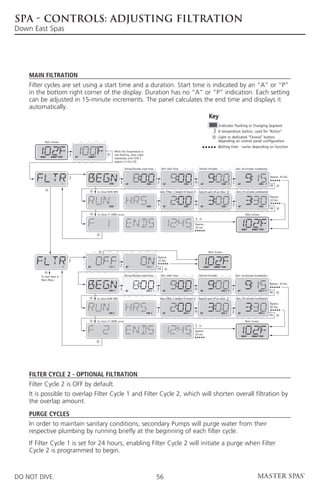
	 Controls��������������������������������������������������48-63            	   Hold (Stand By)���������������������������������������������55
	 Main Menu��������������������������������������������������48              	   Adjusting Filtration���������������������������������������56
	 Fill It Up��������������������������������������������������������49       	   Preferences���������������������������������������������������57
	 Spa Behavior������������������������������������������������50             	   General Messages����������������������������������������58
	 Temperature and Temp Range���������������������51                          	   Heater-Related Messages������������������������������59
	 Mode – Ready and Rest��������������������������������52                    	   Sensor-Related Messages������������������������������60
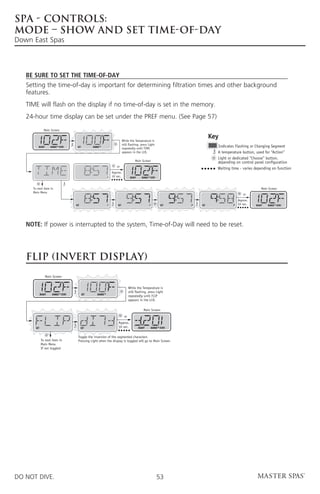
	 Mode – Show and Set Time of Day��������������53                            	   Miscellaneous Messages�������������������������������60
	 Flip (Invert Display)����������������������������������������53            	   System-Related Messages�����������������������������61
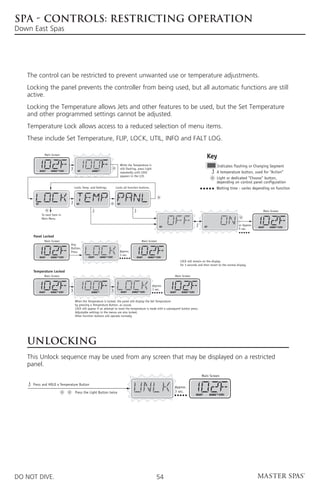
	 Restricting Operation������������������������������������54                	   Reminder Messages���������������������������������62-63
	 Unlocking�����������������������������������������������������54
Stereo Systems�������������������������������������������������������������������������������������������������������������������������������� 64-70
Dolphin Remote������������������������������������������������������������������������������������������������������������������������������� 71-76
Fusion Docking Station��������������������������������������������������������������������������������������������������������������������� 77-78
Spa Trouble Shooting Guide������������������������������������������������������������������������������������������������������������� 79-80
Regular Maintenance Procedures������������������������������������������������������������������������������������������������������ 81-83
Spa Care and Maintenance Record��������������������������������������������������������������������������������������������������� 84-87

DO NOT DIVE.                                                              2
SAFETY INSTRUCTIONS


	               Save These Instructions
	Included with your new spa is a safety sign. The sign is for you and your guest’s protection
  and is suitable for outdoor use in wet locations. The sign should be placed in a location visible
  to all users of the spa.
	Please take time to point out the physical location of the safety sign and the importance of the
  safety precautions displayed on the safety sign to all of your guests. Remember, your safety and
  the safety of anyone who enjoys the use of your spa is our utmost concern.
	The sign should be mounted with screws or another type of permanent fastener. Additional or
  replacement signs can be obtained from your dealer or direct from the factory.


Introduction
It’s time to relax! You now have your very own portable spa by Master Spas, Inc. By fully understanding
the operation of each of the features of your new Master Spa, you will be assured of many years of
hassle-free, hot water therapy and fun.
Your safety is of paramount importance to the MasterSpas family. We urge you to read and become
thoroughly familiar with all safety aspects addressed in this manual.
Through reading and totally understanding the important information in your owner’s manual, you will
realize that you now own THE ULTIMATE RELAXATION MACHINE!


DO NOT DIVE.                                        3
SAFETY INSTRUCTIONS


Important Safety Instructions
When installing and using this electrical equipment, basic safety precautions should be
observed including the following:


Read And Follow ALL
INSTRUCTIONS
WARNING – To reduce the risk of injury, do not permit children to use this product
unless they are closely supervised at all times.

A wire conductor is provided on this unit to connect a minimum 6 AWG (13.302mm2)
solid copper conductor between this unit and any metal equipment, metal enclosures of
electrical equipment, metal water pipe, or conduit within 5 feet (1.5m) of the unit

(For cord-connected/convertible units)
	     DANGER – Risk of injury.
		           a) Replace damaged cord immediately.
		           b) Do not bury cord.
		           c) Connect to a grounded, grounding type receptacle only.

(For units intended for indoor use only)
	     WARNING – For indoor use only. This unit is not intended for outdoor use.

(For units intended for outdoor use only)
	     WARNING – For outdoor use only. This unit is not intended for indoor use.


DO NOT DIVE.                               4
SAFETY INSTRUCTIONS


Important Safety
Instructions (cont.)
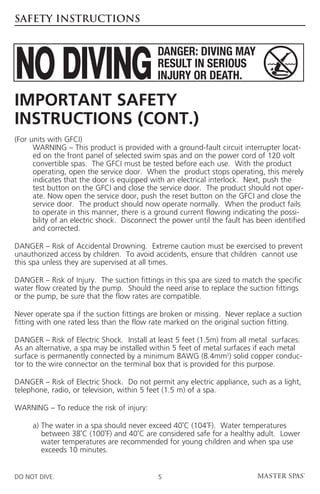
(For units with GFCI)
	    WARNING – This product is provided with a ground-fault circuit interrupter locat-
      ed on the front panel of selected swim spas and on the power cord of 120 volt
      convertible spas. The GFCI must be tested before each use. With the product
      operating, open the service door. When the product stops operating, this merely
      indicates that the door is equipped with an electrical interlock. Next, push the
      test button on the GFCI and close the service door. The product should not oper-
      ate. Now open the service door, push the reset button on the GFCI and close the
      service door. The product should now operate normally. When the product fails
      to operate in this manner, there is a ground current flowing indicating the possi-
      bility of an electric shock. Disconnect the power until the fault has been identified
      and corrected.

D
 ANGER – Risk of Accidental Drowning. Extreme caution must be exercised to prevent
unauthorized access by children. To avoid accidents, ensure that children cannot use
this spa unless they are supervised at all times.

DANGER – Risk of Injury. The suction fittings in this spa are sized to match the specific
water flow created by the pump. Should the need arise to replace the suction fittings
or the pump, be sure that the flow rates are compatible.

Never operate spa if the suction fittings are broken or missing. Never replace a suction
fitting with one rated less than the flow rate marked on the original suction fitting.

DANGER – Risk of Electric Shock. Install at least 5 feet (1.5m) from all metal surfaces.
As an alternative, a spa may be installed within 5 feet of metal surfaces if each metal
surface is permanently connected by a minimum 8AWG (8.4mm2) solid copper conduc-
tor to the wire connector on the terminal box that is provided for this purpose.

DANGER – Risk of Electric Shock. Do not permit any electric appliance, such as a light,
telephone, radio, or television, within 5 feet (1.5 m) of a spa.

WARNING – To reduce the risk of injury:

	    a) The water in a spa should never exceed 40˚C (104˚F). Water temperatures
        
        between 38˚C (100˚F) and 40˚C are considered safe for a healthy adult. Lower
        water temperatures are recommended for young children and when spa use
        exceeds 10 minutes.


DO NOT DIVE.                                5
SAFETY INSTRUCTIONS


Important Safety Instructions
(cont.)
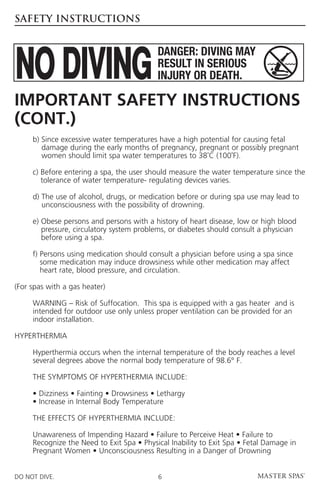
	    b)  ince excessive water temperatures have a high potential for causing fetal
        S
        damage during the early months of pregnancy, pregnant or possibly pregnant
        women should limit spa water temperatures to 38˚C (100˚F).

	    c)  efore entering a spa, the user should measure the water temperature since the
        B
        tolerance of water temperature- regulating devices varies.

	    d)  he use of alcohol, drugs, or medication before or during spa use may lead to
        T
        unconsciousness with the possibility of drowning.

	    e)  bese persons and persons with a history of heart disease, low or high blood
        O
        pressure, circulatory system problems, or diabetes should consult a physician
        before using a spa.

	    f)  ersons using medication should consult a physician before using a spa since
        P
        some medication may induce drowsiness while other medication may affect
        heart rate, blood pressure, and circulation.

(For spas with a gas heater)

	WARNING – Risk of Suffocation. This spa is equipped with a gas heater and is
  intended for outdoor use only unless proper ventilation can be provided for an
  indoor installation.

HYPERTHERMIA

	Hyperthermia occurs when the internal temperature of the body reaches a level
  several degrees above the normal body temperature of 98.6° F.

	    THE SYMPTOMS OF HYPERTHERMIA INCLUDE:

	    • Dizziness • Fainting • Drowsiness • Lethargy
	    • Increase in Internal Body Temperature

	    THE EFFECTS OF HYPERTHERMIA INCLUDE:

	Unawareness of Impending Hazard • Failure to Perceive Heat • Failure to
  Recognize the Need to Exit Spa • Physical Inability to Exit Spa • Fetal Damage in
  Pregnant Women • Unconsciousness Resulting in a Danger of Drowning


DO NOT DIVE.                               6
SAFETY INSTRUCTIONS


Important Safety Instructions
(cont.)
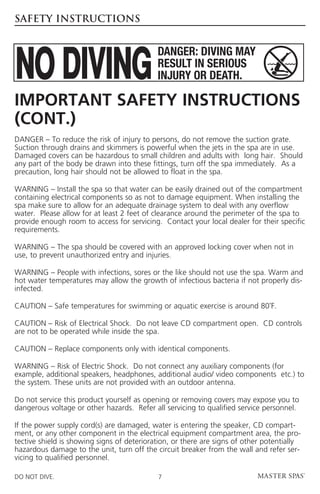
DANGER – To reduce the risk of injury to persons, do not remove the suction grate.
Suction through drains and skimmers is powerful when the jets in the spa are in use.
Damaged covers can be hazardous to small children and adults with long hair. Should
any part of the body be drawn into these fittings, turn off the spa immediately. As a
precaution, long hair should not be allowed to float in the spa.

WARNING – Install the spa so that water can be easily drained out of the compartment
containing electrical components so as not to damage equipment. When installing the
spa make sure to allow for an adequate drainage system to deal with any overflow
water. Please allow for at least 2 feet of clearance around the perimeter of the spa to
provide enough room to access for servicing. Contact your local dealer for their specific
requirements.

WARNING – The spa should be covered with an approved locking cover when not in
use, to prevent unauthorized entry and injuries.

WARNING – People with infections, sores or the like should not use the spa. Warm and
hot water temperatures may allow the growth of infectious bacteria if not properly dis-
infected.

CAUTION – Safe temperatures for swimming or aquatic exercise is around 80˚F.

 AUTION – Risk of Electrical Shock. Do not leave CD compartment open. CD controls
C
are not to be operated while inside the spa.

CAUTION – Replace components only with identical components.

WARNING – Risk of Electric Shock. Do not connect any auxiliary components (for
example, additional speakers, headphones, additional audio/ video components etc.) to
the system. These units are not provided with an outdoor antenna.

Do not service this product yourself as opening or removing covers may expose you to
dangerous voltage or other hazards. Refer all servicing to qualified service personnel.

If the power supply cord(s) are damaged, water is entering the speaker, CD compart-
ment, or any other component in the electrical equipment compartment area, the pro-
tective shield is showing signs of deterioration, or there are signs of other potentially
hazardous damage to the unit, turn off the circuit breaker from the wall and refer ser-
vicing to qualified personnel.

DO NOT DIVE.                                7
SAFETY INSTRUCTIONS


Important Safety Instructions
(cont.)
T
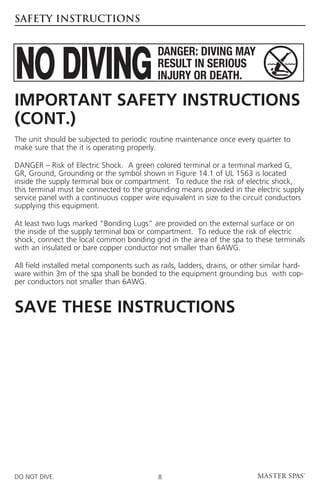
 he unit should be subjected to periodic routine maintenance once every quarter to
make sure that the it is operating properly.

DANGER – Risk of Electric Shock. A green colored terminal or a terminal marked G,
GR, Ground, Grounding or the symbol shown in Figure 14.1 of UL 1563 is located
inside the supply terminal box or compartment. To reduce the risk of electric shock,
this terminal must be connected to the grounding means provided in the electric supply
service panel with a continuous copper wire equivalent in size to the circuit conductors
supplying this equipment.

A
 t least two lugs marked “Bonding Lugs” are provided on the external surface or on
the inside of the supply terminal box or compartment. To reduce the risk of electric
shock, connect the local common bonding grid in the area of the spa to these terminals
with an insulated or bare copper conductor not smaller than 6AWG.

A
 ll field installed metal components such as rails, ladders, drains, or other similar hard-
ware within 3m of the spa shall be bonded to the equipment grounding bus with cop-
per conductors not smaller than 6AWG.


SAVE THESE INSTRUCTIONS


DO NOT DIVE.                                 8
SAFETY INSTRUCTIONS


Warning: Children should not use spas or hot tubs without adult supervision
Avertissement: Ne pas laisser les enfants utiliser une cuve de relaxation
sans surveillance

Warning: Do not use spas or hot tubs unless all suction guards are installed
to prevent body and hair entrapment.
Avertissement: Pour éviter que les cheveux ou une partie du corps puissent
être aspires, ne pas utiliser une cuve de relaxation si les grilles di prise d’aspiration ne
sont pas toutes en place

Warning: People using medications and/or having an adverse medical history
should consult a physician before using a spa or hot tub.
Avertissement: Les personnes qui prennent des médicaments ou ont
des problémes de santé devraient consulter un médecin avant d’utiliser une cuve
de relaxation

Warning: People with infectious diseases should not use a spa or hot tub
Avertissement: Les personnes atteintes de maladies infectieuses ne devraient
pas utiliser une cuve de relaxation

Warning: To avoid injury exercise care when entering or exiting the spa or hot
tub.
Avertissement: Pour éviter des blessures, user de prudence en entrant dans
une cuve de relaxation et en sortant

Warning:        Do not use drugs or alcohol before or during the use of a spa or
hot tub to avoid unconsciousness and possible drowning
Avertissement: Pour éviter l’évanouissement et la noyade éventuelle, ne
prende ni drogue ni alcool avant d’utiliser une cuve de relaxation ni quand on s’y
trouve

Warning:         Pregnant or possibly pregnant women should consult a physician
before using a spa or hot tub.
Avertissement: Les femmes enceintes, que leur grossesse soit confirmée ou
non, devraient consulter un médecin avant d’utiliser une cuve de relaxation

Warning: Water temperature in excess of 38˚C may be injurious to your health
Avertissement: Il peut être dangereux pour la santé de se plonger dans de
l’eau a plus de 38˚C

Warning: Before entering the spa or hot tub measure the water temperature
with an accurate thermometer
Avertissement: AVant d’utiliser une cuve de relaxation mesurer la
température de l’eau À l’aide d’un thermométre précis


DO NOT DIVE.                                  9
SAFETY INSTRUCTIONS


Warning: Do not use a spa or hot tub immediately following strenuous exercise
Avertissement: Ne pas utiliser une cuve de relaxation immédiatement aprés
un exercise fatigant

Warning: Prolonged immersion in a spa or hot tub may be injurous to your
health
Avertissement: L’utilisation prolongée d’une cuve de relaxation peut être
dangereuse pour la santé

Warning:          Do not permit electric appliances (such as light, telephone, radio, or
television) within 1.5 m of this spa or hot tub
Avertissement:              Ne pas placer d’appareil électrique (luminaire, téléphone,
radio, téléviseur, etc) À moins de 1.5 m de cette cuve de relaxation

Caution: Maintain water chemistry in accordance with manufacturer’s
instruction
Attention: La teneur de l’eau en matiéres dissoutes doit être conforme aux
directives du fabricant

Hyperthermia occurs when the internal temperature of the body reaches a level several degrees above
the normal body temperature of 37˚C. The symtoms of hyperthermia include drowsiness, lethargy, and
an increase in the internal temperature of the body. The effects of hyperthermia include
	      (a) unawareness of impending hazard;
	      (b) failure to perceive heat;
	      (c) failure to recognize the need to exit spa;
	      (d) physical inability to exit spa;
	      (e) fetal damage in pregnant women; and
	      (f) unconsciousness and danger of drowning.

Warning:         The use of alcohol or drugs can greatly increase the risk of fatal
hyperthermia in hot tubs and spas
La Consommation d’alcool ou de drogue augmente considérablement les
risques d’hyperthermie mortelle dans une cuve de relaxation.


DO NOT DIVE.                                     10
GLOSSARY OF SPA TERMINOLOGY

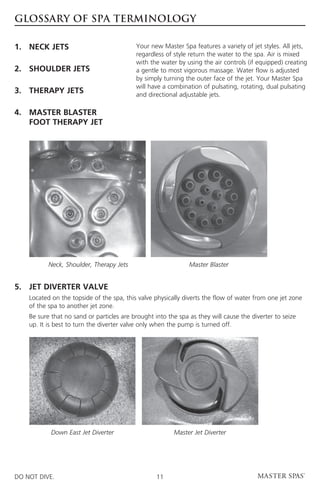
1.	 NECK JETS                              Your new Master Spa features a variety of jet styles. All jets,
                                           regardless of style return the water to the spa. Air is mixed
                                           with the water by using the air controls (if equipped) creating
2.	 SHOULDER JETS                          a gentle to most vigorous massage. Water flow is adjusted
                                           by simply turning the outer face of the jet. Your Master Spa
                                           will have a combination of pulsating, rotating, dual pulsating
3.	 THERAPY JETS                           and directional adjustable jets.

4.	MASTER BLASTER
 	FOOT THERAPY JET


            Neck, Shoulder, Therapy Jets                      Master Blaster


5. 	
    JET DIVERTER VALVE
	Located on the topside of the spa, this valve physically diverts the flow of water from one jet zone
  of the spa to another jet zone.
	 sure that no sand or particles are brought into the spa as they will cause the diverter to seize
  Be
  up. It is best to turn the diverter valve only when the pump is turned off.


            Down East Jet Diverter                      Master Jet Diverter


DO NOT DIVE.                                      11
GLOSSARY OF SPA TERMINOLOGY

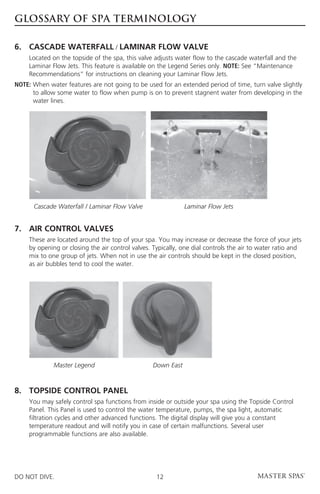
6. 	CASCADE WATERFALL / LAMINAR FLOW VALVE
	  Located on the topside of the spa, this valve adjusts water flow to the cascade waterfall and the
     Laminar Flow Jets. This feature is available on the Legend Series only. NOTE: See “Maintenance
     Recommendations” for instructions on cleaning your Laminar Flow Jets.
NOTE:  hen water features are not going to be used for an extended period of time, turn valve slightly
      W
      to allow some water to flow when pump is on to prevent stagnent water from developing in the
      water lines.


      Cascade Waterfall / Laminar Flow Valve                 Laminar Flow Jets


7.	AIR CONTROL VALVES	
	These are located around the top of your spa. You may increase or decrease the force of your jets
  by opening or closing the air control valves. Typically, one dial controls the air to water ratio and
  mix to one group of jets. When not in use the air controls should be kept in the closed position,
  as air bubbles tend to cool the water.


              Master Legend                      Down East


8. 	 TOPSIDE CONTROL PANEL 	
	You may safely control spa functions from inside or outside your spa using the Topside Control
  Panel. This Panel is used to control the water temperature, pumps, the spa light, automatic
  filtration cycles and other advanced functions. The digital display will give you a constant
  temperature readout and will notify you in case of certain malfunctions. Several user
  programmable functions are also available.


DO NOT DIVE.                                      12
GLOSSARY OF SPA TERMINOLOGY

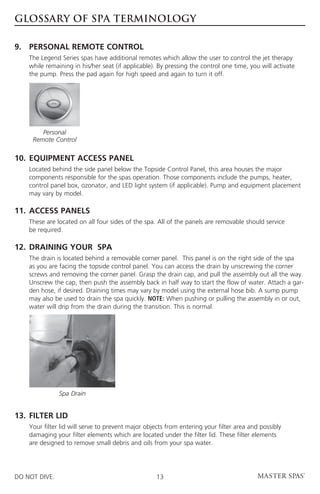
9. 	PERSONAL REMOTE CONTROL
	The Legend Series spas have additional remotes which allow the user to control the jet therapy
  while remaining in his/her seat (if applicable). By pressing the control one time, you will activate
  the pump. Press the pad again for high speed and again to turn it off.


         Personal
      Remote Control

10. 	EQUIPMENT ACCESS PANEL
	Located behind the side panel below the Topside Control Panel, this area houses the major
  components responsible for the spas operation. Those components include the pumps, heater,
  control panel box, ozonator, and LED light system (if applicable). Pump and equipment placement
  may vary by model.

11.	ACCESS PANELS
	These are located on all four sides of the spa. All of the panels are removable should service
  be required.

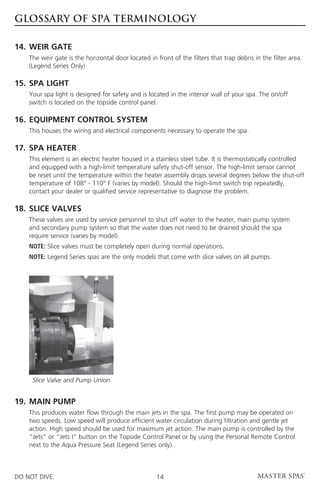
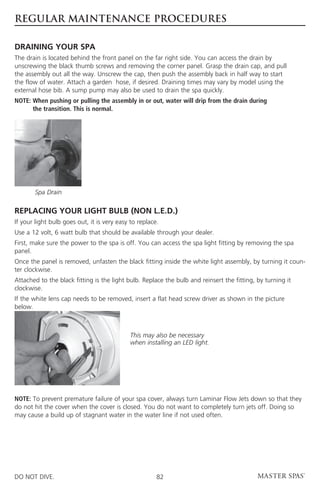
12. 	DRAINING YOUR  SPA
	The drain is located behind a removable corner panel. This panel is on the right side of the spa
  as you are facing the topside control panel. You can access the drain by unscrewing the corner
  screws and removing the corner panel. Grasp the drain cap, and pull the assembly out all the way.
  Unscrew the cap, then push the assembly back in half way to start the flow of water. Attach a gar-
  den hose, if desired. Draining times may vary by model using the external hose bib. A sump pump
  may also be used to drain the spa quickly. NOTE: When pushing or pulling the assembly in or out,
  water will drip from the drain during the transition. This is normal.


                Spa Drain


13. 	FILTER LID
	Your filter lid will serve to prevent major objects from entering your filter area and possibly
  damaging your filter elements which are located under the filter lid. These filter elements
  are designed to remove small debris and oils from your spa water.


DO NOT DIVE.                                       13
GLOSSARY OF SPA TERMINOLOGY

14. 	WEIR GATE
	The weir gate is the horizontal door located in front of the filters that trap debris in the filter area.
  (Legend Series Only)

15. 	SPA LIGHT
	Your spa light is designed for safety and is located in the 	nterior wall of your spa. The on/off
                                                              i
  switch is located on the topside control panel.

16. 	EQUIPMENT CONTROL SYSTEM
	    This houses the wiring and electrical components necessary to operate the spa.

17.	 SPA HEATER
	This element is an electric heater housed in a stainless steel tube. It is thermostatically controlled
  and equipped with a high-limit temperature safety shut-off sensor. The high-limit sensor cannot
  be reset until the temperature within the heater assembly drops several degrees below the shut-off
  temperature of 108° - 110° F (varies by model). Should the high-limit switch trip repeatedly,
  contact your dealer or qualified service representative to diagnose the problem.

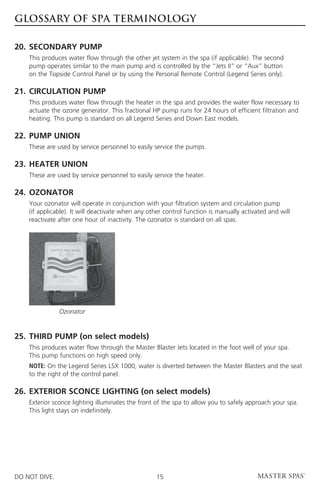
18.	 SLICE VALVES
	These valves are used by service personnel to shut off water to the heater, main pump system
  and secondary pump system so that the water does not need to be drained should the spa
  require service (varies by model).
	    NOTE: Slice valves must be completely open during normal operations.
	    NOTE: Legend Series spas are the only models that come with slice valves on all pumps.


      Slice Valve and Pump Union


19.	MAIN PUMP
	This produces water flow through the main jets in the spa. The first pump may be operated on
  two speeds. Low speed will produce efficient water circulation during filtration and gentle jet
  action. High speed should be used for maximum jet action. The main pump is controlled by the
  “Jets” or “Jets I” button on the Topside Control Panel or by using the Personal Remote Control
  next to the Aqua Pressure Seat (Legend Series only).


DO NOT DIVE.                                        14
GLOSSARY OF SPA TERMINOLOGY

20.	 SECONDARY PUMP
	This produces water flow through the other jet system in the spa (if applicable). The second
  pump operates similar to the main pump and is controlled by the “Jets II” or “Aux” button
  on the Topside Control Panel or by using the Personal Remote Control (Legend Series only).

21. 	CIRCULATION PUMP
	This produces water flow through the heater in the spa and provides the water flow necessary to
  actuate the ozone generator. This fractional HP pump runs for 24 hours of efficient filtration and 	
  heating. This pump is standard on all Legend Series and Down East models.

22.	PUMP UNION
	    These are used by service personnel to easily service the pumps.

23.	HEATER UNION
	    These are used by service personnel to easily service the heater.

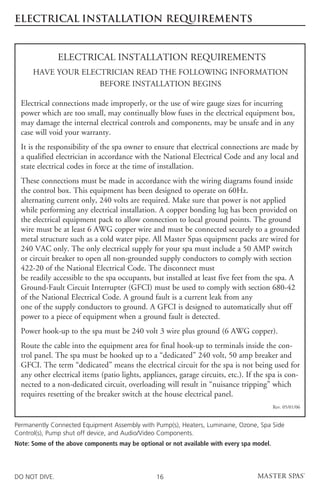
24.	 OZONATOR
	Your ozonator will operate in conjunction with your filtration system and circulation pump
  (if applicable). It will deactivate when any other control function is manually activated and will
  reactivate after one hour of inactivity. The ozonator is standard on all spas.


                Ozonator


25.	 THIRD PUMP (on select models)
	This produces water flow through the Master Blaster Jets located in the foot well of your spa.
  This pump functions on high speed only.
	    N
      OTE: On the Legend Series LSX 1000, water is diverted between the Master Blasters and the seat
     to the right of the control panel.

26.	EXTERIOR SCONCE LIGHTING (on select models)
	Exterior sconce lighting illuminates the front of the spa to allow you to safely approach your spa.
  This light stays on indefinitely.


DO NOT DIVE.                                        15
ELECTRICAL INSTALLATION REQUIREMENTS


               ELECTRICAL INSTALLATION REQUIREMENTS
      HAVE YOUR ELECTRICIAN READ THE FOLLOWING INFORMATION
                    BEFORE INSTALLATION BEGINS

  Electrical connections made improperly, or the use of wire gauge sizes for incurring
  power which are too small, may continually blow fuses in the electrical equipment box,
  may damage the internal electrical controls and components, may be unsafe and in any
  case will void your warranty.
  It is the responsibility of the spa owner to ensure that electrical connections are made by
  a qualified electrician in accordance with the National Electrical Code and any local and
  state electrical codes in force at the time of installation.
  These connections must be made in accordance with the wiring diagrams found inside
  the control box. This equipment has been designed to operate on 60Hz.
  alternating current only, 240 volts are required. Make sure that power is not applied
  while performing any electrical installation. A copper bonding lug has been provided on
  the electrical equipment pack to allow connection to local ground points. The ground
  wire must be at least 6 AWG copper wire and must be connected securely to a grounded
  metal structure such as a cold water pipe. All Master Spas equipment packs are wired for
  240 VAC only. The only electrical supply for your spa must include a 50 AMP switch
  or circuit breaker to open all non-grounded supply conductors to comply with section
  422-20 of the National Electrical Code. The disconnect must
  be readily accessible to the spa occupants, but installed at least five feet from the spa. A
  Ground-Fault Circuit Interrupter (GFCI) must be used to comply with section 680-42
  of the National Electrical Code. A ground fault is a current leak from any
  one of the supply conductors to ground. A GFCI is designed to automatically shut off
  power to a piece of equipment when a ground fault is detected.
  Power hook-up to the spa must be 240 volt 3 wire plus ground (6 AWG copper).
  Route the cable into the equipment area for final hook-up to terminals inside the con-
  trol panel. The spa must be hooked up to a “dedicated” 240 volt, 50 amp breaker and
  GFCI. The term “dedicated” means the electrical circuit for the spa is not being used for
  any other electrical items (patio lights, appliances, garage circuits, etc.). If the spa is con-
  nected to a non-dedicated circuit, overloading will result in “nuisance tripping” which
  requires resetting of the breaker switch at the house electrical panel.
                                                                                            Rev. 05/01/06


Permanently Connected Equipment Assembly with Pump(s), Heaters, Luminaine, Ozone, Spa Side
Control(s), Pump shut off device, and Audio/Video Components.
Note: Some of the above components may be optional or not available with every spa model.


DO NOT DIVE.                                     16
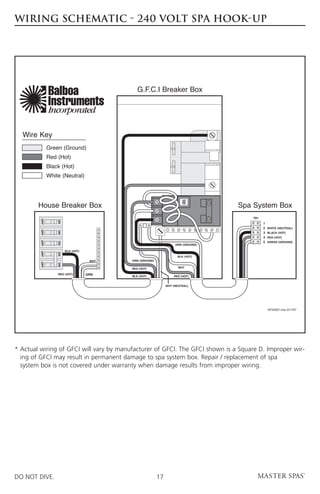
WIRING SCHEMATIC - 240 VOLT SPA HOOK-UP


               Balboa                         G.F.C.I Breaker Box
               Instruments
               Incorporated

  Wire Key
               Green (Ground)
               Red (Hot)
               Black (Hot)
               White (Neutral)
                                                                        TEST


        House Breaker Box                                                          50
                                                                                   50   Spa System Box
                                                                                            TB1
                                                                                   50
                                                                                   50
         OFF


                   ON


                                                                                                  1
                                                                                                  2   WHITE (NEUTRAL)
         OFF


                   ON


                                                                                                  3   BLACK (HOT)
                                                                                                  4   RED (HOT)
                                                                                                  5   GREEN (GROUND)
         OFF


                   ON


                                                                    GRN (GROUND)

                        BLK (HOT)                                                          NOTE: For a 240 V
         OFF


                   ON


                                                                     BLK (HOT)             dedicated hook-up, the
                                     WHT   GRN (GROUND)                                    white neutral wire is
                                                                                           not required between
         OFF


                   ON


                                                                      WHT
                                           RED (HOT)                                       the G.F.C.I. and the
                   RED (HOT)        GRN                                                    system box.
                                           BLK (HOT)               RED (HOT)


                                                               WHT (NEUTRAL)


                                                                                                      IDF00007.mac 6/17/97


*  ctual wiring of GFCI will vary by manufacturer of GFCI. The GFCI shown is a Square D. Improper wir-
  A
  ing of GFCI may result in permanent damage to spa system box. Repair / replacement of spa
  system box is not covered under warranty when damage results from improper wiring.


DO NOT DIVE.                                              17
SITE PREPARATION / GENERAL GUIDELINES

Portable spa installation is simple when properly planned. To that end, it is important that you read the
following information carefully and consult with your Master Spas dealer.
1)  ccess - The actual dimensions of your new spa will determine the amount of space that is needed in
   A
   moving the spa from curbside to its final installation area. Be sure to measure side yard dimensions,
   gates or doors and vertical obstructions such as roof overhangs and overhead cables. Any other space
   limiting obstacles such as trees or shrubs must be evaluated.
2) f the spa is being installed indoors, dimension limitations such as stairs, ceilings and walls must
   I
   be taken into consideration. Please have your Master Spas dealer or delivery service review site
   or installation plans prior to delivery.
3)  urface/Pad Requirements - When your new spa is filled with water and bathers, it may weigh as
   S
   much as several tons. It is imperative that the base beneath the spa can support the entire weight.
   The spa must be on a uniformly firm, continuous, and level surface. The recommended foundation 		
   is a concrete pad with a minimum thickness of four (4) inches with steel reinforcement bars crossed
   throughout the pad.


IMPORTANT
When installing your spa indoors, on a wood deck, or balcony, the same load requirements must
be met. Total load may be as much as 90 pounds per square foot. You should speak with a qualified
contractor or your local building department to confirm that your surface is adequate for supporting
a spa. Be sure to locate your spa so that equipment remains above grade and is not subject to
flooding.
The equipment side(s) of the spa must be accessible in the event that future service is needed. Periodical
maintenance checks require entry into the equipment bay. When possible, it is wise planning for the
future to leave access to all sides of the spa in the event your spas plumbing requires maintenance.
Your spa warranty does not cover the cost of providing access for service.


GENERAL CONSIDERATIONS FOR OUTDOOR INSTALLATION
Again, proper planning will increase your total enjoyment factor with your new spa. Listed below are
some additional items to consider when planning your installation.
•  ow spa will complement landscaping
  H                                                          • Getting to spa from house and return
  and vice versa                                             • Proximity to dressing rooms and bathrooms
•  iew from inside spa and view of spa from
  V                                                          • Storage for spa chemicals
  inside of home
                                                             • Local building codes (if applicable)
• Exposure to sunlight and shading from trees
                                                             • Power cable
• Privacy


GENERAL CONSIDERATIONS FOR INDOOR INSTALLATION
Installing your spa indoors creates an entirely different set of considerations. Here again, with proper
planning, no matter what room your spa goes in, it will be your favorite room.

•  ork with your Master Spas dealer and
  W                                                          •  ventilation fan may be necessary due
                                                               A
  contractor to insure all local building, electrical          to high humidity created by your spa
  and plumbing codes are met                                 •  inished material in your spa room should also
                                                               F
•  lan for a floor drain to drain off excess water
  P                                                            be capable of withstanding increased humidity
  or for draining and cleaning your spa


DO NOT DIVE.                                            18
INSTALLATION INSTRUCTIONS

1.	 Put spa in final position that allows for access to equipment and spa components.
2.	Remove front side panel (This is the side where the main topside control panel is located) so
     electrical can be hooked up to the spa system pack. Panels are removed by unscrewing the screws
     in the corner sections and then lifting up the panels out of the retaining tracks. NOTE: If your spa is
     equipped with Master Select panels, you will need to remove the Phillips mounting screws instead
     of the corner screws.
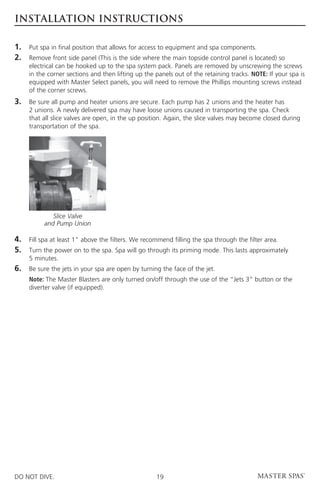
3.	 sure all pump and heater unions are secure. Each pump has 2 unions and the heater has
    Be
     2 unions. A newly delivered spa may have loose unions caused in transporting the spa. Check
     that all slice valves are open, in the up position. Again, the slice valves may become closed during
     transportation of the spa.


             Slice Valve
          and Pump Union

4.	 spa at least 1” above the filters. We recommend filling the spa through the filter area.
    Fill
5.	Turn the power on to the spa. Spa will go through its priming mode. This lasts approximately
     5 minutes.
6.	 Be sure the jets in your spa are open by turning the face of the jet.
	Note: The Master Blasters are only turned on/off through the use of the “Jets 3” button or the
  diverter valve (if equipped).


DO NOT DIVE.                                        19
INSTALLATION INSTRUCTIONS

7.	 may be necessary to bleed air from the pump(s) on your spa if, after start up, your spa pumps
    It
     do not operate.
	Due to the nature of water flow and hydro-therapy pumps, please be advised that air locking of
  pumps may occur. Master Spas has taken measures to reduce the possibility of this, but it still may
  occur, especially after refilling a spa. This is not a service covered under warranty.
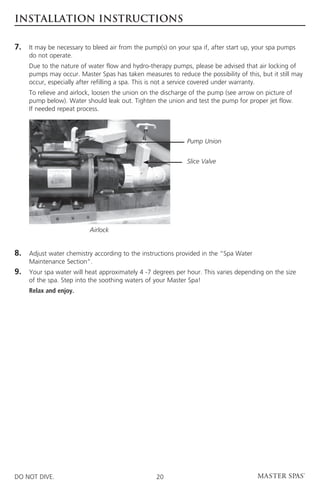
	 relieve and airlock, loosen the union on the discharge of the pump (see arrow on picture of
  To
  pump below). Water should leak out. Tighten the union and test the pump for proper jet flow.
  If needed repeat process.


                                                             Pump Union


                                                             Slice Valve


                          Airlock


8.	Adjust water chemistry according to the instructions provided in the “Spa Water
     Maintenance Section”.
9.	Your spa water will heat approximately 4 -7 degrees per hour. This varies depending on the size
     of the spa. Step into the soothing waters of your Master Spa!
	    Relax and enjoy.


DO NOT DIVE.                                      20
WATER CHEMISTRY TERMS YOU SHOULD KNOW
Before jumping into the Spa Water Maintenance, here are some terms to help you.

1. 	Parts per million, or ppm: This is a form of measurement used in most pool or spa chemical
     readings. Best described as any one million like items of equal size and make up, next to one
     unlike item , but of equal size. This would be one part per million.
2. 	Average size spa: What is it? The national spa and pool institute (NSPI) states; 350 to 400 U.S.
     gallons is average. As a general rule, chemical dosages are the same for any spa between 100
     and 500 U.S. gallons. Spas over 500 U.S. gallons the dosage would be double. Under 100 U.S.
     gallons would be on a case by case basis.
3. 	Total Alkalinity: This is a measurement of the ability of the water to resist changes in pH. Put
     another way, it is the water’s ability to maintain proper pH. Total alkalinity is measured in parts per
     million from 0 to 400 plus, with 80 to 150 ppm being the best range for spas. With low alkalinity,
     the pH will flip, or change back and forth, and be hard to control. With high alkalinity it becomes
     extremely difficult to change the pH.
4. 	 or potential hydrogen: This is a measurement of the active acidity in the water, or it is
     pH
     the measurement of the concentration of active hydrogen ions in the water. The greater the
     concentration of active hydrogen ions, the lower the pH. pH is not measured in parts per million,
     but on a scale from 0 to 14, with 7 being the neutral. In spas when ever possible, a measurement
     between 7.2 and 7.8 is best. Whenever possible, it should be between 7.4 and 7.6. With low pH,
     the results can be corroded metals, etched and stained plaster stained fiberglass or acrylic, eye /
     skin irritation, rapid chlorine or bromine loss, and total alkalinity destruction. With high pH,
     the results can be cloudy water, eye / skin irritation, scale formation and poor chlorine or
     bromine efficiency.
5. 	Shocking: This is when you add either extra chlorine (superchlorinate) by raising the chlorine
     level above 8 ppm, or add a non-chlorine shock (potassium monoperoxysulfate or potassium
     monopersulfate) to burn off the chloramines or bromamines. A non-chlorine shock acts by
     releasing oxygen in the water, which serves the same function as chlorine. The advantage to
     using non-chlorine shock, is you can enter the water within 15 minutes after shocking. Using
     chlorine, you must wait until the total chlorine reading is below 5 ppm. One thing to remember,
     a non-chlorine shock will not kill bacteria or disinfect.
6. 	Sequestering: This can be defined as the ability to form a chemical complex which remains in
     solution, despite the presence of a precipitating agent (i.e. calcium and metals). Common names
     for sequestering chemicals are; minquest, stain and scale control, metal-x, spa defender, spa
     metal gone, (etc.).
7. 	Filtration: Filters are necessary to remove particles of dust, dirt, algae, etc. that are continuously
     entering the water. If the spa is not operated long enough each day for the filter to do a proper
     job, this puts a burden on the chemicals, causing extra expense. Filtration time will depend on the
     spa size, pump and filter size, and of course, bather load. A spare cartridge should be kept on
     hand to make it easy to frequently clean the cartridge without the need for a long shut down. This
     will also allow the cartridge to dry out between usages, which will increase the cartridge life span
     as much as twice. Replace the cartridge when the pleats begin to deteriorate. Cartridge cleaning
     should be done a minimum of once a month. More often with a heavy bather load.


DO NOT DIVE.                                        21
WATER CHEMISTRY TERMS YOU SHOULD KNOW
Before jumping into the Spa Water Maintenance, here are some terms to help you.

8. 	Sanitizers: This is what kills the germs and bacteria that enter the water from the environment and
     the human body.
	 A. Chlorine
		     1.  nly one type is approved for spa use. Sodium dichlor which is granular, fast dissolving and
          O
          pH neutral chlorine.
		        2. Chlorine is an immediate sanitizer.
	    B. Bromine (Note: Bromine use is not recommended with Eco Pur filters.)
		        1. Two types of tablets.
		           a. Hydrotech
		           b. Lonza
		        2.  romine is a slow dissolve chemical and may take a few days to develop a reserve
             B
             or reading in the water.
9. 	Total dissolved solids (TDS): Materials that have been dissolved by the water. i.e. Like what hap-
     pens when you put sugar in coffee or tea.
10.	Useful life of water (in days): Water should be drained at least once every 180 days. Useful life may
     vary by usage and bather load.
11.	Defoamer: Foaming may be caused by body oils, cosmetics, lotions, surface cleaners, high pH or
     algeacides as well as other organic materials. Low levels 	 of calcium or sanitizer can also cause
     foaming. Also, double rinse your bathing suits as they will hold residual soap after being washed.
12.	Calcium hardness: Water that is too hard (over 250 ppm) can promote scale formation in
     components and on spa surface. Water that is too low (below 180 ppm) may also shorten
     the life of metal components on the spa.
	NOTE: Always leave spa cover open for 15 minutes after adding chemicals to prevent the off gas
  from damaging your spa cover, spa pillows and other critical parts.


DO NOT DIVE.                                        22
Spa Water Maintenance
Legend Series Spas and Down East Spas

*  ll Down East and Legend Series Spas use the ECO PUR filter(s). This section pertains specifically to
  A
  maintaining water chemistry in spas that have the ECO PUR filters.


SPECIAL NOTE
ECO PUR™ water filter system is designed to reduce the use of chemicals in your spa. You will still be
required, periodically, based on usage to add a small amount of chlorine to oxidize organic compounds
in the water. The ECO PUR™ filter system will not eliminate the need to maintain proper water
chemistry but can make the maintenance a more natural experience.

Note: Eco-Pur filters are not recommended for use with Bromine. This manual references bromine as well
as chlorine in case you decide to remove the Eco-Pur filters and sanitize your spa with bromine. Consult
your dealer for additional information.

Master Spas, Inc. products are not designed to be used with Biquanides. These chemicals are found in
SoftSwim® and Baqua Spa® products. Due to adverse effects from these types of sanitizers, the use of
these products may void the spa warranty.


DO NOT DIVE.                                         23
WATER QUALITY MAINTENANCE START-UP
Legend Series Spas and Down East Spas

For ECO PUR™ Water Filter System
Step 1: 	   Your spa should be filled using a Pre-filter, which can be obtained from your local dealer. 		
	           This Pre-filter will help remove many of the minerals existing in the water, which will make 		
	           adjusting the water balance easier after a new fill.
Step 2: 	During the initial filling of the spa, add a sequestering agent to combat suspended minerals
          in the water. The agents are sold under many different names such as Mineral Clear, Stain
          and Scale, and other brands. Allow water to circulate and filter for at least 12 hours before
          adding any other chemicals.
Step 3:	Test water for pH, total Alkalinity, and Calcium hardness. The pH should be 7.2 - 7.8 and
         the total Alkalinity 80-150 PPM. Calcium hardness levels should be maintained between 150
         and 250 PPM (part per million).
Step 4: 	Adjust pH, total Alkalinity (TA) and Calcium hardness utilizing the directions on the chemical
          bottles provided by your dealers start up kit.
Step 5: 	 may be necessary to retest and add additional chemicals to get to the proper levels
          It
          in Step 3.
Step 6: 	Add 2 oz. of concentrated chlorinating granules (sodium Dichlor-s-triazinetreone) per 500
          gallons on initial start up to begin sanitizing the spa water. It is important not to add the
          chlorinating granules until the pH, alkalinity and calcium hardness have been adjusted to
          their proper levels.


SPECIAL NOTE:
We recommend a minimum level of 1.0 ppm residual chlorine be maintained in the spa water.
* t may be necessary to rinse your filters within the first few days after filling your spa to ensure that
  I
  they are not restricting water flow due to the initial removal of heavy contaminents in source water.


DO NOT DIVE.                                         24
THE ADVANTAGES OF ECO PUR™ filtration
Legend Series Spas and Down East Spas

•  elps remove calcium carbonate and hydrogen sulphide from spa water to protect heaters
  H
  and equipment from precipitation.
• Helps stabilize the pH and alkalinity of the spa water.
• Helps reduce chemical usage and still provide safe odor-free water.
• Helps deplete excess chlorine after chemical shock to prevent damage to skin, hair, and swim wear.
• Helps to produce ultra clean and clear water.


SPECIAL NOTES
The ECO PUR™ filter system will not oxidize organic compounds and will require periodic doses of
chlorine to assist in the sanitization and oxidation processes required to maintain clear spa water.
	    •  CO PUR™ filter system will not alter the ph of spa water. The ECO PUR™ filter system will
       E
       actually aid in stabilizing the ph. ECO PUR™ does not alter the (TDS) total dissolved solids.
	    •  he main function of the ECO PUR™ filter system is to provide clean and clear spa water.
       T
       Proper chemical balance and filtration are also key components in maintaining healthy spa
       water. Always ensure that the ph and total alkalinity of the spa water is checked and balanced
       at all times. To ensure proper filtration, clean the outer filter cartridge with a “filter cleaner”
       every 30 days and rinse the ECO PUR™ cartridge with a hose to remove any buildup of
       containments. (Do not soak the ECO PUR™ cartridge in filter cleaner.) If water appears
       to be visually cloudy, dull, or has an odor, shock the spa water with 2 ounces of chlorine
       to remove excessive containments.


DO NOT DIVE.                                        25
WATER QUALITY MAINTENANCE SCHEDULE-ECO PUR™
Legend Series Spas and Down East Spas

BEFORE EACH USE
Check spa water with a test strip for proper sanitation levels and adjust accordingly to the proper levels.

ONCE A WEEK
Add 3 Tablespoons of a non-chlorine shock or 1 tea	spoon of Dichlor to spa per 250 gallons.

3 TIMES A WEEK
Test water using chemical test strips. Adjust sanitizer, pH and Alkalinity accordingly.

ONCE A MONTH*
Soak your filter elements overnight in a bucket with spa Filter Cleaner and then rinse with clean water
before re-inserting. (The ECO PUR™ mineral element should never be cleaned in a filter cleaner. Just
rinse with water.)

EVERY 180 DAYS
Drain and refill your spa, replace with a new ECO PUR™ element, repeat start up procedure.

AFTER EACH USE
Add 1 tablespoon of non-chlorine shock or 1/3 teaspoon of Dichlor to spa per 250 gallons.

AS NEEDED
If water looks hazy, shock treat with 1 teaspoon of Dichlor per 500 gallons.

*  hese are general recommendations for water quality maintenance that may vary by usage and or
  T
  bather load. Depending on bather load and frequency of use, drain and refill times may vary as well
  as the frequency of cleaning your filters.
*  oam Gone may be used when excessive foaming occurs. Be sure to use only a drop or two at a time.
  F
  Over use of Foam Gone will result in cloudy, milky water.

Note: As an alternative to non chlorine shock, Dichlor may be substituted.
1 tsp. Dichlor = 3 tablespoons of non chlorine shock


USE ONLY SPA CHEMICALS
(some pool chemicals are not suitable for spa use).
*  hen cleaning filters, be sure to never have the pumps (including the circulation pump)
  w
  running without the filters in place. Failure to do so may result in debris in the pumps causing
  unwarranted damage.


DO NOT DIVE.                                          26
SPA WATER MAINTENANCE - START-UP
For Spas without Eco Pur™ Filtration System

1.	   Read the spa owners manual first.
2. 	 Clean the surface with a spa general purpose cleaner or wipe down with a clean wet towel.
3. 	 Begin filling the spa with fresh water. If possible, do not use softened water.
4. 	When the spa has 2 to 4 inches of water on the bottom, add the recommended amount of
     a sequestering chemical for that size spa. See the chemical bottle for correct amounts.
5. 	When the spa is full, run the pumps on high speed for 30 minutes without air controls open. This
     will give the sequestering chemical time to mix well with 	the water. Allow sequestering chemical
     12-24 hours to properly filter in the water before proceeding with any further steps.
6. 	Using test strips or a test kit, test for total alkalinity, and adjust if necessary to 	 etween 80
                                                                                            b
     to 150 ppm using the pH / alkalinity increaser or decreaser 1oz. at a time. Wait 15 minutes,
     retest, and adjust if necessary. The pump should be running on high speed during this time
     without air controls open.
7. 	Using test strips or a test kit, test for pH, and adjust if necessary to within the 	7.2 and 7.8
     range using the pH / alkalinity increaser or decreaser 1/2oz. at a time. Wait 15 minutes, retest,
     and adjust if necessary. The pump should be running on high speed during this time, without
     air controls open.
8. 	Add the sanitizer of choice, following label directions. If chlorine is used, broadcast the
     recommended amount across the surface of the water, with the pump running on high speed.
     Wait 15 minutes, retest, and adjust if necessary to a total chlorine reading of 1 to 3 ppm. If bro-
     mine is used, add bromine tablets to the bromine feeder following label directions. With the pump
     running on high speed, add 2oz. of sodium bromide, and shock the spa with 2oz. of non chlorine
     shock. It may take several days adjusting the bromine feeder to obtain a total bromine reading of 3
     to 5 ppm. A bromine reading may not be obtained on the first day.
9. 	 any foam develops, add a defoamer at the base of the problem area. Use only enough defoamer
     If
     to get rid of the foam. This is usually one or two drops Do not pour large amounts of defoamer
     into water.
10.	 Wait two days, and begin a three day a week maintenance program.


DO NOT DIVE.                                          27
SPA WATER MAINTENANCE - Schedule
For Spas without Eco Pur™ Filtration System

Day One
1.	Test and adjust total alkalinity if necessary to between 80 to 150 ppm using the pH / alkalinity
    increaser or decreaser 1oz. at a time. Wait 15 minutes, retest and adjust if necessary. The pump
    should be running on high speed during this time with the air controls closed.
2.	Test and adjust pH, if necessary, to within the range of 7.2 to 7.8 using the pH / alkalinity increaser
    or decreaser, 1/2oz. at a time. Wait 15 minutes, retest and adjust if necessary. The pump should be
    running on high speed during this time with the air controls closed.
3. 	Test and adjust sanitizer level. Add chlorine following label directions to maintain a free chlorine
     level of 1 to 3 ppm. If using bromine, adjust feeder to maintain a total bromine level of 3 to 5
     ppm. Add bromine tablets to the dispenser if necessary, following label directions.
4. 	Add a water clarifier following label directions. If the spa is equipped with an ozone unit, we
     recommend adding an enzyme product in place of the clarifier, following the label directions.
5. 	 Use a small amount of defoamer only if necessary.


Day Two Skip

Day Three
1. 	Test and adjust total alkalinity, if necessary, to between 80 and 150 ppm using the pH / alkalinity
     increaser or decreaser, 1oz at a time. Wait 15 minutes, retest and adjust if necessary. The pump
     should be running on high speed during this time with the air controls closed.
2. 	Test and adjust the pH, if necessary, to within the range of 7.2 to 7.8 using the pH / alkalinity
     increaser or decreaser, 1/2oz at a time. Wait 15 minutes, retest and adjust if necessary. The pump
     should be running on high speed during this time with the air controls closed.
3. 	Test and adjust sanitizer level. Add chlorine following label directions to maintain a free chlorine
     level of 1 to 3 ppm. If using bromine, adjust feeder to maintain a total bromine level of 3 to 5
     ppm. Add bromine tablets to the dispenser if necessary, following label directions.
4. 	 Add sequestering chemical, following label directions for maintenance.
5. 	 If necessary, clean water line with a spa general purpose cleaner or enzyme product.
6. 	 Use a defoamer only if necessary.


Day Four Skip

(cont. next page)


DO NOT DIVE.                                        28
SPA WATER MAINTENANCE - schedule
For Spas without Eco Pur™ Filtration System

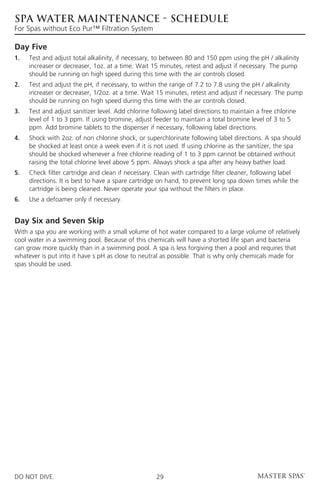
Day Five
1. 	Test and adjust total alkalinity, if necessary, to between 80 and 150 ppm using the pH / alkalinity
     increaser or decreaser, 1oz. at a time. Wait 15 minutes, retest and adjust if necessary. The pump
     should be running on high speed during this time with the air controls closed.
2. 	Test and adjust the pH, if necessary, to within the range of 7.2 to 7.8 using the pH / alkalinity
     increaser or decreaser, 1/2oz. at a time. Wait 15 minutes, retest and adjust if necessary. The pump
     should be running on high speed during this time with the air controls closed.
3. 	Test and adjust sanitizer level. Add chlorine following label directions to maintain a free chlorine
     level of 1 to 3 ppm. If using bromine, adjust feeder to maintain a total bromine level of 3 to 5
     ppm. Add bromine tablets to the dispenser if necessary, following label directions.
4. 	Shock with 2oz. of non chlorine shock, or superchlorinate following label directions. A spa should
     be shocked at least once a week even if it is not used. If using chlorine as the sanitizer, the spa
     should be shocked whenever a free chlorine reading of 1 to 3 ppm cannot be obtained without
     raising the total chlorine level above 5 ppm. Always shock a spa after any heavy bather load.
5. 	Check filter cartridge and clean if necessary. Clean with cartridge filter cleaner, following label
     directions. It is best to have a spare cartridge on hand, to prevent long spa down times while the
     cartridge is being cleaned. Never operate your spa without the filters in place.
6. 	 Use a defoamer only if necessary.


Day Six and Seven Skip
With a spa you are working with a small volume of hot water compared to a large volume of relatively
cool water in a swimming pool. Because of this chemicals will have a shorted life span and bacteria
can grow more quickly than in a swimming pool. A spa is less forgiving then a pool and requires that
whatever is put into it have s pH as close to neutral as possible. That is why only chemicals made for
spas should be used.


DO NOT DIVE.                                        29
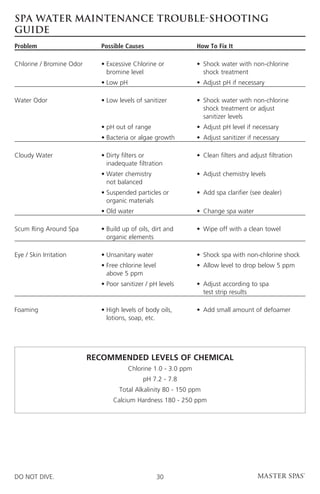
SPA WATER MAINTENANCE TROUBLE-SHOOTING
GUIDE
Problem	                    Possible Causes	                  How To Fix It

Chlorine / Bromine Odor	 •	Excessive Chlorine or 	 •	 Shock water with non-chlorine 		
		 bromine level		 shock treatment
	                           •	Low pH	                         •	 Adjust pH if necessary

Water Odor	 •	Low levels of sanitizer	 •	 Shock water with non-chlorine 		
				 shock treatment or adjust
				 sanitizer levels
	                           •	pH out of range	                •	 Adjust pH level if necessary
	                           •	Bacteria or algae growth	       •	 Adjust sanitizer if necessary

Cloudy Water	 •	Dirty filters or 	                            •	 Clean filters and adjust filtration
		 inadequate filtration
	 •	Water chemistry 	                                         •	 Adjust chemistry levels
		 not balanced
	 •	Suspended particles or 	                                  •	 Add spa clarifier (see dealer)
		 organic materials
	                           •	Old water	                      •	 Change spa water

Scum Ring Around Spa	 •	Build up of oils, dirt and 	          •	 Wipe off with a clean towel
		 organic elements

Eye / Skin Irritation	      •	Unsanitary water	               •	 Shock spa with non-chlorine shock
	 •	Free chlorine level 	                                     •	 Allow level to drop below 5 ppm
		 above 5 ppm
	 •	Poor sanitizer / pH levels	 •	 Adjust according to spa
				 test strip results

Foaming	 •	High levels of body oils, 	                        •	 Add small amount of defoamer
		 lotions, soap, etc.


                         recommended levels of chemical
                                     Chlorine 1.0 - 3.0 ppm
                                           pH 7.2 - 7.8
                                  Total Alkalinity 80 - 150 ppm
                                Calcium Hardness 180 - 250 ppm


DO NOT DIVE.                                      30
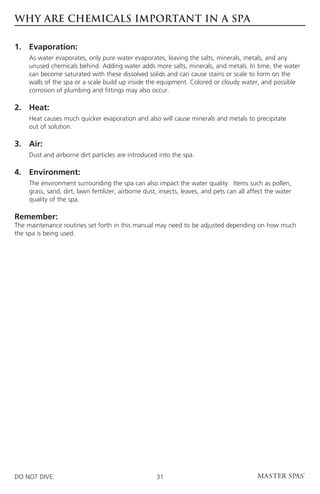
WHY ARE CHEMICALS IMPORTANT IN A SPA

1. 	Evaporation:
	 water evaporates, only pure water evaporates, leaving the salts, minerals, metals, and any
  As
  unused chemicals behind. Adding water adds more salts, minerals, and metals. In time, the water
  can become saturated with these dissolved solids and can cause stains or scale to form on the
  walls of the spa or a scale build up inside the equipment. Colored or cloudy water, and possible
  corrosion of plumbing and fittings may also occur.

2. 	Heat:
	Heat causes much quicker evaporation and also will cause minerals and metals to precipitate
  out of solution.

3. 	Air:
	    Dust and airborne dirt particles are introduced into the spa.

4. 	Environment:
	The environment surrounding the spa can also impact the water quality. Items such as pollen,
  grass, sand, dirt, lawn fertilizer, airborne dust, insects, leaves, and pets can all affect the water
  quality of the spa.

Remember:
The maintenance routines set forth in this manual may need to be adjusted depending on how much
the spa is being used.


DO NOT DIVE.                                        31
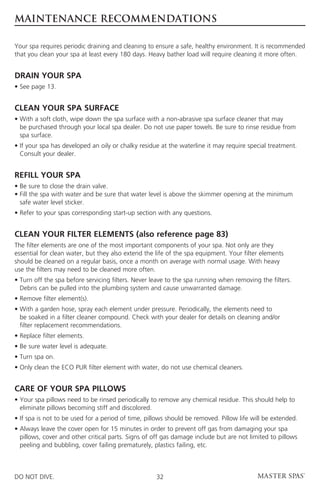
MAINTENANCE RECOMMENDATIONS

Your spa requires periodic draining and cleaning to ensure a safe, healthy environment. It is recommended
that you clean your spa at least every 180 days. Heavy bather load will require cleaning it more often.


DRAIN YOUR SPA
• See page 13.


CLEAN YOUR SPA SURFACE
•  ith a soft cloth, wipe down the spa surface with a non-abrasive spa surface cleaner that may
  W
  be purchased through your local spa dealer. Do not use paper towels. Be sure to rinse residue from
  spa surface.
• f your spa has developed an oily or chalky residue at the waterline it may require special treatment.
  I
  Consult your dealer.


REFILL YOUR SPA
• Be sure to close the drain valve.
•  ill the spa with water and be sure that water level is above the skimmer opening at the minimum
  F
  safe water level sticker.
• Refer to your spas corresponding start-up section with any questions.


CLEAN YOUR FILTER ELEMENTS (also reference page 83)
The filter elements are one of the most important components of your spa. Not only are they
essential for clean water, but they also extend the life of the spa equipment. Your filter elements
should be cleaned on a regular basis, once a month on average with normal usage. With heavy
use the filters may need to be cleaned more often.
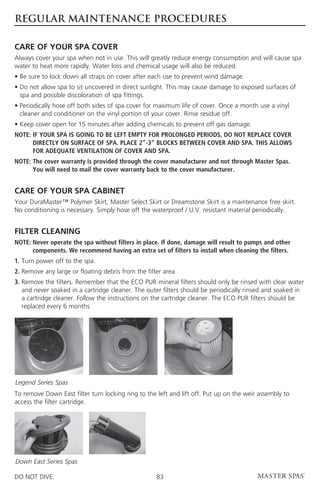
•  urn off the spa before servicing filters. Never leave to the spa running when removing the filters.
  T
  Debris can be pulled into the plumbing system and cause unwarranted damage.
• Remove filter element(s).
•  ith a garden hose, spray each element under pressure. Periodically, the elements need to
  W
  be soaked in a filter cleaner compound. Check with your dealer for details on cleaning and/or
  filter replacement recommendations.
• Replace filter elements.
• Be sure water level is adequate.
• Turn spa on.
• Only clean the ECO PUR filter element with water, do not use chemical cleaners.


CARE OF YOUR SPA PILLOWS
•  our spa pillows need to be rinsed periodically to remove any chemical residue. This should help to
  Y
  eliminate pillows becoming stiff and discolored.
• If spa is not to be used for a period of time, pillows should be removed. Pillow life will be extended.
•  lways leave the cover open for 15 minutes in order to prevent off gas from damaging your spa
  A
  pillows, cover and other critical parts. Signs of off gas damage include but are not limited to pillows
  peeling and bubbling, cover failing prematurely, plastics failing, etc.


DO NOT DIVE.                                        32
MAINTENANCE RECOMMENDATIONS

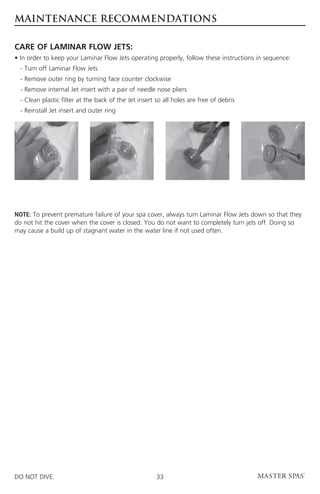
CARE OF LAMINAR FLOW JETS:
• In order to keep your Laminar Flow Jets operating properly, follow these instructions in sequence:
	 - Turn off Laminar Flow Jets
	 - Remove outer ring by turning face counter clockwise
	 - Remove internal Jet insert with a pair of needle nose pliers
	 - Clean plastic filter at the back of the Jet insert so all holes are free of debris
	 - Reinstall Jet insert and outer ring


NOTE: To prevent premature failure of your spa cover, always turn Laminar Flow Jets down so that they
do not hit the cover when the cover is closed. You do not want to completely turn jets off. Doing so
may cause a build up of stagnant water in the water line if not used often.


DO NOT DIVE.                                           33
WINTERIZING YOUR SPA

Many people find they enjoy using their spa more in the winter than any other time. Your spa is
designed to be used year round in any type of climate.
* owever, if you decide you don’t want to use your spa in the winter, you must drain it and follow the
 H
 winterizing steps listed below:

1.	Drain your spa completely using the drain valve (see “To Drain Your Spa”) or use an inexpensive
    submersible pump that you can buy from your dealer or your local hardware store.
2.	Use a shop vac to get all standing water out of your unit.
3.	   Remove access panels from equipment area.
4. 	 Loosen all pump unions
5.	   Remove winterizing plug from face of the pump(s) where applicable.
6.	Using your shop vac in a blowing mode, insert the hose into the nozzle of each jet and blow the
    trapped water from the lines into the interior of the spa.
7. 	After this is completed, use the shop vac to remove any standing water in the spa and in the
     equipment area.
8. 	 Clean the spa with a soft cloth and a non-abrasive spa surface cleaner.
9.	   Replace access panels.
10.	 Cover spa to prevent water from entering the spa.

* isclaimer: Master Spas does not recommend winterizing your spa. If you choose to do so,
 D
 any damage that may result is not covered under the spa warranty.


DO NOT DIVE.                                      34
MASTER SPA - LEGEND SERIES - SPECIFICATIONS

Spa	           Spa	          Electrical	   Water 	      Weight 	         Number	     Jet
Model	         Dimensions	   Required	     Capacity	    Dry/Full	        of Pumps	   Count

LSX700	 84”x 84”x 36” 	 240V 50A 	 410 gallons 	        820lbs/	         4 pump	     53
				                                                    4235lbs 	
LSX800 	 94”x 94”x 36”	 240V 50A 	 485 gallons 	        860lbs/	         4 pump	     52
				                                                    4900lbs      	
LSX800STS	 94”x 94”x 36”	 240V 50A 	 485 gallons 	      870lbs/	         4 pump	     49
				                                                    4910lbs      	
LSX850 	 94”x 94”x 36” 	 240V 50A 	 510 gallons        	 870lbs/	        4 pump	     57
				                                                     5118lbs 	
LSX 	 94”x 94”x 36” 	 240V 50A 	 450 gallons           	 895lbs/	        4 pump	     60
				                                                     4644lbs 	
LSX557	 66”x 84”x 32” 	 240V 50A 	 210 gallons 	        565lbs/	         3 pump 	    31
				                                                    2314lbs 	
LSX1000	 94”x 120”x 39”	 240V 50A	 550 gallons	         1115lbs/	        5 pump	     115
				                                                    5697lbs
LSX1000STS	 94”x 120”x 39”	 240V 50A	 540 gallons	      1145lbs	         5 pump	     112
				                                                    5643lbs	
LSX1050 	 94”x 120”x 39” 	 40V 50A 	
                         2           595 gallons 	      1055lbs/	        4 pump	     62
				                                                    6011lbs 	
LSX 	    94”x 120”x 39” 	240V 50A 	 595 gallons 	       1115lbs/	        4 pump	     62
1050 STS				                                            6071lbs
LSX SPS	 94”x 94”x 36” 	 240V 50A 	 450 gallons        	 895lbs/	        4 pump	     60
				                                                     4644lbs 	


DO NOT DIVE.                                35
MASTER SPA - LEGEND SERIES - CONTROLS

Timeouts refer to a preset length of time that a function is programmed to operate before shutting off
automatically. Certain conditions (filters or freeze) can cause a function to operate longer, while faults
can cause a function to operate for a shorter length of time. The system keeps track of timeouts
regardless of other conditions occurring.
In multi-button sequences, if buttons are pressed too quickly in sequence, they may not register.


Initial Start-up
After power is applied to the spa it will display configuration information. The spa will then go through
its priming mode. This priming lasts approximately 5 minutes. The purpose of the priming mode is to
help insure that the jet pumps have been primed with water and are ready to operate. It may be neces-
sary in some instances to bleed air from the jet pumps in your spa, if after the priming mode the spa
pumps run but do not move water the pump may have an air lock. (See instructions on page 20)
Once the priming mode has been completed the spa will begin to heat and maintain water temperature
in the Standard mode.


Icon Legend
	                    Heat Icon – Indicates different stages of heating.


	                    Jets Icon – Spins fast on high speed; spins slow on low speed.


	Light Icon – Press the “Light” button to turn the light on and off. If you wish to
  change the “function” of the lights, turn the lights off, then on within 5 seconds.
  If you wish to leave the lights in the same “function” setting for the next use, turn
  the lights off and do not turn back on for at least 5 seconds.


DO NOT DIVE.                                        36
MASTER SPA - LEGEND SERIES - CONTROLS

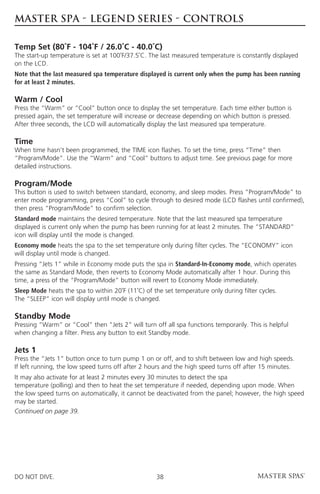
Setting the Time
Once the spa has been properly connected the first time, notice the “Time” icon appearing
on the screen.

Press            Then


Select the hour by pressing            or         (Each press changes the time by 1 hour)


Press         to enter.


Select minutes by pressing            or          (Each press changes the time by 1 hour)


Press         to exit the time setting procedure and enter the optional filter cycle programming.


Press         to exit programming.


Optional Filter Cycle Programming
•  ou are not required to set filter cycle; however, it is an option available to you. To change the filter
  Y
  cycle settings:
•  ress “Time” “Program/Mode” “Program/Mode” “Program/Mode” within 3 seconds. You will see the
  P
  “Program,” “Filter 1” and “Start Time” icons appear on the display.
•  ress “Warm” or “Cool” to choose the filter start time hour. Enter the hour by pressing “Program/
  P
  Mode”. Press “Warm” or “Cool” to choose the filter start time minutes. Each press changes the start
  time by 5 minutes.
•  nter the minutes by pressing “Program/Mode.”
  E
•  ress “Program/Mode” to see the “PROGRAM,” “FILTER 1” and “END TIME” icons.
  P
  Adjust the time as done above.
•  ress “Program/Mode” to see the “PROGRAM,” “FILTER 2” and “START TIME” icons.
  P
  Adjust the time as done above.
•  ress “Program/Mode” to see the “PROGRAM,” “FILTER 2” and “END TIME” icons.
  P
  Adjust the time as done above.
•  ressing “Program/Mode” will enter the new filter cycle times into the system and display
  P
  the current water temperature.
•  ressing “Time” at any time during this programming sequence will save the values entered
  P
  up to that point and exit programming.
• f you would like to select continuous filtration, set the filter 1 start and end times to be the exact
  I
  same time.

Continued on page 38.

DO NOT DIVE.                                         37
MASTER SPA - LEGEND SERIES - CONTROLS

Temp Set (80˚F - 104˚F / 26.0˚C - 40.0˚C)
The start-up temperature is set at 100˚F/37.5˚C. The last measured temperature is constantly displayed
on the LCD.
Note that the last measured spa temperature displayed is current only when the pump has been running
for at least 2 minutes.

Warm / Cool
Press the “Warm” or “Cool” button once to display the set temperature. Each time either button is
pressed again, the set temperature will increase or decrease depending on which button is pressed.
After three seconds, the LCD will automatically display the last measured spa temperature.

Time
When time hasn’t been programmed, the TIME icon flashes. To set the time, press “Time” then
“Program/Mode”. Use the “Warm” and “Cool” buttons to adjust time. See previous page for more
detailed instructions.

Program/Mode
This button is used to switch between standard, economy, and sleep modes. Press “Program/Mode” to
enter mode programming, press “Cool” to cycle through to desired mode (LCD flashes until confirmed),
then press “Program/Mode” to confirm selection.
Standard mode maintains the desired temperature. Note that the last measured spa temperature
displayed is current only when the pump has been running for at least 2 minutes. The “STANDARD”
icon will display until the mode is changed.
Economy mode heats the spa to the set temperature only during filter cycles. The “ECONOMY” icon
will display until mode is changed.
Pressing “Jets 1” while in Economy mode puts the spa in Standard-In-Economy mode, which operates
the same as Standard Mode, then reverts to Economy Mode automatically after 1 hour. During this
time, a press of the “Program/Mode” button will revert to Economy Mode immediately.
Sleep Mode heats the spa to within 20˚F (11˚C) of the set temperature only during filter cycles.
The “SLEEP” icon will display until mode is changed.

Standby Mode
Pressing “Warm” or “Cool” then “Jets 2” will turn off all spa functions temporarily. This is helpful
when changing a filter. Press any button to exit Standby mode.

Jets 1
Press the “Jets 1” button once to turn pump 1 on or off, and to shift between low and high speeds.
If left running, the low speed turns off after 2 hours and the high speed turns off after 15 minutes.
It may also activate for at least 2 minutes every 30 minutes to detect the spa
temperature (polling) and then to heat the set temperature if needed, depending upon mode. When
the low speed turns on automatically, it cannot be deactivated from the panel; however, the high speed
may be started.
Continued on page 39.


DO NOT DIVE.                                       38
MASTER SPA - LEGEND SERIES - CONTROLS

Jets 2
Press the “Jets 2” button once to turn pump 2 on or off, and to shift between low and high speeds.
If left running, the pump will turn off after 15 minutes.

Jets 3
Press the “Jets 3” button once to turn pump 3 on or off. If left running, the pump will turn off after
15 minutes.
NOTE: Air is injected into Master Blaster jets automatically on all equipped spas.

Jets 4 (if equipped)
Press the round auxiliary button designated for jets 4 once to turn pump 4 on and off. If left running,
the pump will turn off after 15 minutes.
NOTE: An icon will not appear on the display when Pump 4 is activated. Please note that this is normal.

TV Lift (if equipped)
Press the “STS” button once to raise the TV;
Press the “STS” button again to lower the TV.

Invert
Press the “Warm” or “Cool” button, followed by the “Jets” button to change the numbers
in the display to read upside down.

Quick Reference LEDs
There are four LEDs on the left side of the panel that offer quick references to what spa functions are
activated. From top to bottom, these lights indicate the following: Filter Cycle 1, Filter Cycle 2, Panel
Lock, Temperature Lock.

L.E.D. Light
Press the “Light” button to turn the light on and off. If you wish to change the “function” of the lights,
turn the lights off, then on within 5 seconds. If you wish to leave the lights in the same “function”
setting for the next use, turn the lights off and do not turn back on for at least 5 seconds.

Circ Pump
Your system may be configured to work in one of three different ways:
1.  he circ pump operates continuously (24 hours) with the exception of turning off for 30 minutes
   T
   at a time when the water temperature reaches 3˚ F (1.5˚C) above the set temperature (most likely
   to happen in very hot climates).
2. The circ pump stays on continuously, regardless of water temperature.
3.  he circ pump will come on when the system is checking temperature (polling), during filter cycles,
   T
   during freeze conditions, or when another pump is on.
4. f the circulation pump operates for more than 15 minutes without proper water flow, it will shut
   I
   down and not operate until power to the spa has been reset.
NOTE:  actory configuration is chosen based on what the majority of users will need. If you would
      F
      like your spa to operate in a different configuration setting, your dealer can change your setting
      for a fee.


DO NOT DIVE.                                        39
MASTER SPA - LEGEND SERIES - CONTROLS

Preset Filter Cycles
On your MS5000 system, the circ pump, low speed of pump 1, and the ozone generator will run during
filtration. At the start of each filter cycle, the lowest speed of all pumps will run for 5 minutes.
(The following is specific to all systems that are programmed according to time)
There are two filter cycles per day. The start/end times of each cycle are programmable. To program,
set time as instructed above, then press “Program/Mode” to advance to the next setting (or to exit
after the last setting). The default filter cycles are as follows:
The first filter cycle is automatically activated at 8:00 AM and operates the pump until 10:00 AM.
The filter 1 indicator icon will light when filter 1 is running.
The second filter cycle is automatically activated at 8:00 PM and operates the pump until 10:00 PM.
The filter 2 indicator icon will light when filter 2 is running.

Clean-up Cycle (optional)
When the pump is turned on by a button press, a clean-up cycle begins 30 minutes after the pump
is turned off or times out. The pump and the ozone generator will run for one hour.

Ozone
On most systems, the ozone generator (if installed) runs during filter cycles (except when pump 1
is operating at high speed on a a non-circ system) and during clean-up cycles.
On some systems, the ozone generator operates whenever the pump runs.
If your system is configured with the optional ozone suppress feature, the ozone generator will turn off
for 1 hour any time a function button (Jets 1, Jets 2, etc.) is pressed. Ozone enabled is indicated by the
O3 icon on the display.

Freeze Protection
If the temperature sensors detect a drop to 44˚F (approximately 6.7˚C) within the heater, then the
pump automatically activates to provide freeze protection. The equipment stays on until 4 minutes
after the sensors detect that the spa temperature has risen to 45˚F (approximately 7.2˚C) or higher.
In colder climates, an optional additional freeze sensor may be added to protect against freeze
conditions that may not be sensed by the standard sensors. Aux freeze sensor protection acts similarly
except with the temperature thresholds determined by the switch and without a 4-minute delay
in turnoff. See your dealer for details.

Locking the Panel (PL)
Press “Time” “Jets 1” then “Warm” within 3 seconds. When locked, the PL indicator light will light. All
buttons are frozen except the “Time” button. To unlock the panel, press “Time” “Jets 1” then “Cool.”

Locking the Set Temperature (TL)
Press “Warm” or “Cool” then “Time,” “Jets 1,” and “Warm” within 3 seconds to activate the lock.
The TL indicator light will light when the set temperature is locked.
To unlock the set temperature, press “Warm” or “Cool” then “Time”, “Jets 1” and “Cool.”


DO NOT DIVE.                                        40
master spas
Diagnostic Messages

Message   Meaning                                         Action Required
          No message on display.                          The control panel will be disabled until power
          Power has been cut off to the spa.              returns. Time of day will be preserved for
                                                          30 days on your system. Spa settings are
                                                          preserved on all systems.

          “
           Overheat” - The spa has shut down.            Do Not Enter The Water. Remove the spa
          On some systems, an alarm may                   cover and allow water to cool. Once the heater
          sound. One of the sensors has                   has cooled, reset by pushing any button. If spa
          detected 118˚F (approx. 47.8˚C) at the          does not reset, shut off the power to the spa and
          heater.                                         call your dealer or service organization.

          “Overheat” - The spa has shut down.             Do Not Enter The Water. Remove the spa
          One of the sensors has detected that            cover and allow water to cool. At 107˚F (approx.
          the spa water is 110˚F (approximately           41.7˚C), the spa should automatically reset. If spa
          43.3˚C).                                        does not reset, shut off the power to the spa and
                                                          call your dealer or service organization.

          “Ice” - Potential freeze condition              No action required. The pumps will automatically
          detected.                                       activate regardless of spa status.

          Spa is shut down. The sensor that is            If the problem persists, contact your dealer or
          plugged into the Sensor “A” jack is             service organization. (May appear temporarily in
          not working.                                    an overheat situation and disappear when the
                                                          heater cools.)

          Spa is shut down. The sensor that is            If the problem persists, contact your dealer or
          plugged into the Sensor “B” jack is not         service organization. (May appear temporarily in
          working.                                        an overheat situation and disappear when the
                                                          heater cools.)

          Sensors are out of balance. If this is          If the problem persists, contact your dealer or
          alternating with the temperature, it            service organization.
          may just be a temporary condition. If
          the display shows only this message
          (periodically blinking), the spa is shut
          down.

          A substantial difference between the            Check water level in spa. Refill if necessary.
          temperature sensors was detected. This          If the water level is okay, make sure the pumps
          could indicate a flow problem.                  have been primed. If problem persists, contact
                                                          your dealer or service organization. Check for
                                                          dirty filters and clean if necessary.

          Persistent low flow problems. (Displays         Follow action required for “HFL” message.
          on the fifth occurrence of the “HFL”            Heating capacity of the spa will not reset auto-
          message within 24 hours.) Heater is             matically; you may press any button to reset.
          shut down, but other spa functions
          continue to run normally.

          Inadequate water detected in heater.            Check water level in spa. Refill if necessary. If the
                                                          water level is okay, make sure the pumps have
                                                          been primed. Press any button to reset.


DO NOT DIVE.                                         41
master spas
Diagnostic Messages

Message        Meaning                                  Action Required
               Inadequate water detected                Follow action required for “dr” message. Spa will not
               in heater. (Displays on third            automatically reset; you may press any button to reset.
               occurrence of “dr”
               message.) Spa is shut down.

               When your spa is first                   See the M-7 Installation Instruction Manual for complete
               actuated, it will go into                instructions on Power-up and Pump Priming. The Priming
               Priming mode.                            mode will last for up to 4 minutes and then the spa will
                                                        begin to heat and maintain the water temperature in the
                                                        Standard mode.

               Temperature unknown.                     After the pump has been running for 2 minutes,
                                                        the temperature will be displayed.

               Temperature not current in               In Economy or Sleep mode, the pump may be off for
               Economy or Sleep mode.                   hours outside a filter. If you wish to see the current spa
                                                        temperature, either switch to Standard mode or turn Jets 1
                                                        on for at least two minutes.

               Standby Mode has been                    Press any button to leave Standby mode and return to
               activated by pressing a                  normal operation.
               button combination on the
               user panel.


Periodic Reminder Messages
Press the “Mode” button to reset a displayed reminder (if configured)

Message        Meaning                                  Action Required
               Every 7 days                             Test and adjust ph chemical levels per manufacturer’s
                                                        instructions.

               Every 7 days                             Test and adjust sanitizer chemical levels per manufacturer’s
                                                        instructions.

               Every 30 days                            Remove, clean, and reinstall filter per manufacturer’s
                                                        instructions.

               Every 30 days                            Test and reset GFCI per manufacturer’s instructions.

               Every 90 days                            Drain and refill spa per manufacturer’s instructions.

               Every 180 days                           Clean and condition cover per manufacturer’s instructions.

               Every 180 days                           Clean and condition wood per manufacturer’s instructions.

               Every 365 days                           Install new filter.


 Warning! Shock Hazard! No User Serviceable Parts. Do not attempt service of this control system. Contact your
 dealer or service organization for assistance. Follow all owner’s manual power connection instructions. Installation must be performed
 by a licensed electrician and all grounding connections must be properly installed.


DO NOT DIVE.                                                       42
MASTER SPA – LEGEND SERIES – LSX 557 - CONTROLS

Initial Start-up
When your spa is first actuated, it will go into Priming mode, indicated by “Pr.” The Priming mode will
last for less than 5 minutes (press “Warm” or “Cool” to skip Priming Mode) and then the spa will begin
to heat the spa and maintain the water temperature in the Standard mode.


This system is equipped with a 24-hour circ pump. The circ pump and ozone generator (if installed)
run continuously.


Warm/Cool (80˚F - 104˚F / 26˚C - 40˚C)
The start-up temperature is set at 100˚F/37˚C. The last measured temperature is constantly displayed on
the LCD.
Note that the last measured spa temperature displayed is current only when the pump has been running
for at least 2 minutes.
To display the set temperature, press the “Warm” or “Cool” pad once.
To change the set temperature, press the pad a second time before the LCD stops flashing.
Each press of the “Warm” or “Cool” pad will continue to either raise or lower the set temperature.
After three seconds, the LCD will stop flashing and display the current spa temperature.


Jets 1
Touch the “Jets 1” button once to activate pump 1. Press the “Jets 1” button again to turn off the
pump. If left running, the pump will automatically turn off after 15 minutes.


Jets 2
Touch the “Jets 2” button once to activate the pump. Press the “Jets 2” button again to turn off the
pump. If left running, the pump will automatically turn off after 15 minutes.


DO NOT DIVE.                                       43
MASTER SPA – LEGEND SERIES – LSX 557 - CONTROLS

Light
Press the “Light” button to turn the light on and off. If left on, the light automatically turns off after
4 hours.


L.E.D. Light
Press the “Light” button to turn the light on and off. If you wish to change the “function” of the lights,
turn the lights off, then on within 5 seconds. If you wish to leave the lights in the same “function”
setting for the next use, turn the lights off and do not turn back on for at least 5 seconds.


Mode
Mode is changed by pressing the “Warm” or “Cool” button, then pressing the “Mode” button.
Standard mode is programmed to maintain the desired temperature. Note that the last measured spa
temperature displayed is current only when the pump has been running for at least 2 minutes. “St” will
be displayed momentarily when you switch into Standard mode.
Economy mode heats the spa to the set temperature only during filter cycles. “Ec” will display solid
when the temperature is not current, and will alternate with the temperature when the temperature is
current.
Sleep mode heats the spa to within 20˚F /10˚C) of the set temperature only during filter cycles. “SL”
will display solid when the temperature is not current, and will alternate with temperature when
temperature is current.


Preset Filter Cycles (if configured)
Your spa comes standard with a 24 hour circulation pump that filters and maintains heat
as programmed/configured.


Freeze Protection
If the temperature sensors detect a drop to below 44˚F /6.7˚C within the heater, the pump automatically
activates to provide freeze protection. The equipment stays on until 4 minutes after the sensors detect
that the spa temperature has risen to 45˚F /7.2˚C or higher. In colder climates, an optional additional
freeze sensor may be added to protect against freeze conditions that may not be sensed by the standard
sensors. Aux freeze sensor protection acts similarly except with the temperature thresholds determined
by the switch and without a 4-minute delay in turnoff. See your dealer for details.


DO NOT DIVE.                                         44
MASTER SPA – LEGEND SERIES – LSX 557
Diagnostic Messages

Message   Meaning                                     Action Required
          No message on display. Power has            The control panel will be disabled until power
          been cut off to the spa.                    returns. Time of day will be preserved for 30
                                                      days on your system. Spa settings are preserved
                                                      on all systems.

          Temperature is unknown.                     After the pump has been running for 2 minutes,
                                                      the temperature will be displayed.

          “Overheat” - The spa has shut down.         Do Not Enter The Water. Remove the spa
          One of the sensors has detected             cover and allow water to cool. Once the heater
          118˚F/48˚C at the heater.                   has cooled, reset by pushing any button If spa
                                                      does not reset, shut off the power to the spa and
                                                      call your dealer or service organization.

          “Overheat” - The spa has shut down.         Do Not Enter The Water. Remove the spa
          One of the sensors has detected that        cover and allow water to cool. At 107˚F/ 42˚C,
          the spa water is 110˚F/43˚C.                the spa should automatically reset. If spa does not
                                                      reset, shut off the power to the spa and call your
                                                      dealer or service organization.

          “Ice” - Potential freeze condition          No action required. The pumps will automatically
          detected.                                   activate regardless of spa status.

          Spa is shut down. The sensor that is        If the problem persists, contact your dealer or
          plugged into the Sensor “A” jack is         service organization. (May appear temporarily in
          not working.                                an overheat situation and disappear when the
                                                      heater cools.)

          Spa is shut down. The sensor that is        If the problem persists, contact your dealer or
          plugged into the Sensor “B” jack is not     service organization. (May appear temporarily in
          working.                                    an overheat situation and disappear when the
                                                      heater cools.)

          Sensors are out of balance. If alternat-    If the problem persists, contact your dealer or ser-
          ing with spa temperature, it may just       vice organization.
          be a temporary condition. If flashing by
          itself, spa is shut down.

          A significant difference between            Check water level in spa. Refill if necessary. If the
          the temperature sensors has been            water level is okay, make sure the pumps have
          detected. This could indicate a flow        been primed. If problem persists, contact your
          problem.                                    dealer or service organization. Check for dirty
                                                      filters and clean if necessary

          Persistent low flow problems.               Follow action required for “HL” message. Heating
          (Displays on the fifth occurrence           capacity of the spa will not reset automatically;
          of “HL” message within 24 hours.)           you may press any button to reset.
          Heater is shut down, but other spa
          functions continue to run normally.


DO NOT DIVE.                                     45
MASTER SPA – LEGEND SERIES – LSX 557
Diagnostic Messages

Message        Meaning                                  Action Required
               Possible inadequate water,               Check water level in spa. Refill if necessary. If the water
               poor flow, or air bubbles                level is okay, make sure the pumps have been primed. Press
               are detected in the heater.              any button to reset, or this message will automatically reset
               Spa is shut down for 15                  within 15 minutes. If problem persists, contact your dealer
               minutes.                                 or service provider.


               Inadequate water detected                Follow action required for “dr” message. Spa will not
               in heater. (Displays on third            automatically reset; you may press any button to reset.
               occurrence of “dr”
               message.) Spa is shut
               down.


 Warning! Shock Hazard! No User Serviceable Parts. Do not attempt service of this control system. Contact your
 dealer or service organization for assistance. Follow all owner’s manual power connection instructions. Installation must be performed
 by a licensed electrician and all grounding connections must be properly installed.


DO NOT DIVE.                                                       46
DOWN EAST SPAs - SPECIFICATIONS

Spa	           Spa	             Electrical	    Water 	          Weight 	        Therapy	         Jet
Model	         Dimensions	      Required	      Capacity	        Dry/Full	       Pumps	           Count

Somerset	 66”x 84”x 32” 	240V 50A 	 215 gallons               	 515lbs/	        1	               28
				                                                            1791lbs     	        	
Cape Cod 	 84”x 84”x 36” 	 240V 50A 	 425 gallons             	 715lbs/	        2	               45
				                                                            4115lbs     	            	
Exeter 	 84”x 84”x 36” 	240V 50A 	 410 gallons                	 705lbs/	        2	               45
				                                                            3985lbs 	                	
Windsor 	 94”x 94”x 36” 	 240V 50A 	 510 gallons              	 760lbs/	        2	               55
				                                                            4840lbs 	                	
Windsor STS 	 94”x 94”x 36” 	 240V 50A 	 510 gallons          	 790lbs/	        2	               54
				                                                            4870lbs 	                    	
Portsmouth 	 94”x 94”x 36” 	 240V 50A 	 485 gallons 	           750lbs/	        2	               54
				                                                            4630lbs 	                    	
East 	  120”x 94”x 39”	 240V 50A	              620 gallons	     970lbs/	        2	               55
Hampton			                                     6135lbs	           	


NOTE: For spas equipped with an optional 24 circulation pump add 1 additional pump to the count.


DO NOT DIVE.                                     47
SPA - CONTROLS: MAIN MENUS
Down East Spas


     Navigation
     Navigating the entire menu structure is done with 2 or 3 buttons on the control panel.
     The WARM and COOL buttons are indicated by a single Temperature icon throughout this User
     Guide. Some panels only have one Temperature Button.
     Panels that have two Temperature buttons can use both of them to simplify navigation and
     programming where a single Temperature icon is shown.
     The LIGHT Button is also used to choose the various menus and navigate each section.
     Typical use of the Temperature button(s) allows changing the Set Temperature while the
     numbers are flashing in the LCD. Pressing the LIGHT button while the numbers are flashing
     will enter the menus.
     The menus can be exited with certain button presses. Waiting for 10 seconds will return the
     panel to normal operation and a display of spa status.
                                                                                                          Key
       Power-up Screens                                 After the startup sequence of numbers,
       Each time the System                             LINK will appear if no button has been pressed.     Indicates Flashing or Changing Segment
       powers up, a series of                           Press any button to Link the Panel                  A temperature button, used for “Action”
       numbers is displayed.                            with the System.
                                                                                                            Light or dedicated “Choose” button,
                                                                                                            depending on control panel configuration
                                                                                                            Waiting time - varies depending on function


                 Main Screen


                                                             While the Temperature is
              READY   RANGE FLTR1   SET   RANGE              still flashing, press Light.


        SET           RANGE


        SET READY                                              SET


                                                    P                                 1


        SET                                                                            2


                                                                        Main Screen


                                                                     READY   RANGE FLTR1


                                                    Waiting Approx. 10 Seconds in the Main Menu
                                                  will allow the display to revert to the Main Screen


DO NOT DIVE.                                                                        48
SPA - CONTROLS: FILL IT UP
Down East Spas


    Preparation and Filling
    Fill the spa to its correct operating level. Be sure to open all valves and jets in the plumbing
    system before filling to allow as much air as possible to escape from the plumbing and the
    control system during the filling process.
    After turning the power on at the main power panel, the top-side panel display will go
    through specific sequences. These sequences are normal and display a variety of information
    regarding the configuration of the hot tub control.

    Priming Mode
    This mode will last for 4-5 minutes or you can manually exit the priming mode after the
    pump(s) have primed.


    Regardless of whether the priming mode ends automatically or you manually exit the priming
    mode, the system will automatically return to normal heating and filtering at the end of the
    priming mode. During the priming mode, the heater is disabled to allow the priming process
    to be completed without the possibility of energizing the heater under low-flow or no-flow
    conditions. Nothing comes on automatically, but the pump(s) can be energized by pushing
    the “Jet” buttons.
    If the spa has a Circ Pump, it can be activated by pressing the “Light” button during Priming
    Mode.

    Priming the Pumps
    As soon as the above display appears on the panel, push the “Jet” button once to start Pump
    1 in low-speed and then again to switch to high-speed. Also, push the Pump 2 or “Aux”
    button, if you have a 2nd pump, to turn it on. The pumps will now be running in high-speed
    to facilitate priming. If the pumps have not primed after 2 minutes, and water is not flowing
    from the jets in the spa, do not allow the pumps to continue to run. Turn off the pumps and
    repeat the process. Note: Turning the power off and back on again will initiate a new pump
    priming session. Sometimes momentarily turning the pump off and on will help it to prime.
    Do not do this more than 5 times. If the pump(s) will not prime, shut off the power to the
    spa and refer to page 16.
    Important: A pump should not be allowed to run without priming for more than 2 minutes.
    Under NO circumstances should a pump be allowed to run without priming beyond the end
    of the 4-5 minute priming mode. Doing so may cause damage to the pump and cause the
    system to energize the heater and go into an overheat condition.

    Exiting Priming Mode
    ou can manually exit Priming Mode by pressing a “Temp” button (Up or Down). Note that
    if you do not manually exit the priming mode as described above, the priming mode will be
    automatically terminated after 4-5 minutes. Be sure that the pump(s) have been primed by
    this time.
    Once the system has exited Priming Mode, the top-side panel will momentarily display the
    set temperature but the display will not show the temperature yet, as shown below. This is
    because the system requires approximately 1 minute of water flowing through the heater to
    determine the water temperature and display it.

                      or
      READY   RANGE        READY   RANGE


DO NOT DIVE.                                        49
SPA - CONTROLS: SPA BEHAVIOR
Down East Spas


    Pumps
    Press the “Jets 1” button once to turn pump 1 on or off, and to shift between low- and high-
    speeds if equipped.
    If left running, the pump will turn off after a time-out period. The pump 1 low-speed will
    time out after 30 minutes. The high-speed will time out after 15 minutes.
    On non-circ systems, the low-speed of pump 1 runs when any other pump is on. If the spa
    is in Ready Mode (See page 52), Pump 1 low may also activate for at least 1 minute every 30
    minutes to detect the spa temperature (polling) and then to heat to the set temperature if
    needed. When the low-speed turns on automatically, it cannot be deactivated from the panel,
    however the high speed may be started.

    Filtration and Ozone
    Pump 1 low and the ozone generator (if so equipped) will run during filtration.
    The system is factory-programmed with one filter cycle that will run in the evening (assuming
    the time-of-day is properly set) when energy rates are often lower. The filter time and dura-
    tion are programmable. (See page 56)
    A second filter cycle can be enabled as needed.
    At the start of each filter cycle, Pump 2 (if there is one) will run briefly to purge its plumbing
    to maintain good water quality.

    Freeze Protection
    If the temperature sensors within the heater detect a low enough temperature, then the
    pump(s) activate to provide freeze protection. The pump(s) will run either continuously or
    periodically depending on conditions.


DO NOT DIVE.                                        50
SPA - CONTROLS: TEMPERATURE AND TEMP RANGE
Down East Spas


    Adjusting the Set Temperature
    When using a panel with Up and Down buttons (Temperature buttons), pressing Up or Down
    will cause the temperature to flash. Pressing a temperature button again will adjust the set
    temperature in the direction indicated on the button. When the LCD stops flashing, the spa
    will heat to the new set temperature when required.
    If the panel has a single temperature button, pressing the button will cause the temperature
    to flash. Pressing the button again will cause the temperature to change in one direction (e.g.
    UP). After allowing the display to stop flashing, pressing the Temperature Button will cause
    the temperature to flash and the next press will change the temperature in the opposite
    direction (e.g. DOWN).

    Press-and-Hold
    If a Temperature button is pressed and held when the temperature is flashing, the tempera-
    ture will continue to change until the button is released. If only one temperature button is
    available and the limit of the Temperature Range is reached when the button is being held,
    the progression will reverse direction.

    Dual Temperature Ranges
    This system incorporates two temperature range settings with independent set temperatures.
    The High Range designated in the display by an “up” arrow, and the Low Range designated
    in the display by a “down” arrow.
    These ranges can be used for various reasons, with a common use being a “ready to use”
    setting vs. a “vacation” setting. The Ranges are chosen using the menu structure below. Each
    range maintains its own set temperature as programmed by the user. This way, when a range
    is chosen, the spa will heat to the set temperature associated with that range.
    High Range can be set between 80°F and 104°F.
    Low Range can be set between 50°F and 80°F.                                                                               Key
                                                                                                                                    Indicates Flashing or Changing Segment
    See Ready and Rest on Page 52 for additional                                                                                    A temperature button, used for “Action”
    heating control information.                                                                                                    Light or dedicated “Choose” button,
                                                                                                                                    depending on control panel configuration
                                                                                                                                    Waiting time - varies depending on function


               Main Screen          Set Temp will Show  Flash       Press a Temp Button repeatedly to change the temperature.                         Main Screen


                                                                                                                                 OR
           READY   RANGE FLTR1          SET          RANGE             SET          RANGE                SET    RANGE                              READY   RANGE FLTR1
                                                                                                                                 Approx. 5 sec.
                                    While                            Pressing and holding a Temp Button will also change the temperature.
                                    temperature
                                    is flashing...
    High-Range vs.
    Low-Range Temp Choice
                                   Toggle the Range arrows in the LCD.                      Main Screen


                                                                   OR
     SET           RANGE                SET          RANGE                              READY     RANGE FLTR1
                                                                   Approx. 5 sec.


            To next item in Main Menu


               Main Screen          Set Temp will Show  Flash       Press a Temp Button repeatedly to change the temperature.                         Main Screen


                                                                                                                                 OR
           READY   RANGE FLTR1          SET          RANGE FLTR1       SET          RANGE FLTR1         SET     RANGE FLTR1                        READY   RANGE FLTR1
                                                                                                                                 Approx. 5 sec.
                                                                     Pressing and holding a Temp Button will also change the temperature.


DO NOT DIVE.                                                                                 51
SPA - CONTROLS: MODE – READY AND REST
Down East Spas


    In order for the spa to heat, a pump needs to circulate water through the heater. The pump
    that performs this function is known as the “heater pump.”
    The heater pump can be either a 2-Speed Pump 1 or a circulation pump.
    If the heater pump is a 2-Speed Pump 1, READY Mode will circulate water every 1/2 hour,
    using Pump 1 Low, in order to maintain a constant water temperature, heat as needed, and
    refresh the temperature display. This is known as “polling.”
    REST Mode will only allow heating during programmed filter cycles. Since polling does not
    occur, the temperature display may not show a current temperature until the heater pump
    has been running for a minute or two.
    If the spa is configured for 24HR circulation, the heater pump generally runs continuously.
    Since the heater pump is always running, the spa will maintain set temperature and heat as
    needed in Ready Mode, without polling.
    In Rest Mode, the spa will only heat to set temperature during programmed filter times, even
    though the water is being filtered constantly when in Circulation Mode.


               Main Screen
                                                                                                                                          Key
                                                                                  While the Temperature is
                                                                                  still flashing, press Light                                Indicates Flashing or Changing Segment
          READY        RANGE FLTR1          SET             RANGE
                                                                                  repeatedly until MODE
                                                                                  appears in the LCD.
                                                                                                                                             A temperature button, used for “Action”
                                                                                                                                             Light or dedicated “Choose” button,
                                                                                             Main Screen                                     depending on control panel configuration
                                                                             or                                                              Waiting time - varies depending on function
                                                                          Approx.
       SET READY                           SET       REST                 10 sec.             REST RANGE FLTR1


                                          Toggle between READY and REST
          To next item in
                                          Pressing Light when the display is toggled will go to Main Screen.
          Main Menu
          If not toggled                  READY Mode will allow the spa to Poll and determine a need for heat. The panel will maintain a “current” temperature display.


                                                  REST Mode will not Poll and will only heat during filter cycles. The panel will not display a current temperature at all times.
               Main Screen


                   REST RANGE FLTR1
                                      1 Hour                 REST RANGE                       REST RANGE                     REST RANGE                      REST RANGE             REST RANGE


                                                  The Main Screen will display RUN PUMP FOR TEMP if the filtration pump has not run for over 1 hour.
                                                  The Main Screen will display normally during Filter Cycles or when the spa is in use.

                                                  If the filtration pump has been off for an hour or more, when any function button, EXCEPT Light, is pressed on the panel,
                                                  the pump used in conjuncton with the heater will run so that temperature can be sensed and displayed.


    Ready-in-Rest Mode
    READY/REST appears in the display if the spa is in Rest Mode and Jet 1 is pressed. It is
    assumed that the spa is being used and will heat to set temperature. While Pump 1 High can
    be turned on and off, Pump 1 Low will run until set temperature is reached, or 1 hour has
    passed. After 1 hour, the System will revert to Rest Mode. This mode can also be reset by
    entering the Mode Menu and changing the Mode.
           Main Screen                                Main Screen


             REST RANGE
                                      J           READY/REST RANGE


DO NOT DIVE.                                                                                               52
SPA - CONTROLS:
MODE – SHOW AND SET TIME-OF-DAY
Down East Spas


   Be sure to set the Time-of-Day
   Setting the time-of-day is important for determining filtration times and other background
   features.
   TIME will flash on the display if no time-of-day is set in the memory.
   24-hour time display can be set under the PREF menu. (See Page 57)
                Main Screen


                                                                          While the Temperature is
                                                                                                                              Key
                                                                          still flashing, press Light
         READY       RANGE FLTR1     SET         RANGE
                                                                          repeatedly until TIME
                                                                                                                                Indicates Flashing or Changing Segment
                                                                          appears in the LCD.                                   A temperature button, used for “Action”
                                                                                                                                Light or dedicated “Choose” button,
                                                                                      Main Screen
                                                                                                                                depending on control panel configuration
                                                                   or
                                                                                                                                Waiting time - varies depending on function
                                                                Approx.
                                                            P   10 sec.           READY     RANGE FLTR1


     To next item in                                                                                                                                       Main Screen
     Main Menu
                                                                                                                                                or
                                                                                                                                             Approx.
                                    SET                     P       SET                           P          SET    P   SET              P   10 sec.   READY   RANGE FLTR1


   Note: If power is interrupted to the system, Time-of-Day will need to be reset.


   FLIP (INVERT DISPLAY)
                 Main Screen


                                                                                 While the Temperature is
                                                                                 still flashing, press Light
             READY    RANGE FLTR1          SET      RANGE
                                                                                 repeatedly until FLIP
                                                                                 appears in the LCD.

                                                                                              Main Screen
                                                                            or
                                                                    Approx.
       SET                                SET                       10 sec.               READY       RANGE FLTR1


                                      Toggle the inversion of the segmented characters
             To next item in          Pressing Light when the display is toggled will go to Main Screen.
             Main Menu
             If not toggled


DO NOT DIVE.                                                                                              53
SPA - CONTROLS: RESTRICTING OPERATION
Down East Spas


   The control can be restricted to prevent unwanted use or temperature adjustments.
   Locking the panel prevents the controller from being used, but all automatic functions are still
   active.
   Locking the Temperature allows Jets and other features to be used, but the Set Temperature
   and other programmed settings cannot be adjusted.
   Temperature Lock allows access to a reduced selection of menu items.
   These include Set Temperature, FLIP, LOCK, UTIL, INFO and FALT LOG.

                Main Screen
                                                                                                                                                     Key
                                                                           While the Temperature is                                                           Indicates Flashing or Changing Segment
                                                                           still flashing, press Light
            READY    RANGE FLTR1       SET        RANGE
                                                                           repeatedly until LOCK                                                              A temperature button, used for “Action”
                                                                           appears in the LCD.
                                                                                                                                                              Light or dedicated “Choose” button,
                                                                                                                                                              depending on control panel configuration
                                     Locks Temp. and Settings.          Locks all function buttons.                                                           Waiting time - varies depending on function


      SET                             SET                                SET


                                                                                                                                                                                            Main Screen
              To next item in
              Main Menu

                                                                                                              SET                                  SET
                                                                                                                                                                           or Approx.
                                                                                                                                                                                        READY   RANGE FLTR1
                                                                                                                                                                           5 sec.

     Panel Locked
                Main Screen                                                                    Main Screen
                                   Any
                                   Button
                                   Press                                   Approx.
                                                                           3 sec.
            READY    RANGE FLTR1               READY      RANGE FLTR1                     READY      RANGE FLTR1
                                                                                                                            LOCK will remain on the display
                                                                                                                            for 3 seconds and then revert to the normal display.

     Temperature Locked
                Main Screen                                                                                             Main Screen


                                                                                                         Approx.
                                                                                                         3 sec.
            READY   RANGE FLTR1                   RANGE                        READY   RANGE FLTR1                  READY    RANGE FLTR1


                                     When the Temperature is locked, the panel will display the Set Temperature
                                     by pressing a Temperature Button, as ususal.
                                     LOCK will appear if an attempt to reset the temperature is made with a subsequent button press.
                                     Adjustable settings in the menus are also locked.
                                     Other function buttons will operate normally.


   UNLOCKING
   This Unlock sequence may be used from any screen that may be displayed on a restricted
   panel.
                                                                                                                                               Main Screen

     Press and HOLD a Temperature Button
                                                                                                                        Approx.
                                     Press the Light Button twice                                                       3 sec.
                                                                                                                                           READY         RANGE FLTR1


DO NOT DIVE.                                                                                                54
SPA - CONTROLS: HOLD (STANDBY)
Down East Spas


    Hold Mode
    Hold Mode is used to disable the pumps during service functions like cleaning or replacing
    the filter. Hold Mode will last for 1 hour unless the mode is exited manually.

                 Main Screen
                                                                                                               Key
                                                                                While the Temperature is         Indicates Flashing or Changing Segment
                                                                                still flashing, press Light      A temperature button, used for “Action”
             READY   RANGE FLTR1        SET       RANGE
                                                                                repeatedly until HOLD            Light or dedicated “Choose” button,
                                                                                appears in the LCD.              depending on control panel configuration
                                                                                                                 Waiting time - varies depending on function
                                                  Main Screen


                                   Approx.
       SET
                                   10 sec.    READY       RANGE FLTR1


       To next item in
       Main Menu


                                                OR

                                                                                            Main Screen
                                                                           or
                                                                        Approx.
                                                                        3 sec.         READY     RANGE FLTR1


DO NOT DIVE.                                                                          55
SPA - CONTROLS: ADJUSTING FILTRATION
Down East Spas


    Main Filtration
    Filter cycles are set using a start time and a duration. Start time is indicated by an “A” or “P”
    in the bottom right corner of the display. Duration has no “A” or “P” indication. Each setting
    can be adjusted in 15-minute increments. The panel calculates the end time and displays it
    automatically.
                                                                         Key
                                                                                                                                                                     Indicates Flashing or Changing Segment
                                                                                                                                                                     A temperature button, used for “Action”
                                                                                                                                                                     Light or dedicated “Choose” button,
            Main Screen                                                                                                                                              depending on control panel configuration
                                                                                                                                                                     Waiting time - varies depending on function
                                                             While the Temperature is
                                                             still flashing, press Light
        READY   RANGE FLTR1   SET   RANGE
                                                             repeatedly until FLTR 1
                                                             appears in the LCD.

                                                                      Shows/flashes start time               Sets start hour                       Selects minutes                   Sets 15-minute increments

                                                                                                                                                                                                                       Approx. 30 Sec.

                          1                          FLTR1             SET                 FLTR1    P         SET              FLTR1        P       SET                 FLTR1    P    SET                 FLTR1    P
                                                                                                                                                                                                                       OR

                                            to show RUN HRS                                              Sets Filter 1 lenght in hours            Selects part of an hour            Sets 15-minute increments
                                                                                                                                                                                                                       Approx.
                                                                                                                                                                                                                       30 Sec.

                                                     FLTR1                                 FLTR1              SET              FLTR1                SET                 FLTR1         SET                 FLTR1
                                                                                                                                                                                                                       OR

                                            to show F1 ENDS xx:xx                                                                                                                              Main Screen
                                                                                                                                                   or
                                                                                                                                                Approx.
                                                                                                                                        A
                                                                                                                                                30 sec.
                                                                                                                                                                                            READY   RANGE FLTR1


                                                                                                                                                              Main Screen
                                                                                                        Approx.
                                                                                                        10 Sec.

                          2         SET              FLTR 2            SET                 FLTR 2                                                         READY   RANGE FLTR1
                                                                                                        OR

        To next item in                                               Shows/flashes start time            Sets start hour                          Selects minutes                   Sets 15-minute increments
        Main Menu
                                                                                                                                                                                                                       Approx. 30 Sec.

                                                     FLTR 2            SET                 FLTR 2 P           SET              FLTR 2 P             SET                 FLTR 2 P      SET                 FLTR 2 P
                                                                                                                                                                                                                       OR

                                            to show RUN HRS                                              Sets Filter 1 lenght in hours            Selects part of an hour            Sets 15-minute increments
                                                                                                                                                                                                                       Approx.
                                                                                                                                                                                                                       30 Sec.

                                                     FLTR 2                                FLTR 2             SET              FLTR 2               SET                 FLTR 2        SET                 FLTR 2
                                                                                                                                                                                                                       OR

                                            to show F1 ENDS xx:xx                                                                                                                              Main Screen
                                                                                                                                                   or
                                                                                                                                                Approx.
                                                                                                                                        A
                                                                                                                                                30 sec.
                                                                                                                                                                                            READY   RANGE FLTR1


    Filter Cycle 2 - Optional Filtration
    Filter Cycle 2 is OFF by default.
    It is possible to overlap Filter Cycle 1 and Filter Cycle 2, which will shorten overall filtration by
    the overlap amount.

    Purge Cycles
    In order to maintain sanitary conditions, secondary Pumps will purge water from their
    respective plumbing by running briefly at the beginning of each filter cycle.
    If Filter Cycle 1 is set for 24 hours, enabling Filter Cycle 2 will initiate a purge when Filter
    Cycle 2 is programmed to begin.


DO NOT DIVE.                                                                                            56
SPA - CONTROLS: PREFERENCES
Down East Spas


            Main Screen
                                                                                                                               Key
                                                                        While the Temperature is
                                                                        still flashing, press Light                                 Indicates Flashing or Changing Segment
        READY     RANGE FLTR1     SET           RANGE
                                                                        repeatedly until PREF                                       A temperature button, used for “Action”
                                                                        appears in the LCD.
                                                                                                                                    Light or dedicated “Choose” button,
                                                                                                                                    depending on control panel configuration
                                                                                                                                    Waiting time - varies depending on function

                                  To show first item in Preferences menu
                                  (F/C)


                To next item in
                  Main Menu
                    (UTIL)


                                                                                             Toggle °F and °C


                                                                        SET                                SET


                                  Press Light           for 12-24                   Toggle 12-hour clock and 24-hour clock
                                                                                                                                                       To next item in
                                                                                                                                                         Main Menu
                                                                                                                                                           (UTIL)
                                                                        SET                                SET


                                  Press Light           for REMINDERS                                                              Toggle Yes and No


                                                                                                                             SET                        SET


    UTILITY MENU
    The utility menu is available for trouble shooting purposes only and should not be accessed.
    Testing modes that are used in this menu can affect the operation of the system and cause it
    not to function correctly.


DO NOT DIVE.                                                                                          57
SPA - CONTROLS: GENERAL MESSAGES
Down East Spas


    Priming Mode
    Each time the spa is powered up, it will enter Priming Mode. The purpose of Priming Mode
    is to allow the user to run each pump and manually verify that the pumps are primed (air is
    purged) and water is flowing. This typically requires observing the output of each pump sepa-
    rately, and is generally not possible in normal operation. Priming Mode lasts 4 minutes, but
    you can exit it earlier by pressing any Temp button. The heater is not allowed to run during
    Priming Mode.
    NOTE: If your spa has a Circ Pump, it will turn on with Jets 1 in Priming Mode. The Circ Pump
    will run by itself when Priming Mode is exited.


                            or
      READY   RANGE              READY   RANGE


    Water Temperature is Unknown
    After the pump has been running for 1 minute, the temperature will be displayed.


      READY   RANGE FLTR1


    Too Cold - Freeze Protection
    A potential freeze condition has been detected, or the Aux Freeze Switch has closed, and all
    pumps are activated. All pumps are ON for at least 4 minutes after the potential freeze con-
    dition has ended, or when the aux freeze switch opens.
    In some cases, pumps may turn on and off and the heater may operate during Freeze
    Protection.
    This is an operational message, not an error indication.


    Water is too Hot - (OHS)
    One of the water temp sensors has detected spa water temp 110°F (43.3°C) and spa func-
    tions are disabled. System will auto reset when the spa water temp is below 108°F (42.2°C).
    Check for extended pump operation or high ambient temp.


DO NOT DIVE.                                      58
SPA - CONTROLS: HEATER-RELATED MESSAGES
Down East Spas


    Heater Flow is Reduced (HFL)
    There may not be enough water flow through the heater to carry the heat away from the
    heating element. Heater start up will begin again after about 1 min. See “Flow Related
    Checks” below.


    Heater Flow is Reduced (LF)*
    There is not enough water flow through the heater to carry the heat away from the heating
    element and the heater has been disabled. See “Flow Related Checks” below. After the
    problem has been resolved, you must press any button to reset and begin heater start up.


    Heater may be Dry (dr)*
    Possible dry heater, or not enough water in the heater to start it. The spa is shut down for
    15 min. Press any button to reset the heater start-up. See “Flow Related Checks” below.


    Heater is Dry*
    There is not enough water in the heater to start it. The spa is shut down. After the problem
    has been resolved, you must press any button to reset and restart heater start up. See “Flow
    Related Checks” below.


    Heater is too Hot (OHH)*
    One of the water temp sensors has detected 118°f (47.8°C) in the heater and the spa is shut
    down. You must press any button to reset when water is below 108°f (42.2°C). See “Flow
    Related Checks” below.


    A Reset Message may Appear with other Messages.
    Some errors may require power to be removed and restored.

    Flow-Related Checks
    Check for low water level, suction flow restrictions, closed valves, trapped air, too many
    closed jets, pump and dirty filters.
    On some systems even when spa is shut down, some equipment may occasionally turn on to
    continue monitoring temperature or if freeze protection is needed.
    * This message can be reset from the topside panel with any button press.


DO NOT DIVE.                                      59
SPA - CONTROLS: SENSOR-RELATED MESSAGES
Down East Spas


      READY   RANGE FLTR1


    Sensor Balance is Poor
    The temperature sensors MAY be out of sync by 2°F or 3°F. Call for Service.


    Sensor Balance is Poor*
    The temperature sensors ARE out of sync. The Sensor Balance is Poor fault has been
    established for at least 1 hour. Call for Service.


    Sensor Failure
    A temperature sensor or sensor circuit has failed. Call for Service.


    MISCELLANEOUS MESSAGES


    No Communications
    The control panel is not receiving communication from the System. Call for Service.


    * This message can be reset from the topside panel with any button press.


DO NOT DIVE.                                       60
SPA - CONTROLS: SYSTEM-RELATED MESSAGES
Down East Spas


    Memory Failure - Checksum Error*
    At Power-Up, the system has failed the Program Checksum Test. This indicates a problem
    with the firmware (operation program) and requires a service call.


    Memory Failure - Persistent Memory Error*
    Contact your dealer or service organization if this message appears on more than one
    power-up.


    Memory Failure - Clock Error*
    Contact your dealer or service organization.


    Configuration Error – Spa will not Start Up
    Contact your dealer or service organization.


    A Pump Appears to be Stuck ON
    Water may be overheated. POWER DOWN THE SPA. DO NOT ENTER THE WATER. Contact
    your dealer or service organization.


    A Pump Appears to have been Stuck ON when spa was last powered
    POWER DOWN THE SPA. DO NOT ENTER THE WATER. Contact your dealer or service
    organization.


    * This message can be reset from the topside panel with any button press.

DO NOT DIVE.                                       61
SPA - CONTROLS: REMINDER MESSAGES
Down East Spas


    General maintenance helps.
    Reminder Messages can be suppressed by using the PREF Menu. See Page 57.
    Reminder Messages can be chosen individually by the Manufacturer. They may be disabled
    entirely, or there may be a limited number of reminders on a specific model.
    The frequency of each reminder (i.e. 7 days) can be specified by the Manufacturer.
    Press a Temperature button to reset a displayed reminder message.


                                            Alternates with temperature or normal display.

    Appears on a regular schedule, i.e. every 7 days.
    Check pH with a test kit and adjust pH with the appropriate chemicals.


                                            Alternates with temperature or normal display.

    Appears on a regular schedule, i.e. every 7 days.
    Check sanitizer level and other water chemistry with a test kit and adjust with the appropriate
    chemicals.


                                            Alternates with temperature or normal display.

    Appears on a regular schedule, i.e. every 30 days.
    Clean the filter media as instructed by the manufacturer. See HOLD on page 55.


                                            Alternates with temperature or normal display.

    Appears on a regular schedule, i.e. every 30 days.
    The GFCI is an important safety device and must be tested on a regular basis to verify
    its reliability.
    Every user should be trained to safely test the GFCI associated with the hot tub installation.
    A GFCI will have a TEST and RESET button on it that allows a user to verify proper GFCI function.


    * This message can be reset from the topside panel with any button press.


DO NOT DIVE.                                       62
SPA - CONTROLS: REMINDER MESSAGES (CONT.)
Down East Spas


                                           Alternates with temperature or normal display.

    Appears on a regular schedule, i.e. every 90 days.
    Change the water in the spa on regular basis to maintain proper chemical balance and
    sanitary conditions.


                                           Alternates with temperature or normal display.

    Appears on a regular schedule, i.e. every 180 days.
    Vinyl covers should be cleaned and conditioned for maximum life.


                                           Alternates with temperature or normal display.

    Appears on a regular schedule, i.e. every 180 days.
    Wood skirting and furniture should be cleaned and conditioned per the manufacturers
    instructions for maximum life.


                                           Alternates with temperature or normal display.

    Appears on a regular schedule, i.e. every 365 days.
    Filters should be replaced occasionally to maintain proper spa function and sanitary
    conditions.


                                           Alternates with temperature or normal display.

    As needed.
    Install new mineral cartridge


DO NOT DIVE.                                      63
MAX STEREO SYSTEM
Available on select Master Spa and Down East Models

	 WARNING:
	Never remain in your spa longer than 15 minutes per session when the water temperature is
  above 98˚ F. If you wish to spend more time in your spa, whether enjoying music, watching tv,
  or just lounging, be sure to keep the spa water at or below body temperature (98.6˚ F).


* Please refer to the Stereo Owner’s Manual for specific operations.
The Max Stereo System includes a CD/FM Stereo with subwoofer, two pop up speakers,
(4 on the LSX 800, 1000  1050 models) and two exterior speakers.


                              STEP 1
                              To use the pop-up speaker, press down on the top of the speaker and
                              then release. The speaker will gently rise to the proper operational height.


                              STEP 2
                              When you have finished using the stereo speakers press down on the top
                              of the speaker until it locks into position. Always put the speakers in the
                              down position before closing the spa cover.


                              STEP 3
                              You can control many of the stereo functions via the remote keypad
                              mounted on the surface of the acrylic spa shell.


Stereo Remote
As mentioned in step 3 your Max stereo system is also equipped with an auxiliary remote that
is mounted conveniently on the acrylic spa shell.
NOTE: Shell mounted remote not available on STS models.


DO NOT DIVE.                                       64
MAX STEREO SYSTEM / SPA THEATER SYSTEM (STS)
Available on select Master Spa and Down East Models

Note:  peakers should be in the down position before covering your spa. Failure to do so will result in
      S
      damage not covered under the warranty.
Note: UV rays may interfere with the operation of the remote.


Note: Do not place wet DVD’s or CD’s into the player at anytime. The resulting damage will NOT be
covered by the warranty.
Note:  M channels will be very limited in reception and in most cases be unavailable.
      A

CAUTION – Risk of Electric Shock. Do not leave compartment door open.
CAUTION –            Risk of Electric Shock. Replace components only with identical components; and
Do not operate the Audio / Video controls while inside the spa.

WARNING –             Prevent Electrocution. Do not connect any auxiliary components (for example
cable, additional speakers, headphones, additional Audio / Video components, etc.) to the system.

NOTE:  hese units are not provided with an outdoor antennae; when provided, it should be installed
      T
      in accordance with article 810 of the National Electrical Code, ANSI / NFPA 70.

NOTE:  o not service this product yourself as opening or removing covers may expose you to dangerous
      D
      voltage or other risk of injury. Refer all servicing to qualified service personnel.


DO NOT DIVE.                                        65
MAX STEREO SYSTEM / SPA THEATER SYSTEM (STS)
Legend

Note:  e have included the audio video system owner’s manual with you spa. This should be read to see
      W
      the specific operation of this component.
Note:  o not place wet DVD’s or CD’s into the player at any time. The resulting damage will NOT be
      D
      covered by the warranty.
The Legend STS system includes a 19” digital TV, all in one DVD/CD stereo receiver, I Pod docking
station, subwoofer, two pop-up marine grade speakers (4 on selected models), two exterior speakers,
water resistant Dolphin remote, and a one touch motorized TV lift.


The digital TV can be raised or lowered by pressing the STS Lift button. Be sure the digital TV and
also the pop-up speakers are in the down position before placing the cover on the spa. Damage
resulting by closing the cover without first lowering the digital TV and pop-up speakers is not covered
by the spa warranty.
Note:  he television communicates with the wireless remote via IR. Please note that the IR is a line of
      T
      sight communication method and the range and functionality can be compromised by sunlight and
      other wireless communications interferences that are not controlled by Master Spas.


DO NOT DIVE.                                       66
MAX STEREO SYSTEM / SPA THEATER SYSTEM (STS)
Down East

Note:  peakers should be in the down position before covering your spa. Failure to do so will result in
      S
      damage not covered under the warranty.
Note: UV rays may interfere with the operation of the remote.


Note: Do not place wet DVD’s or CD’s into the player at anytime. The resulting damage will NOT be
covered by the warranty.
Note:  M channels will be very limited in reception and in most cases be unavailable.
      A

CAUTION – Risk of Electric Shock. Do not leave compartment door open.
CAUTION –            Risk of Electric Shock. Replace components only with identical components; and
Do not operate the Audio / Video controls while inside the spa.

WARNING –             Prevent Electrocution. Do not connect any auxiliary components (for example
cable, additional speakers, headphones, additional Audio / Video components, etc.) to the system.

NOTE:  hese units are not provided with an outdoor antennae; when provided, it should be installed
      T
      in accordance with article 810 of the National Electrical Code, ANSI / NFPA 70.

NOTE:  o not service this product yourself as opening or removing covers may expose you to dangerous
      D
      voltage or other risk of injury. Refer all servicing to qualified service personnel.


DO NOT DIVE.                                        67
spa theater system (sts)
Down East

Note:  e have included the audio video system owner’s manual with you spa. This should be read to see
      W
      the specific operation of this component.
Note:  o not place wet DVD’s or CD’s into the players at any time. Resulting damage will not be covered
      D
      under warranty.
The Windsor STS system includes a 15” HD digital TV, all in one DVD-CD audio unit, subwoofer, two
spa mounted marine grade speakers, two exterior speakers, and a gas shock driven TV lift assembly.


The digital TV can be raised by pressing the lift button located next to the TV lift. Be sure the TV is
down before placing the cover on the spa. Damage resulting by closing the cover without first lowering
the digital TV is not covered by the spa warranty.
To lift and lower your Windsor TV follow these simple instructions;
• To lift, press and hold round button next to the TV until the TV raises completely.
•  o lower the television, press down on the top of the television until it stops and is completely hidden
  T
  in the acrylic shell. Press straight down when lowering lift to avoid damage to the lift assembly and
  the TV housing.


Note: Do not sit on television.
Note:  he television communicates with the wireless remote via IR. Please note that the IR is a line of
      T
      sight communication method and the range and functionality can be compromised by sunlight and
      other wireless communications interferences that are not controlled by Master Spas.
Note:  our new spa’s T.V. lift is tied down with zip ties to prevent damage during shipping.
      Y
      The lift will not operate until these ties are removed.


DO NOT DIVE.                                        68
spa theater SYSTEM (sts) / stereo SYSTEMs

Your STS spa (and any spa with a stereo) comes equipped with a water resistant, locking enclosure for
the system.


We have installed an F-81 television coaxial cable connector located under the front panel for your
convenience. This can be utilized if you wish to add a cable connection or satellite connection to your STS.
Note:  ue to the brightness of daytime light, it may be difficult to view the TV during daytime hours.
      D
      Please consider this when placing your spa outdoors. It also may be difficult to operate the dolphin
      remote due to UV rays.


	 WARNING:
	  ever remain in your spa longer than 15 minutes per session when the water temperature is above
  N
  98˚ F. If you wish to spend more time in your spa, whether enjoying music, watching tv, or just
  lounging, be sure to keep the spa water at or below body temperature (98.6˚ F).


DO NOT DIVE.                                        69
spa theater SYSTEM (sts) / stereo SYSTEMs
Legend

Your STS spa (and any spa with a stereo) comes with a locking, water resistant enclosure for the
audio system.


We have installed an F-81 television coaxial cable connector located under the front panel for your
convenience. This can be utilized if you wish to add a cable connection or satellite connection to your STS.
Note:  ue to the brightness of daytime light, it may be difficult to view the TV during daytime hours.
      D
      Please consider this when placing your spa outdoors. It also may be difficult to operate the dolphin
      remote due to UV rays.
Note:  ue to software variations in many portable audio products the I Pod docking station may not
      D
      operate correctly. This is a compatibility problem that cannot be controlled and is not a defect
      with the docking station.


	 WARNING:
	  ever remain in your spa longer than 15 minutes per session when the water temperature is above
  N
  98˚ F. If you wish to spend more time in your spa, whether enjoying music, watching tv, or just
  lounging, be sure to keep the spa water at or below body temperature (98.6˚ F).


DO NOT DIVE.                                        70
DOLPHIN REMOTE

Legend Series
All STS spas come with a Dolphin Remote Control. This remote uses both radio frequency and infrared
signal to control TV, DVD, and Stereo functions. It will also operate the therapy pumps and LED lights.
The blower, fiber and opt. 2 buttons are not used.
The Dolphin Remote has 2 AA replaceable batteries. These may be replaced by removing the 5 screws
on the back of the Dolphin. Care should be taken when replacing the cover so that the water seal is
not damaged.
Note:  ny time the batteries are changed, the codes for the TV and A/V components may need to be
      A
      reprogrammed into the Dolphin remote.
Note:  he Dolphin Remote should not be left floating in the spa for extended periods and should not be
      T
      stored under the spa cover or left outside exposed to the weather.


DO NOT DIVE.                                       71
DOLPHIN REMOTE
Operation

Power Key: (A)
Turns the power on and off to the TV
and one piece DVD/CD/Stereo receiver.


Volume Buttons: (C)
Adjusts the volume in the selected device.


Channel Buttons: (H)
In the CD mode, these buttons will scan
CD tracks or scan radio presets. In TV mode,
it will search through the TV channels.


Spa Function Buttons: (D)
Will control the pump 1, 2, 3 and the light operations.


Mode Button: (F)
In the CD mode, controls selection of different A/V modes,
Radio station, DVD play and A/V input. In the TV Mode,
this button will switch the video input to watch DVDs
and to the tuner for viewing broadcast TV.


Setup Button: (J)
Use this button to program device codes (see page 73).
Your Dolphin Remote has been preprogrammed at the factory
for all components included. When the batteries are replaced,
the code for each component may need to be reprogrammed.


Device Mode Buttons: (I)
Select unit to control by pressing device button once.


Directional Buttons: (B)
These buttons will navigate through “Menu” options
in the DVD device mode.


Numeric Keypad: (E)
These buttons will change the TV channel manually in the TV device mode.


NOTE: f utilizing a satellite receiver it is necessary to point the Dolphin Remote directly
      I
      at the receiver as the RF portion of the Dolphin remote is not programmable.


DO NOT DIVE.                                          72
DOLPHIN REMOTE
Programming Device Codes

Programming Device Codes:
NOTE:  our remote has been preprogrammed at the factory
      Y
      for all components. When the batteries are replaced,
      these components may need to be reprogrammed.


1.  elect Device
   S                (I) The LED will blink once to confirm.

2.  ress and Hold the “Setup” button
   P                                      (J)
   The LED will blink once, and then twice to continue.


3. Enter the four digit code on the Numeric keypad
                                                      (E)   –
   the LED will blink twice after the last digit to confirm.


4. To lock in the code press the “POWER”        (A) button.


Master Spas Device Codes
Kenwood Stereo / 0337
MB Quart DVD-CD-Stereo / 1318
Flat LCD TV / 1868


DO NOT DIVE.                                          73
DOLPHIN REMOTE
System Operation – To Watch TV

Turn on TV
1. Select Device (TV).   (I)
2. Press Power.   (A)
3. Select Tuner input using the Mode button.    (F)
Note: You may need to step through several
unused video inputs.
4. Select desired channel.     (E or H)
5. Turn on DVD/CD/Stereo unit and select the A/V input mode.

NOTE: The following procedure is for initial set up
and programming of TV channels.
(If using either a satellite receiver or cable box make
sure unit is on before starting this procedure.)
1. Select TV device.   (I)
2.  ress the Arrow up button
   P                             (B) to bring up
   the TV menu.
3.  se the channel down button
   U                                (H) to highlight
   setup.
4.  ress the volume up button
   P                             (B) to select either
   CATV or TV.
5.  se the channel down button
   U                                (H) to highlight
   auto program.
6. Press the volume up button    (B) to start programming.
7.  our TV will now program all available 	
   Y                                                      stations
   into memory.
Note: Menu will disappear after 10 seconds.


DO NOT DIVE.                                            74
DOLPHIN REMOTE
System Operation – To Watch DVDs

Turn on TV
1. Select Device (TV).   (I)
2. Press Power.   (A)
3. Press Mode to select Video Input.   (F)

Turn on the one piece
DVD/CD/Stereo Receiver
1. Select Device.(I)
2. Press Power. (A)
3. Select the DVD mode by pressing the mode button.    (F)
4.  here must be a DVD loaded for the A/V unit
   T
   to recognize this mode.
5.  ress the play button to start the DVD.
   P


DO NOT DIVE.                                      75
DOLPHIN REMOTE
Device Modes / Feature Buttons

The Dolphin remote has multiple functions depending on
the device being controlled. Below is a matrix that explains the
operation of each button, depending on the device it is controlling.


 15”  19” TV	        Dolphin	            DVD/CD Stereo
 1	                   Digit 1	            1
 2	                   Digit 2	            2
 3	                   Digit 3	            3
 4	                   Digit 4	            4
 5	                   Digit 5	            5
 6	                   Digit 6	            6
 7	                   Digit 7	            7
 8	                   Digit 8	            8
 9	                   Digit 9	            9
 0	                   Digit 0	            0
 CH+	                 Channel Up	
 CH-	                 Channel Down	
 VOL+	                Volume Up	          Volume Up
 VOL-	                Volume Down	        Volume Dn
 Mute	                Mute	               Mute
 Format	              Play	               Play/Pause
 TV	                  Stop	               Stop
 AV	                  Pause	              DVD setup
 HD	                  Record	             Play/Pause
 Sound	               Fast Forward	       FF/+
 MTS	                 Rewind	             RW/-
 Up	                  Up	                 Up
 Down	                Down	               Down
 Left	                Left	               Skip back
 Right	               Right	              Skip Forward
 Enter	               Select	             OK
 Standby/On	           Power	             Power
 Picture	              Guide	             Title
 Menu	                 Menu	              menu
 Exit	                 Exit	              Audio
 Display	              Info	              DVD Menu
 ——-	                  Setup	
 Delimiter (.)	        Enter	             Enter/Band
 Function	             Mode	              Mode
 Last CH	              Last	              Sub T


DO NOT DIVE.                                       76
fusion docking station


  Warning: Never remain in your spa longer than 15 minutes per session when the water
  temperature is above 98˚F. If you wish to spend more time in your spa, whether enjoying
  music, or just lounging, be sure to keep the spa water at or below body temperature (98.6˚F).


*Please refer to your stereo Owner’s Manual for specific operations.
Optional Stereo Docking Station
Your spa is equipped with an iPod™ docking station that will allow you to listen to personal selections
through the audio system of the spa. This audio system also has an FM only radio receiver that can be
used to listen to local FM broadcasts. Due to varying signal conditions the FM radio reception may be
limited.
The docking station is compatible with the following iPod™ products Nano™ 3G 4G 8G, iPod Touch™
8G 16G, iPod Classic™ 80G 160G, and iPod™ 5G 30G 60G 80G. Master Spas, Inc. does not guarantee
compatibility with all iPod™ products due to software changes and upgrades.
The wireless remote provided with the spa is water resistant, but should never be left in the spa when
not in use.
RF Remote Control Synchronizing
Each docking station comes with a matching wireless remote control. From time to time it may be
necessary to synchronize the remote to the docking station.
A.  ress and hold the (play/pause) button on the remote control and then press the power button
   P
   simultaneously for 2 seconds. The LCD will display “PAIR”.
B.  urn on the docking station by pressing the power button on the station within 10 seconds after
   T
   the remote displays “PAIR”. A red light will turn on under the power button to indicate the unit is
   turned on.
C. Once the synchronizing is complete, the LCD will return to the original screen setting.


     If your music player is not an iPod, ™, you will only be able to use the volume and power control on the remote control.
     In order to prolong remote battery life the LCD will shut off in 10 seconds if no other button is pressed. To turn remote
     back on press power once and then press the command desired.


DO NOT DIVE.                                                       77
fusion docking station


CAUTION – Risk of Electric Shock. Do not leave compartment door open.
CAUTION – Risk of Electric Shock. Replace components only with identical
components; and
Do not operate the Audio / Video controls while inside the spa.

WARNING –             Prevent Electrocution. Do not connect any auxiliary components (for example
cable, additional speakers, headphones, additional Audio / Video components, etc.) to the system.
NOTE: These units are not provided with an outdoor antennae; when provided, it should
be installed in accordance with article 810 of the National Electrical Code, ANSI / NFPA 70.
NOTE: Do not service this product yourself as opening or removing covers may expose
you to dangerous voltage or other risk of injury. Refer all servicing to qualified service
personnel.


DO NOT DIVE.                                      78
SPA TROUBLE SHOOTING GUIDE

NOTHING ON THE SPA OPERATES-
1.  heck the control panel display for any messages. If there is a message, refer to the diagnostic sec-
   C
   tion on that model spa. There you will find the meaning of the message and what action is to be
   taken.
2. If there is no message on your control panel, check and reset the GFCI and house breaker.


                            * he GFCI should be located in a weather proof box close to the spa,
                             T
                             but no closer than 5 ft.


If the spa does not respond, contact your local service company.


PUMP(S) DO NOT OPERATE -
1.  ress the “Jets” button on your control panel.
   P
   If you hear the pumps trying to operate:
   A. Check that all the slice valves are open. See photo on page 14.
   B. Pump may need to be primed. See page 20.
   C. Check that the air controls are open. See photo on page 12.
   If you do not hear anything from the pump, contact your local service 	company.


POOR JET PERFORMANCE
1. Make sure pump is operating
2. Check that the water level is adequate (up to minimum safe water level side)
3. Make sure the jets are open and the air controls are open. See page 12.
4. Check for dirty filters. Clean if necessary.


DO NOT DIVE.                                        79
SPA TROUBLE SHOOTING GUIDE

SPA NOT HEATING
* f the spas heater has failed, the majority of the time it will trip the GFCI breaker. If the spa is not
  I
  heating and has not tripped the breaker, please follow these steps:
1.  heck the control panel for diagnostic messages. Refer to your spa models diagnostic message area
   C
   in previous sections. Follow steps to alleviate message.
2. Check water set temperature at control panel.
3. Check for dirty filters. Clean if necessary.
4. Check “heat mode” the spa is set in. Spa should be in standard mode.
5.  heck the control panel for heater light indicator and / or thermometer icon. If the light is on or the
   C
   indicator icon is moving, the spa should be heating. Wait a reasonable amount of time (approximately
   1 hour) to see if the water temperature is changing.
6. Check to make sure that the pump is primed and all slice valves are open.
7. Reset power to the spa at GFCI breaker.
8. If spa is still not heating, contact your dealer for service.


GFCI IS TRIPPING
A ground fault circuit interrupter (GFCI) is required by the National Electrical Code for your
protection. The tripping of the GFCI may be caused by a component on the spa or by an electrical
problem. Electrical problems include but are not limited to, a faulty GFCI breaker, spa component,
power fluctuations, or improper wiring. It may be necessary to contact an electrician if your dealer
recommends doing so.


DO NOT DIVE.                                           80
REGULAR MAINTENANCE PROCEDURES

Note: These are areas that will require the spa owner to perform routine maintenance. These are not
areas covered under the warranty of the spa.


CLEANING JETS
The majority of jets in your spa can individually be turned on/off. If any of these jets become hard to
turn, it will be necessary to remove the jet to clean it as grit/sand and mineral deposit may be present.
The jets in your spa can be removed for cleaning by unscrewing them (counter clockwise) and then
pulling out the jet.


To Clean Jets
Place the jet(s) in a bucket, fully immerse in white vinegar. Let the jet(s) soak overnight and then rinse
with water. Reinstall the jet(s). It may be necessary to clean grit and deposits from the white jet body
(mounted in the spa shell) by using a small bristled brush.


CLEANING DIVERTER VALVES
Some Legend Series and Down East Spas have diverter valves. Due to mineral deposits and grit/sand that
may get into the internal parts of the diverter valve, it may become hard to turn or freeze up complete-
ly. In this case, it is necessary to remove the handle and cap of the diverter valve. Before proceeding,
make sure the power to the spa is turned off.
Turn the cap piece counter clockwise. It may be necessary to put a clean rag over the cap and turn it
with a wrench.
Once loose, the cap and handle can be pulled up out of the white plumbing fitting.
Wipe down the internal piece that attaches to the cap and handle.
Soak the cap and handle in white vinegar.
The white plumbing fitting should also be wiped down. If the surface of the white plumbing has
become too abrasive, you can take wet, fine sandpaper and smooth it out. It is also helpful to use a
lubricant (use silicone based, not petroleum based) to allow for an easier turn of the diverter handle.
Rinse the diverter internals and reassemble.
In the future, it is helpful to turn the diverter valve only when the pump is not on. Cleaning your
diverter valve should occur every time you drain your spa.


DO NOT DIVE.                                         81
REGULAR MAINTENANCE PROCEDURES

DRAINING YOUR SPA
The drain is located behind the front panel on the far right side. You can access the drain by
unscrewing the black thumb screws and removing the corner panel. Grasp the drain cap, and pull
the assembly out all the way. Unscrew the cap, then push the assembly back in half way to start
the flow of water. Attach a garden hose, if desired. Draining times may vary by model using the
external hose bib. A sump pump may also be used to drain the spa quickly.
NOTE:  hen pushing or pulling the assembly in or out, water will drip from the drain during
      W
      the transition. This is normal.


       Spa Drain

REPLACING YOUR LIGHT BULB (NON L.E.D.)
If your light bulb goes out, it is very easy to replace.
Use a 12 volt, 6 watt bulb that should be available through your dealer.
First, make sure the power to the spa is off. You can access the spa light fitting by removing the spa
panel.
Once the panel is removed, unfasten the black fitting inside the white light assembly, by turning it coun-
ter clockwise.
Attached to the black fitting is the light bulb. Replace the bulb and reinsert the fitting, by turning it
clockwise.
If the white lens cap needs to be removed, insert a flat head screw driver as shown in the picture
below. 	


                                             This may also be necessary
                                             when installing an LED light.


NOTE: To prevent premature failure of your spa cover, always turn Laminar Flow Jets down so that they
do not hit the cover when the cover is closed. You do not want to completely turn jets off. Doing so
may cause a build up of stagnant water in the water line if not used often.


DO NOT DIVE.                                           82
REGULAR MAINTENANCE PROCEDURES

CARE OF YOUR SPA COVER
Always cover your spa when not in use. This will greatly reduce energy consumption and will cause spa
water to heat more rapidly. Water loss and chemical usage will also be reduced.
• Be sure to lock down all straps on cover after each use to prevent wind damage.
•  o not allow spa to sit uncovered in direct sunlight. This may cause damage to exposed surfaces of
  D
  spa and possible discoloration of spa fittings.
•  eriodically hose off both sides of spa cover for maximum life of cover. Once a month use a vinyl
  P
  cleaner and conditioner on the vinyl portion of your cover. Rinse residue off.
• Keep cover open for 15 minutes after adding chemicals to prevent off gas damage.
NOTE: F YOUR SPA IS GOING TO BE LEFT EMPTY FOR PROLONGED PERIODS, DO NOT REPLACE COVER
      I
      DIRECTLY ON SURFACE OF SPA. PLACE 2”-3” BLOCKS BETWEEN COVER AND SPA. THIS ALLOWS
      FOR ADEQUATE VENTILATION OF COVER AND SPA.
NOTE:  he cover warranty is provided through the cover manufacturer and not through Master Spas.
      T
      You will need to mail the cover warranty back to the cover manufacturer.


CARE OF YOUR SPA CABINET
Your DuraMaster™ Polymer Skirt, Master Select Skirt or Dreamstone Skirt is a maintenance free skirt.
No conditioning is necessary. Simply hose off the waterproof / U.V. resistant material periodically.


FILTER CLEANING
NOTE:  ever operate the spa without filters in place. If done, damage will result to pumps and other
      N
      components. We recommend having an extra set of filters to install when cleaning the filters.
1. Turn power off to the spa.
2. Remove any large or floating debris from the filter area.
3.  emove the filters. Remember that the ECO PUR mineral filters should only be rinsed with clear water
   R
   and never soaked in a cartridge cleaner. The outer filters should be periodically rinsed and soaked in
   a cartridge cleaner. Follow the instructions on the cartridge cleaner. The ECO PUR filters should be
   replaced every 6 months


Legend Series Spas
To remove Down East filter turn locking ring to the left and lift off. Put up on the weir assembly to
access the filter cartridge.


Down East Series Spas

DO NOT DIVE.                                        83
SPA CARE AND MAINTENANCE RECORD

                              DATE   DATE   DATE   DATE   DATE   DATE   DATE   DATE


       Drain  Clean Spa


    Clean Filter Cartridges


      Change ECO PUR™
   Element Every 180 Days


          Soak Filter
    Cartridges in Solution


               Test
               GFCI


     Clean and Condition
          Spa Cover


         Miscellaneous
            Service


DO NOT DIVE.                         84
SPA CARE AND MAINTENANCE RECORD

 DATE   DATE   DATE   DATE   DATE   DATE   DATE   DATE   DATE   DATE   DATE   DATE   DATE


DO NOT DIVE.                                85
SPA CARE AND MAINTENANCE RECORD

 DATE   DATE   DATE   DATE   DATE   DATE   DATE   DATE   DATE   DATE   DATE   DATE   DATE


DO NOT DIVE.                                86
SPA CARE AND MAINTENANCE RECORD

 DATE   DATE   DATE   DATE   DATE   DATE   DATE   DATE   DATE   DATE   DATE   DATE   DATE


DO NOT DIVE.                                87
MASTER SPAS

Sconce Order Form


                     Performance Engineered For:


                      The Smith Family

Family Name �����������������������������������������������������������
                                      (Please print clearly and check spelling.)


Shipping Address


Name������������������������������������������������������������������

Address����������������������������������������������������������������

City________________________________________ State_______ Zip�����������


Mail completed form with a check for $15.00 to:

Master Spas
6601 Lincoln Parkway
Fort Wayne, Indiana 46804

Please allow 4 to 8 weeks for delivery.


DO NOT DIVE.                                    88
6927 Lincoln Parkway • Fort Wayne IN 46804
           800.860.7727                      pop09ownman
         www.masterspas.com                       Rev. 11/10

Legend de-master-spas-owners-manual-2011

  • 1.
    MASTER SPAS ®OWNER’S MANUAL
  • 3.
    MASTER SPAS OWNER’SMANUAL Welcome To Ultimate Relaxation! Thank you for choosing your new spa built by Master Spas. Please read the entire Owner’s Manual before installing and using your spa. The goal of this manual is to provide you with safety and operational information plus some tips that will help you enjoy your spa to its fullest. At the time of print, this manual is accurate in its information. Master Spas reserves the right to change or improve its product without prior notice. To check on updates or for other information, please visit www.masterspas.com and follow the links to the customer service section. Record Of Ownership Name ������������������������������������������������������������������������������������ � Address����������������������������������������������������������������������������������� City _________________________________________________________ State ______ Zip�������������� Phone # (______)________-__________ Date Purchased ______ /______ /_______ Model _________________________________ Serial # ������������������������������������������� � Dealer Name ������������������������������������������������������������������������������ Service Tech Rep��������������������������������������������������������������������������� Serial Number Location The serial number for your spa is located in the filter area, on the spa system pack, or on the listing plate on the skirting. It is a seven digit number. Ex. 1045900 6927 Lincoln Parkway Fort Wayne, Indiana 46804 800-860-7727 www.masterspas.com DO NOT DIVE. 1
  • 4.
    TABLE OF CONTENTS ImportantSafety Instructions All Spa Models, Personal Safety���������������������������������������������������������������������������������������������������� 3-10 Glossary of Spa Terminology������������������������������������������������������������������������������������������������������������ 11-15 Installation Electrical Installation Requirements������������������������������������������������������������������������������������������������������� 16 Wiring Schematic���������������������������������������������������������������������������������������������������������������������������� 17 Site Preparation / General Guidelines����������������������������������������������������������������������������������������������� 18 Installation Instructions��������������������������������������������������������������������������������������������������������������� 19-20 Water Chemistry Terms�������������������������������������������������������������������������������������������������������������������� 21-22 Spa Water Maintenance - Legend Series and Down East Spas ECO PUR™ Information�������������������������������������������������������������������������������������������������������������������� 23 Water Quality Maintenance Start-Up����������������������������������������������������������������������������������������������� 24 Advantages of ECO PUR™���������������������������������������������������������������������������������������������������������������� 25 Water Quality Maintenance Schedule - ECO PUR™��������������������������������������������������������������������������� 26 Spa Water Maintenance - Non ECO PUR™ Spa Water Maintenance Start-Up���������������������������������������������������������������������������������������������������� 27 Spa Water Maintenance Schedule���������������������������������������������������������������������������������������������� 28-29 Water Maintenance Trouble-Shooting Guide������������������������������������������������������������������������������������������ 30 Why Chemicals are Important in a Spa��������������������������������������������������������������������������������������������������� 31 Maintenance Recommendations������������������������������������������������������������������������������������������������������� 32-33 Winterizing Your Spa����������������������������������������������������������������������������������������������������������������������������� 34 Master Spas Legend Series Specifications����������������������������������������������������������������������������������������������������������������������������������� 35 Controls������������������������������������������������������������������������������������������������������������������������������������� 36-40 Diagnostic Messages������������������������������������������������������������������������������������������������������������������ 41-42 Periodic Reminder Messages������������������������������������������������������������������������������������������������������������ 42 Master Spas - Legend Series - LSX 557 Controls������������������������������������������������������������������������������������������������������������������������������������� 43-44 Diagnostic Messages������������������������������������������������������������������������������������������������������������������ 45-46 Down East Spas Specifications�������������������������������������������������������������������������������������������������������������� 47 Down East Controls��������������������������������������������������48-63 Hold (Stand By)���������������������������������������������55 Main Menu��������������������������������������������������48 Adjusting Filtration���������������������������������������56 Fill It Up��������������������������������������������������������49 Preferences���������������������������������������������������57 Spa Behavior������������������������������������������������50 General Messages����������������������������������������58 Temperature and Temp Range���������������������51 Heater-Related Messages������������������������������59 Mode – Ready and Rest��������������������������������52 Sensor-Related Messages������������������������������60 Mode – Show and Set Time of Day��������������53 Miscellaneous Messages�������������������������������60 Flip (Invert Display)����������������������������������������53 System-Related Messages�����������������������������61 Restricting Operation������������������������������������54 Reminder Messages���������������������������������62-63 Unlocking�����������������������������������������������������54 Stereo Systems�������������������������������������������������������������������������������������������������������������������������������� 64-70 Dolphin Remote������������������������������������������������������������������������������������������������������������������������������� 71-76 Fusion Docking Station��������������������������������������������������������������������������������������������������������������������� 77-78 Spa Trouble Shooting Guide������������������������������������������������������������������������������������������������������������� 79-80 Regular Maintenance Procedures������������������������������������������������������������������������������������������������������ 81-83 Spa Care and Maintenance Record��������������������������������������������������������������������������������������������������� 84-87 DO NOT DIVE. 2
  • 5.
    SAFETY INSTRUCTIONS Save These Instructions Included with your new spa is a safety sign. The sign is for you and your guest’s protection and is suitable for outdoor use in wet locations. The sign should be placed in a location visible to all users of the spa. Please take time to point out the physical location of the safety sign and the importance of the safety precautions displayed on the safety sign to all of your guests. Remember, your safety and the safety of anyone who enjoys the use of your spa is our utmost concern. The sign should be mounted with screws or another type of permanent fastener. Additional or replacement signs can be obtained from your dealer or direct from the factory. Introduction It’s time to relax! You now have your very own portable spa by Master Spas, Inc. By fully understanding the operation of each of the features of your new Master Spa, you will be assured of many years of hassle-free, hot water therapy and fun. Your safety is of paramount importance to the MasterSpas family. We urge you to read and become thoroughly familiar with all safety aspects addressed in this manual. Through reading and totally understanding the important information in your owner’s manual, you will realize that you now own THE ULTIMATE RELAXATION MACHINE! DO NOT DIVE. 3
  • 6.
    SAFETY INSTRUCTIONS Important SafetyInstructions When installing and using this electrical equipment, basic safety precautions should be observed including the following: Read And Follow ALL INSTRUCTIONS WARNING – To reduce the risk of injury, do not permit children to use this product unless they are closely supervised at all times. A wire conductor is provided on this unit to connect a minimum 6 AWG (13.302mm2) solid copper conductor between this unit and any metal equipment, metal enclosures of electrical equipment, metal water pipe, or conduit within 5 feet (1.5m) of the unit (For cord-connected/convertible units) DANGER – Risk of injury. a) Replace damaged cord immediately. b) Do not bury cord. c) Connect to a grounded, grounding type receptacle only. (For units intended for indoor use only) WARNING – For indoor use only. This unit is not intended for outdoor use. (For units intended for outdoor use only) WARNING – For outdoor use only. This unit is not intended for indoor use. DO NOT DIVE. 4
  • 7.
    SAFETY INSTRUCTIONS Important Safety Instructions(cont.) (For units with GFCI) WARNING – This product is provided with a ground-fault circuit interrupter locat- ed on the front panel of selected swim spas and on the power cord of 120 volt convertible spas. The GFCI must be tested before each use. With the product operating, open the service door. When the product stops operating, this merely indicates that the door is equipped with an electrical interlock. Next, push the test button on the GFCI and close the service door. The product should not oper- ate. Now open the service door, push the reset button on the GFCI and close the service door. The product should now operate normally. When the product fails to operate in this manner, there is a ground current flowing indicating the possi- bility of an electric shock. Disconnect the power until the fault has been identified and corrected. D ANGER – Risk of Accidental Drowning. Extreme caution must be exercised to prevent unauthorized access by children. To avoid accidents, ensure that children cannot use this spa unless they are supervised at all times. DANGER – Risk of Injury. The suction fittings in this spa are sized to match the specific water flow created by the pump. Should the need arise to replace the suction fittings or the pump, be sure that the flow rates are compatible. Never operate spa if the suction fittings are broken or missing. Never replace a suction fitting with one rated less than the flow rate marked on the original suction fitting. DANGER – Risk of Electric Shock. Install at least 5 feet (1.5m) from all metal surfaces. As an alternative, a spa may be installed within 5 feet of metal surfaces if each metal surface is permanently connected by a minimum 8AWG (8.4mm2) solid copper conduc- tor to the wire connector on the terminal box that is provided for this purpose. DANGER – Risk of Electric Shock. Do not permit any electric appliance, such as a light, telephone, radio, or television, within 5 feet (1.5 m) of a spa. WARNING – To reduce the risk of injury: a) The water in a spa should never exceed 40˚C (104˚F). Water temperatures between 38˚C (100˚F) and 40˚C are considered safe for a healthy adult. Lower water temperatures are recommended for young children and when spa use exceeds 10 minutes. DO NOT DIVE. 5
  • 8.
    SAFETY INSTRUCTIONS Important SafetyInstructions (cont.) b) ince excessive water temperatures have a high potential for causing fetal S damage during the early months of pregnancy, pregnant or possibly pregnant women should limit spa water temperatures to 38˚C (100˚F). c) efore entering a spa, the user should measure the water temperature since the B tolerance of water temperature- regulating devices varies. d) he use of alcohol, drugs, or medication before or during spa use may lead to T unconsciousness with the possibility of drowning. e) bese persons and persons with a history of heart disease, low or high blood O pressure, circulatory system problems, or diabetes should consult a physician before using a spa. f) ersons using medication should consult a physician before using a spa since P some medication may induce drowsiness while other medication may affect heart rate, blood pressure, and circulation. (For spas with a gas heater) WARNING – Risk of Suffocation. This spa is equipped with a gas heater and is intended for outdoor use only unless proper ventilation can be provided for an indoor installation. HYPERTHERMIA Hyperthermia occurs when the internal temperature of the body reaches a level several degrees above the normal body temperature of 98.6° F. THE SYMPTOMS OF HYPERTHERMIA INCLUDE: • Dizziness • Fainting • Drowsiness • Lethargy • Increase in Internal Body Temperature THE EFFECTS OF HYPERTHERMIA INCLUDE: Unawareness of Impending Hazard • Failure to Perceive Heat • Failure to Recognize the Need to Exit Spa • Physical Inability to Exit Spa • Fetal Damage in Pregnant Women • Unconsciousness Resulting in a Danger of Drowning DO NOT DIVE. 6
  • 9.
    SAFETY INSTRUCTIONS Important SafetyInstructions (cont.) DANGER – To reduce the risk of injury to persons, do not remove the suction grate. Suction through drains and skimmers is powerful when the jets in the spa are in use. Damaged covers can be hazardous to small children and adults with long hair. Should any part of the body be drawn into these fittings, turn off the spa immediately. As a precaution, long hair should not be allowed to float in the spa. WARNING – Install the spa so that water can be easily drained out of the compartment containing electrical components so as not to damage equipment. When installing the spa make sure to allow for an adequate drainage system to deal with any overflow water. Please allow for at least 2 feet of clearance around the perimeter of the spa to provide enough room to access for servicing. Contact your local dealer for their specific requirements. WARNING – The spa should be covered with an approved locking cover when not in use, to prevent unauthorized entry and injuries. WARNING – People with infections, sores or the like should not use the spa. Warm and hot water temperatures may allow the growth of infectious bacteria if not properly dis- infected. CAUTION – Safe temperatures for swimming or aquatic exercise is around 80˚F. AUTION – Risk of Electrical Shock. Do not leave CD compartment open. CD controls C are not to be operated while inside the spa. CAUTION – Replace components only with identical components. WARNING – Risk of Electric Shock. Do not connect any auxiliary components (for example, additional speakers, headphones, additional audio/ video components etc.) to the system. These units are not provided with an outdoor antenna. Do not service this product yourself as opening or removing covers may expose you to dangerous voltage or other hazards. Refer all servicing to qualified service personnel. If the power supply cord(s) are damaged, water is entering the speaker, CD compart- ment, or any other component in the electrical equipment compartment area, the pro- tective shield is showing signs of deterioration, or there are signs of other potentially hazardous damage to the unit, turn off the circuit breaker from the wall and refer ser- vicing to qualified personnel. DO NOT DIVE. 7
  • 10.
    SAFETY INSTRUCTIONS Important SafetyInstructions (cont.) T he unit should be subjected to periodic routine maintenance once every quarter to make sure that the it is operating properly. DANGER – Risk of Electric Shock. A green colored terminal or a terminal marked G, GR, Ground, Grounding or the symbol shown in Figure 14.1 of UL 1563 is located inside the supply terminal box or compartment. To reduce the risk of electric shock, this terminal must be connected to the grounding means provided in the electric supply service panel with a continuous copper wire equivalent in size to the circuit conductors supplying this equipment. A t least two lugs marked “Bonding Lugs” are provided on the external surface or on the inside of the supply terminal box or compartment. To reduce the risk of electric shock, connect the local common bonding grid in the area of the spa to these terminals with an insulated or bare copper conductor not smaller than 6AWG. A ll field installed metal components such as rails, ladders, drains, or other similar hard- ware within 3m of the spa shall be bonded to the equipment grounding bus with cop- per conductors not smaller than 6AWG. SAVE THESE INSTRUCTIONS DO NOT DIVE. 8
  • 11.
    SAFETY INSTRUCTIONS Warning: Childrenshould not use spas or hot tubs without adult supervision Avertissement: Ne pas laisser les enfants utiliser une cuve de relaxation sans surveillance Warning: Do not use spas or hot tubs unless all suction guards are installed to prevent body and hair entrapment. Avertissement: Pour éviter que les cheveux ou une partie du corps puissent être aspires, ne pas utiliser une cuve de relaxation si les grilles di prise d’aspiration ne sont pas toutes en place Warning: People using medications and/or having an adverse medical history should consult a physician before using a spa or hot tub. Avertissement: Les personnes qui prennent des médicaments ou ont des problémes de santé devraient consulter un médecin avant d’utiliser une cuve de relaxation Warning: People with infectious diseases should not use a spa or hot tub Avertissement: Les personnes atteintes de maladies infectieuses ne devraient pas utiliser une cuve de relaxation Warning: To avoid injury exercise care when entering or exiting the spa or hot tub. Avertissement: Pour éviter des blessures, user de prudence en entrant dans une cuve de relaxation et en sortant Warning: Do not use drugs or alcohol before or during the use of a spa or hot tub to avoid unconsciousness and possible drowning Avertissement: Pour éviter l’évanouissement et la noyade éventuelle, ne prende ni drogue ni alcool avant d’utiliser une cuve de relaxation ni quand on s’y trouve Warning: Pregnant or possibly pregnant women should consult a physician before using a spa or hot tub. Avertissement: Les femmes enceintes, que leur grossesse soit confirmée ou non, devraient consulter un médecin avant d’utiliser une cuve de relaxation Warning: Water temperature in excess of 38˚C may be injurious to your health Avertissement: Il peut être dangereux pour la santé de se plonger dans de l’eau a plus de 38˚C Warning: Before entering the spa or hot tub measure the water temperature with an accurate thermometer Avertissement: AVant d’utiliser une cuve de relaxation mesurer la température de l’eau À l’aide d’un thermométre précis DO NOT DIVE. 9
  • 12.
    SAFETY INSTRUCTIONS Warning: Donot use a spa or hot tub immediately following strenuous exercise Avertissement: Ne pas utiliser une cuve de relaxation immédiatement aprés un exercise fatigant Warning: Prolonged immersion in a spa or hot tub may be injurous to your health Avertissement: L’utilisation prolongée d’une cuve de relaxation peut être dangereuse pour la santé Warning: Do not permit electric appliances (such as light, telephone, radio, or television) within 1.5 m of this spa or hot tub Avertissement: Ne pas placer d’appareil électrique (luminaire, téléphone, radio, téléviseur, etc) À moins de 1.5 m de cette cuve de relaxation Caution: Maintain water chemistry in accordance with manufacturer’s instruction Attention: La teneur de l’eau en matiéres dissoutes doit être conforme aux directives du fabricant Hyperthermia occurs when the internal temperature of the body reaches a level several degrees above the normal body temperature of 37˚C. The symtoms of hyperthermia include drowsiness, lethargy, and an increase in the internal temperature of the body. The effects of hyperthermia include (a) unawareness of impending hazard; (b) failure to perceive heat; (c) failure to recognize the need to exit spa; (d) physical inability to exit spa; (e) fetal damage in pregnant women; and (f) unconsciousness and danger of drowning. Warning: The use of alcohol or drugs can greatly increase the risk of fatal hyperthermia in hot tubs and spas La Consommation d’alcool ou de drogue augmente considérablement les risques d’hyperthermie mortelle dans une cuve de relaxation. DO NOT DIVE. 10
  • 13.
    GLOSSARY OF SPATERMINOLOGY 1. NECK JETS Your new Master Spa features a variety of jet styles. All jets, regardless of style return the water to the spa. Air is mixed with the water by using the air controls (if equipped) creating 2. SHOULDER JETS a gentle to most vigorous massage. Water flow is adjusted by simply turning the outer face of the jet. Your Master Spa will have a combination of pulsating, rotating, dual pulsating 3. THERAPY JETS and directional adjustable jets. 4. MASTER BLASTER FOOT THERAPY JET Neck, Shoulder, Therapy Jets Master Blaster 5. JET DIVERTER VALVE Located on the topside of the spa, this valve physically diverts the flow of water from one jet zone of the spa to another jet zone. sure that no sand or particles are brought into the spa as they will cause the diverter to seize Be up. It is best to turn the diverter valve only when the pump is turned off. Down East Jet Diverter Master Jet Diverter DO NOT DIVE. 11
  • 14.
    GLOSSARY OF SPATERMINOLOGY 6. CASCADE WATERFALL / LAMINAR FLOW VALVE Located on the topside of the spa, this valve adjusts water flow to the cascade waterfall and the Laminar Flow Jets. This feature is available on the Legend Series only. NOTE: See “Maintenance Recommendations” for instructions on cleaning your Laminar Flow Jets. NOTE: hen water features are not going to be used for an extended period of time, turn valve slightly W to allow some water to flow when pump is on to prevent stagnent water from developing in the water lines. Cascade Waterfall / Laminar Flow Valve Laminar Flow Jets 7. AIR CONTROL VALVES These are located around the top of your spa. You may increase or decrease the force of your jets by opening or closing the air control valves. Typically, one dial controls the air to water ratio and mix to one group of jets. When not in use the air controls should be kept in the closed position, as air bubbles tend to cool the water. Master Legend Down East 8. TOPSIDE CONTROL PANEL You may safely control spa functions from inside or outside your spa using the Topside Control Panel. This Panel is used to control the water temperature, pumps, the spa light, automatic filtration cycles and other advanced functions. The digital display will give you a constant temperature readout and will notify you in case of certain malfunctions. Several user programmable functions are also available. DO NOT DIVE. 12
  • 15.
    GLOSSARY OF SPATERMINOLOGY 9. PERSONAL REMOTE CONTROL The Legend Series spas have additional remotes which allow the user to control the jet therapy while remaining in his/her seat (if applicable). By pressing the control one time, you will activate the pump. Press the pad again for high speed and again to turn it off. Personal Remote Control 10. EQUIPMENT ACCESS PANEL Located behind the side panel below the Topside Control Panel, this area houses the major components responsible for the spas operation. Those components include the pumps, heater, control panel box, ozonator, and LED light system (if applicable). Pump and equipment placement may vary by model. 11. ACCESS PANELS These are located on all four sides of the spa. All of the panels are removable should service be required. 12. DRAINING YOUR  SPA The drain is located behind a removable corner panel. This panel is on the right side of the spa as you are facing the topside control panel. You can access the drain by unscrewing the corner screws and removing the corner panel. Grasp the drain cap, and pull the assembly out all the way. Unscrew the cap, then push the assembly back in half way to start the flow of water. Attach a gar- den hose, if desired. Draining times may vary by model using the external hose bib. A sump pump may also be used to drain the spa quickly. NOTE: When pushing or pulling the assembly in or out, water will drip from the drain during the transition. This is normal. Spa Drain 13. FILTER LID Your filter lid will serve to prevent major objects from entering your filter area and possibly damaging your filter elements which are located under the filter lid. These filter elements are designed to remove small debris and oils from your spa water. DO NOT DIVE. 13
  • 16.
    GLOSSARY OF SPATERMINOLOGY 14. WEIR GATE The weir gate is the horizontal door located in front of the filters that trap debris in the filter area. (Legend Series Only) 15. SPA LIGHT Your spa light is designed for safety and is located in the nterior wall of your spa. The on/off i switch is located on the topside control panel. 16. EQUIPMENT CONTROL SYSTEM This houses the wiring and electrical components necessary to operate the spa. 17. SPA HEATER This element is an electric heater housed in a stainless steel tube. It is thermostatically controlled and equipped with a high-limit temperature safety shut-off sensor. The high-limit sensor cannot be reset until the temperature within the heater assembly drops several degrees below the shut-off temperature of 108° - 110° F (varies by model). Should the high-limit switch trip repeatedly, contact your dealer or qualified service representative to diagnose the problem. 18. SLICE VALVES These valves are used by service personnel to shut off water to the heater, main pump system and secondary pump system so that the water does not need to be drained should the spa require service (varies by model). NOTE: Slice valves must be completely open during normal operations. NOTE: Legend Series spas are the only models that come with slice valves on all pumps. Slice Valve and Pump Union 19. MAIN PUMP This produces water flow through the main jets in the spa. The first pump may be operated on two speeds. Low speed will produce efficient water circulation during filtration and gentle jet action. High speed should be used for maximum jet action. The main pump is controlled by the “Jets” or “Jets I” button on the Topside Control Panel or by using the Personal Remote Control next to the Aqua Pressure Seat (Legend Series only). DO NOT DIVE. 14
  • 17.
    GLOSSARY OF SPATERMINOLOGY 20. SECONDARY PUMP This produces water flow through the other jet system in the spa (if applicable). The second pump operates similar to the main pump and is controlled by the “Jets II” or “Aux” button on the Topside Control Panel or by using the Personal Remote Control (Legend Series only). 21. CIRCULATION PUMP This produces water flow through the heater in the spa and provides the water flow necessary to actuate the ozone generator. This fractional HP pump runs for 24 hours of efficient filtration and heating. This pump is standard on all Legend Series and Down East models. 22. PUMP UNION These are used by service personnel to easily service the pumps. 23. HEATER UNION These are used by service personnel to easily service the heater. 24. OZONATOR Your ozonator will operate in conjunction with your filtration system and circulation pump (if applicable). It will deactivate when any other control function is manually activated and will reactivate after one hour of inactivity. The ozonator is standard on all spas. Ozonator 25. THIRD PUMP (on select models) This produces water flow through the Master Blaster Jets located in the foot well of your spa. This pump functions on high speed only. N OTE: On the Legend Series LSX 1000, water is diverted between the Master Blasters and the seat to the right of the control panel. 26. EXTERIOR SCONCE LIGHTING (on select models) Exterior sconce lighting illuminates the front of the spa to allow you to safely approach your spa. This light stays on indefinitely. DO NOT DIVE. 15
  • 18.
    ELECTRICAL INSTALLATION REQUIREMENTS ELECTRICAL INSTALLATION REQUIREMENTS HAVE YOUR ELECTRICIAN READ THE FOLLOWING INFORMATION BEFORE INSTALLATION BEGINS Electrical connections made improperly, or the use of wire gauge sizes for incurring power which are too small, may continually blow fuses in the electrical equipment box, may damage the internal electrical controls and components, may be unsafe and in any case will void your warranty. It is the responsibility of the spa owner to ensure that electrical connections are made by a qualified electrician in accordance with the National Electrical Code and any local and state electrical codes in force at the time of installation. These connections must be made in accordance with the wiring diagrams found inside the control box. This equipment has been designed to operate on 60Hz. alternating current only, 240 volts are required. Make sure that power is not applied while performing any electrical installation. A copper bonding lug has been provided on the electrical equipment pack to allow connection to local ground points. The ground wire must be at least 6 AWG copper wire and must be connected securely to a grounded metal structure such as a cold water pipe. All Master Spas equipment packs are wired for 240 VAC only. The only electrical supply for your spa must include a 50 AMP switch or circuit breaker to open all non-grounded supply conductors to comply with section 422-20 of the National Electrical Code. The disconnect must be readily accessible to the spa occupants, but installed at least five feet from the spa. A Ground-Fault Circuit Interrupter (GFCI) must be used to comply with section 680-42 of the National Electrical Code. A ground fault is a current leak from any one of the supply conductors to ground. A GFCI is designed to automatically shut off power to a piece of equipment when a ground fault is detected. Power hook-up to the spa must be 240 volt 3 wire plus ground (6 AWG copper). Route the cable into the equipment area for final hook-up to terminals inside the con- trol panel. The spa must be hooked up to a “dedicated” 240 volt, 50 amp breaker and GFCI. The term “dedicated” means the electrical circuit for the spa is not being used for any other electrical items (patio lights, appliances, garage circuits, etc.). If the spa is con- nected to a non-dedicated circuit, overloading will result in “nuisance tripping” which requires resetting of the breaker switch at the house electrical panel. Rev. 05/01/06 Permanently Connected Equipment Assembly with Pump(s), Heaters, Luminaine, Ozone, Spa Side Control(s), Pump shut off device, and Audio/Video Components. Note: Some of the above components may be optional or not available with every spa model. DO NOT DIVE. 16
  • 19.
    WIRING SCHEMATIC -240 VOLT SPA HOOK-UP Balboa G.F.C.I Breaker Box Instruments Incorporated Wire Key Green (Ground) Red (Hot) Black (Hot) White (Neutral) TEST House Breaker Box 50 50 Spa System Box TB1 50 50 OFF ON 1 2 WHITE (NEUTRAL) OFF ON 3 BLACK (HOT) 4 RED (HOT) 5 GREEN (GROUND) OFF ON GRN (GROUND) BLK (HOT) NOTE: For a 240 V OFF ON BLK (HOT) dedicated hook-up, the WHT GRN (GROUND) white neutral wire is not required between OFF ON WHT RED (HOT) the G.F.C.I. and the RED (HOT) GRN system box. BLK (HOT) RED (HOT) WHT (NEUTRAL) IDF00007.mac 6/17/97 * ctual wiring of GFCI will vary by manufacturer of GFCI. The GFCI shown is a Square D. Improper wir- A ing of GFCI may result in permanent damage to spa system box. Repair / replacement of spa system box is not covered under warranty when damage results from improper wiring. DO NOT DIVE. 17
  • 20.
    SITE PREPARATION /GENERAL GUIDELINES Portable spa installation is simple when properly planned. To that end, it is important that you read the following information carefully and consult with your Master Spas dealer. 1) ccess - The actual dimensions of your new spa will determine the amount of space that is needed in A moving the spa from curbside to its final installation area. Be sure to measure side yard dimensions, gates or doors and vertical obstructions such as roof overhangs and overhead cables. Any other space limiting obstacles such as trees or shrubs must be evaluated. 2) f the spa is being installed indoors, dimension limitations such as stairs, ceilings and walls must I be taken into consideration. Please have your Master Spas dealer or delivery service review site or installation plans prior to delivery. 3) urface/Pad Requirements - When your new spa is filled with water and bathers, it may weigh as S much as several tons. It is imperative that the base beneath the spa can support the entire weight. The spa must be on a uniformly firm, continuous, and level surface. The recommended foundation is a concrete pad with a minimum thickness of four (4) inches with steel reinforcement bars crossed throughout the pad. IMPORTANT When installing your spa indoors, on a wood deck, or balcony, the same load requirements must be met. Total load may be as much as 90 pounds per square foot. You should speak with a qualified contractor or your local building department to confirm that your surface is adequate for supporting a spa. Be sure to locate your spa so that equipment remains above grade and is not subject to flooding. The equipment side(s) of the spa must be accessible in the event that future service is needed. Periodical maintenance checks require entry into the equipment bay. When possible, it is wise planning for the future to leave access to all sides of the spa in the event your spas plumbing requires maintenance. Your spa warranty does not cover the cost of providing access for service. GENERAL CONSIDERATIONS FOR OUTDOOR INSTALLATION Again, proper planning will increase your total enjoyment factor with your new spa. Listed below are some additional items to consider when planning your installation. • ow spa will complement landscaping H • Getting to spa from house and return and vice versa • Proximity to dressing rooms and bathrooms • iew from inside spa and view of spa from V • Storage for spa chemicals inside of home • Local building codes (if applicable) • Exposure to sunlight and shading from trees • Power cable • Privacy GENERAL CONSIDERATIONS FOR INDOOR INSTALLATION Installing your spa indoors creates an entirely different set of considerations. Here again, with proper planning, no matter what room your spa goes in, it will be your favorite room. • ork with your Master Spas dealer and W • ventilation fan may be necessary due A contractor to insure all local building, electrical to high humidity created by your spa and plumbing codes are met • inished material in your spa room should also F • lan for a floor drain to drain off excess water P be capable of withstanding increased humidity or for draining and cleaning your spa DO NOT DIVE. 18
  • 21.
    INSTALLATION INSTRUCTIONS 1. Putspa in final position that allows for access to equipment and spa components. 2. Remove front side panel (This is the side where the main topside control panel is located) so electrical can be hooked up to the spa system pack. Panels are removed by unscrewing the screws in the corner sections and then lifting up the panels out of the retaining tracks. NOTE: If your spa is equipped with Master Select panels, you will need to remove the Phillips mounting screws instead of the corner screws. 3. sure all pump and heater unions are secure. Each pump has 2 unions and the heater has Be 2 unions. A newly delivered spa may have loose unions caused in transporting the spa. Check that all slice valves are open, in the up position. Again, the slice valves may become closed during transportation of the spa. Slice Valve and Pump Union 4. spa at least 1” above the filters. We recommend filling the spa through the filter area. Fill 5. Turn the power on to the spa. Spa will go through its priming mode. This lasts approximately 5 minutes. 6. Be sure the jets in your spa are open by turning the face of the jet. Note: The Master Blasters are only turned on/off through the use of the “Jets 3” button or the diverter valve (if equipped). DO NOT DIVE. 19
  • 22.
    INSTALLATION INSTRUCTIONS 7. maybe necessary to bleed air from the pump(s) on your spa if, after start up, your spa pumps It do not operate. Due to the nature of water flow and hydro-therapy pumps, please be advised that air locking of pumps may occur. Master Spas has taken measures to reduce the possibility of this, but it still may occur, especially after refilling a spa. This is not a service covered under warranty. relieve and airlock, loosen the union on the discharge of the pump (see arrow on picture of To pump below). Water should leak out. Tighten the union and test the pump for proper jet flow. If needed repeat process. Pump Union Slice Valve Airlock 8. Adjust water chemistry according to the instructions provided in the “Spa Water Maintenance Section”. 9. Your spa water will heat approximately 4 -7 degrees per hour. This varies depending on the size of the spa. Step into the soothing waters of your Master Spa! Relax and enjoy. DO NOT DIVE. 20
  • 23.
    WATER CHEMISTRY TERMSYOU SHOULD KNOW Before jumping into the Spa Water Maintenance, here are some terms to help you. 1. Parts per million, or ppm: This is a form of measurement used in most pool or spa chemical readings. Best described as any one million like items of equal size and make up, next to one unlike item , but of equal size. This would be one part per million. 2. Average size spa: What is it? The national spa and pool institute (NSPI) states; 350 to 400 U.S. gallons is average. As a general rule, chemical dosages are the same for any spa between 100 and 500 U.S. gallons. Spas over 500 U.S. gallons the dosage would be double. Under 100 U.S. gallons would be on a case by case basis. 3. Total Alkalinity: This is a measurement of the ability of the water to resist changes in pH. Put another way, it is the water’s ability to maintain proper pH. Total alkalinity is measured in parts per million from 0 to 400 plus, with 80 to 150 ppm being the best range for spas. With low alkalinity, the pH will flip, or change back and forth, and be hard to control. With high alkalinity it becomes extremely difficult to change the pH. 4. or potential hydrogen: This is a measurement of the active acidity in the water, or it is pH the measurement of the concentration of active hydrogen ions in the water. The greater the concentration of active hydrogen ions, the lower the pH. pH is not measured in parts per million, but on a scale from 0 to 14, with 7 being the neutral. In spas when ever possible, a measurement between 7.2 and 7.8 is best. Whenever possible, it should be between 7.4 and 7.6. With low pH, the results can be corroded metals, etched and stained plaster stained fiberglass or acrylic, eye / skin irritation, rapid chlorine or bromine loss, and total alkalinity destruction. With high pH, the results can be cloudy water, eye / skin irritation, scale formation and poor chlorine or bromine efficiency. 5. Shocking: This is when you add either extra chlorine (superchlorinate) by raising the chlorine level above 8 ppm, or add a non-chlorine shock (potassium monoperoxysulfate or potassium monopersulfate) to burn off the chloramines or bromamines. A non-chlorine shock acts by releasing oxygen in the water, which serves the same function as chlorine. The advantage to using non-chlorine shock, is you can enter the water within 15 minutes after shocking. Using chlorine, you must wait until the total chlorine reading is below 5 ppm. One thing to remember, a non-chlorine shock will not kill bacteria or disinfect. 6. Sequestering: This can be defined as the ability to form a chemical complex which remains in solution, despite the presence of a precipitating agent (i.e. calcium and metals). Common names for sequestering chemicals are; minquest, stain and scale control, metal-x, spa defender, spa metal gone, (etc.). 7. Filtration: Filters are necessary to remove particles of dust, dirt, algae, etc. that are continuously entering the water. If the spa is not operated long enough each day for the filter to do a proper job, this puts a burden on the chemicals, causing extra expense. Filtration time will depend on the spa size, pump and filter size, and of course, bather load. A spare cartridge should be kept on hand to make it easy to frequently clean the cartridge without the need for a long shut down. This will also allow the cartridge to dry out between usages, which will increase the cartridge life span as much as twice. Replace the cartridge when the pleats begin to deteriorate. Cartridge cleaning should be done a minimum of once a month. More often with a heavy bather load. DO NOT DIVE. 21
  • 24.
    WATER CHEMISTRY TERMSYOU SHOULD KNOW Before jumping into the Spa Water Maintenance, here are some terms to help you. 8. Sanitizers: This is what kills the germs and bacteria that enter the water from the environment and the human body. A. Chlorine 1. nly one type is approved for spa use. Sodium dichlor which is granular, fast dissolving and O pH neutral chlorine. 2. Chlorine is an immediate sanitizer. B. Bromine (Note: Bromine use is not recommended with Eco Pur filters.) 1. Two types of tablets. a. Hydrotech b. Lonza 2. romine is a slow dissolve chemical and may take a few days to develop a reserve B or reading in the water. 9. Total dissolved solids (TDS): Materials that have been dissolved by the water. i.e. Like what hap- pens when you put sugar in coffee or tea. 10. Useful life of water (in days): Water should be drained at least once every 180 days. Useful life may vary by usage and bather load. 11. Defoamer: Foaming may be caused by body oils, cosmetics, lotions, surface cleaners, high pH or algeacides as well as other organic materials. Low levels of calcium or sanitizer can also cause foaming. Also, double rinse your bathing suits as they will hold residual soap after being washed. 12. Calcium hardness: Water that is too hard (over 250 ppm) can promote scale formation in components and on spa surface. Water that is too low (below 180 ppm) may also shorten the life of metal components on the spa. NOTE: Always leave spa cover open for 15 minutes after adding chemicals to prevent the off gas from damaging your spa cover, spa pillows and other critical parts. DO NOT DIVE. 22
  • 25.
    Spa Water Maintenance LegendSeries Spas and Down East Spas * ll Down East and Legend Series Spas use the ECO PUR filter(s). This section pertains specifically to A maintaining water chemistry in spas that have the ECO PUR filters. SPECIAL NOTE ECO PUR™ water filter system is designed to reduce the use of chemicals in your spa. You will still be required, periodically, based on usage to add a small amount of chlorine to oxidize organic compounds in the water. The ECO PUR™ filter system will not eliminate the need to maintain proper water chemistry but can make the maintenance a more natural experience. Note: Eco-Pur filters are not recommended for use with Bromine. This manual references bromine as well as chlorine in case you decide to remove the Eco-Pur filters and sanitize your spa with bromine. Consult your dealer for additional information. Master Spas, Inc. products are not designed to be used with Biquanides. These chemicals are found in SoftSwim® and Baqua Spa® products. Due to adverse effects from these types of sanitizers, the use of these products may void the spa warranty. DO NOT DIVE. 23
  • 26.
    WATER QUALITY MAINTENANCESTART-UP Legend Series Spas and Down East Spas For ECO PUR™ Water Filter System Step 1: Your spa should be filled using a Pre-filter, which can be obtained from your local dealer. This Pre-filter will help remove many of the minerals existing in the water, which will make adjusting the water balance easier after a new fill. Step 2: During the initial filling of the spa, add a sequestering agent to combat suspended minerals in the water. The agents are sold under many different names such as Mineral Clear, Stain and Scale, and other brands. Allow water to circulate and filter for at least 12 hours before adding any other chemicals. Step 3: Test water for pH, total Alkalinity, and Calcium hardness. The pH should be 7.2 - 7.8 and the total Alkalinity 80-150 PPM. Calcium hardness levels should be maintained between 150 and 250 PPM (part per million). Step 4: Adjust pH, total Alkalinity (TA) and Calcium hardness utilizing the directions on the chemical bottles provided by your dealers start up kit. Step 5: may be necessary to retest and add additional chemicals to get to the proper levels It in Step 3. Step 6: Add 2 oz. of concentrated chlorinating granules (sodium Dichlor-s-triazinetreone) per 500 gallons on initial start up to begin sanitizing the spa water. It is important not to add the chlorinating granules until the pH, alkalinity and calcium hardness have been adjusted to their proper levels. SPECIAL NOTE: We recommend a minimum level of 1.0 ppm residual chlorine be maintained in the spa water. * t may be necessary to rinse your filters within the first few days after filling your spa to ensure that I they are not restricting water flow due to the initial removal of heavy contaminents in source water. DO NOT DIVE. 24
  • 27.
    THE ADVANTAGES OFECO PUR™ filtration Legend Series Spas and Down East Spas • elps remove calcium carbonate and hydrogen sulphide from spa water to protect heaters H and equipment from precipitation. • Helps stabilize the pH and alkalinity of the spa water. • Helps reduce chemical usage and still provide safe odor-free water. • Helps deplete excess chlorine after chemical shock to prevent damage to skin, hair, and swim wear. • Helps to produce ultra clean and clear water. SPECIAL NOTES The ECO PUR™ filter system will not oxidize organic compounds and will require periodic doses of chlorine to assist in the sanitization and oxidation processes required to maintain clear spa water. • CO PUR™ filter system will not alter the ph of spa water. The ECO PUR™ filter system will E actually aid in stabilizing the ph. ECO PUR™ does not alter the (TDS) total dissolved solids. • he main function of the ECO PUR™ filter system is to provide clean and clear spa water. T Proper chemical balance and filtration are also key components in maintaining healthy spa water. Always ensure that the ph and total alkalinity of the spa water is checked and balanced at all times. To ensure proper filtration, clean the outer filter cartridge with a “filter cleaner” every 30 days and rinse the ECO PUR™ cartridge with a hose to remove any buildup of containments. (Do not soak the ECO PUR™ cartridge in filter cleaner.) If water appears to be visually cloudy, dull, or has an odor, shock the spa water with 2 ounces of chlorine to remove excessive containments. DO NOT DIVE. 25
  • 28.
    WATER QUALITY MAINTENANCESCHEDULE-ECO PUR™ Legend Series Spas and Down East Spas BEFORE EACH USE Check spa water with a test strip for proper sanitation levels and adjust accordingly to the proper levels. ONCE A WEEK Add 3 Tablespoons of a non-chlorine shock or 1 tea spoon of Dichlor to spa per 250 gallons. 3 TIMES A WEEK Test water using chemical test strips. Adjust sanitizer, pH and Alkalinity accordingly. ONCE A MONTH* Soak your filter elements overnight in a bucket with spa Filter Cleaner and then rinse with clean water before re-inserting. (The ECO PUR™ mineral element should never be cleaned in a filter cleaner. Just rinse with water.) EVERY 180 DAYS Drain and refill your spa, replace with a new ECO PUR™ element, repeat start up procedure. AFTER EACH USE Add 1 tablespoon of non-chlorine shock or 1/3 teaspoon of Dichlor to spa per 250 gallons. AS NEEDED If water looks hazy, shock treat with 1 teaspoon of Dichlor per 500 gallons. * hese are general recommendations for water quality maintenance that may vary by usage and or T bather load. Depending on bather load and frequency of use, drain and refill times may vary as well as the frequency of cleaning your filters. * oam Gone may be used when excessive foaming occurs. Be sure to use only a drop or two at a time. F Over use of Foam Gone will result in cloudy, milky water. Note: As an alternative to non chlorine shock, Dichlor may be substituted. 1 tsp. Dichlor = 3 tablespoons of non chlorine shock USE ONLY SPA CHEMICALS (some pool chemicals are not suitable for spa use). * hen cleaning filters, be sure to never have the pumps (including the circulation pump) w running without the filters in place. Failure to do so may result in debris in the pumps causing unwarranted damage. DO NOT DIVE. 26
  • 29.
    SPA WATER MAINTENANCE- START-UP For Spas without Eco Pur™ Filtration System 1. Read the spa owners manual first. 2. Clean the surface with a spa general purpose cleaner or wipe down with a clean wet towel. 3. Begin filling the spa with fresh water. If possible, do not use softened water. 4. When the spa has 2 to 4 inches of water on the bottom, add the recommended amount of a sequestering chemical for that size spa. See the chemical bottle for correct amounts. 5. When the spa is full, run the pumps on high speed for 30 minutes without air controls open. This will give the sequestering chemical time to mix well with the water. Allow sequestering chemical 12-24 hours to properly filter in the water before proceeding with any further steps. 6. Using test strips or a test kit, test for total alkalinity, and adjust if necessary to etween 80 b to 150 ppm using the pH / alkalinity increaser or decreaser 1oz. at a time. Wait 15 minutes, retest, and adjust if necessary. The pump should be running on high speed during this time without air controls open. 7. Using test strips or a test kit, test for pH, and adjust if necessary to within the 7.2 and 7.8 range using the pH / alkalinity increaser or decreaser 1/2oz. at a time. Wait 15 minutes, retest, and adjust if necessary. The pump should be running on high speed during this time, without air controls open. 8. Add the sanitizer of choice, following label directions. If chlorine is used, broadcast the recommended amount across the surface of the water, with the pump running on high speed. Wait 15 minutes, retest, and adjust if necessary to a total chlorine reading of 1 to 3 ppm. If bro- mine is used, add bromine tablets to the bromine feeder following label directions. With the pump running on high speed, add 2oz. of sodium bromide, and shock the spa with 2oz. of non chlorine shock. It may take several days adjusting the bromine feeder to obtain a total bromine reading of 3 to 5 ppm. A bromine reading may not be obtained on the first day. 9. any foam develops, add a defoamer at the base of the problem area. Use only enough defoamer If to get rid of the foam. This is usually one or two drops Do not pour large amounts of defoamer into water. 10. Wait two days, and begin a three day a week maintenance program. DO NOT DIVE. 27
  • 30.
    SPA WATER MAINTENANCE- Schedule For Spas without Eco Pur™ Filtration System Day One 1. Test and adjust total alkalinity if necessary to between 80 to 150 ppm using the pH / alkalinity increaser or decreaser 1oz. at a time. Wait 15 minutes, retest and adjust if necessary. The pump should be running on high speed during this time with the air controls closed. 2. Test and adjust pH, if necessary, to within the range of 7.2 to 7.8 using the pH / alkalinity increaser or decreaser, 1/2oz. at a time. Wait 15 minutes, retest and adjust if necessary. The pump should be running on high speed during this time with the air controls closed. 3. Test and adjust sanitizer level. Add chlorine following label directions to maintain a free chlorine level of 1 to 3 ppm. If using bromine, adjust feeder to maintain a total bromine level of 3 to 5 ppm. Add bromine tablets to the dispenser if necessary, following label directions. 4. Add a water clarifier following label directions. If the spa is equipped with an ozone unit, we recommend adding an enzyme product in place of the clarifier, following the label directions. 5. Use a small amount of defoamer only if necessary. Day Two Skip Day Three 1. Test and adjust total alkalinity, if necessary, to between 80 and 150 ppm using the pH / alkalinity increaser or decreaser, 1oz at a time. Wait 15 minutes, retest and adjust if necessary. The pump should be running on high speed during this time with the air controls closed. 2. Test and adjust the pH, if necessary, to within the range of 7.2 to 7.8 using the pH / alkalinity increaser or decreaser, 1/2oz at a time. Wait 15 minutes, retest and adjust if necessary. The pump should be running on high speed during this time with the air controls closed. 3. Test and adjust sanitizer level. Add chlorine following label directions to maintain a free chlorine level of 1 to 3 ppm. If using bromine, adjust feeder to maintain a total bromine level of 3 to 5 ppm. Add bromine tablets to the dispenser if necessary, following label directions. 4. Add sequestering chemical, following label directions for maintenance. 5. If necessary, clean water line with a spa general purpose cleaner or enzyme product. 6. Use a defoamer only if necessary. Day Four Skip (cont. next page) DO NOT DIVE. 28
  • 31.
    SPA WATER MAINTENANCE- schedule For Spas without Eco Pur™ Filtration System Day Five 1. Test and adjust total alkalinity, if necessary, to between 80 and 150 ppm using the pH / alkalinity increaser or decreaser, 1oz. at a time. Wait 15 minutes, retest and adjust if necessary. The pump should be running on high speed during this time with the air controls closed. 2. Test and adjust the pH, if necessary, to within the range of 7.2 to 7.8 using the pH / alkalinity increaser or decreaser, 1/2oz. at a time. Wait 15 minutes, retest and adjust if necessary. The pump should be running on high speed during this time with the air controls closed. 3. Test and adjust sanitizer level. Add chlorine following label directions to maintain a free chlorine level of 1 to 3 ppm. If using bromine, adjust feeder to maintain a total bromine level of 3 to 5 ppm. Add bromine tablets to the dispenser if necessary, following label directions. 4. Shock with 2oz. of non chlorine shock, or superchlorinate following label directions. A spa should be shocked at least once a week even if it is not used. If using chlorine as the sanitizer, the spa should be shocked whenever a free chlorine reading of 1 to 3 ppm cannot be obtained without raising the total chlorine level above 5 ppm. Always shock a spa after any heavy bather load. 5. Check filter cartridge and clean if necessary. Clean with cartridge filter cleaner, following label directions. It is best to have a spare cartridge on hand, to prevent long spa down times while the cartridge is being cleaned. Never operate your spa without the filters in place. 6. Use a defoamer only if necessary. Day Six and Seven Skip With a spa you are working with a small volume of hot water compared to a large volume of relatively cool water in a swimming pool. Because of this chemicals will have a shorted life span and bacteria can grow more quickly than in a swimming pool. A spa is less forgiving then a pool and requires that whatever is put into it have s pH as close to neutral as possible. That is why only chemicals made for spas should be used. DO NOT DIVE. 29
  • 32.
    SPA WATER MAINTENANCETROUBLE-SHOOTING GUIDE Problem Possible Causes How To Fix It Chlorine / Bromine Odor • Excessive Chlorine or • Shock water with non-chlorine bromine level shock treatment • Low pH • Adjust pH if necessary Water Odor • Low levels of sanitizer • Shock water with non-chlorine shock treatment or adjust sanitizer levels • pH out of range • Adjust pH level if necessary • Bacteria or algae growth • Adjust sanitizer if necessary Cloudy Water • Dirty filters or • Clean filters and adjust filtration inadequate filtration • Water chemistry • Adjust chemistry levels not balanced • Suspended particles or • Add spa clarifier (see dealer) organic materials • Old water • Change spa water Scum Ring Around Spa • Build up of oils, dirt and • Wipe off with a clean towel organic elements Eye / Skin Irritation • Unsanitary water • Shock spa with non-chlorine shock • Free chlorine level • Allow level to drop below 5 ppm above 5 ppm • Poor sanitizer / pH levels • Adjust according to spa test strip results Foaming • High levels of body oils, • Add small amount of defoamer lotions, soap, etc. recommended levels of chemical Chlorine 1.0 - 3.0 ppm pH 7.2 - 7.8 Total Alkalinity 80 - 150 ppm Calcium Hardness 180 - 250 ppm DO NOT DIVE. 30
  • 33.
    WHY ARE CHEMICALSIMPORTANT IN A SPA 1. Evaporation: water evaporates, only pure water evaporates, leaving the salts, minerals, metals, and any As unused chemicals behind. Adding water adds more salts, minerals, and metals. In time, the water can become saturated with these dissolved solids and can cause stains or scale to form on the walls of the spa or a scale build up inside the equipment. Colored or cloudy water, and possible corrosion of plumbing and fittings may also occur. 2. Heat: Heat causes much quicker evaporation and also will cause minerals and metals to precipitate out of solution. 3. Air: Dust and airborne dirt particles are introduced into the spa. 4. Environment: The environment surrounding the spa can also impact the water quality. Items such as pollen, grass, sand, dirt, lawn fertilizer, airborne dust, insects, leaves, and pets can all affect the water quality of the spa. Remember: The maintenance routines set forth in this manual may need to be adjusted depending on how much the spa is being used. DO NOT DIVE. 31
  • 34.
    MAINTENANCE RECOMMENDATIONS Your sparequires periodic draining and cleaning to ensure a safe, healthy environment. It is recommended that you clean your spa at least every 180 days. Heavy bather load will require cleaning it more often. DRAIN YOUR SPA • See page 13. CLEAN YOUR SPA SURFACE • ith a soft cloth, wipe down the spa surface with a non-abrasive spa surface cleaner that may W be purchased through your local spa dealer. Do not use paper towels. Be sure to rinse residue from spa surface. • f your spa has developed an oily or chalky residue at the waterline it may require special treatment. I Consult your dealer. REFILL YOUR SPA • Be sure to close the drain valve. • ill the spa with water and be sure that water level is above the skimmer opening at the minimum F safe water level sticker. • Refer to your spas corresponding start-up section with any questions. CLEAN YOUR FILTER ELEMENTS (also reference page 83) The filter elements are one of the most important components of your spa. Not only are they essential for clean water, but they also extend the life of the spa equipment. Your filter elements should be cleaned on a regular basis, once a month on average with normal usage. With heavy use the filters may need to be cleaned more often. • urn off the spa before servicing filters. Never leave to the spa running when removing the filters. T Debris can be pulled into the plumbing system and cause unwarranted damage. • Remove filter element(s). • ith a garden hose, spray each element under pressure. Periodically, the elements need to W be soaked in a filter cleaner compound. Check with your dealer for details on cleaning and/or filter replacement recommendations. • Replace filter elements. • Be sure water level is adequate. • Turn spa on. • Only clean the ECO PUR filter element with water, do not use chemical cleaners. CARE OF YOUR SPA PILLOWS • our spa pillows need to be rinsed periodically to remove any chemical residue. This should help to Y eliminate pillows becoming stiff and discolored. • If spa is not to be used for a period of time, pillows should be removed. Pillow life will be extended. • lways leave the cover open for 15 minutes in order to prevent off gas from damaging your spa A pillows, cover and other critical parts. Signs of off gas damage include but are not limited to pillows peeling and bubbling, cover failing prematurely, plastics failing, etc. DO NOT DIVE. 32
  • 35.
    MAINTENANCE RECOMMENDATIONS CARE OFLAMINAR FLOW JETS: • In order to keep your Laminar Flow Jets operating properly, follow these instructions in sequence: - Turn off Laminar Flow Jets - Remove outer ring by turning face counter clockwise - Remove internal Jet insert with a pair of needle nose pliers - Clean plastic filter at the back of the Jet insert so all holes are free of debris - Reinstall Jet insert and outer ring NOTE: To prevent premature failure of your spa cover, always turn Laminar Flow Jets down so that they do not hit the cover when the cover is closed. You do not want to completely turn jets off. Doing so may cause a build up of stagnant water in the water line if not used often. DO NOT DIVE. 33
  • 36.
    WINTERIZING YOUR SPA Many people findthey enjoy using their spa more in the winter than any other time. Your spa is designed to be used year round in any type of climate. * owever, if you decide you don’t want to use your spa in the winter, you must drain it and follow the H winterizing steps listed below: 1. Drain your spa completely using the drain valve (see “To Drain Your Spa”) or use an inexpensive submersible pump that you can buy from your dealer or your local hardware store. 2. Use a shop vac to get all standing water out of your unit. 3. Remove access panels from equipment area. 4. Loosen all pump unions 5. Remove winterizing plug from face of the pump(s) where applicable. 6. Using your shop vac in a blowing mode, insert the hose into the nozzle of each jet and blow the trapped water from the lines into the interior of the spa. 7. After this is completed, use the shop vac to remove any standing water in the spa and in the equipment area. 8. Clean the spa with a soft cloth and a non-abrasive spa surface cleaner. 9. Replace access panels. 10. Cover spa to prevent water from entering the spa. * isclaimer: Master Spas does not recommend winterizing your spa. If you choose to do so, D any damage that may result is not covered under the spa warranty. DO NOT DIVE. 34
  • 37.
    MASTER SPA -LEGEND SERIES - SPECIFICATIONS Spa Spa Electrical Water Weight Number Jet Model Dimensions Required Capacity Dry/Full of Pumps Count LSX700 84”x 84”x 36” 240V 50A 410 gallons 820lbs/ 4 pump 53 4235lbs LSX800 94”x 94”x 36” 240V 50A 485 gallons 860lbs/ 4 pump 52 4900lbs LSX800STS 94”x 94”x 36” 240V 50A 485 gallons 870lbs/ 4 pump 49 4910lbs LSX850 94”x 94”x 36” 240V 50A 510 gallons 870lbs/ 4 pump 57 5118lbs LSX 94”x 94”x 36” 240V 50A 450 gallons 895lbs/ 4 pump 60 4644lbs LSX557 66”x 84”x 32” 240V 50A 210 gallons 565lbs/ 3 pump 31 2314lbs LSX1000 94”x 120”x 39” 240V 50A 550 gallons 1115lbs/ 5 pump 115 5697lbs LSX1000STS 94”x 120”x 39” 240V 50A 540 gallons 1145lbs 5 pump 112 5643lbs LSX1050 94”x 120”x 39” 40V 50A 2 595 gallons 1055lbs/ 4 pump 62 6011lbs LSX 94”x 120”x 39” 240V 50A 595 gallons 1115lbs/ 4 pump 62 1050 STS 6071lbs LSX SPS 94”x 94”x 36” 240V 50A 450 gallons 895lbs/ 4 pump 60 4644lbs DO NOT DIVE. 35
  • 38.
    MASTER SPA -LEGEND SERIES - CONTROLS Timeouts refer to a preset length of time that a function is programmed to operate before shutting off automatically. Certain conditions (filters or freeze) can cause a function to operate longer, while faults can cause a function to operate for a shorter length of time. The system keeps track of timeouts regardless of other conditions occurring. In multi-button sequences, if buttons are pressed too quickly in sequence, they may not register. Initial Start-up After power is applied to the spa it will display configuration information. The spa will then go through its priming mode. This priming lasts approximately 5 minutes. The purpose of the priming mode is to help insure that the jet pumps have been primed with water and are ready to operate. It may be neces- sary in some instances to bleed air from the jet pumps in your spa, if after the priming mode the spa pumps run but do not move water the pump may have an air lock. (See instructions on page 20) Once the priming mode has been completed the spa will begin to heat and maintain water temperature in the Standard mode. Icon Legend Heat Icon – Indicates different stages of heating. Jets Icon – Spins fast on high speed; spins slow on low speed. Light Icon – Press the “Light” button to turn the light on and off. If you wish to change the “function” of the lights, turn the lights off, then on within 5 seconds. If you wish to leave the lights in the same “function” setting for the next use, turn the lights off and do not turn back on for at least 5 seconds. DO NOT DIVE. 36
  • 39.
    MASTER SPA -LEGEND SERIES - CONTROLS Setting the Time Once the spa has been properly connected the first time, notice the “Time” icon appearing on the screen. Press Then Select the hour by pressing or (Each press changes the time by 1 hour) Press to enter. Select minutes by pressing or (Each press changes the time by 1 hour) Press to exit the time setting procedure and enter the optional filter cycle programming. Press to exit programming. Optional Filter Cycle Programming • ou are not required to set filter cycle; however, it is an option available to you. To change the filter Y cycle settings: • ress “Time” “Program/Mode” “Program/Mode” “Program/Mode” within 3 seconds. You will see the P “Program,” “Filter 1” and “Start Time” icons appear on the display. • ress “Warm” or “Cool” to choose the filter start time hour. Enter the hour by pressing “Program/ P Mode”. Press “Warm” or “Cool” to choose the filter start time minutes. Each press changes the start time by 5 minutes. • nter the minutes by pressing “Program/Mode.” E • ress “Program/Mode” to see the “PROGRAM,” “FILTER 1” and “END TIME” icons. P Adjust the time as done above. • ress “Program/Mode” to see the “PROGRAM,” “FILTER 2” and “START TIME” icons. P Adjust the time as done above. • ress “Program/Mode” to see the “PROGRAM,” “FILTER 2” and “END TIME” icons. P Adjust the time as done above. • ressing “Program/Mode” will enter the new filter cycle times into the system and display P the current water temperature. • ressing “Time” at any time during this programming sequence will save the values entered P up to that point and exit programming. • f you would like to select continuous filtration, set the filter 1 start and end times to be the exact I same time. Continued on page 38. DO NOT DIVE. 37
  • 40.
    MASTER SPA -LEGEND SERIES - CONTROLS Temp Set (80˚F - 104˚F / 26.0˚C - 40.0˚C) The start-up temperature is set at 100˚F/37.5˚C. The last measured temperature is constantly displayed on the LCD. Note that the last measured spa temperature displayed is current only when the pump has been running for at least 2 minutes. Warm / Cool Press the “Warm” or “Cool” button once to display the set temperature. Each time either button is pressed again, the set temperature will increase or decrease depending on which button is pressed. After three seconds, the LCD will automatically display the last measured spa temperature. Time When time hasn’t been programmed, the TIME icon flashes. To set the time, press “Time” then “Program/Mode”. Use the “Warm” and “Cool” buttons to adjust time. See previous page for more detailed instructions. Program/Mode This button is used to switch between standard, economy, and sleep modes. Press “Program/Mode” to enter mode programming, press “Cool” to cycle through to desired mode (LCD flashes until confirmed), then press “Program/Mode” to confirm selection. Standard mode maintains the desired temperature. Note that the last measured spa temperature displayed is current only when the pump has been running for at least 2 minutes. The “STANDARD” icon will display until the mode is changed. Economy mode heats the spa to the set temperature only during filter cycles. The “ECONOMY” icon will display until mode is changed. Pressing “Jets 1” while in Economy mode puts the spa in Standard-In-Economy mode, which operates the same as Standard Mode, then reverts to Economy Mode automatically after 1 hour. During this time, a press of the “Program/Mode” button will revert to Economy Mode immediately. Sleep Mode heats the spa to within 20˚F (11˚C) of the set temperature only during filter cycles. The “SLEEP” icon will display until mode is changed. Standby Mode Pressing “Warm” or “Cool” then “Jets 2” will turn off all spa functions temporarily. This is helpful when changing a filter. Press any button to exit Standby mode. Jets 1 Press the “Jets 1” button once to turn pump 1 on or off, and to shift between low and high speeds. If left running, the low speed turns off after 2 hours and the high speed turns off after 15 minutes. It may also activate for at least 2 minutes every 30 minutes to detect the spa temperature (polling) and then to heat the set temperature if needed, depending upon mode. When the low speed turns on automatically, it cannot be deactivated from the panel; however, the high speed may be started. Continued on page 39. DO NOT DIVE. 38
  • 41.
    MASTER SPA -LEGEND SERIES - CONTROLS Jets 2 Press the “Jets 2” button once to turn pump 2 on or off, and to shift between low and high speeds. If left running, the pump will turn off after 15 minutes. Jets 3 Press the “Jets 3” button once to turn pump 3 on or off. If left running, the pump will turn off after 15 minutes. NOTE: Air is injected into Master Blaster jets automatically on all equipped spas. Jets 4 (if equipped) Press the round auxiliary button designated for jets 4 once to turn pump 4 on and off. If left running, the pump will turn off after 15 minutes. NOTE: An icon will not appear on the display when Pump 4 is activated. Please note that this is normal. TV Lift (if equipped) Press the “STS” button once to raise the TV; Press the “STS” button again to lower the TV. Invert Press the “Warm” or “Cool” button, followed by the “Jets” button to change the numbers in the display to read upside down. Quick Reference LEDs There are four LEDs on the left side of the panel that offer quick references to what spa functions are activated. From top to bottom, these lights indicate the following: Filter Cycle 1, Filter Cycle 2, Panel Lock, Temperature Lock. L.E.D. Light Press the “Light” button to turn the light on and off. If you wish to change the “function” of the lights, turn the lights off, then on within 5 seconds. If you wish to leave the lights in the same “function” setting for the next use, turn the lights off and do not turn back on for at least 5 seconds. Circ Pump Your system may be configured to work in one of three different ways: 1. he circ pump operates continuously (24 hours) with the exception of turning off for 30 minutes T at a time when the water temperature reaches 3˚ F (1.5˚C) above the set temperature (most likely to happen in very hot climates). 2. The circ pump stays on continuously, regardless of water temperature. 3. he circ pump will come on when the system is checking temperature (polling), during filter cycles, T during freeze conditions, or when another pump is on. 4. f the circulation pump operates for more than 15 minutes without proper water flow, it will shut I down and not operate until power to the spa has been reset. NOTE: actory configuration is chosen based on what the majority of users will need. If you would F like your spa to operate in a different configuration setting, your dealer can change your setting for a fee. DO NOT DIVE. 39
  • 42.
    MASTER SPA -LEGEND SERIES - CONTROLS Preset Filter Cycles On your MS5000 system, the circ pump, low speed of pump 1, and the ozone generator will run during filtration. At the start of each filter cycle, the lowest speed of all pumps will run for 5 minutes. (The following is specific to all systems that are programmed according to time) There are two filter cycles per day. The start/end times of each cycle are programmable. To program, set time as instructed above, then press “Program/Mode” to advance to the next setting (or to exit after the last setting). The default filter cycles are as follows: The first filter cycle is automatically activated at 8:00 AM and operates the pump until 10:00 AM. The filter 1 indicator icon will light when filter 1 is running. The second filter cycle is automatically activated at 8:00 PM and operates the pump until 10:00 PM. The filter 2 indicator icon will light when filter 2 is running. Clean-up Cycle (optional) When the pump is turned on by a button press, a clean-up cycle begins 30 minutes after the pump is turned off or times out. The pump and the ozone generator will run for one hour. Ozone On most systems, the ozone generator (if installed) runs during filter cycles (except when pump 1 is operating at high speed on a a non-circ system) and during clean-up cycles. On some systems, the ozone generator operates whenever the pump runs. If your system is configured with the optional ozone suppress feature, the ozone generator will turn off for 1 hour any time a function button (Jets 1, Jets 2, etc.) is pressed. Ozone enabled is indicated by the O3 icon on the display. Freeze Protection If the temperature sensors detect a drop to 44˚F (approximately 6.7˚C) within the heater, then the pump automatically activates to provide freeze protection. The equipment stays on until 4 minutes after the sensors detect that the spa temperature has risen to 45˚F (approximately 7.2˚C) or higher. In colder climates, an optional additional freeze sensor may be added to protect against freeze conditions that may not be sensed by the standard sensors. Aux freeze sensor protection acts similarly except with the temperature thresholds determined by the switch and without a 4-minute delay in turnoff. See your dealer for details. Locking the Panel (PL) Press “Time” “Jets 1” then “Warm” within 3 seconds. When locked, the PL indicator light will light. All buttons are frozen except the “Time” button. To unlock the panel, press “Time” “Jets 1” then “Cool.” Locking the Set Temperature (TL) Press “Warm” or “Cool” then “Time,” “Jets 1,” and “Warm” within 3 seconds to activate the lock. The TL indicator light will light when the set temperature is locked. To unlock the set temperature, press “Warm” or “Cool” then “Time”, “Jets 1” and “Cool.” DO NOT DIVE. 40
  • 43.
    master spas Diagnostic Messages Message Meaning Action Required No message on display. The control panel will be disabled until power Power has been cut off to the spa. returns. Time of day will be preserved for 30 days on your system. Spa settings are preserved on all systems. “ Overheat” - The spa has shut down. Do Not Enter The Water. Remove the spa On some systems, an alarm may cover and allow water to cool. Once the heater sound. One of the sensors has has cooled, reset by pushing any button. If spa detected 118˚F (approx. 47.8˚C) at the does not reset, shut off the power to the spa and heater. call your dealer or service organization. “Overheat” - The spa has shut down. Do Not Enter The Water. Remove the spa One of the sensors has detected that cover and allow water to cool. At 107˚F (approx. the spa water is 110˚F (approximately 41.7˚C), the spa should automatically reset. If spa 43.3˚C). does not reset, shut off the power to the spa and call your dealer or service organization. “Ice” - Potential freeze condition No action required. The pumps will automatically detected. activate regardless of spa status. Spa is shut down. The sensor that is If the problem persists, contact your dealer or plugged into the Sensor “A” jack is service organization. (May appear temporarily in not working. an overheat situation and disappear when the heater cools.) Spa is shut down. The sensor that is If the problem persists, contact your dealer or plugged into the Sensor “B” jack is not service organization. (May appear temporarily in working. an overheat situation and disappear when the heater cools.) Sensors are out of balance. If this is If the problem persists, contact your dealer or alternating with the temperature, it service organization. may just be a temporary condition. If the display shows only this message (periodically blinking), the spa is shut down. A substantial difference between the Check water level in spa. Refill if necessary. temperature sensors was detected. This If the water level is okay, make sure the pumps could indicate a flow problem. have been primed. If problem persists, contact your dealer or service organization. Check for dirty filters and clean if necessary. Persistent low flow problems. (Displays Follow action required for “HFL” message. on the fifth occurrence of the “HFL” Heating capacity of the spa will not reset auto- message within 24 hours.) Heater is matically; you may press any button to reset. shut down, but other spa functions continue to run normally. Inadequate water detected in heater. Check water level in spa. Refill if necessary. If the water level is okay, make sure the pumps have been primed. Press any button to reset. DO NOT DIVE. 41
  • 44.
    master spas Diagnostic Messages Message Meaning Action Required Inadequate water detected Follow action required for “dr” message. Spa will not in heater. (Displays on third automatically reset; you may press any button to reset. occurrence of “dr” message.) Spa is shut down. When your spa is first See the M-7 Installation Instruction Manual for complete actuated, it will go into instructions on Power-up and Pump Priming. The Priming Priming mode. mode will last for up to 4 minutes and then the spa will begin to heat and maintain the water temperature in the Standard mode. Temperature unknown. After the pump has been running for 2 minutes, the temperature will be displayed. Temperature not current in In Economy or Sleep mode, the pump may be off for Economy or Sleep mode. hours outside a filter. If you wish to see the current spa temperature, either switch to Standard mode or turn Jets 1 on for at least two minutes. Standby Mode has been Press any button to leave Standby mode and return to activated by pressing a normal operation. button combination on the user panel. Periodic Reminder Messages Press the “Mode” button to reset a displayed reminder (if configured) Message Meaning Action Required Every 7 days Test and adjust ph chemical levels per manufacturer’s instructions. Every 7 days Test and adjust sanitizer chemical levels per manufacturer’s instructions. Every 30 days Remove, clean, and reinstall filter per manufacturer’s instructions. Every 30 days Test and reset GFCI per manufacturer’s instructions. Every 90 days Drain and refill spa per manufacturer’s instructions. Every 180 days Clean and condition cover per manufacturer’s instructions. Every 180 days Clean and condition wood per manufacturer’s instructions. Every 365 days Install new filter. Warning! Shock Hazard! No User Serviceable Parts. Do not attempt service of this control system. Contact your dealer or service organization for assistance. Follow all owner’s manual power connection instructions. Installation must be performed by a licensed electrician and all grounding connections must be properly installed. DO NOT DIVE. 42
  • 45.
    MASTER SPA –LEGEND SERIES – LSX 557 - CONTROLS Initial Start-up When your spa is first actuated, it will go into Priming mode, indicated by “Pr.” The Priming mode will last for less than 5 minutes (press “Warm” or “Cool” to skip Priming Mode) and then the spa will begin to heat the spa and maintain the water temperature in the Standard mode. This system is equipped with a 24-hour circ pump. The circ pump and ozone generator (if installed) run continuously. Warm/Cool (80˚F - 104˚F / 26˚C - 40˚C) The start-up temperature is set at 100˚F/37˚C. The last measured temperature is constantly displayed on the LCD. Note that the last measured spa temperature displayed is current only when the pump has been running for at least 2 minutes. To display the set temperature, press the “Warm” or “Cool” pad once. To change the set temperature, press the pad a second time before the LCD stops flashing. Each press of the “Warm” or “Cool” pad will continue to either raise or lower the set temperature. After three seconds, the LCD will stop flashing and display the current spa temperature. Jets 1 Touch the “Jets 1” button once to activate pump 1. Press the “Jets 1” button again to turn off the pump. If left running, the pump will automatically turn off after 15 minutes. Jets 2 Touch the “Jets 2” button once to activate the pump. Press the “Jets 2” button again to turn off the pump. If left running, the pump will automatically turn off after 15 minutes. DO NOT DIVE. 43
  • 46.
    MASTER SPA –LEGEND SERIES – LSX 557 - CONTROLS Light Press the “Light” button to turn the light on and off. If left on, the light automatically turns off after 4 hours. L.E.D. Light Press the “Light” button to turn the light on and off. If you wish to change the “function” of the lights, turn the lights off, then on within 5 seconds. If you wish to leave the lights in the same “function” setting for the next use, turn the lights off and do not turn back on for at least 5 seconds. Mode Mode is changed by pressing the “Warm” or “Cool” button, then pressing the “Mode” button. Standard mode is programmed to maintain the desired temperature. Note that the last measured spa temperature displayed is current only when the pump has been running for at least 2 minutes. “St” will be displayed momentarily when you switch into Standard mode. Economy mode heats the spa to the set temperature only during filter cycles. “Ec” will display solid when the temperature is not current, and will alternate with the temperature when the temperature is current. Sleep mode heats the spa to within 20˚F /10˚C) of the set temperature only during filter cycles. “SL” will display solid when the temperature is not current, and will alternate with temperature when temperature is current. Preset Filter Cycles (if configured) Your spa comes standard with a 24 hour circulation pump that filters and maintains heat as programmed/configured. Freeze Protection If the temperature sensors detect a drop to below 44˚F /6.7˚C within the heater, the pump automatically activates to provide freeze protection. The equipment stays on until 4 minutes after the sensors detect that the spa temperature has risen to 45˚F /7.2˚C or higher. In colder climates, an optional additional freeze sensor may be added to protect against freeze conditions that may not be sensed by the standard sensors. Aux freeze sensor protection acts similarly except with the temperature thresholds determined by the switch and without a 4-minute delay in turnoff. See your dealer for details. DO NOT DIVE. 44
  • 47.
    MASTER SPA –LEGEND SERIES – LSX 557 Diagnostic Messages Message Meaning Action Required No message on display. Power has The control panel will be disabled until power been cut off to the spa. returns. Time of day will be preserved for 30 days on your system. Spa settings are preserved on all systems. Temperature is unknown. After the pump has been running for 2 minutes, the temperature will be displayed. “Overheat” - The spa has shut down. Do Not Enter The Water. Remove the spa One of the sensors has detected cover and allow water to cool. Once the heater 118˚F/48˚C at the heater. has cooled, reset by pushing any button If spa does not reset, shut off the power to the spa and call your dealer or service organization. “Overheat” - The spa has shut down. Do Not Enter The Water. Remove the spa One of the sensors has detected that cover and allow water to cool. At 107˚F/ 42˚C, the spa water is 110˚F/43˚C. the spa should automatically reset. If spa does not reset, shut off the power to the spa and call your dealer or service organization. “Ice” - Potential freeze condition No action required. The pumps will automatically detected. activate regardless of spa status. Spa is shut down. The sensor that is If the problem persists, contact your dealer or plugged into the Sensor “A” jack is service organization. (May appear temporarily in not working. an overheat situation and disappear when the heater cools.) Spa is shut down. The sensor that is If the problem persists, contact your dealer or plugged into the Sensor “B” jack is not service organization. (May appear temporarily in working. an overheat situation and disappear when the heater cools.) Sensors are out of balance. If alternat- If the problem persists, contact your dealer or ser- ing with spa temperature, it may just vice organization. be a temporary condition. If flashing by itself, spa is shut down. A significant difference between Check water level in spa. Refill if necessary. If the the temperature sensors has been water level is okay, make sure the pumps have detected. This could indicate a flow been primed. If problem persists, contact your problem. dealer or service organization. Check for dirty filters and clean if necessary Persistent low flow problems. Follow action required for “HL” message. Heating (Displays on the fifth occurrence capacity of the spa will not reset automatically; of “HL” message within 24 hours.) you may press any button to reset. Heater is shut down, but other spa functions continue to run normally. DO NOT DIVE. 45
  • 48.
    MASTER SPA –LEGEND SERIES – LSX 557 Diagnostic Messages Message Meaning Action Required Possible inadequate water, Check water level in spa. Refill if necessary. If the water poor flow, or air bubbles level is okay, make sure the pumps have been primed. Press are detected in the heater. any button to reset, or this message will automatically reset Spa is shut down for 15 within 15 minutes. If problem persists, contact your dealer minutes. or service provider. Inadequate water detected Follow action required for “dr” message. Spa will not in heater. (Displays on third automatically reset; you may press any button to reset. occurrence of “dr” message.) Spa is shut down. Warning! Shock Hazard! No User Serviceable Parts. Do not attempt service of this control system. Contact your dealer or service organization for assistance. Follow all owner’s manual power connection instructions. Installation must be performed by a licensed electrician and all grounding connections must be properly installed. DO NOT DIVE. 46
  • 49.
    DOWN EAST SPAs -SPECIFICATIONS Spa Spa Electrical Water Weight Therapy Jet Model Dimensions Required Capacity Dry/Full Pumps Count Somerset 66”x 84”x 32” 240V 50A 215 gallons 515lbs/ 1 28 1791lbs Cape Cod 84”x 84”x 36” 240V 50A 425 gallons 715lbs/ 2 45 4115lbs Exeter 84”x 84”x 36” 240V 50A 410 gallons 705lbs/ 2 45 3985lbs Windsor 94”x 94”x 36” 240V 50A 510 gallons 760lbs/ 2 55 4840lbs Windsor STS 94”x 94”x 36” 240V 50A 510 gallons 790lbs/ 2 54 4870lbs Portsmouth 94”x 94”x 36” 240V 50A 485 gallons 750lbs/ 2 54 4630lbs East 120”x 94”x 39” 240V 50A 620 gallons 970lbs/ 2 55 Hampton 6135lbs NOTE: For spas equipped with an optional 24 circulation pump add 1 additional pump to the count. DO NOT DIVE. 47
  • 50.
    SPA - CONTROLS:MAIN MENUS Down East Spas Navigation Navigating the entire menu structure is done with 2 or 3 buttons on the control panel. The WARM and COOL buttons are indicated by a single Temperature icon throughout this User Guide. Some panels only have one Temperature Button. Panels that have two Temperature buttons can use both of them to simplify navigation and programming where a single Temperature icon is shown. The LIGHT Button is also used to choose the various menus and navigate each section. Typical use of the Temperature button(s) allows changing the Set Temperature while the numbers are flashing in the LCD. Pressing the LIGHT button while the numbers are flashing will enter the menus. The menus can be exited with certain button presses. Waiting for 10 seconds will return the panel to normal operation and a display of spa status. Key Power-up Screens After the startup sequence of numbers, Each time the System LINK will appear if no button has been pressed. Indicates Flashing or Changing Segment powers up, a series of Press any button to Link the Panel A temperature button, used for “Action” numbers is displayed. with the System. Light or dedicated “Choose” button, depending on control panel configuration Waiting time - varies depending on function Main Screen While the Temperature is READY RANGE FLTR1 SET RANGE still flashing, press Light. SET RANGE SET READY SET P 1 SET 2 Main Screen READY RANGE FLTR1 Waiting Approx. 10 Seconds in the Main Menu will allow the display to revert to the Main Screen DO NOT DIVE. 48
  • 51.
    SPA - CONTROLS:FILL IT UP Down East Spas Preparation and Filling Fill the spa to its correct operating level. Be sure to open all valves and jets in the plumbing system before filling to allow as much air as possible to escape from the plumbing and the control system during the filling process. After turning the power on at the main power panel, the top-side panel display will go through specific sequences. These sequences are normal and display a variety of information regarding the configuration of the hot tub control. Priming Mode This mode will last for 4-5 minutes or you can manually exit the priming mode after the pump(s) have primed. Regardless of whether the priming mode ends automatically or you manually exit the priming mode, the system will automatically return to normal heating and filtering at the end of the priming mode. During the priming mode, the heater is disabled to allow the priming process to be completed without the possibility of energizing the heater under low-flow or no-flow conditions. Nothing comes on automatically, but the pump(s) can be energized by pushing the “Jet” buttons. If the spa has a Circ Pump, it can be activated by pressing the “Light” button during Priming Mode. Priming the Pumps As soon as the above display appears on the panel, push the “Jet” button once to start Pump 1 in low-speed and then again to switch to high-speed. Also, push the Pump 2 or “Aux” button, if you have a 2nd pump, to turn it on. The pumps will now be running in high-speed to facilitate priming. If the pumps have not primed after 2 minutes, and water is not flowing from the jets in the spa, do not allow the pumps to continue to run. Turn off the pumps and repeat the process. Note: Turning the power off and back on again will initiate a new pump priming session. Sometimes momentarily turning the pump off and on will help it to prime. Do not do this more than 5 times. If the pump(s) will not prime, shut off the power to the spa and refer to page 16. Important: A pump should not be allowed to run without priming for more than 2 minutes. Under NO circumstances should a pump be allowed to run without priming beyond the end of the 4-5 minute priming mode. Doing so may cause damage to the pump and cause the system to energize the heater and go into an overheat condition. Exiting Priming Mode ou can manually exit Priming Mode by pressing a “Temp” button (Up or Down). Note that if you do not manually exit the priming mode as described above, the priming mode will be automatically terminated after 4-5 minutes. Be sure that the pump(s) have been primed by this time. Once the system has exited Priming Mode, the top-side panel will momentarily display the set temperature but the display will not show the temperature yet, as shown below. This is because the system requires approximately 1 minute of water flowing through the heater to determine the water temperature and display it. or READY RANGE READY RANGE DO NOT DIVE. 49
  • 52.
    SPA - CONTROLS:SPA BEHAVIOR Down East Spas Pumps Press the “Jets 1” button once to turn pump 1 on or off, and to shift between low- and high- speeds if equipped. If left running, the pump will turn off after a time-out period. The pump 1 low-speed will time out after 30 minutes. The high-speed will time out after 15 minutes. On non-circ systems, the low-speed of pump 1 runs when any other pump is on. If the spa is in Ready Mode (See page 52), Pump 1 low may also activate for at least 1 minute every 30 minutes to detect the spa temperature (polling) and then to heat to the set temperature if needed. When the low-speed turns on automatically, it cannot be deactivated from the panel, however the high speed may be started. Filtration and Ozone Pump 1 low and the ozone generator (if so equipped) will run during filtration. The system is factory-programmed with one filter cycle that will run in the evening (assuming the time-of-day is properly set) when energy rates are often lower. The filter time and dura- tion are programmable. (See page 56) A second filter cycle can be enabled as needed. At the start of each filter cycle, Pump 2 (if there is one) will run briefly to purge its plumbing to maintain good water quality. Freeze Protection If the temperature sensors within the heater detect a low enough temperature, then the pump(s) activate to provide freeze protection. The pump(s) will run either continuously or periodically depending on conditions. DO NOT DIVE. 50
  • 53.
    SPA - CONTROLS:TEMPERATURE AND TEMP RANGE Down East Spas Adjusting the Set Temperature When using a panel with Up and Down buttons (Temperature buttons), pressing Up or Down will cause the temperature to flash. Pressing a temperature button again will adjust the set temperature in the direction indicated on the button. When the LCD stops flashing, the spa will heat to the new set temperature when required. If the panel has a single temperature button, pressing the button will cause the temperature to flash. Pressing the button again will cause the temperature to change in one direction (e.g. UP). After allowing the display to stop flashing, pressing the Temperature Button will cause the temperature to flash and the next press will change the temperature in the opposite direction (e.g. DOWN). Press-and-Hold If a Temperature button is pressed and held when the temperature is flashing, the tempera- ture will continue to change until the button is released. If only one temperature button is available and the limit of the Temperature Range is reached when the button is being held, the progression will reverse direction. Dual Temperature Ranges This system incorporates two temperature range settings with independent set temperatures. The High Range designated in the display by an “up” arrow, and the Low Range designated in the display by a “down” arrow. These ranges can be used for various reasons, with a common use being a “ready to use” setting vs. a “vacation” setting. The Ranges are chosen using the menu structure below. Each range maintains its own set temperature as programmed by the user. This way, when a range is chosen, the spa will heat to the set temperature associated with that range. High Range can be set between 80°F and 104°F. Low Range can be set between 50°F and 80°F. Key Indicates Flashing or Changing Segment See Ready and Rest on Page 52 for additional A temperature button, used for “Action” heating control information. Light or dedicated “Choose” button, depending on control panel configuration Waiting time - varies depending on function Main Screen Set Temp will Show Flash Press a Temp Button repeatedly to change the temperature. Main Screen OR READY RANGE FLTR1 SET RANGE SET RANGE SET RANGE READY RANGE FLTR1 Approx. 5 sec. While Pressing and holding a Temp Button will also change the temperature. temperature is flashing... High-Range vs. Low-Range Temp Choice Toggle the Range arrows in the LCD. Main Screen OR SET RANGE SET RANGE READY RANGE FLTR1 Approx. 5 sec. To next item in Main Menu Main Screen Set Temp will Show Flash Press a Temp Button repeatedly to change the temperature. Main Screen OR READY RANGE FLTR1 SET RANGE FLTR1 SET RANGE FLTR1 SET RANGE FLTR1 READY RANGE FLTR1 Approx. 5 sec. Pressing and holding a Temp Button will also change the temperature. DO NOT DIVE. 51
  • 54.
    SPA - CONTROLS:MODE – READY AND REST Down East Spas In order for the spa to heat, a pump needs to circulate water through the heater. The pump that performs this function is known as the “heater pump.” The heater pump can be either a 2-Speed Pump 1 or a circulation pump. If the heater pump is a 2-Speed Pump 1, READY Mode will circulate water every 1/2 hour, using Pump 1 Low, in order to maintain a constant water temperature, heat as needed, and refresh the temperature display. This is known as “polling.” REST Mode will only allow heating during programmed filter cycles. Since polling does not occur, the temperature display may not show a current temperature until the heater pump has been running for a minute or two. If the spa is configured for 24HR circulation, the heater pump generally runs continuously. Since the heater pump is always running, the spa will maintain set temperature and heat as needed in Ready Mode, without polling. In Rest Mode, the spa will only heat to set temperature during programmed filter times, even though the water is being filtered constantly when in Circulation Mode. Main Screen Key While the Temperature is still flashing, press Light Indicates Flashing or Changing Segment READY RANGE FLTR1 SET RANGE repeatedly until MODE appears in the LCD. A temperature button, used for “Action” Light or dedicated “Choose” button, Main Screen depending on control panel configuration or Waiting time - varies depending on function Approx. SET READY SET REST 10 sec. REST RANGE FLTR1 Toggle between READY and REST To next item in Pressing Light when the display is toggled will go to Main Screen. Main Menu If not toggled READY Mode will allow the spa to Poll and determine a need for heat. The panel will maintain a “current” temperature display. REST Mode will not Poll and will only heat during filter cycles. The panel will not display a current temperature at all times. Main Screen REST RANGE FLTR1 1 Hour REST RANGE REST RANGE REST RANGE REST RANGE REST RANGE The Main Screen will display RUN PUMP FOR TEMP if the filtration pump has not run for over 1 hour. The Main Screen will display normally during Filter Cycles or when the spa is in use. If the filtration pump has been off for an hour or more, when any function button, EXCEPT Light, is pressed on the panel, the pump used in conjuncton with the heater will run so that temperature can be sensed and displayed. Ready-in-Rest Mode READY/REST appears in the display if the spa is in Rest Mode and Jet 1 is pressed. It is assumed that the spa is being used and will heat to set temperature. While Pump 1 High can be turned on and off, Pump 1 Low will run until set temperature is reached, or 1 hour has passed. After 1 hour, the System will revert to Rest Mode. This mode can also be reset by entering the Mode Menu and changing the Mode. Main Screen Main Screen REST RANGE J READY/REST RANGE DO NOT DIVE. 52
  • 55.
    SPA - CONTROLS: MODE– SHOW AND SET TIME-OF-DAY Down East Spas Be sure to set the Time-of-Day Setting the time-of-day is important for determining filtration times and other background features. TIME will flash on the display if no time-of-day is set in the memory. 24-hour time display can be set under the PREF menu. (See Page 57) Main Screen While the Temperature is Key still flashing, press Light READY RANGE FLTR1 SET RANGE repeatedly until TIME Indicates Flashing or Changing Segment appears in the LCD. A temperature button, used for “Action” Light or dedicated “Choose” button, Main Screen depending on control panel configuration or Waiting time - varies depending on function Approx. P 10 sec. READY RANGE FLTR1 To next item in Main Screen Main Menu or Approx. SET P SET P SET P SET P 10 sec. READY RANGE FLTR1 Note: If power is interrupted to the system, Time-of-Day will need to be reset. FLIP (INVERT DISPLAY) Main Screen While the Temperature is still flashing, press Light READY RANGE FLTR1 SET RANGE repeatedly until FLIP appears in the LCD. Main Screen or Approx. SET SET 10 sec. READY RANGE FLTR1 Toggle the inversion of the segmented characters To next item in Pressing Light when the display is toggled will go to Main Screen. Main Menu If not toggled DO NOT DIVE. 53
  • 56.
    SPA - CONTROLS:RESTRICTING OPERATION Down East Spas The control can be restricted to prevent unwanted use or temperature adjustments. Locking the panel prevents the controller from being used, but all automatic functions are still active. Locking the Temperature allows Jets and other features to be used, but the Set Temperature and other programmed settings cannot be adjusted. Temperature Lock allows access to a reduced selection of menu items. These include Set Temperature, FLIP, LOCK, UTIL, INFO and FALT LOG. Main Screen Key While the Temperature is Indicates Flashing or Changing Segment still flashing, press Light READY RANGE FLTR1 SET RANGE repeatedly until LOCK A temperature button, used for “Action” appears in the LCD. Light or dedicated “Choose” button, depending on control panel configuration Locks Temp. and Settings. Locks all function buttons. Waiting time - varies depending on function SET SET SET Main Screen To next item in Main Menu SET SET or Approx. READY RANGE FLTR1 5 sec. Panel Locked Main Screen Main Screen Any Button Press Approx. 3 sec. READY RANGE FLTR1 READY RANGE FLTR1 READY RANGE FLTR1 LOCK will remain on the display for 3 seconds and then revert to the normal display. Temperature Locked Main Screen Main Screen Approx. 3 sec. READY RANGE FLTR1 RANGE READY RANGE FLTR1 READY RANGE FLTR1 When the Temperature is locked, the panel will display the Set Temperature by pressing a Temperature Button, as ususal. LOCK will appear if an attempt to reset the temperature is made with a subsequent button press. Adjustable settings in the menus are also locked. Other function buttons will operate normally. UNLOCKING This Unlock sequence may be used from any screen that may be displayed on a restricted panel. Main Screen Press and HOLD a Temperature Button Approx. Press the Light Button twice 3 sec. READY RANGE FLTR1 DO NOT DIVE. 54
  • 57.
    SPA - CONTROLS:HOLD (STANDBY) Down East Spas Hold Mode Hold Mode is used to disable the pumps during service functions like cleaning or replacing the filter. Hold Mode will last for 1 hour unless the mode is exited manually. Main Screen Key While the Temperature is Indicates Flashing or Changing Segment still flashing, press Light A temperature button, used for “Action” READY RANGE FLTR1 SET RANGE repeatedly until HOLD Light or dedicated “Choose” button, appears in the LCD. depending on control panel configuration Waiting time - varies depending on function Main Screen Approx. SET 10 sec. READY RANGE FLTR1 To next item in Main Menu OR Main Screen or Approx. 3 sec. READY RANGE FLTR1 DO NOT DIVE. 55
  • 58.
    SPA - CONTROLS:ADJUSTING FILTRATION Down East Spas Main Filtration Filter cycles are set using a start time and a duration. Start time is indicated by an “A” or “P” in the bottom right corner of the display. Duration has no “A” or “P” indication. Each setting can be adjusted in 15-minute increments. The panel calculates the end time and displays it automatically. Key Indicates Flashing or Changing Segment A temperature button, used for “Action” Light or dedicated “Choose” button, Main Screen depending on control panel configuration Waiting time - varies depending on function While the Temperature is still flashing, press Light READY RANGE FLTR1 SET RANGE repeatedly until FLTR 1 appears in the LCD. Shows/flashes start time Sets start hour Selects minutes Sets 15-minute increments Approx. 30 Sec. 1 FLTR1 SET FLTR1 P SET FLTR1 P SET FLTR1 P SET FLTR1 P OR to show RUN HRS Sets Filter 1 lenght in hours Selects part of an hour Sets 15-minute increments Approx. 30 Sec. FLTR1 FLTR1 SET FLTR1 SET FLTR1 SET FLTR1 OR to show F1 ENDS xx:xx Main Screen or Approx. A 30 sec. READY RANGE FLTR1 Main Screen Approx. 10 Sec. 2 SET FLTR 2 SET FLTR 2 READY RANGE FLTR1 OR To next item in Shows/flashes start time Sets start hour Selects minutes Sets 15-minute increments Main Menu Approx. 30 Sec. FLTR 2 SET FLTR 2 P SET FLTR 2 P SET FLTR 2 P SET FLTR 2 P OR to show RUN HRS Sets Filter 1 lenght in hours Selects part of an hour Sets 15-minute increments Approx. 30 Sec. FLTR 2 FLTR 2 SET FLTR 2 SET FLTR 2 SET FLTR 2 OR to show F1 ENDS xx:xx Main Screen or Approx. A 30 sec. READY RANGE FLTR1 Filter Cycle 2 - Optional Filtration Filter Cycle 2 is OFF by default. It is possible to overlap Filter Cycle 1 and Filter Cycle 2, which will shorten overall filtration by the overlap amount. Purge Cycles In order to maintain sanitary conditions, secondary Pumps will purge water from their respective plumbing by running briefly at the beginning of each filter cycle. If Filter Cycle 1 is set for 24 hours, enabling Filter Cycle 2 will initiate a purge when Filter Cycle 2 is programmed to begin. DO NOT DIVE. 56
  • 59.
    SPA - CONTROLS:PREFERENCES Down East Spas Main Screen Key While the Temperature is still flashing, press Light Indicates Flashing or Changing Segment READY RANGE FLTR1 SET RANGE repeatedly until PREF A temperature button, used for “Action” appears in the LCD. Light or dedicated “Choose” button, depending on control panel configuration Waiting time - varies depending on function To show first item in Preferences menu (F/C) To next item in Main Menu (UTIL) Toggle °F and °C SET SET Press Light for 12-24 Toggle 12-hour clock and 24-hour clock To next item in Main Menu (UTIL) SET SET Press Light for REMINDERS Toggle Yes and No SET SET UTILITY MENU The utility menu is available for trouble shooting purposes only and should not be accessed. Testing modes that are used in this menu can affect the operation of the system and cause it not to function correctly. DO NOT DIVE. 57
  • 60.
    SPA - CONTROLS:GENERAL MESSAGES Down East Spas Priming Mode Each time the spa is powered up, it will enter Priming Mode. The purpose of Priming Mode is to allow the user to run each pump and manually verify that the pumps are primed (air is purged) and water is flowing. This typically requires observing the output of each pump sepa- rately, and is generally not possible in normal operation. Priming Mode lasts 4 minutes, but you can exit it earlier by pressing any Temp button. The heater is not allowed to run during Priming Mode. NOTE: If your spa has a Circ Pump, it will turn on with Jets 1 in Priming Mode. The Circ Pump will run by itself when Priming Mode is exited. or READY RANGE READY RANGE Water Temperature is Unknown After the pump has been running for 1 minute, the temperature will be displayed. READY RANGE FLTR1 Too Cold - Freeze Protection A potential freeze condition has been detected, or the Aux Freeze Switch has closed, and all pumps are activated. All pumps are ON for at least 4 minutes after the potential freeze con- dition has ended, or when the aux freeze switch opens. In some cases, pumps may turn on and off and the heater may operate during Freeze Protection. This is an operational message, not an error indication. Water is too Hot - (OHS) One of the water temp sensors has detected spa water temp 110°F (43.3°C) and spa func- tions are disabled. System will auto reset when the spa water temp is below 108°F (42.2°C). Check for extended pump operation or high ambient temp. DO NOT DIVE. 58
  • 61.
    SPA - CONTROLS:HEATER-RELATED MESSAGES Down East Spas Heater Flow is Reduced (HFL) There may not be enough water flow through the heater to carry the heat away from the heating element. Heater start up will begin again after about 1 min. See “Flow Related Checks” below. Heater Flow is Reduced (LF)* There is not enough water flow through the heater to carry the heat away from the heating element and the heater has been disabled. See “Flow Related Checks” below. After the problem has been resolved, you must press any button to reset and begin heater start up. Heater may be Dry (dr)* Possible dry heater, or not enough water in the heater to start it. The spa is shut down for 15 min. Press any button to reset the heater start-up. See “Flow Related Checks” below. Heater is Dry* There is not enough water in the heater to start it. The spa is shut down. After the problem has been resolved, you must press any button to reset and restart heater start up. See “Flow Related Checks” below. Heater is too Hot (OHH)* One of the water temp sensors has detected 118°f (47.8°C) in the heater and the spa is shut down. You must press any button to reset when water is below 108°f (42.2°C). See “Flow Related Checks” below. A Reset Message may Appear with other Messages. Some errors may require power to be removed and restored. Flow-Related Checks Check for low water level, suction flow restrictions, closed valves, trapped air, too many closed jets, pump and dirty filters. On some systems even when spa is shut down, some equipment may occasionally turn on to continue monitoring temperature or if freeze protection is needed. * This message can be reset from the topside panel with any button press. DO NOT DIVE. 59
  • 62.
    SPA - CONTROLS:SENSOR-RELATED MESSAGES Down East Spas READY RANGE FLTR1 Sensor Balance is Poor The temperature sensors MAY be out of sync by 2°F or 3°F. Call for Service. Sensor Balance is Poor* The temperature sensors ARE out of sync. The Sensor Balance is Poor fault has been established for at least 1 hour. Call for Service. Sensor Failure A temperature sensor or sensor circuit has failed. Call for Service. MISCELLANEOUS MESSAGES No Communications The control panel is not receiving communication from the System. Call for Service. * This message can be reset from the topside panel with any button press. DO NOT DIVE. 60
  • 63.
    SPA - CONTROLS:SYSTEM-RELATED MESSAGES Down East Spas Memory Failure - Checksum Error* At Power-Up, the system has failed the Program Checksum Test. This indicates a problem with the firmware (operation program) and requires a service call. Memory Failure - Persistent Memory Error* Contact your dealer or service organization if this message appears on more than one power-up. Memory Failure - Clock Error* Contact your dealer or service organization. Configuration Error – Spa will not Start Up Contact your dealer or service organization. A Pump Appears to be Stuck ON Water may be overheated. POWER DOWN THE SPA. DO NOT ENTER THE WATER. Contact your dealer or service organization. A Pump Appears to have been Stuck ON when spa was last powered POWER DOWN THE SPA. DO NOT ENTER THE WATER. Contact your dealer or service organization. * This message can be reset from the topside panel with any button press. DO NOT DIVE. 61
  • 64.
    SPA - CONTROLS:REMINDER MESSAGES Down East Spas General maintenance helps. Reminder Messages can be suppressed by using the PREF Menu. See Page 57. Reminder Messages can be chosen individually by the Manufacturer. They may be disabled entirely, or there may be a limited number of reminders on a specific model. The frequency of each reminder (i.e. 7 days) can be specified by the Manufacturer. Press a Temperature button to reset a displayed reminder message. Alternates with temperature or normal display. Appears on a regular schedule, i.e. every 7 days. Check pH with a test kit and adjust pH with the appropriate chemicals. Alternates with temperature or normal display. Appears on a regular schedule, i.e. every 7 days. Check sanitizer level and other water chemistry with a test kit and adjust with the appropriate chemicals. Alternates with temperature or normal display. Appears on a regular schedule, i.e. every 30 days. Clean the filter media as instructed by the manufacturer. See HOLD on page 55. Alternates with temperature or normal display. Appears on a regular schedule, i.e. every 30 days. The GFCI is an important safety device and must be tested on a regular basis to verify its reliability. Every user should be trained to safely test the GFCI associated with the hot tub installation. A GFCI will have a TEST and RESET button on it that allows a user to verify proper GFCI function. * This message can be reset from the topside panel with any button press. DO NOT DIVE. 62
  • 65.
    SPA - CONTROLS:REMINDER MESSAGES (CONT.) Down East Spas Alternates with temperature or normal display. Appears on a regular schedule, i.e. every 90 days. Change the water in the spa on regular basis to maintain proper chemical balance and sanitary conditions. Alternates with temperature or normal display. Appears on a regular schedule, i.e. every 180 days. Vinyl covers should be cleaned and conditioned for maximum life. Alternates with temperature or normal display. Appears on a regular schedule, i.e. every 180 days. Wood skirting and furniture should be cleaned and conditioned per the manufacturers instructions for maximum life. Alternates with temperature or normal display. Appears on a regular schedule, i.e. every 365 days. Filters should be replaced occasionally to maintain proper spa function and sanitary conditions. Alternates with temperature or normal display. As needed. Install new mineral cartridge DO NOT DIVE. 63
  • 66.
    MAX STEREO SYSTEM Availableon select Master Spa and Down East Models WARNING: Never remain in your spa longer than 15 minutes per session when the water temperature is above 98˚ F. If you wish to spend more time in your spa, whether enjoying music, watching tv, or just lounging, be sure to keep the spa water at or below body temperature (98.6˚ F). * Please refer to the Stereo Owner’s Manual for specific operations. The Max Stereo System includes a CD/FM Stereo with subwoofer, two pop up speakers, (4 on the LSX 800, 1000 1050 models) and two exterior speakers. STEP 1 To use the pop-up speaker, press down on the top of the speaker and then release. The speaker will gently rise to the proper operational height. STEP 2 When you have finished using the stereo speakers press down on the top of the speaker until it locks into position. Always put the speakers in the down position before closing the spa cover. STEP 3 You can control many of the stereo functions via the remote keypad mounted on the surface of the acrylic spa shell. Stereo Remote As mentioned in step 3 your Max stereo system is also equipped with an auxiliary remote that is mounted conveniently on the acrylic spa shell. NOTE: Shell mounted remote not available on STS models. DO NOT DIVE. 64
  • 67.
    MAX STEREO SYSTEM/ SPA THEATER SYSTEM (STS) Available on select Master Spa and Down East Models Note: peakers should be in the down position before covering your spa. Failure to do so will result in S damage not covered under the warranty. Note: UV rays may interfere with the operation of the remote. Note: Do not place wet DVD’s or CD’s into the player at anytime. The resulting damage will NOT be covered by the warranty. Note: M channels will be very limited in reception and in most cases be unavailable. A CAUTION – Risk of Electric Shock. Do not leave compartment door open. CAUTION – Risk of Electric Shock. Replace components only with identical components; and Do not operate the Audio / Video controls while inside the spa. WARNING – Prevent Electrocution. Do not connect any auxiliary components (for example cable, additional speakers, headphones, additional Audio / Video components, etc.) to the system. NOTE: hese units are not provided with an outdoor antennae; when provided, it should be installed T in accordance with article 810 of the National Electrical Code, ANSI / NFPA 70. NOTE: o not service this product yourself as opening or removing covers may expose you to dangerous D voltage or other risk of injury. Refer all servicing to qualified service personnel. DO NOT DIVE. 65
  • 68.
    MAX STEREO SYSTEM/ SPA THEATER SYSTEM (STS) Legend Note: e have included the audio video system owner’s manual with you spa. This should be read to see W the specific operation of this component. Note: o not place wet DVD’s or CD’s into the player at any time. The resulting damage will NOT be D covered by the warranty. The Legend STS system includes a 19” digital TV, all in one DVD/CD stereo receiver, I Pod docking station, subwoofer, two pop-up marine grade speakers (4 on selected models), two exterior speakers, water resistant Dolphin remote, and a one touch motorized TV lift. The digital TV can be raised or lowered by pressing the STS Lift button. Be sure the digital TV and also the pop-up speakers are in the down position before placing the cover on the spa. Damage resulting by closing the cover without first lowering the digital TV and pop-up speakers is not covered by the spa warranty. Note: he television communicates with the wireless remote via IR. Please note that the IR is a line of T sight communication method and the range and functionality can be compromised by sunlight and other wireless communications interferences that are not controlled by Master Spas. DO NOT DIVE. 66
  • 69.
    MAX STEREO SYSTEM/ SPA THEATER SYSTEM (STS) Down East Note: peakers should be in the down position before covering your spa. Failure to do so will result in S damage not covered under the warranty. Note: UV rays may interfere with the operation of the remote. Note: Do not place wet DVD’s or CD’s into the player at anytime. The resulting damage will NOT be covered by the warranty. Note: M channels will be very limited in reception and in most cases be unavailable. A CAUTION – Risk of Electric Shock. Do not leave compartment door open. CAUTION – Risk of Electric Shock. Replace components only with identical components; and Do not operate the Audio / Video controls while inside the spa. WARNING – Prevent Electrocution. Do not connect any auxiliary components (for example cable, additional speakers, headphones, additional Audio / Video components, etc.) to the system. NOTE: hese units are not provided with an outdoor antennae; when provided, it should be installed T in accordance with article 810 of the National Electrical Code, ANSI / NFPA 70. NOTE: o not service this product yourself as opening or removing covers may expose you to dangerous D voltage or other risk of injury. Refer all servicing to qualified service personnel. DO NOT DIVE. 67
  • 70.
    spa theater system(sts) Down East Note: e have included the audio video system owner’s manual with you spa. This should be read to see W the specific operation of this component. Note: o not place wet DVD’s or CD’s into the players at any time. Resulting damage will not be covered D under warranty. The Windsor STS system includes a 15” HD digital TV, all in one DVD-CD audio unit, subwoofer, two spa mounted marine grade speakers, two exterior speakers, and a gas shock driven TV lift assembly. The digital TV can be raised by pressing the lift button located next to the TV lift. Be sure the TV is down before placing the cover on the spa. Damage resulting by closing the cover without first lowering the digital TV is not covered by the spa warranty. To lift and lower your Windsor TV follow these simple instructions; • To lift, press and hold round button next to the TV until the TV raises completely. • o lower the television, press down on the top of the television until it stops and is completely hidden T in the acrylic shell. Press straight down when lowering lift to avoid damage to the lift assembly and the TV housing. Note: Do not sit on television. Note: he television communicates with the wireless remote via IR. Please note that the IR is a line of T sight communication method and the range and functionality can be compromised by sunlight and other wireless communications interferences that are not controlled by Master Spas. Note: our new spa’s T.V. lift is tied down with zip ties to prevent damage during shipping. Y The lift will not operate until these ties are removed. DO NOT DIVE. 68
  • 71.
    spa theater SYSTEM(sts) / stereo SYSTEMs Your STS spa (and any spa with a stereo) comes equipped with a water resistant, locking enclosure for the system. We have installed an F-81 television coaxial cable connector located under the front panel for your convenience. This can be utilized if you wish to add a cable connection or satellite connection to your STS. Note: ue to the brightness of daytime light, it may be difficult to view the TV during daytime hours. D Please consider this when placing your spa outdoors. It also may be difficult to operate the dolphin remote due to UV rays. WARNING: ever remain in your spa longer than 15 minutes per session when the water temperature is above N 98˚ F. If you wish to spend more time in your spa, whether enjoying music, watching tv, or just lounging, be sure to keep the spa water at or below body temperature (98.6˚ F). DO NOT DIVE. 69
  • 72.
    spa theater SYSTEM(sts) / stereo SYSTEMs Legend Your STS spa (and any spa with a stereo) comes with a locking, water resistant enclosure for the audio system. We have installed an F-81 television coaxial cable connector located under the front panel for your convenience. This can be utilized if you wish to add a cable connection or satellite connection to your STS. Note: ue to the brightness of daytime light, it may be difficult to view the TV during daytime hours. D Please consider this when placing your spa outdoors. It also may be difficult to operate the dolphin remote due to UV rays. Note: ue to software variations in many portable audio products the I Pod docking station may not D operate correctly. This is a compatibility problem that cannot be controlled and is not a defect with the docking station. WARNING: ever remain in your spa longer than 15 minutes per session when the water temperature is above N 98˚ F. If you wish to spend more time in your spa, whether enjoying music, watching tv, or just lounging, be sure to keep the spa water at or below body temperature (98.6˚ F). DO NOT DIVE. 70
  • 73.
    DOLPHIN REMOTE Legend Series AllSTS spas come with a Dolphin Remote Control. This remote uses both radio frequency and infrared signal to control TV, DVD, and Stereo functions. It will also operate the therapy pumps and LED lights. The blower, fiber and opt. 2 buttons are not used. The Dolphin Remote has 2 AA replaceable batteries. These may be replaced by removing the 5 screws on the back of the Dolphin. Care should be taken when replacing the cover so that the water seal is not damaged. Note: ny time the batteries are changed, the codes for the TV and A/V components may need to be A reprogrammed into the Dolphin remote. Note: he Dolphin Remote should not be left floating in the spa for extended periods and should not be T stored under the spa cover or left outside exposed to the weather. DO NOT DIVE. 71
  • 74.
    DOLPHIN REMOTE Operation Power Key:(A) Turns the power on and off to the TV and one piece DVD/CD/Stereo receiver. Volume Buttons: (C) Adjusts the volume in the selected device. Channel Buttons: (H) In the CD mode, these buttons will scan CD tracks or scan radio presets. In TV mode, it will search through the TV channels. Spa Function Buttons: (D) Will control the pump 1, 2, 3 and the light operations. Mode Button: (F) In the CD mode, controls selection of different A/V modes, Radio station, DVD play and A/V input. In the TV Mode, this button will switch the video input to watch DVDs and to the tuner for viewing broadcast TV. Setup Button: (J) Use this button to program device codes (see page 73). Your Dolphin Remote has been preprogrammed at the factory for all components included. When the batteries are replaced, the code for each component may need to be reprogrammed. Device Mode Buttons: (I) Select unit to control by pressing device button once. Directional Buttons: (B) These buttons will navigate through “Menu” options in the DVD device mode. Numeric Keypad: (E) These buttons will change the TV channel manually in the TV device mode. NOTE: f utilizing a satellite receiver it is necessary to point the Dolphin Remote directly I at the receiver as the RF portion of the Dolphin remote is not programmable. DO NOT DIVE. 72
  • 75.
    DOLPHIN REMOTE Programming DeviceCodes Programming Device Codes: NOTE: our remote has been preprogrammed at the factory Y for all components. When the batteries are replaced, these components may need to be reprogrammed. 1. elect Device S (I) The LED will blink once to confirm. 2. ress and Hold the “Setup” button P (J) The LED will blink once, and then twice to continue. 3. Enter the four digit code on the Numeric keypad (E) – the LED will blink twice after the last digit to confirm. 4. To lock in the code press the “POWER” (A) button. Master Spas Device Codes Kenwood Stereo / 0337 MB Quart DVD-CD-Stereo / 1318 Flat LCD TV / 1868 DO NOT DIVE. 73
  • 76.
    DOLPHIN REMOTE System Operation– To Watch TV Turn on TV 1. Select Device (TV). (I) 2. Press Power. (A) 3. Select Tuner input using the Mode button. (F) Note: You may need to step through several unused video inputs. 4. Select desired channel. (E or H) 5. Turn on DVD/CD/Stereo unit and select the A/V input mode. NOTE: The following procedure is for initial set up and programming of TV channels. (If using either a satellite receiver or cable box make sure unit is on before starting this procedure.) 1. Select TV device. (I) 2. ress the Arrow up button P (B) to bring up the TV menu. 3. se the channel down button U (H) to highlight setup. 4. ress the volume up button P (B) to select either CATV or TV. 5. se the channel down button U (H) to highlight auto program. 6. Press the volume up button (B) to start programming. 7. our TV will now program all available Y stations into memory. Note: Menu will disappear after 10 seconds. DO NOT DIVE. 74
  • 77.
    DOLPHIN REMOTE System Operation– To Watch DVDs Turn on TV 1. Select Device (TV). (I) 2. Press Power. (A) 3. Press Mode to select Video Input. (F) Turn on the one piece DVD/CD/Stereo Receiver 1. Select Device.(I) 2. Press Power. (A) 3. Select the DVD mode by pressing the mode button. (F) 4. here must be a DVD loaded for the A/V unit T to recognize this mode. 5. ress the play button to start the DVD. P DO NOT DIVE. 75
  • 78.
    DOLPHIN REMOTE Device Modes/ Feature Buttons The Dolphin remote has multiple functions depending on the device being controlled. Below is a matrix that explains the operation of each button, depending on the device it is controlling. 15” 19” TV Dolphin DVD/CD Stereo 1 Digit 1 1 2 Digit 2 2 3 Digit 3 3 4 Digit 4 4 5 Digit 5 5 6 Digit 6 6 7 Digit 7 7 8 Digit 8 8 9 Digit 9 9 0 Digit 0 0 CH+ Channel Up CH- Channel Down VOL+ Volume Up Volume Up VOL- Volume Down Volume Dn Mute Mute Mute Format Play Play/Pause TV Stop Stop AV Pause DVD setup HD Record Play/Pause Sound Fast Forward FF/+ MTS Rewind RW/- Up Up Up Down Down Down Left Left Skip back Right Right Skip Forward Enter Select OK Standby/On Power Power Picture Guide Title Menu Menu menu Exit Exit Audio Display Info DVD Menu ——- Setup Delimiter (.) Enter Enter/Band Function Mode Mode Last CH Last Sub T DO NOT DIVE. 76
  • 79.
    fusion docking station Warning: Never remain in your spa longer than 15 minutes per session when the water temperature is above 98˚F. If you wish to spend more time in your spa, whether enjoying music, or just lounging, be sure to keep the spa water at or below body temperature (98.6˚F). *Please refer to your stereo Owner’s Manual for specific operations. Optional Stereo Docking Station Your spa is equipped with an iPod™ docking station that will allow you to listen to personal selections through the audio system of the spa. This audio system also has an FM only radio receiver that can be used to listen to local FM broadcasts. Due to varying signal conditions the FM radio reception may be limited. The docking station is compatible with the following iPod™ products Nano™ 3G 4G 8G, iPod Touch™ 8G 16G, iPod Classic™ 80G 160G, and iPod™ 5G 30G 60G 80G. Master Spas, Inc. does not guarantee compatibility with all iPod™ products due to software changes and upgrades. The wireless remote provided with the spa is water resistant, but should never be left in the spa when not in use. RF Remote Control Synchronizing Each docking station comes with a matching wireless remote control. From time to time it may be necessary to synchronize the remote to the docking station. A. ress and hold the (play/pause) button on the remote control and then press the power button P simultaneously for 2 seconds. The LCD will display “PAIR”. B. urn on the docking station by pressing the power button on the station within 10 seconds after T the remote displays “PAIR”. A red light will turn on under the power button to indicate the unit is turned on. C. Once the synchronizing is complete, the LCD will return to the original screen setting. If your music player is not an iPod, ™, you will only be able to use the volume and power control on the remote control. In order to prolong remote battery life the LCD will shut off in 10 seconds if no other button is pressed. To turn remote back on press power once and then press the command desired. DO NOT DIVE. 77
  • 80.
    fusion docking station CAUTION– Risk of Electric Shock. Do not leave compartment door open. CAUTION – Risk of Electric Shock. Replace components only with identical components; and Do not operate the Audio / Video controls while inside the spa. WARNING – Prevent Electrocution. Do not connect any auxiliary components (for example cable, additional speakers, headphones, additional Audio / Video components, etc.) to the system. NOTE: These units are not provided with an outdoor antennae; when provided, it should be installed in accordance with article 810 of the National Electrical Code, ANSI / NFPA 70. NOTE: Do not service this product yourself as opening or removing covers may expose you to dangerous voltage or other risk of injury. Refer all servicing to qualified service personnel. DO NOT DIVE. 78
  • 81.
    SPA TROUBLE SHOOTING GUIDE NOTHING ON THE SPA OPERATES- 1. heck the control panel display for any messages. If there is a message, refer to the diagnostic sec- C tion on that model spa. There you will find the meaning of the message and what action is to be taken. 2. If there is no message on your control panel, check and reset the GFCI and house breaker. * he GFCI should be located in a weather proof box close to the spa, T but no closer than 5 ft. If the spa does not respond, contact your local service company. PUMP(S) DO NOT OPERATE - 1. ress the “Jets” button on your control panel. P If you hear the pumps trying to operate: A. Check that all the slice valves are open. See photo on page 14. B. Pump may need to be primed. See page 20. C. Check that the air controls are open. See photo on page 12. If you do not hear anything from the pump, contact your local service company. POOR JET PERFORMANCE 1. Make sure pump is operating 2. Check that the water level is adequate (up to minimum safe water level side) 3. Make sure the jets are open and the air controls are open. See page 12. 4. Check for dirty filters. Clean if necessary. DO NOT DIVE. 79
  • 82.
    SPA TROUBLE SHOOTING GUIDE SPA NOT HEATING * f thespas heater has failed, the majority of the time it will trip the GFCI breaker. If the spa is not I heating and has not tripped the breaker, please follow these steps: 1. heck the control panel for diagnostic messages. Refer to your spa models diagnostic message area C in previous sections. Follow steps to alleviate message. 2. Check water set temperature at control panel. 3. Check for dirty filters. Clean if necessary. 4. Check “heat mode” the spa is set in. Spa should be in standard mode. 5. heck the control panel for heater light indicator and / or thermometer icon. If the light is on or the C indicator icon is moving, the spa should be heating. Wait a reasonable amount of time (approximately 1 hour) to see if the water temperature is changing. 6. Check to make sure that the pump is primed and all slice valves are open. 7. Reset power to the spa at GFCI breaker. 8. If spa is still not heating, contact your dealer for service. GFCI IS TRIPPING A ground fault circuit interrupter (GFCI) is required by the National Electrical Code for your protection. The tripping of the GFCI may be caused by a component on the spa or by an electrical problem. Electrical problems include but are not limited to, a faulty GFCI breaker, spa component, power fluctuations, or improper wiring. It may be necessary to contact an electrician if your dealer recommends doing so. DO NOT DIVE. 80
  • 83.
    REGULAR MAINTENANCE PROCEDURES Note:These are areas that will require the spa owner to perform routine maintenance. These are not areas covered under the warranty of the spa. CLEANING JETS The majority of jets in your spa can individually be turned on/off. If any of these jets become hard to turn, it will be necessary to remove the jet to clean it as grit/sand and mineral deposit may be present. The jets in your spa can be removed for cleaning by unscrewing them (counter clockwise) and then pulling out the jet. To Clean Jets Place the jet(s) in a bucket, fully immerse in white vinegar. Let the jet(s) soak overnight and then rinse with water. Reinstall the jet(s). It may be necessary to clean grit and deposits from the white jet body (mounted in the spa shell) by using a small bristled brush. CLEANING DIVERTER VALVES Some Legend Series and Down East Spas have diverter valves. Due to mineral deposits and grit/sand that may get into the internal parts of the diverter valve, it may become hard to turn or freeze up complete- ly. In this case, it is necessary to remove the handle and cap of the diverter valve. Before proceeding, make sure the power to the spa is turned off. Turn the cap piece counter clockwise. It may be necessary to put a clean rag over the cap and turn it with a wrench. Once loose, the cap and handle can be pulled up out of the white plumbing fitting. Wipe down the internal piece that attaches to the cap and handle. Soak the cap and handle in white vinegar. The white plumbing fitting should also be wiped down. If the surface of the white plumbing has become too abrasive, you can take wet, fine sandpaper and smooth it out. It is also helpful to use a lubricant (use silicone based, not petroleum based) to allow for an easier turn of the diverter handle. Rinse the diverter internals and reassemble. In the future, it is helpful to turn the diverter valve only when the pump is not on. Cleaning your diverter valve should occur every time you drain your spa. DO NOT DIVE. 81
  • 84.
    REGULAR MAINTENANCE PROCEDURES DRAININGYOUR SPA The drain is located behind the front panel on the far right side. You can access the drain by unscrewing the black thumb screws and removing the corner panel. Grasp the drain cap, and pull the assembly out all the way. Unscrew the cap, then push the assembly back in half way to start the flow of water. Attach a garden hose, if desired. Draining times may vary by model using the external hose bib. A sump pump may also be used to drain the spa quickly. NOTE: hen pushing or pulling the assembly in or out, water will drip from the drain during W the transition. This is normal. Spa Drain REPLACING YOUR LIGHT BULB (NON L.E.D.) If your light bulb goes out, it is very easy to replace. Use a 12 volt, 6 watt bulb that should be available through your dealer. First, make sure the power to the spa is off. You can access the spa light fitting by removing the spa panel. Once the panel is removed, unfasten the black fitting inside the white light assembly, by turning it coun- ter clockwise. Attached to the black fitting is the light bulb. Replace the bulb and reinsert the fitting, by turning it clockwise. If the white lens cap needs to be removed, insert a flat head screw driver as shown in the picture below. This may also be necessary when installing an LED light. NOTE: To prevent premature failure of your spa cover, always turn Laminar Flow Jets down so that they do not hit the cover when the cover is closed. You do not want to completely turn jets off. Doing so may cause a build up of stagnant water in the water line if not used often. DO NOT DIVE. 82
  • 85.
    REGULAR MAINTENANCE PROCEDURES CAREOF YOUR SPA COVER Always cover your spa when not in use. This will greatly reduce energy consumption and will cause spa water to heat more rapidly. Water loss and chemical usage will also be reduced. • Be sure to lock down all straps on cover after each use to prevent wind damage. • o not allow spa to sit uncovered in direct sunlight. This may cause damage to exposed surfaces of D spa and possible discoloration of spa fittings. • eriodically hose off both sides of spa cover for maximum life of cover. Once a month use a vinyl P cleaner and conditioner on the vinyl portion of your cover. Rinse residue off. • Keep cover open for 15 minutes after adding chemicals to prevent off gas damage. NOTE: F YOUR SPA IS GOING TO BE LEFT EMPTY FOR PROLONGED PERIODS, DO NOT REPLACE COVER I DIRECTLY ON SURFACE OF SPA. PLACE 2”-3” BLOCKS BETWEEN COVER AND SPA. THIS ALLOWS FOR ADEQUATE VENTILATION OF COVER AND SPA. NOTE: he cover warranty is provided through the cover manufacturer and not through Master Spas. T You will need to mail the cover warranty back to the cover manufacturer. CARE OF YOUR SPA CABINET Your DuraMaster™ Polymer Skirt, Master Select Skirt or Dreamstone Skirt is a maintenance free skirt. No conditioning is necessary. Simply hose off the waterproof / U.V. resistant material periodically. FILTER CLEANING NOTE:  ever operate the spa without filters in place. If done, damage will result to pumps and other N components. We recommend having an extra set of filters to install when cleaning the filters. 1. Turn power off to the spa. 2. Remove any large or floating debris from the filter area. 3. emove the filters. Remember that the ECO PUR mineral filters should only be rinsed with clear water R and never soaked in a cartridge cleaner. The outer filters should be periodically rinsed and soaked in a cartridge cleaner. Follow the instructions on the cartridge cleaner. The ECO PUR filters should be replaced every 6 months Legend Series Spas To remove Down East filter turn locking ring to the left and lift off. Put up on the weir assembly to access the filter cartridge. Down East Series Spas DO NOT DIVE. 83
  • 86.
    SPA CARE ANDMAINTENANCE RECORD DATE DATE DATE DATE DATE DATE DATE DATE Drain Clean Spa Clean Filter Cartridges Change ECO PUR™ Element Every 180 Days Soak Filter Cartridges in Solution Test GFCI Clean and Condition Spa Cover Miscellaneous Service DO NOT DIVE. 84
  • 87.
    SPA CARE ANDMAINTENANCE RECORD DATE DATE DATE DATE DATE DATE DATE DATE DATE DATE DATE DATE DATE DO NOT DIVE. 85
  • 88.
    SPA CARE ANDMAINTENANCE RECORD DATE DATE DATE DATE DATE DATE DATE DATE DATE DATE DATE DATE DATE DO NOT DIVE. 86
  • 89.
    SPA CARE ANDMAINTENANCE RECORD DATE DATE DATE DATE DATE DATE DATE DATE DATE DATE DATE DATE DATE DO NOT DIVE. 87
  • 90.
    MASTER SPAS Sconce OrderForm Performance Engineered For: The Smith Family Family Name ����������������������������������������������������������� (Please print clearly and check spelling.) Shipping Address Name������������������������������������������������������������������ Address���������������������������������������������������������������� City________________________________________ State_______ Zip����������� Mail completed form with a check for $15.00 to: Master Spas 6601 Lincoln Parkway Fort Wayne, Indiana 46804 Please allow 4 to 8 weeks for delivery. DO NOT DIVE. 88
  • 92.
    6927 Lincoln Parkway• Fort Wayne IN 46804 800.860.7727 pop09ownman www.masterspas.com Rev. 11/10