CS102
Computer Programming I
Lecture 9:
Selection (Part 2)
Bicol University College of Science
CSIT Department
1st Semester, 2024-2025
Topics
• Multiway selection
• The switch statement
• The break statement
• Multivalued case
Multiway Selection
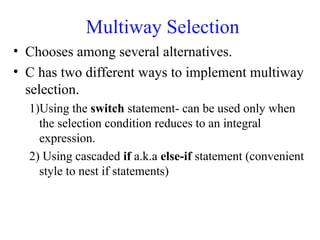
• Chooses among several alternatives.
• C has two different ways to implement multiway
selection.
1)Using the switch statement- can be used only when
the selection condition reduces to an integral
expression.
2) Using cascaded if a.k.a else-if statement (convenient
style to nest if statements)
Multiway Selection
• Switch is a composite statement used to make
decision between many alternatives.
– The selection condition must be one of the C integral
types.
– The most commonly used expression is a unary
expression in the form of an integral identifier.
The switch Statement
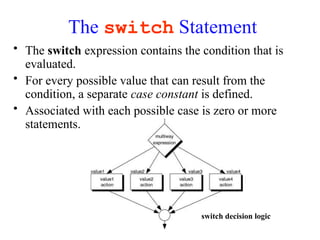
• The switch expression contains the condition that is
evaluated.
• For every possible value that can result from the
condition, a separate case constant is defined.
• Associated with each possible case is zero or more
statements.
switch decision logic
The switch Statement
• The format must include at least one case
statement.
• Each case expression is associated with a
constant. The keyword case together
with its constant are known as a case-
labeled statement.
• The label is a syntactical identifier that C
uses to determine which statement is the
starting point in the switch statement.
• The case is followed by a colon (:) and
then the statement with which it is
associated.
• Each case may have zero or more
statements.
• default is executed whenever none of the
other case values matches the value in the
switch expression.
The switch Statement
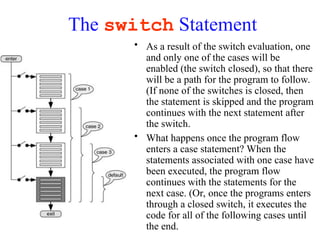
• As a result of the switch evaluation, one
and only one of the cases will be
enabled (the switch closed), so that there
will be a path for the program to follow.
(If none of the switches is closed, then
the statement is skipped and the program
continues with the next statement after
the switch.
• What happens once the program flow
enters a case statement? When the
statements associated with one case have
been executed, the program flow
continues with the statements for the
next case. (Or, once the programs enters
through a closed switch, it executes the
code for all of the following cases until
the end.
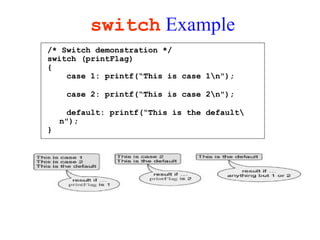
switch Example
/* Switch demonstration */
switch (printFlag)
{
case 1: printf(“This is case 1n");
case 2: printf(“This is case 2n");
default: printf(“This is the default
n");
}
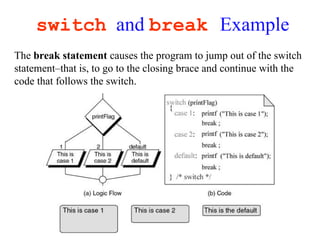
switch and break Example
The break statement causes the program to jump out of the switch
statement–that is, to go to the closing brace and continue with the
code that follows the switch.
Summary of switch Statement Rules
1. The control expression that follows the keyword switch must be an
integral type.
2. The expression followed by each case label must be a constant
expression. A constant expression is an expression that is evaluated
at compilation time, not run time.
3. No two case labels can have the same value.
4. But two case labels can be associated with the same statements.
5. The default label is not required. If the value of the expression does
not match with any label, the control transfers outside the switch
statement.
6. The switch statement can include at most one default label. The
default label may be coded anywhere, but it is traditionally coded
last.
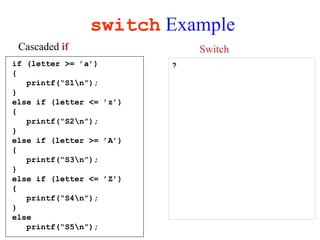
switch Example
?
if (letter >= ’a’)
{
printf(“S1n”);
}
else if (letter <= ’z’)
{
printf(“S2n”);
}
else if (letter >= ’A’)
{
printf(“S3n”);
}
else if (letter <= ’Z’)
{
printf(“S4n”);
}
else
printf(“S5n”);
Cascaded if Switch
switch Example
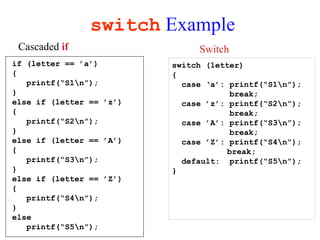
switch (letter)
{
case ‘a’: printf(“S1n”);
break;
case ’z’: printf(“S2n”);
break;
case ’A’: printf(“S3n”);
break;
case ’Z’: printf(“S4n”);
break;
default: printf(“S5n”);
}
if (letter == ’a’)
{
printf(“S1n”);
}
else if (letter == ’z’)
{
printf(“S2n”);
}
else if (letter == ’A’)
{
printf(“S3n”);
}
else if (letter == ’Z’)
{
printf(“S4n”);
}
else
printf(“S5n”);
Cascaded if Switch
Multivalued case Statements
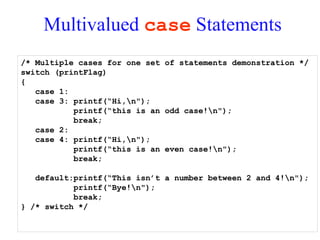
/* Multiple cases for one set of statements demonstration */
switch (printFlag)
{
case 1:
case 3: printf(“Hi,n");
printf(“this is an odd case!n");
break;
case 2:
case 4: printf(“Hi,n");
printf(“this is an even case!n");
break;
default:printf(“This isn’t a number between 2 and 4!n");
printf(“Bye!n");
break;
} /* switch */
Summary
• Multiway selection
• The switch statement
• The break statement
• Multivalued case

Lecture9(Selection -Part 2) computers.pdf

  • 1.
    CS102 Computer Programming I Lecture9: Selection (Part 2) Bicol University College of Science CSIT Department 1st Semester, 2024-2025
  • 2.
    Topics • Multiway selection •The switch statement • The break statement • Multivalued case
  • 3.
    Multiway Selection • Choosesamong several alternatives. • C has two different ways to implement multiway selection. 1)Using the switch statement- can be used only when the selection condition reduces to an integral expression. 2) Using cascaded if a.k.a else-if statement (convenient style to nest if statements)
  • 4.
    Multiway Selection • Switchis a composite statement used to make decision between many alternatives. – The selection condition must be one of the C integral types. – The most commonly used expression is a unary expression in the form of an integral identifier.
  • 5.
    The switch Statement •The switch expression contains the condition that is evaluated. • For every possible value that can result from the condition, a separate case constant is defined. • Associated with each possible case is zero or more statements. switch decision logic
  • 6.
    The switch Statement •The format must include at least one case statement. • Each case expression is associated with a constant. The keyword case together with its constant are known as a case- labeled statement. • The label is a syntactical identifier that C uses to determine which statement is the starting point in the switch statement. • The case is followed by a colon (:) and then the statement with which it is associated. • Each case may have zero or more statements. • default is executed whenever none of the other case values matches the value in the switch expression.
  • 7.
    The switch Statement •As a result of the switch evaluation, one and only one of the cases will be enabled (the switch closed), so that there will be a path for the program to follow. (If none of the switches is closed, then the statement is skipped and the program continues with the next statement after the switch. • What happens once the program flow enters a case statement? When the statements associated with one case have been executed, the program flow continues with the statements for the next case. (Or, once the programs enters through a closed switch, it executes the code for all of the following cases until the end.
  • 8.
    switch Example /* Switchdemonstration */ switch (printFlag) { case 1: printf(“This is case 1n"); case 2: printf(“This is case 2n"); default: printf(“This is the default n"); }
  • 9.
    switch and breakExample The break statement causes the program to jump out of the switch statement–that is, to go to the closing brace and continue with the code that follows the switch.
  • 10.
    Summary of switchStatement Rules 1. The control expression that follows the keyword switch must be an integral type. 2. The expression followed by each case label must be a constant expression. A constant expression is an expression that is evaluated at compilation time, not run time. 3. No two case labels can have the same value. 4. But two case labels can be associated with the same statements. 5. The default label is not required. If the value of the expression does not match with any label, the control transfers outside the switch statement. 6. The switch statement can include at most one default label. The default label may be coded anywhere, but it is traditionally coded last.
  • 11.
    switch Example ? if (letter>= ’a’) { printf(“S1n”); } else if (letter <= ’z’) { printf(“S2n”); } else if (letter >= ’A’) { printf(“S3n”); } else if (letter <= ’Z’) { printf(“S4n”); } else printf(“S5n”); Cascaded if Switch
  • 12.
    switch Example switch (letter) { case‘a’: printf(“S1n”); break; case ’z’: printf(“S2n”); break; case ’A’: printf(“S3n”); break; case ’Z’: printf(“S4n”); break; default: printf(“S5n”); } if (letter == ’a’) { printf(“S1n”); } else if (letter == ’z’) { printf(“S2n”); } else if (letter == ’A’) { printf(“S3n”); } else if (letter == ’Z’) { printf(“S4n”); } else printf(“S5n”); Cascaded if Switch
  • 13.
    Multivalued case Statements /*Multiple cases for one set of statements demonstration */ switch (printFlag) { case 1: case 3: printf(“Hi,n"); printf(“this is an odd case!n"); break; case 2: case 4: printf(“Hi,n"); printf(“this is an even case!n"); break; default:printf(“This isn’t a number between 2 and 4!n"); printf(“Bye!n"); break; } /* switch */
  • 14.
    Summary • Multiway selection •The switch statement • The break statement • Multivalued case