Fundamentals of Web Development - 2nd Ed.
Randy Connolly and Ricardo Hoar
Fundamentals of Web Development
Randy Connolly and Ricardo Hoar
© 2017 Pearson
http://www.funwebdev.com
JavaScript 1:
Language
Fundamentals
Chapter 8
Fundamentals of Web Development - 2nd Ed.
Randy Connolly and Ricardo Hoar
What is JavaScript &What Can It Do?
• JavaScript was introduced by Netscape in their
Navigator browser back in 1996
• JavaScript that is supported by your browser
contains language features
• not included in the current ECMAScript
specification and
• missing certain language features from that
specification
The latest version of ECMAScript is the Sixth
Edition (generally referred to as ES6 or ES2015 ).
JavaScript’s History
Fundamentals of Web Development - 2nd Ed.
Randy Connolly and Ricardo Hoar
What is JavaScript &What Can It Do?
• Early JavaScript had only a few common uses:
• 2000s onward saw more sophisticated uses for
JavaScript
• AJAX as both an acronym and a general term
• Chapters 10 and 19 will cover AJAX in much more
detail.
JavaScript and Web 2.0
Fundamentals of Web Development - 2nd Ed.
Randy Connolly and Ricardo Hoar
Where Does JavaScript Go?
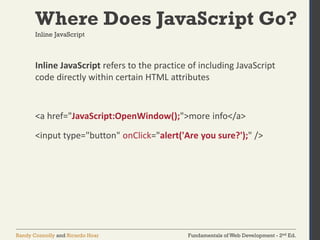
Inline JavaScript refers to the practice of including JavaScript
code directly within certain HTML attributes
<a href="JavaScript:OpenWindow();">more info</a>
<input type="button" onClick="alert('Are you sure?');" />
Inline JavaScript
Fundamentals of Web Development - 2nd Ed.
Randy Connolly and Ricardo Hoar
Where Does JavaScript Go?
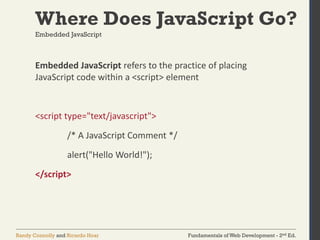
Embedded JavaScript refers to the practice of placing
JavaScript code within a <script> element
<script type="text/javascript">
/* A JavaScript Comment */
alert("Hello World!");
</script>
Embedded JavaScript
Fundamentals of Web Development - 2nd Ed.
Randy Connolly and Ricardo Hoar
Where Does JavaScript Go?
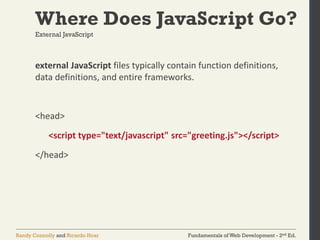
external JavaScript files typically contain function definitions,
data definitions, and entire frameworks.
<head>
<script type="text/javascript" src="greeting.js"></script>
</head>
External JavaScript
Fundamentals of Web Development - 2nd Ed.
Randy Connolly and Ricardo Hoar
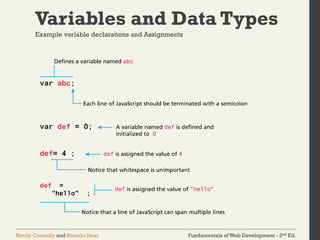
Variables and Data Types
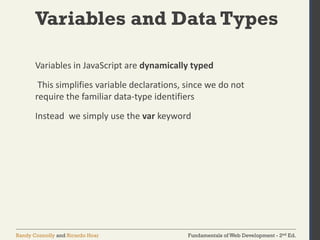
Variables in JavaScript are dynamically typed
This simplifies variable declarations, since we do not
require the familiar data-type identifiers
Instead we simply use the var keyword
Fundamentals of Web Development - 2nd Ed.
Randy Connolly and Ricardo Hoar
Variables and Data Types
Example variable declarations and Assignments
Fundamentals of Web Development - 2nd Ed.
Randy Connolly and Ricardo Hoar
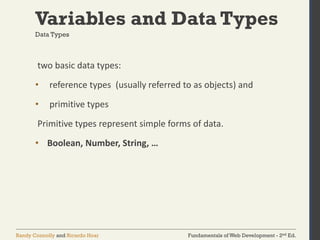
Variables and Data Types
two basic data types:
• reference types (usually referred to as objects) and
• primitive types
Primitive types represent simple forms of data.
• Boolean, Number, String, …
Data Types
Fundamentals of Web Development - 2nd Ed.
Randy Connolly and Ricardo Hoar
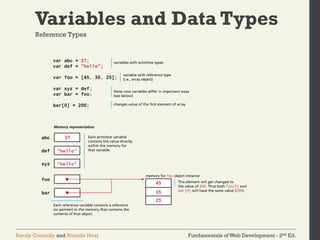
Variables and Data Types
Reference Types
Fundamentals of Web Development - 2nd Ed.
Randy Connolly and Ricardo Hoar
JavaScript Output
alert("Hello world");
Fundamentals of Web Development - 2nd Ed.
Randy Connolly and Ricardo Hoar
JavaScript Output
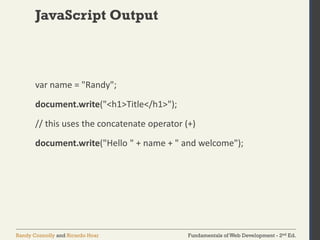
var name = "Randy";
document.write("<h1>Title</h1>");
// this uses the concatenate operator (+)
document.write("Hello " + name + " and welcome");
Fundamentals of Web Development - 2nd Ed.
Randy Connolly and Ricardo Hoar
JavaScript Output
• alert() Displays content within a pop-up box.
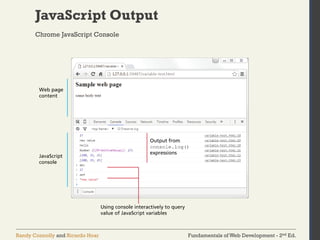
• console.log() Displays content in the Browser’s
JavaScript console.
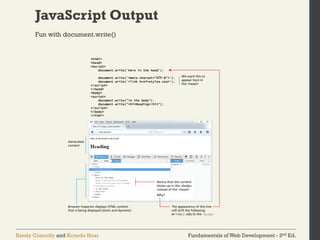
• document.write() Outputs the content (as markup)
directly to the HTML document.
Fundamentals of Web Development - 2nd Ed.
Randy Connolly and Ricardo Hoar
JavaScript Output
Chrome JavaScript Console
Fundamentals of Web Development - 2nd Ed.
Randy Connolly and Ricardo Hoar
JavaScript Output
Fun with document.write()
Fundamentals of Web Development - 2nd Ed.
Randy Connolly and Ricardo Hoar
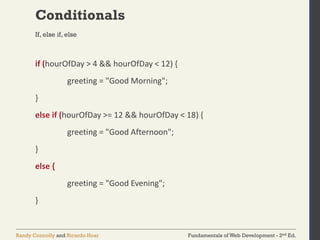
Conditionals
if (hourOfDay > 4 && hourOfDay < 12) {
greeting = "Good Morning";
}
else if (hourOfDay >= 12 && hourOfDay < 18) {
greeting = "Good Afternoon";
}
else {
greeting = "Good Evening";
}
If, else if, else
Fundamentals of Web Development - 2nd Ed.
Randy Connolly and Ricardo Hoar
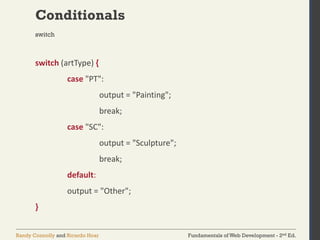
Conditionals
switch (artType) {
case "PT":
output = "Painting";
break;
case "SC":
output = "Sculpture";
break;
default:
output = "Other";
}
switch
Fundamentals of Web Development - 2nd Ed.
Randy Connolly and Ricardo Hoar
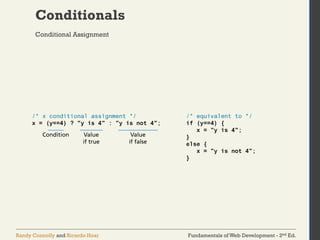
Conditionals
Conditional Assignment
Fundamentals of Web Development - 2nd Ed.
Randy Connolly and Ricardo Hoar
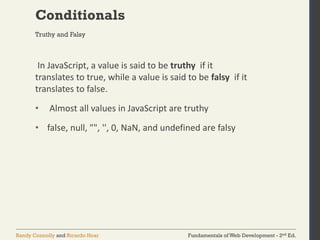
Conditionals
In JavaScript, a value is said to be truthy if it
translates to true, while a value is said to be falsy if it
translates to false.
• Almost all values in JavaScript are truthy
• false, null, "", '', 0, NaN, and undefined are falsy
Truthy and Falsy
Fundamentals of Web Development - 2nd Ed.
Randy Connolly and Ricardo Hoar
Loops
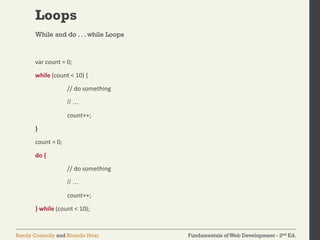
var count = 0;
while (count < 10) {
// do something
// ...
count++;
}
count = 0;
do {
// do something
// ...
count++;
} while (count < 10);
While and do . . . while Loops
Fundamentals of Web Development - 2nd Ed.
Randy Connolly and Ricardo Hoar
Loops
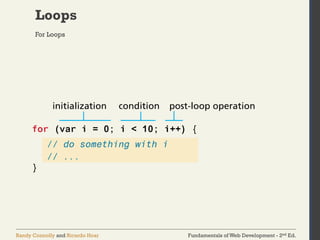
For Loops
Fundamentals of Web Development - 2nd Ed.
Randy Connolly and Ricardo Hoar
Arrays
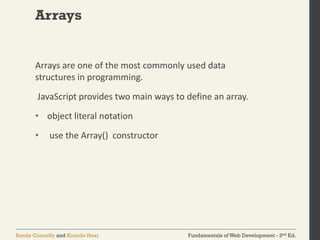
Arrays are one of the most commonly used data
structures in programming.
JavaScript provides two main ways to define an array.
• object literal notation
• use the Array() constructor
Fundamentals of Web Development - 2nd Ed.
Randy Connolly and Ricardo Hoar
Arrays
The literal notation approach is generally preferred
since it involves less typing, is more readable, and
executes a little bit quicker
var years = [1855, 1648, 1420];
var countries = ["Canada", "France",
"Germany", "Nigeria",
"Thailand", "United States"];
var mess = [53, "Canada", true, 1420];
object literal notation
Fundamentals of Web Development - 2nd Ed.
Randy Connolly and Ricardo Hoar
Arrays
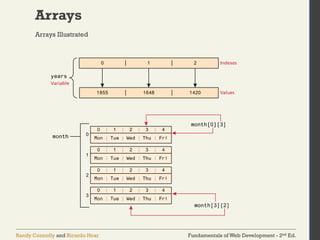
• arrays in JavaScript are zero indexed
• [] notation for access
• .length gives the length of the array
• .push()
• .pop()
• concat(), slice(), join(), reverse(), shift(), and sort()
Some common features
Fundamentals of Web Development - 2nd Ed.
Randy Connolly and Ricardo Hoar
Arrays
Arrays Illustrated
Fundamentals of Web Development - 2nd Ed.
Randy Connolly and Ricardo Hoar
Objects
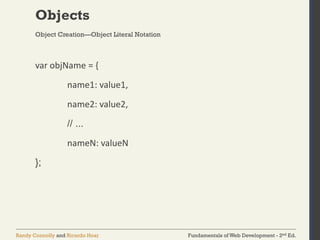
var objName = {
name1: value1,
name2: value2,
// ...
nameN: valueN
};
Object Creation—Object Literal Notation
Fundamentals of Web Development - 2nd Ed.
Randy Connolly and Ricardo Hoar
Objects
Access using either of:
• objName.name1
• objName["name1"]
Object Creation—Object Literal Notation
Fundamentals of Web Development - 2nd Ed.
Randy Connolly and Ricardo Hoar
Objects
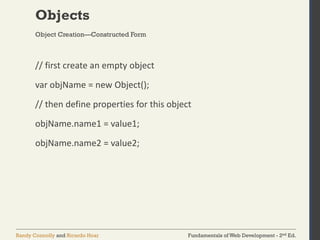
// first create an empty object
var objName = new Object();
// then define properties for this object
objName.name1 = value1;
objName.name2 = value2;
Object Creation—Constructed Form
Fundamentals of Web Development - 2nd Ed.
Randy Connolly and Ricardo Hoar
Functions
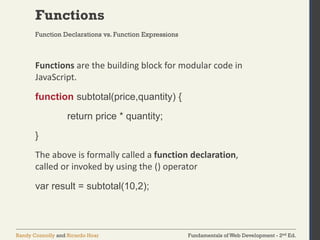
Functions are the building block for modular code in
JavaScript.
function subtotal(price,quantity) {
return price * quantity;
}
The above is formally called a function declaration,
called or invoked by using the () operator
var result = subtotal(10,2);
Function Declarations vs. Function Expressions
Fundamentals of Web Development - 2nd Ed.
Randy Connolly and Ricardo Hoar
Functions
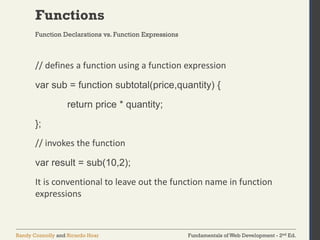
// defines a function using a function expression
var sub = function subtotal(price,quantity) {
return price * quantity;
};
// invokes the function
var result = sub(10,2);
It is conventional to leave out the function name in function
expressions
Function Declarations vs. Function Expressions
Fundamentals of Web Development - 2nd Ed.
Randy Connolly and Ricardo Hoar
Functions
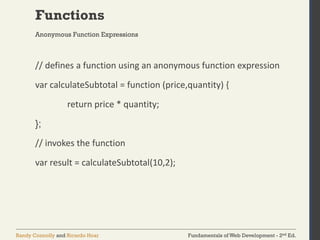
// defines a function using an anonymous function expression
var calculateSubtotal = function (price,quantity) {
return price * quantity;
};
// invokes the function
var result = calculateSubtotal(10,2);
Anonymous Function Expressions
Fundamentals of Web Development - 2nd Ed.
Randy Connolly and Ricardo Hoar
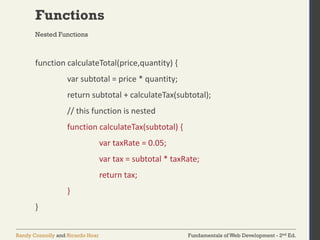
Functions
function calculateTotal(price,quantity) {
var subtotal = price * quantity;
return subtotal + calculateTax(subtotal);
// this function is nested
function calculateTax(subtotal) {
var taxRate = 0.05;
var tax = subtotal * taxRate;
return tax;
}
}
Nested Functions
Fundamentals of Web Development - 2nd Ed.
Randy Connolly and Ricardo Hoar
Functions
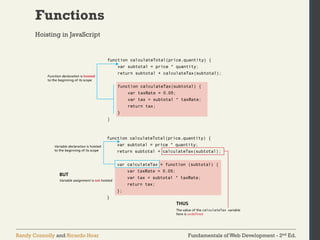
Hoisting in JavaScript
Fundamentals of Web Development - 2nd Ed.
Randy Connolly and Ricardo Hoar
Functions
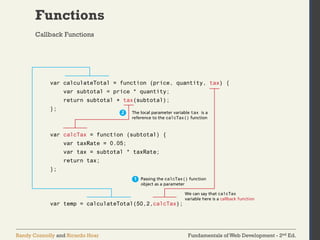
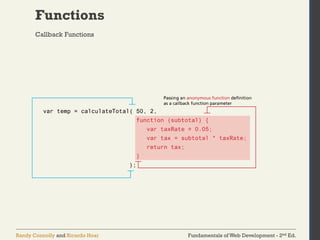
Callback Functions
Fundamentals of Web Development - 2nd Ed.
Randy Connolly and Ricardo Hoar
Functions
Callback Functions
Fundamentals of Web Development - 2nd Ed.
Randy Connolly and Ricardo Hoar
Functions
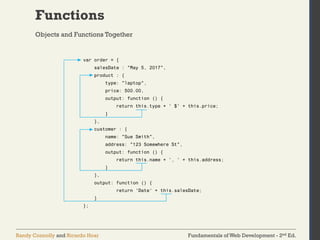
Objects and Functions Together
Fundamentals of Web Development - 2nd Ed.
Randy Connolly and Ricardo Hoar
Functions
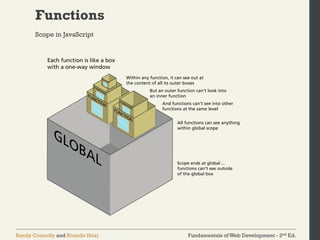
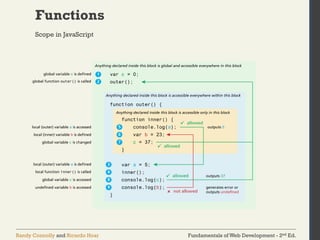
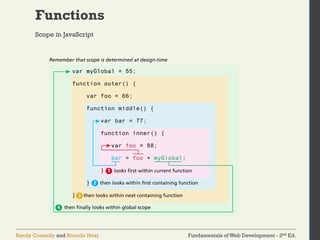
Scope in JavaScript
Fundamentals of Web Development - 2nd Ed.
Randy Connolly and Ricardo Hoar
Functions
Scope in JavaScript
Fundamentals of Web Development - 2nd Ed.
Randy Connolly and Ricardo Hoar
Functions
Scope in JavaScript
Fundamentals of Web Development - 2nd Ed.
Randy Connolly and Ricardo Hoar
Functions
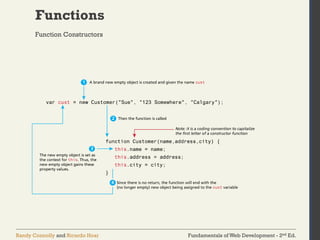
Function Constructors
Fundamentals of Web Development - 2nd Ed.
Randy Connolly and Ricardo Hoar
Object Prototypes
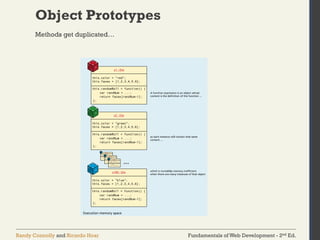
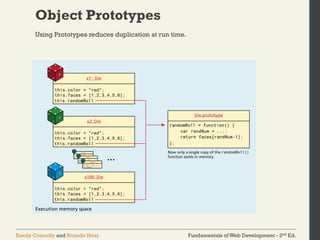
While the constructor function is simple to use, it can
be an inefficient approach for objects that contain
methods.
Prototypes are an essential syntax mechanism in
JavaScript, and are used to make JavaScript behave
more like an object-oriented language.
There’s a better way
Fundamentals of Web Development - 2nd Ed.
Randy Connolly and Ricardo Hoar
Object Prototypes
Methods get duplicated…
Fundamentals of Web Development - 2nd Ed.
Randy Connolly and Ricardo Hoar
Object Prototypes
Using Prototypes reduces duplication at run time.
Fundamentals of Web Development - 2nd Ed.
Randy Connolly and Ricardo Hoar
Object Prototypes
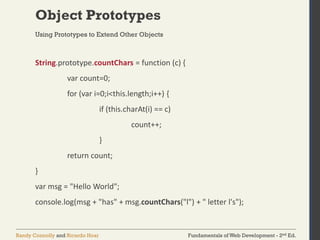
String.prototype.countChars = function (c) {
var count=0;
for (var i=0;i<this.length;i++) {
if (this.charAt(i) == c)
count++;
}
return count;
}
var msg = "Hello World";
console.log(msg + "has" + msg.countChars("l") + " letter l's");
Using Prototypes to Extend Other Objects
Fundamentals of Web Development - 2nd Ed.
Randy Connolly and Ricardo Hoar
Summary
ActionScript
Adobe Flash
anonymous functions
assignment
AJAX
applet
arrays
arrow functions
associative arrays
browser extension
browser plug-in
built-in objects
callback function
client-side scripting
closure
conditional assignment
dot notation
dynamically typed
ECMAScript
embedded JavaScript
ES2015
ES6
exception
expressions
external JavaScript files
falsy
fail-safe design
for loops
functions
function constructor
function declaration
function expression
inline JavaScript
immediately-invoked
function
Java applet
JavaScript frameworks
JavaScript Object Notation
JSON
lexical scope
libraries
loop control variable
method
minification
module pattern
namespace conflict
problem
objects
object literal notation
primitive types
property
prototypes
reference types
scope (local and global)
strict mode
throw
truthy
try. . . catch block
undefined
variables
Key Terms
Fundamentals of Web Development - 2nd Ed.
Randy Connolly and Ricardo Hoar
Summary
Questions?

lec 7 Introduction to JavaScript Language and Fundamentals.pdf

  • 1.
    Fundamentals of WebDevelopment - 2nd Ed. Randy Connolly and Ricardo Hoar Fundamentals of Web Development Randy Connolly and Ricardo Hoar © 2017 Pearson http://www.funwebdev.com JavaScript 1: Language Fundamentals Chapter 8
  • 2.
    Fundamentals of WebDevelopment - 2nd Ed. Randy Connolly and Ricardo Hoar What is JavaScript &What Can It Do? • JavaScript was introduced by Netscape in their Navigator browser back in 1996 • JavaScript that is supported by your browser contains language features • not included in the current ECMAScript specification and • missing certain language features from that specification The latest version of ECMAScript is the Sixth Edition (generally referred to as ES6 or ES2015 ). JavaScript’s History
  • 3.
    Fundamentals of WebDevelopment - 2nd Ed. Randy Connolly and Ricardo Hoar What is JavaScript &What Can It Do? • Early JavaScript had only a few common uses: • 2000s onward saw more sophisticated uses for JavaScript • AJAX as both an acronym and a general term • Chapters 10 and 19 will cover AJAX in much more detail. JavaScript and Web 2.0
  • 4.
    Fundamentals of WebDevelopment - 2nd Ed. Randy Connolly and Ricardo Hoar Where Does JavaScript Go? Inline JavaScript refers to the practice of including JavaScript code directly within certain HTML attributes <a href="JavaScript:OpenWindow();">more info</a> <input type="button" onClick="alert('Are you sure?');" /> Inline JavaScript
  • 5.
    Fundamentals of WebDevelopment - 2nd Ed. Randy Connolly and Ricardo Hoar Where Does JavaScript Go? Embedded JavaScript refers to the practice of placing JavaScript code within a <script> element <script type="text/javascript"> /* A JavaScript Comment */ alert("Hello World!"); </script> Embedded JavaScript
  • 6.
    Fundamentals of WebDevelopment - 2nd Ed. Randy Connolly and Ricardo Hoar Where Does JavaScript Go? external JavaScript files typically contain function definitions, data definitions, and entire frameworks. <head> <script type="text/javascript" src="greeting.js"></script> </head> External JavaScript
  • 7.
    Fundamentals of WebDevelopment - 2nd Ed. Randy Connolly and Ricardo Hoar Variables and Data Types Variables in JavaScript are dynamically typed This simplifies variable declarations, since we do not require the familiar data-type identifiers Instead we simply use the var keyword
  • 8.
    Fundamentals of WebDevelopment - 2nd Ed. Randy Connolly and Ricardo Hoar Variables and Data Types Example variable declarations and Assignments
  • 9.
    Fundamentals of WebDevelopment - 2nd Ed. Randy Connolly and Ricardo Hoar Variables and Data Types two basic data types: • reference types (usually referred to as objects) and • primitive types Primitive types represent simple forms of data. • Boolean, Number, String, … Data Types
  • 10.
    Fundamentals of WebDevelopment - 2nd Ed. Randy Connolly and Ricardo Hoar Variables and Data Types Reference Types
  • 11.
    Fundamentals of WebDevelopment - 2nd Ed. Randy Connolly and Ricardo Hoar JavaScript Output alert("Hello world");
  • 12.
    Fundamentals of WebDevelopment - 2nd Ed. Randy Connolly and Ricardo Hoar JavaScript Output var name = "Randy"; document.write("<h1>Title</h1>"); // this uses the concatenate operator (+) document.write("Hello " + name + " and welcome");
  • 13.
    Fundamentals of WebDevelopment - 2nd Ed. Randy Connolly and Ricardo Hoar JavaScript Output • alert() Displays content within a pop-up box. • console.log() Displays content in the Browser’s JavaScript console. • document.write() Outputs the content (as markup) directly to the HTML document.
  • 14.
    Fundamentals of WebDevelopment - 2nd Ed. Randy Connolly and Ricardo Hoar JavaScript Output Chrome JavaScript Console
  • 15.
    Fundamentals of WebDevelopment - 2nd Ed. Randy Connolly and Ricardo Hoar JavaScript Output Fun with document.write()
  • 16.
    Fundamentals of WebDevelopment - 2nd Ed. Randy Connolly and Ricardo Hoar Conditionals if (hourOfDay > 4 && hourOfDay < 12) { greeting = "Good Morning"; } else if (hourOfDay >= 12 && hourOfDay < 18) { greeting = "Good Afternoon"; } else { greeting = "Good Evening"; } If, else if, else
  • 17.
    Fundamentals of WebDevelopment - 2nd Ed. Randy Connolly and Ricardo Hoar Conditionals switch (artType) { case "PT": output = "Painting"; break; case "SC": output = "Sculpture"; break; default: output = "Other"; } switch
  • 18.
    Fundamentals of WebDevelopment - 2nd Ed. Randy Connolly and Ricardo Hoar Conditionals Conditional Assignment
  • 19.
    Fundamentals of WebDevelopment - 2nd Ed. Randy Connolly and Ricardo Hoar Conditionals In JavaScript, a value is said to be truthy if it translates to true, while a value is said to be falsy if it translates to false. • Almost all values in JavaScript are truthy • false, null, "", '', 0, NaN, and undefined are falsy Truthy and Falsy
  • 20.
    Fundamentals of WebDevelopment - 2nd Ed. Randy Connolly and Ricardo Hoar Loops var count = 0; while (count < 10) { // do something // ... count++; } count = 0; do { // do something // ... count++; } while (count < 10); While and do . . . while Loops
  • 21.
    Fundamentals of WebDevelopment - 2nd Ed. Randy Connolly and Ricardo Hoar Loops For Loops
  • 22.
    Fundamentals of WebDevelopment - 2nd Ed. Randy Connolly and Ricardo Hoar Arrays Arrays are one of the most commonly used data structures in programming. JavaScript provides two main ways to define an array. • object literal notation • use the Array() constructor
  • 23.
    Fundamentals of WebDevelopment - 2nd Ed. Randy Connolly and Ricardo Hoar Arrays The literal notation approach is generally preferred since it involves less typing, is more readable, and executes a little bit quicker var years = [1855, 1648, 1420]; var countries = ["Canada", "France", "Germany", "Nigeria", "Thailand", "United States"]; var mess = [53, "Canada", true, 1420]; object literal notation
  • 24.
    Fundamentals of WebDevelopment - 2nd Ed. Randy Connolly and Ricardo Hoar Arrays • arrays in JavaScript are zero indexed • [] notation for access • .length gives the length of the array • .push() • .pop() • concat(), slice(), join(), reverse(), shift(), and sort() Some common features
  • 25.
    Fundamentals of WebDevelopment - 2nd Ed. Randy Connolly and Ricardo Hoar Arrays Arrays Illustrated
  • 26.
    Fundamentals of WebDevelopment - 2nd Ed. Randy Connolly and Ricardo Hoar Objects var objName = { name1: value1, name2: value2, // ... nameN: valueN }; Object Creation—Object Literal Notation
  • 27.
    Fundamentals of WebDevelopment - 2nd Ed. Randy Connolly and Ricardo Hoar Objects Access using either of: • objName.name1 • objName["name1"] Object Creation—Object Literal Notation
  • 28.
    Fundamentals of WebDevelopment - 2nd Ed. Randy Connolly and Ricardo Hoar Objects // first create an empty object var objName = new Object(); // then define properties for this object objName.name1 = value1; objName.name2 = value2; Object Creation—Constructed Form
  • 29.
    Fundamentals of WebDevelopment - 2nd Ed. Randy Connolly and Ricardo Hoar Functions Functions are the building block for modular code in JavaScript. function subtotal(price,quantity) { return price * quantity; } The above is formally called a function declaration, called or invoked by using the () operator var result = subtotal(10,2); Function Declarations vs. Function Expressions
  • 30.
    Fundamentals of WebDevelopment - 2nd Ed. Randy Connolly and Ricardo Hoar Functions // defines a function using a function expression var sub = function subtotal(price,quantity) { return price * quantity; }; // invokes the function var result = sub(10,2); It is conventional to leave out the function name in function expressions Function Declarations vs. Function Expressions
  • 31.
    Fundamentals of WebDevelopment - 2nd Ed. Randy Connolly and Ricardo Hoar Functions // defines a function using an anonymous function expression var calculateSubtotal = function (price,quantity) { return price * quantity; }; // invokes the function var result = calculateSubtotal(10,2); Anonymous Function Expressions
  • 32.
    Fundamentals of WebDevelopment - 2nd Ed. Randy Connolly and Ricardo Hoar Functions function calculateTotal(price,quantity) { var subtotal = price * quantity; return subtotal + calculateTax(subtotal); // this function is nested function calculateTax(subtotal) { var taxRate = 0.05; var tax = subtotal * taxRate; return tax; } } Nested Functions
  • 33.
    Fundamentals of WebDevelopment - 2nd Ed. Randy Connolly and Ricardo Hoar Functions Hoisting in JavaScript
  • 34.
    Fundamentals of WebDevelopment - 2nd Ed. Randy Connolly and Ricardo Hoar Functions Callback Functions
  • 35.
    Fundamentals of WebDevelopment - 2nd Ed. Randy Connolly and Ricardo Hoar Functions Callback Functions
  • 36.
    Fundamentals of WebDevelopment - 2nd Ed. Randy Connolly and Ricardo Hoar Functions Objects and Functions Together
  • 37.
    Fundamentals of WebDevelopment - 2nd Ed. Randy Connolly and Ricardo Hoar Functions Scope in JavaScript
  • 38.
    Fundamentals of WebDevelopment - 2nd Ed. Randy Connolly and Ricardo Hoar Functions Scope in JavaScript
  • 39.
    Fundamentals of WebDevelopment - 2nd Ed. Randy Connolly and Ricardo Hoar Functions Scope in JavaScript
  • 40.
    Fundamentals of WebDevelopment - 2nd Ed. Randy Connolly and Ricardo Hoar Functions Function Constructors
  • 41.
    Fundamentals of WebDevelopment - 2nd Ed. Randy Connolly and Ricardo Hoar Object Prototypes While the constructor function is simple to use, it can be an inefficient approach for objects that contain methods. Prototypes are an essential syntax mechanism in JavaScript, and are used to make JavaScript behave more like an object-oriented language. There’s a better way
  • 42.
    Fundamentals of WebDevelopment - 2nd Ed. Randy Connolly and Ricardo Hoar Object Prototypes Methods get duplicated…
  • 43.
    Fundamentals of WebDevelopment - 2nd Ed. Randy Connolly and Ricardo Hoar Object Prototypes Using Prototypes reduces duplication at run time.
  • 44.
    Fundamentals of WebDevelopment - 2nd Ed. Randy Connolly and Ricardo Hoar Object Prototypes String.prototype.countChars = function (c) { var count=0; for (var i=0;i<this.length;i++) { if (this.charAt(i) == c) count++; } return count; } var msg = "Hello World"; console.log(msg + "has" + msg.countChars("l") + " letter l's"); Using Prototypes to Extend Other Objects
  • 45.
    Fundamentals of WebDevelopment - 2nd Ed. Randy Connolly and Ricardo Hoar Summary ActionScript Adobe Flash anonymous functions assignment AJAX applet arrays arrow functions associative arrays browser extension browser plug-in built-in objects callback function client-side scripting closure conditional assignment dot notation dynamically typed ECMAScript embedded JavaScript ES2015 ES6 exception expressions external JavaScript files falsy fail-safe design for loops functions function constructor function declaration function expression inline JavaScript immediately-invoked function Java applet JavaScript frameworks JavaScript Object Notation JSON lexical scope libraries loop control variable method minification module pattern namespace conflict problem objects object literal notation primitive types property prototypes reference types scope (local and global) strict mode throw truthy try. . . catch block undefined variables Key Terms
  • 46.
    Fundamentals of WebDevelopment - 2nd Ed. Randy Connolly and Ricardo Hoar Summary Questions?