데이터 분석 알아보기
백승용
2017/09/22
© 2016 NetApp, Inc. All rights reserved. --- NETAPP CONFIDENTIAL ---1
Agenda
1. 세션 개요
2. 통계 기초 지식
3. R 알아보기
4. RHadoop 알아보기
© 2016 NetApp, Inc. All rights reserved. --- NETAPP CONFIDENTIAL ---2
세션 개요
© 2016 NetApp, Inc. All rights reserved. --- NETAPP CONFIDENTIAL ---3
빅 데이터 플랫폼??
© 2016 NetApp, Inc. All rights reserved. --- NETAPP CONFIDENTIAL ---4
데이터 저장, 처리, 관리 데이터 분석, 시각화데이터 수집, 통합, 정제
데이터를 분석하고 사용자가
사용할 수 있는 형태로 가공하는
기술
▪ 분석, 시각화, 마이닝등
▪ R, SAS, SPSS, Tableau, Fusion
Tables, Gephi, Tag Cloud등
▪ 텍스트 마이닝, 오피니언 마이닝,
리얼리티 마이닝, 군집화, 그래프
마이닝, SNS 분석, 머신 러닝,
Mahout, NLTK, OpenNLP, BolierPipe,
WEKA등
▪ ????????????
통합된 데이터를 저장하고
분산처리 및 관리하는 기술
▪ NoSQL
▪ HBase, DynamoDB, MongoDB,
CouchDB, Cassandra, Hypertable,
Riak, Redis, Voldermort등
▪ 처리(분산, 배치, 실시간등), 관리
▪ Hadoop(MapReduce), Ambari,
Spark, Storm, ZooKeeper, Pig, Hive,
Mrjob, Azkaban, Oozie, Solr,
ElastricSearch, Cascading,
Cascalog등
▪ 파일시스템
▪ HDFS, S3, NFS, GPFS등
정형, 반정형, 비정형의 소스
데이터를 분석 시스템으로
통합하고 분석에 용이한 형태로
가공하는 기술
▪ Flume, Chukwa, Scribe – 로그 수집
▪ SQOOP(SQL to HADOOP) – RDBMS와
NoSQL의 연동
▪ Nutch – 웹 크롤링
▪ Kafka – 메시지 전송 및 수집
▪ OpenRefine – 대용량 데이터 정제
▪ Thrift – 비정형 데이터 정형화 및 관리
▪ Avro – 데이터 직렬화 등
하둡 알아보기(2016-09) 데이터 분석 알아보기(2017-09)
시스템 구성
3 노드 하둡 클러스터
© 2016 NetApp, Inc. All rights reserved. --- NETAPP CONFIDENTIAL ---5
▪ hostname: hadoop01
▪ OS: CentOS 7
▪ 가상메모리: 1GB
▪ IP: 192.168.2.191
▪ Role:
Master NameNode, DataNode
▪ Virtual Machine
▪ R for Linux: 3.3.2
▪ Rstudio Server: 1.0.136
▪ RHadoop: rhdfs, rmr2, plyrmr
▪ hostname: hadoop02
▪ OS: CentOS 7
▪ 가상메모리: 1GB
▪ IP: 192.168.2.192
▪ Role:
Secondary NameNode, DataNode
▪ Virtual Machine
▪ R for Linux: 3.3.2
▪ Rstudio Server: 1.0.136
▪ RHadoop: rhdfs, rmr2, plyrmr
▪ hostname: hadoop03
▪ OS: CentOS 7
▪ 가상메모리: 1GB
▪ IP: 192.168.2.193
▪ Role:
DataNode
▪ Virtual Machine
▪ R for Linux: 3.3.2
▪ Rstudio Server: 1.0.136
▪ RHadoop: rhdfs, rmr2, plyrmr
▪ 테스트 환경: VMWare Workstation
데이터 분석 소프트웨어
© 2016 NetApp, Inc. All rights reserved. --- NETAPP CONFIDENTIAL ---6
통계 기초 지식
© 2016 NetApp, Inc. All rights reserved. --- NETAPP CONFIDENTIAL ---7
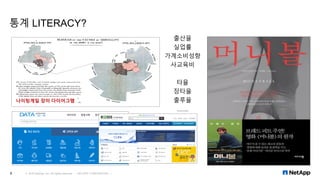
통계 LITERACY?
© 2016 NetApp, Inc. All rights reserved. --- NETAPP CONFIDENTIAL ---8
나이팅게일 장미 다이어그램
출산율
실업률
가계소비성향
사교육비
타율
장타율
출루율
……..
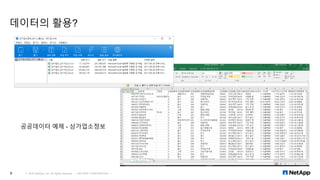
데이터의 활용?
© 2016 NetApp, Inc. All rights reserved. --- NETAPP CONFIDENTIAL ---9
공공데이터 예제 - 상가업소정보
통계학이란?
▪ 통계학(statistics)
관심의 대상에 대해 관련된 데이터를 수집하고 그 데이터를 요약 및 정리하여, 이로부터 불확실한
사실에 대한 결론이나 일반적인 규칙성을 추구하는 학문
▪ 기술통계학(descriptive statistics): 수집된 데이터의 정리 및 요약 방법을 다룸
▪ 추론통계학(inferential statistics): 표본 데이터를 통한 모수의 추정 및 모수에 대한 가설 검정
▪ 통계 기본 용어
▪ 전수조사(census): 대상의 전체를 조사
▪ 표본조사(sampling): 대상의 일부를 추출하여 조사
▪ 모집단(population): 전체 데이터
▪ 모수(parameter): 모집단의 특성을 나타내는 값
▪ 표본(sample): 일부 데이터
▪ 통계량(statistics): 표본의 특성을 나타내는 값
© 2016 NetApp, Inc. All rights reserved. --- NETAPP CONFIDENTIAL ---10
통계 데이터 분석의 단계
© 2016 NetApp, Inc. All rights reserved. --- NETAPP CONFIDENTIAL ---11
요약, 정리
특성을 수치화하여 객관적인
데이터로 정리 및 분석
표본 추출
통계조사, 실험계획
분석, 추론
표본에서 기술통계로 얻어진 모집단의
특징에 관한 유용한 정보를 추출 및 추측
모집단
표본
기술통계추론통계
합리적인
의사결정
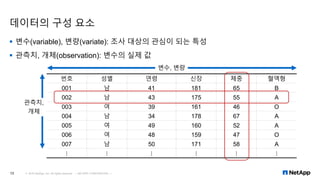
번호 성별 연령 신장 체중 혈액형
001 남 41 181 65 B
002 남 43 175 55 A
003 여 39 161 46 O
004 남 34 178 67 A
005 여 49 160 52 A
006 여 48 159 47 O
007 남 50 171 58 A
⋮ ⋮ ⋮ ⋮ ⋮ ⋮
데이터의 구성 요소
▪ 변수(variable), 변량(variate): 조사 대상의 관심이 되는 특성
▪ 관측치, 개체(observation): 변수의 실제 값
© 2016 NetApp, Inc. All rights reserved. --- NETAPP CONFIDENTIAL ---12
변수, 변량
관측치,
개체
데이터의 종류
© 2016 NetApp, Inc. All rights reserved. --- NETAPP CONFIDENTIAL ---13
성적, 선호도 등: A+, A, A-, B+, …
성별, 종교, 혈액형 등: 남자, 여자
키, 몸무게 등: 177.5cm, 68.29kg, ...
개수, 인원수 등: 3명, 100대
데이터(data)
수치형 데이터
(양적 데이터, quantitative data)
범주형 데이터
(질적 데이터, qualitative data)
이산형(discrete) 자료
연속형(continuous) 자료
명목형(nominal) 자료
순서형(ordinal) 자료
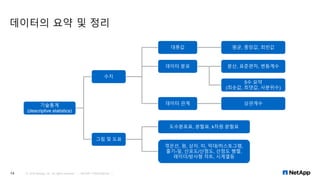
데이터의 요약 및 정리
© 2016 NetApp, Inc. All rights reserved. --- NETAPP CONFIDENTIAL ---14
기술통계
(descriptive statistics)
수치
대푯값 평균, 중앙값, 최빈값
데이터 분포
그림 및 도표
분산, 표준편차, 변동계수
5수 요약
(최솟값, 최댓값, 사분위수)
데이터 관계 상관계수
꺾은선, 원, 상자, 띠, 막대/히스토그램,
줄기-잎, 산포도/산점도, 산점도 행렬,
레이더/방사형 챠트, 시계열등
도수분포표, 분할표, k차원 분할표
수치를 통한 요약 및 정리 – 대푯값
▪ 대푯값: 데이터의 중심경향 측정을 위한 수치적 요약
▪ 평균(mean)
▪ 산술평균(arithmetic mean): 우리가 흔히 알고 있는 평균(모두 더해서 개수로 나눔)
▪ 기하평균(geometric mean): 인구 변동률, 물가 변동률과 같은 비율에 대한 대푯값으로 주로 사용
▪ 조화평균(harmonic mean): 평균 속도, 평균 가격을 얻는 경우에 사용할 수 있는 대푯값으로 사용
▪ 절사평균(trimmed mean): 가장 높고 가장 낮은 특정 퍼센트 만큼을 버리고 난 후 남아있는 값들로 평균을 계산
▪ 중앙값(median): 데이터를 작은 값에서부터 큰 값까지 순서대로 나열했을 때 중앙에 있는 값
▪ 데이터가 홀수일 경우에는 정 가운데의 값이고, 짝수일 경우에는 가운데 2개 값의 평균
▪ 최빈값(mode): 데이터에서 가장 많이 나타나는 관측값
▪ 이상값, 이상점(outlier): 대부분의 관측값들에서 멀리 떨어져 있는 일부 관측값
© 2016 NetApp, Inc. All rights reserved. --- NETAPP CONFIDENTIAL ---15
▪ A사 임직원 급여 ▪ 산술평균: 304
▪ 중앙값: 186
▪ 최빈값: 126 이지만, 해당 표처럼 연속형 변수는 의미가 없음
▪ 만약, 734가 2,000으로 바뀔 경우: 평균이 346으로 매우 높아짐
115 181 127 205 122 207 168 126 177 106
185 180 153 126 106 188 245 226 157 177
363 584 501 375 487 529 495 955 734 823
금액 A 제품 구매 개수 단가
1월 10,000원 10개 1,000원
2월 10,000원 20개 500원
3월 10,000원 50개 200원
▪ 산술평균: 566.7원(1000원+500원+200원/3개월)
▪ 조화평균: 375원(30,000원/80개)
수치를 통한 요약 및 정리 – 데이터 분포
▪ 데이터의 분포와 변동을 파악
▪ 분산(variance):
▪ 각각의 관측값들이 평균과 얼마나 떨어져 있는지, 즉 편차(deviation)를 구하여 제곱한 후 이들의 평균을 구하는 것
▪ 분산 = (편차)2
합의 평균
▪ 표준편차(standard deviation):
▪ 분산은 값이 너무 크고, 비교군이 없으면 흩어짐을 알기 어려움
▪ 표준편차 = 분산
▪ 표준편차가 작다는 것은 데이터가 평균값 주위에 집중되어 있음을 나타냄
▪ 변동계수(coefficient of variation):
▪ 평균과 표준편차가 서로 다른 두 데이터의 비교
▪ 변동계수 = 표본 표준편차 / 표본평균
▪ A가게(표준편차 1천만원/평균매출 1억원=0.1), B가게(표준편차 5백만원/평균매출 1천만원=0.5)의 변동 비교?
© 2016 NetApp, Inc. All rights reserved. --- NETAPP CONFIDENTIAL ---16
115 181 127 205 122 207 168 126 177 106
185 180 153 126 106 188 245 226 157 177
363 584 501 375 487 529 495 955 734 823
▪ A사 임직원 급여
▪ 분산: 53,393
▪ 표준편차: 231
수치를 통한 요약 및 정리 – 데이터 분포
▪ 5수 요약: 최솟값, 최댓값, 사분위수
▪ 최솟값(min): 전체 데이터에서 가장 작은 값
▪ 최댓값(max): 전체 데이터에서 가장 큰 값
▪ 범위(range): 최댓값 – 최솟값
▪ 사분위수(quantile): 데이터를 크기순으로 배열했을 때 4등분하는 3개의 수치, 제 1, 2, 3사분위수(Q1, Q2, Q3)
▪ 제 2사분위수는 중앙값과 일치하며, 5수 요약의 각 구획에는 데이터의 25%가 포함되어 있음
▪ 사분위수 구하기: 데이터의 최솟값과 최댓값을 구한다  중앙값을 구한다(제2사분위수)  중앙값 아래쪽 절반의
중앙값을 구한다(제1사분위수)  중앙값 위쪽 절반의 중앙값을 구한다(제3사분위수)
▪ 사분위범위(interquartile range): IQR = Q3 – Q1, 중앙값 주변의 50% 데이터가 분포
▪ 상자그림(box and whisker plot)의 박스가 IQR
▪ 사분위수, 상자그림: 중앙값을 기준으로 흩어진 정도를 나타냄
▪ 분산, 표준편차: 평균값을 기준으로 흩어진 정도를 나타냄
© 2016 NetApp, Inc. All rights reserved. --- NETAPP CONFIDENTIAL ---17
115 181 127 205 122 207 168 126 177 106
185 180 153 126 106 188 245 226 157 177
363 584 501 375 487 529 495 955 734 823
▪ A사 임직원 급여
▪ (min, Q1, M, Q3, max) = (106, 154, 186.5, 459, 955)
▪ IQR = 459-154 = 305
그림 및 도표를 이용한 요약 및 정리
© 2016 NetApp, Inc. All rights reserved. --- NETAPP CONFIDENTIAL ---18
꺾은선 그래프(line graph) – 연속형 변수의 변화
막대 그래프(bar graph) – 양의 비교
원 그래프(pie chart) – 비율의 비교
그림 및 도표를 이용한 요약 및 정리
© 2016 NetApp, Inc. All rights reserved. --- NETAPP CONFIDENTIAL ---19
줄기-잎 그래프(stem and leaf plot) 띠 그래프(band graph) 상자 그래프 (box and whisker plot)
번호 키
1 167
2 165
3 186
4 197
5 198
6 196
7 164
8 186
9 177
10 197
11 174
그림 및 도표를 이용한 요약 및 정리 – 도수분포표, 히스토그램
© 2016 NetApp, Inc. All rights reserved. --- NETAPP CONFIDENTIAL ---20
▪ 도수분포표(frequency table)
▪ 계급: 데이터를 몇 개의 동등한 폭으로 나눈 구간
▪ 계급값: 각 계급의 중앙값
▪ 도수: 각각의 계급에 들어가는 데이터의 수
▪ 상대도수: 도수의 합계에 대한 각 계급 도수의 비율
▪ 누적상대도수: 그 계급 이하의 상대도수의 합계
▪ 히스토그램(histogram): 도수분포표의 그래프
계급(이상~미만) 계급값 도수 상대도수(%) 누적상대도수(%)
100~200 150 16 53.3 53.3
200~300 250 4 13.3 66.7
300~400 350 2 6.67 73.3
400~500 450 2 6.67 80.0
500~600 550 3 10 90.0
600~700 650 0 0 90.0
700~800 750 1 3.33 93.3
800~900 850 1 3.33 96.7
900~1000 950 1 3.33 100
30 100
도수분포표
히스토그램
그림 및 도표를 이용한 요약 및 정리 – 분할표, k차원 분할표
© 2016 NetApp, Inc. All rights reserved. --- NETAPP CONFIDENTIAL ---21
▪ 분할표(contingency table): 2개 이상의 변수에 대해 교차시켜 빈도를 표시한 표(엑셀 피벗)
▪ k차원 분할표(k-dimensional contingency table): 3개 이상의 범주형 변수에 대한 분할표
그룹 남자 여자 어린이 전체
생존여부 생존 사망 생존 사망 생존 사망 생존 사망 합
등급
1등실 57 118 140 4 5 1 202 123 325
2등실 14 154 80 13 24 0 118 167 285
3등실 75 387 76 89 27 52 178 528 706
승무원 192 693 20 3 - - 212 696 908
전체 338 1352 316 109 56 53 710 1514 2224
A+ A0 B+ B0 합계
여자 18(34.0%) 2(18.2%) 1(20.0%) 1(50.0%) 22(30.1%)
남자 35(66.0%) 11(81.8%) 4(80.0%) 1(50.0%) 51(69.9%)
합계 53(100.0%) 13(100.0%) 5(100.0%) 2(100.0%) 73(100.0%)
https://en.wikipedia.org/wiki/RMS_Titanic
k차원 분할표
분할표
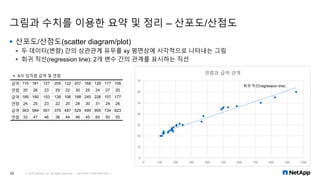
그림과 수치를 이용한 요약 및 정리 – 산포도/산점도
© 2016 NetApp, Inc. All rights reserved. --- NETAPP CONFIDENTIAL ---22
▪ 산포도/산점도(scatter diagram/plot)
▪ 두 데이터(변량) 간의 상관관계 유무를 xy 평면상에 시각적으로 나타내는 그림
▪ 회귀 직선(regression line): 2개 변수 간의 관계를 표시하는 직선
급여 115 181 127 205 122 207 168 126 177 106
연령 20 26 23 29 22 30 25 24 27 20
급여 185 180 153 126 106 188 245 226 157 177
연령 24 25 23 22 20 28 30 31 24 26
급여 363 584 501 375 487 529 495 955 734 823
연령 33 47 46 38 44 46 45 60 50 55
▪ A사 임직원 급여 및 연령
0
10
20
30
40
50
60
70
0 100 200 300 400 500 600 700 800 900 1000
연령과 급여 관계
회귀 직선(regression line)
그림과 수치를 이용한 요약 및 정리 – 상관계수
▪ 상관계수(correlation coefficient)
▪ 양이나 음의 상관관계를 엄밀하게 표현하는 통계 수치
▪ 상관계수를 구하기 위해서는, x와 y의 표준편차, 공분산(covariance) 필요, 공분산 = 𝐶 𝑥𝑦
▪ 상관계수 r은 반드시 -1 ≤ r ≤ 1의 범위에 있다.
▪ -1.0~-0.7: 강한 음, -0.7~-0.4: 중간 음, -0.4~-0.2: 약한 음, -0.2~0.2: 거의 없음, 0.2~0.4: 약한 양, 0.4~0.7: 중간
양, 0.7~1.0
© 2016 NetApp, Inc. All rights reserved. --- NETAPP CONFIDENTIAL ---23
강한 음 강한 음 중간 음 상관 관계 없음 중간 음 강한 음 강한 음
추론통계학(inferential statistics)?
© 2016 NetApp, Inc. All rights reserved. --- NETAPP CONFIDENTIAL ---24
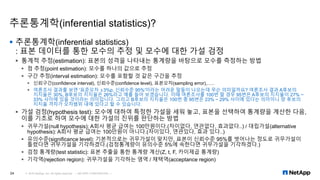
▪ 추론통계학(inferential statistics)
: 표본 데이터를 통한 모수의 추정 및 모수에 대한 가설 검정
▪ 통계적 추정(estimation): 표본의 성격을 나타내는 통계량을 바탕으로 모수를 측정하는 방법
▪ 점 추정(point estimation): 모수를 하나의 값으로 추정
▪ 구간 추정(interval estimation): 모수를 포함할 것 같은 구간을 추정
▪ 신뢰구간(confidence interval), 신뢰수준(confidence level), 표본오차(sampling error),…..
▪ 여론조사 결과를 보면 '표준오차 ±3%p, 신뢰수준 95%'이라는 어려운 말들이 나오는데 무슨 의미일까요? 여론조사 결과 A후보의
지지율은 30%, B후보의 지지율은 26%라고 예를 들어 보겠습니다. 이때 여론조사를 100번 할 경우 95번은 A후보의 지지율이 27% ~
33% 사이에 있을 것이라는 의미입니다. 그리고 B후보의 지지율은 100번 중 95번은 23% ~ 29% 사이에 있다는 의미이니 양 후보의
지지율 격차가 오차범위 내에 있다고 할 수 있습니다.
▪ 가설 검정(hypothesis test): 모수에 대하여 특정한 가설을 세워 놓고, 표본을 선택하여 통계량을 계산한 다음,
이를 기초로 하여 모수에 대한 가설의 진위를 판단하는 방법
▪ 귀무가설(null hypothesis): A회사 평균 급여는 100만원이다.(차이없다, 연관없다, 효과없다..) / 대립가설(alternative
hypothesis): A회사 평균 급여는 100만원이 아니다.(차이있다, 연관있다, 효과 있다..)
▪ 유의수준(significance level): 기본적으로는 귀무가설이 맞지만, 표본이 신뢰수준 95%를 벗어나는 정도로 귀무가설이
틀렸다면 귀무가설을 기각하겠다.(검정통계량이 유의수준 5%에 속한다면 귀무가설을 기각하겠다.)
▪ 검정 통계량(test statistic): 표본 추출을 통한 통계량 계산(Z, t, F, 카이제곱 통계량)
▪ 기각역(rejection region): 귀무가설을 기각하는 영역 / 채택역(acceptance region)
R 알아보기
© 2016 NetApp, Inc. All rights reserved. --- NETAPP CONFIDENTIAL ---25
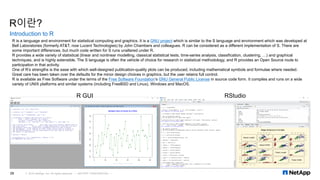
R이란?
Introduction to R
© 2016 NetApp, Inc. All rights reserved. --- NETAPP CONFIDENTIAL ---26
R GUI RStudio
R is a language and environment for statistical computing and graphics. It is a GNU project which is similar to the S language and environment which was developed at
Bell Laboratories (formerly AT&T, now Lucent Technologies) by John Chambers and colleagues. R can be considered as a different implementation of S. There are
some important differences, but much code written for S runs unaltered under R.
R provides a wide variety of statistical (linear and nonlinear modelling, classical statistical tests, time-series analysis, classification, clustering, …) and graphical
techniques, and is highly extensible. The S language is often the vehicle of choice for research in statistical methodology, and R provides an Open Source route to
participation in that activity.
One of R’s strengths is the ease with which well-designed publication-quality plots can be produced, including mathematical symbols and formulae where needed.
Great care has been taken over the defaults for the minor design choices in graphics, but the user retains full control.
R is available as Free Software under the terms of the Free Software Foundation’s GNU General Public License in source code form. It compiles and runs on a wide
variety of UNIX platforms and similar systems (including FreeBSD and Linux), Windows and MacOS.
R의 대중성
© 2016 NetApp, Inc. All rights reserved. --- NETAPP CONFIDENTIAL ---27
Figure 4a. Analytics tools used by respondents to the 2015 Rexer Analytics Survey. In this view,
each respondent was free to check multiple tools.
Figure 4b. The percent of survey respondents who checked each package as their primary tool in
2015. Note that free and commercial versions of KNIME and RapidMiner are combined. Multiple
tools from the same company are also combined. Only the top 10 are shown.
R 및 RStudio 설치
© 2016 NetApp, Inc. All rights reserved. --- NETAPP CONFIDENTIAL ---28
1. EPEL(Extra Packages for Enterprise Linux) 패키지 설치
[hadoop@hadoop01 ~]$ sudo yum install epel-release
▪ 모든 노드에서 설치
2. R 설치
[hadoop@hadoop01 ~]$ sudo yum install R
▪ 모든 노드에서 설치
3. RStudio 다운로드 및 설치
▪ https://www.rstudio.com/products/rstudio/download/
▪ RStudio Server(OpenSource License) 다운로드 및 사용할 노드 1대에만 설치
▪ http://192.168.2.191:8787
▪ [hadoop@hadoop01 ~]$ sudo yum install --nogpgcheck rstudio-server-rhel-1.0.136-x86_64.rpm
▪ [hadoop@hadoop01 ~]$ systemctl status rstudio-server.service
R 및 RStudio 설치 확인
© 2016 NetApp, Inc. All rights reserved. --- NETAPP CONFIDENTIAL ---29
R CLI Rstudio Web GUI
R 데이터 분석 예제
© 2016 NetApp, Inc. All rights reserved. --- NETAPP CONFIDENTIAL ---30
▪ 내장 데이터
> data()
> ?iris
> plot(iris)
> ls()
> str(Acorp)
> rm(Acorp)
▪ 데이터 입력
> salary<-
c(115,181,127,205,122,207,168,126,177,106,185,180,153,126,106,188,245,226,157,177,363,584,501,375,487,529,495,9
55,734,823)
> age<-c(20,26,23,29,22,30,25,24,27,20,24,25,23,22,20,28,30,31,24,26,33,47,46,38,44,46,45,60,50,55)
> Acorp<-data.frame(salary,age)
> head(Acorp)
> csv<-read.csv("d:csvfile.csv")
> head(csv)
R 데이터 분석 예제
© 2016 NetApp, Inc. All rights reserved. --- NETAPP CONFIDENTIAL ---31
▪ 기본 분석
> stem(age)
> table(salary)
> sd(salary)
> summary(salary)
> cor(salary,age)
> lm(age~salary)  나이를 연봉으로 예측하라.  Y=aX+b  Y=0.0487*500만원+17.2904  약 41세
▪ 시각화
> plot(Acorp)
> hist(salary,main="Salary",ylim=c(0,20),xlab="Million WON",breaks=seq(100,1000,100),col="blue")
▪ 패키지 설치 및 시각화
> installed.packages()
> install.packages("ggplot2")
> library(ggplot2)
> ggplot(Acorp,aes(x=salary,y=age))+geom_point(shape=2)+geom_smooth(method=lm,se=FALSE)
ggplot2 시각화 예제급여와 연령 관계
요약 출력
회귀분석 통계량
다중 상관계수 0.980642623
결정계수 0.961659954
조정된 결정계수 0.960290667
표준 오차 2.286678289
관측수 30
분산 분석
자유도 제곱합 제곱 평균 F 비 유의한 F
회귀 1 3672.290867 3672.290867 702.3069009 2.25702E-21
잔차 28 146.4091327 5.228897598
계 29 3818.7
계수 표준 오차 t 통계량 P-값 하위 95% 상위 95% 하위 95.0% 상위 95.0%
Y 절편 17.2903922 0.69755867 24.78700782 1.36295E-20 15.86150804 18.71927636 15.86150804 18.71927636
X 1 0.048699795 0.001837654 26.50107358 2.25702E-21 0.044935533 0.052464058 0.044935533 0.052464058
엑셀 데이터 분석 예제
엑셀로는 R로 한 분석을 못하나요??
© 2016 NetApp, Inc. All rights reserved. --- NETAPP CONFIDENTIAL ---32
급여 연령
115 20
181 26
127 23
205 29
122 22
207 30
168 25
126 24
177 27
106 20
185 24
180 25
153 23
126 22
106 20
188 28
245 30
226 31
157 24
177 26
363 33
584 47
501 46
375 38
487 44
529 46
495 45
955 60
734 50
823 55
급여 연령
평균 304.1 평균 32.1
표준 오차 42.1873 표준 오차 2.095068
중앙값 186.5 중앙값 27.5
최빈값 126 최빈값 20
표준 편차 231.0694 표준 편차 11.47516
분산 53393.06 분산 131.6793
첨도 1.278816 첨도 -0.21278
왜도 1.441734 왜도 0.984902
범위 849 범위 40
최소값 106 최소값 20
최대값 955 최대값 60
합 9123 합 963
관측수 30 관측수 30
기술 통계법
회귀 분석
급여 연령
급여 1
연령 0.980643 1
상관 분석
RHadoop 설치 및 알아보기
© 2016 NetApp, Inc. All rights reserved. --- NETAPP CONFIDENTIAL ---33
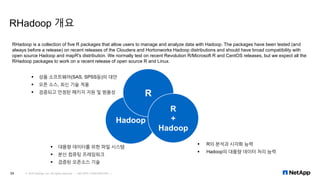
RHadoop 개요
© 2016 NetApp, Inc. All rights reserved. --- NETAPP CONFIDENTIAL ---34
▪ 상용 소프트웨어(SAS, SPSS등)의 대안
▪ 오픈 소스, 최신 기술 적용
▪ 검증되고 안정된 패키지 지원 및 범용성
Hadoop
R
R
+
Hadoop
▪ 대용량 데이터를 위한 파일 시스템
▪ 분산 컴퓨팅 프레임워크
▪ 검증된 오픈소스 기술
▪ R의 분석과 시각화 능력
▪ Hadoop의 대용량 데이터 처리 능력
RHadoop is a collection of five R packages that allow users to manage and analyze data with Hadoop. The packages have been tested (and
always before a release) on recent releases of the Cloudera and Hortonworks Hadoop distributions and should have broad compatibility with
open source Hadoop and mapR's distribution. We normally test on recent Revolution R/Microsoft R and CentOS releases, but we expect all the
RHadoop packages to work on a recent release of open source R and Linux.
RHadoop 구성 요소
© 2016 NetApp, Inc. All rights reserved. --- NETAPP CONFIDENTIAL ---35
Package Where to Install
plyrmr On every node in the cluster
ravro Only on the node that runs the R client
rhbase Only on the node that runs the R client
rhdfs Only on the node that runs the R client
rmr2 On every node in the cluster
HADOOP
rhdfs rmr rhbase
R과 HADOOP 연결 R과 HBASE 연결
MapReduce
RHadoop 구성 요소
https://github.com/RevolutionAnalytics/RHadoop/wiki
© 2016 NetApp, Inc. All rights reserved. --- NETAPP CONFIDENTIAL ---36
Package Name Description
rhdfs
This package provides basic connectivity to the Hadoop Distributed File System. R programmers can browse, read,
write, and modify files stored in HDFS from within R. Install this package only on the node that will run the R client.
rhbase
This package provides basic connectivity to the HBASE distributed database, using the Thrift server. R programmers
can browse, read, write, and modify tables stored in HBASE from within R. Install this package only on the node that
will run the R client.
plyrmr
This package enables the R user to perform common data manipulation operations, as found in popular packages
such as plyr and reshape2, on very large data sets stored on Hadoop. Like rmr, it relies on Hadoop MapReduce to
perform its tasks, but it provides a familiar plyr-like interface while hiding many of the MapReduce details. Install this
package only every node in the cluster.
rmr2
A package that allows R developer to perform statistical analysis in R via Hadoop MapReduce functionality on a
Hadoop cluster. Install this package on every node in the cluster.
ravro
A package that adds the ability to read and write avro files from local and HDFS file system and adds an avro input
format for rmr2. Install this package only on the node that will run the R client.
RHadoop 설치
© 2016 NetApp, Inc. All rights reserved. --- NETAPP CONFIDENTIAL ---37
1. https://github.com/RevolutionAnalytics/RHadoop/wiki 에서 필요 패키지 다운로드 및 모든 노드에 업로드
▪ plyrmr_0.6.0.tar.gz, rhdfs_1.0.8.tar.gz, rmr2_3.3.1.tar.gz
2. R 추가 필요 의존 패키지 설치
[root@hadoop01 ~]# R
> install.packages(‘httr’)
▪ R 패키지: httr, functional, devtools, plyr, reshape2, rJava, RJSONIO, itertools, digest, Rcpp, dplyr, rsjon, caTools등
▪ OS 패키지: *-libcurl-devel-*, *-openssl-devel-* 등
▪ 설치시에 의존성 문제가 발생하면 R의 install.packages 및 CentOS의 yum 명령을 이용하여 필요 패키지 설치
▪ 모든 노드에서 설치
3. RHadoop 패키지 설치
[root@hadoop01 ~]# R CMD INSTALL rmr2_3.3.1.tar.gz
▪ plyrmr_0.6.0.tar.gz, rhdfs_1.0.8.tar.gz, rmr2_3.3.1.tar.gz
▪ 모든 노드에서 설치
RHadoop 환경 설정 및 기본 테스트
© 2016 NetApp, Inc. All rights reserved. --- NETAPP CONFIDENTIAL ---38
1. .bashrc 환경변수 설정 – hadoop 사용자의 기타 HADOOP 환경 변수는 설정되어 있다고 가정
# RHadoop
export HADOOP_CMD=/home/hadoop/hadoop/bin/hadoop
export HADOOP_STREAMING=/home/hadoop/hadoop/share/hadoop/tools/lib/hadoop-streaming-2.7.2.jar
2. R 실행 및 RHadoop 기본 테스트 - MapReduce
[hadoop@hadoop01 ~]$ R
> library(rmr2)
> from.dfs(to.dfs(1:100))
> from.dfs(mapreduce(to.dfs(1:100)))
17/01/25 16:18:58 INFO client.RMProxy: Connecting to ResourceManager at hadoop01/192.168.2.191:8032
17/01/25 16:18:59 INFO client.RMProxy: Connecting to ResourceManager at hadoop01/192.168.2.191:8032
…………..
17/01/25 16:19:21 INFO mapreduce.Job: map 50% reduce 0%
17/01/25 16:19:22 INFO mapreduce.Job: map 100% reduce 0%
17/01/25 16:19:22 INFO mapreduce.Job: Counters: 30
File System Counters
FILE: Number of bytes read=0
FILE: Number of bytes written=244870
RHadoop 환경 설정 및 기본 테스트
© 2016 NetApp, Inc. All rights reserved. --- NETAPP CONFIDENTIAL ---39
3. RHadoop 기본 테스트 – hdfs
> library(rhdfs)
> hdfs.init()
> hdfs.ls(‘/’)
permission owner group size modtime file
1 drwx------ hadoop supergroup 0 2017-01-25 16:23 /tmp
2 drwxr-xr-x hadoop supergroup 0 2017-01-25 10:52 /wc_input
> hdfs.defaults('conf')
[1] "Java-Object{Configuration: core-default.xml, core-site.xml, mapred-default.xml, mapred-site.xml, yarn-default.xml,
yarn-site.xml, hdfs-default.xml, hdfs-site.xml}“
> hdfs.defaults('blocksize')
[1] 134217728
> hdfs.defaults('fs')
[1] "Java-Object{DFS[DFSClient[clientName=DFSClient_NONMAPREDUCE_-200405410_1, ugi=hadoop
(auth:SIMPLE)]]}"
RHadoop WordCount MapReduce 테스트
© 2016 NetApp, Inc. All rights reserved. --- NETAPP CONFIDENTIAL ---40
> library(rmr2)
> library(rhdfs)
> hdfs.init()
> map <-function(k,lines) {
+ words.list<-strsplit(lines, ' ')
+ words<-unlist(words.list)
+ return( keyval(words, 1) )
+ }
>
> reduce<-function(word, counts) {
+ keyval(word, sum(counts))
+ }
>
> wordcount<-function (input, output) {
+ mapreduce(input=input, output=output, input.format="text", map=map,reduce=reduce)
+ }
>
> hdfs.root<-'/wc_input'
> hdfs.data<-file.path(hdfs.root, 'LICENSE.txt')
> hdfs.out<-file.path(hdfs.root, 'output')
>
> out<-wordcount(hdfs.data, hdfs.out)
…...
17/01/25 16:44:09 INFO mapreduce.Job: The url to track the job:
http://hadoop01:8088/proxy/application_1485308958672_0005/
17/01/25 16:44:09 INFO mapreduce.Job: Running job: job_1485308958672_0005
17/01/25 16:44:19 INFO mapreduce.Job: map 0% reduce 0%
17/01/25 16:44:33 INFO mapreduce.Job: map 100% reduce 0%
17/01/25 16:44:41 INFO mapreduce.Job: map 100% reduce 100%
17/01/25 16:44:42 INFO mapreduce.Job: Job job_1485308958672_0005 completed successfully
17/01/25 16:44:43 INFO mapreduce.Job: Counters: 50
File System Counters
FILE: Number of bytes read=86261
FILE: Number of bytes written=541617
…..
File Output Format Counters
Bytes Written=53990
rmr
reduce calls=756
17/01/25 16:44:43 INFO streaming.StreamJob: Output directory: /wc_input/output
> results<-from.dfs(out)
> results.df<-as.data.frame(results, stringsAsFactors=F)
> colnames(results.df)<-c('word', 'count')
>
> head(results.df)
word count
1 1256
2 * 34
3 - 7
4 1 1
5 9 1
6 : 3
> head(results.df,20)
© 2016 NetApp, Inc. All rights reserved. --- NETAPP CONFIDENTIAL ---41
감사합니다.

데이터분석 알아보기(Learn about basic data analysis)

  • 1.
    데이터 분석 알아보기 백승용 2017/09/22 ©2016 NetApp, Inc. All rights reserved. --- NETAPP CONFIDENTIAL ---1
  • 2.
    Agenda 1. 세션 개요 2.통계 기초 지식 3. R 알아보기 4. RHadoop 알아보기 © 2016 NetApp, Inc. All rights reserved. --- NETAPP CONFIDENTIAL ---2
  • 3.
    세션 개요 © 2016NetApp, Inc. All rights reserved. --- NETAPP CONFIDENTIAL ---3
  • 4.
    빅 데이터 플랫폼?? ©2016 NetApp, Inc. All rights reserved. --- NETAPP CONFIDENTIAL ---4 데이터 저장, 처리, 관리 데이터 분석, 시각화데이터 수집, 통합, 정제 데이터를 분석하고 사용자가 사용할 수 있는 형태로 가공하는 기술 ▪ 분석, 시각화, 마이닝등 ▪ R, SAS, SPSS, Tableau, Fusion Tables, Gephi, Tag Cloud등 ▪ 텍스트 마이닝, 오피니언 마이닝, 리얼리티 마이닝, 군집화, 그래프 마이닝, SNS 분석, 머신 러닝, Mahout, NLTK, OpenNLP, BolierPipe, WEKA등 ▪ ???????????? 통합된 데이터를 저장하고 분산처리 및 관리하는 기술 ▪ NoSQL ▪ HBase, DynamoDB, MongoDB, CouchDB, Cassandra, Hypertable, Riak, Redis, Voldermort등 ▪ 처리(분산, 배치, 실시간등), 관리 ▪ Hadoop(MapReduce), Ambari, Spark, Storm, ZooKeeper, Pig, Hive, Mrjob, Azkaban, Oozie, Solr, ElastricSearch, Cascading, Cascalog등 ▪ 파일시스템 ▪ HDFS, S3, NFS, GPFS등 정형, 반정형, 비정형의 소스 데이터를 분석 시스템으로 통합하고 분석에 용이한 형태로 가공하는 기술 ▪ Flume, Chukwa, Scribe – 로그 수집 ▪ SQOOP(SQL to HADOOP) – RDBMS와 NoSQL의 연동 ▪ Nutch – 웹 크롤링 ▪ Kafka – 메시지 전송 및 수집 ▪ OpenRefine – 대용량 데이터 정제 ▪ Thrift – 비정형 데이터 정형화 및 관리 ▪ Avro – 데이터 직렬화 등 하둡 알아보기(2016-09) 데이터 분석 알아보기(2017-09)
  • 5.
    시스템 구성 3 노드하둡 클러스터 © 2016 NetApp, Inc. All rights reserved. --- NETAPP CONFIDENTIAL ---5 ▪ hostname: hadoop01 ▪ OS: CentOS 7 ▪ 가상메모리: 1GB ▪ IP: 192.168.2.191 ▪ Role: Master NameNode, DataNode ▪ Virtual Machine ▪ R for Linux: 3.3.2 ▪ Rstudio Server: 1.0.136 ▪ RHadoop: rhdfs, rmr2, plyrmr ▪ hostname: hadoop02 ▪ OS: CentOS 7 ▪ 가상메모리: 1GB ▪ IP: 192.168.2.192 ▪ Role: Secondary NameNode, DataNode ▪ Virtual Machine ▪ R for Linux: 3.3.2 ▪ Rstudio Server: 1.0.136 ▪ RHadoop: rhdfs, rmr2, plyrmr ▪ hostname: hadoop03 ▪ OS: CentOS 7 ▪ 가상메모리: 1GB ▪ IP: 192.168.2.193 ▪ Role: DataNode ▪ Virtual Machine ▪ R for Linux: 3.3.2 ▪ Rstudio Server: 1.0.136 ▪ RHadoop: rhdfs, rmr2, plyrmr ▪ 테스트 환경: VMWare Workstation
  • 6.
    데이터 분석 소프트웨어 ©2016 NetApp, Inc. All rights reserved. --- NETAPP CONFIDENTIAL ---6
  • 7.
    통계 기초 지식 ©2016 NetApp, Inc. All rights reserved. --- NETAPP CONFIDENTIAL ---7
  • 8.
    통계 LITERACY? © 2016NetApp, Inc. All rights reserved. --- NETAPP CONFIDENTIAL ---8 나이팅게일 장미 다이어그램 출산율 실업률 가계소비성향 사교육비 타율 장타율 출루율 ……..
  • 9.
    데이터의 활용? © 2016NetApp, Inc. All rights reserved. --- NETAPP CONFIDENTIAL ---9 공공데이터 예제 - 상가업소정보
  • 10.
    통계학이란? ▪ 통계학(statistics) 관심의 대상에대해 관련된 데이터를 수집하고 그 데이터를 요약 및 정리하여, 이로부터 불확실한 사실에 대한 결론이나 일반적인 규칙성을 추구하는 학문 ▪ 기술통계학(descriptive statistics): 수집된 데이터의 정리 및 요약 방법을 다룸 ▪ 추론통계학(inferential statistics): 표본 데이터를 통한 모수의 추정 및 모수에 대한 가설 검정 ▪ 통계 기본 용어 ▪ 전수조사(census): 대상의 전체를 조사 ▪ 표본조사(sampling): 대상의 일부를 추출하여 조사 ▪ 모집단(population): 전체 데이터 ▪ 모수(parameter): 모집단의 특성을 나타내는 값 ▪ 표본(sample): 일부 데이터 ▪ 통계량(statistics): 표본의 특성을 나타내는 값 © 2016 NetApp, Inc. All rights reserved. --- NETAPP CONFIDENTIAL ---10
  • 11.
    통계 데이터 분석의단계 © 2016 NetApp, Inc. All rights reserved. --- NETAPP CONFIDENTIAL ---11 요약, 정리 특성을 수치화하여 객관적인 데이터로 정리 및 분석 표본 추출 통계조사, 실험계획 분석, 추론 표본에서 기술통계로 얻어진 모집단의 특징에 관한 유용한 정보를 추출 및 추측 모집단 표본 기술통계추론통계 합리적인 의사결정
  • 12.
    번호 성별 연령신장 체중 혈액형 001 남 41 181 65 B 002 남 43 175 55 A 003 여 39 161 46 O 004 남 34 178 67 A 005 여 49 160 52 A 006 여 48 159 47 O 007 남 50 171 58 A ⋮ ⋮ ⋮ ⋮ ⋮ ⋮ 데이터의 구성 요소 ▪ 변수(variable), 변량(variate): 조사 대상의 관심이 되는 특성 ▪ 관측치, 개체(observation): 변수의 실제 값 © 2016 NetApp, Inc. All rights reserved. --- NETAPP CONFIDENTIAL ---12 변수, 변량 관측치, 개체
  • 13.
    데이터의 종류 © 2016NetApp, Inc. All rights reserved. --- NETAPP CONFIDENTIAL ---13 성적, 선호도 등: A+, A, A-, B+, … 성별, 종교, 혈액형 등: 남자, 여자 키, 몸무게 등: 177.5cm, 68.29kg, ... 개수, 인원수 등: 3명, 100대 데이터(data) 수치형 데이터 (양적 데이터, quantitative data) 범주형 데이터 (질적 데이터, qualitative data) 이산형(discrete) 자료 연속형(continuous) 자료 명목형(nominal) 자료 순서형(ordinal) 자료
  • 14.
    데이터의 요약 및정리 © 2016 NetApp, Inc. All rights reserved. --- NETAPP CONFIDENTIAL ---14 기술통계 (descriptive statistics) 수치 대푯값 평균, 중앙값, 최빈값 데이터 분포 그림 및 도표 분산, 표준편차, 변동계수 5수 요약 (최솟값, 최댓값, 사분위수) 데이터 관계 상관계수 꺾은선, 원, 상자, 띠, 막대/히스토그램, 줄기-잎, 산포도/산점도, 산점도 행렬, 레이더/방사형 챠트, 시계열등 도수분포표, 분할표, k차원 분할표
  • 15.
    수치를 통한 요약및 정리 – 대푯값 ▪ 대푯값: 데이터의 중심경향 측정을 위한 수치적 요약 ▪ 평균(mean) ▪ 산술평균(arithmetic mean): 우리가 흔히 알고 있는 평균(모두 더해서 개수로 나눔) ▪ 기하평균(geometric mean): 인구 변동률, 물가 변동률과 같은 비율에 대한 대푯값으로 주로 사용 ▪ 조화평균(harmonic mean): 평균 속도, 평균 가격을 얻는 경우에 사용할 수 있는 대푯값으로 사용 ▪ 절사평균(trimmed mean): 가장 높고 가장 낮은 특정 퍼센트 만큼을 버리고 난 후 남아있는 값들로 평균을 계산 ▪ 중앙값(median): 데이터를 작은 값에서부터 큰 값까지 순서대로 나열했을 때 중앙에 있는 값 ▪ 데이터가 홀수일 경우에는 정 가운데의 값이고, 짝수일 경우에는 가운데 2개 값의 평균 ▪ 최빈값(mode): 데이터에서 가장 많이 나타나는 관측값 ▪ 이상값, 이상점(outlier): 대부분의 관측값들에서 멀리 떨어져 있는 일부 관측값 © 2016 NetApp, Inc. All rights reserved. --- NETAPP CONFIDENTIAL ---15 ▪ A사 임직원 급여 ▪ 산술평균: 304 ▪ 중앙값: 186 ▪ 최빈값: 126 이지만, 해당 표처럼 연속형 변수는 의미가 없음 ▪ 만약, 734가 2,000으로 바뀔 경우: 평균이 346으로 매우 높아짐 115 181 127 205 122 207 168 126 177 106 185 180 153 126 106 188 245 226 157 177 363 584 501 375 487 529 495 955 734 823 금액 A 제품 구매 개수 단가 1월 10,000원 10개 1,000원 2월 10,000원 20개 500원 3월 10,000원 50개 200원 ▪ 산술평균: 566.7원(1000원+500원+200원/3개월) ▪ 조화평균: 375원(30,000원/80개)
  • 16.
    수치를 통한 요약및 정리 – 데이터 분포 ▪ 데이터의 분포와 변동을 파악 ▪ 분산(variance): ▪ 각각의 관측값들이 평균과 얼마나 떨어져 있는지, 즉 편차(deviation)를 구하여 제곱한 후 이들의 평균을 구하는 것 ▪ 분산 = (편차)2 합의 평균 ▪ 표준편차(standard deviation): ▪ 분산은 값이 너무 크고, 비교군이 없으면 흩어짐을 알기 어려움 ▪ 표준편차 = 분산 ▪ 표준편차가 작다는 것은 데이터가 평균값 주위에 집중되어 있음을 나타냄 ▪ 변동계수(coefficient of variation): ▪ 평균과 표준편차가 서로 다른 두 데이터의 비교 ▪ 변동계수 = 표본 표준편차 / 표본평균 ▪ A가게(표준편차 1천만원/평균매출 1억원=0.1), B가게(표준편차 5백만원/평균매출 1천만원=0.5)의 변동 비교? © 2016 NetApp, Inc. All rights reserved. --- NETAPP CONFIDENTIAL ---16 115 181 127 205 122 207 168 126 177 106 185 180 153 126 106 188 245 226 157 177 363 584 501 375 487 529 495 955 734 823 ▪ A사 임직원 급여 ▪ 분산: 53,393 ▪ 표준편차: 231
  • 17.
    수치를 통한 요약및 정리 – 데이터 분포 ▪ 5수 요약: 최솟값, 최댓값, 사분위수 ▪ 최솟값(min): 전체 데이터에서 가장 작은 값 ▪ 최댓값(max): 전체 데이터에서 가장 큰 값 ▪ 범위(range): 최댓값 – 최솟값 ▪ 사분위수(quantile): 데이터를 크기순으로 배열했을 때 4등분하는 3개의 수치, 제 1, 2, 3사분위수(Q1, Q2, Q3) ▪ 제 2사분위수는 중앙값과 일치하며, 5수 요약의 각 구획에는 데이터의 25%가 포함되어 있음 ▪ 사분위수 구하기: 데이터의 최솟값과 최댓값을 구한다  중앙값을 구한다(제2사분위수)  중앙값 아래쪽 절반의 중앙값을 구한다(제1사분위수)  중앙값 위쪽 절반의 중앙값을 구한다(제3사분위수) ▪ 사분위범위(interquartile range): IQR = Q3 – Q1, 중앙값 주변의 50% 데이터가 분포 ▪ 상자그림(box and whisker plot)의 박스가 IQR ▪ 사분위수, 상자그림: 중앙값을 기준으로 흩어진 정도를 나타냄 ▪ 분산, 표준편차: 평균값을 기준으로 흩어진 정도를 나타냄 © 2016 NetApp, Inc. All rights reserved. --- NETAPP CONFIDENTIAL ---17 115 181 127 205 122 207 168 126 177 106 185 180 153 126 106 188 245 226 157 177 363 584 501 375 487 529 495 955 734 823 ▪ A사 임직원 급여 ▪ (min, Q1, M, Q3, max) = (106, 154, 186.5, 459, 955) ▪ IQR = 459-154 = 305
  • 18.
    그림 및 도표를이용한 요약 및 정리 © 2016 NetApp, Inc. All rights reserved. --- NETAPP CONFIDENTIAL ---18 꺾은선 그래프(line graph) – 연속형 변수의 변화 막대 그래프(bar graph) – 양의 비교 원 그래프(pie chart) – 비율의 비교
  • 19.
    그림 및 도표를이용한 요약 및 정리 © 2016 NetApp, Inc. All rights reserved. --- NETAPP CONFIDENTIAL ---19 줄기-잎 그래프(stem and leaf plot) 띠 그래프(band graph) 상자 그래프 (box and whisker plot) 번호 키 1 167 2 165 3 186 4 197 5 198 6 196 7 164 8 186 9 177 10 197 11 174
  • 20.
    그림 및 도표를이용한 요약 및 정리 – 도수분포표, 히스토그램 © 2016 NetApp, Inc. All rights reserved. --- NETAPP CONFIDENTIAL ---20 ▪ 도수분포표(frequency table) ▪ 계급: 데이터를 몇 개의 동등한 폭으로 나눈 구간 ▪ 계급값: 각 계급의 중앙값 ▪ 도수: 각각의 계급에 들어가는 데이터의 수 ▪ 상대도수: 도수의 합계에 대한 각 계급 도수의 비율 ▪ 누적상대도수: 그 계급 이하의 상대도수의 합계 ▪ 히스토그램(histogram): 도수분포표의 그래프 계급(이상~미만) 계급값 도수 상대도수(%) 누적상대도수(%) 100~200 150 16 53.3 53.3 200~300 250 4 13.3 66.7 300~400 350 2 6.67 73.3 400~500 450 2 6.67 80.0 500~600 550 3 10 90.0 600~700 650 0 0 90.0 700~800 750 1 3.33 93.3 800~900 850 1 3.33 96.7 900~1000 950 1 3.33 100 30 100 도수분포표 히스토그램
  • 21.
    그림 및 도표를이용한 요약 및 정리 – 분할표, k차원 분할표 © 2016 NetApp, Inc. All rights reserved. --- NETAPP CONFIDENTIAL ---21 ▪ 분할표(contingency table): 2개 이상의 변수에 대해 교차시켜 빈도를 표시한 표(엑셀 피벗) ▪ k차원 분할표(k-dimensional contingency table): 3개 이상의 범주형 변수에 대한 분할표 그룹 남자 여자 어린이 전체 생존여부 생존 사망 생존 사망 생존 사망 생존 사망 합 등급 1등실 57 118 140 4 5 1 202 123 325 2등실 14 154 80 13 24 0 118 167 285 3등실 75 387 76 89 27 52 178 528 706 승무원 192 693 20 3 - - 212 696 908 전체 338 1352 316 109 56 53 710 1514 2224 A+ A0 B+ B0 합계 여자 18(34.0%) 2(18.2%) 1(20.0%) 1(50.0%) 22(30.1%) 남자 35(66.0%) 11(81.8%) 4(80.0%) 1(50.0%) 51(69.9%) 합계 53(100.0%) 13(100.0%) 5(100.0%) 2(100.0%) 73(100.0%) https://en.wikipedia.org/wiki/RMS_Titanic k차원 분할표 분할표
  • 22.
    그림과 수치를 이용한요약 및 정리 – 산포도/산점도 © 2016 NetApp, Inc. All rights reserved. --- NETAPP CONFIDENTIAL ---22 ▪ 산포도/산점도(scatter diagram/plot) ▪ 두 데이터(변량) 간의 상관관계 유무를 xy 평면상에 시각적으로 나타내는 그림 ▪ 회귀 직선(regression line): 2개 변수 간의 관계를 표시하는 직선 급여 115 181 127 205 122 207 168 126 177 106 연령 20 26 23 29 22 30 25 24 27 20 급여 185 180 153 126 106 188 245 226 157 177 연령 24 25 23 22 20 28 30 31 24 26 급여 363 584 501 375 487 529 495 955 734 823 연령 33 47 46 38 44 46 45 60 50 55 ▪ A사 임직원 급여 및 연령 0 10 20 30 40 50 60 70 0 100 200 300 400 500 600 700 800 900 1000 연령과 급여 관계 회귀 직선(regression line)
  • 23.
    그림과 수치를 이용한요약 및 정리 – 상관계수 ▪ 상관계수(correlation coefficient) ▪ 양이나 음의 상관관계를 엄밀하게 표현하는 통계 수치 ▪ 상관계수를 구하기 위해서는, x와 y의 표준편차, 공분산(covariance) 필요, 공분산 = 𝐶 𝑥𝑦 ▪ 상관계수 r은 반드시 -1 ≤ r ≤ 1의 범위에 있다. ▪ -1.0~-0.7: 강한 음, -0.7~-0.4: 중간 음, -0.4~-0.2: 약한 음, -0.2~0.2: 거의 없음, 0.2~0.4: 약한 양, 0.4~0.7: 중간 양, 0.7~1.0 © 2016 NetApp, Inc. All rights reserved. --- NETAPP CONFIDENTIAL ---23 강한 음 강한 음 중간 음 상관 관계 없음 중간 음 강한 음 강한 음
  • 24.
    추론통계학(inferential statistics)? © 2016NetApp, Inc. All rights reserved. --- NETAPP CONFIDENTIAL ---24 ▪ 추론통계학(inferential statistics) : 표본 데이터를 통한 모수의 추정 및 모수에 대한 가설 검정 ▪ 통계적 추정(estimation): 표본의 성격을 나타내는 통계량을 바탕으로 모수를 측정하는 방법 ▪ 점 추정(point estimation): 모수를 하나의 값으로 추정 ▪ 구간 추정(interval estimation): 모수를 포함할 것 같은 구간을 추정 ▪ 신뢰구간(confidence interval), 신뢰수준(confidence level), 표본오차(sampling error),….. ▪ 여론조사 결과를 보면 '표준오차 ±3%p, 신뢰수준 95%'이라는 어려운 말들이 나오는데 무슨 의미일까요? 여론조사 결과 A후보의 지지율은 30%, B후보의 지지율은 26%라고 예를 들어 보겠습니다. 이때 여론조사를 100번 할 경우 95번은 A후보의 지지율이 27% ~ 33% 사이에 있을 것이라는 의미입니다. 그리고 B후보의 지지율은 100번 중 95번은 23% ~ 29% 사이에 있다는 의미이니 양 후보의 지지율 격차가 오차범위 내에 있다고 할 수 있습니다. ▪ 가설 검정(hypothesis test): 모수에 대하여 특정한 가설을 세워 놓고, 표본을 선택하여 통계량을 계산한 다음, 이를 기초로 하여 모수에 대한 가설의 진위를 판단하는 방법 ▪ 귀무가설(null hypothesis): A회사 평균 급여는 100만원이다.(차이없다, 연관없다, 효과없다..) / 대립가설(alternative hypothesis): A회사 평균 급여는 100만원이 아니다.(차이있다, 연관있다, 효과 있다..) ▪ 유의수준(significance level): 기본적으로는 귀무가설이 맞지만, 표본이 신뢰수준 95%를 벗어나는 정도로 귀무가설이 틀렸다면 귀무가설을 기각하겠다.(검정통계량이 유의수준 5%에 속한다면 귀무가설을 기각하겠다.) ▪ 검정 통계량(test statistic): 표본 추출을 통한 통계량 계산(Z, t, F, 카이제곱 통계량) ▪ 기각역(rejection region): 귀무가설을 기각하는 영역 / 채택역(acceptance region)
  • 25.
    R 알아보기 © 2016NetApp, Inc. All rights reserved. --- NETAPP CONFIDENTIAL ---25
  • 26.
    R이란? Introduction to R ©2016 NetApp, Inc. All rights reserved. --- NETAPP CONFIDENTIAL ---26 R GUI RStudio R is a language and environment for statistical computing and graphics. It is a GNU project which is similar to the S language and environment which was developed at Bell Laboratories (formerly AT&T, now Lucent Technologies) by John Chambers and colleagues. R can be considered as a different implementation of S. There are some important differences, but much code written for S runs unaltered under R. R provides a wide variety of statistical (linear and nonlinear modelling, classical statistical tests, time-series analysis, classification, clustering, …) and graphical techniques, and is highly extensible. The S language is often the vehicle of choice for research in statistical methodology, and R provides an Open Source route to participation in that activity. One of R’s strengths is the ease with which well-designed publication-quality plots can be produced, including mathematical symbols and formulae where needed. Great care has been taken over the defaults for the minor design choices in graphics, but the user retains full control. R is available as Free Software under the terms of the Free Software Foundation’s GNU General Public License in source code form. It compiles and runs on a wide variety of UNIX platforms and similar systems (including FreeBSD and Linux), Windows and MacOS.
  • 27.
    R의 대중성 © 2016NetApp, Inc. All rights reserved. --- NETAPP CONFIDENTIAL ---27 Figure 4a. Analytics tools used by respondents to the 2015 Rexer Analytics Survey. In this view, each respondent was free to check multiple tools. Figure 4b. The percent of survey respondents who checked each package as their primary tool in 2015. Note that free and commercial versions of KNIME and RapidMiner are combined. Multiple tools from the same company are also combined. Only the top 10 are shown.
  • 28.
    R 및 RStudio설치 © 2016 NetApp, Inc. All rights reserved. --- NETAPP CONFIDENTIAL ---28 1. EPEL(Extra Packages for Enterprise Linux) 패키지 설치 [hadoop@hadoop01 ~]$ sudo yum install epel-release ▪ 모든 노드에서 설치 2. R 설치 [hadoop@hadoop01 ~]$ sudo yum install R ▪ 모든 노드에서 설치 3. RStudio 다운로드 및 설치 ▪ https://www.rstudio.com/products/rstudio/download/ ▪ RStudio Server(OpenSource License) 다운로드 및 사용할 노드 1대에만 설치 ▪ http://192.168.2.191:8787 ▪ [hadoop@hadoop01 ~]$ sudo yum install --nogpgcheck rstudio-server-rhel-1.0.136-x86_64.rpm ▪ [hadoop@hadoop01 ~]$ systemctl status rstudio-server.service
  • 29.
    R 및 RStudio설치 확인 © 2016 NetApp, Inc. All rights reserved. --- NETAPP CONFIDENTIAL ---29 R CLI Rstudio Web GUI
  • 30.
    R 데이터 분석예제 © 2016 NetApp, Inc. All rights reserved. --- NETAPP CONFIDENTIAL ---30 ▪ 내장 데이터 > data() > ?iris > plot(iris) > ls() > str(Acorp) > rm(Acorp) ▪ 데이터 입력 > salary<- c(115,181,127,205,122,207,168,126,177,106,185,180,153,126,106,188,245,226,157,177,363,584,501,375,487,529,495,9 55,734,823) > age<-c(20,26,23,29,22,30,25,24,27,20,24,25,23,22,20,28,30,31,24,26,33,47,46,38,44,46,45,60,50,55) > Acorp<-data.frame(salary,age) > head(Acorp) > csv<-read.csv("d:csvfile.csv") > head(csv)
  • 31.
    R 데이터 분석예제 © 2016 NetApp, Inc. All rights reserved. --- NETAPP CONFIDENTIAL ---31 ▪ 기본 분석 > stem(age) > table(salary) > sd(salary) > summary(salary) > cor(salary,age) > lm(age~salary)  나이를 연봉으로 예측하라.  Y=aX+b  Y=0.0487*500만원+17.2904  약 41세 ▪ 시각화 > plot(Acorp) > hist(salary,main="Salary",ylim=c(0,20),xlab="Million WON",breaks=seq(100,1000,100),col="blue") ▪ 패키지 설치 및 시각화 > installed.packages() > install.packages("ggplot2") > library(ggplot2) > ggplot(Acorp,aes(x=salary,y=age))+geom_point(shape=2)+geom_smooth(method=lm,se=FALSE) ggplot2 시각화 예제급여와 연령 관계
  • 32.
    요약 출력 회귀분석 통계량 다중상관계수 0.980642623 결정계수 0.961659954 조정된 결정계수 0.960290667 표준 오차 2.286678289 관측수 30 분산 분석 자유도 제곱합 제곱 평균 F 비 유의한 F 회귀 1 3672.290867 3672.290867 702.3069009 2.25702E-21 잔차 28 146.4091327 5.228897598 계 29 3818.7 계수 표준 오차 t 통계량 P-값 하위 95% 상위 95% 하위 95.0% 상위 95.0% Y 절편 17.2903922 0.69755867 24.78700782 1.36295E-20 15.86150804 18.71927636 15.86150804 18.71927636 X 1 0.048699795 0.001837654 26.50107358 2.25702E-21 0.044935533 0.052464058 0.044935533 0.052464058 엑셀 데이터 분석 예제 엑셀로는 R로 한 분석을 못하나요?? © 2016 NetApp, Inc. All rights reserved. --- NETAPP CONFIDENTIAL ---32 급여 연령 115 20 181 26 127 23 205 29 122 22 207 30 168 25 126 24 177 27 106 20 185 24 180 25 153 23 126 22 106 20 188 28 245 30 226 31 157 24 177 26 363 33 584 47 501 46 375 38 487 44 529 46 495 45 955 60 734 50 823 55 급여 연령 평균 304.1 평균 32.1 표준 오차 42.1873 표준 오차 2.095068 중앙값 186.5 중앙값 27.5 최빈값 126 최빈값 20 표준 편차 231.0694 표준 편차 11.47516 분산 53393.06 분산 131.6793 첨도 1.278816 첨도 -0.21278 왜도 1.441734 왜도 0.984902 범위 849 범위 40 최소값 106 최소값 20 최대값 955 최대값 60 합 9123 합 963 관측수 30 관측수 30 기술 통계법 회귀 분석 급여 연령 급여 1 연령 0.980643 1 상관 분석
  • 33.
    RHadoop 설치 및알아보기 © 2016 NetApp, Inc. All rights reserved. --- NETAPP CONFIDENTIAL ---33
  • 34.
    RHadoop 개요 © 2016NetApp, Inc. All rights reserved. --- NETAPP CONFIDENTIAL ---34 ▪ 상용 소프트웨어(SAS, SPSS등)의 대안 ▪ 오픈 소스, 최신 기술 적용 ▪ 검증되고 안정된 패키지 지원 및 범용성 Hadoop R R + Hadoop ▪ 대용량 데이터를 위한 파일 시스템 ▪ 분산 컴퓨팅 프레임워크 ▪ 검증된 오픈소스 기술 ▪ R의 분석과 시각화 능력 ▪ Hadoop의 대용량 데이터 처리 능력 RHadoop is a collection of five R packages that allow users to manage and analyze data with Hadoop. The packages have been tested (and always before a release) on recent releases of the Cloudera and Hortonworks Hadoop distributions and should have broad compatibility with open source Hadoop and mapR's distribution. We normally test on recent Revolution R/Microsoft R and CentOS releases, but we expect all the RHadoop packages to work on a recent release of open source R and Linux.
  • 35.
    RHadoop 구성 요소 ©2016 NetApp, Inc. All rights reserved. --- NETAPP CONFIDENTIAL ---35 Package Where to Install plyrmr On every node in the cluster ravro Only on the node that runs the R client rhbase Only on the node that runs the R client rhdfs Only on the node that runs the R client rmr2 On every node in the cluster HADOOP rhdfs rmr rhbase R과 HADOOP 연결 R과 HBASE 연결 MapReduce
  • 36.
    RHadoop 구성 요소 https://github.com/RevolutionAnalytics/RHadoop/wiki ©2016 NetApp, Inc. All rights reserved. --- NETAPP CONFIDENTIAL ---36 Package Name Description rhdfs This package provides basic connectivity to the Hadoop Distributed File System. R programmers can browse, read, write, and modify files stored in HDFS from within R. Install this package only on the node that will run the R client. rhbase This package provides basic connectivity to the HBASE distributed database, using the Thrift server. R programmers can browse, read, write, and modify tables stored in HBASE from within R. Install this package only on the node that will run the R client. plyrmr This package enables the R user to perform common data manipulation operations, as found in popular packages such as plyr and reshape2, on very large data sets stored on Hadoop. Like rmr, it relies on Hadoop MapReduce to perform its tasks, but it provides a familiar plyr-like interface while hiding many of the MapReduce details. Install this package only every node in the cluster. rmr2 A package that allows R developer to perform statistical analysis in R via Hadoop MapReduce functionality on a Hadoop cluster. Install this package on every node in the cluster. ravro A package that adds the ability to read and write avro files from local and HDFS file system and adds an avro input format for rmr2. Install this package only on the node that will run the R client.
  • 37.
    RHadoop 설치 © 2016NetApp, Inc. All rights reserved. --- NETAPP CONFIDENTIAL ---37 1. https://github.com/RevolutionAnalytics/RHadoop/wiki 에서 필요 패키지 다운로드 및 모든 노드에 업로드 ▪ plyrmr_0.6.0.tar.gz, rhdfs_1.0.8.tar.gz, rmr2_3.3.1.tar.gz 2. R 추가 필요 의존 패키지 설치 [root@hadoop01 ~]# R > install.packages(‘httr’) ▪ R 패키지: httr, functional, devtools, plyr, reshape2, rJava, RJSONIO, itertools, digest, Rcpp, dplyr, rsjon, caTools등 ▪ OS 패키지: *-libcurl-devel-*, *-openssl-devel-* 등 ▪ 설치시에 의존성 문제가 발생하면 R의 install.packages 및 CentOS의 yum 명령을 이용하여 필요 패키지 설치 ▪ 모든 노드에서 설치 3. RHadoop 패키지 설치 [root@hadoop01 ~]# R CMD INSTALL rmr2_3.3.1.tar.gz ▪ plyrmr_0.6.0.tar.gz, rhdfs_1.0.8.tar.gz, rmr2_3.3.1.tar.gz ▪ 모든 노드에서 설치
  • 38.
    RHadoop 환경 설정및 기본 테스트 © 2016 NetApp, Inc. All rights reserved. --- NETAPP CONFIDENTIAL ---38 1. .bashrc 환경변수 설정 – hadoop 사용자의 기타 HADOOP 환경 변수는 설정되어 있다고 가정 # RHadoop export HADOOP_CMD=/home/hadoop/hadoop/bin/hadoop export HADOOP_STREAMING=/home/hadoop/hadoop/share/hadoop/tools/lib/hadoop-streaming-2.7.2.jar 2. R 실행 및 RHadoop 기본 테스트 - MapReduce [hadoop@hadoop01 ~]$ R > library(rmr2) > from.dfs(to.dfs(1:100)) > from.dfs(mapreduce(to.dfs(1:100))) 17/01/25 16:18:58 INFO client.RMProxy: Connecting to ResourceManager at hadoop01/192.168.2.191:8032 17/01/25 16:18:59 INFO client.RMProxy: Connecting to ResourceManager at hadoop01/192.168.2.191:8032 ………….. 17/01/25 16:19:21 INFO mapreduce.Job: map 50% reduce 0% 17/01/25 16:19:22 INFO mapreduce.Job: map 100% reduce 0% 17/01/25 16:19:22 INFO mapreduce.Job: Counters: 30 File System Counters FILE: Number of bytes read=0 FILE: Number of bytes written=244870
  • 39.
    RHadoop 환경 설정및 기본 테스트 © 2016 NetApp, Inc. All rights reserved. --- NETAPP CONFIDENTIAL ---39 3. RHadoop 기본 테스트 – hdfs > library(rhdfs) > hdfs.init() > hdfs.ls(‘/’) permission owner group size modtime file 1 drwx------ hadoop supergroup 0 2017-01-25 16:23 /tmp 2 drwxr-xr-x hadoop supergroup 0 2017-01-25 10:52 /wc_input > hdfs.defaults('conf') [1] "Java-Object{Configuration: core-default.xml, core-site.xml, mapred-default.xml, mapred-site.xml, yarn-default.xml, yarn-site.xml, hdfs-default.xml, hdfs-site.xml}“ > hdfs.defaults('blocksize') [1] 134217728 > hdfs.defaults('fs') [1] "Java-Object{DFS[DFSClient[clientName=DFSClient_NONMAPREDUCE_-200405410_1, ugi=hadoop (auth:SIMPLE)]]}"
  • 40.
    RHadoop WordCount MapReduce테스트 © 2016 NetApp, Inc. All rights reserved. --- NETAPP CONFIDENTIAL ---40 > library(rmr2) > library(rhdfs) > hdfs.init() > map <-function(k,lines) { + words.list<-strsplit(lines, ' ') + words<-unlist(words.list) + return( keyval(words, 1) ) + } > > reduce<-function(word, counts) { + keyval(word, sum(counts)) + } > > wordcount<-function (input, output) { + mapreduce(input=input, output=output, input.format="text", map=map,reduce=reduce) + } > > hdfs.root<-'/wc_input' > hdfs.data<-file.path(hdfs.root, 'LICENSE.txt') > hdfs.out<-file.path(hdfs.root, 'output') > > out<-wordcount(hdfs.data, hdfs.out) > out<-wordcount(hdfs.data, hdfs.out) …... 17/01/25 16:44:09 INFO mapreduce.Job: The url to track the job: http://hadoop01:8088/proxy/application_1485308958672_0005/ 17/01/25 16:44:09 INFO mapreduce.Job: Running job: job_1485308958672_0005 17/01/25 16:44:19 INFO mapreduce.Job: map 0% reduce 0% 17/01/25 16:44:33 INFO mapreduce.Job: map 100% reduce 0% 17/01/25 16:44:41 INFO mapreduce.Job: map 100% reduce 100% 17/01/25 16:44:42 INFO mapreduce.Job: Job job_1485308958672_0005 completed successfully 17/01/25 16:44:43 INFO mapreduce.Job: Counters: 50 File System Counters FILE: Number of bytes read=86261 FILE: Number of bytes written=541617 ….. File Output Format Counters Bytes Written=53990 rmr reduce calls=756 17/01/25 16:44:43 INFO streaming.StreamJob: Output directory: /wc_input/output > results<-from.dfs(out) > results.df<-as.data.frame(results, stringsAsFactors=F) > colnames(results.df)<-c('word', 'count') > > head(results.df) word count 1 1256 2 * 34 3 - 7 4 1 1 5 9 1 6 : 3 > head(results.df,20)
  • 41.
    © 2016 NetApp,Inc. All rights reserved. --- NETAPP CONFIDENTIAL ---41 감사합니다.