TOPIC: LAY OUT PLANNING
VENUE:KUMARAGURU COLLEGE OF
TECHNOLOGY
DATE: 13.06.12
1
KCT FDP 2012
• Orbito Spread & Cut Planner(oscp) is used
to plan the layers for the required
quantity.
• All size combinations of different colors
and different fabrics can be planned in
the single program.
• OSCP is used to optimize the number of
lays on the marker for the planned
quantity
• Best dia can be fixed automatically.
2
KCT FDP 2012
 ORDER SETTINGS:- no. of lays recommended,
maximum no. of products in a lay and the
allowance is given.
 FABRIC SETTINGS:- GSM , type and color of
the fabric is given.
 MARKER SETTINGS:- Marker width and piece
Gap is given.
 SPREADING OPTIONS:- Tubular or
Openwidth.
3
KCT FDP 2012
 Grouping of similar fabrics can be done.
 Different dia can be fixed for the each order
fabric given in the quantity table.
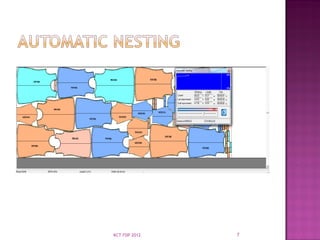
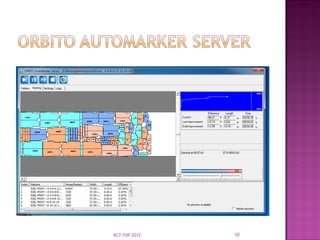
 All lays planned can be automatically nested
sequentially with the help of auto Marker
Server and the nested marker are stored in
the same order file.
 OSCP is used to print the cut plan report of
all lays planned and nested automatically.
 The lays planned can be exported to plotter
for manual cutting or can be send directly to
the cutting machine.
4
KCT FDP 2012
 The Spread & cut planner is then best
options for the Orbito Software.
 This Options Cannot worked with the other
Softwares.
 Other Software files(Gerber ,Lectra,
Invetronica,& Assyst etc) are also Imported.
 Number of Colours & Number of Quantity's
are put into files are automatic converted
the Ratio.
 This Software Files Exported for the other
Software Files.
5
KCT FDP 2012
 The Ratio Converted to the Marker then
selected the files put into the Optimum
width can be prepared the Dia Fixing.
 The Separate files are put into the Different
Method fixed for best Dia. For Example ;The
Single file are red,bule.red for openwidth &
bule for tubular can be fixed for the best
dia.
 The Nested time are fixed to the marker
planning.
6
KCT FDP 2012
7
KCT FDP 2012
 The Single Garment Weight are Automatic
Calculated.
 The Total Lay Weight, Used Weight , Waste
Weight & Marker efficiency are prepared.
 The Vertical Stripes & Horizontal Stripes also
can be prepared.
8
KCT FDP 2012
 The Cut Plan Report can prepared for Total
Fabric Consumption & average Fabric Weight
Consumptions.
 Then Calculate Total Order Quantity's.
 Single Marker can Spread for Number of
Layers.
 Single Lay Can Produced for the number of
products.
9
KCT FDP 2012
10
KCT FDP 2012

LAY PLANNING in cutting department .ppt

  • 1.
    TOPIC: LAY OUTPLANNING VENUE:KUMARAGURU COLLEGE OF TECHNOLOGY DATE: 13.06.12 1 KCT FDP 2012
  • 2.
    • Orbito Spread& Cut Planner(oscp) is used to plan the layers for the required quantity. • All size combinations of different colors and different fabrics can be planned in the single program. • OSCP is used to optimize the number of lays on the marker for the planned quantity • Best dia can be fixed automatically. 2 KCT FDP 2012
  • 3.
     ORDER SETTINGS:-no. of lays recommended, maximum no. of products in a lay and the allowance is given.  FABRIC SETTINGS:- GSM , type and color of the fabric is given.  MARKER SETTINGS:- Marker width and piece Gap is given.  SPREADING OPTIONS:- Tubular or Openwidth. 3 KCT FDP 2012
  • 4.
     Grouping ofsimilar fabrics can be done.  Different dia can be fixed for the each order fabric given in the quantity table.  All lays planned can be automatically nested sequentially with the help of auto Marker Server and the nested marker are stored in the same order file.  OSCP is used to print the cut plan report of all lays planned and nested automatically.  The lays planned can be exported to plotter for manual cutting or can be send directly to the cutting machine. 4 KCT FDP 2012
  • 5.
     The Spread& cut planner is then best options for the Orbito Software.  This Options Cannot worked with the other Softwares.  Other Software files(Gerber ,Lectra, Invetronica,& Assyst etc) are also Imported.  Number of Colours & Number of Quantity's are put into files are automatic converted the Ratio.  This Software Files Exported for the other Software Files. 5 KCT FDP 2012
  • 6.
     The RatioConverted to the Marker then selected the files put into the Optimum width can be prepared the Dia Fixing.  The Separate files are put into the Different Method fixed for best Dia. For Example ;The Single file are red,bule.red for openwidth & bule for tubular can be fixed for the best dia.  The Nested time are fixed to the marker planning. 6 KCT FDP 2012
  • 7.
  • 8.
     The SingleGarment Weight are Automatic Calculated.  The Total Lay Weight, Used Weight , Waste Weight & Marker efficiency are prepared.  The Vertical Stripes & Horizontal Stripes also can be prepared. 8 KCT FDP 2012
  • 9.
     The CutPlan Report can prepared for Total Fabric Consumption & average Fabric Weight Consumptions.  Then Calculate Total Order Quantity's.  Single Marker can Spread for Number of Layers.  Single Lay Can Produced for the number of products. 9 KCT FDP 2012
  • 10.