App for Latest Innovation Across The World
Using
MIT APP Inventor
Introduction
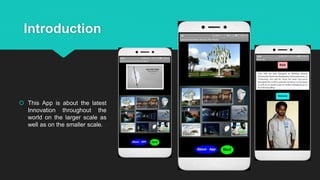
 This App is about the latest
Innovation throughout the
world on the larger scale as
well as on the smaller scale.
Home Screen
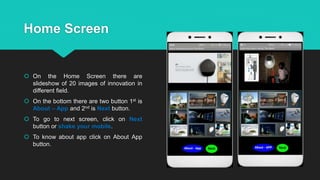
 On the Home Screen there are
slideshow of 20 images of innovation in
different field.
 On the bottom there are two button 1st is
About – App and 2nd is Next button.
 To go to next screen, click on Next
button or shake your mobile.
 To know about app click on About App
button.
Screen 2
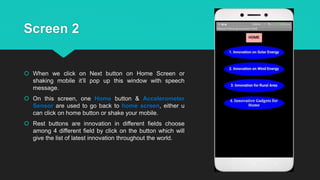
 When we click on Next button on Home Screen or
shaking mobile it’ll pop up this window with speech
message.
 On this screen, one Home button & Accelerometer
Sensor are used to go back to home screen, either u
can click on home button or shake your mobile.
 Rest buttons are innovation in different fields choose
among 4 different field by click on the button which will
give the list of latest innovation throughout the world.
Screen 3
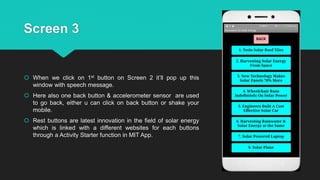
 When we click on 1st button on Screen 2 it’ll pop up this
window with speech message.
 Here also one back button & accelerometer sensor are used
to go back, either u can click on back button or shake your
mobile.
 Rest buttons are latest innovation in the field of solar energy
which is linked with a different websites for each buttons
through a Activity Starter function in MIT App.
Screen 4
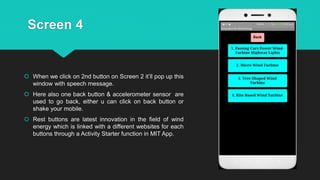
 When we click on 2nd button on Screen 2 it’ll pop up this
window with speech message.
 Here also one back button & accelerometer sensor are
used to go back, either u can click on back button or
shake your mobile.
 Rest buttons are latest innovation in the field of wind
energy which is linked with a different websites for each
buttons through a Activity Starter function in MIT App.
Screen 5
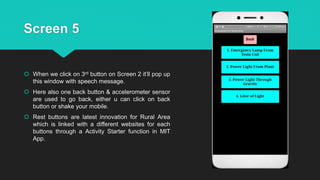
 When we click on 3rd button on Screen 2 it’ll pop up
this window with speech message.
 Here also one back button & accelerometer sensor
are used to go back, either u can click on back
button or shake your mobile.
 Rest buttons are latest innovation for Rural Area
which is linked with a different websites for each
buttons through a Activity Starter function in MIT
App.
Screen 6
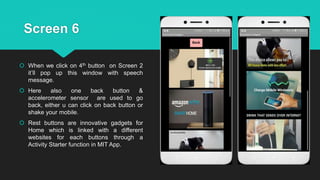
 When we click on 4th button on Screen 2
it’ll pop up this window with speech
message.
 Here also one back button &
accelerometer sensor are used to go
back, either u can click on back button or
shake your mobile.
 Rest buttons are innovative gadgets for
Home which is linked with a different
websites for each buttons through a
Activity Starter function in MIT App.
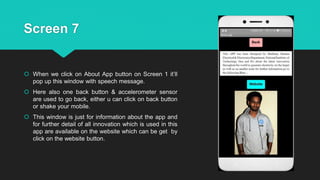
Screen 7
 When we click on About App button on Screen 1 it’ll
pop up this window with speech message.
 Here also one back button & accelerometer sensor
are used to go back, either u can click on back button
or shake your mobile.
 This window is just for information about the app and
for further detail of all innovation which is used in this
app are available on the website which can be get by
click on the website button.
References
 http://www.alternative-energy-news.info/
 http://www.alternative-energy-news.info/japan-solar-energy-from-space/
 http://www.alternative-energy-news.info/tree-shaped-wind-turbines-paris/
 http://gravitylight.org/
 https://en.wikipedia.org/wiki/Airborne_wind_turbine
 http://www.greencarreports.com/news/1042537_could-passing-cars-power-wind-turbine-highway-
lights
 http://literoflight.org/
 https://jugaaruprojects.blogspot.in/

Latest innovation APP on MIT APP Inventor

  • 1.
    App for LatestInnovation Across The World Using MIT APP Inventor
  • 2.
    Introduction  This Appis about the latest Innovation throughout the world on the larger scale as well as on the smaller scale.
  • 3.
    Home Screen  Onthe Home Screen there are slideshow of 20 images of innovation in different field.  On the bottom there are two button 1st is About – App and 2nd is Next button.  To go to next screen, click on Next button or shake your mobile.  To know about app click on About App button.
  • 4.
    Screen 2  Whenwe click on Next button on Home Screen or shaking mobile it’ll pop up this window with speech message.  On this screen, one Home button & Accelerometer Sensor are used to go back to home screen, either u can click on home button or shake your mobile.  Rest buttons are innovation in different fields choose among 4 different field by click on the button which will give the list of latest innovation throughout the world.
  • 5.
    Screen 3  Whenwe click on 1st button on Screen 2 it’ll pop up this window with speech message.  Here also one back button & accelerometer sensor are used to go back, either u can click on back button or shake your mobile.  Rest buttons are latest innovation in the field of solar energy which is linked with a different websites for each buttons through a Activity Starter function in MIT App.
  • 6.
    Screen 4  Whenwe click on 2nd button on Screen 2 it’ll pop up this window with speech message.  Here also one back button & accelerometer sensor are used to go back, either u can click on back button or shake your mobile.  Rest buttons are latest innovation in the field of wind energy which is linked with a different websites for each buttons through a Activity Starter function in MIT App.
  • 7.
    Screen 5  Whenwe click on 3rd button on Screen 2 it’ll pop up this window with speech message.  Here also one back button & accelerometer sensor are used to go back, either u can click on back button or shake your mobile.  Rest buttons are latest innovation for Rural Area which is linked with a different websites for each buttons through a Activity Starter function in MIT App.
  • 8.
    Screen 6  Whenwe click on 4th button on Screen 2 it’ll pop up this window with speech message.  Here also one back button & accelerometer sensor are used to go back, either u can click on back button or shake your mobile.  Rest buttons are innovative gadgets for Home which is linked with a different websites for each buttons through a Activity Starter function in MIT App.
  • 9.
    Screen 7  Whenwe click on About App button on Screen 1 it’ll pop up this window with speech message.  Here also one back button & accelerometer sensor are used to go back, either u can click on back button or shake your mobile.  This window is just for information about the app and for further detail of all innovation which is used in this app are available on the website which can be get by click on the website button.
  • 11.
    References  http://www.alternative-energy-news.info/  http://www.alternative-energy-news.info/japan-solar-energy-from-space/ http://www.alternative-energy-news.info/tree-shaped-wind-turbines-paris/  http://gravitylight.org/  https://en.wikipedia.org/wiki/Airborne_wind_turbine  http://www.greencarreports.com/news/1042537_could-passing-cars-power-wind-turbine-highway- lights  http://literoflight.org/  https://jugaaruprojects.blogspot.in/