KSQLOpen-source streaming for Apache Kafka
KSQLis the
Streaming
SQL Engine
for
Apache Kafka
4
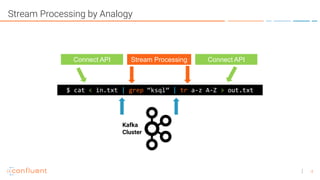
Stream Processing by Analogy
$ cat < in.txt | grep “ksql” | tr a-z A-Z > out.txt
Stream Processing
Kafka
Cluster
Connect API Connect API
5
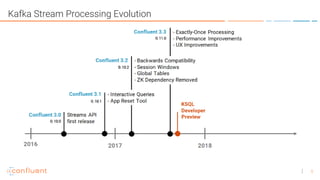
Kafka Stream Processing Evolution
6
Consumer,
Producer
Kafka
Streams
KSQL
Flexibility Simplicity
subscribe(),
poll(), send(),
flush()
mapValues(),
filter(),
punctuate()
Select…from…
join…where…
group by..
7
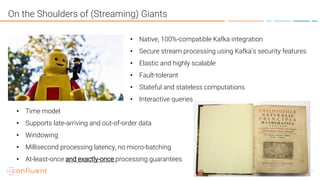
On the Shoulders of (Streaming) Giants
• Native, 100%-compatible Kafka integration
• Secure stream processing using Kafka’s security features
• Elastic and highly scalable
• Fault-tolerant
• Stateful and stateless computations
• Interactive queries
• Time model
• Supports late-arriving and out-of-order data
• Windowing
• Millisecond processing latency, no micro-batching
• At-least-once and exactly-once processing guarantees
8
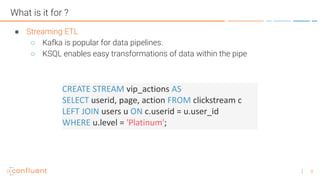
What is it for ?
● Streaming ETL
○ Kafka is popular for data pipelines.
○ KSQL enables easy transformations of data within the pipe
CREATE STREAM vip_actions AS
SELECT userid, page, action FROM clickstream c
LEFT JOIN users u ON c.userid = u.user_id
WHERE u.level = 'Platinum';
9
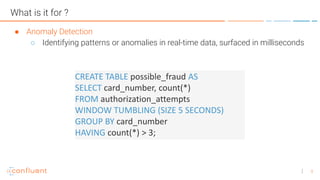
What is it for ?
● Anomaly Detection
○ Identifying patterns or anomalies in real-time data, surfaced in milliseconds
CREATE TABLE possible_fraud AS
SELECT card_number, count(*)
FROM authorization_attempts
WINDOW TUMBLING (SIZE 5 SECONDS)
GROUP BY card_number
HAVING count(*) > 3;
10
What is it for ?
● Real Time Monitoring
○ Log data monitoring, tracking and alerting
○ Sensor / IoT data
CREATE TABLE error_counts AS
SELECT error_code, count(*)
FROM monitoring_stream
WINDOW TUMBLING (SIZE 1 MINUTE)
WHERE type = 'ERROR'
GROUP BY error_code;
11
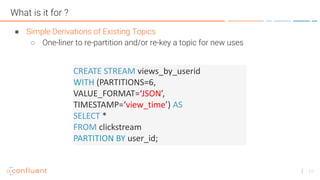
What is it for ?
● Simple Derivations of Existing Topics
○ One-liner to re-partition and/or re-key a topic for new uses
CREATE STREAM views_by_userid
WITH (PARTITIONS=6,
VALUE_FORMAT=‘JSON’,
TIMESTAMP=‘view_time’) AS
SELECT *
FROM clickstream
PARTITION BY user_id;
12
Where is KSQL not such a great fit ?
• Ad-hoc query
• Limited span of time usually retained in Kafka
• No indexes for random point lookups
• BI reports (Tableau etc.)
• No indexes
• No JDBC (most BI tools are not good with continuous results!)
13
Do you think that’s a table you are querying ?
14
Streams & Tables
● STREAM and TABLE as first-class citizens
● Interpretations of topic content
● STREAM - data in motion
● TABLE - collected state of a stream
• One record per key (per window)
• Current values (compacted topic) ← Not yet in KSQL
• Changelog
● STREAM – TABLE Joins
15
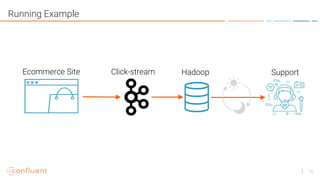
Running Example
Ecommerce Site HadoopClick-stream Support
18
Schema and Format
• A Kafka broker knows how to move <sets of bytes>
• Technically a message is ( ts, byte[], byte[] )
• SQL-like queries require a richer structure
• Start with message (value) format
• JSON
• DELIMITED (comma-separated in this preview)
• AVRO – requires that you supply a .avsc schema-file
• Pseudo-columns are automatically generated
• ROWKEY, ROWTIME
19
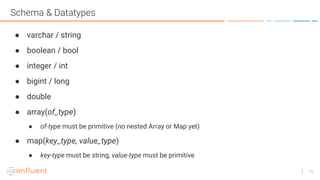
Schema & Datatypes
● varchar / string
● boolean / bool
● integer / int
● bigint / long
● double
● array(of_type)
● of-type must be primitive (no nested Array or Map yet)
● map(key_type, value_type)
● key-type must be string, value-type must be primitive
20
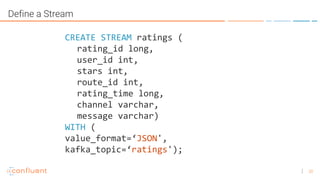
Define a Stream
CREATE STREAM ratings (
rating_id long,
user_id int,
stars int,
route_id int,
rating_time long,
channel varchar,
message varchar)
WITH (
value_format=‘JSON',
kafka_topic=‘ratings');
21
SELECTing from the Stream
SELECT *
FROM ratings
WHERE stars <= 2
AND lcase(channel) LIKE ‘%ios%'
LIMIT 10;
Let’s test our new stream definition by finding all the low-
scoring ratings from our iPhone app
AND user_id > 0
22
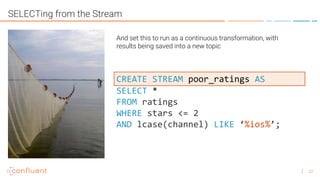
SELECTing from the Stream
SELECT *
FROM ratings
WHERE stars <= 2
AND lcase(channel) LIKE ‘%ios%’;
CREATE STREAM poor_ratings AS
And set this to run as a continuous transformation, with
results being saved into a new topic
23
Bring in reference tables
25
Define reference tables
CREATE TABLE users (
uid int,
name varchar,
elite varchar)
WITH (
value_format=‘JSON’,
kafka_topic=‘mysql-users');
key=‘uid’,
27
Joins for Enrichment
CREATE STREAM vip_poor_ratings AS
SELECT uid, name, elite,
stars, route_id, rating_time, message
FROM poor_ratings r
LEFT JOIN users u ON r.user_id = u.uid
WHERE u.elite = 'P';
Enrich the ‘poor_ratings’ stream with data about each user, and derive a stream of
low quality ratings posted only by our Platinum Elite users
28
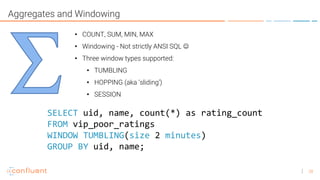
Aggregates and Windowing
• COUNT, SUM, MIN, MAX
• Windowing - Not strictly ANSI SQL ☺
• Three window types supported:
• TUMBLING
• HOPPING (aka ‘sliding’)
• SESSION
SELECT uid, name, count(*) as rating_count
FROM vip_poor_ratings
WINDOW TUMBLING(size 2 minutes)
GROUP BY uid, name;
29
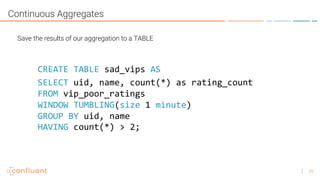
Continuous Aggregates
Save the results of our aggregation to a TABLE
SELECT uid, name, count(*) as rating_count
FROM vip_poor_ratings
WINDOW TUMBLING(size 1 minute)
GROUP BY uid, name
CREATE TABLE sad_vips AS
HAVING count(*) > 2;
33
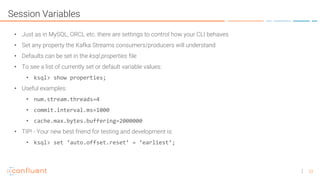
Session Variables
• Just as in MySQL, ORCL etc. there are settings to control how your CLI behaves
• Set any property the Kafka Streams consumers/producers will understand
• Defaults can be set in the ksql.properties file
• To see a list of currently set or default variable values:
• ksql> show properties;
• Useful examples:
• num.stream.threads=4
• commit.interval.ms=1000
• cache.max.bytes.buffering=2000000
• TIP! - Your new best friend for testing and development is:
• ksql> set ‘auto.offset.reset’ = ‘earliest’;
35
KSQL Components
• CLI
• Designed to be familiar to users of MySQL, Postgres, etc
• Engine
• Actually runs the Kafka Streams topologies
• REST Server
• HTTP interface allows an Engine to receive instructions from the CLI
36
How to run KSQL - #1 Stand-alone aka ‘local mode’
• Starts a CLI, an Engine, and a REST server all in the same JVM
• Ideal for laptop development
• Start with default settings:
> bin/ksql-cli local
• Or with customized settings:
> bin/ksql-cli local –-properties-file foo/bar/ksql.properties
37
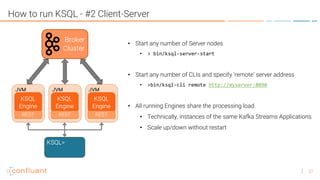
How to run KSQL - #2 Client-Server
• Start any number of Server nodes
• > bin/ksql-server-start
• Start any number of CLIs and specify ‘remote’ server address
• >bin/ksql-cli remote http://myserver:8090
• All running Engines share the processing load
• Technically, instances of the same Kafka Streams Applications
• Scale up/down without restart
39
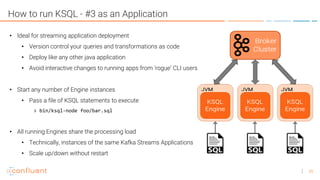
How to run KSQL - #3 as an Application
• Ideal for streaming application deployment
• Version control your queries and transformations as code
• Deploy like any other java application
• Avoid interactive changes to running apps from ‘rogue’ CLI users
• Start any number of Engine instances
• Pass a file of KSQL statements to execute
> bin/ksql-node foo/bar.sql
• All running Engines share the processing load
• Technically, instances of the same Kafka Streams Applications
• Scale up/down without restart
41
Resources & Next Steps
Time to get involved !
• Try the Quickstart on Github
• Check out the code
• Play with the examples
The point of ‘developer preview’ is that we can change things for the better, together
https://github.com/confluentinc/ksql
http://confluent.io/ksql
https://slackpass.io/confluentcommunity #ksql

KSQL Intro

  • 1.
  • 2.
  • 3.
    4 Stream Processing byAnalogy $ cat < in.txt | grep “ksql” | tr a-z A-Z > out.txt Stream Processing Kafka Cluster Connect API Connect API
  • 4.
  • 5.
  • 6.
    7 On the Shouldersof (Streaming) Giants • Native, 100%-compatible Kafka integration • Secure stream processing using Kafka’s security features • Elastic and highly scalable • Fault-tolerant • Stateful and stateless computations • Interactive queries • Time model • Supports late-arriving and out-of-order data • Windowing • Millisecond processing latency, no micro-batching • At-least-once and exactly-once processing guarantees
  • 7.
    8 What is itfor ? ● Streaming ETL ○ Kafka is popular for data pipelines. ○ KSQL enables easy transformations of data within the pipe CREATE STREAM vip_actions AS SELECT userid, page, action FROM clickstream c LEFT JOIN users u ON c.userid = u.user_id WHERE u.level = 'Platinum';
  • 8.
    9 What is itfor ? ● Anomaly Detection ○ Identifying patterns or anomalies in real-time data, surfaced in milliseconds CREATE TABLE possible_fraud AS SELECT card_number, count(*) FROM authorization_attempts WINDOW TUMBLING (SIZE 5 SECONDS) GROUP BY card_number HAVING count(*) > 3;
  • 9.
    10 What is itfor ? ● Real Time Monitoring ○ Log data monitoring, tracking and alerting ○ Sensor / IoT data CREATE TABLE error_counts AS SELECT error_code, count(*) FROM monitoring_stream WINDOW TUMBLING (SIZE 1 MINUTE) WHERE type = 'ERROR' GROUP BY error_code;
  • 10.
    11 What is itfor ? ● Simple Derivations of Existing Topics ○ One-liner to re-partition and/or re-key a topic for new uses CREATE STREAM views_by_userid WITH (PARTITIONS=6, VALUE_FORMAT=‘JSON’, TIMESTAMP=‘view_time’) AS SELECT * FROM clickstream PARTITION BY user_id;
  • 11.
    12 Where is KSQLnot such a great fit ? • Ad-hoc query • Limited span of time usually retained in Kafka • No indexes for random point lookups • BI reports (Tableau etc.) • No indexes • No JDBC (most BI tools are not good with continuous results!)
  • 12.
    13 Do you thinkthat’s a table you are querying ?
  • 13.
    14 Streams & Tables ●STREAM and TABLE as first-class citizens ● Interpretations of topic content ● STREAM - data in motion ● TABLE - collected state of a stream • One record per key (per window) • Current values (compacted topic) ← Not yet in KSQL • Changelog ● STREAM – TABLE Joins
  • 14.
    15 Running Example Ecommerce SiteHadoopClick-stream Support
  • 15.
    18 Schema and Format •A Kafka broker knows how to move <sets of bytes> • Technically a message is ( ts, byte[], byte[] ) • SQL-like queries require a richer structure • Start with message (value) format • JSON • DELIMITED (comma-separated in this preview) • AVRO – requires that you supply a .avsc schema-file • Pseudo-columns are automatically generated • ROWKEY, ROWTIME
  • 16.
    19 Schema & Datatypes ●varchar / string ● boolean / bool ● integer / int ● bigint / long ● double ● array(of_type) ● of-type must be primitive (no nested Array or Map yet) ● map(key_type, value_type) ● key-type must be string, value-type must be primitive
  • 17.
    20 Define a Stream CREATESTREAM ratings ( rating_id long, user_id int, stars int, route_id int, rating_time long, channel varchar, message varchar) WITH ( value_format=‘JSON', kafka_topic=‘ratings');
  • 18.
    21 SELECTing from theStream SELECT * FROM ratings WHERE stars <= 2 AND lcase(channel) LIKE ‘%ios%' LIMIT 10; Let’s test our new stream definition by finding all the low- scoring ratings from our iPhone app AND user_id > 0
  • 19.
    22 SELECTing from theStream SELECT * FROM ratings WHERE stars <= 2 AND lcase(channel) LIKE ‘%ios%’; CREATE STREAM poor_ratings AS And set this to run as a continuous transformation, with results being saved into a new topic
  • 20.
  • 21.
    25 Define reference tables CREATETABLE users ( uid int, name varchar, elite varchar) WITH ( value_format=‘JSON’, kafka_topic=‘mysql-users'); key=‘uid’,
  • 22.
    27 Joins for Enrichment CREATESTREAM vip_poor_ratings AS SELECT uid, name, elite, stars, route_id, rating_time, message FROM poor_ratings r LEFT JOIN users u ON r.user_id = u.uid WHERE u.elite = 'P'; Enrich the ‘poor_ratings’ stream with data about each user, and derive a stream of low quality ratings posted only by our Platinum Elite users
  • 23.
    28 Aggregates and Windowing •COUNT, SUM, MIN, MAX • Windowing - Not strictly ANSI SQL ☺ • Three window types supported: • TUMBLING • HOPPING (aka ‘sliding’) • SESSION SELECT uid, name, count(*) as rating_count FROM vip_poor_ratings WINDOW TUMBLING(size 2 minutes) GROUP BY uid, name;
  • 24.
    29 Continuous Aggregates Save theresults of our aggregation to a TABLE SELECT uid, name, count(*) as rating_count FROM vip_poor_ratings WINDOW TUMBLING(size 1 minute) GROUP BY uid, name CREATE TABLE sad_vips AS HAVING count(*) > 2;
  • 25.
    33 Session Variables • Justas in MySQL, ORCL etc. there are settings to control how your CLI behaves • Set any property the Kafka Streams consumers/producers will understand • Defaults can be set in the ksql.properties file • To see a list of currently set or default variable values: • ksql> show properties; • Useful examples: • num.stream.threads=4 • commit.interval.ms=1000 • cache.max.bytes.buffering=2000000 • TIP! - Your new best friend for testing and development is: • ksql> set ‘auto.offset.reset’ = ‘earliest’;
  • 26.
    35 KSQL Components • CLI •Designed to be familiar to users of MySQL, Postgres, etc • Engine • Actually runs the Kafka Streams topologies • REST Server • HTTP interface allows an Engine to receive instructions from the CLI
  • 27.
    36 How to runKSQL - #1 Stand-alone aka ‘local mode’ • Starts a CLI, an Engine, and a REST server all in the same JVM • Ideal for laptop development • Start with default settings: > bin/ksql-cli local • Or with customized settings: > bin/ksql-cli local –-properties-file foo/bar/ksql.properties
  • 28.
    37 How to runKSQL - #2 Client-Server • Start any number of Server nodes • > bin/ksql-server-start • Start any number of CLIs and specify ‘remote’ server address • >bin/ksql-cli remote http://myserver:8090 • All running Engines share the processing load • Technically, instances of the same Kafka Streams Applications • Scale up/down without restart
  • 29.
    39 How to runKSQL - #3 as an Application • Ideal for streaming application deployment • Version control your queries and transformations as code • Deploy like any other java application • Avoid interactive changes to running apps from ‘rogue’ CLI users • Start any number of Engine instances • Pass a file of KSQL statements to execute > bin/ksql-node foo/bar.sql • All running Engines share the processing load • Technically, instances of the same Kafka Streams Applications • Scale up/down without restart
  • 30.
    41 Resources & NextSteps Time to get involved ! • Try the Quickstart on Github • Check out the code • Play with the examples The point of ‘developer preview’ is that we can change things for the better, together https://github.com/confluentinc/ksql http://confluent.io/ksql https://slackpass.io/confluentcommunity #ksql