KISSY


KISSY Component API Design
                    yiminghe@gmail.com

                       2012-06-05 draft
KISSY
                                                      2


             Outline
•   Why create component
•   Why API design
•   KISSY Component API Design
•   API Design principles

             docs.kissyui.com | kissyteam@gmail.com
KISSY
                                                               3


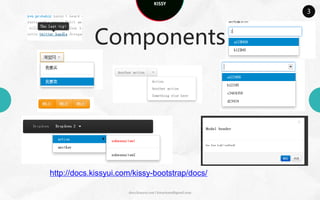
            Components


http://docs.kissyui.com/kissy-bootstrap/docs/

                      docs.kissyui.com | kissyteam@gmail.com
KISSY
                                           4


Components


  docs.kissyui.com | kissyteam@gmail.com
KISSY
                                                     5


Why create components

• Ease of development


            docs.kissyui.com | kissyteam@gmail.com
KISSY
                                                         6


Why create components

• Ease of development

• Reusability


                docs.kissyui.com | kissyteam@gmail.com
KISSY
                                                         7


Why create components

• Ease of development

• Reusability

•Maintainability
                docs.kissyui.com | kissyteam@gmail.com
KISSY
                                                        8


       Why API Design

• Contract between user and developer


               docs.kissyui.com | kissyteam@gmail.com
KISSY
                                                         9


        Why API Design

• Contract between user and developer

• Stable platform to build on


                docs.kissyui.com | kissyteam@gmail.com
KISSY
                                                                      1
                                                                      0


            Why API Design

• Contract between user and developer

• Stable platform to build on
• Minimize waste
  •   Code-reuse instead of re-writing
  •   Reduce code and complexity


                             docs.kissyui.com | kissyteam@gmail.com
KISSY
                                                             1
                                                             1


  Component API Design
• Structure
• Subcomponent
• Subclass
• Plugin
• Events
    • Lifecycle event
• Skin
• Creation

                    docs.kissyui.com | kissyteam@gmail.com
KISSY
                                                        1
                                                        2


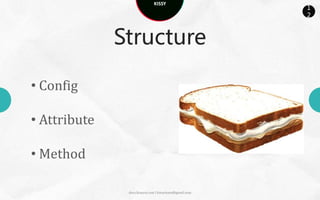
              Structure

• Config

• Attribute

• Method

               docs.kissyui.com | kissyteam@gmail.com
KISSY
                                                             1
                                                             3


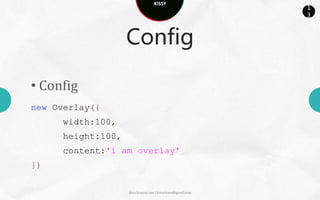
                    Config

• Config
new Overlay({
      width:100,
      height:100,
      content:'i am overlay'
})

                    docs.kissyui.com | kissyteam@gmail.com
KISSY
                                                               1
                                                               4


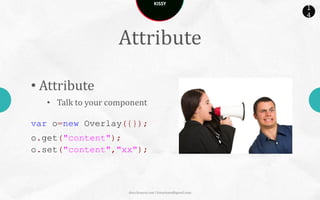
                    Attribute

• Attribute
   • Talk to your component

var o=new Overlay({});
o.get("content");
o.set("content","xx");


                      docs.kissyui.com | kissyteam@gmail.com
KISSY
                                                                 1
                                                                 5


                     Method

• Method
   • Attribute first, method second

var o=new Tree({});
o.collapseAll();
o.set(“collapsed",true);


                        docs.kissyui.com | kissyteam@gmail.com
KISSY
                                                             1
                                                             6


          Subcomponent

•Config/Attribute
  • Children


•Method
  • addChild/removeChild/removeChildren


                    docs.kissyui.com | kissyteam@gmail.com
KISSY
                                                                       1
                                                                       7


              Subcomponent

•Config/Attribute
      • Children

var o=new Menu({
children:[{new Menu.Item(){}},{xclass:'menuitem‘, content:'menuitem-
content2'}]
});
o.get("children");


                          docs.kissyui.com | kissyteam@gmail.com
KISSY
                                                              1
                                                              8


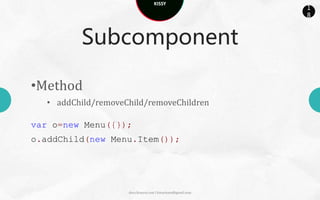
          Subcomponent

•Method
   • addChild/removeChild/removeChildren

var o=new Menu({});
o.addChild(new Menu.Item());


                     docs.kissyui.com | kissyteam@gmail.com
KISSY
                                                             1
                                                             9


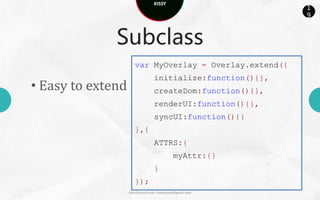
              Subclass
                      var MyOverlay = Overlay.extend({
                                  initialize:function(){},
• Easy to extend                  createDom:function(){},
                                  renderUI:function(){},
                                  syncUI:function(){}
                      },{
                                  ATTRS:{
                                             myAttr:{}
                                  }
                      });
                   docs.kissyui.com | kissyteam@gmail.com
KISSY
                                                                   2
                                                                   0


                Plugin

• enhance ability            var editor = new Editor({
                                    plugins:[
dynamically at
                                       FontSize,
runtime                                new Image({
                                                url:’upload.htm’
                                       })]
                             });


                docs.kissyui.com | kissyteam@gmail.com
KISSY
                                                                    2
                                                                    1


                           Events
• Event
    • Native lifecycle event / attrChange event / Custom event
    • Method: on / detach
    • Config : listeners
{
type:,
target:, // consider bubbling
yy:xx
}


                           docs.kissyui.com | kissyteam@gmail.com
KISSY
                                                           2
                                                           2


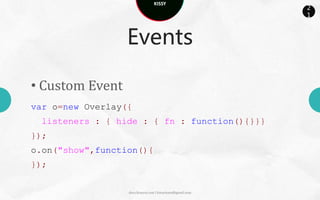
                  Events

• Custom Event
var o = new Overlay({
 listeners : { hide : { fn : function(){}}}
});
o.on("show",function(){
});

                  docs.kissyui.com | kissyteam@gmail.com
KISSY
                                                                      2
                                                                      3


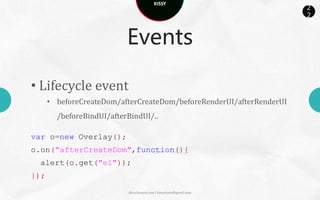
                           Events

• Lifecycle event
      • beforeCreateDom/afterCreateDom/beforeRenderUI/afterRenderUI
        /beforeBindUI/afterBindUI/..

var o=new Overlay();
o.on("afterCreateDom",function(){
  alert(o.get("el"));
});

                           docs.kissyui.com | kissyteam@gmail.com
KISSY
                                                                   2
                                                                   4


                          Events

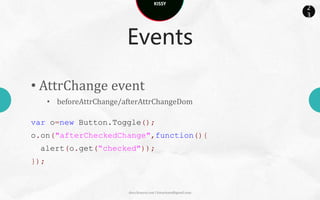
• AttrChange event
      • beforeAttrChange/afterAttrChangeDom

var o=new Button.Toggle();
o.on("afterCheckedChange",function(){
 alert(o.get(“checked"));
});


                          docs.kissyui.com | kissyteam@gmail.com
KISSY
                                                             2
                                                             5


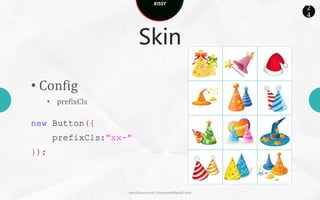
                          Skin

• Config
   • prefixCls

new Button({
      prefixCls:"xx-"
});


                    docs.kissyui.com | kissyteam@gmail.com
KISSY
                                                      2
                                                      6


            Creation

• new

• srcNode

• xclass

             docs.kissyui.com | kissyteam@gmail.com
KISSY
                                                           2
                                                           7


                Creation

• new

var m = new Menu();
m.addChild(new Menu.Item());
m.on("click",function(){})
m.render();


                  docs.kissyui.com | kissyteam@gmail.com
KISSY
                                                                           2
                                                                           8


                  Creation

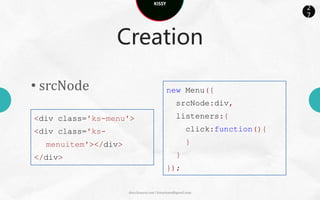
• srcNode                                   new Menu({
                                                 srcNode:div,
<div class='ks-menu'>                            listeners:{
<div class='ks-                                        click:function(){
  menuitem'></div>                                     }
</div>                                           }
                                            });

                     docs.kissyui.com | kissyteam@gmail.com
KISSY
                                                           2
                                                           9


             Creation
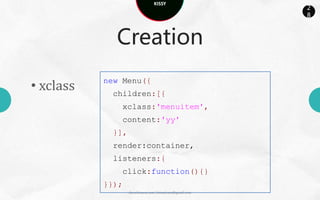
           new Menu({
• xclass    children:[{
              xclass:'menuitem',
              content:'yy'
            }],
            render:container,
            listeners:{
              click:function(){}
           }});
                  docs.kissyui.com | kissyteam@gmail.com
KISSY
                                                           3
                                                           0


      API Design Principle

• Hide implementation

new Overlay({
// view: new OverlayRender()
});


                  docs.kissyui.com | kissyteam@gmail.com
KISSY
                                                           3
                                                           1


    API Design Principle

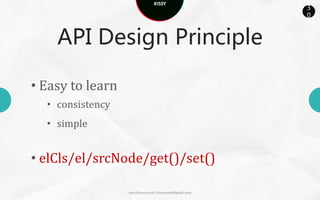
• Easy to learn
  • consistency
  • simple


• elCls/el/srcNode/get()/set()

                  docs.kissyui.com | kissyteam@gmail.com
KISSY
                                                           3
                                                           2


    API Design Principle

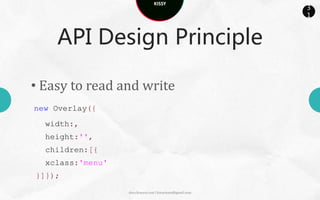
• Easy to read and write
new Overlay({
  width:,
  height:'',
  children:[{
  xclass:'menu'
}]});

                  docs.kissyui.com | kissyteam@gmail.com
KISSY
                                                            3
                                                            3


    API Design Principle

• Easy to extend


var MyOverlay = Overlay.extend(…);


                   docs.kissyui.com | kissyteam@gmail.com
KISSY
                                                           3
                                                           4


     API Design Principle

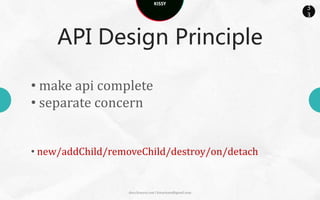
• make api complete
• separate concern


• new/addChild/removeChild/destroy/on/detach


                  docs.kissyui.com | kissyteam@gmail.com
KISSY


THANKS FOR
  COMING
   SEE YOU SOON!

KISSY Component API Design

  • 1.
    KISSY KISSY Component APIDesign yiminghe@gmail.com 2012-06-05 draft
  • 2.
    KISSY 2 Outline • Why create component • Why API design • KISSY Component API Design • API Design principles docs.kissyui.com | kissyteam@gmail.com
  • 3.
    KISSY 3 Components http://docs.kissyui.com/kissy-bootstrap/docs/ docs.kissyui.com | kissyteam@gmail.com
  • 4.
    KISSY 4 Components docs.kissyui.com | kissyteam@gmail.com
  • 5.
    KISSY 5 Why create components • Ease of development docs.kissyui.com | kissyteam@gmail.com
  • 6.
    KISSY 6 Why create components • Ease of development • Reusability docs.kissyui.com | kissyteam@gmail.com
  • 7.
    KISSY 7 Why create components • Ease of development • Reusability •Maintainability docs.kissyui.com | kissyteam@gmail.com
  • 8.
    KISSY 8 Why API Design • Contract between user and developer docs.kissyui.com | kissyteam@gmail.com
  • 9.
    KISSY 9 Why API Design • Contract between user and developer • Stable platform to build on docs.kissyui.com | kissyteam@gmail.com
  • 10.
    KISSY 1 0 Why API Design • Contract between user and developer • Stable platform to build on • Minimize waste • Code-reuse instead of re-writing • Reduce code and complexity docs.kissyui.com | kissyteam@gmail.com
  • 11.
    KISSY 1 1 Component API Design • Structure • Subcomponent • Subclass • Plugin • Events • Lifecycle event • Skin • Creation docs.kissyui.com | kissyteam@gmail.com
  • 12.
    KISSY 1 2 Structure • Config • Attribute • Method docs.kissyui.com | kissyteam@gmail.com
  • 13.
    KISSY 1 3 Config • Config new Overlay({ width:100, height:100, content:'i am overlay' }) docs.kissyui.com | kissyteam@gmail.com
  • 14.
    KISSY 1 4 Attribute • Attribute • Talk to your component var o=new Overlay({}); o.get("content"); o.set("content","xx"); docs.kissyui.com | kissyteam@gmail.com
  • 15.
    KISSY 1 5 Method • Method • Attribute first, method second var o=new Tree({}); o.collapseAll(); o.set(“collapsed",true); docs.kissyui.com | kissyteam@gmail.com
  • 16.
    KISSY 1 6 Subcomponent •Config/Attribute • Children •Method • addChild/removeChild/removeChildren docs.kissyui.com | kissyteam@gmail.com
  • 17.
    KISSY 1 7 Subcomponent •Config/Attribute • Children var o=new Menu({ children:[{new Menu.Item(){}},{xclass:'menuitem‘, content:'menuitem- content2'}] }); o.get("children"); docs.kissyui.com | kissyteam@gmail.com
  • 18.
    KISSY 1 8 Subcomponent •Method • addChild/removeChild/removeChildren var o=new Menu({}); o.addChild(new Menu.Item()); docs.kissyui.com | kissyteam@gmail.com
  • 19.
    KISSY 1 9 Subclass var MyOverlay = Overlay.extend({ initialize:function(){}, • Easy to extend createDom:function(){}, renderUI:function(){}, syncUI:function(){} },{ ATTRS:{ myAttr:{} } }); docs.kissyui.com | kissyteam@gmail.com
  • 20.
    KISSY 2 0 Plugin • enhance ability var editor = new Editor({ plugins:[ dynamically at FontSize, runtime new Image({ url:’upload.htm’ })] }); docs.kissyui.com | kissyteam@gmail.com
  • 21.
    KISSY 2 1 Events • Event • Native lifecycle event / attrChange event / Custom event • Method: on / detach • Config : listeners { type:, target:, // consider bubbling yy:xx } docs.kissyui.com | kissyteam@gmail.com
  • 22.
    KISSY 2 2 Events • Custom Event var o = new Overlay({ listeners : { hide : { fn : function(){}}} }); o.on("show",function(){ }); docs.kissyui.com | kissyteam@gmail.com
  • 23.
    KISSY 2 3 Events • Lifecycle event • beforeCreateDom/afterCreateDom/beforeRenderUI/afterRenderUI /beforeBindUI/afterBindUI/.. var o=new Overlay(); o.on("afterCreateDom",function(){ alert(o.get("el")); }); docs.kissyui.com | kissyteam@gmail.com
  • 24.
    KISSY 2 4 Events • AttrChange event • beforeAttrChange/afterAttrChangeDom var o=new Button.Toggle(); o.on("afterCheckedChange",function(){ alert(o.get(“checked")); }); docs.kissyui.com | kissyteam@gmail.com
  • 25.
    KISSY 2 5 Skin • Config • prefixCls new Button({ prefixCls:"xx-" }); docs.kissyui.com | kissyteam@gmail.com
  • 26.
    KISSY 2 6 Creation • new • srcNode • xclass docs.kissyui.com | kissyteam@gmail.com
  • 27.
    KISSY 2 7 Creation • new var m = new Menu(); m.addChild(new Menu.Item()); m.on("click",function(){}) m.render(); docs.kissyui.com | kissyteam@gmail.com
  • 28.
    KISSY 2 8 Creation • srcNode new Menu({ srcNode:div, <div class='ks-menu'> listeners:{ <div class='ks- click:function(){ menuitem'></div> } </div> } }); docs.kissyui.com | kissyteam@gmail.com
  • 29.
    KISSY 2 9 Creation new Menu({ • xclass children:[{ xclass:'menuitem', content:'yy' }], render:container, listeners:{ click:function(){} }}); docs.kissyui.com | kissyteam@gmail.com
  • 30.
    KISSY 3 0 API Design Principle • Hide implementation new Overlay({ // view: new OverlayRender() }); docs.kissyui.com | kissyteam@gmail.com
  • 31.
    KISSY 3 1 API Design Principle • Easy to learn • consistency • simple • elCls/el/srcNode/get()/set() docs.kissyui.com | kissyteam@gmail.com
  • 32.
    KISSY 3 2 API Design Principle • Easy to read and write new Overlay({ width:, height:'', children:[{ xclass:'menu' }]}); docs.kissyui.com | kissyteam@gmail.com
  • 33.
    KISSY 3 3 API Design Principle • Easy to extend var MyOverlay = Overlay.extend(…); docs.kissyui.com | kissyteam@gmail.com
  • 34.
    KISSY 3 4 API Design Principle • make api complete • separate concern • new/addChild/removeChild/destroy/on/detach docs.kissyui.com | kissyteam@gmail.com
  • 35.
    KISSY THANKS FOR COMING SEE YOU SOON!