A python project presented by
Jatinder Kumar Chaurasia
Ankur Kumar
Kandula Chaturya
Kids Games
1/5/2017 A python project 1
KIDS LEARNING GAME :Based on Image Recognition, a game in
which the kids will watch the various images for some particular
time duration and after that they have to recognize them by the
names of images.
Project information
1/5/2017 A python project 2
Games and education have a very important part in our life.
Playing games that give some knowledge and improve our
memory power.
Introduction
1/5/2017 A python project 3
Graphical User Interface
GUI (graphical user interface) programming lets
your program use a windowing environment to
interact with the user and display graphics.
Tkinter is the standard GUI library for Python. Python
when combined with Tkinter provides a fast and easy
way to create GUI applications. Tkinter provides a
powerful object-oriented interface to the Tk GUI toolkit.
1/5/2017 A python project 4
 Grid():The Grid geometry manager puts the widgets in a 2-dimensional table. The
master widget is split into a number of rows and columns, and each “cell” in the resulting
table can hold a widget. In grid geometry box, we used sticky(defines how to expand the
widget if the resulting cell is larger than the widget itself),column, rows, padx (Optional
horizontal padding to place around the widget in a cell, default is 0),pady (vertical
padding)
 pack(): The Pack geometry manager packs widgets in rows or columns. You can use
options like fill, expand, and side to control this geometry manager.
Geometry
1/5/2017 A python project 5
 Button: The Button widget is used to display buttons in your application.
 Checkbutton : The Checkbutton widget is used to display a number of options as
checkboxes. The user can select multiple options at a time.
 Label: The Label widget is used to provide a single-line caption for other widgets. It can
also contain images.
 Frame: The Frame widget is used as a container widget to organize other widgets.
 Menu: The Menu widget is used to provide various commands to a user. These
commands are contained inside Menubutton.
Widgets used in the project
1/5/2017 A python project 6
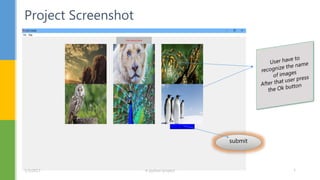
Project Screenshot
submit
1/5/2017 A python project 7
Project sceenshot
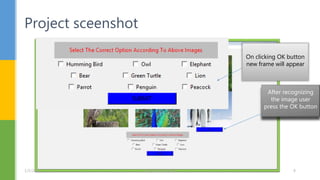
After recognizing
the image user
press the OK button
On clicking OK button
new frame will appear
1/5/2017 A python project 8
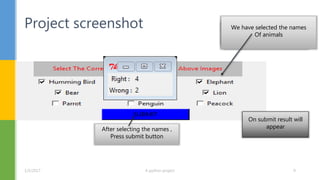
Project screenshot Select the list of items
We have selected the names
Of animals
On submit result will
appearAfter selecting the names ,
Press submit button
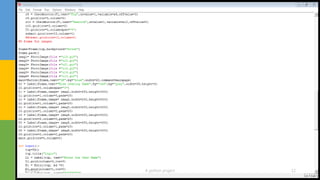
1/5/2017 A python project 9
1/5/2017 A python project 10
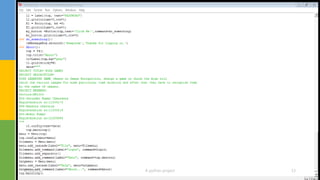
1/5/2017 A python project 11
1/5/2017 A python project 12
1/5/2017 A python project 13
 https://wiki.python.org/moin/GuiProgramming
 Python gui programming cookbook By Burkhard-A-Meier
 Starting out with python by Tonny Gadis
 How to think like a computer scientist by Allen Downey, Jeffrey
Elkener
Refrences
1/5/2017 A python project 14
1/5/2017 A python project 15

Kids Games

  • 1.
    A python projectpresented by Jatinder Kumar Chaurasia Ankur Kumar Kandula Chaturya Kids Games 1/5/2017 A python project 1
  • 2.
    KIDS LEARNING GAME:Based on Image Recognition, a game in which the kids will watch the various images for some particular time duration and after that they have to recognize them by the names of images. Project information 1/5/2017 A python project 2
  • 3.
    Games and educationhave a very important part in our life. Playing games that give some knowledge and improve our memory power. Introduction 1/5/2017 A python project 3
  • 4.
    Graphical User Interface GUI(graphical user interface) programming lets your program use a windowing environment to interact with the user and display graphics. Tkinter is the standard GUI library for Python. Python when combined with Tkinter provides a fast and easy way to create GUI applications. Tkinter provides a powerful object-oriented interface to the Tk GUI toolkit. 1/5/2017 A python project 4
  • 5.
     Grid():The Gridgeometry manager puts the widgets in a 2-dimensional table. The master widget is split into a number of rows and columns, and each “cell” in the resulting table can hold a widget. In grid geometry box, we used sticky(defines how to expand the widget if the resulting cell is larger than the widget itself),column, rows, padx (Optional horizontal padding to place around the widget in a cell, default is 0),pady (vertical padding)  pack(): The Pack geometry manager packs widgets in rows or columns. You can use options like fill, expand, and side to control this geometry manager. Geometry 1/5/2017 A python project 5
  • 6.
     Button: TheButton widget is used to display buttons in your application.  Checkbutton : The Checkbutton widget is used to display a number of options as checkboxes. The user can select multiple options at a time.  Label: The Label widget is used to provide a single-line caption for other widgets. It can also contain images.  Frame: The Frame widget is used as a container widget to organize other widgets.  Menu: The Menu widget is used to provide various commands to a user. These commands are contained inside Menubutton. Widgets used in the project 1/5/2017 A python project 6
  • 7.
  • 8.
    Project sceenshot After recognizing theimage user press the OK button On clicking OK button new frame will appear 1/5/2017 A python project 8
  • 9.
    Project screenshot Selectthe list of items We have selected the names Of animals On submit result will appearAfter selecting the names , Press submit button 1/5/2017 A python project 9
  • 10.
  • 11.
  • 12.
  • 13.
  • 14.
     https://wiki.python.org/moin/GuiProgramming  Pythongui programming cookbook By Burkhard-A-Meier  Starting out with python by Tonny Gadis  How to think like a computer scientist by Allen Downey, Jeffrey Elkener Refrences 1/5/2017 A python project 14
  • 15.