
Presented By :- Deepak Sheogan
Mobile number :- 7385553173
Email id:- sheogandeepak@gmail.com
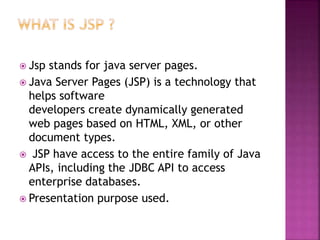
 Jsp stands for java server pages.
 Java Server Pages (JSP) is a technology that
helps software
developers create dynamically generated
web pages based on HTML, XML, or other
document types.
 JSP have access to the entire family of Java
APIs, including the JDBC API to access
enterprise databases.
 Presentation purpose used.
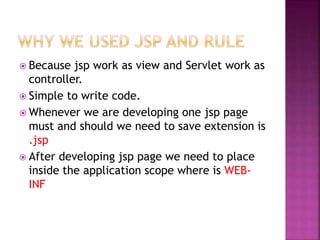
 Because jsp work as view and Servlet work as
controller.
 Simple to write code.
 Whenever we are developing one jsp page
must and should we need to save extension is
.jsp
 After developing jsp page we need to place
inside the application scope where is WEB-
INF
Scripting elements
 Declarations.
Example :- <%! Int i=1; %>
 Scriptlet( any business logic in jsp )
Example :-<% logic code %>
 Expression
Example :- <%= expression %>
Continue…….
Directive in jsp elements
 A JSP directive affects the overall structure of the
servlet class
 <%@ page ... %>
Defines page-dependent attributes, such as scripting
language, error page, and buffering requirements.
 <%@ include ... %>
Includes a file during the translation phase.
<%@ include file="header.jsp" %> <center> <p>Thanks for
visiting my page.</p> </center> <%@ include
file="footer.jsp" %><%@ include file="header.jsp" %>
<center> <p>Thanks for visiting my page.</p>
</center> <%@ include file="footer.jsp" %>
 <%@ taglib ... %>
Declares a tag library, containing custom actions, used
in the page
Continue….
Actions jsp elemets
•Forword action tag
•Include action tag
•Param action tag
•Usebean action tag
1. Setproperty action tag
2. Getpropetry action tag
Example :- https://www.tutorialspoint.com/jsp/jsp_actions.htm
 Request :- java.servlet.http.servletrequest
 Response :-java.servlet.http.servletresponse
 Config :- java.servlet.http.servletconfig
 Exception :- java.io.exception
 Out :- java.io.printwriter
 Page :- java.lang.object
 Session :- java.servlet.httpsession
 When a browser requests for a web page, it
sends lot of information to the web server
which can not be read directly because this
information travel as a part of header of
HTTP request.
 int getServerPort()
 Cookie[] getCookies()
 HttpSession getSession()
 Example:-
https://www.tutorialspoint.com/jsp/jsp_clie
nt_request.htm
 When a Web server responds to a HTTP
request to the browser, the response
typically consists of a status line, some
response headers, a blank line, and the
document.
 void sendRedirect(String location)
 Sends a temporary redirect response to the
client using the specified redirect location
URL.
 void setIntHeader(String name, int value)
 Sets a response header with the given name
and integer value.
 GET method:
1. The GET method sends the encoded user
information appended to the page request.
2. www.test.com/hello?key1=value1&key2=value2
 POST method:
1. A generally more reliable method of passing
information to a backend program is the POST
method
 getParameter():
 getParameterValues(): for checkbox value
 HTTP is a "stateless" protocol which means
each time a client retrieves a Web page, the
client opens a separate connection to the
Web server and the server automatically
does not keep any record of previous client
request.
1. Cookies:
2. Hidden Form Fields:
3. URL Rewriting
4. Session
 Cookies are text files stored on the client
computer and they are kept for various
information tracking purpose. JSP
transparently supports HTTP cookies using
underlying servlet technology.
 Browser stores this information on local
machine for future use.
 Cookie cookie = new Cookie("key","value");
 response.addCookie(cookie);
 public int getMaxAge() [ for set time]
 Example:-
 Hidden Form Fields:-
• A web server can send a hidden HTML form field
along with a unique session ID
• Example :- <input type="hidden"
name="sessionid" value="12345">
 URL Rewriting:
You can append some extra data on the end of
each URL that identifies the session, and the
server can associate that session entifier with
data it has stored about that session.
http://tutorialspoint.com/file.htm;sessionid=12
345
https://www.tutorialspoint.com/jsp/jsp_session
_tracking.htm
 A JSP can be used with an HTML form tag to
allow users to upload files to the server. An
uploaded file could be a text file or binary or
image file or any document.
 <form action="UploadServlet" method="post"
enctype="multipart/form-data">
 Page redirect:-we need to send the client to
this new location or may be because of load
balancing, or for simple randomization.
 Auto refresh:-
response.setIntHeader("Refresh", 5);
Jsp

Jsp

  • 1.
    Presented By :-Deepak Sheogan Mobile number :- 7385553173 Email id:- sheogandeepak@gmail.com
  • 2.
     Jsp standsfor java server pages.  Java Server Pages (JSP) is a technology that helps software developers create dynamically generated web pages based on HTML, XML, or other document types.  JSP have access to the entire family of Java APIs, including the JDBC API to access enterprise databases.  Presentation purpose used.
  • 3.
     Because jspwork as view and Servlet work as controller.  Simple to write code.  Whenever we are developing one jsp page must and should we need to save extension is .jsp  After developing jsp page we need to place inside the application scope where is WEB- INF
  • 6.
    Scripting elements  Declarations. Example:- <%! Int i=1; %>  Scriptlet( any business logic in jsp ) Example :-<% logic code %>  Expression Example :- <%= expression %> Continue…….
  • 7.
    Directive in jspelements  A JSP directive affects the overall structure of the servlet class  <%@ page ... %> Defines page-dependent attributes, such as scripting language, error page, and buffering requirements.  <%@ include ... %> Includes a file during the translation phase. <%@ include file="header.jsp" %> <center> <p>Thanks for visiting my page.</p> </center> <%@ include file="footer.jsp" %><%@ include file="header.jsp" %> <center> <p>Thanks for visiting my page.</p> </center> <%@ include file="footer.jsp" %>  <%@ taglib ... %> Declares a tag library, containing custom actions, used in the page Continue….
  • 8.
    Actions jsp elemets •Forwordaction tag •Include action tag •Param action tag •Usebean action tag 1. Setproperty action tag 2. Getpropetry action tag Example :- https://www.tutorialspoint.com/jsp/jsp_actions.htm
  • 9.
     Request :-java.servlet.http.servletrequest  Response :-java.servlet.http.servletresponse  Config :- java.servlet.http.servletconfig  Exception :- java.io.exception  Out :- java.io.printwriter  Page :- java.lang.object  Session :- java.servlet.httpsession
  • 10.
     When abrowser requests for a web page, it sends lot of information to the web server which can not be read directly because this information travel as a part of header of HTTP request.  int getServerPort()  Cookie[] getCookies()  HttpSession getSession()  Example:- https://www.tutorialspoint.com/jsp/jsp_clie nt_request.htm
  • 11.
     When aWeb server responds to a HTTP request to the browser, the response typically consists of a status line, some response headers, a blank line, and the document.  void sendRedirect(String location)  Sends a temporary redirect response to the client using the specified redirect location URL.  void setIntHeader(String name, int value)  Sets a response header with the given name and integer value.
  • 12.
     GET method: 1.The GET method sends the encoded user information appended to the page request. 2. www.test.com/hello?key1=value1&key2=value2  POST method: 1. A generally more reliable method of passing information to a backend program is the POST method  getParameter():  getParameterValues(): for checkbox value
  • 13.
     HTTP isa "stateless" protocol which means each time a client retrieves a Web page, the client opens a separate connection to the Web server and the server automatically does not keep any record of previous client request. 1. Cookies: 2. Hidden Form Fields: 3. URL Rewriting 4. Session
  • 14.
     Cookies aretext files stored on the client computer and they are kept for various information tracking purpose. JSP transparently supports HTTP cookies using underlying servlet technology.  Browser stores this information on local machine for future use.  Cookie cookie = new Cookie("key","value");  response.addCookie(cookie);  public int getMaxAge() [ for set time]  Example:-
  • 15.
     Hidden FormFields:- • A web server can send a hidden HTML form field along with a unique session ID • Example :- <input type="hidden" name="sessionid" value="12345">  URL Rewriting: You can append some extra data on the end of each URL that identifies the session, and the server can associate that session entifier with data it has stored about that session. http://tutorialspoint.com/file.htm;sessionid=12 345 https://www.tutorialspoint.com/jsp/jsp_session _tracking.htm
  • 16.
     A JSPcan be used with an HTML form tag to allow users to upload files to the server. An uploaded file could be a text file or binary or image file or any document.  <form action="UploadServlet" method="post" enctype="multipart/form-data">  Page redirect:-we need to send the client to this new location or may be because of load balancing, or for simple randomization.  Auto refresh:- response.setIntHeader("Refresh", 5);