Java & JEE Training
Session 34 – Design Patterns, JDBC Best Practices
Page 1Classification: Restricted
Agenda
• Deployment Descripter
• Configuring and Mapping a Servlet
• The flow of the demo web apps
• JDBC Best practices
• Design Patterns
Page 2Classification: Restricted
Quick review of previous session…
• Session management using Servlet technology
• Cookies
• Hidden Form Fields
• URL rewriting
• HttpSession (Preferred)
Page 3Classification: Restricted
What we covered till now in Servlets…
• Servlet API – GenericServlet and HttpServlet
• Servlet LifeCycle
• Servlet Collaboration using response.sendRedirect()
• Forwarding and Including using RequestDispatcher
• Parameters and Attributes
• Session Tracking / Session Management
Deployment Descriptor
– A detailed look
Page 5Classification: Restricted
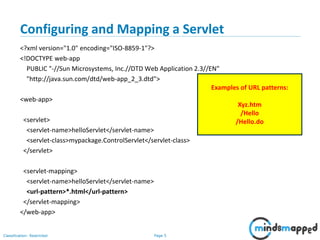
Configuring and Mapping a Servlet
<?xml version="1.0" encoding="ISO-8859-1"?>
<!DOCTYPE web-app
PUBLIC "-//Sun Microsystems, Inc.//DTD Web Application 2.3//EN"
"http://java.sun.com/dtd/web-app_2_3.dtd">
<web-app>
<servlet>
<servlet-name>helloServlet</servlet-name>
<servlet-class>mypackage.ControlServlet</servlet-class>
</servlet>
<servlet-mapping>
<servlet-name>helloServlet</servlet-name>
<url-pattern>*.html</url-pattern>
</servlet-mapping>
</web-app>
Examples of URL patterns:
Xyz.htm
/Hello
/Hello.do
Page 6Classification: Restricted
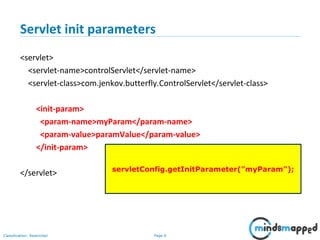
Servlet init parameters
<servlet>
<servlet-name>controlServlet</servlet-name>
<servlet-class>com.jenkov.butterfly.ControlServlet</servlet-class>
<init-param>
<param-name>myParam</param-name>
<param-value>paramValue</param-value>
</init-param>
</servlet> servletConfig.getInitParameter("myParam");
Page 7Classification: Restricted
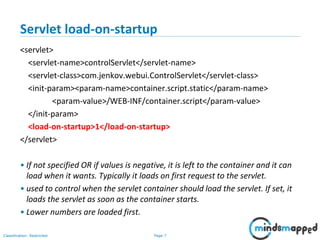
Servlet load-on-startup
<servlet>
<servlet-name>controlServlet</servlet-name>
<servlet-class>com.jenkov.webui.ControlServlet</servlet-class>
<init-param><param-name>container.script.static</param-name>
<param-value>/WEB-INF/container.script</param-value>
</init-param>
<load-on-startup>1</load-on-startup>
</servlet>
• If not specified OR if values is negative, it is left to the container and it can
load when it wants. Typically it loads on first request to the servlet.
• used to control when the servlet container should load the servlet. If set, it
loads the servlet as soon as the container starts.
• Lower numbers are loaded first.
Page 8Classification: Restricted
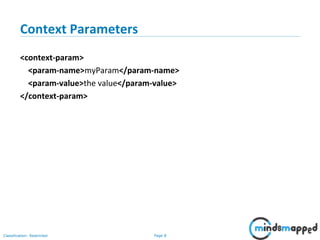
Context Parameters
<context-param>
<param-name>myParam</param-name>
<param-value>the value</param-value>
</context-param>
The flow of the demo web apps
Page 10Classification: Restricted
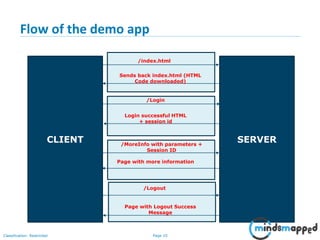
Flow of the demo app
CLIENT SERVER
/index.html
Sends back index.html (HTML
Code downloaded)
/Login
Login successful HTML
+ session id
/MoreInfo with parameters +
Session ID
Page with more information
/Logout
Page with Logout Success
Message
JDBC Best Practices
Page 12Classification: Restricted
Best Practice # 1
Use PreparedStatement
• Why?
• Prevents SQL Injection attacks.
• How?
• SQL Queries and precompiled, and bind variables are used.
Page 13Classification: Restricted
Best Practice # 2
Use Connection Pooling
• Why?
• Creating JDBC Connection takes relatively longer time, thus increasing
overall response time.
• How?
• Cache JDBC Connection in pool application and reuse the connection from
the pool.
Page 14Classification: Restricted
Best Practice # 3
Use JDBC Batch Update
• Why?
• Reduces number of database roundtrip which result in significant
performance gain for insertion and update queries.
• How?
• JDBC API provides addBatch() method to add SQL queries into batch and
executeBatch() to send batch queries for execution.
Page 15Classification: Restricted
Best Practice # 4
Use Bind Variables instead of String Concatenation
• Why?
• Better performance, prevent SQL Injection
• How?
• Use bind variables and setInt() and setString() and similar methods.
Page 16Classification: Restricted
Best Practice # 5
Always close Statement, PreparedStatement and Connection.
• Why?
• JDBC Connection and other classes are costly resources.
• How?
• Close all resources in finally block.
Page 17Classification: Restricted
Best Practice # 6
Use standard SQL statement and avoid using DB specific query until
necessary
• Why?
• Ensures portability of code.
• How?
• Use standard SQL and not database specific features.
Page 18Classification: Restricted
Best Practice # 7
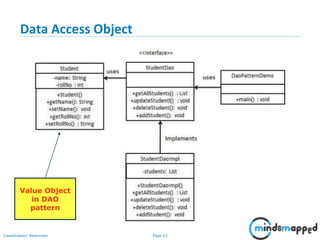
Use Appropriate Design Patterns
• Why?
• Ensures maintainability of code.
• How?
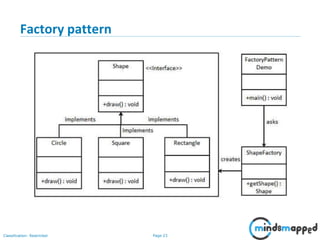
• Use Factory pattern to create Connections or get connections from the
pool. Use DAO pattern for database access logic. Use Value Object to
return records from the DB.
Page 19Classification: Restricted
Best Practice # 8
Separate Service Layer from Database Access (DAO) Layer
• Why?
• Ensures separation of concerns, enhances usability and modularity of the
code. Easier to maintain transactions.
• How?
• Separate the DAO classes from the service classes. Use the service classes
to implement transactions.
Design Patterns
Value Object, DAO, Factory Pattern
Page 21Classification: Restricted
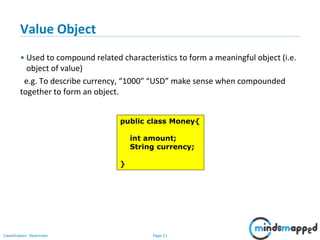
Value Object
• Used to compound related characteristics to form a meaningful object (i.e.
object of value)
e.g. To describe currency, “1000” “USD” make sense when compounded
together to form an object.
public class Money{
int amount;
String currency;
}
Page 22Classification: Restricted
Data Access Object
Value Object
in DAO
pattern
Page 23Classification: Restricted
Factory pattern
Page 24Classification: Restricted
Design Pattern Exercise
• Exercise: Create a class that can be instantiated
• max of 5 times.
• Max once.
Page 25Classification: Restricted
Topics to be covered in next session
• Design Patterns
• Flow of the Demo App
• Value objects
• Data Access object
• Factory pattern
Page 26Classification: Restricted
Thank you!

Session 34 - JDBC Best Practices, Introduction to Design Patterns

  • 1.
    Java & JEETraining Session 34 – Design Patterns, JDBC Best Practices
  • 2.
    Page 1Classification: Restricted Agenda •Deployment Descripter • Configuring and Mapping a Servlet • The flow of the demo web apps • JDBC Best practices • Design Patterns
  • 3.
    Page 2Classification: Restricted Quickreview of previous session… • Session management using Servlet technology • Cookies • Hidden Form Fields • URL rewriting • HttpSession (Preferred)
  • 4.
    Page 3Classification: Restricted Whatwe covered till now in Servlets… • Servlet API – GenericServlet and HttpServlet • Servlet LifeCycle • Servlet Collaboration using response.sendRedirect() • Forwarding and Including using RequestDispatcher • Parameters and Attributes • Session Tracking / Session Management
  • 5.
  • 6.
    Page 5Classification: Restricted Configuringand Mapping a Servlet <?xml version="1.0" encoding="ISO-8859-1"?> <!DOCTYPE web-app PUBLIC "-//Sun Microsystems, Inc.//DTD Web Application 2.3//EN" "http://java.sun.com/dtd/web-app_2_3.dtd"> <web-app> <servlet> <servlet-name>helloServlet</servlet-name> <servlet-class>mypackage.ControlServlet</servlet-class> </servlet> <servlet-mapping> <servlet-name>helloServlet</servlet-name> <url-pattern>*.html</url-pattern> </servlet-mapping> </web-app> Examples of URL patterns: Xyz.htm /Hello /Hello.do
  • 7.
    Page 6Classification: Restricted Servletinit parameters <servlet> <servlet-name>controlServlet</servlet-name> <servlet-class>com.jenkov.butterfly.ControlServlet</servlet-class> <init-param> <param-name>myParam</param-name> <param-value>paramValue</param-value> </init-param> </servlet> servletConfig.getInitParameter("myParam");
  • 8.
    Page 7Classification: Restricted Servletload-on-startup <servlet> <servlet-name>controlServlet</servlet-name> <servlet-class>com.jenkov.webui.ControlServlet</servlet-class> <init-param><param-name>container.script.static</param-name> <param-value>/WEB-INF/container.script</param-value> </init-param> <load-on-startup>1</load-on-startup> </servlet> • If not specified OR if values is negative, it is left to the container and it can load when it wants. Typically it loads on first request to the servlet. • used to control when the servlet container should load the servlet. If set, it loads the servlet as soon as the container starts. • Lower numbers are loaded first.
  • 9.
    Page 8Classification: Restricted ContextParameters <context-param> <param-name>myParam</param-name> <param-value>the value</param-value> </context-param>
  • 10.
    The flow ofthe demo web apps
  • 11.
    Page 10Classification: Restricted Flowof the demo app CLIENT SERVER /index.html Sends back index.html (HTML Code downloaded) /Login Login successful HTML + session id /MoreInfo with parameters + Session ID Page with more information /Logout Page with Logout Success Message
  • 12.
  • 13.
    Page 12Classification: Restricted BestPractice # 1 Use PreparedStatement • Why? • Prevents SQL Injection attacks. • How? • SQL Queries and precompiled, and bind variables are used.
  • 14.
    Page 13Classification: Restricted BestPractice # 2 Use Connection Pooling • Why? • Creating JDBC Connection takes relatively longer time, thus increasing overall response time. • How? • Cache JDBC Connection in pool application and reuse the connection from the pool.
  • 15.
    Page 14Classification: Restricted BestPractice # 3 Use JDBC Batch Update • Why? • Reduces number of database roundtrip which result in significant performance gain for insertion and update queries. • How? • JDBC API provides addBatch() method to add SQL queries into batch and executeBatch() to send batch queries for execution.
  • 16.
    Page 15Classification: Restricted BestPractice # 4 Use Bind Variables instead of String Concatenation • Why? • Better performance, prevent SQL Injection • How? • Use bind variables and setInt() and setString() and similar methods.
  • 17.
    Page 16Classification: Restricted BestPractice # 5 Always close Statement, PreparedStatement and Connection. • Why? • JDBC Connection and other classes are costly resources. • How? • Close all resources in finally block.
  • 18.
    Page 17Classification: Restricted BestPractice # 6 Use standard SQL statement and avoid using DB specific query until necessary • Why? • Ensures portability of code. • How? • Use standard SQL and not database specific features.
  • 19.
    Page 18Classification: Restricted BestPractice # 7 Use Appropriate Design Patterns • Why? • Ensures maintainability of code. • How? • Use Factory pattern to create Connections or get connections from the pool. Use DAO pattern for database access logic. Use Value Object to return records from the DB.
  • 20.
    Page 19Classification: Restricted BestPractice # 8 Separate Service Layer from Database Access (DAO) Layer • Why? • Ensures separation of concerns, enhances usability and modularity of the code. Easier to maintain transactions. • How? • Separate the DAO classes from the service classes. Use the service classes to implement transactions.
  • 21.
    Design Patterns Value Object,DAO, Factory Pattern
  • 22.
    Page 21Classification: Restricted ValueObject • Used to compound related characteristics to form a meaningful object (i.e. object of value) e.g. To describe currency, “1000” “USD” make sense when compounded together to form an object. public class Money{ int amount; String currency; }
  • 23.
    Page 22Classification: Restricted DataAccess Object Value Object in DAO pattern
  • 24.
  • 25.
    Page 24Classification: Restricted DesignPattern Exercise • Exercise: Create a class that can be instantiated • max of 5 times. • Max once.
  • 26.
    Page 25Classification: Restricted Topicsto be covered in next session • Design Patterns • Flow of the Demo App • Value objects • Data Access object • Factory pattern
  • 27.