{"JSON, Swift and Type
Safety" : "It's a wrap"}
@gylphi @sketchytech
[Anthony Levings,
@sketchyTech]
Presented at SwiftSummit.com, 21 March 2015
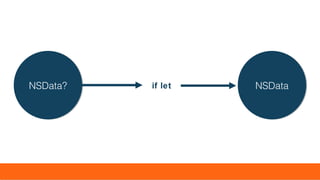
NSDataNSDataif letNSData?NSData?
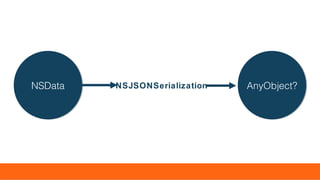
AnyObject?AnyObject?NSJSONSerializationNSDataNSData
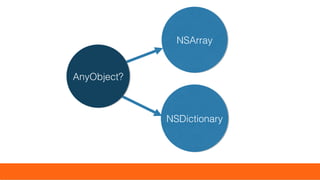
NSArrayNSArray
AnyObject?AnyObject?
NSDictionaryNSDictionary
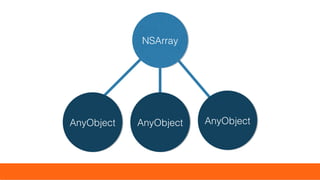
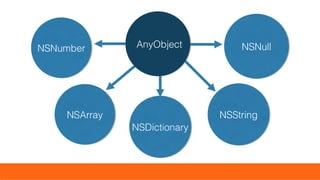
AnyObjectAnyObject AnyObjectAnyObject AnyObjectAnyObject
NSArrayNSArray
NSArrayNSArray
NSDictionaryNSDictionary
NSStringNSString
AnyObjectAnyObjectNSNumberNSNumber NSNullNSNull
Safety Last
“Smash and Grab”
var error:NSError?
if let jsonObject = NSJSONSerialization.JSONObjectWithData(data, options: nil, error: &error)
as? [String: AnyObject] {
let count = jsonObject["resultCount"] as? Int
// casting value to Int
}
var error:NSError?
if let jsonObject = NSJSONSerialization.JSONObjectWithData(data, options: nil, error: &error) as?
[String: AnyObject] {
var jDict = jsonObject
jDict["resultCount"] = "string"
// change of type can happen easily
let jsonData = NSJSONSerialization.dataWithJSONObject(jDict, options: nil, error: nil)
}
Simple Safety
“Dream Data”
if the JSON you are receiving looks like this
{"key1":"value1","key2":"value2","key3":"value3"
}
or this
[1,2,3,4,5,6,6,7,8,9,10]
then you can simply write
if let dict = jsonObject as? Dictionary<String,String>
{ }
or this
if let dict = jsonObject as? [Int]
{ }
to achieve type safety, but this will rarely the case in
the real world and so rather than keep dreaming, we
have…
Safely Wrapped
enum with associated values
enum Value {
// enum cases
case StringType(String)
case NumberType(NSNumber)
case NullType(NSNull)
// collection types
case DictionaryType(Dictionary<String,Value>)
case ArrayType([Value])
}
And we then wrap each value of a received
[AnyObject] or [String: AnyObject] as the
initializer to our enum*
* working code available, ask me after if you’re interested
if let num = dictionary["key"]?.number { }
RATHER THAN THIS:
if let dict = jsonObj as? [String: AnyObject],
str = dict[“key”] as? NSNumber { }
We can then combine associated values with
computed variables to achieve this kind of syntax:
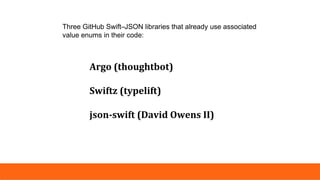
Argo (thoughtbot)
Swiftz (typelift)
json-swift (David Owens II)
Three GitHub Swift–JSON libraries that already use associated
value enums in their code:
Type Safety =
Empowerment
• restrict changes of type (e.g. through subscripting)
• prevent the return of AnyObject
• enable the compiler to better detect errors and assist the
programmer
• reduction in the amount of code to test types and return
values
• IT MAKES US THINK ABOUT TREATMENT OF JSON!
Potential Problems
The larger your model object, the longer the build takes [using
Argo]. This is an issue with the Swift compiler having trouble
working out all the nested type inference. While Argo works, it
can be impracticle for large objects. There is work being done on
a separate branch to reduce this time. (Tony DiPasquale,
thoughtbot)
https://robots.thoughtbot.com/parsing-embedded-json-and-arrays-in-swift
Argo
Wrapped on Demand
A possible solution
enum Value {
// enum cases
case StringType(String)
case NumberType(NSNumber)
case NullType(NSNull)
// collection types
case DictionaryType(JSONDictionary)
case ArrayType(JSONArray)
}
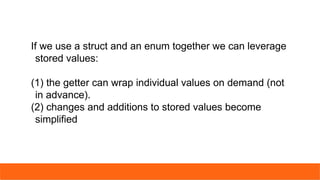
If we use a struct and an enum together we can leverage
stored values:
(1) the getter can wrap individual values on demand (not
in advance).
(2) changes and additions to stored values become
simplified
if let p = parsedJSON["results"]?.jsonArr,
d = p[0]?.jsonDict {
d["trackName"]?.str
}
parsedJSON["results"]?[0]?["trackName"] = "Something"
And setting:
Getting:
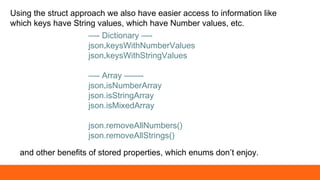
Using the struct approach we also have easier access to information like
which keys have String values, which have Number values, etc.
—- Dictionary —-
json.keysWithNumberValues
json.keysWithStringValues
—- Array ——-
json.isNumberArray
json.isStringArray
json.isMixedArray
json.removeAllNumbers()
json.removeAllStrings()
and other benefits of stored properties, which enums don’t enjoy.
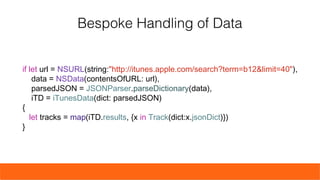
Bespoke Handling of
Data
if let url = NSURL(string:"http://itunes.apple.com/search?term=b12&limit=40"),
data = NSData(contentsOfURL: url),
parsedJSON = JSONParser.parseDictionary(data),
iTD = iTunesData(dict: parsedJSON)
{
let tracks = map(iTD.results, {x in Track(dict:x.jsonDict)})
}
Bespoke Handling of Data
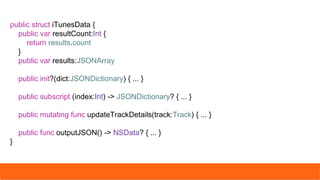
public struct iTunesData {
public var resultCount:Int {
return results.count
}
public var results:JSONArray
public init?(dict:JSONDictionary) { ... }
public subscript (index:Int) -> JSONDictionary? { ... }
public mutating func updateTrackDetails(track:Track) { ... }
public func outputJSON() -> NSData? { ... }
}
public struct Track {
public var trackName:String, collectionName:String, trackId:Int
public init?(dict:JSONDictionary?) {
if let tN = dict?["trackName"]?.str,
cN = dict?["collectionName"]?.str,
tI = dict?["trackId"]?.num {
trackName = tN
collectionName = cN
trackId = tI.integerValue
}
else {
return nil
}
}
}
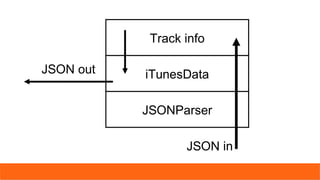
Round-tripping bespoke
data
Track info
iTunesData
JSONParser
JSON in
JSON out
JSON (JavaScript Object Notation) is a lightweight
data-interchange format. It is easy for humans to read
and write. It is easy for machines to parse and
generate. It is based on a subset of the JavaScript
Programming Language, Standard ECMA-262 3rd
Edition - December 1999. JSON is a text format that is
completely language independent but uses conventions
that are familiar to programmers of the C-family of
languages, including C, C++, C#, Java, JavaScript,
Perl, Python, and many others. These properties make
JSON an ideal data-interchange language.

{"JSON, Swift and Type Safety" : "It's a wrap"}

  • 1.
    {"JSON, Swift andType Safety" : "It's a wrap"} @gylphi @sketchytech [Anthony Levings, @sketchyTech] Presented at SwiftSummit.com, 21 March 2015
  • 2.
  • 3.
  • 4.
  • 5.
  • 6.
  • 7.
  • 8.
    var error:NSError? if letjsonObject = NSJSONSerialization.JSONObjectWithData(data, options: nil, error: &error) as? [String: AnyObject] { let count = jsonObject["resultCount"] as? Int // casting value to Int }
  • 9.
    var error:NSError? if letjsonObject = NSJSONSerialization.JSONObjectWithData(data, options: nil, error: &error) as? [String: AnyObject] { var jDict = jsonObject jDict["resultCount"] = "string" // change of type can happen easily let jsonData = NSJSONSerialization.dataWithJSONObject(jDict, options: nil, error: nil) }
  • 10.
  • 11.
    if the JSONyou are receiving looks like this {"key1":"value1","key2":"value2","key3":"value3" } or this [1,2,3,4,5,6,6,7,8,9,10]
  • 12.
    then you cansimply write if let dict = jsonObject as? Dictionary<String,String> { } or this if let dict = jsonObject as? [Int] { } to achieve type safety, but this will rarely the case in the real world and so rather than keep dreaming, we have…
  • 13.
    Safely Wrapped enum withassociated values
  • 14.
    enum Value { //enum cases case StringType(String) case NumberType(NSNumber) case NullType(NSNull) // collection types case DictionaryType(Dictionary<String,Value>) case ArrayType([Value]) }
  • 15.
    And we thenwrap each value of a received [AnyObject] or [String: AnyObject] as the initializer to our enum* * working code available, ask me after if you’re interested
  • 16.
    if let num= dictionary["key"]?.number { } RATHER THAN THIS: if let dict = jsonObj as? [String: AnyObject], str = dict[“key”] as? NSNumber { } We can then combine associated values with computed variables to achieve this kind of syntax:
  • 17.
    Argo (thoughtbot) Swiftz (typelift) json-swift(David Owens II) Three GitHub Swift–JSON libraries that already use associated value enums in their code:
  • 18.
    Type Safety = Empowerment •restrict changes of type (e.g. through subscripting) • prevent the return of AnyObject • enable the compiler to better detect errors and assist the programmer • reduction in the amount of code to test types and return values • IT MAKES US THINK ABOUT TREATMENT OF JSON!
  • 19.
  • 20.
    The larger yourmodel object, the longer the build takes [using Argo]. This is an issue with the Swift compiler having trouble working out all the nested type inference. While Argo works, it can be impracticle for large objects. There is work being done on a separate branch to reduce this time. (Tony DiPasquale, thoughtbot) https://robots.thoughtbot.com/parsing-embedded-json-and-arrays-in-swift Argo
  • 21.
    Wrapped on Demand Apossible solution
  • 22.
    enum Value { //enum cases case StringType(String) case NumberType(NSNumber) case NullType(NSNull) // collection types case DictionaryType(JSONDictionary) case ArrayType(JSONArray) }
  • 23.
    If we usea struct and an enum together we can leverage stored values: (1) the getter can wrap individual values on demand (not in advance). (2) changes and additions to stored values become simplified
  • 24.
    if let p= parsedJSON["results"]?.jsonArr, d = p[0]?.jsonDict { d["trackName"]?.str } parsedJSON["results"]?[0]?["trackName"] = "Something" And setting: Getting:
  • 25.
    Using the structapproach we also have easier access to information like which keys have String values, which have Number values, etc. —- Dictionary —- json.keysWithNumberValues json.keysWithStringValues —- Array ——- json.isNumberArray json.isStringArray json.isMixedArray json.removeAllNumbers() json.removeAllStrings() and other benefits of stored properties, which enums don’t enjoy.
  • 26.
  • 27.
    if let url= NSURL(string:"http://itunes.apple.com/search?term=b12&limit=40"), data = NSData(contentsOfURL: url), parsedJSON = JSONParser.parseDictionary(data), iTD = iTunesData(dict: parsedJSON) { let tracks = map(iTD.results, {x in Track(dict:x.jsonDict)}) } Bespoke Handling of Data
  • 28.
    public struct iTunesData{ public var resultCount:Int { return results.count } public var results:JSONArray public init?(dict:JSONDictionary) { ... } public subscript (index:Int) -> JSONDictionary? { ... } public mutating func updateTrackDetails(track:Track) { ... } public func outputJSON() -> NSData? { ... } }
  • 29.
    public struct Track{ public var trackName:String, collectionName:String, trackId:Int public init?(dict:JSONDictionary?) { if let tN = dict?["trackName"]?.str, cN = dict?["collectionName"]?.str, tI = dict?["trackId"]?.num { trackName = tN collectionName = cN trackId = tI.integerValue } else { return nil } } }
  • 30.
  • 31.
  • 32.
    JSON (JavaScript ObjectNotation) is a lightweight data-interchange format. It is easy for humans to read and write. It is easy for machines to parse and generate. It is based on a subset of the JavaScript Programming Language, Standard ECMA-262 3rd Edition - December 1999. JSON is a text format that is completely language independent but uses conventions that are familiar to programmers of the C-family of languages, including C, C++, C#, Java, JavaScript, Perl, Python, and many others. These properties make JSON an ideal data-interchange language.

Editor's Notes

  • #3 Slides to accompany Box demo
  • #8 There is nothing to stop us ignoring type safety and working with the JSON objects without a care for type beyond an adherence to the AnyObject protocol.
  • #9 before you can use a value in any meaningful way it must be cast to a type in Swift
  • #10 We are flexible to change values paying no regard to type. Here the resultCount is changed from a number to a string.
  • #11 JSON is characteristically mixed in types and it unless the data was preprepared with strong typing in mind it would be unusual for JSON to be treated in this way
  • #12 Then you have a very simple situation
  • #13 You can transform what you have into a Swift Dictionary or Array and be done with it.
  • #14 JSON is characteristically mixed in types and it unless the data was preprepared with strong typing in mind it would be unusual for JSON to be treated in this way, so how do we co-exist with this while still respecting Swift’s strong typing. The answer is enums with associated values.
  • #15 This is what the cases look like if we wrap all values and NullType probably doesn’t need a NSNull inside because NSNull is always the same. One their own they can wrap everything and provide us with a type safe way to access values.
  • #16 enums allow us to escape the world of AnyObject and use a neater looking syntax when paired with computed variables.
  • #17 enums allow us to escape the world of AnyObject and use a neater looking syntax when paired with computed variables.
  • #18 Note the omission of SwiftyJSON, which uses enums (without associated values) in unison with a stored AnyObject type property
  • #19 JSON is characteristically mixed in types and it unless the data was preprepared with strong typing in mind it would be unusual for JSON to be treated in this way
  • #20 JSON is characteristically mixed in types and it unless the data was preprepared with strong typing in mind it would be unusual for JSON to be treated in this way
  • #21 This might not be due to the wrapping but other elements of the approach.
  • #22 JSON is characteristically mixed in types and it unless the data was preprepared with strong typing in mind it would be unusual for JSON to be treated in this way
  • #23 What if instead of using Dictionary and Array we created unique JSONDictionary and JSONArray types? Would a struct that wrapped on demand, instead of storing wrapped values, save time wrapping and unwrapping? And how would it work? One idea that I’ve worked on is to internally store five dictionaries corresponding to the cases. In the dictionary these are of type [String: String], [String: NSNumber], [String: NSNull], [String: JSONDictionary], [String: JSONArray] and internally the JSONArray type has similar dictionaries but using Int as its key. This approach makes it very easy to add and change values, to return all strings or numbers, to see at a glance whether arrays contain only strings or only numbers, and so on. It is made possible by the ability of structs to store property values.
  • #28 While we can access all values from the parsed JSON, we can also build bespoke ways of handling the parsed JSON making it easier to manipulate and we could drill down even further if we wished.
  • #32 Remember to have MAMP on for demo, Dropbox/SwiftSummit/SwiftSummit_JSON_Presentation_Struct.Playground Document/Developer/Swift/JSONParser