Job Aid Series
Sample 1 (2-pg. layout)
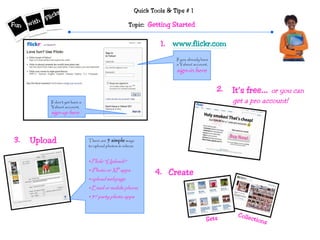
Quick Tools & Tips # 1
Topic: Getting Started
It’s free… or you can
get a pro account!
If you already have
a Yahoo! account,
sign-in here
If don’t yet have a
Yahoo! account,
sign-up here
1. www.flickr.com
2.
3. There are 5 simple ways
to upload photos & videos:
•Flickr “Uploadr”
•iPhoto or XP apps
•upload webpage
•Email or mobile phone
•3rd party photo apps
Upload
4. Create
Sets
Collections
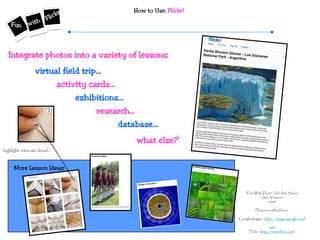
How to Use: Flickr!
“Fun With Flickr” Job Aid Series
~Ann Younce~
2009
Photos modified from:
Google Images (http://images.google.com)
and
Flickr (http://www.flickr.com)
More Lesson Ideas:
virtual field trip…
Integrate photos into a variety of lessons:
activity cards…
exhibitions…
research…
database…
what else?
highlight intricate detail…
Job Aid Series
Sample 2 (2-pg. layout)
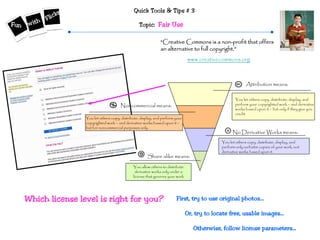
Quick Tools & Tips # 3
Topic: Fair Use
“Creative Commons is a non-profit that offers
an alternative to full copyright.”
www.creativecommons.org
Share alike means:
No Derivative Works means:
Noncommercial means:
Attribution means:
You allow others to distribute
derivative works only under a
license that governs your work
You let others copy, distribute, display, and
perform only verbatim copies of your work, not
derivative works based upon it.
You let others copy, distribute, display, and perform your
copyrighted work – and derivative works based upon it –
but for noncommercial purposes only.
You let others copy, distribute, display, and
perform your copyrighted work – and derivative
works based upon it – but only if they give you
credit.
Which license level is right for you? First, try to use original photos…
Or, try to locate free, usable images…
Otherwise, follow license parameters…
How to Use: Creative Commons & Privacy Settings
“Fun With Flickr” Job Aid Series
~Ann Younce~
2009
Photos modified from:
Google Images (http://images.google.com)
and
Flickr (http://www.flickr.com)
More Lesson Ideas:
http://www.mediafestival.org/copyrightchart.html
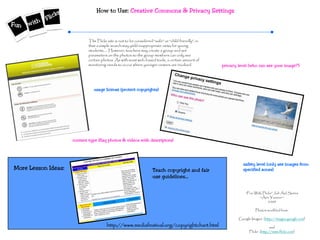
The Flickr site is not to be considered “safe” or “child friendly”, in
that a simple search may yield inappropriate views for young
students….. However, teachers may create a group and set
parameters on the photos so the group members can only see
certain photos. As with most web-based tools, a certain amount of
monitoring needs to occur where younger viewers are involved.
usage license (protect copyrights)
privacy level (who can see your image?)
content type (flag photos & videos with descriptors)
safety level (only see images from
specified zones)Teach copyright and fair
use guidelines…
Job Aid Series
Sample 3 (2-pg. layout)
Quick Tools & Tips # 5
Topic: Take Note!
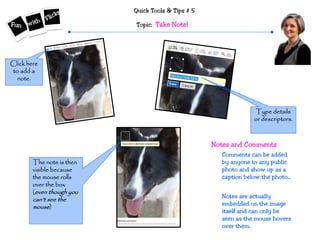
Click here
to add a
note.
Type details
or descriptors.
The note is then
visible because
the mouse rolls
over the box
(even though you
can’t see the
mouse)
Comments can be added
by anyone to any public
photo and show up as a
caption below the photo...
Notes are actually
embedded on the image
itself and can only be
seen as the mouse hovers
over them.
Notes and Comments
How to Use: Flickr Notes
“Fun With Flickr” Job Aid Series
~Ann Younce~
2009
Photos modified from:
Google Images (http://images.google.com)
and
Flickr (http://www.flickr.com)
More Lesson Ideas:
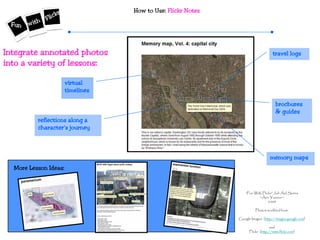
virtual
timelines
travel logsIntegrate annotated photos
into a variety of lessons:
brochures
& guides
reflections along a
character’s journey
memory maps
Job Aid Series
Sample 4 (2-pg. layout)
Quick Tools & Tips # 8
Topic: Trading Cards
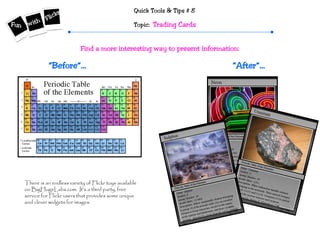
“After”…“Before”…
There is an endless variety of Flickr toys available
on BigHugeLabs.com. It’s a third party, free
service for Flickr users that provides some unique
and clever widgets for images.
Find a more interesting way to present information:
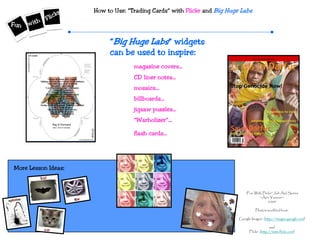
How to Use: “Trading Cards” with Flickr and Big Huge Labs
“Fun With Flickr” Job Aid Series
~Ann Younce~
2009
Photos modified from:
Google Images (http://images.google.com)
and
Flickr (http://www.flickr.com)
More Lesson Ideas:
“Big Huge Labs” widgets
can be used to inspire:
magazine covers…
CD liner notes…
mosaics…
billboards…
jigsaw puzzles…
“Warholizer”…
flash cards…

Job Aid Spectacular

  • 1.
    Job Aid Series Sample1 (2-pg. layout)
  • 2.
    Quick Tools &Tips # 1 Topic: Getting Started It’s free… or you can get a pro account! If you already have a Yahoo! account, sign-in here If don’t yet have a Yahoo! account, sign-up here 1. www.flickr.com 2. 3. There are 5 simple ways to upload photos & videos: •Flickr “Uploadr” •iPhoto or XP apps •upload webpage •Email or mobile phone •3rd party photo apps Upload 4. Create Sets Collections
  • 3.
    How to Use:Flickr! “Fun With Flickr” Job Aid Series ~Ann Younce~ 2009 Photos modified from: Google Images (http://images.google.com) and Flickr (http://www.flickr.com) More Lesson Ideas: virtual field trip… Integrate photos into a variety of lessons: activity cards… exhibitions… research… database… what else? highlight intricate detail…
  • 4.
    Job Aid Series Sample2 (2-pg. layout)
  • 5.
    Quick Tools &Tips # 3 Topic: Fair Use “Creative Commons is a non-profit that offers an alternative to full copyright.” www.creativecommons.org Share alike means: No Derivative Works means: Noncommercial means: Attribution means: You allow others to distribute derivative works only under a license that governs your work You let others copy, distribute, display, and perform only verbatim copies of your work, not derivative works based upon it. You let others copy, distribute, display, and perform your copyrighted work – and derivative works based upon it – but for noncommercial purposes only. You let others copy, distribute, display, and perform your copyrighted work – and derivative works based upon it – but only if they give you credit. Which license level is right for you? First, try to use original photos… Or, try to locate free, usable images… Otherwise, follow license parameters…
  • 6.
    How to Use:Creative Commons & Privacy Settings “Fun With Flickr” Job Aid Series ~Ann Younce~ 2009 Photos modified from: Google Images (http://images.google.com) and Flickr (http://www.flickr.com) More Lesson Ideas: http://www.mediafestival.org/copyrightchart.html The Flickr site is not to be considered “safe” or “child friendly”, in that a simple search may yield inappropriate views for young students….. However, teachers may create a group and set parameters on the photos so the group members can only see certain photos. As with most web-based tools, a certain amount of monitoring needs to occur where younger viewers are involved. usage license (protect copyrights) privacy level (who can see your image?) content type (flag photos & videos with descriptors) safety level (only see images from specified zones)Teach copyright and fair use guidelines…
  • 7.
    Job Aid Series Sample3 (2-pg. layout)
  • 8.
    Quick Tools &Tips # 5 Topic: Take Note! Click here to add a note. Type details or descriptors. The note is then visible because the mouse rolls over the box (even though you can’t see the mouse) Comments can be added by anyone to any public photo and show up as a caption below the photo... Notes are actually embedded on the image itself and can only be seen as the mouse hovers over them. Notes and Comments
  • 9.
    How to Use:Flickr Notes “Fun With Flickr” Job Aid Series ~Ann Younce~ 2009 Photos modified from: Google Images (http://images.google.com) and Flickr (http://www.flickr.com) More Lesson Ideas: virtual timelines travel logsIntegrate annotated photos into a variety of lessons: brochures & guides reflections along a character’s journey memory maps
  • 10.
    Job Aid Series Sample4 (2-pg. layout)
  • 11.
    Quick Tools &Tips # 8 Topic: Trading Cards “After”…“Before”… There is an endless variety of Flickr toys available on BigHugeLabs.com. It’s a third party, free service for Flickr users that provides some unique and clever widgets for images. Find a more interesting way to present information:
  • 12.
    How to Use:“Trading Cards” with Flickr and Big Huge Labs “Fun With Flickr” Job Aid Series ~Ann Younce~ 2009 Photos modified from: Google Images (http://images.google.com) and Flickr (http://www.flickr.com) More Lesson Ideas: “Big Huge Labs” widgets can be used to inspire: magazine covers… CD liner notes… mosaics… billboards… jigsaw puzzles… “Warholizer”… flash cards…