ES7 & ES8
vs
@Rafael_Casuso
A B O U T M E
•CTO @StayApp
•CEO @SnowStormIO
•Organizer @BotDevMad &
@VueJSMadrid
•Software Engineer with +10 years
of experience leading teams and
developing.
•Software Architect looking for
revolutionary ways to change the
world.
A
BRIEF
SETTING
+ INTRODUCTION
JAVASCRIPT VERSIONS
JAVASCRIPT (December 4th 1995) Netscape and Sun press release
ECMAScript Standard Editions:
ES1 (June 1997) Object-based, Scripting, Relaxed syntax, Prototypes
ES2 (June 1998) Editorial changes for ISO 16262
ES3 (December 1999) Regexps, Try/Catch, Do-While, String methods
ES5 (December 2009) Strict mode, JSON, .bind, Object mts, Array mts
ES5.1 (June 2011) Editorial changes for ISO 16262:2011
ES6 (June 2015) Classes, Modules, Arrow Fs, Generators, Const/Let,

Destructuring, Template Literals, Promise, Proxy, Symbol, Reflect
ES7 (June 2016) Exponentiation operator (**) and Array Includes
ES8 (June 2017) Async Fs, Shared Memory & Atomics
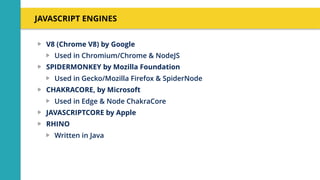
JAVASCRIPT ENGINES
V8 (Chrome V8) by Google
Used in Chromium/Chrome & NodeJS
SPIDERMONKEY by Mozilla Foundation
Used in Gecko/Mozilla Firefox & SpiderNode
CHAKRACORE, by Microsoft
Used in Edge & Node ChakraCore
JAVASCRIPTCORE by Apple
RHINO
Written in Java
HOW
DOES
A RELEASE
WORK?
+ INTRODUCTION
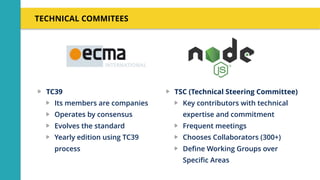
TECHNICAL COMMITEES
TC39
Its members are companies
Operates by consensus
Evolves the standard
Yearly edition using TC39
process
TSC (Technical Steering Committee)
Key contributors with technical
expertise and commitment
Frequent meetings
Chooses Collaborators (300+)
Define Working Groups over
Specific Areas
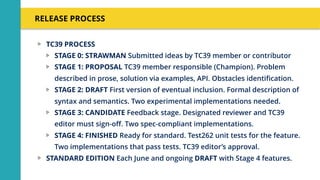
RELEASE PROCESS
TC39 PROCESS
STAGE 0: STRAWMAN Submitted ideas by TC39 member or contributor
STAGE 1: PROPOSAL TC39 member responsible (Champion). Problem
described in prose, solution via examples, API. Obstacles identification.
STAGE 2: DRAFT First version of eventual inclusion. Formal description of
syntax and semantics. Two experimental implementations needed.
STAGE 3: CANDIDATE Feedback stage. Designated reviewer and TC39
editor must sign-off. Two spec-compliant implementations.
STAGE 4: FINISHED Ready for standard. Test262 unit tests for the feature.
Two implementations that pass tests. TC39 editor’s approval.
STANDARD EDITION Each June and ongoing DRAFT with Stage 4 features.
ES7 Edition
(2016)
+ OVERVIEW
ARRAY INCLUDES
Array.prototype.includes(searchElement[, fromIndex]) // => Boolean
WHY
array.indexOf(el) !== -1 || array.indexOf(el) >= 0
It does not work with NaN
Not explicit syntax
EXAMPLES
assert([1, 2, 3].includes(2) === true);
assert([1, 2, 3].includes(4) === false);
assert([1, 2, NaN].includes(NaN) === true);
assert(["a", "b", "c"].includes("a") === true);
assert(["a", "b", "c"].includes("a", 1) === false);
EXPONENTIATION OPERATOR
x ** y // => Math.pow(x, y)
WHY
Math.pow(x, y)
More succint syntax
EXAMPLES
let squared = 3 ** 2; // 9
let num = 3;
num **= 3; // 9
ES8 Edition
(2017)
+ OVERVIEW
ASYNC FUNCTIONS
async function () {} async () => {} //=> Promise
WHY
Sequential much more succinct way to deal with Asynchrony
Better understandable than callbacks (no jumps) and mere Promises
Basic implementation
async function asyncFunc() { return 123 };
asyncFunc().then( x => console.log(x) ); //=> 123
async function asyncFunc() { throw new Error(‘Problem’) };
asyncFunc().catch( err => console.log(err) ); //=> Error: Problem
ASYNC FUNCTIONS: AWAIT OPERATOR
async function asyncFunc() {
const result1 = await otherAsyncFunc1(); //Waits for Promise1 to settle
console.log(result1);
const result2 = await otherAsyncFunc2(); //Waits for Promise2 to settle
console.log(result2);
try { await otherAsyncFunc3() } catch(e) { //Handles err }
}
If Promise is resolved await returns its value
If it is rejected it throws an exception (so Try/Catch is encouraged)
If operand is not a Promise it converts it to a resolved one
Don’t forget it. It has use case even if async function does not return.
You don’t need await if you “fire and forget”
Use Promise.all (parallel) instead of multiple await (sequential) whenever
possible
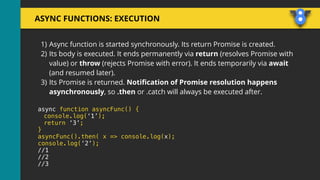
ASYNC FUNCTIONS: EXECUTION
1) Async function is started synchronously. Its return Promise is created.
2) Its body is executed. It ends permanently via return (resolves Promise with
value) or throw (rejects Promise with error). It ends temporarily via await
(and resumed later).
3) Its Promise is returned. Notification of Promise resolution happens
asynchronously, so .then or .catch will always be executed after.
async function asyncFunc() {
console.log(‘1’);
return ‘3’;
}
asyncFunc().then( x => console.log(x);
console.log(‘2’);
//1
//2
//3
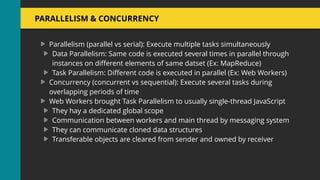
PARALLELISM & CONCURRENCY
Parallelism (parallel vs serial): Execute multiple tasks simultaneously
Data Parallelism: Same code is executed several times in parallel through
instances on different elements of same datset (Ex: MapReduce)
Task Parallelism: Different code is executed in parallel (Ex: Web Workers)
Concurrency (concurrent vs sequential): Execute several tasks during
overlapping periods of time
Web Workers brought Task Parallelism to usually single-thread JavaScript
They hay a dedicated global scope
Communication between workers and main thread by messaging system
They can communicate cloned data structures
Transferable objects are cleared from sender and owned by receiver
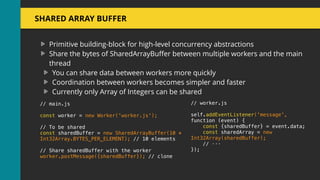
SHARED ARRAY BUFFER
Primitive building-block for high-level concurrency abstractions
Share the bytes of SharedArrayBuffer between multiple workers and the main
thread
You can share data between workers more quickly
Coordination between workers becomes simpler and faster
Currently only Array of Integers can be shared
// main.js
const worker = new Worker('worker.js');
// To be shared
const sharedBuffer = new SharedArrayBuffer(10 *
Int32Array.BYTES_PER_ELEMENT); // 10 elements
// Share sharedBuffer with the worker
worker.postMessage({sharedBuffer}); // clone
// worker.js
self.addEventListener('message',
function (event) {
const {sharedBuffer} = event.data;
const sharedArray = new
Int32Array(sharedBuffer);
// ···
});
ATOMICS
Global variable to synchronize the activity of multiple workers using same
SharedArrayBuffer
Synchronization:
// main.js
console.log('notifying...');
Atomics.store(sharedArray, 0, 123);
// worker.js
while (Atomics.load(sharedArray, 0) !== 123) ;
console.log('notified');
Waiting:
Atomics.wait(int32, 0, 0);
console.log(int32[0]); // 123
Operations:
Atomics.add(ta, 0, 12);
// returns 0, the old value
Atomics.load(ta, 0); // 12
OBJECT.ENTRIES() & OBJECT.VALUES()
Object.entries({ one: 1, two: 2 }) //[ [ 'one', 1 ], [ 'two', 2 ] ]
WHY
A better way to allow object entries iteration
let obj = { one: 1, two: 2 };
for (let [k,v] of Object.entries(obj)) {
console.log(`${JSON.stringify(k)}: ${JSON.stringify(v)}`);
}
Object.values({ one: 1, two: 2 }) //[ 1 , 2 ]
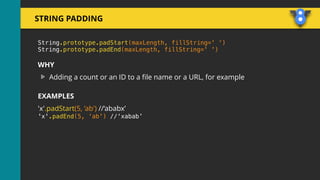
STRING PADDING
String.prototype.padStart(maxLength, fillString=' ‘)
String.prototype.padEnd(maxLength, fillString=' ')
WHY
Adding a count or an ID to a file name or a URL, for example
EXAMPLES
'x'.padStart(5, ‘ab') //‘ababx’
'x'.padEnd(5, ‘ab') //‘xabab’
OBJECT.GETOWNPROPERTYDESCRIPTORS()
const obj = {
[Symbol('foo')]: 123,
get bar() { return 'abc' },
};
console.log(Object.getOwnPropertyDescriptors(obj));
// Output:
// { [Symbol('foo')]:
// { value: 123,
// writable: true,
// enumerable: true,
// configurable: true },
// bar:
// { get: [Function: bar],
// set: undefined,
// enumerable: true,
// configurable: true } }
WHY
Copying properties into an object or cloning it
ES9 Current Draft
(2018)
+ OVERVIEW
OBJECT DESTRUCTURING (STAGE 3)
REST PROPERTIES
Analog to Array rest properties
let { x, y, ...z } = { x: 1, y: 2, a: 3, b: 4 };
x; // 1
y; // 2
z; // { a: 3, b: 4 }
SPREAD PROPERTIES
Analog to Array spread properties
let n = { x, y, ...z };
n; // { x: 1, y: 2, a: 3, b: 4 }
ASYNC ITERATION (STAGE 3)
for await (const line of readLines(filePath)) {
console.log(line);
}
const { value, done } = syncIterator.next();
asyncIterator.next().then(({ value, done }) => /* ... */);
WHY
A sequential iteration due to await to async operations
IMPORT() (STAGE 3)
import(`./section-modules/${link.dataset.entryModule}.js`)
.then(module => {
module.loadPageInto(main);
})
.catch(err => {
main.textContent = err.message;
});
WHY
Enabling dynamically load parts of a JavaScript application at runtime
THANK YOU

JavaScript Editions ES7, ES8 and ES9 vs V8

  • 1.
  • 2.
    @Rafael_Casuso A B OU T M E •CTO @StayApp •CEO @SnowStormIO •Organizer @BotDevMad & @VueJSMadrid •Software Engineer with +10 years of experience leading teams and developing. •Software Architect looking for revolutionary ways to change the world.
  • 3.
  • 4.
    JAVASCRIPT VERSIONS JAVASCRIPT (December4th 1995) Netscape and Sun press release ECMAScript Standard Editions: ES1 (June 1997) Object-based, Scripting, Relaxed syntax, Prototypes ES2 (June 1998) Editorial changes for ISO 16262 ES3 (December 1999) Regexps, Try/Catch, Do-While, String methods ES5 (December 2009) Strict mode, JSON, .bind, Object mts, Array mts ES5.1 (June 2011) Editorial changes for ISO 16262:2011 ES6 (June 2015) Classes, Modules, Arrow Fs, Generators, Const/Let,
 Destructuring, Template Literals, Promise, Proxy, Symbol, Reflect ES7 (June 2016) Exponentiation operator (**) and Array Includes ES8 (June 2017) Async Fs, Shared Memory & Atomics
  • 5.
    JAVASCRIPT ENGINES V8 (ChromeV8) by Google Used in Chromium/Chrome & NodeJS SPIDERMONKEY by Mozilla Foundation Used in Gecko/Mozilla Firefox & SpiderNode CHAKRACORE, by Microsoft Used in Edge & Node ChakraCore JAVASCRIPTCORE by Apple RHINO Written in Java
  • 6.
  • 7.
    TECHNICAL COMMITEES TC39 Its membersare companies Operates by consensus Evolves the standard Yearly edition using TC39 process TSC (Technical Steering Committee) Key contributors with technical expertise and commitment Frequent meetings Chooses Collaborators (300+) Define Working Groups over Specific Areas
  • 8.
    RELEASE PROCESS TC39 PROCESS STAGE0: STRAWMAN Submitted ideas by TC39 member or contributor STAGE 1: PROPOSAL TC39 member responsible (Champion). Problem described in prose, solution via examples, API. Obstacles identification. STAGE 2: DRAFT First version of eventual inclusion. Formal description of syntax and semantics. Two experimental implementations needed. STAGE 3: CANDIDATE Feedback stage. Designated reviewer and TC39 editor must sign-off. Two spec-compliant implementations. STAGE 4: FINISHED Ready for standard. Test262 unit tests for the feature. Two implementations that pass tests. TC39 editor’s approval. STANDARD EDITION Each June and ongoing DRAFT with Stage 4 features.
  • 9.
  • 10.
    ARRAY INCLUDES Array.prototype.includes(searchElement[, fromIndex])// => Boolean WHY array.indexOf(el) !== -1 || array.indexOf(el) >= 0 It does not work with NaN Not explicit syntax EXAMPLES assert([1, 2, 3].includes(2) === true); assert([1, 2, 3].includes(4) === false); assert([1, 2, NaN].includes(NaN) === true); assert(["a", "b", "c"].includes("a") === true); assert(["a", "b", "c"].includes("a", 1) === false);
  • 11.
    EXPONENTIATION OPERATOR x **y // => Math.pow(x, y) WHY Math.pow(x, y) More succint syntax EXAMPLES let squared = 3 ** 2; // 9 let num = 3; num **= 3; // 9
  • 12.
  • 13.
    ASYNC FUNCTIONS async function() {} async () => {} //=> Promise WHY Sequential much more succinct way to deal with Asynchrony Better understandable than callbacks (no jumps) and mere Promises Basic implementation async function asyncFunc() { return 123 }; asyncFunc().then( x => console.log(x) ); //=> 123 async function asyncFunc() { throw new Error(‘Problem’) }; asyncFunc().catch( err => console.log(err) ); //=> Error: Problem
  • 14.
    ASYNC FUNCTIONS: AWAITOPERATOR async function asyncFunc() { const result1 = await otherAsyncFunc1(); //Waits for Promise1 to settle console.log(result1); const result2 = await otherAsyncFunc2(); //Waits for Promise2 to settle console.log(result2); try { await otherAsyncFunc3() } catch(e) { //Handles err } } If Promise is resolved await returns its value If it is rejected it throws an exception (so Try/Catch is encouraged) If operand is not a Promise it converts it to a resolved one Don’t forget it. It has use case even if async function does not return. You don’t need await if you “fire and forget” Use Promise.all (parallel) instead of multiple await (sequential) whenever possible
  • 15.
    ASYNC FUNCTIONS: EXECUTION 1)Async function is started synchronously. Its return Promise is created. 2) Its body is executed. It ends permanently via return (resolves Promise with value) or throw (rejects Promise with error). It ends temporarily via await (and resumed later). 3) Its Promise is returned. Notification of Promise resolution happens asynchronously, so .then or .catch will always be executed after. async function asyncFunc() { console.log(‘1’); return ‘3’; } asyncFunc().then( x => console.log(x); console.log(‘2’); //1 //2 //3
  • 16.
    PARALLELISM & CONCURRENCY Parallelism(parallel vs serial): Execute multiple tasks simultaneously Data Parallelism: Same code is executed several times in parallel through instances on different elements of same datset (Ex: MapReduce) Task Parallelism: Different code is executed in parallel (Ex: Web Workers) Concurrency (concurrent vs sequential): Execute several tasks during overlapping periods of time Web Workers brought Task Parallelism to usually single-thread JavaScript They hay a dedicated global scope Communication between workers and main thread by messaging system They can communicate cloned data structures Transferable objects are cleared from sender and owned by receiver
  • 17.
    SHARED ARRAY BUFFER Primitivebuilding-block for high-level concurrency abstractions Share the bytes of SharedArrayBuffer between multiple workers and the main thread You can share data between workers more quickly Coordination between workers becomes simpler and faster Currently only Array of Integers can be shared // main.js const worker = new Worker('worker.js'); // To be shared const sharedBuffer = new SharedArrayBuffer(10 * Int32Array.BYTES_PER_ELEMENT); // 10 elements // Share sharedBuffer with the worker worker.postMessage({sharedBuffer}); // clone // worker.js self.addEventListener('message', function (event) { const {sharedBuffer} = event.data; const sharedArray = new Int32Array(sharedBuffer); // ··· });
  • 18.
    ATOMICS Global variable tosynchronize the activity of multiple workers using same SharedArrayBuffer Synchronization: // main.js console.log('notifying...'); Atomics.store(sharedArray, 0, 123); // worker.js while (Atomics.load(sharedArray, 0) !== 123) ; console.log('notified'); Waiting: Atomics.wait(int32, 0, 0); console.log(int32[0]); // 123 Operations: Atomics.add(ta, 0, 12); // returns 0, the old value Atomics.load(ta, 0); // 12
  • 19.
    OBJECT.ENTRIES() & OBJECT.VALUES() Object.entries({one: 1, two: 2 }) //[ [ 'one', 1 ], [ 'two', 2 ] ] WHY A better way to allow object entries iteration let obj = { one: 1, two: 2 }; for (let [k,v] of Object.entries(obj)) { console.log(`${JSON.stringify(k)}: ${JSON.stringify(v)}`); } Object.values({ one: 1, two: 2 }) //[ 1 , 2 ]
  • 20.
    STRING PADDING String.prototype.padStart(maxLength, fillString='‘) String.prototype.padEnd(maxLength, fillString=' ') WHY Adding a count or an ID to a file name or a URL, for example EXAMPLES 'x'.padStart(5, ‘ab') //‘ababx’ 'x'.padEnd(5, ‘ab') //‘xabab’
  • 21.
    OBJECT.GETOWNPROPERTYDESCRIPTORS() const obj ={ [Symbol('foo')]: 123, get bar() { return 'abc' }, }; console.log(Object.getOwnPropertyDescriptors(obj)); // Output: // { [Symbol('foo')]: // { value: 123, // writable: true, // enumerable: true, // configurable: true }, // bar: // { get: [Function: bar], // set: undefined, // enumerable: true, // configurable: true } } WHY Copying properties into an object or cloning it
  • 22.
  • 23.
    OBJECT DESTRUCTURING (STAGE3) REST PROPERTIES Analog to Array rest properties let { x, y, ...z } = { x: 1, y: 2, a: 3, b: 4 }; x; // 1 y; // 2 z; // { a: 3, b: 4 } SPREAD PROPERTIES Analog to Array spread properties let n = { x, y, ...z }; n; // { x: 1, y: 2, a: 3, b: 4 }
  • 24.
    ASYNC ITERATION (STAGE3) for await (const line of readLines(filePath)) { console.log(line); } const { value, done } = syncIterator.next(); asyncIterator.next().then(({ value, done }) => /* ... */); WHY A sequential iteration due to await to async operations
  • 25.
    IMPORT() (STAGE 3) import(`./section-modules/${link.dataset.entryModule}.js`) .then(module=> { module.loadPageInto(main); }) .catch(err => { main.textContent = err.message; }); WHY Enabling dynamically load parts of a JavaScript application at runtime
  • 26.