JavaScript Arrays INTERACTIVITY
WITH JAVASCRIPT
03.01
JavaScript Arrays
JavaScript Arrays INTERACTIVITY
WITH JAVASCRIPT
03.01
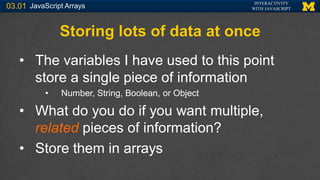
Storing lots of data at once
• The variables I have used to this point
store a single piece of information
• Number, String, Boolean, or Object
• What do you do if you want multiple,
related pieces of information?
• Store them in arrays
JavaScript Arrays INTERACTIVITY
WITH JAVASCRIPT
03.01
Declaring An Array
• Declaring an array
var grades= [80, 87, 94, 82, 62, 98, 81, 81, 74, 91];
var foods = [‘bananas’, ‘apples’, ‘pizza’];
var images= document.getElementsByClassName[‘imgs’];
var listItems = document.getElementsByTagName[‘li’];
JavaScript Arrays INTERACTIVITY
WITH JAVASCRIPT
03.01
Arrays
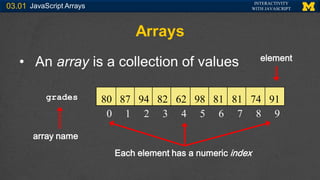
• An array is a collection of values
0 1 2 3 4 5 6 7 8 9
80 87 94 82 62 98 81 81 74 91
grades
array name
Each element has a numeric index
element
JavaScript Arrays INTERACTIVITY
WITH JAVASCRIPT
03.01
Accessing An Array
• Each value is called an element
• Elements are referenced by index
grades[0] refers to the value 80 (1st value)
grades[4] refers to the value 62 (5th value)
0 1 2 3 4 5 6 7 8 9
80 87 94 82 62 98 81 81 74 91
80 62
JavaScript Arrays INTERACTIVITY
WITH JAVASCRIPT
03.01
Arrays
• The elements in the array DON’T have to
be all the same type
var info= [“Colleen’, 1715, “Walnut”, 44004];
JavaScript Arrays INTERACTIVITY
WITH JAVASCRIPT
03.01
JavaScript Arrays are Objects
• They have attributes and methods
• grades.length
• grades.sort()
• grades.push(element)
• grades[grades.length] = element
JavaScript Arrays INTERACTIVITY
WITH JAVASCRIPT
03.01
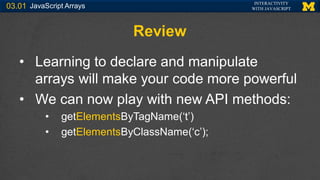
Review
• Learning to declare and manipulate
arrays will make your code more powerful
• We can now play with new API methods:
• getElementsByTagName(‘t’)
• getElementsByClassName(‘c’);
JavaScript Arrays INTERACTIVITY
WITH JAVASCRIPT
03.01
Acknowledgements/Contributions
These slides are Copyright 2015- Colleen van Lent as part of
http://www.intro-webdesign.com/ and made available under a Creative
Commons Attribution Non-Commercial 4.0 License. Please maintain
this last slide in all copies of the document to comply with the attribution
requirements of the license. If you make a change, feel free to add
your name and organization to the list of contributors on this page as
you republish the materials.
Initial Development: Colleen van Lent , University of Michigan School of
Information

Javascript Arrays related PowerPoint slide set

  • 1.
    JavaScript Arrays INTERACTIVITY WITHJAVASCRIPT 03.01 JavaScript Arrays
  • 2.
    JavaScript Arrays INTERACTIVITY WITHJAVASCRIPT 03.01 Storing lots of data at once • The variables I have used to this point store a single piece of information • Number, String, Boolean, or Object • What do you do if you want multiple, related pieces of information? • Store them in arrays
  • 3.
    JavaScript Arrays INTERACTIVITY WITHJAVASCRIPT 03.01 Declaring An Array • Declaring an array var grades= [80, 87, 94, 82, 62, 98, 81, 81, 74, 91]; var foods = [‘bananas’, ‘apples’, ‘pizza’]; var images= document.getElementsByClassName[‘imgs’]; var listItems = document.getElementsByTagName[‘li’];
  • 4.
    JavaScript Arrays INTERACTIVITY WITHJAVASCRIPT 03.01 Arrays • An array is a collection of values 0 1 2 3 4 5 6 7 8 9 80 87 94 82 62 98 81 81 74 91 grades array name Each element has a numeric index element
  • 5.
    JavaScript Arrays INTERACTIVITY WITHJAVASCRIPT 03.01 Accessing An Array • Each value is called an element • Elements are referenced by index grades[0] refers to the value 80 (1st value) grades[4] refers to the value 62 (5th value) 0 1 2 3 4 5 6 7 8 9 80 87 94 82 62 98 81 81 74 91 80 62
  • 6.
    JavaScript Arrays INTERACTIVITY WITHJAVASCRIPT 03.01 Arrays • The elements in the array DON’T have to be all the same type var info= [“Colleen’, 1715, “Walnut”, 44004];
  • 7.
    JavaScript Arrays INTERACTIVITY WITHJAVASCRIPT 03.01 JavaScript Arrays are Objects • They have attributes and methods • grades.length • grades.sort() • grades.push(element) • grades[grades.length] = element
  • 8.
    JavaScript Arrays INTERACTIVITY WITHJAVASCRIPT 03.01 Review • Learning to declare and manipulate arrays will make your code more powerful • We can now play with new API methods: • getElementsByTagName(‘t’) • getElementsByClassName(‘c’);
  • 9.
    JavaScript Arrays INTERACTIVITY WITHJAVASCRIPT 03.01 Acknowledgements/Contributions These slides are Copyright 2015- Colleen van Lent as part of http://www.intro-webdesign.com/ and made available under a Creative Commons Attribution Non-Commercial 4.0 License. Please maintain this last slide in all copies of the document to comply with the attribution requirements of the license. If you make a change, feel free to add your name and organization to the list of contributors on this page as you republish the materials. Initial Development: Colleen van Lent , University of Michigan School of Information