

JavaScript
Useful methods and
JavaScript code snippets
Learn More -
Videos and source
code included
Get this Course
https://www.udemy.com/javascript-course-
plus/?couponCode=SLIDESHARE
Course instructor : Laurence Svekis - providing online
training to over 500,000 students across hundreds of
courses and many platforms.
Course topics include
1. JavaScript Number Methods
2. JavaScript String Methods
3. JavaScript Math
4. DOMContentLoaded
5. JavaScript Date
6. JavaScript parse and stringify
7. JavaScript LocalStorage
8. JavaScript getBoundingClientRect()
9. JavaScript Timers setTimeout() setInterval()
requestAnimationFrame()
10. encodeURIComponent
11. Regex
12. prototype
13. Try and catch
14. Fetch xHR requests
JavaScript Number Methods
● parseInt()
● toFixed(2)
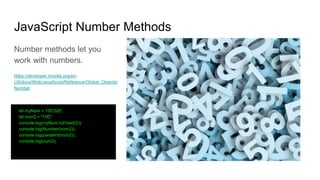
JavaScript Number Methods
Number methods let you
work with numbers.
https://developer.mozilla.org/en-
US/docs/Web/JavaScript/Reference/Global_Objects/
Number
let myNum = 100.525;
let num2 = "100";
console.log(myNum.toFixed(2));
console.log(Number(num2));
console.log(parseInt(num2));
console.log(num2);
Lesson Challenge
Try some of the number methods.
JavaScript String Methods
● String.prototype.trim()
● String.prototype.toUpperCase()
● String.prototype.toLowerCase()
● String.prototype.split()
● String.prototype.slice()
● String.prototype.replace()
● String.prototype.lastIndexOf()
● String.prototype.indexOf()
JavaScript String Methods
String methods let you work with strings.
https://developer.mozilla.org/en-
US/docs/Web/JavaScript/Reference/Global_Objects/String/indexOf
console.log(myString.length);
console.log(myString.trim());
console.log(myString.toUpperCase());
console.log(myString.toLowerCase());
console.log(myString.split(' ')); // into array (",") // Split on commas
console.log(myString.charAt(9));
console.log(myString[9]);
console.log(myString.slice(9));
console.log(myString.slice(9,20));
console.log(myString.substring(9,20)); // to position 20 // cannot accept negative indexes
console.log(myString.substr(9,20)); //next 20
console.log(myString.replace('enjoy', 'use'));
console.log(myString.lastIndexOf('JavaScript'));
console.log(myString.indexOf('JavaScript')); //same as search returns position
console.log(myString.search('JavaScript'));//same as indexof returns position
Lesson Challenge
Try some of the string methods return part of your
string. Turn the string into an array of words, replace
content and update the string output.
JavaScript Math
● Generate Random Numbers
● Rounding up
● Rounding down
● Rounding
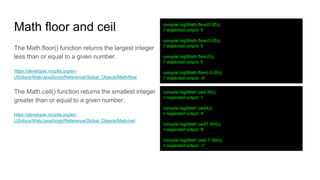
Math floor and ceil
The Math.floor() function returns the largest integer
less than or equal to a given number.
https://developer.mozilla.org/en-
US/docs/Web/JavaScript/Reference/Global_Objects/Math/floor
The Math.ceil() function returns the smallest integer
greater than or equal to a given number.
https://developer.mozilla.org/en-
US/docs/Web/JavaScript/Reference/Global_Objects/Math/ceil
console.log(Math.floor(5.95));
// expected output: 5
console.log(Math.floor(5.05));
// expected output: 5
console.log(Math.floor(5));
// expected output: 5
console.log(Math.floor(-5.05));
// expected output: -6
console.log(Math.ceil(.95));
// expected output: 1
console.log(Math.ceil(4));
// expected output: 4
console.log(Math.ceil(7.004));
// expected output: 8
console.log(Math.ceil(-7.004));
// expected output: -7
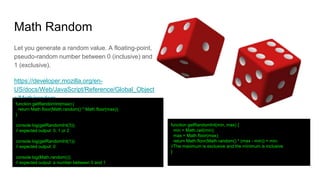
Math Random
Let you generate a random value. A floating-point,
pseudo-random number between 0 (inclusive) and
1 (exclusive).
https://developer.mozilla.org/en-
US/docs/Web/JavaScript/Reference/Global_Object
s/Math/random
function getRandomInt(min, max) {
min = Math.ceil(min);
max = Math.floor(max);
return Math.floor(Math.random() * (max - min)) + min;
//The maximum is exclusive and the minimum is inclusive
}
function getRandomInt(max) {
return Math.floor(Math.random() * Math.floor(max));
}
console.log(getRandomInt(3));
// expected output: 0, 1 or 2
console.log(getRandomInt(1));
// expected output: 0
console.log(Math.random());
// expected output: a number between 0 and 1
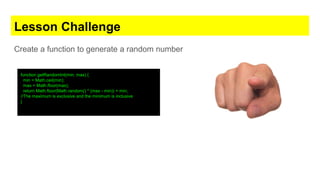
Lesson Challenge
Create a function to generate a random number
function getRandomInt(min, max) {
min = Math.ceil(min);
max = Math.floor(max);
return Math.floor(Math.random() * (max - min)) + min;
//The maximum is exclusive and the minimum is inclusive
}
Array Includes and ternary operator
● Includes
● Ternary operator
Includes and ternary
The includes() method determines whether an array includes a certain value among its entries,
returning true or false as appropriate.
https://developer.mozilla.org/en-US/docs/Web/JavaScript/Reference/Global_Objects/Array/includes
The conditional (ternary) operator is the only JavaScript operator that takes three operands. This
operator is frequently used as a shortcut for the if statement.
https://developer.mozilla.org/en-US/docs/Web/JavaScript/Reference/Operators/Conditional_Operator
function getFee(isMember) {
return (isMember ? "$2.00" : "$10.00");
}
console.log(getFee(true)); // expected output: "$2.00"
console.log(getFee(false)); // expected output: "$10.00"
console.log(getFee(1)); // expected output: "$2.00"
var array1 = [1, 2, 3];
console.log(array1.includes(2)); // expected output: true
var pets = ['cat', 'dog', 'bat'];
console.log(pets.includes('cat'));// expected output: true
console.log(pets.includes('at'));// expected output: false
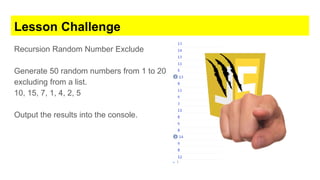
Lesson Challenge
Recursion Random Number Exclude
Generate 50 random numbers from 1 to 20
excluding from a list.
10, 15, 7, 1, 4, 2, 5
Output the results into the console.
Code Snippet
const excludeNumbers = [10, 15, 7, 1, 4, 2, 5];
function generateRandom(min, max) {
let num = Math.floor(Math.random() * (max - min + 1)) + min;
return excludeNumbers.includes(num) ? generateRandom(min, max) : num;
}
for (let x = 0; x < 20; x++) {
let min = 1;
let max = 15;
let num = generateRandom(min, max);
console.log(num);
}
Challenge #1 - Random Array Message
Create an array and randomly on page load
output an item from the array on the screen.
<body>
<script>
const myArray = ["Hello", "Welcome", "Bye Bye"];
let temp = randomItem(myArray);
let mes = document.createTextNode(temp);
document.body.appendChild(mes);
function randomItem(arr) {
return arr[Math.floor(Math.random() * arr.length)]
}
</script>
</body>
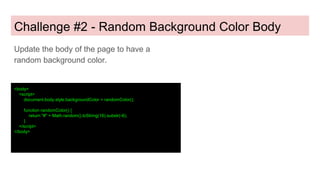
Challenge #2 - Random Background Color Body
Update the body of the page to have a
random background color.
<body>
<script>
document.body.style.backgroundColor = randomColor();
function randomColor() {
return "#" + Math.random().toString(16).substr(-6);
}
</script>
</body>
DOMContentLoaded
● Invokes when DOM has loaded
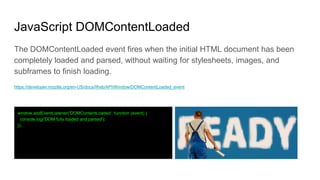
JavaScript DOMContentLoaded
The DOMContentLoaded event fires when the initial HTML document has been
completely loaded and parsed, without waiting for stylesheets, images, and
subframes to finish loading.
https://developer.mozilla.org/en-US/docs/Web/API/Window/DOMContentLoaded_event
window.addEventListener('DOMContentLoaded', function (event) {
console.log('DOM fully loaded and parsed');
});
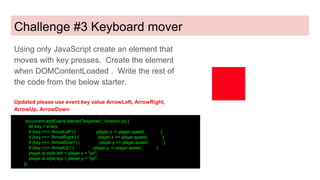
Challenge #3 Keyboard mover
Using only JavaScript create an element that
moves with key presses. Create the element
when DOMContentLoaded . Write the rest of
the code from the below starter.
Updated please use event.key value ArrowLeft, ArrowRight,
ArrowUp, ArrowDown
document.addEventListener("keydown", function (e) {
let key = e.key;
if (key === 'ArrowLeft') { player.x -= player.speed; }
if (key === 'ArrowRight') { player.x += player.speed; }
if (key === 'ArrowDown') { player.y += player.speed; }
if (key === 'ArrowUp') { player.y -= player.speed; }
player.el.style.left = player.x + "px";
player.el.style.top = player.y + "px";
})
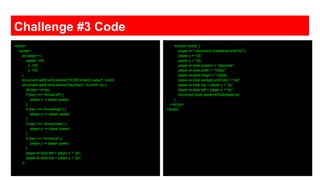
Challenge #3 Code
<body>
<script>
let player = {
speed: 100
, x: 100
, y: 100
}
document.addEventListener("DOMContentLoaded", build);
document.addEventListener("keydown", function (e) {
let key = e.key;
if (key === 'ArrowLeft') {
player.x -= player.speed;
}
if (key === 'ArrowRight') {
player.x += player.speed;
}
if (key === 'ArrowDown') {
player.y += player.speed;
}
if (key === 'ArrowUp') {
player.y -= player.speed;
}
player.el.style.left = player.x + "px";
player.el.style.top = player.y + "px";
})
function build() {
player.el = document.createElement("div");
player.x = 100;
player.y = 100;
player.el.style.position = "absolute";
player.el.style.width = "100px";
player.el.style.height = "100px";
player.el.style.backgroundColor = "red";
player.el.style.top = player.y + "px";
player.el.style.left = player.x + "px";
document.body.appendChild(player.el);
}
</script>
</body>
JavaScript Date
● new Date()
● getDate()
● setDate()
JavaScript Date
Examples show several ways to create
JavaScript dates
var today = new Date();
var birthday = new Date('December 17, 1995 03:24:00');
var birthday = new Date('1995-12-17T03:24:00');
var birthday = new Date(1995, 11, 17);
var birthday = new Date(1995, 11, 17, 3, 24, 0);
JavaScript Date
Creates a JavaScript Date
instance that represents a
single moment in time.
https://developer.mozilla.org/en-
US/docs/Web/JavaScript/Reference/Global_Objects
/Date
Date.prototype.getTime()
Returns the numeric value of the specified date as
the number of milliseconds since January 1, 1970,
00:00:00 UTC (negative for prior times).
let d = new Date();
console.log(d);
d = new Date(2020, 10, 15, 5, 15, 30, 0); //year, month, day, hour, minute, second
//JavaScript counts months from 0 to 11. January is 0. December is 11.
console.log(d);
//milliseconds
d = new Date(0); //Start January 01, 1970
console.log(d);
console.log(d.toString());
console.log(d.toUTCString());
console.log(d.toDateString());
d = new Date("2020-12-31");
console.log(d);
d = new Date("12/31/2020");
console.log(d);
console.log(d.getDate());
console.log(d.getDay());
console.log(d.getTime());
d = new Date();
console.log(d.getMilliseconds()); //according to local time.
console.log(d.getUTCMilliseconds()); //according to universal time.
d.setFullYear(2025)
console.log(d);
JavaScript Date
Add 1 day to current date.
*Try it add a week now.
let days = 1;
const newDate = new Date(Date.now() + days * 24*60*60*1000);
console.log(newDate);
Lesson Challenge
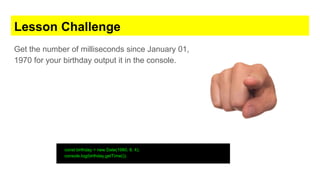
Get the number of milliseconds since January 01,
1970 for your birthday output it in the console.
const birthday = new Date(1980, 8, 4);
console.log(birthday.getTime());
JavaScript parse and stringify
● JSON.parse()
● JSON.stringify()
JavaScript parse and stringify
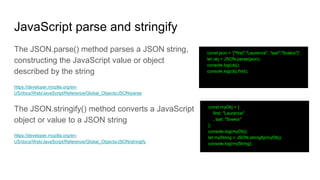
The JSON.parse() method parses a JSON string,
constructing the JavaScript value or object
described by the string
https://developer.mozilla.org/en-
US/docs/Web/JavaScript/Reference/Global_Objects/JSON/parse
The JSON.stringify() method converts a JavaScript
object or value to a JSON string
https://developer.mozilla.org/en-
US/docs/Web/JavaScript/Reference/Global_Objects/JSON/stringify
const json = '{"first":"Laurence", “last":"Svekis"}';
let obj = JSON.parse(json);
console.log(obj);
console.log(obj.first);
const myObj = {
first: "Laurence"
, last: "Svekis"
};
console.log(myObj);
let myString = JSON.stringify(myObj);
console.log(myString);
Lesson Challenge
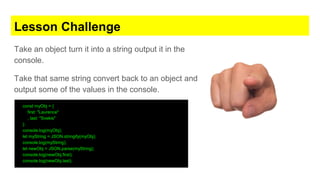
Take an object turn it into a string output it in the
console.
Take that same string convert back to an object and
output some of the values in the console.
const myObj = {
first: "Laurence"
, last: "Svekis"
};
console.log(myObj);
let myString = JSON.stringify(myObj);
console.log(myString);
let newObj = JSON.parse(myString);
console.log(newObj.first);
console.log(newObj.last);
JavaScript LocalStorage
● localStorage.setItem()
● localStorage.getItem()
● localStorage.removeItem()
● localStorage.clear()
JavaScript LocalStorage
The read-only localStorage property allows you to
access a Storage object for the Document's origin;
the stored data is saved across browser sessions.
localStorage is similar to sessionStorage, except
that while data stored in localStorage has no
expiration time.
https://developer.mozilla.org/en-US/docs/Web/API/Window/localStorage
localStorage.setItem('myName', 'Laurence');
let me = localStorage.getItem('myName');
localStorage.removeItem('myName');
localStorage.clear();
Lesson Challenge
Check if a value exists in the local storage, if it does
increment it by one, otherwise create it and set it to
1. Output the value into the console.
if(localStorage.getItem('num')){
let cnt = localStorage.getItem('num');
cnt = Number(cnt);
cnt++;
localStorage.setItem('num',cnt);
}else{
localStorage.setItem('num',1);
}
console.log(localStorage.getItem('num'))
JavaScript getBoundingClientRect()
● getBoundingClientRect()
getBoundingClientRect
The Element.getBoundingClientRect() method
returns the size of an element and its position
relative to the viewport.
https://developer.mozilla.org/en-US/docs/Web/API/Element/getBoundingClientRect
var rect = obj.getBoundingClientRect();
Lesson Challenge
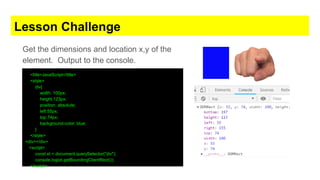
Get the dimensions and location x,y of the
element. Output to the console.
<title>JavaScript</title>
<style>
div{
width: 100px;
height:123px;
position: absolute;
left:55px;
top:74px;
background-color: blue;
}
</style>
<div></div>
<script>
const el = document.querySelector("div");
console.log(el.getBoundingClientRect());
</script>
JavaScript Timers
● setTimeout()
● setInterval()
● requestAnimationFrame()
Timers setTimeout() setInterval()
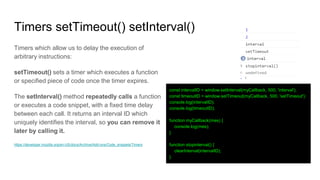
Timers which allow us to delay the execution of
arbitrary instructions:
setTimeout() sets a timer which executes a function
or specified piece of code once the timer expires.
The setInterval() method repeatedly calls a function
or executes a code snippet, with a fixed time delay
between each call. It returns an interval ID which
uniquely identifies the interval, so you can remove it
later by calling it.
https://developer.mozilla.org/en-US/docs/Archive/Add-ons/Code_snippets/Timers
const intervalID = window.setInterval(myCallback, 500, 'interval');
const timeoutID = window.setTimeout(myCallback, 500, 'setTimeout');
console.log(intervalID);
console.log(timeoutID);
function myCallback(mes) {
console.log(mes);
}
function stopinterval() {
clearInterval(intervalID);
}
Timers requestAnimationFrame()
The window.requestAnimationFrame() method
tells the browser that you wish to perform an
animation and requests that the browser call a
specified function to update an animation before
the next repaint.
https://developer.mozilla.org/en-US/docs/Web/API/Window/requestAnimationFrame
<div>Hello</div>
<script>
let x = 0;
const element = document.querySelector('div');
function step() {
x++;
element.style.transform = 'translateX(' + x + 'px)';
if (x < 450) {
window.requestAnimationFrame(step);
}
}
window.requestAnimationFrame(step);
</script>
Lesson Challenge
Create a countdown timer that decreases by
one each second until it reaches zero.
Output the value to an element.
<div></div>
<script>
let x = 10;
const element = document.querySelector('div');
const intervalID = window.setInterval(counter, 100);
function counter() {
element.textContent = x;
x--;
if (x < 0) {
clearInterval(intervalID);
}
}
</script>
encodeURIComponent
● decodeURIComponent()
● encodeURIComponent()
● encodeURI()
● decodeURI()
encodeURIComponent decodeURIComponent
Less NOT escaped than encodeURI
The encodeURIComponent() function encodes a
Uniform Resource Identifier (URI) component by
replacing each instance of certain characters
https://developer.mozilla.org/en-
US/docs/Web/JavaScript/Reference/Global_Objects/encodeURIComponent
The decodeURIComponent() function decodes a
Uniform Resource Identifier (URI) component
previously created by encodeURIComponent or by a
similar routine.
https://developer.mozilla.org/en-
US/docs/Web/JavaScript/Reference/Global_Objects/decodeURIComponent
let url = window.location.href;
let encodeurl = encodeURIComponent(url);
let dencodeurl = decodeURIComponent(encodeurl);
console.log(encodeurl);
console.log(dencodeurl);
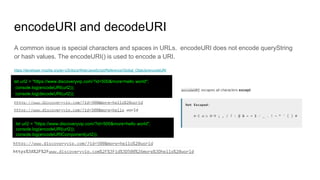
encodeURI and decodeURI
A common issue is special characters and spaces in URLs. encodeURI does not encode queryString
or hash values. The encodeURI() is used to encode a URI.
https://developer.mozilla.org/en-US/docs/Web/JavaScript/Reference/Global_Objects/encodeURI
let url2 = "https://www.discoveryvip.com/?id=500&more=hello world";
console.log(encodeURI(url2));
console.log(decodeURI(url2));
let url2 = "https://www.discoveryvip.com/?id=500&more=hello world";
console.log(encodeURI(url2));
console.log(encodeURIComponent(url2));
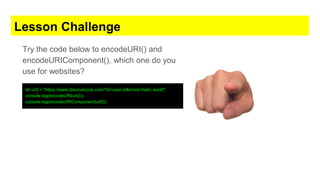
Lesson Challenge
Try the code below to encodeURI() and
encodeURIComponent(), which one do you
use for websites?
let url2 = "https://www.discoveryvip.com/?id=user-id&more=hello world";
console.log(encodeURI(url2));
console.log(encodeURIComponent(url2));
Regex
● RegExp
● Match
● Replace
● Test
● exec
RegExp
The RegExp constructor creates a regular
expression object for matching text with a pattern
https://developer.mozilla.org/en-
US/docs/Web/JavaScript/Reference/Global_Objects/RegExp
* (zero or more times)
+ (one or more times)
{n} (exactly n times)
{n,} (at least n times)
{n,m} (at least n times but no more than m times)
[0-9]+ (and its equivalent d+) matches any non-negative integer
d{4}-d{2}-d{2} matches dates formatted like 2019-01-01
d Any digit character
w Alphanumeric character
s Any whitespace character
D A character that is not a digit
W A nonalphanumeric character
S A nonwhitespace character
https://regexr.com/ - best tool to build regex, check the cheatsheet for a
nice list.
let myStr = "HelloWorld JavaScript 123 this works I love
JavaScript 44";
let reg = /(w+)s(w+)/;
let temp1 = myStr.replace(reg, 'TEST1,TEST2');
let temp5 = myStr.replace("World", "People");
console.log(temp1);
console.log(temp5);
console.log(myStr.match(/J/));
console.log(myStr.match(/J/gi));
console.log(/JavaScript/.test(myStr));
console.log(/[0-9]/.test(myStr));
let temp4 = /d+/.exec(myStr);
console.log(temp4);
console.log(temp4.index);
let myArr = ["one", "two", "three", "four"];
let temp2 = myArr.toString();
let temp3 = myArr.join('....');
console.log(temp3);
console.log(myStr.search(/JavaScript/));
let exp = /JavaScript/gi;
let data = myStr.match(exp);
console.log(data);
Lesson Challenge
Take all the email addresses from the string
and output them into the console.
"HelloWorld JavaScript 123 this works
sometestemail@gmail.com I love JavaScript
44 sample@email.com";
let myStr2 = "HelloWorld JavaScript 123 this works sometestemail@gmail.com
I love JavaScript 44 sample@email.com";
let exp2 = /([A-Za-z0-9._-]+@[a-zA-Z0-9._-]+.[a-zA-Z0-9._-]+)/g;
let emailData = myStr2.match(exp2);
for (let x = 0; x < emailData.length; x++) {
console.log(emailData[x]);
}
prototype
● prototype
prototype
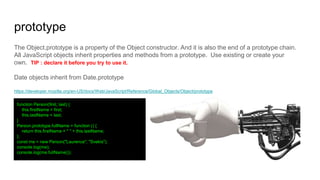
The Object.prototype is a property of the Object constructor. And it is also the end of a prototype chain.
All JavaScript objects inherit properties and methods from a prototype. Use existing or create your
own. TIP : declare it before you try to use it.
Date objects inherit from Date.prototype
https://developer.mozilla.org/en-US/docs/Web/JavaScript/Reference/Global_Objects/Object/prototype
function Person(first, last) {
this.firstName = first;
this.lastName = last;
}
Person.prototype.fullName = function () {
return this.firstName + " " + this.lastName;
};
const me = new Person("Laurence", "Svekis");
console.log(me);
console.log(me.fullName());
Lesson Challenge
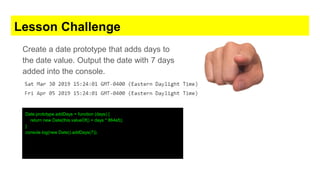
Create a date prototype that adds days to
the date value. Output the date with 7 days
added into the console.
Date.prototype.addDays = function (days) {
return new Date(this.valueOf() + days * 864e5);
}
console.log(new Date().addDays(7));
Try and catch
● Try
● Catch
● Throw
● Finally
try...catch...throw….finally
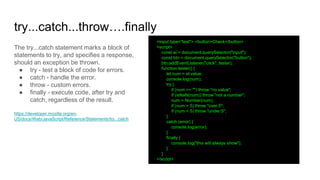
The try...catch statement marks a block of
statements to try, and specifies a response,
should an exception be thrown.
● try - test a block of code for errors.
● catch - handle the error.
● throw - custom errors.
● finally - execute code, after try and
catch, regardless of the result.
https://developer.mozilla.org/en-
US/docs/Web/JavaScript/Reference/Statements/try...catch
<input type="text"> <button>Check</button>
<script>
const el = document.querySelector("input");
const btn = document.querySelector("button");
btn.addEventListener("click", tester);
function tester() {
let num = el.value;
console.log(num);
try {
if (num == "") throw "no value";
if (isNaN(num)) throw "not a number";
num = Number(num);
if (num > 5) throw "over 5";
if (num < 5) throw "under 5";
}
catch (error) {
console.log(error);
}
finally {
console.log("this will always show");
}
}
</script>
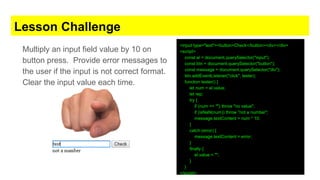
Lesson Challenge
Multiply an input field value by 10 on
button press. Provide error messages to
the user if the input is not correct format.
Clear the input value each time.
<input type="text"><button>Check</button><div></div>
<script>
const el = document.querySelector("input");
const btn = document.querySelector("button");
const message = document.querySelector("div");
btn.addEventListener("click", tester);
function tester() {
let num = el.value;
let rep;
try {
if (num == "") throw "no value";
if (isNaN(num)) throw "not a number";
message.textContent = num * 10;
}
catch (error) {
message.textContent = error;
}
finally {
el.value = "";
}
}
</script>
Fetch xHR requests
● Fetch
● xHR
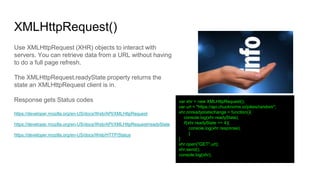
XMLHttpRequest()
Use XMLHttpRequest (XHR) objects to interact with
servers. You can retrieve data from a URL without having
to do a full page refresh.
The XMLHttpRequest.readyState property returns the
state an XMLHttpRequest client is in.
Response gets Status codes
https://developer.mozilla.org/en-US/docs/Web/API/XMLHttpRequest
https://developer.mozilla.org/en-US/docs/Web/API/XMLHttpRequest/readyState
https://developer.mozilla.org/en-US/docs/Web/HTTP/Status
var xhr = new XMLHttpRequest();
var url = "https://api.chucknorris.io/jokes/random";
xhr.onreadystatechange = function(){
console.log(xhr.readyState);
if(xhr.readyState == 4){
console.log(xhr.response);
}
}
xhr.open("GET",url);
xhr.send();
console.log(xhr);
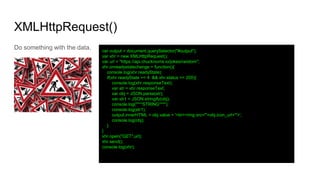
XMLHttpRequest()
Do something with the data. var output = document.querySelector("#output");
var xhr = new XMLHttpRequest();
var url = "https://api.chucknorris.io/jokes/random";
xhr.onreadystatechange = function(){
console.log(xhr.readyState);
if(xhr.readyState == 4 && xhr.status == 200){
console.log(xhr.responseText);
var str = xhr.responseText;
var obj = JSON.parse(str);
var str1 = JSON.stringify(obj);
console.log("***STRING***");
console.log(str1);
output.innerHTML = obj.value + '<br><img src="'+obj.icon_url+'">';
console.log(obj);
}
}
xhr.open("GET",url);
xhr.send();
console.log(xhr);
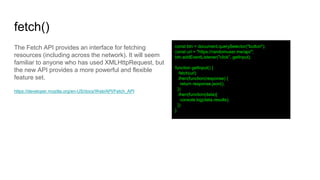
fetch()
The Fetch API provides an interface for fetching
resources (including across the network). It will seem
familiar to anyone who has used XMLHttpRequest, but
the new API provides a more powerful and flexible
feature set.
https://developer.mozilla.org/en-US/docs/Web/API/Fetch_API
const btn = document.querySelector("button");
const url = "https://randomuser.me/api/";
btn.addEventListener("click", getInput);
function getInput() {
fetch(url)
.then(function(response) {
return response.json();
})
.then(function(data){
console.log(data.results);
})
}
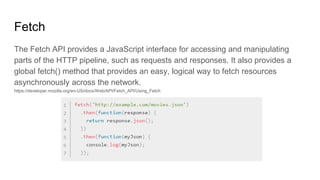
Fetch
The Fetch API provides a JavaScript interface for accessing and manipulating
parts of the HTTP pipeline, such as requests and responses. It also provides a
global fetch() method that provides an easy, logical way to fetch resources
asynchronously across the network.
https://developer.mozilla.org/en-US/docs/Web/API/Fetch_API/Using_Fetch
fetch()
Multiple results iteration <input type="number" value="10"><button>Get</button><div></div>
<script>
const btn = document.querySelector("button");
const output = document.querySelector("div");
const intake = document.querySelector("input");
const url = "https://randomuser.me/api/";
btn.addEventListener("click", getInput);
function getInput() {
let tempVal = intake.value;
let tempURL = url + "?results=" + tempVal;
fetch(tempURL).then(function (response) {
return response.json();
}).then(function (data) {
console.log(data.results);
for (let x = 0; x < data.results.length; x++) {
output.innerHTML += data.results[x].name.first + " ";
output.innerHTML += data.results[x].name.last + "<br>";
}
})
}
</script>
Lesson Challenge
Get data https://jsonplaceholder.typicode.com/todos
create elements that are green for
completed and red for not complete items
in the list. Populate a page div.
const output = document.querySelector("div");
const url = "https://jsonplaceholder.typicode.com/todos";
loadJSON();
function loadJSON() {
fetch(url).then(function (res) {
return res.json()
}).then(function (data) {
console.log(data);
for (let x = 0; x < data.length; x++) {
let div = document.createElement("div");
if (data[x].completed) {
div.style.color = "green"
}
else {
div.style.color = "red"
}
div.textContent = data[x].id + ". " + data[x].title;
output.appendChild(div);
}
})
}
Congratulations on completing the course!
Thank you
This ebook uses https://developer.mozilla.org/en-US/docs/Web/JavaScript as a source for examples. Check out
more about JavaScript at MDN.
Course content https://www.udemy.com/javascript-course-projects
Find out more about my courses at http://discoveryvip.com/
Course instructor : Laurence Svekis -
providing online training to over
500,000 students across hundreds of
courses and many platforms.

JavaScript Advanced - Useful methods to power up your code

  • 1.
  • 2.
    Learn More - Videosand source code included Get this Course https://www.udemy.com/javascript-course- plus/?couponCode=SLIDESHARE Course instructor : Laurence Svekis - providing online training to over 500,000 students across hundreds of courses and many platforms.
  • 3.
    Course topics include 1.JavaScript Number Methods 2. JavaScript String Methods 3. JavaScript Math 4. DOMContentLoaded 5. JavaScript Date 6. JavaScript parse and stringify 7. JavaScript LocalStorage 8. JavaScript getBoundingClientRect() 9. JavaScript Timers setTimeout() setInterval() requestAnimationFrame() 10. encodeURIComponent 11. Regex 12. prototype 13. Try and catch 14. Fetch xHR requests
  • 4.
    JavaScript Number Methods ●parseInt() ● toFixed(2)
  • 5.
    JavaScript Number Methods Numbermethods let you work with numbers. https://developer.mozilla.org/en- US/docs/Web/JavaScript/Reference/Global_Objects/ Number let myNum = 100.525; let num2 = "100"; console.log(myNum.toFixed(2)); console.log(Number(num2)); console.log(parseInt(num2)); console.log(num2);
  • 6.
    Lesson Challenge Try someof the number methods.
  • 7.
    JavaScript String Methods ●String.prototype.trim() ● String.prototype.toUpperCase() ● String.prototype.toLowerCase() ● String.prototype.split() ● String.prototype.slice() ● String.prototype.replace() ● String.prototype.lastIndexOf() ● String.prototype.indexOf()
  • 8.
    JavaScript String Methods Stringmethods let you work with strings. https://developer.mozilla.org/en- US/docs/Web/JavaScript/Reference/Global_Objects/String/indexOf console.log(myString.length); console.log(myString.trim()); console.log(myString.toUpperCase()); console.log(myString.toLowerCase()); console.log(myString.split(' ')); // into array (",") // Split on commas console.log(myString.charAt(9)); console.log(myString[9]); console.log(myString.slice(9)); console.log(myString.slice(9,20)); console.log(myString.substring(9,20)); // to position 20 // cannot accept negative indexes console.log(myString.substr(9,20)); //next 20 console.log(myString.replace('enjoy', 'use')); console.log(myString.lastIndexOf('JavaScript')); console.log(myString.indexOf('JavaScript')); //same as search returns position console.log(myString.search('JavaScript'));//same as indexof returns position
  • 9.
    Lesson Challenge Try someof the string methods return part of your string. Turn the string into an array of words, replace content and update the string output.
  • 10.
    JavaScript Math ● GenerateRandom Numbers ● Rounding up ● Rounding down ● Rounding
  • 11.
    Math floor andceil The Math.floor() function returns the largest integer less than or equal to a given number. https://developer.mozilla.org/en- US/docs/Web/JavaScript/Reference/Global_Objects/Math/floor The Math.ceil() function returns the smallest integer greater than or equal to a given number. https://developer.mozilla.org/en- US/docs/Web/JavaScript/Reference/Global_Objects/Math/ceil console.log(Math.floor(5.95)); // expected output: 5 console.log(Math.floor(5.05)); // expected output: 5 console.log(Math.floor(5)); // expected output: 5 console.log(Math.floor(-5.05)); // expected output: -6 console.log(Math.ceil(.95)); // expected output: 1 console.log(Math.ceil(4)); // expected output: 4 console.log(Math.ceil(7.004)); // expected output: 8 console.log(Math.ceil(-7.004)); // expected output: -7
  • 12.
    Math Random Let yougenerate a random value. A floating-point, pseudo-random number between 0 (inclusive) and 1 (exclusive). https://developer.mozilla.org/en- US/docs/Web/JavaScript/Reference/Global_Object s/Math/random function getRandomInt(min, max) { min = Math.ceil(min); max = Math.floor(max); return Math.floor(Math.random() * (max - min)) + min; //The maximum is exclusive and the minimum is inclusive } function getRandomInt(max) { return Math.floor(Math.random() * Math.floor(max)); } console.log(getRandomInt(3)); // expected output: 0, 1 or 2 console.log(getRandomInt(1)); // expected output: 0 console.log(Math.random()); // expected output: a number between 0 and 1
  • 13.
    Lesson Challenge Create afunction to generate a random number function getRandomInt(min, max) { min = Math.ceil(min); max = Math.floor(max); return Math.floor(Math.random() * (max - min)) + min; //The maximum is exclusive and the minimum is inclusive }
  • 14.
    Array Includes andternary operator ● Includes ● Ternary operator
  • 15.
    Includes and ternary Theincludes() method determines whether an array includes a certain value among its entries, returning true or false as appropriate. https://developer.mozilla.org/en-US/docs/Web/JavaScript/Reference/Global_Objects/Array/includes The conditional (ternary) operator is the only JavaScript operator that takes three operands. This operator is frequently used as a shortcut for the if statement. https://developer.mozilla.org/en-US/docs/Web/JavaScript/Reference/Operators/Conditional_Operator function getFee(isMember) { return (isMember ? "$2.00" : "$10.00"); } console.log(getFee(true)); // expected output: "$2.00" console.log(getFee(false)); // expected output: "$10.00" console.log(getFee(1)); // expected output: "$2.00" var array1 = [1, 2, 3]; console.log(array1.includes(2)); // expected output: true var pets = ['cat', 'dog', 'bat']; console.log(pets.includes('cat'));// expected output: true console.log(pets.includes('at'));// expected output: false
  • 16.
    Lesson Challenge Recursion RandomNumber Exclude Generate 50 random numbers from 1 to 20 excluding from a list. 10, 15, 7, 1, 4, 2, 5 Output the results into the console.
  • 17.
    Code Snippet const excludeNumbers= [10, 15, 7, 1, 4, 2, 5]; function generateRandom(min, max) { let num = Math.floor(Math.random() * (max - min + 1)) + min; return excludeNumbers.includes(num) ? generateRandom(min, max) : num; } for (let x = 0; x < 20; x++) { let min = 1; let max = 15; let num = generateRandom(min, max); console.log(num); }
  • 18.
    Challenge #1 -Random Array Message Create an array and randomly on page load output an item from the array on the screen. <body> <script> const myArray = ["Hello", "Welcome", "Bye Bye"]; let temp = randomItem(myArray); let mes = document.createTextNode(temp); document.body.appendChild(mes); function randomItem(arr) { return arr[Math.floor(Math.random() * arr.length)] } </script> </body>
  • 19.
    Challenge #2 -Random Background Color Body Update the body of the page to have a random background color. <body> <script> document.body.style.backgroundColor = randomColor(); function randomColor() { return "#" + Math.random().toString(16).substr(-6); } </script> </body>
  • 20.
  • 21.
    JavaScript DOMContentLoaded The DOMContentLoadedevent fires when the initial HTML document has been completely loaded and parsed, without waiting for stylesheets, images, and subframes to finish loading. https://developer.mozilla.org/en-US/docs/Web/API/Window/DOMContentLoaded_event window.addEventListener('DOMContentLoaded', function (event) { console.log('DOM fully loaded and parsed'); });
  • 22.
    Challenge #3 Keyboardmover Using only JavaScript create an element that moves with key presses. Create the element when DOMContentLoaded . Write the rest of the code from the below starter. Updated please use event.key value ArrowLeft, ArrowRight, ArrowUp, ArrowDown document.addEventListener("keydown", function (e) { let key = e.key; if (key === 'ArrowLeft') { player.x -= player.speed; } if (key === 'ArrowRight') { player.x += player.speed; } if (key === 'ArrowDown') { player.y += player.speed; } if (key === 'ArrowUp') { player.y -= player.speed; } player.el.style.left = player.x + "px"; player.el.style.top = player.y + "px"; })
  • 23.
    Challenge #3 Code <body> <script> letplayer = { speed: 100 , x: 100 , y: 100 } document.addEventListener("DOMContentLoaded", build); document.addEventListener("keydown", function (e) { let key = e.key; if (key === 'ArrowLeft') { player.x -= player.speed; } if (key === 'ArrowRight') { player.x += player.speed; } if (key === 'ArrowDown') { player.y += player.speed; } if (key === 'ArrowUp') { player.y -= player.speed; } player.el.style.left = player.x + "px"; player.el.style.top = player.y + "px"; }) function build() { player.el = document.createElement("div"); player.x = 100; player.y = 100; player.el.style.position = "absolute"; player.el.style.width = "100px"; player.el.style.height = "100px"; player.el.style.backgroundColor = "red"; player.el.style.top = player.y + "px"; player.el.style.left = player.x + "px"; document.body.appendChild(player.el); } </script> </body>
  • 24.
    JavaScript Date ● newDate() ● getDate() ● setDate()
  • 25.
    JavaScript Date Examples showseveral ways to create JavaScript dates var today = new Date(); var birthday = new Date('December 17, 1995 03:24:00'); var birthday = new Date('1995-12-17T03:24:00'); var birthday = new Date(1995, 11, 17); var birthday = new Date(1995, 11, 17, 3, 24, 0);
  • 26.
    JavaScript Date Creates aJavaScript Date instance that represents a single moment in time. https://developer.mozilla.org/en- US/docs/Web/JavaScript/Reference/Global_Objects /Date Date.prototype.getTime() Returns the numeric value of the specified date as the number of milliseconds since January 1, 1970, 00:00:00 UTC (negative for prior times). let d = new Date(); console.log(d); d = new Date(2020, 10, 15, 5, 15, 30, 0); //year, month, day, hour, minute, second //JavaScript counts months from 0 to 11. January is 0. December is 11. console.log(d); //milliseconds d = new Date(0); //Start January 01, 1970 console.log(d); console.log(d.toString()); console.log(d.toUTCString()); console.log(d.toDateString()); d = new Date("2020-12-31"); console.log(d); d = new Date("12/31/2020"); console.log(d); console.log(d.getDate()); console.log(d.getDay()); console.log(d.getTime()); d = new Date(); console.log(d.getMilliseconds()); //according to local time. console.log(d.getUTCMilliseconds()); //according to universal time. d.setFullYear(2025) console.log(d);
  • 27.
    JavaScript Date Add 1day to current date. *Try it add a week now. let days = 1; const newDate = new Date(Date.now() + days * 24*60*60*1000); console.log(newDate);
  • 28.
    Lesson Challenge Get thenumber of milliseconds since January 01, 1970 for your birthday output it in the console. const birthday = new Date(1980, 8, 4); console.log(birthday.getTime());
  • 29.
    JavaScript parse andstringify ● JSON.parse() ● JSON.stringify()
  • 30.
    JavaScript parse andstringify The JSON.parse() method parses a JSON string, constructing the JavaScript value or object described by the string https://developer.mozilla.org/en- US/docs/Web/JavaScript/Reference/Global_Objects/JSON/parse The JSON.stringify() method converts a JavaScript object or value to a JSON string https://developer.mozilla.org/en- US/docs/Web/JavaScript/Reference/Global_Objects/JSON/stringify const json = '{"first":"Laurence", “last":"Svekis"}'; let obj = JSON.parse(json); console.log(obj); console.log(obj.first); const myObj = { first: "Laurence" , last: "Svekis" }; console.log(myObj); let myString = JSON.stringify(myObj); console.log(myString);
  • 31.
    Lesson Challenge Take anobject turn it into a string output it in the console. Take that same string convert back to an object and output some of the values in the console. const myObj = { first: "Laurence" , last: "Svekis" }; console.log(myObj); let myString = JSON.stringify(myObj); console.log(myString); let newObj = JSON.parse(myString); console.log(newObj.first); console.log(newObj.last);
  • 32.
    JavaScript LocalStorage ● localStorage.setItem() ●localStorage.getItem() ● localStorage.removeItem() ● localStorage.clear()
  • 33.
    JavaScript LocalStorage The read-onlylocalStorage property allows you to access a Storage object for the Document's origin; the stored data is saved across browser sessions. localStorage is similar to sessionStorage, except that while data stored in localStorage has no expiration time. https://developer.mozilla.org/en-US/docs/Web/API/Window/localStorage localStorage.setItem('myName', 'Laurence'); let me = localStorage.getItem('myName'); localStorage.removeItem('myName'); localStorage.clear();
  • 34.
    Lesson Challenge Check ifa value exists in the local storage, if it does increment it by one, otherwise create it and set it to 1. Output the value into the console. if(localStorage.getItem('num')){ let cnt = localStorage.getItem('num'); cnt = Number(cnt); cnt++; localStorage.setItem('num',cnt); }else{ localStorage.setItem('num',1); } console.log(localStorage.getItem('num'))
  • 35.
  • 36.
    getBoundingClientRect The Element.getBoundingClientRect() method returnsthe size of an element and its position relative to the viewport. https://developer.mozilla.org/en-US/docs/Web/API/Element/getBoundingClientRect var rect = obj.getBoundingClientRect();
  • 37.
    Lesson Challenge Get thedimensions and location x,y of the element. Output to the console. <title>JavaScript</title> <style> div{ width: 100px; height:123px; position: absolute; left:55px; top:74px; background-color: blue; } </style> <div></div> <script> const el = document.querySelector("div"); console.log(el.getBoundingClientRect()); </script>
  • 38.
    JavaScript Timers ● setTimeout() ●setInterval() ● requestAnimationFrame()
  • 39.
    Timers setTimeout() setInterval() Timerswhich allow us to delay the execution of arbitrary instructions: setTimeout() sets a timer which executes a function or specified piece of code once the timer expires. The setInterval() method repeatedly calls a function or executes a code snippet, with a fixed time delay between each call. It returns an interval ID which uniquely identifies the interval, so you can remove it later by calling it. https://developer.mozilla.org/en-US/docs/Archive/Add-ons/Code_snippets/Timers const intervalID = window.setInterval(myCallback, 500, 'interval'); const timeoutID = window.setTimeout(myCallback, 500, 'setTimeout'); console.log(intervalID); console.log(timeoutID); function myCallback(mes) { console.log(mes); } function stopinterval() { clearInterval(intervalID); }
  • 40.
    Timers requestAnimationFrame() The window.requestAnimationFrame()method tells the browser that you wish to perform an animation and requests that the browser call a specified function to update an animation before the next repaint. https://developer.mozilla.org/en-US/docs/Web/API/Window/requestAnimationFrame <div>Hello</div> <script> let x = 0; const element = document.querySelector('div'); function step() { x++; element.style.transform = 'translateX(' + x + 'px)'; if (x < 450) { window.requestAnimationFrame(step); } } window.requestAnimationFrame(step); </script>
  • 41.
    Lesson Challenge Create acountdown timer that decreases by one each second until it reaches zero. Output the value to an element. <div></div> <script> let x = 10; const element = document.querySelector('div'); const intervalID = window.setInterval(counter, 100); function counter() { element.textContent = x; x--; if (x < 0) { clearInterval(intervalID); } } </script>
  • 42.
  • 43.
    encodeURIComponent decodeURIComponent Less NOTescaped than encodeURI The encodeURIComponent() function encodes a Uniform Resource Identifier (URI) component by replacing each instance of certain characters https://developer.mozilla.org/en- US/docs/Web/JavaScript/Reference/Global_Objects/encodeURIComponent The decodeURIComponent() function decodes a Uniform Resource Identifier (URI) component previously created by encodeURIComponent or by a similar routine. https://developer.mozilla.org/en- US/docs/Web/JavaScript/Reference/Global_Objects/decodeURIComponent let url = window.location.href; let encodeurl = encodeURIComponent(url); let dencodeurl = decodeURIComponent(encodeurl); console.log(encodeurl); console.log(dencodeurl);
  • 44.
    encodeURI and decodeURI Acommon issue is special characters and spaces in URLs. encodeURI does not encode queryString or hash values. The encodeURI() is used to encode a URI. https://developer.mozilla.org/en-US/docs/Web/JavaScript/Reference/Global_Objects/encodeURI let url2 = "https://www.discoveryvip.com/?id=500&more=hello world"; console.log(encodeURI(url2)); console.log(decodeURI(url2)); let url2 = "https://www.discoveryvip.com/?id=500&more=hello world"; console.log(encodeURI(url2)); console.log(encodeURIComponent(url2));
  • 45.
    Lesson Challenge Try thecode below to encodeURI() and encodeURIComponent(), which one do you use for websites? let url2 = "https://www.discoveryvip.com/?id=user-id&more=hello world"; console.log(encodeURI(url2)); console.log(encodeURIComponent(url2));
  • 46.
    Regex ● RegExp ● Match ●Replace ● Test ● exec
  • 47.
    RegExp The RegExp constructorcreates a regular expression object for matching text with a pattern https://developer.mozilla.org/en- US/docs/Web/JavaScript/Reference/Global_Objects/RegExp * (zero or more times) + (one or more times) {n} (exactly n times) {n,} (at least n times) {n,m} (at least n times but no more than m times) [0-9]+ (and its equivalent d+) matches any non-negative integer d{4}-d{2}-d{2} matches dates formatted like 2019-01-01 d Any digit character w Alphanumeric character s Any whitespace character D A character that is not a digit W A nonalphanumeric character S A nonwhitespace character https://regexr.com/ - best tool to build regex, check the cheatsheet for a nice list. let myStr = "HelloWorld JavaScript 123 this works I love JavaScript 44"; let reg = /(w+)s(w+)/; let temp1 = myStr.replace(reg, 'TEST1,TEST2'); let temp5 = myStr.replace("World", "People"); console.log(temp1); console.log(temp5); console.log(myStr.match(/J/)); console.log(myStr.match(/J/gi)); console.log(/JavaScript/.test(myStr)); console.log(/[0-9]/.test(myStr)); let temp4 = /d+/.exec(myStr); console.log(temp4); console.log(temp4.index); let myArr = ["one", "two", "three", "four"]; let temp2 = myArr.toString(); let temp3 = myArr.join('....'); console.log(temp3); console.log(myStr.search(/JavaScript/)); let exp = /JavaScript/gi; let data = myStr.match(exp); console.log(data);
  • 48.
    Lesson Challenge Take allthe email addresses from the string and output them into the console. "HelloWorld JavaScript 123 this works sometestemail@gmail.com I love JavaScript 44 sample@email.com"; let myStr2 = "HelloWorld JavaScript 123 this works sometestemail@gmail.com I love JavaScript 44 sample@email.com"; let exp2 = /([A-Za-z0-9._-]+@[a-zA-Z0-9._-]+.[a-zA-Z0-9._-]+)/g; let emailData = myStr2.match(exp2); for (let x = 0; x < emailData.length; x++) { console.log(emailData[x]); }
  • 49.
  • 50.
    prototype The Object.prototype isa property of the Object constructor. And it is also the end of a prototype chain. All JavaScript objects inherit properties and methods from a prototype. Use existing or create your own. TIP : declare it before you try to use it. Date objects inherit from Date.prototype https://developer.mozilla.org/en-US/docs/Web/JavaScript/Reference/Global_Objects/Object/prototype function Person(first, last) { this.firstName = first; this.lastName = last; } Person.prototype.fullName = function () { return this.firstName + " " + this.lastName; }; const me = new Person("Laurence", "Svekis"); console.log(me); console.log(me.fullName());
  • 51.
    Lesson Challenge Create adate prototype that adds days to the date value. Output the date with 7 days added into the console. Date.prototype.addDays = function (days) { return new Date(this.valueOf() + days * 864e5); } console.log(new Date().addDays(7));
  • 52.
    Try and catch ●Try ● Catch ● Throw ● Finally
  • 53.
    try...catch...throw….finally The try...catch statementmarks a block of statements to try, and specifies a response, should an exception be thrown. ● try - test a block of code for errors. ● catch - handle the error. ● throw - custom errors. ● finally - execute code, after try and catch, regardless of the result. https://developer.mozilla.org/en- US/docs/Web/JavaScript/Reference/Statements/try...catch <input type="text"> <button>Check</button> <script> const el = document.querySelector("input"); const btn = document.querySelector("button"); btn.addEventListener("click", tester); function tester() { let num = el.value; console.log(num); try { if (num == "") throw "no value"; if (isNaN(num)) throw "not a number"; num = Number(num); if (num > 5) throw "over 5"; if (num < 5) throw "under 5"; } catch (error) { console.log(error); } finally { console.log("this will always show"); } } </script>
  • 54.
    Lesson Challenge Multiply aninput field value by 10 on button press. Provide error messages to the user if the input is not correct format. Clear the input value each time. <input type="text"><button>Check</button><div></div> <script> const el = document.querySelector("input"); const btn = document.querySelector("button"); const message = document.querySelector("div"); btn.addEventListener("click", tester); function tester() { let num = el.value; let rep; try { if (num == "") throw "no value"; if (isNaN(num)) throw "not a number"; message.textContent = num * 10; } catch (error) { message.textContent = error; } finally { el.value = ""; } } </script>
  • 55.
  • 56.
    XMLHttpRequest() Use XMLHttpRequest (XHR)objects to interact with servers. You can retrieve data from a URL without having to do a full page refresh. The XMLHttpRequest.readyState property returns the state an XMLHttpRequest client is in. Response gets Status codes https://developer.mozilla.org/en-US/docs/Web/API/XMLHttpRequest https://developer.mozilla.org/en-US/docs/Web/API/XMLHttpRequest/readyState https://developer.mozilla.org/en-US/docs/Web/HTTP/Status var xhr = new XMLHttpRequest(); var url = "https://api.chucknorris.io/jokes/random"; xhr.onreadystatechange = function(){ console.log(xhr.readyState); if(xhr.readyState == 4){ console.log(xhr.response); } } xhr.open("GET",url); xhr.send(); console.log(xhr);
  • 57.
    XMLHttpRequest() Do something withthe data. var output = document.querySelector("#output"); var xhr = new XMLHttpRequest(); var url = "https://api.chucknorris.io/jokes/random"; xhr.onreadystatechange = function(){ console.log(xhr.readyState); if(xhr.readyState == 4 && xhr.status == 200){ console.log(xhr.responseText); var str = xhr.responseText; var obj = JSON.parse(str); var str1 = JSON.stringify(obj); console.log("***STRING***"); console.log(str1); output.innerHTML = obj.value + '<br><img src="'+obj.icon_url+'">'; console.log(obj); } } xhr.open("GET",url); xhr.send(); console.log(xhr);
  • 58.
    fetch() The Fetch APIprovides an interface for fetching resources (including across the network). It will seem familiar to anyone who has used XMLHttpRequest, but the new API provides a more powerful and flexible feature set. https://developer.mozilla.org/en-US/docs/Web/API/Fetch_API const btn = document.querySelector("button"); const url = "https://randomuser.me/api/"; btn.addEventListener("click", getInput); function getInput() { fetch(url) .then(function(response) { return response.json(); }) .then(function(data){ console.log(data.results); }) }
  • 59.
    Fetch The Fetch APIprovides a JavaScript interface for accessing and manipulating parts of the HTTP pipeline, such as requests and responses. It also provides a global fetch() method that provides an easy, logical way to fetch resources asynchronously across the network. https://developer.mozilla.org/en-US/docs/Web/API/Fetch_API/Using_Fetch
  • 60.
    fetch() Multiple results iteration<input type="number" value="10"><button>Get</button><div></div> <script> const btn = document.querySelector("button"); const output = document.querySelector("div"); const intake = document.querySelector("input"); const url = "https://randomuser.me/api/"; btn.addEventListener("click", getInput); function getInput() { let tempVal = intake.value; let tempURL = url + "?results=" + tempVal; fetch(tempURL).then(function (response) { return response.json(); }).then(function (data) { console.log(data.results); for (let x = 0; x < data.results.length; x++) { output.innerHTML += data.results[x].name.first + " "; output.innerHTML += data.results[x].name.last + "<br>"; } }) } </script>
  • 61.
    Lesson Challenge Get datahttps://jsonplaceholder.typicode.com/todos create elements that are green for completed and red for not complete items in the list. Populate a page div. const output = document.querySelector("div"); const url = "https://jsonplaceholder.typicode.com/todos"; loadJSON(); function loadJSON() { fetch(url).then(function (res) { return res.json() }).then(function (data) { console.log(data); for (let x = 0; x < data.length; x++) { let div = document.createElement("div"); if (data[x].completed) { div.style.color = "green" } else { div.style.color = "red" } div.textContent = data[x].id + ". " + data[x].title; output.appendChild(div); } }) }
  • 62.
    Congratulations on completingthe course! Thank you This ebook uses https://developer.mozilla.org/en-US/docs/Web/JavaScript as a source for examples. Check out more about JavaScript at MDN. Course content https://www.udemy.com/javascript-course-projects Find out more about my courses at http://discoveryvip.com/ Course instructor : Laurence Svekis - providing online training to over 500,000 students across hundreds of courses and many platforms.