Object Oriented
Programming
in
JAVA
(PRACTICAL#01)
Introduction to JDK
 Objective: Installation of JDK and become familiar with the basic java
program structure, the identifiers the primitive data types and Type
Conversion and Casting .
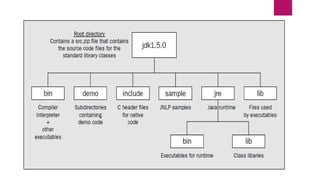
 A software development environment for developing Java applications
 Java Development Kit (JDK) is comprised of the following basic
components:
 Java compiler (javac)
 Java Virtual Machine (JVM)
 Java Application Programming Interface (API)
 JRE Java Runtime Environment
Introduction to JDK
 Javac The name of Java compile is Javac
 The Java Language Compiler compiles programs written in the Java
Programming language.
 Translates Java source code into Bytecodes.
 Produces or creates .class containing bytecodes
 Java language Complier compiles java programs into platform independent
bytecode.
 .class file contains bytecodes or Containing compiled version of the
program
 javac MyProgram.java
Introduction to JDK
 A Java compiler converts the Java source code that you write into a binary
program consisting of bytecodes.
 Bytecodes are machine instructions for the Java Virtual Machine. When you
execute a Java program, a program called the Java interpreter inspects and
translates the bytecodes then executes the actions that the bytecodes specify
within the Java Virtual Machine.
What is Java Bytecode ?
Bytecodes: is the result of compiling source code written in java
language. This bytecode can be run in any platform which has a
Java installation in it.
 We you compile a java program, the java complier (javac) creates a
.class file, that contains bytecodes.
Upon compile, the Java source code is converted into the .class
bytecode.
Bytecodes are the Platform independent instructions or portable
instructions.
The Java bytecode is not completely compiled, but
rather just an intermediate code sitting in the middle
because it still has to be interpreted and executed by the
JVM installed on the specific platform such as
Windows, Mac or Linux.
https://en.wikipedia.org/wiki/Java_bytecode
Introduction to JDK
 Java Virtual Machine (JVM): Is the engine that executes java bytecodes
 The JVM is part of the JDK. Java bytecode runs on the virtual machine
 JVM is a software converts the .class file containing bytecodes into specific
platform such windows, linux, solaris etc.
 execution environment for Java byte-code
 Java command is used to launch the JVM.
Introduction to JDK
 Java Core API Or Java Class libraries
 A library in Java is a collection of classes.
 Collection of predefiened classes
 Collections of classes organized in packages
 The classes are grouped together into related sets that are called packages
 java.lang (Object, Integer, String ….)
 java.util (Vector, Hashtable, Date….)
 java.awt (Window, Menu, Button….)
 java.net (Socket, URL, DatagramPacket….)
 https://docs.oracle.com/javase/7/docs/api/
Introduction to JDK
 JRE is part of the Java Development Kit (JDK):
 JRE consists of the following components:
 Deployment technologies, including deployment, Java Web Start and Java Plug-in.
 User interface toolkits, including Abstract Window Toolkit (AWT), Swing, Java 2D,
Accessibility, Image I/O, Print Service, Sound, drag and drop (DnD) and input methods.
 Integration libraries, including Interface Definition Language (IDL), Java Database
Connectivity (JDBC), Java Naming and Directory Interface (JNDI), Remote Method
Invocation (RMI), Remote Method Invocation Over Internet Inter-Orb Protocol (RMI-IIOP)
and scripting.
Java development environment
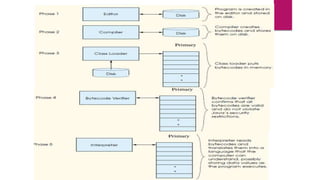
 Normally java programs go through the following phases
 Phase 1. Edit : Program is created in an editor and stored on disk in a file ending with .
. . . java extension.
 Phase 2. Compile : The compiler translates the java source code into bytecodes and
stores them on disk in a file ending with . Class extension
 Phase 3. Load : Loader reads .class file containing bytecodes from disk and puts those
bytecodes in memory.
 Phase 4. Verify : Bytecode verifier confirms that all bytecodes are valid .
 Phase 5. Execute : To execute a program , JVM reads bytecodes and translates them
into a language the computer understands
Java development environment
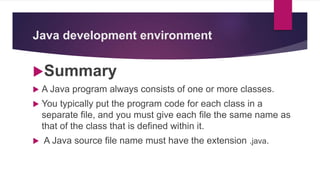
Summary
 A Java program always consists of one or more classes.
 You typically put the program code for each class in a
separate file, and you must give each file the same name as
that of the class that is defined within it.
 A Java source file name must have the extension .java.
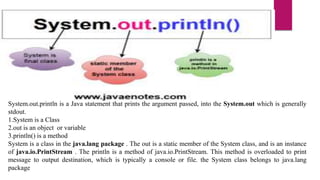
System.out.println is a Java statement that prints the argument passed, into the System.out which is generally
stdout.
1.System is a Class
2.out is an object or variable
3.println() is a method
System is a class in the java.lang package . The out is a static member of the System class, and is an instance
of java.io.PrintStream . The println is a method of java.io.PrintStream. This method is overloaded to print
message to output destination, which is typically a console or file. the System class belongs to java.lang
package
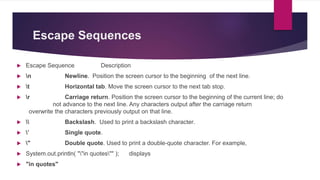
Escape Sequences
 Escape Sequence Description
 n Newline. Position the screen cursor to the beginning of the next line.
 t Horizontal tab. Move the screen cursor to the next tab stop.
 r Carriage return. Position the screen cursor to the beginning of the current line; do
not advance to the next line. Any characters output after the carriage return
overwrite the characters previously output on that line.
  Backslash. Used to print a backslash character.
 ’ Single quote.
 " Double quote. Used to print a double-quote character. For example,
 System.out.println( ""in quotes"" ); displays
 "in quotes"
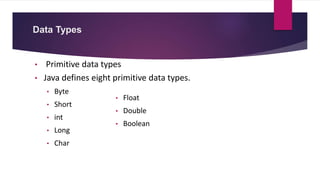
Data Types
• Primitive data types
• Java defines eight primitive data types.
• Byte
• Short
• int
• Long
• Char
• Float
• Double
• Boolean
Integer data Types
 Variable: A variable is a space in the computer’s memory set a side for a certain kind of data and gives
it a name for easy reference.
 Integers : There are four types of variables that you can use to store integer data.
 The value can be –ve or +ve.
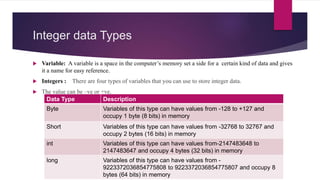
Data Type Description
Byte Variables of this type can have values from -128 to +127 and
occupy 1 byte (8 bits) in memory
Short Variables of this type can have values from -32768 to 32767 and
occupy 2 bytes (16 bits) in memory
int Variables of this type can have values from-2147483648 to
2147483647 and occupy 4 bytes (32 bits) in memory
long Variables of this type can have values from -
9223372036854775808 to 9223372036854775807 and occupy 8
bytes (64 bits) in memory
Byte & Short
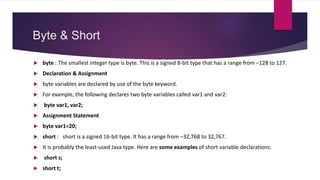
 byte : The smallest integer type is byte. This is a signed 8-bit type that has a range from –128 to 127.
 Declaration & Assignment
 byte variables are declared by use of the byte keyword.
 For example, the following declares two byte variables called var1 and var2:
 byte var1, var2;
 Assignment Statement
 byte var1=20;
 short : short is a signed 16-bit type. It has a range from –32,768 to 32,767.
 It is probably the least-used Java type. Here are some examples of short variable declarations:
 short s;
 short t;
Int & long
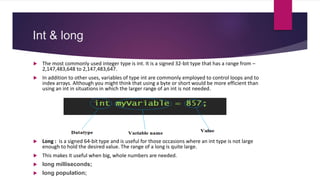
 The most commonly used integer type is int. It is a signed 32-bit type that has a range from –
2,147,483,648 to 2,147,483,647.
 In addition to other uses, variables of type int are commonly employed to control loops and to
index arrays. Although you might think that using a byte or short would be more efficient than
using an int in situations in which the larger range of an int is not needed.
 Long : is a signed 64-bit type and is useful for those occasions where an int type is not large
enough to hold the desired value. The range of a long is quite large.
 This makes it useful when big, whole numbers are needed.
 long milliseconds;
 long population;
Integer Data Types Example Program
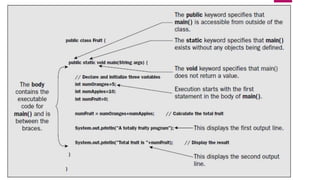
 public class EggBasket {
 public static void main(String[] args){
 int numberOfBaskets, eggsPerBasket, totalEggs;
 numberOfBaskets= 10;
 eggsPerBasket= 6;
 totalEggs= numberOfBaskets* eggsPerBasket;
 System.out.println(eggsPerBasket+ " eggs per basket and");
 System.out.println(numberOfBaskets+ " baskets, then");
 System.out.println("the total number of eggs is " + totalEggs);
 }
 }
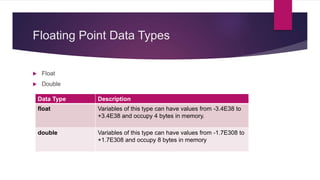
Floating Point Data Types
 Float
 Double
Data Type Description
float Variables of this type can have values from -3.4E38 to
+3.4E38 and occupy 4 bytes in memory.
double Variables of this type can have values from -1.7E308 to
+1.7E308 and occupy 8 bytes in memory
Floating-point Data Types Example
Program
 // Compute the area of a circle.
 class Area {
 public static void main(String args[]) {
 double pi, r, a;
 r = 10.8; // radius of circle
 pi = 3.1416; // pi, approximately
 a = pi * r * r; // compute area
 System.out.println("Area of circle is " + a);
 }
 }
Characters
 in Java char is a 16-bit type. The range of a char is 0 to 65,536.
 Internally characters are stored as numbers.
 CharacterExample Program
 // Demonstrate
 class CharDemo{
 public static void main(String args[]) {
 char ch1, ch2;
 ch1 = 65; // code for A
 ch2 = 'Y';
 System.out.print("ch1 and ch2: ");
 System.out.println(ch1 + " " + ch2);
 }
 }
Booleans
 Java has a primitive type, called boolean, for logical values.
 It can have only one of two possible values, true or false.
 This is the type returned by all relational operators, as in the case of a < b.
 Booleans Example Program
 public static void main(String args[]){
 boolean b=true, c=false;
 System.out.println("b = "+b);
 System.out.println("c = "+c);
 System.out.println("b is equal to c: "+ (b==c) );
 System.out.println("b is NOT equal to c: “ + (b!=c) );
 }
 }
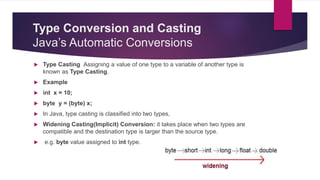
Type Conversion and Casting
Java’s Automatic Conversions
 Type Casting Assigning a value of one type to a variable of another type is
known as Type Casting.
 Example
 int x = 10;
 byte y = (byte) x;
 In Java, type casting is classified into two types,
 Widening Casting(Implicit) Conversion: it takes place when two types are
compatible and the destination type is larger than the source type.
 e.g. byte value assigned to int type.
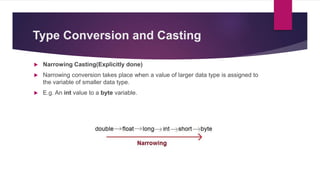
Type Conversion and Casting
 Narrowing Casting(Explicitly done)
 Narrowing conversion takes place when a value of larger data type is assigned to
the variable of smaller data type.
 E.g. An int value to a byte variable.
Type Conversion and Casting
class Test {
public static void main(String[] args) {
int i = 100;
long l = i; //no explicit type casting required
float f = l; //no explicit type casting required
System.out.println("Int value "+i);
System.out.println("Long value "+l);
System.out.println("Float value "+f);
}
}
Narrowing or Explicit type conversion
public class Test {
public static void main(String[] args) {
double d = 100.04;
long l = (long) d; //explicit type casting required
int i = (int)l; //explicit type casting required
System.out.println("Double value "+d);
System.out.println("Long value "+l);
System.out.println("Int value "+i);
}
}
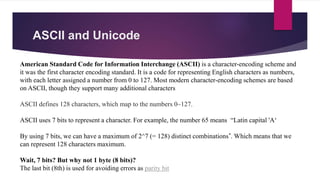
ASCII and Unicode
American Standard Code for Information Interchange (ASCII) is a character-encoding scheme and
it was the first character encoding standard. It is a code for representing English characters as numbers,
with each letter assigned a number from 0 to 127. Most modern character-encoding schemes are based
on ASCII, though they support many additional characters
ASCII defines 128 characters, which map to the numbers 0–127.
ASCII uses 7 bits to represent a character. For example, the number 65 means “Latin capital 'A‘
By using 7 bits, we can have a maximum of 2^7 (= 128) distinct combinations*. Which means that we
can represent 128 characters maximum.
Wait, 7 bits? But why not 1 byte (8 bits)?
The last bit (8th) is used for avoiding errors as parity bit
ASCII and Unicode
 Unicode is a superset of ASCII, and is a character-encoding scheme. Basically, they
are standards on how to represent difference characters in binary.
 The Unicode standard was initially designed using 16 bits to encode characters
because the primary machines were 16-bit PCs.
 Unicode is designed to uniquely encode characters used in written languages
throughout the world.
 The numbers 0–128 have the same meaning in ASCII as they have in Unicode.
ASCII and Unicode
Problem
The encodings for languages with large character sets have variable length. Some
common characters are encoded as single bytes, other require two or more byte.
Solution
To solve these problems, a new language standard was developed i.e. Unicode System.
In unicode, character holds 2 byte, so java also uses 2 byte for characters
ASCII and Unicode
The major advantage of Unicode is that at its maximum it can
accommodate a huge number of characters. Because of this,
Unicode currently contains most written languages and still has
room for even more. This includes typical left-to-right scripts like
English and even right-to-left scripts like Arabic. Chinese,
Japanese, and the many other variants are also represented within
Unicode
ASCII and Unicode
Summary:
1.ASCII uses an 8-bit encoding while Unicode uses a variable bit encoding.
2.Unicode represents most written languages in the world while ASCII does
not.
3.ASCII has its equivalent within Unicode.
ASCII and Unicode
Unicode: defines two mapping methods, the UTF (Unicode Transformation Format)
encodings, and the UCS (Universal Character Set) encodings. Unicode-based encodings
implement the Unicode standard and include UTF-8, UTF-16 and UTF-32/UCS-4.
UTF-8 - uses 1 byte to represent characters in the ASCII set, two bytes for characters in
several more alphabetic blocks, and three bytes for the rest of the BMP. Supplementary
characters use 4 bytes.
UTF-16 - uses 2 bytes for any character in the BMP, and 4 bytes for supplementary
characters.
J2SE vs J2ME vs J2EE
 Java is basically a general purpose, high level programming language, which is
widely used for development of application softwares.
 It’s used in a wide variety of platforms such as mobile phones, embedded
systems, web pages, servers and much more. Due to its cross platform
compatibility, it makes it ideal for working across platforms.
 The most important characteristic of Java is that it was designed from the outset
to be machine independent.
 You can run Java programs unchanged on any machine and operating system
combination that supports Java
 Java features
 Simple, Object-oriented and familiar
 Robust and Secure
 Architecture-neutral and portable
 High performance
 Interpreted and dynamic
J2SE(Java Platform, Standard Edition)
 Also known as Core Java, this is the most basic and standard version of Java. It’s
the purest form of Java, a basic foundation for all other editions.
 It consists of a wide variety of general purpose API’s (like java.lang, java.util) as
well as many special purpose APIs
 J2SE is mainly used to create applications for Desktop environment.
 It consist all the basics of Java the language, variables, primitive data types,
Arrays, Streams, Strings Java Database Connectivity(JDBC) and much more.
 This is the standard, from which all other editions came out, according to the
needs of the time.
 The famous JVM of Java, the heart of Java development, was also given by this
edition only
J2SE(Java Platform, Standard Edition)
 The Java Development Kit has been referred to at various
times as the JDK—the Java Development Kit—and as the
SDK—the Software Development Kit.
 The usage with release 5.0 is JDK but with release 1.4 it
was SDK, so if you see SDK this generally means the same
as JDK.
 we’ll use JDK to refer to any Java Development Kit in the
course.
J2ME(Java Platform, Micro Edition)
 This version of Java is mainly concentrated for the applications running on
embedded systems, mobiles and small devices.(which was a constraint before it’s
development)
 Constraints included limited processing power, battery limitation, small display
etc.
 J2ME uses many libraries and API’s of J2SE, as well as, many of it’s own.
 The basic aim of this edition was to work on mobiles, wireless devices, Old
Nokia phones, which used Symbian OS, used this technology.
 Most of the apps, developed for the phones(prior to smartphones era), were built
on J2ME platform only(the .jar apps on Nokia app store).
J2EE(Java Platform, Enterprise Edition)
 The Enterprise version of Java has a much larger usage of Java, like development
of web services, networking, server side scripting and other various web based
applications.
 J2EE is a community driven edition, i.e. there is a lot of continuous contributions
from industry experts, Java developers and other open source organizations.
 J2EE uses many components of J2SE, as well as, has many new features of it’s
own like Servlets, JavaBeans, Java Message Services, adding a whole new
functionalities to the language.
 J2EE uses HTML, CSS, JavaScript etc., so as to create web pages and web
services. It’s also one of the most widely accepted web development standard.
 Apart from these three versions, there was another Java version, released Java
Card.
 This edition was targeted, to run applets smoothly and securely on smart cards
and similar technology. Portability and security was its main features.
 JavaFX is another such edition of Java technology, which is now merged with
J2SE 8.It is mainly used, to create rich GUI (Graphical User Interface) in Java
apps.
 It replaces Swings (in J2SE), with itself as the standard GUI library.
 It is supported by both Desktop environment as well as web browsers.
 PersonalJava was another edition, which was not deployed much, as its function
was fulfilled by further versions of J2ME. Made to support World Wide Web (and
Java applets) and consumer electronics.
PersonalJava was also used for embedded systems and mobile. But, it was
discontinued in its earlier stages.
Learning Java
1. To be able to program effectively in Java, you
also need to understand the libraries (Java APIs)
that go with the language, and these are very
extensive.
2. Java’s Syntax
Java Programs
 There are two basic kinds of programs you can write in Java.
 Programs that are to be embedded in a web page are called Java applets, and
 Normal standalone programs are called Java applications.
 You can further subdivide Java applications into console applications, which
output to your computer screen (to the command line on a PC under Windows,
for example), and
 Windowed applications, which can create and manage multiple windows. The
latter use the typical GUI mechanisms of window-based programs—menus,
toolbars, dialogs, and so on
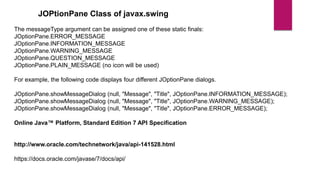
JOPtionPane Class of javax.swing
The messageType argument can be assigned one of these static finals:
JOptionPane.ERROR_MESSAGE
JOptionPane.INFORMATION_MESSAGE
JOptionPane.WARNING_MESSAGE
JOptionPane.QUESTION_MESSAGE
JOptionPane.PLAIN_MESSAGE (no icon will be used)
For example, the following code displays four different JOptionPane dialogs.
JOptionPane.showMessageDialog (null, "Message", "Title", JOptionPane.INFORMATION_MESSAGE);
JOptionPane.showMessageDialog (null, "Message", "Title", JOptionPane.WARNING_MESSAGE);
JOptionPane.showMessageDialog (null, "Message", "Title", JOptionPane.ERROR_MESSAGE);
Online Java™ Platform, Standard Edition 7 API Specification
http://www.oracle.com/technetwork/java/api-141528.html
https://docs.oracle.com/javase/7/docs/api/
Tasks
Write a program in which declare some variables with
valid identifiers and conventions rule, to hold your
name, your total marks in previous semester,
percentage, your grade, your status of pass or fail (by a
Boolean variable) etc, assign them explicitly and print
them. Try to declare variables of all (8) data types and
assign the appropriate values.
Tasks
Write a program to declare and initialize a double variable with some
value such as 50.25. Then retrieve the integral part and store it in the
variable of type long, and the fractional part and store it in a variable of
of type double. Display actual number, integral part Fractional part.

Java OOP Concepts 1st Slide

  • 1.
  • 2.
    Introduction to JDK Objective: Installation of JDK and become familiar with the basic java program structure, the identifiers the primitive data types and Type Conversion and Casting .  A software development environment for developing Java applications  Java Development Kit (JDK) is comprised of the following basic components:  Java compiler (javac)  Java Virtual Machine (JVM)  Java Application Programming Interface (API)  JRE Java Runtime Environment
  • 3.
    Introduction to JDK Javac The name of Java compile is Javac  The Java Language Compiler compiles programs written in the Java Programming language.  Translates Java source code into Bytecodes.  Produces or creates .class containing bytecodes  Java language Complier compiles java programs into platform independent bytecode.  .class file contains bytecodes or Containing compiled version of the program  javac MyProgram.java
  • 4.
    Introduction to JDK A Java compiler converts the Java source code that you write into a binary program consisting of bytecodes.  Bytecodes are machine instructions for the Java Virtual Machine. When you execute a Java program, a program called the Java interpreter inspects and translates the bytecodes then executes the actions that the bytecodes specify within the Java Virtual Machine.
  • 5.
    What is JavaBytecode ? Bytecodes: is the result of compiling source code written in java language. This bytecode can be run in any platform which has a Java installation in it.  We you compile a java program, the java complier (javac) creates a .class file, that contains bytecodes. Upon compile, the Java source code is converted into the .class bytecode. Bytecodes are the Platform independent instructions or portable instructions.
  • 6.
    The Java bytecodeis not completely compiled, but rather just an intermediate code sitting in the middle because it still has to be interpreted and executed by the JVM installed on the specific platform such as Windows, Mac or Linux. https://en.wikipedia.org/wiki/Java_bytecode
  • 7.
    Introduction to JDK Java Virtual Machine (JVM): Is the engine that executes java bytecodes  The JVM is part of the JDK. Java bytecode runs on the virtual machine  JVM is a software converts the .class file containing bytecodes into specific platform such windows, linux, solaris etc.  execution environment for Java byte-code  Java command is used to launch the JVM.
  • 8.
    Introduction to JDK Java Core API Or Java Class libraries  A library in Java is a collection of classes.  Collection of predefiened classes  Collections of classes organized in packages  The classes are grouped together into related sets that are called packages  java.lang (Object, Integer, String ….)  java.util (Vector, Hashtable, Date….)  java.awt (Window, Menu, Button….)  java.net (Socket, URL, DatagramPacket….)  https://docs.oracle.com/javase/7/docs/api/
  • 9.
    Introduction to JDK JRE is part of the Java Development Kit (JDK):  JRE consists of the following components:  Deployment technologies, including deployment, Java Web Start and Java Plug-in.  User interface toolkits, including Abstract Window Toolkit (AWT), Swing, Java 2D, Accessibility, Image I/O, Print Service, Sound, drag and drop (DnD) and input methods.  Integration libraries, including Interface Definition Language (IDL), Java Database Connectivity (JDBC), Java Naming and Directory Interface (JNDI), Remote Method Invocation (RMI), Remote Method Invocation Over Internet Inter-Orb Protocol (RMI-IIOP) and scripting.
  • 11.
    Java development environment Normally java programs go through the following phases  Phase 1. Edit : Program is created in an editor and stored on disk in a file ending with . . . . java extension.  Phase 2. Compile : The compiler translates the java source code into bytecodes and stores them on disk in a file ending with . Class extension  Phase 3. Load : Loader reads .class file containing bytecodes from disk and puts those bytecodes in memory.  Phase 4. Verify : Bytecode verifier confirms that all bytecodes are valid .  Phase 5. Execute : To execute a program , JVM reads bytecodes and translates them into a language the computer understands
  • 12.
    Java development environment Summary A Java program always consists of one or more classes.  You typically put the program code for each class in a separate file, and you must give each file the same name as that of the class that is defined within it.  A Java source file name must have the extension .java.
  • 14.
    System.out.println is aJava statement that prints the argument passed, into the System.out which is generally stdout. 1.System is a Class 2.out is an object or variable 3.println() is a method System is a class in the java.lang package . The out is a static member of the System class, and is an instance of java.io.PrintStream . The println is a method of java.io.PrintStream. This method is overloaded to print message to output destination, which is typically a console or file. the System class belongs to java.lang package
  • 15.
    Escape Sequences  EscapeSequence Description  n Newline. Position the screen cursor to the beginning of the next line.  t Horizontal tab. Move the screen cursor to the next tab stop.  r Carriage return. Position the screen cursor to the beginning of the current line; do not advance to the next line. Any characters output after the carriage return overwrite the characters previously output on that line.  Backslash. Used to print a backslash character.  ’ Single quote.  " Double quote. Used to print a double-quote character. For example,  System.out.println( ""in quotes"" ); displays  "in quotes"
  • 16.
    Data Types • Primitivedata types • Java defines eight primitive data types. • Byte • Short • int • Long • Char • Float • Double • Boolean
  • 17.
    Integer data Types Variable: A variable is a space in the computer’s memory set a side for a certain kind of data and gives it a name for easy reference.  Integers : There are four types of variables that you can use to store integer data.  The value can be –ve or +ve. Data Type Description Byte Variables of this type can have values from -128 to +127 and occupy 1 byte (8 bits) in memory Short Variables of this type can have values from -32768 to 32767 and occupy 2 bytes (16 bits) in memory int Variables of this type can have values from-2147483648 to 2147483647 and occupy 4 bytes (32 bits) in memory long Variables of this type can have values from - 9223372036854775808 to 9223372036854775807 and occupy 8 bytes (64 bits) in memory
  • 18.
    Byte & Short byte : The smallest integer type is byte. This is a signed 8-bit type that has a range from –128 to 127.  Declaration & Assignment  byte variables are declared by use of the byte keyword.  For example, the following declares two byte variables called var1 and var2:  byte var1, var2;  Assignment Statement  byte var1=20;  short : short is a signed 16-bit type. It has a range from –32,768 to 32,767.  It is probably the least-used Java type. Here are some examples of short variable declarations:  short s;  short t;
  • 19.
    Int & long The most commonly used integer type is int. It is a signed 32-bit type that has a range from – 2,147,483,648 to 2,147,483,647.  In addition to other uses, variables of type int are commonly employed to control loops and to index arrays. Although you might think that using a byte or short would be more efficient than using an int in situations in which the larger range of an int is not needed.  Long : is a signed 64-bit type and is useful for those occasions where an int type is not large enough to hold the desired value. The range of a long is quite large.  This makes it useful when big, whole numbers are needed.  long milliseconds;  long population;
  • 20.
    Integer Data TypesExample Program  public class EggBasket {  public static void main(String[] args){  int numberOfBaskets, eggsPerBasket, totalEggs;  numberOfBaskets= 10;  eggsPerBasket= 6;  totalEggs= numberOfBaskets* eggsPerBasket;  System.out.println(eggsPerBasket+ " eggs per basket and");  System.out.println(numberOfBaskets+ " baskets, then");  System.out.println("the total number of eggs is " + totalEggs);  }  }
  • 21.
    Floating Point DataTypes  Float  Double Data Type Description float Variables of this type can have values from -3.4E38 to +3.4E38 and occupy 4 bytes in memory. double Variables of this type can have values from -1.7E308 to +1.7E308 and occupy 8 bytes in memory
  • 22.
    Floating-point Data TypesExample Program  // Compute the area of a circle.  class Area {  public static void main(String args[]) {  double pi, r, a;  r = 10.8; // radius of circle  pi = 3.1416; // pi, approximately  a = pi * r * r; // compute area  System.out.println("Area of circle is " + a);  }  }
  • 23.
    Characters  in Javachar is a 16-bit type. The range of a char is 0 to 65,536.  Internally characters are stored as numbers.  CharacterExample Program  // Demonstrate  class CharDemo{  public static void main(String args[]) {  char ch1, ch2;  ch1 = 65; // code for A  ch2 = 'Y';  System.out.print("ch1 and ch2: ");  System.out.println(ch1 + " " + ch2);  }  }
  • 24.
    Booleans  Java hasa primitive type, called boolean, for logical values.  It can have only one of two possible values, true or false.  This is the type returned by all relational operators, as in the case of a < b.  Booleans Example Program  public static void main(String args[]){  boolean b=true, c=false;  System.out.println("b = "+b);  System.out.println("c = "+c);  System.out.println("b is equal to c: "+ (b==c) );  System.out.println("b is NOT equal to c: “ + (b!=c) );  }  }
  • 25.
    Type Conversion andCasting Java’s Automatic Conversions  Type Casting Assigning a value of one type to a variable of another type is known as Type Casting.  Example  int x = 10;  byte y = (byte) x;  In Java, type casting is classified into two types,  Widening Casting(Implicit) Conversion: it takes place when two types are compatible and the destination type is larger than the source type.  e.g. byte value assigned to int type.
  • 26.
    Type Conversion andCasting  Narrowing Casting(Explicitly done)  Narrowing conversion takes place when a value of larger data type is assigned to the variable of smaller data type.  E.g. An int value to a byte variable.
  • 27.
    Type Conversion andCasting class Test { public static void main(String[] args) { int i = 100; long l = i; //no explicit type casting required float f = l; //no explicit type casting required System.out.println("Int value "+i); System.out.println("Long value "+l); System.out.println("Float value "+f); } }
  • 28.
    Narrowing or Explicittype conversion public class Test { public static void main(String[] args) { double d = 100.04; long l = (long) d; //explicit type casting required int i = (int)l; //explicit type casting required System.out.println("Double value "+d); System.out.println("Long value "+l); System.out.println("Int value "+i); } }
  • 29.
    ASCII and Unicode AmericanStandard Code for Information Interchange (ASCII) is a character-encoding scheme and it was the first character encoding standard. It is a code for representing English characters as numbers, with each letter assigned a number from 0 to 127. Most modern character-encoding schemes are based on ASCII, though they support many additional characters ASCII defines 128 characters, which map to the numbers 0–127. ASCII uses 7 bits to represent a character. For example, the number 65 means “Latin capital 'A‘ By using 7 bits, we can have a maximum of 2^7 (= 128) distinct combinations*. Which means that we can represent 128 characters maximum. Wait, 7 bits? But why not 1 byte (8 bits)? The last bit (8th) is used for avoiding errors as parity bit
  • 30.
    ASCII and Unicode Unicode is a superset of ASCII, and is a character-encoding scheme. Basically, they are standards on how to represent difference characters in binary.  The Unicode standard was initially designed using 16 bits to encode characters because the primary machines were 16-bit PCs.  Unicode is designed to uniquely encode characters used in written languages throughout the world.  The numbers 0–128 have the same meaning in ASCII as they have in Unicode.
  • 31.
    ASCII and Unicode Problem Theencodings for languages with large character sets have variable length. Some common characters are encoded as single bytes, other require two or more byte. Solution To solve these problems, a new language standard was developed i.e. Unicode System. In unicode, character holds 2 byte, so java also uses 2 byte for characters
  • 32.
    ASCII and Unicode Themajor advantage of Unicode is that at its maximum it can accommodate a huge number of characters. Because of this, Unicode currently contains most written languages and still has room for even more. This includes typical left-to-right scripts like English and even right-to-left scripts like Arabic. Chinese, Japanese, and the many other variants are also represented within Unicode
  • 33.
    ASCII and Unicode Summary: 1.ASCIIuses an 8-bit encoding while Unicode uses a variable bit encoding. 2.Unicode represents most written languages in the world while ASCII does not. 3.ASCII has its equivalent within Unicode.
  • 34.
    ASCII and Unicode Unicode:defines two mapping methods, the UTF (Unicode Transformation Format) encodings, and the UCS (Universal Character Set) encodings. Unicode-based encodings implement the Unicode standard and include UTF-8, UTF-16 and UTF-32/UCS-4. UTF-8 - uses 1 byte to represent characters in the ASCII set, two bytes for characters in several more alphabetic blocks, and three bytes for the rest of the BMP. Supplementary characters use 4 bytes. UTF-16 - uses 2 bytes for any character in the BMP, and 4 bytes for supplementary characters.
  • 35.
    J2SE vs J2MEvs J2EE  Java is basically a general purpose, high level programming language, which is widely used for development of application softwares.  It’s used in a wide variety of platforms such as mobile phones, embedded systems, web pages, servers and much more. Due to its cross platform compatibility, it makes it ideal for working across platforms.  The most important characteristic of Java is that it was designed from the outset to be machine independent.  You can run Java programs unchanged on any machine and operating system combination that supports Java  Java features  Simple, Object-oriented and familiar  Robust and Secure  Architecture-neutral and portable  High performance  Interpreted and dynamic
  • 36.
    J2SE(Java Platform, StandardEdition)  Also known as Core Java, this is the most basic and standard version of Java. It’s the purest form of Java, a basic foundation for all other editions.  It consists of a wide variety of general purpose API’s (like java.lang, java.util) as well as many special purpose APIs  J2SE is mainly used to create applications for Desktop environment.  It consist all the basics of Java the language, variables, primitive data types, Arrays, Streams, Strings Java Database Connectivity(JDBC) and much more.  This is the standard, from which all other editions came out, according to the needs of the time.  The famous JVM of Java, the heart of Java development, was also given by this edition only
  • 37.
    J2SE(Java Platform, StandardEdition)  The Java Development Kit has been referred to at various times as the JDK—the Java Development Kit—and as the SDK—the Software Development Kit.  The usage with release 5.0 is JDK but with release 1.4 it was SDK, so if you see SDK this generally means the same as JDK.  we’ll use JDK to refer to any Java Development Kit in the course.
  • 38.
    J2ME(Java Platform, MicroEdition)  This version of Java is mainly concentrated for the applications running on embedded systems, mobiles and small devices.(which was a constraint before it’s development)  Constraints included limited processing power, battery limitation, small display etc.  J2ME uses many libraries and API’s of J2SE, as well as, many of it’s own.  The basic aim of this edition was to work on mobiles, wireless devices, Old Nokia phones, which used Symbian OS, used this technology.  Most of the apps, developed for the phones(prior to smartphones era), were built on J2ME platform only(the .jar apps on Nokia app store).
  • 39.
    J2EE(Java Platform, EnterpriseEdition)  The Enterprise version of Java has a much larger usage of Java, like development of web services, networking, server side scripting and other various web based applications.  J2EE is a community driven edition, i.e. there is a lot of continuous contributions from industry experts, Java developers and other open source organizations.  J2EE uses many components of J2SE, as well as, has many new features of it’s own like Servlets, JavaBeans, Java Message Services, adding a whole new functionalities to the language.  J2EE uses HTML, CSS, JavaScript etc., so as to create web pages and web services. It’s also one of the most widely accepted web development standard.
  • 40.
     Apart fromthese three versions, there was another Java version, released Java Card.  This edition was targeted, to run applets smoothly and securely on smart cards and similar technology. Portability and security was its main features.  JavaFX is another such edition of Java technology, which is now merged with J2SE 8.It is mainly used, to create rich GUI (Graphical User Interface) in Java apps.  It replaces Swings (in J2SE), with itself as the standard GUI library.  It is supported by both Desktop environment as well as web browsers.  PersonalJava was another edition, which was not deployed much, as its function was fulfilled by further versions of J2ME. Made to support World Wide Web (and Java applets) and consumer electronics. PersonalJava was also used for embedded systems and mobile. But, it was discontinued in its earlier stages.
  • 41.
    Learning Java 1. Tobe able to program effectively in Java, you also need to understand the libraries (Java APIs) that go with the language, and these are very extensive. 2. Java’s Syntax
  • 42.
    Java Programs  Thereare two basic kinds of programs you can write in Java.  Programs that are to be embedded in a web page are called Java applets, and  Normal standalone programs are called Java applications.  You can further subdivide Java applications into console applications, which output to your computer screen (to the command line on a PC under Windows, for example), and  Windowed applications, which can create and manage multiple windows. The latter use the typical GUI mechanisms of window-based programs—menus, toolbars, dialogs, and so on
  • 44.
    JOPtionPane Class ofjavax.swing The messageType argument can be assigned one of these static finals: JOptionPane.ERROR_MESSAGE JOptionPane.INFORMATION_MESSAGE JOptionPane.WARNING_MESSAGE JOptionPane.QUESTION_MESSAGE JOptionPane.PLAIN_MESSAGE (no icon will be used) For example, the following code displays four different JOptionPane dialogs. JOptionPane.showMessageDialog (null, "Message", "Title", JOptionPane.INFORMATION_MESSAGE); JOptionPane.showMessageDialog (null, "Message", "Title", JOptionPane.WARNING_MESSAGE); JOptionPane.showMessageDialog (null, "Message", "Title", JOptionPane.ERROR_MESSAGE); Online Java™ Platform, Standard Edition 7 API Specification http://www.oracle.com/technetwork/java/api-141528.html https://docs.oracle.com/javase/7/docs/api/
  • 45.
    Tasks Write a programin which declare some variables with valid identifiers and conventions rule, to hold your name, your total marks in previous semester, percentage, your grade, your status of pass or fail (by a Boolean variable) etc, assign them explicitly and print them. Try to declare variables of all (8) data types and assign the appropriate values.
  • 46.
    Tasks Write a programto declare and initialize a double variable with some value such as 50.25. Then retrieve the integral part and store it in the variable of type long, and the fractional part and store it in a variable of of type double. Display actual number, integral part Fractional part.