New and Cool: JavaFX
Eugene Bogaart
Solution Architect
Sun Microsystems

                       1
Sun Confidential: Internal Only   2
JavaFX Vision
    JavaFX is the platform for creating and
                   delivering
         Rich Internet Applications
      across all the screens of your life


   JavaFX is Powered by Java

                   Sun Confidential: Internal Only   3
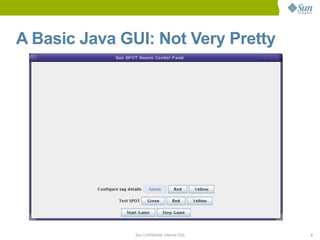
A Basic Java GUI: Not Very Pretty


               Sun Confidential: Internal Only   4
Samples
• Vancouver Medal app
• Simon's Book example
• JavaFX Widget set


                    Sun Confidential: Internal Only   5
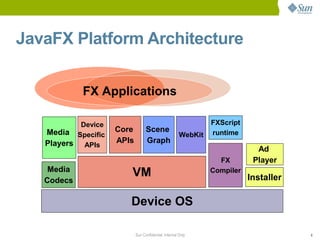
JavaFX Platform Architecture


            FX Applications

           Device                                              FXScript
   Media Specific   Core         Scene                         runtime
                                                      WebKit
   Players APIs     APIs         Graph
                                                                            Ad
                                                                 FX        Player
    Media
                       VM                                      Compiler
                                                                          Installer
   Codecs

                       Device OS

                           Sun Confidential: Internal Only                            6
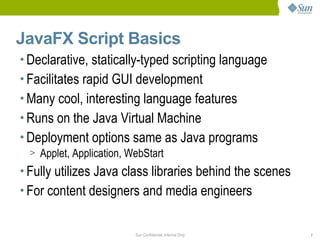
JavaFX Script Basics
• Declarative, statically-typed scripting language
• Facilitates rapid GUI development
• Many cool, interesting language features
• Runs on the Java Virtual Machine
• Deployment options same as Java programs
  > Applet, Application, WebStart
• Fully utilizes Java class libraries behind the scenes
• For content designers and media engineers


                       Sun Confidential: Internal Only    7
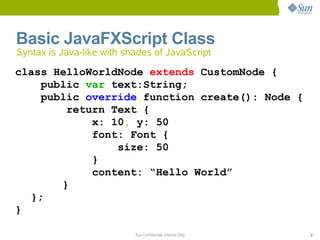
Basic JavaFXScript Class
Syntax is Java-like with shades of JavaScript

class HelloWorldNode extends CustomNode {
    public var text:String;
    public override function create(): Node {
        return Text {
            x: 10, y: 50
            font: Font {
                size: 50
            }
            content: “Hello World”
       }
  };
}

                           Sun Confidential: Internal Only   8
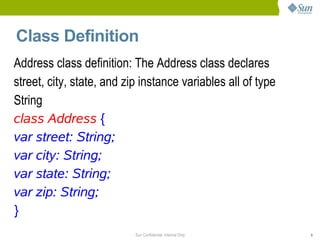
Class Definition
Address class definition: The Address class declares
street, city, state, and zip instance variables all of type
String
class Address {
var street: String;
var city: String;
var state: String;
var zip: String;
}
                           Sun Confidential: Internal Only    9
Declaring an Object Literal
• In the JavaFX Script language, an object instance can
  be created with an object literal (unlike Java)
• Example: The first word (Address) specifies the type of
  object, class, that you are creating.
Address {
street: "1 Main Street"; // separated by semi colons
city: "Santa Clara";
state: "CA";
zip: "95050";
}
                      Sun Confidential: Internal Only   10
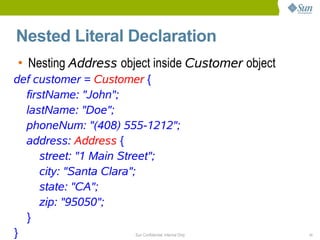
Nested Literal Declaration
• Nesting Address object inside Customer object
def customer = Customer {
  firstName: "John";
  lastName: "Doe";
  phoneNum: "(408) 555-1212";
  address: Address {
      street: "1 Main Street";
      city: "Santa Clara";
      state: "CA";
      zip: "95050";
  }
}                    Sun Confidential: Internal Only   11
Sequences
• Sequences
 var time:Duration[] = [1s, 5s, 10s];
 var days = [1..31];
• Insert, delete, membership and reverse
 insert 20s into time;
 delete 31 from days;
 var revDays = Sequences.reverse(days);


• Slice via range and predicate
 var oddDays = days[n | (n mod 2) == 1];
 var firstThree = time[0..<3];


                      Sun Confidential: Internal Only   12
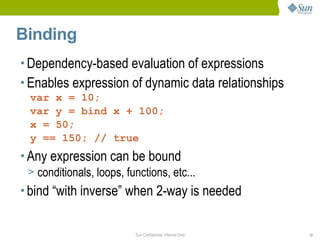
Binding
• Dependency-based evaluation of expressions
• Enables expression of dynamic data relationships
  var x = 10;
  var y = bind x + 100;
  x = 50;
  y == 150; // true
• Any expression can be bound
  > conditionals, loops, functions, etc...
• bind “with inverse” when 2-way is needed


                           Sun Confidential: Internal Only   13
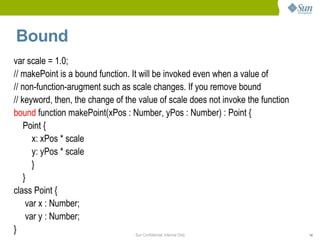
Bound
var scale = 1.0;
// makePoint is a bound function. It will be invoked even when a value of
// non-function-arugment such as scale changes. If you remove bound
// keyword, then, the change of the value of scale does not invoke the function
bound function makePoint(xPos : Number, yPos : Number) : Point {
    Point {
       x: xPos * scale
       y: yPos * scale
       }
    }
class Point {
     var x : Number;
     var y : Number;
}                                   Sun Confidential: Internal Only               14
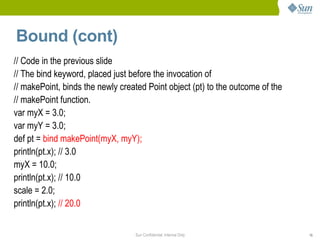
Bound (cont)
// Code in the previous slide
// The bind keyword, placed just before the invocation of
// makePoint, binds the newly created Point object (pt) to the outcome of the
// makePoint function.
var myX = 3.0;
var myY = 3.0;
def pt = bind makePoint(myX, myY);
println(pt.x); // 3.0
myX = 10.0;
println(pt.x); // 10.0
scale = 2.0;
println(pt.x); // 20.0


                                  Sun Confidential: Internal Only               15
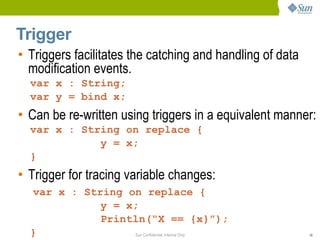
Trigger
• Triggers facilitates the catching and handling of data
  modification events.
  var x : String;
  var y = bind x;
• Can be re-written using triggers in a equivalent manner:
  var x : String on replace {
             y = x;
  }
• Trigger for tracing variable changes:
  var x : String on replace {
             y = x;
             Println(“X == {x}”);
  }               Sun Confidential: Internal Only          16
Many more
Why Declarative Syntax for Building


                      Sun Confidential: Internal Only   17
GUI?

• Because the structure of declared objects in the
  code reflects the visual structure of the scene
  graph, and this enables you to understand and
  maintain the code easily.
• The order of elements you declare in the code
  matches the order in which they appear in the
  application.


                      Sun Confidential: Internal Only   18
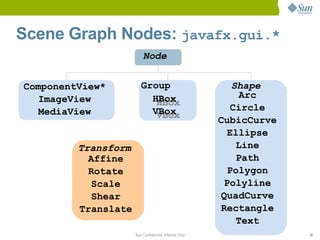
Scene Graph Nodes: javafx.gui.*
                         Node


ComponentView*          Group                             Shape
  ImageView               HBox                              Arc
                           HBox
  MediaView               VBox                            Circle
                           VBox
                                                       CubicCurve
                                                         Ellipse
         Transform                                         Line
           Affine                                          Path
           Rotate                                        Polygon
            Scale                                       Polyline
            Shear                                      QuadCurve
         Translate                                     Rectangle
                                                           Text
                     Sun Confidential: Internal Only                19
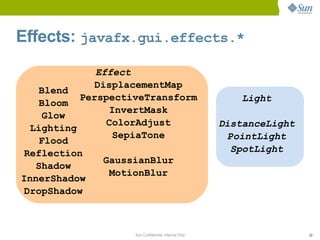
Effects: javafx.gui.effects.*
              Effect
              DisplacementMap
   Blend
           PerspectiveTransform                          Light
   Bloom
                  InvertMask
    Glow
                 ColorAdjust                          DistanceLight
  Lighting
                   SepiaTone                            PointLight
   Flood
 Reflection                                              SpotLight
                GaussianBlur
   Shadow
                  MotionBlur
InnerShadow
 DropShadow


                    Sun Confidential: Internal Only                   20
Effects
• Effects On Images Demo


                    Sun Confidential: Internal Only   21
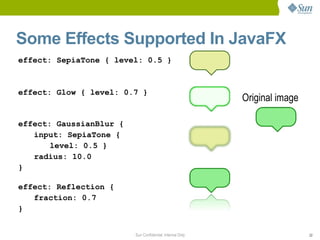
Some Effects Supported In JavaFX
effect: SepiaTone { level: 0.5 }


effect: Glow { level: 0.7 }
                                                           Original image

effect: GaussianBlur {
   input: SepiaTone {
       level: 0.5 }
   radius: 10.0
}

effect: Reflection {
   fraction: 0.7
}


                         Sun Confidential: Internal Only                    22
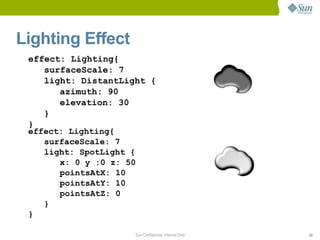
Lighting Effect
 effect: Lighting{
    surfaceScale: 7
    light: DistantLight {
       azimuth: 90
       elevation: 30
    }
 }
 effect: Lighting{
    surfaceScale: 7
    light: SpotLight {
       x: 0 y :0 z: 50
       pointsAtX: 10
       pointsAtY: 10
       pointsAtZ: 0
    }
 }

                     Sun Confidential: Internal Only   23
Animation
• Timelines handles the animation in JavaFX
• Timelines are first-class citizen in the language
  along with the duration time constants (1s, 10s)
• They can have one or more KeyFrames
• Functions: start(), stop(), pause(),
 resume()
• Properties: autoReverse, repeatCount,
 toggle


                       Sun Confidential: Internal Only   24
Example – Defining Key Frames
Timeline {
   keyFrames: [
       KeyFrame {
           time: 0s
           values: [ radius => 30 ]
         }
       KeyFrame {
           time: 5s
           values: [
              radius => 300 tween Interpolator.LINEAR
           ]
       }     Key value     How the value changes over time
   ]
}
             radius = 30                          radius = 300


                0s            1s              2s              3s   4s   5s   6s
                  Keyframes Sun Confidential: Internal Only                       25
Animation
• Animating TimeLines Sample


                    Sun Confidential: Internal Only   26
JavaFX Media Design Goals
• Media Playback is of primary importance
• Simple API: only a few lines of coded needed
• Cross platform A/V format required
• Native support also desirable
  > “Mash ups”
  > Viewing local media
• Zero Configuration plug in support
  > Drop in format support
• Going beyond rectangular video
  > Lightweight rendering
                      Sun Confidential: Internal Only   27
Streaming Media
• Simple Stream Media Sample


                   Sun Confidential: Internal Only   28
JavaFX Media Example
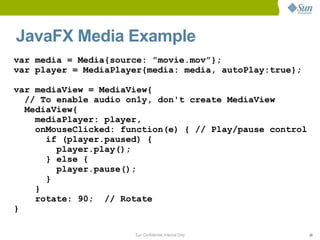
var media = Media{source: ”movie.mov”};
var player = MediaPlayer{media: media, autoPlay:true};

var mediaView = MediaView{
  // To enable audio only, don't create MediaView
  MediaView{
    mediaPlayer: player,
    onMouseClicked: function(e) { // Play/pause control
      if (player.paused) {
        player.play();
      } else {
        player.pause();
      }
    }
    rotate: 90; // Rotate
}

                      Sun Confidential: Internal Only     29
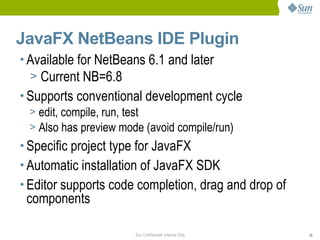
JavaFX NetBeans IDE Plugin
• Available for NetBeans 6.1 and later
  > Current NB=6.8
• Supports conventional development cycle
  > edit, compile, run, test
  > Also has preview mode (avoid compile/run)
• Specific project type for JavaFX
• Automatic installation of JavaFX SDK
• Editor supports code completion, drag and drop of
 components

                       Sun Confidential: Internal Only   30
Further Information
•   openjdk.java.net
•   www.javafx.com
•   www.sun.com/javafx
•   openjfx.org
•   learnjavafx.typepad.com


                       Sun Confidential: Internal Only   31
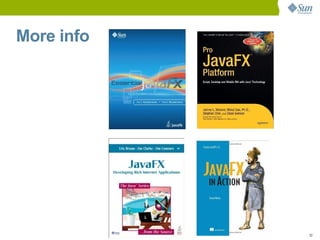
More info


            Sun Confidential: Internal Only   32
Summary
•   Java continues to evolve
•   JDK7 driving changes in the platform
•   JavaFX providing a RIA platform built on Java
•   More to come...


                        Sun Confidential: Internal Only   33
Q&A
Presenter’s Name
first.last@sun.com


                     34

Introduction into JavaFX

  • 1.
    New and Cool:JavaFX Eugene Bogaart Solution Architect Sun Microsystems 1
  • 2.
  • 3.
    JavaFX Vision JavaFX is the platform for creating and delivering Rich Internet Applications across all the screens of your life JavaFX is Powered by Java Sun Confidential: Internal Only 3
  • 4.
    A Basic JavaGUI: Not Very Pretty Sun Confidential: Internal Only 4
  • 5.
    Samples • Vancouver Medalapp • Simon's Book example • JavaFX Widget set Sun Confidential: Internal Only 5
  • 6.
    JavaFX Platform Architecture FX Applications Device FXScript Media Specific Core Scene runtime WebKit Players APIs APIs Graph Ad FX Player Media VM Compiler Installer Codecs Device OS Sun Confidential: Internal Only 6
  • 7.
    JavaFX Script Basics •Declarative, statically-typed scripting language • Facilitates rapid GUI development • Many cool, interesting language features • Runs on the Java Virtual Machine • Deployment options same as Java programs > Applet, Application, WebStart • Fully utilizes Java class libraries behind the scenes • For content designers and media engineers Sun Confidential: Internal Only 7
  • 8.
    Basic JavaFXScript Class Syntaxis Java-like with shades of JavaScript class HelloWorldNode extends CustomNode { public var text:String; public override function create(): Node { return Text { x: 10, y: 50 font: Font { size: 50 } content: “Hello World” } }; } Sun Confidential: Internal Only 8
  • 9.
    Class Definition Address classdefinition: The Address class declares street, city, state, and zip instance variables all of type String class Address { var street: String; var city: String; var state: String; var zip: String; } Sun Confidential: Internal Only 9
  • 10.
    Declaring an ObjectLiteral • In the JavaFX Script language, an object instance can be created with an object literal (unlike Java) • Example: The first word (Address) specifies the type of object, class, that you are creating. Address { street: "1 Main Street"; // separated by semi colons city: "Santa Clara"; state: "CA"; zip: "95050"; } Sun Confidential: Internal Only 10
  • 11.
    Nested Literal Declaration •Nesting Address object inside Customer object def customer = Customer { firstName: "John"; lastName: "Doe"; phoneNum: "(408) 555-1212"; address: Address { street: "1 Main Street"; city: "Santa Clara"; state: "CA"; zip: "95050"; } } Sun Confidential: Internal Only 11
  • 12.
    Sequences • Sequences vartime:Duration[] = [1s, 5s, 10s]; var days = [1..31]; • Insert, delete, membership and reverse insert 20s into time; delete 31 from days; var revDays = Sequences.reverse(days); • Slice via range and predicate var oddDays = days[n | (n mod 2) == 1]; var firstThree = time[0..<3]; Sun Confidential: Internal Only 12
  • 13.
    Binding • Dependency-based evaluationof expressions • Enables expression of dynamic data relationships var x = 10; var y = bind x + 100; x = 50; y == 150; // true • Any expression can be bound > conditionals, loops, functions, etc... • bind “with inverse” when 2-way is needed Sun Confidential: Internal Only 13
  • 14.
    Bound var scale =1.0; // makePoint is a bound function. It will be invoked even when a value of // non-function-arugment such as scale changes. If you remove bound // keyword, then, the change of the value of scale does not invoke the function bound function makePoint(xPos : Number, yPos : Number) : Point { Point { x: xPos * scale y: yPos * scale } } class Point { var x : Number; var y : Number; } Sun Confidential: Internal Only 14
  • 15.
    Bound (cont) // Codein the previous slide // The bind keyword, placed just before the invocation of // makePoint, binds the newly created Point object (pt) to the outcome of the // makePoint function. var myX = 3.0; var myY = 3.0; def pt = bind makePoint(myX, myY); println(pt.x); // 3.0 myX = 10.0; println(pt.x); // 10.0 scale = 2.0; println(pt.x); // 20.0 Sun Confidential: Internal Only 15
  • 16.
    Trigger • Triggers facilitatesthe catching and handling of data modification events. var x : String; var y = bind x; • Can be re-written using triggers in a equivalent manner: var x : String on replace { y = x; } • Trigger for tracing variable changes: var x : String on replace { y = x; Println(“X == {x}”); } Sun Confidential: Internal Only 16
  • 17.
    Many more Why DeclarativeSyntax for Building Sun Confidential: Internal Only 17
  • 18.
    GUI? • Because thestructure of declared objects in the code reflects the visual structure of the scene graph, and this enables you to understand and maintain the code easily. • The order of elements you declare in the code matches the order in which they appear in the application. Sun Confidential: Internal Only 18
  • 19.
    Scene Graph Nodes:javafx.gui.* Node ComponentView* Group Shape ImageView HBox Arc HBox MediaView VBox Circle VBox CubicCurve Ellipse Transform Line Affine Path Rotate Polygon Scale Polyline Shear QuadCurve Translate Rectangle Text Sun Confidential: Internal Only 19
  • 20.
    Effects: javafx.gui.effects.* Effect DisplacementMap Blend PerspectiveTransform Light Bloom InvertMask Glow ColorAdjust DistanceLight Lighting SepiaTone PointLight Flood Reflection SpotLight GaussianBlur Shadow MotionBlur InnerShadow DropShadow Sun Confidential: Internal Only 20
  • 21.
    Effects • Effects OnImages Demo Sun Confidential: Internal Only 21
  • 22.
    Some Effects SupportedIn JavaFX effect: SepiaTone { level: 0.5 } effect: Glow { level: 0.7 } Original image effect: GaussianBlur { input: SepiaTone { level: 0.5 } radius: 10.0 } effect: Reflection { fraction: 0.7 } Sun Confidential: Internal Only 22
  • 23.
    Lighting Effect effect:Lighting{ surfaceScale: 7 light: DistantLight { azimuth: 90 elevation: 30 } } effect: Lighting{ surfaceScale: 7 light: SpotLight { x: 0 y :0 z: 50 pointsAtX: 10 pointsAtY: 10 pointsAtZ: 0 } } Sun Confidential: Internal Only 23
  • 24.
    Animation • Timelines handlesthe animation in JavaFX • Timelines are first-class citizen in the language along with the duration time constants (1s, 10s) • They can have one or more KeyFrames • Functions: start(), stop(), pause(), resume() • Properties: autoReverse, repeatCount, toggle Sun Confidential: Internal Only 24
  • 25.
    Example – DefiningKey Frames Timeline { keyFrames: [ KeyFrame { time: 0s values: [ radius => 30 ] } KeyFrame { time: 5s values: [ radius => 300 tween Interpolator.LINEAR ] } Key value How the value changes over time ] } radius = 30 radius = 300 0s 1s 2s 3s 4s 5s 6s Keyframes Sun Confidential: Internal Only 25
  • 26.
    Animation • Animating TimeLinesSample Sun Confidential: Internal Only 26
  • 27.
    JavaFX Media DesignGoals • Media Playback is of primary importance • Simple API: only a few lines of coded needed • Cross platform A/V format required • Native support also desirable > “Mash ups” > Viewing local media • Zero Configuration plug in support > Drop in format support • Going beyond rectangular video > Lightweight rendering Sun Confidential: Internal Only 27
  • 28.
    Streaming Media • SimpleStream Media Sample Sun Confidential: Internal Only 28
  • 29.
    JavaFX Media Example varmedia = Media{source: ”movie.mov”}; var player = MediaPlayer{media: media, autoPlay:true}; var mediaView = MediaView{ // To enable audio only, don't create MediaView MediaView{ mediaPlayer: player, onMouseClicked: function(e) { // Play/pause control if (player.paused) { player.play(); } else { player.pause(); } } rotate: 90; // Rotate } Sun Confidential: Internal Only 29
  • 30.
    JavaFX NetBeans IDEPlugin • Available for NetBeans 6.1 and later > Current NB=6.8 • Supports conventional development cycle > edit, compile, run, test > Also has preview mode (avoid compile/run) • Specific project type for JavaFX • Automatic installation of JavaFX SDK • Editor supports code completion, drag and drop of components Sun Confidential: Internal Only 30
  • 31.
    Further Information • openjdk.java.net • www.javafx.com • www.sun.com/javafx • openjfx.org • learnjavafx.typepad.com Sun Confidential: Internal Only 31
  • 32.
    More info Sun Confidential: Internal Only 32
  • 33.
    Summary • Java continues to evolve • JDK7 driving changes in the platform • JavaFX providing a RIA platform built on Java • More to come... Sun Confidential: Internal Only 33
  • 34.