IT vs. USERS?
How Law Firms Can Maximize Security
While Granting Access to the Web
Firms that establish a secure browsing
environment without compromising data
security or work culture gain a
competitive advantage.
2
There is a battle brewing in law firms, pitting IT security needs against the needs of the users. The pressure
on firms to protect their data is mounting. At the same time, the always-on work culture blurs the lines
between work and personal life.
This dynamic poses a particular challenge for law firm CISOs. They are expected to balance the demands
of different stakeholders. But in information security, striking a balance means dangerous trade-offs.
Compromises like shutting off personal web access to protect the firm against data theft don’t work. They
can actually add new risks. This paper shows how successful firms are optimizing on both axes: data
security and user satisfaction.
Law Firms are the stewards of their client’s most sensitive data.
They handle proprietary information that can be of immense
value to outsiders: internal merger and acquisition documents,
litigation files, intellectual property (IP) records, financial
reports, contracts, employment agreements and more.
Intruders are known to attack the weakest link in the security
chain. The defenses at a top-tier bank are a tough nut to crack,
but in comparison, a bank’s law firm may be a much softer
target.
Attackers exploit security holes in Internet browsers that
lawyers and legal staff use. Every time a page is viewed, the
browser fetches active code and runs it on the local computer.
Because the web page content can include malicious code,
the browser is an open door for attackers to infiltrate the user’s
device, and jump to other resources on the network.
Attacks against law firms are not an abstract threat.
48 of the nation’s most prestigious firms have experienced
large-scale attacks by computer criminals in the first quarter
of 2016 alone.
As news reports following such incidents suggest, the fallout
from law firm data breaches can be catastrophic.
Nationwide, law firms were targeted with
“ransomware”, malicious software that encrypted
their data and demanded a ransom for them to
regain access.
The FBI warns that firms with IP practice groups
are increasingly targeted by attackers who are
after patent and trade secrets.
Sensitive merger and acquisition data was
obtained in a widely publicized security breach at
15 leading firms. Manipulation of financial markets
is the presumed motive behind the network
intrusions.
LAW FIRMS UNDER ATTACK LIKE NEVER BEFORE
SECURITY VS. CULTURE BECOMES IT VS. USERS
CLIENTS HOLD FIRMS ACCOUNTABLE
This trend puts law firms under pressure. Clients are
mandating better IT security controls for their law partners, a
major aspect of which is a secure browsing environment.
We’ve learned of firms that were given an ultimatum from
long-standing clients: “Align your security practices with our
requirements, or we’ll have to part ways.”
Yet law firms don’t have the budgets or IT infrastructure
that their highly regulated clients can command. Wall Street’s
investments in cybersecurity are measured in billions. In
comparison, the average law firm has been spending less than
0.5 percent of its annual revenue on computer security.
As a result, law firms find themselves in a difficult position. IT
leaders are forced to take drastic steps to secure their
environment. This can put them on a collision course with their
firm’s culture.
Lawyers are “always on”, always working. Employees at law
firms expect to be able to access personal web resources like
email or online banking sites while working long hours. Mixing
personal use with business activities is key to the work-life
balance.
Historically, internal policies have allowed partners and staff to
access these personal web resources with minimal controls.
Changes to these policies are guaranteed to cause turmoil in
the organization. We have seen firms try to shut off access to
non-work related websites, only to experience open revolt by
their employees.
In instances where IT suggested that lawyers access personal
websites from their phones or tablets, users protested. Having
to context switch between multiple devices was disruptive to
their job-related workflow.
23 percent of law firms with more than
100 attorneys experienced a security
breach in 2015.
Source: American Bar Association
IT VS. USERS? Maximize Security While Granting Access to the Web
A more important lesson was that users would find ways to work around restrictive policies. Firms who have tried to remove access
reported how their lawyers simply “relocated” to neighborhood coffee shops to access the web - via free, unsecured WiFi networks.
Some firms have turned to existing technologies to secure web access. Many have used Citrix® or other virtualization software as a way
to give employees access to their personal web sites without exposing the firm’s resources.
The rationale is logical. Executing the browser on a remote server prevents web code from reaching the local computer. But virtualizing
the entire desktop environment or publishing apps through a virtualization layer can be confusing to users and complicated to administer.
Another major issue virtualization is that it is not inherently secure. The browser in the virtual infrastructure is as susceptible to web
exploits as the browser on the user’s desktop. And the virtual systems integration points with firm resources, like file repositories or
collaboration apps, open other network resources to exploits.
Virtualization requires additional
investment to deploy and manage
Virtualization can improve insulation
from web-borne threats, but …
can still put the firm at risk, due to lack of inherent
VDI security and connections to all virtual system
resources,
report a poor web experience, including significant
video lag,
expose the firm’s identity when the VDI runs on
premise.
can’t lock down the virtualized environment completely
due to the lack of integrated web policy controls,
struggles to secure the increased attack surface area
across significantly more endpoints
faces additional workload due to complex configuration
and patching requirements,
needs to budget for higher hard and soft costs.
SILO SOLVES THE WEB DILEMMA FOR LAW FIRMS
VIRTUALIZATION IS A POOR MIDDLE GROUND
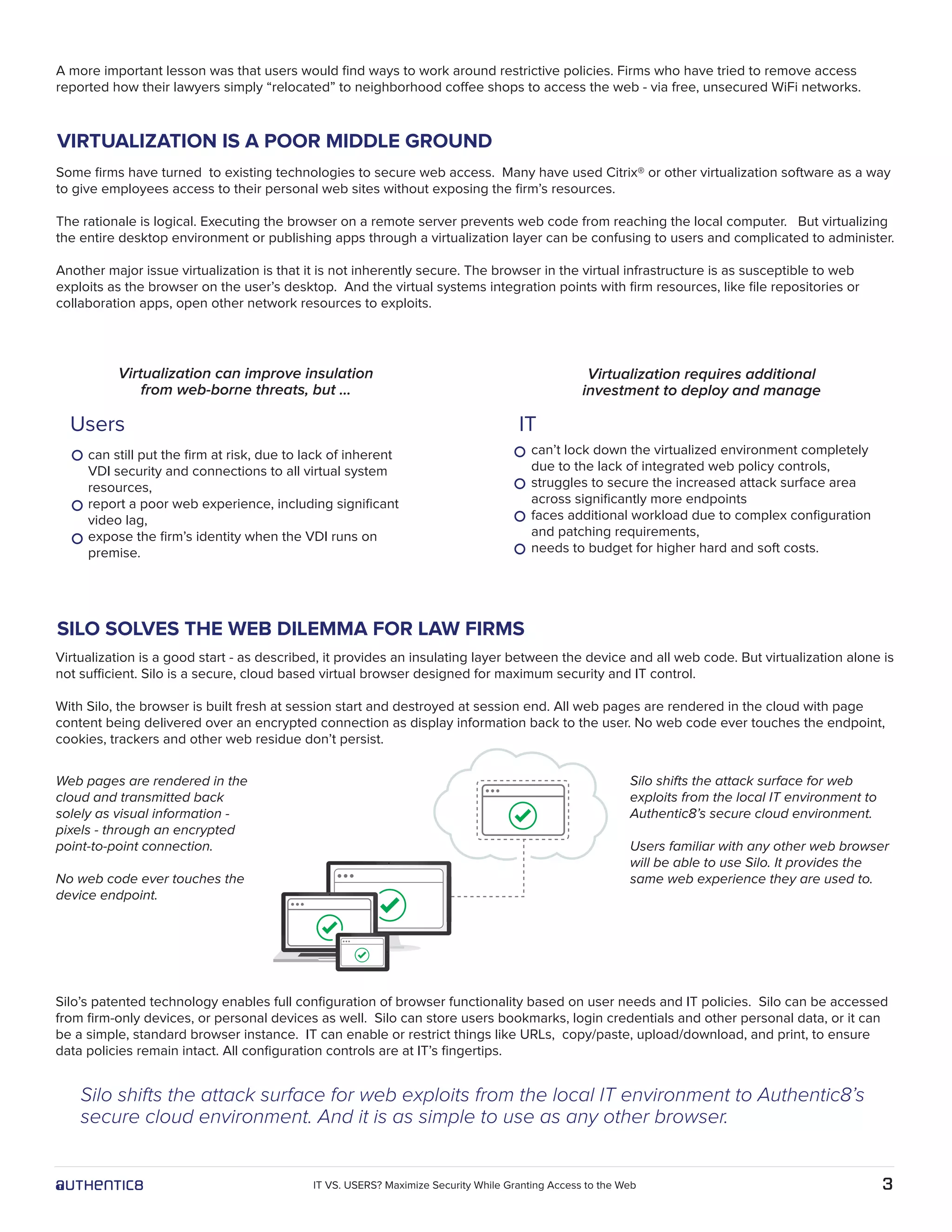
Web pages are rendered in the
cloud and transmitted back
solely as visual information -
pixels - through an encrypted
point-to-point connection.
No web code ever touches the
device endpoint.
Virtualization is a good start - as described, it provides an insulating layer between the device and all web code. But virtualization alone is
not sufficient. Silo is a secure, cloud based virtual browser designed for maximum security and IT control.
With Silo, the browser is built fresh at session start and destroyed at session end. All web pages are rendered in the cloud with page
content being delivered over an encrypted connection as display information back to the user. No web code ever touches the endpoint,
cookies, trackers and other web residue don’t persist.
Silo’s patented technology enables full configuration of browser functionality based on user needs and IT policies. Silo can be accessed
from firm-only devices, or personal devices as well. Silo can store users bookmarks, login credentials and other personal data, or it can
be a simple, standard browser instance. IT can enable or restrict things like URLs, copy/paste, upload/download, and print, to ensure
data policies remain intact. All configuration controls are at IT’s fingertips.
Silo shifts the attack surface for web exploits from the local IT environment to Authentic8’s
secure cloud environment. And it is as simple to use as any other browser.
Silo shifts the attack surface for web
exploits from the local IT environment to
Authentic8’s secure cloud environment.
Users familiar with any other web browser
will be able to use Silo. It provides the
same web experience they are used to.
Users IT
3IT VS. USERS? Maximize Security While Granting Access to the Web
IT AND USERS RECONCILED: WIN-WIN WITH SILO
IT prefers Silo because it delivers better security. No web code
reaches the network, and no data can pass between firm
repositories and the web.
They can configure Silo with a variety of access and use
policies. Silo is cost-effective and simple to deploy. It integrates
with current IT infrastructure, doesn’t disrupt the user’s
workflow, and it eliminates the web exploit surface area.
Silo runs off-network. Nothing about the firm’s users, network
or identity is exposed on the web.
USERS prefer Silo because it provides web access at the
same or better quality and speed that they’re accustomed to,
even for video content.
They get access to personal sites without disrupting their
workflow. Email, social sites, whatever web content their use
policies allow.
Users can personalize Silo to help them manage credentials to
websites, access from alternate devices, and use any network,
any time without jeopardizing themselves or their data.
This helps law firms to manage a frictionless onboarding process for anyone who accesses the web - partners, associates, employees,
temps, interns and external contractors.
Tools that fail to support the firm’s cultural requirements or conflict with work-life balance needs can negatively impact productivity and
office morale.
With Silo, IT gets definitive control over web use and devices, as well as perfect insulation for the firm’s data. Users get a responsive
personalized browser that they can use without disruptions to their workflow, and without jeopardizing their firm.
Instead of ending up with a weak compromise, both parties win. Silo provides perfect insulation between the firm, their users, data and
the web. Users get a responsive personalized browser without disruption to their workflow.
Silo represents a new approach to solving the
problem. It is an innovative product that addresses
the needs of both groups.
Leading law firms have chosen Silo because it
allows them to achieve maximum protection against
web-borne threats while maximizing user
satisfaction.
Silo’s patented technology combines a rich, fast
web experience with perfect insulation from ALL
web borne threats. IT can provision Silo to users on
demand without additional hardware, software or
ongoing maintenance.
THE SECURE BROWSER THAT MAKES USERS AND IT CLICK
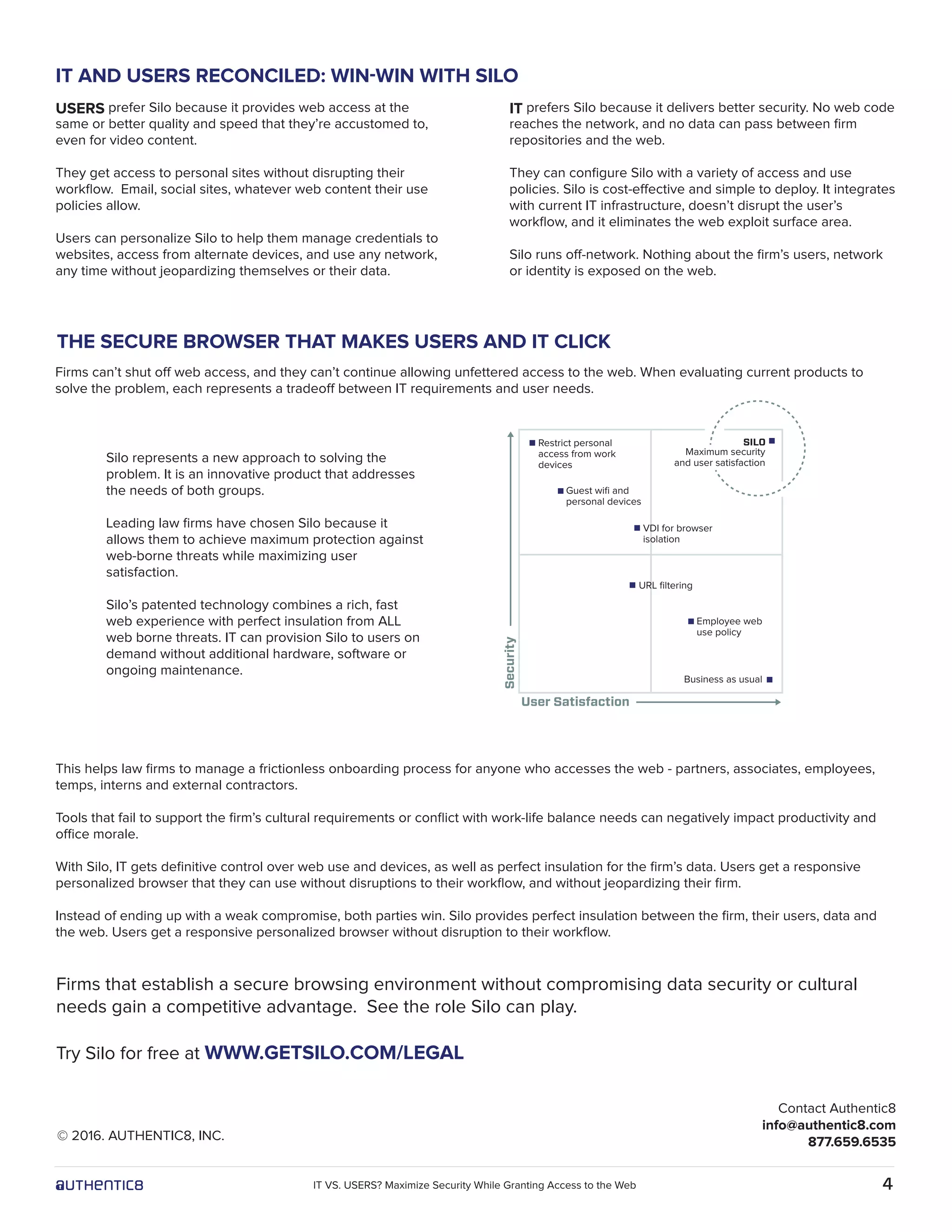
Firms can’t shut off web access, and they can’t continue allowing unfettered access to the web. When evaluating current products to
solve the problem, each represents a tradeoff between IT requirements and user needs.
Security
Guest wifi and
personal devices
Restrict personal
access from work
devices
User Satisfaction
Employee web
use policy
Business as usual
Contact Authentic8
info@authentic8.com
877.659.6535
Firms that establish a secure browsing environment without compromising data security or cultural
needs gain a competitive advantage. See the role Silo can play.
Try Silo for free at WWW.GETSILO.COM/LEGAL
© 2016. AUTHENTIC8, INC.
4IT VS. USERS? Maximize Security While Granting Access to the Web
VDI for browser
isolation
URL filtering
SILO
Maximum security
and user satisfaction

IT vs. Users? How Law Firms Can Maximize Security While Granting Access to the Web

  • 1.
    IT vs. USERS? HowLaw Firms Can Maximize Security While Granting Access to the Web Firms that establish a secure browsing environment without compromising data security or work culture gain a competitive advantage.
  • 2.
    2 There is abattle brewing in law firms, pitting IT security needs against the needs of the users. The pressure on firms to protect their data is mounting. At the same time, the always-on work culture blurs the lines between work and personal life. This dynamic poses a particular challenge for law firm CISOs. They are expected to balance the demands of different stakeholders. But in information security, striking a balance means dangerous trade-offs. Compromises like shutting off personal web access to protect the firm against data theft don’t work. They can actually add new risks. This paper shows how successful firms are optimizing on both axes: data security and user satisfaction. Law Firms are the stewards of their client’s most sensitive data. They handle proprietary information that can be of immense value to outsiders: internal merger and acquisition documents, litigation files, intellectual property (IP) records, financial reports, contracts, employment agreements and more. Intruders are known to attack the weakest link in the security chain. The defenses at a top-tier bank are a tough nut to crack, but in comparison, a bank’s law firm may be a much softer target. Attackers exploit security holes in Internet browsers that lawyers and legal staff use. Every time a page is viewed, the browser fetches active code and runs it on the local computer. Because the web page content can include malicious code, the browser is an open door for attackers to infiltrate the user’s device, and jump to other resources on the network. Attacks against law firms are not an abstract threat. 48 of the nation’s most prestigious firms have experienced large-scale attacks by computer criminals in the first quarter of 2016 alone. As news reports following such incidents suggest, the fallout from law firm data breaches can be catastrophic. Nationwide, law firms were targeted with “ransomware”, malicious software that encrypted their data and demanded a ransom for them to regain access. The FBI warns that firms with IP practice groups are increasingly targeted by attackers who are after patent and trade secrets. Sensitive merger and acquisition data was obtained in a widely publicized security breach at 15 leading firms. Manipulation of financial markets is the presumed motive behind the network intrusions. LAW FIRMS UNDER ATTACK LIKE NEVER BEFORE SECURITY VS. CULTURE BECOMES IT VS. USERS CLIENTS HOLD FIRMS ACCOUNTABLE This trend puts law firms under pressure. Clients are mandating better IT security controls for their law partners, a major aspect of which is a secure browsing environment. We’ve learned of firms that were given an ultimatum from long-standing clients: “Align your security practices with our requirements, or we’ll have to part ways.” Yet law firms don’t have the budgets or IT infrastructure that their highly regulated clients can command. Wall Street’s investments in cybersecurity are measured in billions. In comparison, the average law firm has been spending less than 0.5 percent of its annual revenue on computer security. As a result, law firms find themselves in a difficult position. IT leaders are forced to take drastic steps to secure their environment. This can put them on a collision course with their firm’s culture. Lawyers are “always on”, always working. Employees at law firms expect to be able to access personal web resources like email or online banking sites while working long hours. Mixing personal use with business activities is key to the work-life balance. Historically, internal policies have allowed partners and staff to access these personal web resources with minimal controls. Changes to these policies are guaranteed to cause turmoil in the organization. We have seen firms try to shut off access to non-work related websites, only to experience open revolt by their employees. In instances where IT suggested that lawyers access personal websites from their phones or tablets, users protested. Having to context switch between multiple devices was disruptive to their job-related workflow. 23 percent of law firms with more than 100 attorneys experienced a security breach in 2015. Source: American Bar Association IT VS. USERS? Maximize Security While Granting Access to the Web
  • 3.
    A more importantlesson was that users would find ways to work around restrictive policies. Firms who have tried to remove access reported how their lawyers simply “relocated” to neighborhood coffee shops to access the web - via free, unsecured WiFi networks. Some firms have turned to existing technologies to secure web access. Many have used Citrix® or other virtualization software as a way to give employees access to their personal web sites without exposing the firm’s resources. The rationale is logical. Executing the browser on a remote server prevents web code from reaching the local computer. But virtualizing the entire desktop environment or publishing apps through a virtualization layer can be confusing to users and complicated to administer. Another major issue virtualization is that it is not inherently secure. The browser in the virtual infrastructure is as susceptible to web exploits as the browser on the user’s desktop. And the virtual systems integration points with firm resources, like file repositories or collaboration apps, open other network resources to exploits. Virtualization requires additional investment to deploy and manage Virtualization can improve insulation from web-borne threats, but … can still put the firm at risk, due to lack of inherent VDI security and connections to all virtual system resources, report a poor web experience, including significant video lag, expose the firm’s identity when the VDI runs on premise. can’t lock down the virtualized environment completely due to the lack of integrated web policy controls, struggles to secure the increased attack surface area across significantly more endpoints faces additional workload due to complex configuration and patching requirements, needs to budget for higher hard and soft costs. SILO SOLVES THE WEB DILEMMA FOR LAW FIRMS VIRTUALIZATION IS A POOR MIDDLE GROUND Web pages are rendered in the cloud and transmitted back solely as visual information - pixels - through an encrypted point-to-point connection. No web code ever touches the device endpoint. Virtualization is a good start - as described, it provides an insulating layer between the device and all web code. But virtualization alone is not sufficient. Silo is a secure, cloud based virtual browser designed for maximum security and IT control. With Silo, the browser is built fresh at session start and destroyed at session end. All web pages are rendered in the cloud with page content being delivered over an encrypted connection as display information back to the user. No web code ever touches the endpoint, cookies, trackers and other web residue don’t persist. Silo’s patented technology enables full configuration of browser functionality based on user needs and IT policies. Silo can be accessed from firm-only devices, or personal devices as well. Silo can store users bookmarks, login credentials and other personal data, or it can be a simple, standard browser instance. IT can enable or restrict things like URLs, copy/paste, upload/download, and print, to ensure data policies remain intact. All configuration controls are at IT’s fingertips. Silo shifts the attack surface for web exploits from the local IT environment to Authentic8’s secure cloud environment. And it is as simple to use as any other browser. Silo shifts the attack surface for web exploits from the local IT environment to Authentic8’s secure cloud environment. Users familiar with any other web browser will be able to use Silo. It provides the same web experience they are used to. Users IT 3IT VS. USERS? Maximize Security While Granting Access to the Web
  • 4.
    IT AND USERSRECONCILED: WIN-WIN WITH SILO IT prefers Silo because it delivers better security. No web code reaches the network, and no data can pass between firm repositories and the web. They can configure Silo with a variety of access and use policies. Silo is cost-effective and simple to deploy. It integrates with current IT infrastructure, doesn’t disrupt the user’s workflow, and it eliminates the web exploit surface area. Silo runs off-network. Nothing about the firm’s users, network or identity is exposed on the web. USERS prefer Silo because it provides web access at the same or better quality and speed that they’re accustomed to, even for video content. They get access to personal sites without disrupting their workflow. Email, social sites, whatever web content their use policies allow. Users can personalize Silo to help them manage credentials to websites, access from alternate devices, and use any network, any time without jeopardizing themselves or their data. This helps law firms to manage a frictionless onboarding process for anyone who accesses the web - partners, associates, employees, temps, interns and external contractors. Tools that fail to support the firm’s cultural requirements or conflict with work-life balance needs can negatively impact productivity and office morale. With Silo, IT gets definitive control over web use and devices, as well as perfect insulation for the firm’s data. Users get a responsive personalized browser that they can use without disruptions to their workflow, and without jeopardizing their firm. Instead of ending up with a weak compromise, both parties win. Silo provides perfect insulation between the firm, their users, data and the web. Users get a responsive personalized browser without disruption to their workflow. Silo represents a new approach to solving the problem. It is an innovative product that addresses the needs of both groups. Leading law firms have chosen Silo because it allows them to achieve maximum protection against web-borne threats while maximizing user satisfaction. Silo’s patented technology combines a rich, fast web experience with perfect insulation from ALL web borne threats. IT can provision Silo to users on demand without additional hardware, software or ongoing maintenance. THE SECURE BROWSER THAT MAKES USERS AND IT CLICK Firms can’t shut off web access, and they can’t continue allowing unfettered access to the web. When evaluating current products to solve the problem, each represents a tradeoff between IT requirements and user needs. Security Guest wifi and personal devices Restrict personal access from work devices User Satisfaction Employee web use policy Business as usual Contact Authentic8 info@authentic8.com 877.659.6535 Firms that establish a secure browsing environment without compromising data security or cultural needs gain a competitive advantage. See the role Silo can play. Try Silo for free at WWW.GETSILO.COM/LEGAL © 2016. AUTHENTIC8, INC. 4IT VS. USERS? Maximize Security While Granting Access to the Web VDI for browser isolation URL filtering SILO Maximum security and user satisfaction