Download free for 30 days
Sign in
Upload
Language (EN)
Support
Business
Mobile
Social Media
Marketing
Technology
Art & Photos
Career
Design
Education
Presentations & Public Speaking
Government & Nonprofit
Healthcare
Internet
Law
Leadership & Management
Automotive
Engineering
Software
Recruiting & HR
Retail
Sales
Services
Science
Small Business & Entrepreneurship
Food
Environment
Economy & Finance
Data & Analytics
Investor Relations
Sports
Spiritual
News & Politics
Travel
Self Improvement
Real Estate
Entertainment & Humor
Health & Medicine
Devices & Hardware
Lifestyle
Change Language
Language
English
Español
Português
Français
Deutsche
Cancel
Save
EN
Uploaded by
Yahoo!デベロッパーネットワーク
PDF, PPTX
25,959 views
既存アプリのiOS8対応 #ios8yahoo
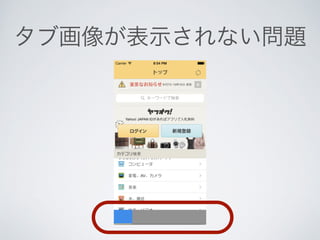
http://connpass.com/event/8629/
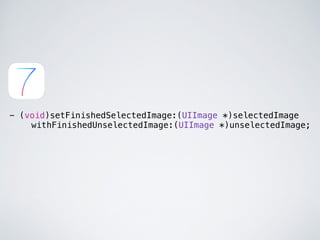
Read more
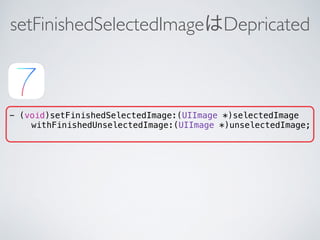
23
Save
Share
Embed
Embed presentation
Download
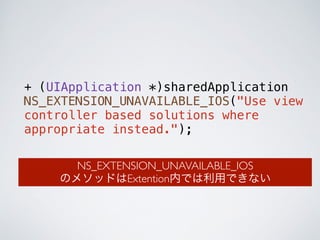
Download as PDF, PPTX
1
/ 91
2
/ 91
3
/ 91
4
/ 91
5
/ 91
6
/ 91
7
/ 91
8
/ 91
9
/ 91
10
/ 91
11
/ 91
12
/ 91
13
/ 91
14
/ 91
15
/ 91
16
/ 91
17
/ 91
18
/ 91
19
/ 91
20
/ 91
21
/ 91
22
/ 91
23
/ 91
24
/ 91
25
/ 91
26
/ 91
27
/ 91
28
/ 91
29
/ 91
30
/ 91
31
/ 91
32
/ 91
33
/ 91
34
/ 91
35
/ 91
36
/ 91
37
/ 91
38
/ 91
39
/ 91
40
/ 91
41
/ 91
42
/ 91
43
/ 91
44
/ 91
45
/ 91
46
/ 91
47
/ 91
48
/ 91
49
/ 91
50
/ 91
51
/ 91
52
/ 91
53
/ 91
54
/ 91
55
/ 91
56
/ 91
57
/ 91
58
/ 91
59
/ 91
60
/ 91
61
/ 91
62
/ 91
63
/ 91
64
/ 91
65
/ 91
66
/ 91
67
/ 91
68
/ 91
69
/ 91
70
/ 91
71
/ 91
72
/ 91
73
/ 91
74
/ 91
75
/ 91
76
/ 91
77
/ 91
78
/ 91
79
/ 91
80
/ 91
81
/ 91
82
/ 91
83
/ 91
84
/ 91
85
/ 91
86
/ 91
87
/ 91
88
/ 91
89
/ 91
90
/ 91
91
/ 91
More Related Content
PDF
Xcode 6の新機能
by
Shingo Sato
PDF
もしiOS8のカスタムキーボードがガジェットのSDKを搭載したら Ver.#ios8yahoo
by
niwatako
PDF
iOS 8 Widget ~ 導入から Tips まで
by
Yuki Tanabe
PDF
iOS 8/Swift 概要 #ios8yahoo
by
Hiramatsu Ryosuke
PDF
Xcodeを便利に使って爆速開発する #yxcm
by
Hiramatsu Ryosuke
PDF
Swift勉強会
by
Nagamine Hiromasa
PDF
SwiftでSioriを開発した体験記
by
yohei sugigami
PDF
Xcode 7 の新しいところ #cm_ios9
by
Tomohiro Kumagai
Xcode 6の新機能
by
Shingo Sato
もしiOS8のカスタムキーボードがガジェットのSDKを搭載したら Ver.#ios8yahoo
by
niwatako
iOS 8 Widget ~ 導入から Tips まで
by
Yuki Tanabe
iOS 8/Swift 概要 #ios8yahoo
by
Hiramatsu Ryosuke
Xcodeを便利に使って爆速開発する #yxcm
by
Hiramatsu Ryosuke
Swift勉強会
by
Nagamine Hiromasa
SwiftでSioriを開発した体験記
by
yohei sugigami
Xcode 7 の新しいところ #cm_ios9
by
Tomohiro Kumagai
What's hot
PDF
NSNotification in Swift #cocoa_kansai
by
Tomohiro Kumagai
PDF
Swift 3 その基本ルールを眺める #cswift
by
Tomohiro Kumagai
PDF
Swift ドキュメントコメント
by
Tomohiro Kumagai
PDF
Swift入門
by
聡 中川
PDF
Study Swift
by
Akihiro Urushihara
PDF
Swift 構造体の時代 #yidev
by
Tomohiro Kumagai
PDF
Swift : クラス継承とプロトコル拡張を比べてみる #yidev
by
Tomohiro Kumagai
PDF
Xcode グループとフォルダー参照 #yhios
by
Tomohiro Kumagai
PDF
iOS豆知識ver0.0.5
by
ppengotsu Name
PDF
Android カスタムROMの作り方
by
Masahiro Hidaka
PDF
はじめてのiOSアプリ開発 ①
by
Nagamine Hiromasa
PDF
Swift を振り返ってみよう #cswift
by
Tomohiro Kumagai
PDF
Core Image Tips & Tricks in iOS 9
by
Shuichi Tsutsumi
PPTX
【Swift】 それ、enumとstructでやってみましょう!!
by
Yu Tanaka
PDF
はじめてのCodeIgniter
by
Yuya Matsushima
PPTX
iPhoneアプリ開発の歩き方〜Swift編〜
by
Yusuke SAITO
PDF
Swiftアプリ制作入門 かんたんシューティングゲーム
by
聡 中川
ODP
はじめてのAndroid開発
by
Katsumi Honda
PDF
Css nite(2010.09.23)
by
Yoshiki Ushida
PDF
WTM53 phpフレームワーク いまさらcodeigniter
by
Masanori Oobayashi
NSNotification in Swift #cocoa_kansai
by
Tomohiro Kumagai
Swift 3 その基本ルールを眺める #cswift
by
Tomohiro Kumagai
Swift ドキュメントコメント
by
Tomohiro Kumagai
Swift入門
by
聡 中川
Study Swift
by
Akihiro Urushihara
Swift 構造体の時代 #yidev
by
Tomohiro Kumagai
Swift : クラス継承とプロトコル拡張を比べてみる #yidev
by
Tomohiro Kumagai
Xcode グループとフォルダー参照 #yhios
by
Tomohiro Kumagai
iOS豆知識ver0.0.5
by
ppengotsu Name
Android カスタムROMの作り方
by
Masahiro Hidaka
はじめてのiOSアプリ開発 ①
by
Nagamine Hiromasa
Swift を振り返ってみよう #cswift
by
Tomohiro Kumagai
Core Image Tips & Tricks in iOS 9
by
Shuichi Tsutsumi
【Swift】 それ、enumとstructでやってみましょう!!
by
Yu Tanaka
はじめてのCodeIgniter
by
Yuya Matsushima
iPhoneアプリ開発の歩き方〜Swift編〜
by
Yusuke SAITO
Swiftアプリ制作入門 かんたんシューティングゲーム
by
聡 中川
はじめてのAndroid開発
by
Katsumi Honda
Css nite(2010.09.23)
by
Yoshiki Ushida
WTM53 phpフレームワーク いまさらcodeigniter
by
Masanori Oobayashi
Similar to 既存アプリのiOS8対応 #ios8yahoo
PDF
既存アプリのiOS 7対応 | iOS 7エンジニア勉強会
by
Yahoo!デベロッパーネットワーク
PDF
iPhone develop for Beginner
by
Sachiko Kajishima
PPTX
マンガボックスのiOS10プッシュ通知導入事例
by
Fukaya Akifumi
PDF
yidev 第18回勉強会 「業務でSwiftで3ヶ月開発してきたので一旦振り返り」
by
佐藤 俊太郎
PDF
flasherがはじめてiOS開発をしてみて
by
佐藤 俊太郎
PDF
iPhone アプリ開発の実例
by
Tokyo City University, Ueno Lab.
PDF
【Monaca×mobile backend】プッシュ通知をカンタン実装!スピード感ある開発をしよう!-準備編(iOS)-
by
natsumo
PPTX
2012 05-19第44回cocoa勉強会発表資料
by
OCHI Shuji
PDF
Storyboard
by
Hidetoshi Mori
PDF
RFC Viewer開発を通して学ぶ!! iOS開発のパターン化
by
幸雄 村上
PDF
WatchKitを実際にさわってみてわかったこと
by
Shuichi Tsutsumi
PDF
効率的なアプリ開発のベストプラクティス
by
yayugu
PDF
iOS 開発のいま (CAMPHOR- x KMC 合同LT会)
by
Yusuke Miyazaki
PDF
Beginning iPhone Vol2
by
Sachiko Kajishima
PDF
Swiftアプリにプッシュ通知を組み込もう!
by
natsumo
PDF
iOS 9 Bootcamp #6 UIKit
by
Shingo Hiraya
PDF
iPhoneとAndroidのアプリ開発最新潮流
by
Rakuten Group, Inc.
PDF
iOS の動画アプリ開発に Xamarin を使ってみた @JXUG #2 East
by
irgaly
PDF
DevLOVE iPhoneアプリ勉強会
by
Toshimitsu Takahashi
PPTX
最近のiOS開発の現状と実状
by
クラスメソッド株式会社
既存アプリのiOS 7対応 | iOS 7エンジニア勉強会
by
Yahoo!デベロッパーネットワーク
iPhone develop for Beginner
by
Sachiko Kajishima
マンガボックスのiOS10プッシュ通知導入事例
by
Fukaya Akifumi
yidev 第18回勉強会 「業務でSwiftで3ヶ月開発してきたので一旦振り返り」
by
佐藤 俊太郎
flasherがはじめてiOS開発をしてみて
by
佐藤 俊太郎
iPhone アプリ開発の実例
by
Tokyo City University, Ueno Lab.
【Monaca×mobile backend】プッシュ通知をカンタン実装!スピード感ある開発をしよう!-準備編(iOS)-
by
natsumo
2012 05-19第44回cocoa勉強会発表資料
by
OCHI Shuji
Storyboard
by
Hidetoshi Mori
RFC Viewer開発を通して学ぶ!! iOS開発のパターン化
by
幸雄 村上
WatchKitを実際にさわってみてわかったこと
by
Shuichi Tsutsumi
効率的なアプリ開発のベストプラクティス
by
yayugu
iOS 開発のいま (CAMPHOR- x KMC 合同LT会)
by
Yusuke Miyazaki
Beginning iPhone Vol2
by
Sachiko Kajishima
Swiftアプリにプッシュ通知を組み込もう!
by
natsumo
iOS 9 Bootcamp #6 UIKit
by
Shingo Hiraya
iPhoneとAndroidのアプリ開発最新潮流
by
Rakuten Group, Inc.
iOS の動画アプリ開発に Xamarin を使ってみた @JXUG #2 East
by
irgaly
DevLOVE iPhoneアプリ勉強会
by
Toshimitsu Takahashi
最近のiOS開発の現状と実状
by
クラスメソッド株式会社
More from Yahoo!デベロッパーネットワーク
PDF
ゼロから始める転移学習
by
Yahoo!デベロッパーネットワーク
PDF
継続的なモデルモニタリングを実現するKubernetes Operator
by
Yahoo!デベロッパーネットワーク
PDF
ヤフーでは開発迅速性と品質のバランスをどう取ってるか
by
Yahoo!デベロッパーネットワーク
PDF
オンプレML基盤on Kubernetes パネルディスカッション
by
Yahoo!デベロッパーネットワーク
PDF
LakeTahoe
by
Yahoo!デベロッパーネットワーク
PDF
オンプレML基盤on Kubernetes 〜Yahoo! JAPAN AIPF〜
by
Yahoo!デベロッパーネットワーク
PDF
Persistent-memory-native Database High-availability Feature
by
Yahoo!デベロッパーネットワーク
PDF
データの価値を最大化させるためのデザイン~データビジュアライゼーションの方法~ #devsumi 17-E-2
by
Yahoo!デベロッパーネットワーク
PDF
eコマースと実店舗の相互利益を目指したデザイン #yjtc
by
Yahoo!デベロッパーネットワーク
PDF
ヤフーを支えるセキュリティ ~サイバー攻撃を防ぐエンジニアの仕事とは~ #yjtc
by
Yahoo!デベロッパーネットワーク
PDF
Yahoo! JAPANのIaaSを支えるKubernetesクラスタ、アップデート自動化への挑戦 #yjtc
by
Yahoo!デベロッパーネットワーク
PDF
ビッグデータから人々のムードを捉える #yjtc
by
Yahoo!デベロッパーネットワーク
PDF
サイエンス領域におけるMLOpsの取り組み #yjtc
by
Yahoo!デベロッパーネットワーク
PDF
ヤフーのAIプラットフォーム紹介 ~AIテックカンパニーを支えるデータ基盤~ #yjtc
by
Yahoo!デベロッパーネットワーク
PDF
Yahoo! JAPAN Tech Conference 2022 Day2 Keynote #yjtc
by
Yahoo!デベロッパーネットワーク
PDF
新技術を使った次世代の商品の見せ方 ~ヤフオク!のマルチビュー機能~ #yjtc
by
Yahoo!デベロッパーネットワーク
PDF
PC版Yahoo!メールリニューアル ~サービスのUI/UX統合と改善プロセス~ #yjtc
by
Yahoo!デベロッパーネットワーク
PDF
モブデザインによる多職種チームのコミュニケーション改善 #yjtc
by
Yahoo!デベロッパーネットワーク
PDF
「新しいおうち探し」のためのAIアシスト検索 #yjtc
by
Yahoo!デベロッパーネットワーク
PDF
ユーザーの地域を考慮した検索入力補助機能の改善の試み #yjtc
by
Yahoo!デベロッパーネットワーク
ゼロから始める転移学習
by
Yahoo!デベロッパーネットワーク
継続的なモデルモニタリングを実現するKubernetes Operator
by
Yahoo!デベロッパーネットワーク
ヤフーでは開発迅速性と品質のバランスをどう取ってるか
by
Yahoo!デベロッパーネットワーク
オンプレML基盤on Kubernetes パネルディスカッション
by
Yahoo!デベロッパーネットワーク
LakeTahoe
by
Yahoo!デベロッパーネットワーク
オンプレML基盤on Kubernetes 〜Yahoo! JAPAN AIPF〜
by
Yahoo!デベロッパーネットワーク
Persistent-memory-native Database High-availability Feature
by
Yahoo!デベロッパーネットワーク
データの価値を最大化させるためのデザイン~データビジュアライゼーションの方法~ #devsumi 17-E-2
by
Yahoo!デベロッパーネットワーク
eコマースと実店舗の相互利益を目指したデザイン #yjtc
by
Yahoo!デベロッパーネットワーク
ヤフーを支えるセキュリティ ~サイバー攻撃を防ぐエンジニアの仕事とは~ #yjtc
by
Yahoo!デベロッパーネットワーク
Yahoo! JAPANのIaaSを支えるKubernetesクラスタ、アップデート自動化への挑戦 #yjtc
by
Yahoo!デベロッパーネットワーク
ビッグデータから人々のムードを捉える #yjtc
by
Yahoo!デベロッパーネットワーク
サイエンス領域におけるMLOpsの取り組み #yjtc
by
Yahoo!デベロッパーネットワーク
ヤフーのAIプラットフォーム紹介 ~AIテックカンパニーを支えるデータ基盤~ #yjtc
by
Yahoo!デベロッパーネットワーク
Yahoo! JAPAN Tech Conference 2022 Day2 Keynote #yjtc
by
Yahoo!デベロッパーネットワーク
新技術を使った次世代の商品の見せ方 ~ヤフオク!のマルチビュー機能~ #yjtc
by
Yahoo!デベロッパーネットワーク
PC版Yahoo!メールリニューアル ~サービスのUI/UX統合と改善プロセス~ #yjtc
by
Yahoo!デベロッパーネットワーク
モブデザインによる多職種チームのコミュニケーション改善 #yjtc
by
Yahoo!デベロッパーネットワーク
「新しいおうち探し」のためのAIアシスト検索 #yjtc
by
Yahoo!デベロッパーネットワーク
ユーザーの地域を考慮した検索入力補助機能の改善の試み #yjtc
by
Yahoo!デベロッパーネットワーク
既存アプリのiOS8対応 #ios8yahoo
1.
既存アプリの iOS8対応 Mao
Nishi
2.
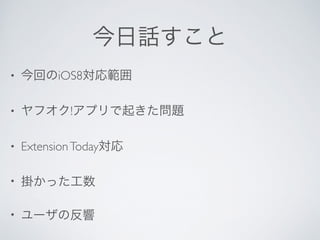
今日話すこと • 今回のiOS8対応範囲
• ヤフオク!アプリで起きた問題 • Extension Today対応 • 掛かった工数 • ユーザの反響
3.
ヤフオク!アプリについて
5.
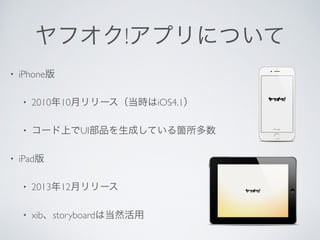
ヤフオク!アプリについて • iPhone版
• 2010年10月リリース(当時はiOS4.1) • コード上でUI部品を生成している箇所多数 • iPad版 • 2013年12月リリース • xib、storyboardは当然活用
6.
今回のiOS8対応範囲について
7.
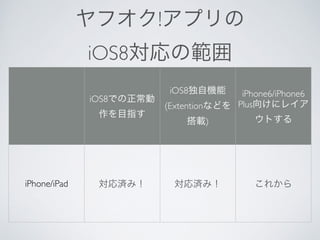
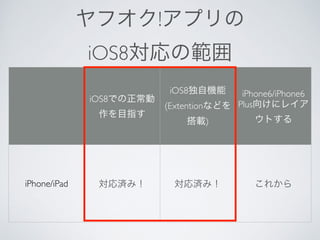
ヤフオク!アプリの iOS8対応の範囲 iOS8での正常動
作を目指す iOS8独自機能 (Extentionなどを 搭載) iPhone6/iPhone6 Plus向けにレイア ウトする iPhone/iPad 対応済み! 対応済み! これから
8.
ヤフオク!アプリの iOS8対応の範囲 iOS8での正常動
作を目指す iOS8独自機能 (Extentionなどを 搭載) iPhone6/iPhone6 Plus向けにレイア ウトする iPhone/iPad 対応済み! 対応済み! これから
9.
iOS8対応時に出会った事象・ 不具合等を紹介します
10.
これからiOS8対応にあたられる 方の参考になればと思います
11.
CASE 1 回転時にレイアウトが崩れる
12.
とりあえずビルドして 動かしてみた
13.
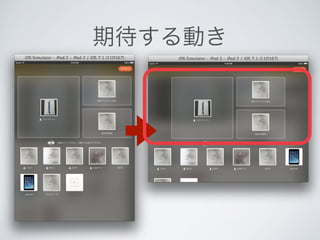
期待する動き
14.
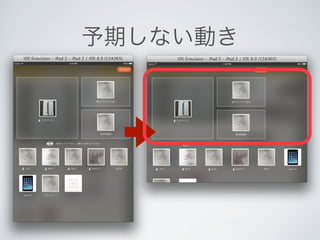
予期しない動き
15.
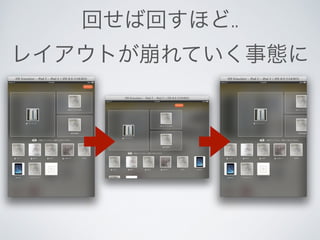
回せば回すほど.. レイアウトが崩れていく事態に
16.
原因 [[UIScreen mainScreen]
applicationFrame];
17.
原因 CGRect appFrame
= [[UIScreen mainScreen] applicationFrame]; /* 以下はiOS8からは端末の向きによって返却される値が変わるようになった*/ CGFloat height = appFrame.size.height; CGFloat width = appFrame.size.width;
18.
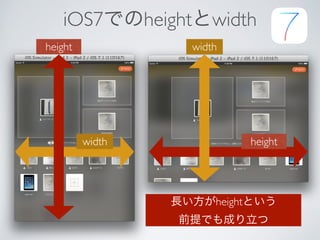
iOS7でのheightとwidth height width
width height 長い方がheightという 前提でも成り立つ
19.
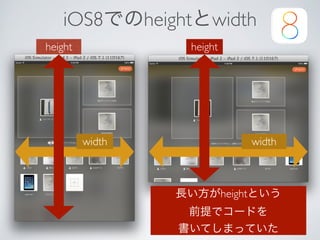
iOS8でのheightとwidth height height
width width 長い方がheightという 前提でコードを 書いてしまっていた
20.
端末の向きにってheight、width に変化があるメソッド •
[[UIScreen mainScreen] applicationFrame]; • [[UIScreen mainScreen] bounds]; • [[UIApplication sharedApplication] statusBarFrame]; これらを使っている箇所は見直しましょう
21.
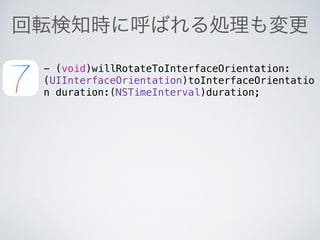
回転検知時に呼ばれる処理も変更 - (void)willRotateToInterfaceOrientation:
(UIInterfaceOrientation)toInterfaceOrientatio n duration:(NSTimeInterval)duration;
22.
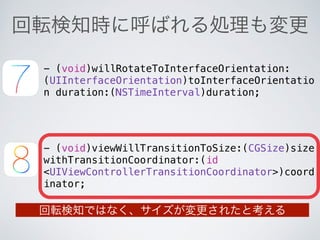
回転検知時に呼ばれる処理も変更 - (void)willRotateToInterfaceOrientation:
(UIInterfaceOrientation)toInterfaceOrientatio n duration:(NSTimeInterval)duration; - (void)viewWillTransitionToSize:(CGSize)size withTransitionCoordinator:(id <UIViewControllerTransitionCoordinator>)coord inator; 回転検知ではなく、サイズが変更されたと考える
23.
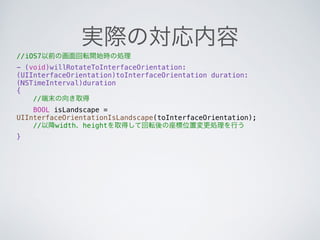
実際の対応内容 //iOS7以前の画面回転開始時の処理 -
(void)willRotateToInterfaceOrientation: (UIInterfaceOrientation)toInterfaceOrientation duration: (NSTimeInterval)duration { //端末の向き取得 BOOL isLandscape = UIInterfaceOrientationIsLandscape(toInterfaceOrientation); //以降width、heightを取得して回転後の座標位置変更処理を行う }
24.
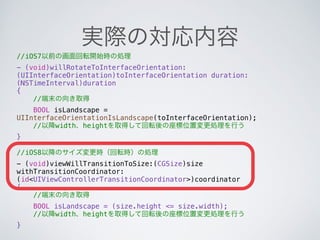
実際の対応内容 //iOS7以前の画面回転開始時の処理 -
(void)willRotateToInterfaceOrientation: (UIInterfaceOrientation)toInterfaceOrientation duration: (NSTimeInterval)duration { //端末の向き取得 BOOL isLandscape = UIInterfaceOrientationIsLandscape(toInterfaceOrientation); //以降width、heightを取得して回転後の座標位置変更処理を行う } ! //iOS8以降のサイズ変更時(回転時)の処理 - (void)viewWillTransitionToSize:(CGSize)size withTransitionCoordinator: (id<UIViewControllerTransitionCoordinator>)coordinator { //端末の向き取得 BOOL isLandscape = (size.height <= size.width); //以降width、heightを取得して回転後の座標位置変更処理を行う }
25.
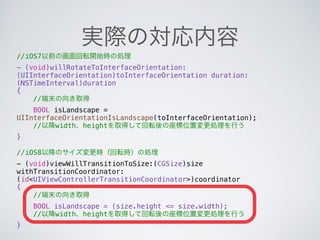
実際の対応内容 //iOS7以前の画面回転開始時の処理 -
(void)willRotateToInterfaceOrientation: (UIInterfaceOrientation)toInterfaceOrientation duration: (NSTimeInterval)duration { //端末の向き取得 BOOL isLandscape = UIInterfaceOrientationIsLandscape(toInterfaceOrientation); //以降width、heightを取得して回転後の座標位置変更処理を行う } ! //iOS8以降のサイズ変更時(回転時)の処理 - (void)viewWillTransitionToSize:(CGSize)size withTransitionCoordinator: (id<UIViewControllerTransitionCoordinator>)coordinator { //端末の向き取得 BOOL isLandscape = (size.height <= size.width); //以降width、heightを取得して回転後の座標位置変更処理を行う }
26.
CASE 2 罫線の左が切れる
27.
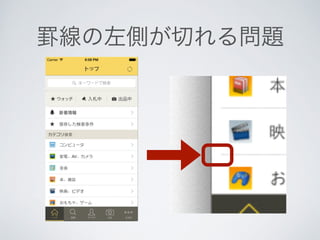
罫線の左側が切れる問題
28.
iOS7対応の時に行った処理 [UITableViewCell appearance].separatorInset
= UIEdgeInsetsZero;
29.
iOS8の新しいプロパティlayoutMargins によりマージンが設定されている (lldb)
p (UIEdgeInsets)[self.tableView layoutMargins] (UIEdgeInsets) $1 = (top = 0, left = 16, bottom = 0, right = 16)
30.
コンテンツのマージン 設定をオフにする -(void)viewDidLayoutSubviews
{ [super viewDidLayoutSubviews]; self.tableView.layoutMargins = UIEdgeInsetsZero; }
31.
コンテンツのマージン 設定をオフにする -(void)viewDidLayoutSubviews
{ [super viewDidLayoutSubviews]; self.tableView.layoutMargins = UIEdgeInsetsZero; }
32.
コンテンツのマージン 設定をオフにする -(void)viewDidLayoutSubviews
{ [super viewDidLayoutSubviews]; self.tableView.layoutMargins = UIEdgeInsetsZero; }
33.
CASE 3 デバイストークンが
取得できない
34.
デバイストークン取得処理変更 [[UIApplication sharedApplication]
registerForRemoteNotificationTypes: (UIRemoteNotificationTypeBadge| UIRemoteNotificationTypeSound| UIRemoteNotificationTypeAlert)];
35.
デバイストークン取得処理変更 [[UIApplication sharedApplication]
registerForRemoteNotificationTypes: (UIRemoteNotificationTypeBadge| UIRemoteNotificationTypeSound| UIRemoteNotificationTypeAlert)];
36.
デバイストークン取得処理変更 //通知タイプの設定 UIUserNotificationType
types = UIUserNotificationTypeBadge | UIUserNotificationTypeSound | UIUserNotificationTypeAlert; ! UIUserNotificationSettings *settings = [UIUserNotificationSettings settingsForTypes:types categories:nil]; ! [[UIApplication sharedApplication] registerUserNotificationSettings:settings]; ! //Push通知の利用許可をとる [[UIApplication sharedApplication] registerForRemoteNotifications]; iOSバージョン毎に処理を分岐する必要がある
37.
デバイストークン取得処理変更 //通知タイプの設定 UIUserNotificationType
types = UIUserNotificationTypeBadge | UIUserNotificationTypeSound | UIUserNotificationTypeAlert; ! UIUserNotificationSettings *settings = [UIUserNotificationSettings settingsForTypes:types categories:nil]; ! [[UIApplication sharedApplication] registerUserNotificationSettings:settings]; ! //Push通知の利用許可をとる [[UIApplication sharedApplication] registerForRemoteNotifications];
38.
デバイストークン取得処理変更 //通知タイプの設定 UIUserNotificationType
types = UIUserNotificationTypeBadge | UIUserNotificationTypeSound | UIUserNotificationTypeAlert; ! UIUserNotificationSettings *settings = [UIUserNotificationSettings settingsForTypes:types categories:nil]; ! [[UIApplication sharedApplication] registerUserNotificationSettings:settings]; ! //Push通知の利用許可をとる [[UIApplication sharedApplication] registerForRemoteNotifications];
39.
デバイストークン取得処理変更 //通知タイプの設定 UIUserNotificationType
types = UIUserNotificationTypeBadge | UIUserNotificationTypeSound | UIUserNotificationTypeAlert; ! UIUserNotificationSettings *settings = [UIUserNotificationSettings settingsForTypes:types categories:nil]; ! [[UIApplication sharedApplication] registerUserNotificationSettings:settings]; ! //Push通知の利用許可をとる [[UIApplication sharedApplication] registerForRemoteNotifications];
40.
デバイストークン取得処理変更 //通知タイプの設定 UIUserNotificationType
types = UIUserNotificationTypeBadge | UIUserNotificationTypeSound | UIUserNotificationTypeAlert; ! UIUserNotificationSettings *settings = [UIUserNotificationSettings settingsForTypes:types categories:nil]; ! [[UIApplication sharedApplication] registerUserNotificationSettings:settings]; ! //Push通知の利用許可をとる [[UIApplication sharedApplication] registerForRemoteNotifications];
41.
デバイストークン取得処理変更 //通知タイプの設定 UIUserNotificationType
types = UIUserNotificationTypeBadge | UIUserNotificationTypeSound | UIUserNotificationTypeAlert; ! UIUserNotificationSettings *settings = [UIUserNotificationSettings settingsForTypes:types categories:nil]; ! [[UIApplication sharedApplication] registerUserNotificationSettings:settings]; ! //Push通知の利用許可をとる [[UIApplication sharedApplication] registerForRemoteNotifications]; iOSバージョン毎に処理を分岐する必要がある
42.
OSバージョンで分岐させてます + (void)registerNotification
{ //iOS8とそれ以外で設定を変更する必要がある if ([YJUtil isIOS8]){ [AucNotificationConfigure registerNotificationAfteriOS8]; } else { [AucNotificationConfigure registerNotificationBeforeiOS7]; } }
43.
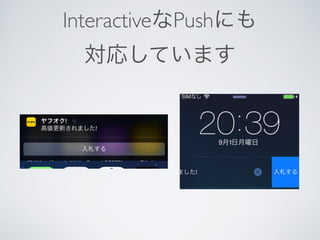
InteractiveなPushにも 対応しています
44.
+ (void)registerNotificationAfteriOS8 {
UIMutableUserNotificationAction *bidAction = [[UIMutableUserNotificationAction alloc] init]; bidAction.identifier = XXXXXXX; bidAction.title = @"入札する"; bidAction.activationMode = UIUserNotificationActivationModeForeground; bidAction.destructive = NO; bidAction.authenticationRequired = NO; UIMutableUserNotificationCategory *inviteCategory = [[UIMutableUserNotificationCategory alloc] init]; inviteCategory.identifier = XXXXXXX; [inviteCategory setActions:@[bidAction] forContext:UIUserNotificationActionContextMinimal]; //通知タイプの設定 UIUserNotificationType types = UIUserNotificationTypeBadge | UIUserNotificationTypeSound | UIUserNotificationTypeAlert; NSSet *categories = [NSSet setWithObject:inviteCategory]; UIUserNotificationSettings *settings = [UIUserNotificationSettings settingsForTypes:types categories:categories]; [[UIApplication sharedApplication] registerUserNotificationSettings:settings]; //Push通知の利用許可をとる [[UIApplication sharedApplication] registerForRemoteNotifications]; } iOS8以後の処理
45.
+ (void)registerNotificationAfteriOS8 {
UIMutableUserNotificationAction *bidAction = [[UIMutableUserNotificationAction alloc] init]; bidAction.identifier = XXXXXXX; bidAction.title = @"入札する"; bidAction.activationMode = UIUserNotificationActivationModeForeground; bidAction.destructive = NO; bidAction.authenticationRequired = NO; UIMutableUserNotificationCategory *inviteCategory = [[UIMutableUserNotificationCategory alloc] init]; inviteCategory.identifier = XXXXXXX; [inviteCategory setActions:@[bidAction] forContext:UIUserNotificationActionContextMinimal]; //通知タイプの設定 UIUserNotificationType types = UIUserNotificationTypeBadge | UIUserNotificationTypeSound | UIUserNotificationTypeAlert; NSSet *categories = [NSSet setWithObject:inviteCategory]; UIUserNotificationSettings *settings = [UIUserNotificationSettings settingsForTypes:types categories:categories]; [[UIApplication sharedApplication] registerUserNotificationSettings:settings]; //Push通知の利用許可をとる [[UIApplication sharedApplication] registerForRemoteNotifications]; } iOS8以後の処理
46.
+ (void)registerNotificationAfteriOS8 {
UIMutableUserNotificationAction *bidAction = [[UIMutableUserNotificationAction alloc] init]; bidAction.identifier = XXXXXXX; bidAction.title = @"入札する"; bidAction.activationMode = UIUserNotificationActivationModeForeground; bidAction.destructive = NO; bidAction.authenticationRequired = NO; UIMutableUserNotificationCategory *inviteCategory = [[UIMutableUserNotificationCategory alloc] init]; inviteCategory.identifier = XXXXXXX; [inviteCategory setActions:@[bidAction] forContext:UIUserNotificationActionContextMinimal]; //通知タイプの設定 UIUserNotificationType types = UIUserNotificationTypeBadge | UIUserNotificationTypeSound | UIUserNotificationTypeAlert; NSSet *categories = [NSSet setWithObject:inviteCategory]; UIUserNotificationSettings *settings = [UIUserNotificationSettings settingsForTypes:types categories:categories]; [[UIApplication sharedApplication] registerUserNotificationSettings:settings]; //Push通知の利用許可をとる [[UIApplication sharedApplication] registerForRemoteNotifications]; } iOS8以後の処理
47.
CASE 4 iPadでカメラが反応しない
48.
iPadでカメラ撮影する時 UIImagePickerController *
picker = [[UIImagePickerController alloc] init]; picker.delegate = self; picker.sourceType = UIImagePickerControllerSourceTypeCamera; ! [self presentViewController:picker animated:YES completion:nil];
49.
iPadでカメラ撮影する時 UIImagePickerController *
picker = [[UIImagePickerController alloc] init]; picker.delegate = self; picker.sourceType = UIImagePickerControllerSourceTypeCamera; ! [self presentViewController:picker animated:YES completion:nil];
50.
iPadでカメラ撮影する時 UIImagePickerController *
picker = [[UIImagePickerController alloc] init]; picker.delegate = self; picker.sourceType = UIImagePickerControllerSourceTypeCamera; ! dispatch_async(dispatch_get_main_queue(), ^ { [self presentViewController:picker animated:YES completion:nil]; 非同期で起動しないと固まってしまう });
51.
iPadでカメラ撮影する時 UIImagePickerController *
picker = [[UIImagePickerController alloc] init]; picker.delegate = self; picker.sourceType = UIImagePickerControllerSourceTypeCamera; ! dispatch_async(dispatch_get_main_queue(), ^ { [self presentViewController:picker animated:YES completion:nil]; 非同期で起動しないと固まってしまう });
52.
iPadでカメラ撮影する時 UIImagePickerController *
picker = [[UIImagePickerController alloc] init]; picker.delegate = self; picker.sourceType = UIImagePickerControllerSourceTypeCamera; if (SYSTEM_VERSION_GREATER_THAN_OR_EQUAL_TO(@"8.0")) { dispatch_async(dispatch_get_main_queue(), ^ { [self presentViewController:picker animated:YES completion:nil]; }); } else { [self presentViewController:picker animated:YES completion:nil]; } 非同期で起動しないと固まってしまう
53.
iPadでアルバムから写真を選 択する際も同様
54.
iPadでアルバムから写真を選択する際も同様 UIImagePickerController *imagePickerController
= [[UIImagePickerController alloc]init]; imagePickerController.delegate = self; imagePickerController.sourceType = UIImagePickerControllerSourceTypePhotoLibrary; ! self.popover = [[UIPopoverController alloc] initWithContentViewController: imagePickerController]; self.popover.delegate = self; if (SYSTEM_VERSION_GREATER_THAN_OR_EQUAL_TO(@"8.0")) { dispatch_async(dispatch_get_main_queue(), ^ { [self.popover presentPopoverFromRect:cell.frame inView:self.view permittedArrowDirections:UIPopoverArrowDirectionAny animated:YES]; }); } else { [self.popover presentPopoverFromRect:cell.frame inView:self.view permittedArrowDirections:UIPopoverArrowDirectionAny animated:YES]; } 非同期で起動しないと固まってしまう
55.
iPadでアルバムから写真を選択する際も同様 UIImagePickerController *imagePickerController
= [[UIImagePickerController alloc]init]; imagePickerController.delegate = self; imagePickerController.sourceType = UIImagePickerControllerSourceTypePhotoLibrary; ! self.popover = [[UIPopoverController alloc] initWithContentViewController: imagePickerController]; self.popover.delegate = self; if (SYSTEM_VERSION_GREATER_THAN_OR_EQUAL_TO(@"8.0")) { dispatch_async(dispatch_get_main_queue(), ^ { [self.popover presentPopoverFromRect:cell.frame inView:self.view permittedArrowDirections:UIPopoverArrowDirectionAny animated:YES]; }); } else { [self.popover presentPopoverFromRect:cell.frame inView:self.view permittedArrowDirections:UIPopoverArrowDirectionAny animated:YES]; } 非同期で起動しないと固まってしまう
56.
iPadでアルバムから写真を選択する際も同様 UIImagePickerController *imagePickerController
= [[UIImagePickerController alloc]init]; imagePickerController.delegate = self; imagePickerController.sourceType = UIImagePickerControllerSourceTypePhotoLibrary; ! self.popover = [[UIPopoverController alloc] initWithContentViewController: imagePickerController]; self.popover.delegate = self; if (SYSTEM_VERSION_GREATER_THAN_OR_EQUAL_TO(@"8.0")) { dispatch_async(dispatch_get_main_queue(), ^ { [self.popover presentPopoverFromRect:cell.frame inView:self.view permittedArrowDirections:UIPopoverArrowDirectionAny animated:YES]; }); } else { [self.popover presentPopoverFromRect:cell.frame inView:self.view permittedArrowDirections:UIPopoverArrowDirectionAny animated:YES]; } 非同期で起動しないと固まってしまう
57.
iPadでアルバムから写真を選択する際も同様 UIImagePickerController *imagePickerController
= [[UIImagePickerController alloc]init]; imagePickerController.delegate = self; imagePickerController.sourceType = UIImagePickerControllerSourceTypePhotoLibrary; ! self.popover = [[UIPopoverController alloc] initWithContentViewController: imagePickerController]; self.popover.delegate = self; if (SYSTEM_VERSION_GREATER_THAN_OR_EQUAL_TO(@"8.0")) { dispatch_async(dispatch_get_main_queue(), ^ { [self.popover presentPopoverFromRect:cell.frame inView:self.view permittedArrowDirections:UIPopoverArrowDirectionAny animated:YES]; }); } else { [self.popover presentPopoverFromRect:cell.frame inView:self.view permittedArrowDirections:UIPopoverArrowDirectionAny animated:YES]; } 非同期で起動しないと固まってしまう
58.
CASE 5 タブ画像が表示されない
59.
タブ画像が表示されない問題
60.
- (void)setFinishedSelectedImage:(UIImage *)selectedImage
withFinishedUnselectedImage:(UIImage *)unselectedImage;
61.
setFinishedSelectedImageはDepricated - (void)setFinishedSelectedImage:(UIImage
*)selectedImage withFinishedUnselectedImage:(UIImage *)unselectedImage;
62.
setFinishedSelectedImageはDepricated UIImage *m1
= [[UIImage imageNamed:@"m1.png"] imageWithRenderingMode:UIImageRenderingModeAlwaysOriginal]; ! UIImage *m2 = [[UIImage imageNamed:@"m2.png"] imageWithRenderingMode:UIImageRenderingModeAlwaysOriginal]; ! UITabBarItem *tab = [[UITabBarItem alloc] initWithTitle:@"" image:m1 selectedImage:m2];
63.
setFinishedSelectedImageはDepricated UIImage *m1
= [[UIImage imageNamed:@"m1.png"] imageWithRenderingMode:UIImageRenderingModeAlwaysOriginal]; ! UIImage *m2 = [[UIImage imageNamed:@"m2.png"] imageWithRenderingMode:UIImageRenderingModeAlwaysOriginal]; ! UITabBarItem *tab = [[UITabBarItem alloc] initWithTitle:@"" image:m1 selectedImage:m2];
64.
setFinishedSelectedImageはDepricated UIImage *m1
= [[UIImage imageNamed:@"m1.png"] imageWithRenderingMode:UIImageRenderingModeAlwaysOriginal]; ! UIImage *m2 = [[UIImage imageNamed:@"m2.png"] imageWithRenderingMode:UIImageRenderingModeAlwaysOriginal]; ! UITabBarItem *tab = [[UITabBarItem alloc] initWithTitle:@"" image:m1 selectedImage:m2]; UIImageRenderingModeAlwaysOriginalと共に生成する
65.
CASE 6 Extentionの共通ロジックどうする
問題
66.
アプリ本体とExtentionで 利用する共通部品クラスにおいて [UIApplication
sharedApplication] が使われているメソッドがある 色々な事情で共通部品クラスに 大きな修正を加えることができませんでした
67.
+ (UIApplication *)sharedApplication
NS_EXTENSION_UNAVAILABLE_IOS("Use view controller based solutions where appropriate instead."); NS_EXTENSION_UNAVAILABLE_IOS のメソッドはExtention内では利用できない
68.
どうするべきか ! !
// 特定のアプリを起動する void launchXXXXX(NSString* message) { NSString* url = [NSString stringWithFormat: @"%@://XXXXX/?message=%@", kXXXXSchemes, message]; [[UIApplication sharedApplication] openURL:[NSURL URLWithString:url]]; } !
69.
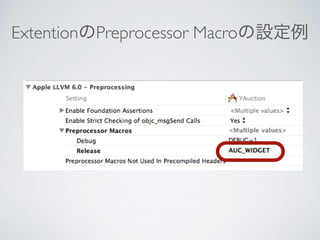
Preprocessor Macroを使う方法 #ifndef
AUC_WIDGET ! // 特定のアプリを起動する void launchXXXXX(NSString* message) { NSString* url = [NSString stringWithFormat: @"%@://XXXXX/?message=%@", kXXXXSchemes, message]; [[UIApplication sharedApplication] openURL:[NSURL URLWithString:url]]; } #endif
70.
Preprocessor Macroを使う方法 #ifndef
AUC_WIDGET ! // 特定のアプリを起動する void launchXXXXX(NSString* message) { NSString* url = [NSString stringWithFormat: @"%@://XXXXX/?message=%@", kXXXXSchemes, message]; [[UIApplication sharedApplication] openURL:[NSURL URLWithString:url]]; } #endif できるだけ共通部品から取り除くべきですが、 一手段として参考にしてください
71.
ExtentionのPreprocessor Macroの設定例
72.
Extention Today対応
74.
Extention Todayについて •
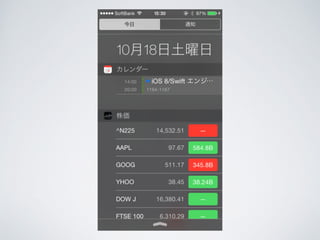
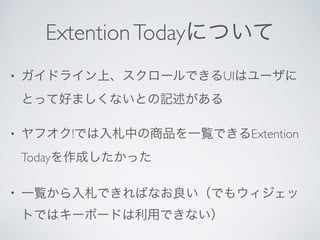
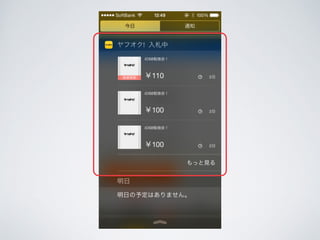
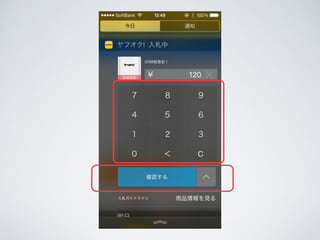
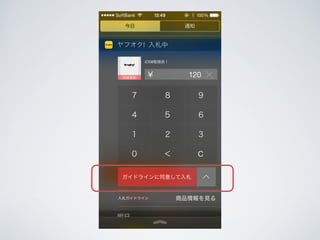
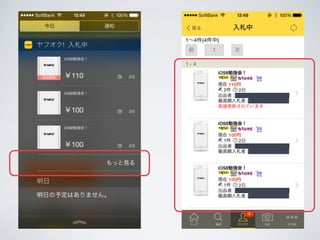
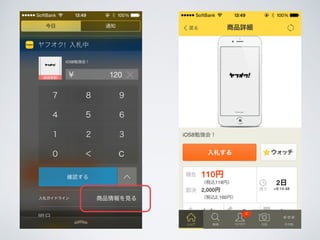
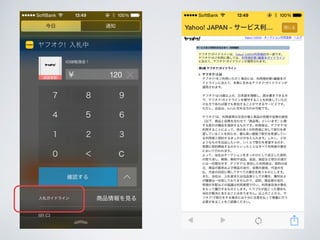
ガイドライン上、スクロールできるUIはユーザに とって好ましくないとの記述がある • ヤフオク!では入札中の商品を一覧できるExtention Todayを作成したかった • 一覧から入札できればなお良い(でもウィジェッ トではキーボードは利用できない)
81.
iOS8対応に 掛かった工数
82.
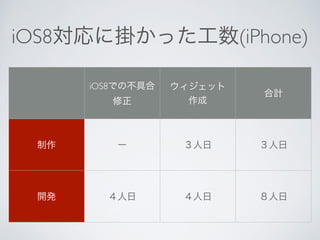
iOS8対応に掛かった工数(iPhone) iOS8での不具合 修正
ウィジェット 作成合計 制作ー3人日3人日 開発4人日4人日8人日
83.
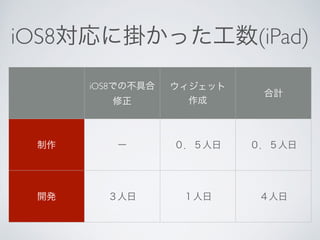
iOS8対応に掛かった工数(iPad) iOS8での不具合 修正
ウィジェット 作成合計 制作ー0.5人日0.5人日 開発3人日1人日4人日
84.
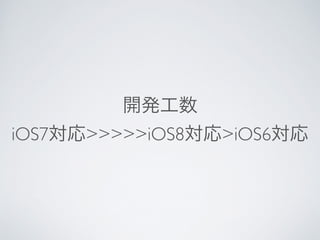
開発工数 iOS7対応>>>>>iOS8対応>iOS6対応
85.
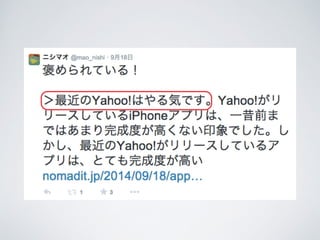
リリース後の反響
89.
最後に
90.
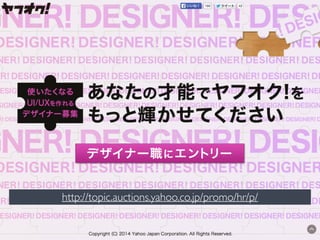
http://topic.auctions.yahoo.co.jp/promo/hr/p/
91.
http://topic.auctions.yahoo.co.jp/promo/hr/p/
Download

![原因
[[UIScreen mainScreen] applicationFrame];](https://image.slidesharecdn.com/yahooyahuokuios8-141023212333-conversion-gate02/85/iOS8-ios8yahoo-16-320.jpg)
![原因
CGRect appFrame = [[UIScreen mainScreen] applicationFrame];
/* 以下はiOS8からは端末の向きによって返却される値が変わるようになった*/
CGFloat height = appFrame.size.height;
CGFloat width = appFrame.size.width;](https://image.slidesharecdn.com/yahooyahuokuios8-141023212333-conversion-gate02/85/iOS8-ios8yahoo-17-320.jpg)
![端末の向きにってheight、width
に変化があるメソッド
• [[UIScreen mainScreen] applicationFrame];
• [[UIScreen mainScreen] bounds];
• [[UIApplication sharedApplication] statusBarFrame];
これらを使っている箇所は見直しましょう](https://image.slidesharecdn.com/yahooyahuokuios8-141023212333-conversion-gate02/85/iOS8-ios8yahoo-20-320.jpg)
![iOS7対応の時に行った処理
[UITableViewCell appearance].separatorInset =
UIEdgeInsetsZero;](https://image.slidesharecdn.com/yahooyahuokuios8-141023212333-conversion-gate02/85/iOS8-ios8yahoo-28-320.jpg)
![iOS8の新しいプロパティlayoutMargins
によりマージンが設定されている
(lldb) p (UIEdgeInsets)[self.tableView layoutMargins]
(UIEdgeInsets) $1 = (top = 0, left = 16, bottom = 0,
right = 16)](https://image.slidesharecdn.com/yahooyahuokuios8-141023212333-conversion-gate02/85/iOS8-ios8yahoo-29-320.jpg)
![コンテンツのマージン
設定をオフにする
-(void)viewDidLayoutSubviews
{
[super viewDidLayoutSubviews];
self.tableView.layoutMargins = UIEdgeInsetsZero;
}](https://image.slidesharecdn.com/yahooyahuokuios8-141023212333-conversion-gate02/85/iOS8-ios8yahoo-30-320.jpg)
![コンテンツのマージン
設定をオフにする
-(void)viewDidLayoutSubviews
{
[super viewDidLayoutSubviews];
self.tableView.layoutMargins = UIEdgeInsetsZero;
}](https://image.slidesharecdn.com/yahooyahuokuios8-141023212333-conversion-gate02/85/iOS8-ios8yahoo-31-320.jpg)
![コンテンツのマージン
設定をオフにする
-(void)viewDidLayoutSubviews
{
[super viewDidLayoutSubviews];
self.tableView.layoutMargins = UIEdgeInsetsZero;
}](https://image.slidesharecdn.com/yahooyahuokuios8-141023212333-conversion-gate02/85/iOS8-ios8yahoo-32-320.jpg)
![デバイストークン取得処理変更
[[UIApplication sharedApplication]
registerForRemoteNotificationTypes:
(UIRemoteNotificationTypeBadge|
UIRemoteNotificationTypeSound|
UIRemoteNotificationTypeAlert)];](https://image.slidesharecdn.com/yahooyahuokuios8-141023212333-conversion-gate02/85/iOS8-ios8yahoo-34-320.jpg)
![デバイストークン取得処理変更
[[UIApplication sharedApplication]
registerForRemoteNotificationTypes:
(UIRemoteNotificationTypeBadge|
UIRemoteNotificationTypeSound|
UIRemoteNotificationTypeAlert)];](https://image.slidesharecdn.com/yahooyahuokuios8-141023212333-conversion-gate02/85/iOS8-ios8yahoo-35-320.jpg)
![デバイストークン取得処理変更
//通知タイプの設定
UIUserNotificationType types = UIUserNotificationTypeBadge |
UIUserNotificationTypeSound | UIUserNotificationTypeAlert;
!
UIUserNotificationSettings *settings = [UIUserNotificationSettings
settingsForTypes:types categories:nil];
!
[[UIApplication sharedApplication]
registerUserNotificationSettings:settings];
!
//Push通知の利用許可をとる
[[UIApplication sharedApplication] registerForRemoteNotifications];
iOSバージョン毎に処理を分岐する必要がある](https://image.slidesharecdn.com/yahooyahuokuios8-141023212333-conversion-gate02/85/iOS8-ios8yahoo-36-320.jpg)
![デバイストークン取得処理変更
//通知タイプの設定
UIUserNotificationType types = UIUserNotificationTypeBadge |
UIUserNotificationTypeSound | UIUserNotificationTypeAlert;
!
UIUserNotificationSettings *settings = [UIUserNotificationSettings
settingsForTypes:types categories:nil];
!
[[UIApplication sharedApplication]
registerUserNotificationSettings:settings];
!
//Push通知の利用許可をとる
[[UIApplication sharedApplication] registerForRemoteNotifications];](https://image.slidesharecdn.com/yahooyahuokuios8-141023212333-conversion-gate02/85/iOS8-ios8yahoo-37-320.jpg)
![デバイストークン取得処理変更
//通知タイプの設定
UIUserNotificationType types = UIUserNotificationTypeBadge |
UIUserNotificationTypeSound | UIUserNotificationTypeAlert;
!
UIUserNotificationSettings *settings = [UIUserNotificationSettings
settingsForTypes:types categories:nil];
!
[[UIApplication sharedApplication]
registerUserNotificationSettings:settings];
!
//Push通知の利用許可をとる
[[UIApplication sharedApplication] registerForRemoteNotifications];](https://image.slidesharecdn.com/yahooyahuokuios8-141023212333-conversion-gate02/85/iOS8-ios8yahoo-38-320.jpg)
![デバイストークン取得処理変更
//通知タイプの設定
UIUserNotificationType types = UIUserNotificationTypeBadge |
UIUserNotificationTypeSound | UIUserNotificationTypeAlert;
!
UIUserNotificationSettings *settings = [UIUserNotificationSettings
settingsForTypes:types categories:nil];
!
[[UIApplication sharedApplication]
registerUserNotificationSettings:settings];
!
//Push通知の利用許可をとる
[[UIApplication sharedApplication] registerForRemoteNotifications];](https://image.slidesharecdn.com/yahooyahuokuios8-141023212333-conversion-gate02/85/iOS8-ios8yahoo-39-320.jpg)
![デバイストークン取得処理変更
//通知タイプの設定
UIUserNotificationType types = UIUserNotificationTypeBadge |
UIUserNotificationTypeSound | UIUserNotificationTypeAlert;
!
UIUserNotificationSettings *settings = [UIUserNotificationSettings
settingsForTypes:types categories:nil];
!
[[UIApplication sharedApplication]
registerUserNotificationSettings:settings];
!
//Push通知の利用許可をとる
[[UIApplication sharedApplication] registerForRemoteNotifications];](https://image.slidesharecdn.com/yahooyahuokuios8-141023212333-conversion-gate02/85/iOS8-ios8yahoo-40-320.jpg)
![デバイストークン取得処理変更
//通知タイプの設定
UIUserNotificationType types = UIUserNotificationTypeBadge |
UIUserNotificationTypeSound | UIUserNotificationTypeAlert;
!
UIUserNotificationSettings *settings = [UIUserNotificationSettings
settingsForTypes:types categories:nil];
!
[[UIApplication sharedApplication]
registerUserNotificationSettings:settings];
!
//Push通知の利用許可をとる
[[UIApplication sharedApplication] registerForRemoteNotifications];
iOSバージョン毎に処理を分岐する必要がある](https://image.slidesharecdn.com/yahooyahuokuios8-141023212333-conversion-gate02/85/iOS8-ios8yahoo-41-320.jpg)
![OSバージョンで分岐させてます
+ (void)registerNotification
{
//iOS8とそれ以外で設定を変更する必要がある
if ([YJUtil isIOS8]){
[AucNotificationConfigure registerNotificationAfteriOS8];
} else {
[AucNotificationConfigure registerNotificationBeforeiOS7];
}
}](https://image.slidesharecdn.com/yahooyahuokuios8-141023212333-conversion-gate02/85/iOS8-ios8yahoo-42-320.jpg)
![+ (void)registerNotificationAfteriOS8
{
UIMutableUserNotificationAction *bidAction =
[[UIMutableUserNotificationAction alloc] init];
bidAction.identifier = XXXXXXX;
bidAction.title = @"入札する";
bidAction.activationMode = UIUserNotificationActivationModeForeground;
bidAction.destructive = NO;
bidAction.authenticationRequired = NO;
UIMutableUserNotificationCategory *inviteCategory =
[[UIMutableUserNotificationCategory alloc] init];
inviteCategory.identifier = XXXXXXX;
[inviteCategory setActions:@[bidAction]
forContext:UIUserNotificationActionContextMinimal];
//通知タイプの設定
UIUserNotificationType types = UIUserNotificationTypeBadge |
UIUserNotificationTypeSound | UIUserNotificationTypeAlert;
NSSet *categories = [NSSet setWithObject:inviteCategory];
UIUserNotificationSettings *settings = [UIUserNotificationSettings settingsForTypes:types
categories:categories];
[[UIApplication sharedApplication] registerUserNotificationSettings:settings];
//Push通知の利用許可をとる
[[UIApplication sharedApplication] registerForRemoteNotifications];
}
iOS8以後の処理](https://image.slidesharecdn.com/yahooyahuokuios8-141023212333-conversion-gate02/85/iOS8-ios8yahoo-44-320.jpg)
![+ (void)registerNotificationAfteriOS8
{
UIMutableUserNotificationAction *bidAction =
[[UIMutableUserNotificationAction alloc] init];
bidAction.identifier = XXXXXXX;
bidAction.title = @"入札する";
bidAction.activationMode = UIUserNotificationActivationModeForeground;
bidAction.destructive = NO;
bidAction.authenticationRequired = NO;
UIMutableUserNotificationCategory *inviteCategory =
[[UIMutableUserNotificationCategory alloc] init];
inviteCategory.identifier = XXXXXXX;
[inviteCategory setActions:@[bidAction]
forContext:UIUserNotificationActionContextMinimal];
//通知タイプの設定
UIUserNotificationType types = UIUserNotificationTypeBadge |
UIUserNotificationTypeSound | UIUserNotificationTypeAlert;
NSSet *categories = [NSSet setWithObject:inviteCategory];
UIUserNotificationSettings *settings = [UIUserNotificationSettings settingsForTypes:types
categories:categories];
[[UIApplication sharedApplication] registerUserNotificationSettings:settings];
//Push通知の利用許可をとる
[[UIApplication sharedApplication] registerForRemoteNotifications];
}
iOS8以後の処理](https://image.slidesharecdn.com/yahooyahuokuios8-141023212333-conversion-gate02/85/iOS8-ios8yahoo-45-320.jpg)
![+ (void)registerNotificationAfteriOS8
{
UIMutableUserNotificationAction *bidAction =
[[UIMutableUserNotificationAction alloc] init];
bidAction.identifier = XXXXXXX;
bidAction.title = @"入札する";
bidAction.activationMode = UIUserNotificationActivationModeForeground;
bidAction.destructive = NO;
bidAction.authenticationRequired = NO;
UIMutableUserNotificationCategory *inviteCategory =
[[UIMutableUserNotificationCategory alloc] init];
inviteCategory.identifier = XXXXXXX;
[inviteCategory setActions:@[bidAction]
forContext:UIUserNotificationActionContextMinimal];
//通知タイプの設定
UIUserNotificationType types = UIUserNotificationTypeBadge |
UIUserNotificationTypeSound | UIUserNotificationTypeAlert;
NSSet *categories = [NSSet setWithObject:inviteCategory];
UIUserNotificationSettings *settings = [UIUserNotificationSettings settingsForTypes:types
categories:categories];
[[UIApplication sharedApplication] registerUserNotificationSettings:settings];
//Push通知の利用許可をとる
[[UIApplication sharedApplication] registerForRemoteNotifications];
}
iOS8以後の処理](https://image.slidesharecdn.com/yahooyahuokuios8-141023212333-conversion-gate02/85/iOS8-ios8yahoo-46-320.jpg)
![iPadでカメラ撮影する時
UIImagePickerController * picker = [[UIImagePickerController alloc] init];
picker.delegate = self;
picker.sourceType = UIImagePickerControllerSourceTypeCamera;
!
[self presentViewController:picker animated:YES completion:nil];](https://image.slidesharecdn.com/yahooyahuokuios8-141023212333-conversion-gate02/85/iOS8-ios8yahoo-48-320.jpg)
![iPadでカメラ撮影する時
UIImagePickerController * picker = [[UIImagePickerController alloc] init];
picker.delegate = self;
picker.sourceType = UIImagePickerControllerSourceTypeCamera;
!
[self presentViewController:picker animated:YES completion:nil];](https://image.slidesharecdn.com/yahooyahuokuios8-141023212333-conversion-gate02/85/iOS8-ios8yahoo-49-320.jpg)
![iPadでカメラ撮影する時
UIImagePickerController * picker = [[UIImagePickerController alloc] init];
picker.delegate = self;
picker.sourceType = UIImagePickerControllerSourceTypeCamera;
!
dispatch_async(dispatch_get_main_queue(), ^ {
[self presentViewController:picker animated:YES completion:nil];
非同期で起動しないと固まってしまう
});](https://image.slidesharecdn.com/yahooyahuokuios8-141023212333-conversion-gate02/85/iOS8-ios8yahoo-50-320.jpg)
![iPadでカメラ撮影する時
UIImagePickerController * picker = [[UIImagePickerController alloc] init];
picker.delegate = self;
picker.sourceType = UIImagePickerControllerSourceTypeCamera;
!
dispatch_async(dispatch_get_main_queue(), ^ {
[self presentViewController:picker animated:YES completion:nil];
非同期で起動しないと固まってしまう
});](https://image.slidesharecdn.com/yahooyahuokuios8-141023212333-conversion-gate02/85/iOS8-ios8yahoo-51-320.jpg)
![iPadでカメラ撮影する時
UIImagePickerController * picker = [[UIImagePickerController alloc] init];
picker.delegate = self;
picker.sourceType = UIImagePickerControllerSourceTypeCamera;
if (SYSTEM_VERSION_GREATER_THAN_OR_EQUAL_TO(@"8.0")) {
dispatch_async(dispatch_get_main_queue(), ^ {
[self presentViewController:picker animated:YES completion:nil];
});
} else {
[self presentViewController:picker animated:YES completion:nil];
}
非同期で起動しないと固まってしまう](https://image.slidesharecdn.com/yahooyahuokuios8-141023212333-conversion-gate02/85/iOS8-ios8yahoo-52-320.jpg)
![iPadでアルバムから写真を選択する際も同様
UIImagePickerController *imagePickerController = [[UIImagePickerController alloc]init];
imagePickerController.delegate = self;
imagePickerController.sourceType = UIImagePickerControllerSourceTypePhotoLibrary;
!
self.popover = [[UIPopoverController alloc] initWithContentViewController:
imagePickerController];
self.popover.delegate = self;
if (SYSTEM_VERSION_GREATER_THAN_OR_EQUAL_TO(@"8.0")) {
dispatch_async(dispatch_get_main_queue(), ^ {
[self.popover presentPopoverFromRect:cell.frame inView:self.view
permittedArrowDirections:UIPopoverArrowDirectionAny animated:YES];
});
} else {
[self.popover presentPopoverFromRect:cell.frame inView:self.view
permittedArrowDirections:UIPopoverArrowDirectionAny animated:YES];
}
非同期で起動しないと固まってしまう](https://image.slidesharecdn.com/yahooyahuokuios8-141023212333-conversion-gate02/85/iOS8-ios8yahoo-54-320.jpg)
![iPadでアルバムから写真を選択する際も同様
UIImagePickerController *imagePickerController = [[UIImagePickerController alloc]init];
imagePickerController.delegate = self;
imagePickerController.sourceType = UIImagePickerControllerSourceTypePhotoLibrary;
!
self.popover = [[UIPopoverController alloc] initWithContentViewController:
imagePickerController];
self.popover.delegate = self;
if (SYSTEM_VERSION_GREATER_THAN_OR_EQUAL_TO(@"8.0")) {
dispatch_async(dispatch_get_main_queue(), ^ {
[self.popover presentPopoverFromRect:cell.frame inView:self.view
permittedArrowDirections:UIPopoverArrowDirectionAny animated:YES];
});
} else {
[self.popover presentPopoverFromRect:cell.frame inView:self.view
permittedArrowDirections:UIPopoverArrowDirectionAny animated:YES];
}
非同期で起動しないと固まってしまう](https://image.slidesharecdn.com/yahooyahuokuios8-141023212333-conversion-gate02/85/iOS8-ios8yahoo-55-320.jpg)
![iPadでアルバムから写真を選択する際も同様
UIImagePickerController *imagePickerController = [[UIImagePickerController alloc]init];
imagePickerController.delegate = self;
imagePickerController.sourceType = UIImagePickerControllerSourceTypePhotoLibrary;
!
self.popover = [[UIPopoverController alloc] initWithContentViewController:
imagePickerController];
self.popover.delegate = self;
if (SYSTEM_VERSION_GREATER_THAN_OR_EQUAL_TO(@"8.0")) {
dispatch_async(dispatch_get_main_queue(), ^ {
[self.popover presentPopoverFromRect:cell.frame inView:self.view
permittedArrowDirections:UIPopoverArrowDirectionAny animated:YES];
});
} else {
[self.popover presentPopoverFromRect:cell.frame inView:self.view
permittedArrowDirections:UIPopoverArrowDirectionAny animated:YES];
}
非同期で起動しないと固まってしまう](https://image.slidesharecdn.com/yahooyahuokuios8-141023212333-conversion-gate02/85/iOS8-ios8yahoo-56-320.jpg)
![iPadでアルバムから写真を選択する際も同様
UIImagePickerController *imagePickerController = [[UIImagePickerController alloc]init];
imagePickerController.delegate = self;
imagePickerController.sourceType = UIImagePickerControllerSourceTypePhotoLibrary;
!
self.popover = [[UIPopoverController alloc] initWithContentViewController:
imagePickerController];
self.popover.delegate = self;
if (SYSTEM_VERSION_GREATER_THAN_OR_EQUAL_TO(@"8.0")) {
dispatch_async(dispatch_get_main_queue(), ^ {
[self.popover presentPopoverFromRect:cell.frame inView:self.view
permittedArrowDirections:UIPopoverArrowDirectionAny animated:YES];
});
} else {
[self.popover presentPopoverFromRect:cell.frame inView:self.view
permittedArrowDirections:UIPopoverArrowDirectionAny animated:YES];
}
非同期で起動しないと固まってしまう](https://image.slidesharecdn.com/yahooyahuokuios8-141023212333-conversion-gate02/85/iOS8-ios8yahoo-57-320.jpg)
![setFinishedSelectedImageはDepricated
UIImage *m1 = [[UIImage imageNamed:@"m1.png"]
imageWithRenderingMode:UIImageRenderingModeAlwaysOriginal];
!
UIImage *m2 = [[UIImage imageNamed:@"m2.png"]
imageWithRenderingMode:UIImageRenderingModeAlwaysOriginal];
!
UITabBarItem *tab = [[UITabBarItem alloc] initWithTitle:@"" image:m1
selectedImage:m2];](https://image.slidesharecdn.com/yahooyahuokuios8-141023212333-conversion-gate02/85/iOS8-ios8yahoo-62-320.jpg)
![setFinishedSelectedImageはDepricated
UIImage *m1 = [[UIImage imageNamed:@"m1.png"]
imageWithRenderingMode:UIImageRenderingModeAlwaysOriginal];
!
UIImage *m2 = [[UIImage imageNamed:@"m2.png"]
imageWithRenderingMode:UIImageRenderingModeAlwaysOriginal];
!
UITabBarItem *tab = [[UITabBarItem alloc] initWithTitle:@"" image:m1
selectedImage:m2];](https://image.slidesharecdn.com/yahooyahuokuios8-141023212333-conversion-gate02/85/iOS8-ios8yahoo-63-320.jpg)
![setFinishedSelectedImageはDepricated
UIImage *m1 = [[UIImage imageNamed:@"m1.png"]
imageWithRenderingMode:UIImageRenderingModeAlwaysOriginal];
!
UIImage *m2 = [[UIImage imageNamed:@"m2.png"]
imageWithRenderingMode:UIImageRenderingModeAlwaysOriginal];
!
UITabBarItem *tab = [[UITabBarItem alloc] initWithTitle:@"" image:m1
selectedImage:m2];
UIImageRenderingModeAlwaysOriginalと共に生成する](https://image.slidesharecdn.com/yahooyahuokuios8-141023212333-conversion-gate02/85/iOS8-ios8yahoo-64-320.jpg)
![アプリ本体とExtentionで
利用する共通部品クラスにおいて
[UIApplication sharedApplication]
が使われているメソッドがある
色々な事情で共通部品クラスに
大きな修正を加えることができませんでした](https://image.slidesharecdn.com/yahooyahuokuios8-141023212333-conversion-gate02/85/iOS8-ios8yahoo-66-320.jpg)
![どうするべきか
!
!
// 特定のアプリを起動する
void launchXXXXX(NSString* message)
{
NSString* url = [NSString stringWithFormat:
@"%@://XXXXX/?message=%@", kXXXXSchemes, message];
[[UIApplication sharedApplication] openURL:[NSURL URLWithString:url]];
}
!](https://image.slidesharecdn.com/yahooyahuokuios8-141023212333-conversion-gate02/85/iOS8-ios8yahoo-68-320.jpg)
![Preprocessor Macroを使う方法
#ifndef AUC_WIDGET
!
// 特定のアプリを起動する
void launchXXXXX(NSString* message)
{
NSString* url = [NSString stringWithFormat:
@"%@://XXXXX/?message=%@", kXXXXSchemes, message];
[[UIApplication sharedApplication] openURL:[NSURL URLWithString:url]];
}
#endif](https://image.slidesharecdn.com/yahooyahuokuios8-141023212333-conversion-gate02/85/iOS8-ios8yahoo-69-320.jpg)
![Preprocessor Macroを使う方法
#ifndef AUC_WIDGET
!
// 特定のアプリを起動する
void launchXXXXX(NSString* message)
{
NSString* url = [NSString stringWithFormat:
@"%@://XXXXX/?message=%@", kXXXXSchemes, message];
[[UIApplication sharedApplication] openURL:[NSURL
URLWithString:url]];
}
#endif
できるだけ共通部品から取り除くべきですが、
一手段として参考にしてください](https://image.slidesharecdn.com/yahooyahuokuios8-141023212333-conversion-gate02/85/iOS8-ios8yahoo-70-320.jpg)