


Разработка приложений
               для iPhone и iPad
                  занятие #4


вторник, 12 октября 2010 г.
feedback


вторник, 12 октября 2010 г.
домашнее задание?


вторник, 12 октября 2010 г.
результаты


                    • Шулюгин Владислав - 10
                    • Кабир Павел - 10


вторник, 12 октября 2010 г.
а что было?


вторник, 12 октября 2010 г.
события
                    • Срабатывают при действии пользователя
                    • Посылает action у target
                              target: myObject
  Пример:                     action: @selector(decrease:)
                              event: UIControlEventTouchUpInside


                   [myControl addTarget:myObject action:@selector(decrease:)
                   forControlEvents: UIControlEventTouchUpInside];


                   [myControl removeTarget:myObject action:@selector(decrease:)
                   forControlEvents: UIControlEventTouchUpInside];


вторник, 12 октября 2010 г.
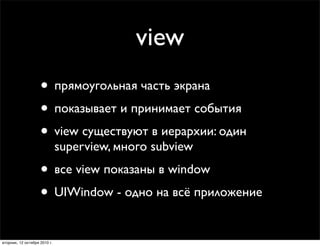
view
                    • прямоугольная часть экрана
                    • показывает и принимает события
                    • view существуют в иерархии: один
                              superview, много subview
                    • все view показаны в window
                    • UIWindow - одно на всё приложение
вторник, 12 октября 2010 г.
иерархия view
   Либо в IB, либо программно:
                   •      [superView addSubview:view];

                   •      [subView removeFromSuperview];

  Управление иерархией:
   -   (void)insertSubview:(UIView *)view atIndex:(int)index;
   -   (void)insertSubview:(UIView *)view belowSubview:(UIView *)view;
   -   (void)insertSubview:(UIView *)view aboveSubview:(UIView *)view;
   -   (void)exchangeSubviewAtIndex:(int)index withSubviewAtIndex:(int)otherIndex;


вторник, 12 октября 2010 г.
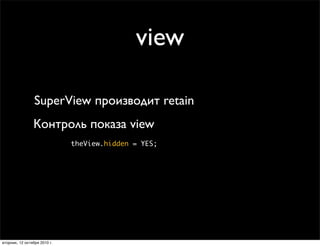
view

                 SuperView производит retain
                Контроль показа view
                              theView.hidden = YES;


вторник, 12 октября 2010 г.
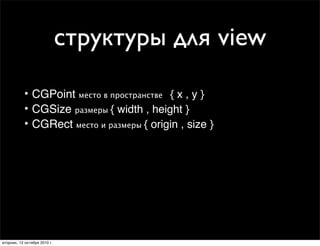
структуры для view

           • CGPoint место в пространстве+ { x , y }
           • CGSize размеры { width , height }
           • CGRect место и размеры { origin , size }


вторник, 12 октября 2010 г.
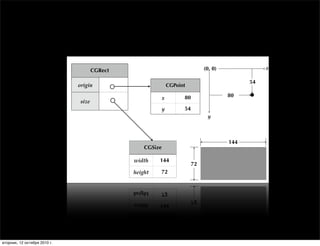
Rects, Points and Sizes

                                                   CGRect                                    (0, 0)              x

                                                                                                            54
                                           origin                            CGPoint

                                                                         x         80                 80
                                            size
                                                                     y             54
                                                                                              y


                                                                                                      144
                                                                CGSize

                                                            width    144
                                                                                        72
                                                            height   72


                              Tuesday, January 19, 2010                                                              11


вторник, 12 октября 2010 г.
View-related Structure
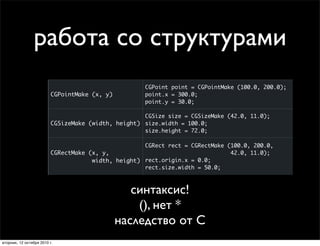
                работа со структурами
                         Creation Function           Example

                                                     CGPoint point = CGPointMake (100.0, 200.0);
                         CGPointMake (x, y)          point.x = 300.0;
                                                     point.y = 30.0;

                                                    CGSize size = CGSizeMake (42.0, 11.0);
                         CGSizeMake (width, height) size.width = 100.0;
                                                    size.height = 72.0;

                                                    CGRect rect = CGRectMake (100.0, 200.0,
                         CGRectMake (x, y,                                    42.0, 11.0);
                                     width, height) rect.origin.x = 0.0;
                                                    rect.size.width = 50.0;


                                                 синтаксис!
                  Tuesday, January 19, 2010       (), нет *                                        12


                                              наследство от С
вторник, 12 октября 2010 г.
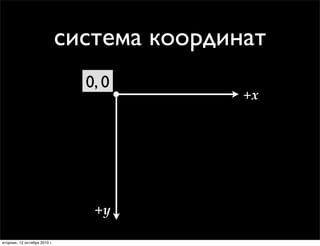
ordinate System
left corner
wnwards
                               система координат
                                 0, 0
                                              +x


                                  +y

 вторник, 12 октября 2010 г.
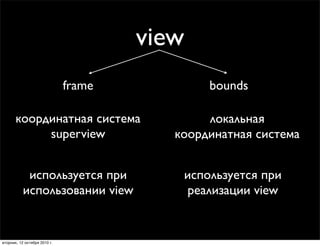
view
                              frame           bounds

       координатная система                   локальная
            superview                    координатная система


            используется при              используется при
           использовании view             реализации view


вторник, 12 октября 2010 г.
создаём view
         CGRect frame = CGRectMake(20, 45, 140, 21);
         UILabel *label = [[UILabel alloc] initWithFrame:frame];
         [window addSubview:label];
         [label setText:@”Привет всем!”];
         [label release];


вторник, 12 октября 2010 г.
дополнительные бонусы
       UIColor
       UIColor *redColor = [UIColor redColor];
       [myLabel textColor] = redColor;


       UIFont
       UIFont *font = [UIFont systemFontOfSize:14.0];
       [myLabel setFont:font];


вторник, 12 октября 2010 г.
UIImage и UIImageView
         Создание UIImage:
        из ресурсов:
        +[UIImage imageNamed:(NSString *)name]

        с диска
        -[UIImage initWithContentsOfFile:(NSString *)path]

        из памяти в виде данных
         -[UIImage initWithData:(NSData *)data]


UIImage *myImage = [UIImage imageNamed:@’‘oleg.jpg’’];
CGRect frame = CGRectMake(20, 45, 140, 21);
UIImageView *myImageView = [[UIImageView alloc] initWithFrame:frame];
myImageView.image = myImage;
[myImage release];


вторник, 12 октября 2010 г.
простая анимация
      -(IBAction)changeValue {
      	

 [UIView beginAnimations:@"advancedAnimations" context:nil];
      	

 [UIView setAnimationDuration:0.5];


 int value = slider.value;
      	

 [label setText:[NSString stringWithFormat:@"%d",value]];


 CGRect fr = label.frame;
      	

 fr.origin.y += 40;
      	

 label.frame = fr;
      	

 [UIView commitAnimations];
      }


вторник, 12 октября 2010 г.
посмотрим?


вторник, 12 октября 2010 г.
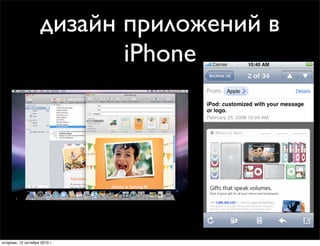
дизайн приложений в
                        Two Flavors of Mail
                           iPhone


вторник, 12 октября 2010 г.
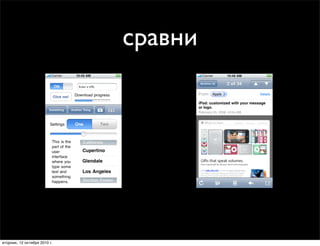
сравни
                      Organizing Content             Organizing Content


              Friday, January 22, 2010       Friday, January 22, 2010   6


вторник, 12 октября 2010 г.
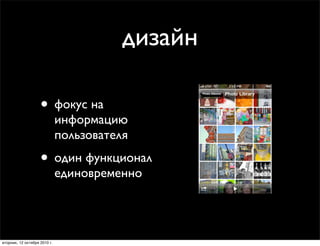
дизайн
                                                      Organizing Content
                                                                         • Focus on yo

                    • фокус на                                           • One thing a
                                                                         • Screenfuls o
                              информацию
                              пользователя
                    • один функционал
                              единовременно


                                              Friday, January 22, 2010


вторник, 12 октября 2010 г.
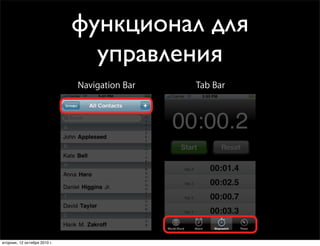
функционал для
                                    управления
                              Patterns for Organizing Content
                                Navigation Bar     Tab Bar


вторник, 12 октября 2010 г.
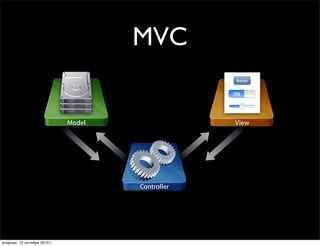
MVC
                                      Parts of a Screenful


                              Model                          View


                                            Controller


      Friday, January 22, 2010                                      12

вторник, 12 октября 2010 г.
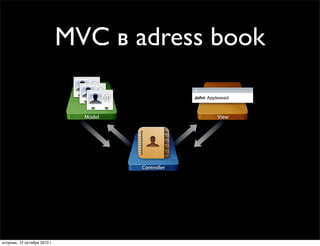
MVCParts adress book
                                  в of a Screenful

                                            Model                View


                                                    Controller


                     Friday, January 22, 2010                           11


вторник, 12 октября 2010 г.
а зачем
                           MVC?


вторник, 12 октября 2010 г.
Why Model-View-Controller?
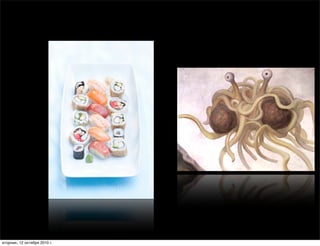
                                      • Ever used the word “spaghetti” to describe code?
                                      • Clear responsibilities make things easier to maint
                                      • Avoid having one monster class that does everyth


                              Friday, January 22, 2010


вторник, 12 октября 2010 г.
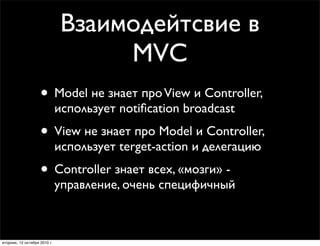
Взаимодейтсвие в
                                    MVC
                    • Model не знает про View и Controller,
                              использует notification broadcast
                    • View не знает про Model и Controller,
                              использует terget-action и делегацию
                    • Controller знает всех, «мозги» -
                              управление, очень специфичный


вторник, 12 октября 2010 г.
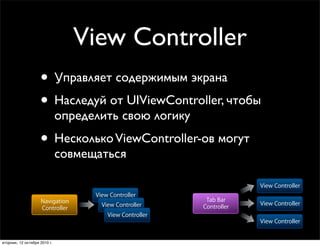
View Controller
                      • Управляет содержимым экрана
                      • Наследуй от UIViewController, чтобы
                                определить свою логику
                              “Your” and “Our” View Controllers
Your” and “Our” View Controllers
                      • Несколько ViewController-ов могут
                                               • Create your
Create your own UIViewController subclass for each screenful own UIViewController subclass for each s
                                совмещаться    • Plug them together using existing composite view co
 lug them together using existing composite view controllers


                                                                                 View Controller
                                      View Controller
                      Navigation                                 Tab Bar
                                        View Controller                          View Controller
                      Controller                                Controller
                                          View Controller
                                                                                 View Controller


  вторник, 12 октября 2010 г.
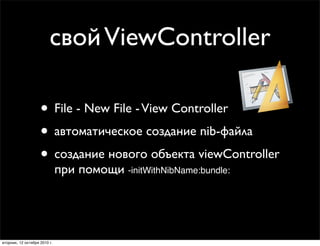
свой ViewController
       #import <UIKit/UIKit.h>
       @interface MyViewController : UIViewController {
       NSMutableArray *myData;
                              Creating Your View in Code
       UILabel *myLabel;
                      • Override -loadView
       }                 ■        Never call this directly
                      • Create your views
       @property (readonly) NSArray *myData;
       - (void)doSomeAction:(id)sender;
                      • Set the view property
                              • Create view controller with -init

                               // Subclass of UIViewController
                               - (void)loadView
                               {view объявлен в UIViewController
                                 MyView *myView = [[MyView alloc] initWithFrame:frame];
                                 self.view = myView; // The view controller now owns the view
                                 [myView release];
                               }
                                   в нашей реализации - loadView
вторник, 12 октября 2010 г.
свой ViewController
           - (void)loadView {
           MyView *myView = [[MyView alloc] initWithFrame:frame];
           self.view = myView;
           [myView release];
           }


вторник, 12 октября 2010 г.
свой ViewController Builder
                              Creating Your View with Interface
                                              • Lay out a view in Interface Builder
                                              • File’s owner is view controller class
                                              • Hook up view outlet

                    • File - New File - View Controller
                                              • Create view controller
                                                 with -initWithNibName:bundle:


                    • автоматическое создание nib-файла
                    • создание нового объекта viewController
                              при помощи -initWithNibName:bundle:

                                      Friday, January 22, 2010


вторник, 12 октября 2010 г.
http://empatika.com
      oleg.parinov@empatika.com


вторник, 12 октября 2010 г.

Четвертое занятие курса iOS-разработки в ГУ-ВШЭ

  • 1.
    Разработка приложений для iPhone и iPad занятие #4 вторник, 12 октября 2010 г.
  • 2.
  • 3.
  • 4.
    результаты • Шулюгин Владислав - 10 • Кабир Павел - 10 вторник, 12 октября 2010 г.
  • 5.
    а что было? вторник,12 октября 2010 г.
  • 6.
    события • Срабатывают при действии пользователя • Посылает action у target target: myObject Пример: action: @selector(decrease:) event: UIControlEventTouchUpInside [myControl addTarget:myObject action:@selector(decrease:) forControlEvents: UIControlEventTouchUpInside]; [myControl removeTarget:myObject action:@selector(decrease:) forControlEvents: UIControlEventTouchUpInside]; вторник, 12 октября 2010 г.
  • 7.
    view • прямоугольная часть экрана • показывает и принимает события • view существуют в иерархии: один superview, много subview • все view показаны в window • UIWindow - одно на всё приложение вторник, 12 октября 2010 г.
  • 8.
    иерархия view Либо в IB, либо программно: • [superView addSubview:view]; • [subView removeFromSuperview]; Управление иерархией: - (void)insertSubview:(UIView *)view atIndex:(int)index; - (void)insertSubview:(UIView *)view belowSubview:(UIView *)view; - (void)insertSubview:(UIView *)view aboveSubview:(UIView *)view; - (void)exchangeSubviewAtIndex:(int)index withSubviewAtIndex:(int)otherIndex; вторник, 12 октября 2010 г.
  • 9.
    view SuperView производит retain Контроль показа view theView.hidden = YES; вторник, 12 октября 2010 г.
  • 10.
    структуры для view • CGPoint место в пространстве+ { x , y } • CGSize размеры { width , height } • CGRect место и размеры { origin , size } вторник, 12 октября 2010 г.
  • 11.
    Rects, Points andSizes CGRect (0, 0) x 54 origin CGPoint x 80 80 size y 54 y 144 CGSize width 144 72 height 72 Tuesday, January 19, 2010 11 вторник, 12 октября 2010 г.
  • 12.
    View-related Structure работа со структурами Creation Function Example CGPoint point = CGPointMake (100.0, 200.0); CGPointMake (x, y) point.x = 300.0; point.y = 30.0; CGSize size = CGSizeMake (42.0, 11.0); CGSizeMake (width, height) size.width = 100.0; size.height = 72.0; CGRect rect = CGRectMake (100.0, 200.0, CGRectMake (x, y, 42.0, 11.0); width, height) rect.origin.x = 0.0; rect.size.width = 50.0; синтаксис! Tuesday, January 19, 2010 (), нет * 12 наследство от С вторник, 12 октября 2010 г.
  • 13.
    ordinate System left corner wnwards система координат 0, 0 +x +y вторник, 12 октября 2010 г.
  • 14.
    view frame bounds координатная система локальная superview координатная система используется при используется при использовании view реализации view вторник, 12 октября 2010 г.
  • 15.
    создаём view CGRect frame = CGRectMake(20, 45, 140, 21); UILabel *label = [[UILabel alloc] initWithFrame:frame]; [window addSubview:label]; [label setText:@”Привет всем!”]; [label release]; вторник, 12 октября 2010 г.
  • 16.
    дополнительные бонусы UIColor UIColor *redColor = [UIColor redColor]; [myLabel textColor] = redColor; UIFont UIFont *font = [UIFont systemFontOfSize:14.0]; [myLabel setFont:font]; вторник, 12 октября 2010 г.
  • 17.
    UIImage и UIImageView Создание UIImage: из ресурсов: +[UIImage imageNamed:(NSString *)name] с диска -[UIImage initWithContentsOfFile:(NSString *)path] из памяти в виде данных -[UIImage initWithData:(NSData *)data] UIImage *myImage = [UIImage imageNamed:@’‘oleg.jpg’’]; CGRect frame = CGRectMake(20, 45, 140, 21); UIImageView *myImageView = [[UIImageView alloc] initWithFrame:frame]; myImageView.image = myImage; [myImage release]; вторник, 12 октября 2010 г.
  • 18.
    простая анимация -(IBAction)changeValue { [UIView beginAnimations:@"advancedAnimations" context:nil]; [UIView setAnimationDuration:0.5]; int value = slider.value; [label setText:[NSString stringWithFormat:@"%d",value]]; CGRect fr = label.frame; fr.origin.y += 40; label.frame = fr; [UIView commitAnimations]; } вторник, 12 октября 2010 г.
  • 19.
  • 20.
    дизайн приложений в Two Flavors of Mail iPhone вторник, 12 октября 2010 г.
  • 21.
    сравни Organizing Content Organizing Content Friday, January 22, 2010 Friday, January 22, 2010 6 вторник, 12 октября 2010 г.
  • 22.
    дизайн Organizing Content • Focus on yo • фокус на • One thing a • Screenfuls o информацию пользователя • один функционал единовременно Friday, January 22, 2010 вторник, 12 октября 2010 г.
  • 23.
    функционал для управления Patterns for Organizing Content Navigation Bar Tab Bar вторник, 12 октября 2010 г.
  • 24.
    MVC Parts of a Screenful Model View Controller Friday, January 22, 2010 12 вторник, 12 октября 2010 г.
  • 25.
    MVCParts adress book в of a Screenful Model View Controller Friday, January 22, 2010 11 вторник, 12 октября 2010 г.
  • 26.
    а зачем MVC? вторник, 12 октября 2010 г.
  • 27.
  • 28.
    Why Model-View-Controller? • Ever used the word “spaghetti” to describe code? • Clear responsibilities make things easier to maint • Avoid having one monster class that does everyth Friday, January 22, 2010 вторник, 12 октября 2010 г.
  • 29.
    Взаимодейтсвие в MVC • Model не знает про View и Controller, использует notification broadcast • View не знает про Model и Controller, использует terget-action и делегацию • Controller знает всех, «мозги» - управление, очень специфичный вторник, 12 октября 2010 г.
  • 30.
    View Controller • Управляет содержимым экрана • Наследуй от UIViewController, чтобы определить свою логику “Your” and “Our” View Controllers Your” and “Our” View Controllers • Несколько ViewController-ов могут • Create your Create your own UIViewController subclass for each screenful own UIViewController subclass for each s совмещаться • Plug them together using existing composite view co lug them together using existing composite view controllers View Controller View Controller Navigation Tab Bar View Controller View Controller Controller Controller View Controller View Controller вторник, 12 октября 2010 г.
  • 31.
    свой ViewController #import <UIKit/UIKit.h> @interface MyViewController : UIViewController { NSMutableArray *myData; Creating Your View in Code UILabel *myLabel; • Override -loadView } ■ Never call this directly • Create your views @property (readonly) NSArray *myData; - (void)doSomeAction:(id)sender; • Set the view property • Create view controller with -init // Subclass of UIViewController - (void)loadView {view объявлен в UIViewController MyView *myView = [[MyView alloc] initWithFrame:frame]; self.view = myView; // The view controller now owns the view [myView release]; } в нашей реализации - loadView вторник, 12 октября 2010 г.
  • 32.
    свой ViewController - (void)loadView { MyView *myView = [[MyView alloc] initWithFrame:frame]; self.view = myView; [myView release]; } вторник, 12 октября 2010 г.
  • 33.
    свой ViewController Builder Creating Your View with Interface • Lay out a view in Interface Builder • File’s owner is view controller class • Hook up view outlet • File - New File - View Controller • Create view controller with -initWithNibName:bundle: • автоматическое создание nib-файла • создание нового объекта viewController при помощи -initWithNibName:bundle: Friday, January 22, 2010 вторник, 12 октября 2010 г.
  • 34.
    http://empatika.com oleg.parinov@empatika.com вторник, 12 октября 2010 г.