LOCALIZING YOUR APP
INTERNATIONALIZATION
JULY 13, 2016
By Lammert Westerhoff
TYPE A QUOTE
HERE.
LAMMERT
WESTERHOFF
LOCALIZING YOUR APP
WHAT I’LL BE TALKING ABOUT
▸ Basics of String localization
▸ Storyboard localization
▸ Automating the update process
▸ Generating custom keys
▸ Formatting Strings with arguments
▸ String dictionaries
LOCALIZING YOUR APP
WHAT I’LL NOT BE TALKING ABOUT
▸ RTL (Right-to-left) Languages
▸ Localized images
▸ Localized Info.plist (App name)
▸ XLIFF files
LOCALIZING YOUR APP
PROJECT SETTINGS
First of all, add the languages you need to support in your
project settings (not target settings).
LOCALIZING YOUR APP
BASICS OF STRING LOCALIZATION
Instead of hard coded Strings, always use NSLocalizedString
with a meaningful comment.
This will use Strings defined in the Localizable.strings file.
You’ll have one for each language you support.
buyButton.setTitle(NSLocalizedString("Buy", comment: "Title for the button to buy an item from the
store"), forState: .Normal)
"Buy" = "Koop";
LOCALIZING YOUR APP
RUN IN DIFFERENT LANGUAGE
You can control the Application Language in your scheme
options:
LOCALIZING YOUR APP
LOCALIZE STORYBOARDS
You can localize a Storyboard which will generate a .strings
file for that Storyboard. Also works for xib files.
/* Class = "UIButton"; normalTitle = "Buy"; ObjectID = "7Vf-Sa-WMo"; */
"7Vf-Sa-WMo.normalTitle" = "Koop";
DEMO
LOCALIZING YOUR APP
XCODE TOOLS
▸ genstrings to generate .strings files from
NSLocalizedString in code
▸ ibtool to generate .strings from Storyboards
▸ appleglot
▸ “Export For Localization…”
WHICH ONE TO USE?!
LOCALIZING YOUR APP
LET’S AUTOMATE EVERYTHING!
Solution: mergegenstrings.py
It’s a script you add to your build phase that handles
everything for you.
https://gist.github.com/yoichitgy/29bdd71c3556c2055cc0
DEMO
LOCALIZING YOUR APP
NEW PROBLEM
Now that we’re automating everything, we can’t add custom
strings to Localizable.strings anymore.
These entries will be replaced by the script:
for day in 0 ..< 7 {
print(NSLocalizedString("day(day)", comment: "One of the days of the week"))
}
"day0" = "Monday";
"day1" = "Tuesday";
/* One of the days of the week */
"day(day)" = "day(day)";
LOCALIZING YOUR APP
SOLUTION
▸ Place in another .strings file.
▸ E.g. CustomLocalizable.strings
▸ Don’t use NSLocalizedString (else the script finds it)
func CustomLocalizedString(key: String) -> String {
return NSBundle.mainBundle().localizedStringForKey(key, value: key, table:
"CustomLocalizable")
}
for day in 0 ..< 7 {
print(CustomLocalizedString("day(day)")
}
DEMO
LOCALIZING YOUR APP
FORMATTING STRINGS WITH ARGUMENTS
let place = "CocoaheadsNL Meetup"
let when = NSDateFormatter.localizedStringFromDate(NSDate(), dateStyle: .LongStyle,
timeStyle: .NoStyle)
let format = NSLocalizedString("Let's go to %@ on %@",
comment: "Printing where we go at which date")
print(String.localizedStringWithFormat(format, place, when))
Generates:
We can change the order of the arguments:
"Let's go to %@ on %@" = "Laten we op %2$@ naar %1$@ gaan";
"Let's go to %@ on %@" = "Let's go to %1$@ on %2$@";
LOCALIZING YOUR APP
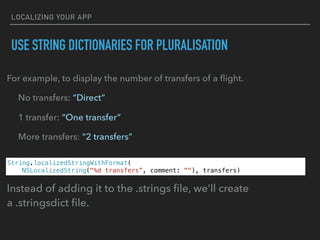
USE STRING DICTIONARIES FOR PLURALISATION
For example, to display the number of transfers of a flight.
No transfers: “Direct”
1 transfer: “One transfer”
More transfers: “2 transfers”
String.localizedStringWithFormat(
NSLocalizedString("%d transfers”, comment: ""), transfers)
Instead of adding it to the .strings file, we’ll create
a .stringsdict file.
LOCALIZING YOUR APP
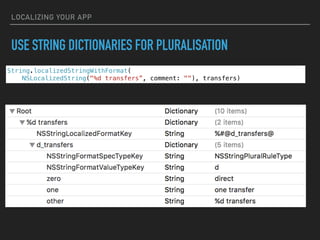
USE STRING DICTIONARIES FOR PLURALISATION
String.localizedStringWithFormat(
NSLocalizedString("%d transfers”, comment: ""), transfers)
DEMO
LOCALIZING YOUR APP
SOURCE CODE:
HTTPS://GITHUB.COM/LAMMERTW/LOCALIZATIONDEMO
FOLLOW ME ON TWITTER:
@LWESTERHOFF
Related:
https://www.objc.io/issues/9-strings/string-localization/

iOS localization

  • 1.
    LOCALIZING YOUR APP INTERNATIONALIZATION JULY13, 2016 By Lammert Westerhoff
  • 2.
  • 3.
    LOCALIZING YOUR APP WHATI’LL BE TALKING ABOUT ▸ Basics of String localization ▸ Storyboard localization ▸ Automating the update process ▸ Generating custom keys ▸ Formatting Strings with arguments ▸ String dictionaries
  • 4.
    LOCALIZING YOUR APP WHATI’LL NOT BE TALKING ABOUT ▸ RTL (Right-to-left) Languages ▸ Localized images ▸ Localized Info.plist (App name) ▸ XLIFF files
  • 5.
    LOCALIZING YOUR APP PROJECTSETTINGS First of all, add the languages you need to support in your project settings (not target settings).
  • 6.
    LOCALIZING YOUR APP BASICSOF STRING LOCALIZATION Instead of hard coded Strings, always use NSLocalizedString with a meaningful comment. This will use Strings defined in the Localizable.strings file. You’ll have one for each language you support. buyButton.setTitle(NSLocalizedString("Buy", comment: "Title for the button to buy an item from the store"), forState: .Normal) "Buy" = "Koop";
  • 7.
    LOCALIZING YOUR APP RUNIN DIFFERENT LANGUAGE You can control the Application Language in your scheme options:
  • 8.
    LOCALIZING YOUR APP LOCALIZESTORYBOARDS You can localize a Storyboard which will generate a .strings file for that Storyboard. Also works for xib files. /* Class = "UIButton"; normalTitle = "Buy"; ObjectID = "7Vf-Sa-WMo"; */ "7Vf-Sa-WMo.normalTitle" = "Koop";
  • 9.
  • 10.
    LOCALIZING YOUR APP XCODETOOLS ▸ genstrings to generate .strings files from NSLocalizedString in code ▸ ibtool to generate .strings from Storyboards ▸ appleglot ▸ “Export For Localization…” WHICH ONE TO USE?!
  • 11.
    LOCALIZING YOUR APP LET’SAUTOMATE EVERYTHING! Solution: mergegenstrings.py It’s a script you add to your build phase that handles everything for you. https://gist.github.com/yoichitgy/29bdd71c3556c2055cc0
  • 12.
  • 13.
    LOCALIZING YOUR APP NEWPROBLEM Now that we’re automating everything, we can’t add custom strings to Localizable.strings anymore. These entries will be replaced by the script: for day in 0 ..< 7 { print(NSLocalizedString("day(day)", comment: "One of the days of the week")) } "day0" = "Monday"; "day1" = "Tuesday"; /* One of the days of the week */ "day(day)" = "day(day)";
  • 14.
    LOCALIZING YOUR APP SOLUTION ▸Place in another .strings file. ▸ E.g. CustomLocalizable.strings ▸ Don’t use NSLocalizedString (else the script finds it) func CustomLocalizedString(key: String) -> String { return NSBundle.mainBundle().localizedStringForKey(key, value: key, table: "CustomLocalizable") } for day in 0 ..< 7 { print(CustomLocalizedString("day(day)") }
  • 15.
  • 16.
    LOCALIZING YOUR APP FORMATTINGSTRINGS WITH ARGUMENTS let place = "CocoaheadsNL Meetup" let when = NSDateFormatter.localizedStringFromDate(NSDate(), dateStyle: .LongStyle, timeStyle: .NoStyle) let format = NSLocalizedString("Let's go to %@ on %@", comment: "Printing where we go at which date") print(String.localizedStringWithFormat(format, place, when)) Generates: We can change the order of the arguments: "Let's go to %@ on %@" = "Laten we op %2$@ naar %1$@ gaan"; "Let's go to %@ on %@" = "Let's go to %1$@ on %2$@";
  • 17.
    LOCALIZING YOUR APP USESTRING DICTIONARIES FOR PLURALISATION For example, to display the number of transfers of a flight. No transfers: “Direct” 1 transfer: “One transfer” More transfers: “2 transfers” String.localizedStringWithFormat( NSLocalizedString("%d transfers”, comment: ""), transfers) Instead of adding it to the .strings file, we’ll create a .stringsdict file.
  • 18.
    LOCALIZING YOUR APP USESTRING DICTIONARIES FOR PLURALISATION String.localizedStringWithFormat( NSLocalizedString("%d transfers”, comment: ""), transfers)
  • 19.
  • 20.
    LOCALIZING YOUR APP SOURCECODE: HTTPS://GITHUB.COM/LAMMERTW/LOCALIZATIONDEMO FOLLOW ME ON TWITTER: @LWESTERHOFF Related: https://www.objc.io/issues/9-strings/string-localization/