Ionic 으로 모바일앱 만들기
#2. MVC, Component(css)
ABCD, 스노우키위 한성일
1. 콘솔 사용방법(윈도우, 맥)
2. 작업 환경 설정
3. 아이오닉 CSS 컴포넌트
4. MVC 사용
코스
1. 콘솔 사용방법(윈도우, 맥)
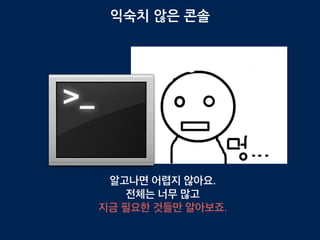
익숙치 않은 콘솔
알고나면 어렵지 않아요.
전체는 너무 많고
지금 필요한 것들만 알아보죠.
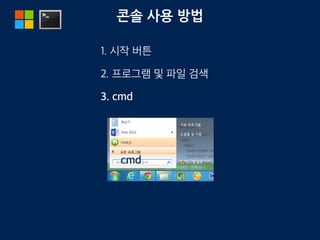
콘솔 사용 방법
1. 시작 버튼
2. 프로그램 및 파일 검색
3. cmd
cmd
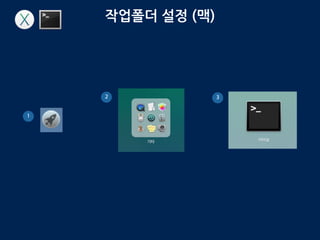
작업폴더 설정 (맥)
1
2 3
mkdir
make directory
디렉토리를 생성하는 명령어
$ mkdir ~/Documents/test
mkdir C:test
C드라이브 아래에 test 라는 폴더를 생성
~ 자신의 홈디렉토리의 Document 폴더에 test 라는 폴더 생성
cd 1
change directory
cd c:ionic-space
cd ~/Document/ionic-space
C드라이브 test라는 폴더로 이동합니다.
Document의 test 폴더로 이동합니다.
cd 2
change directory
cd ..
한칸 뒤로 나옵니다. 윈도우에서는 c: 로
맥에서는 Document 폴더로 이동합니다.
~
자기의 홈 디렉토리를 나타냅니다.
(리눅스에서는 /home/아이디)
ex) /Users/자신의 아이디
하면 자신의 홈으로 이동합니다.
cd ~
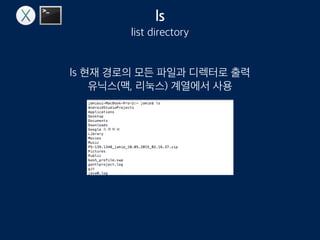
ls
list directory
ls 현재 경로의 모든 파일과 디렉토리 출력
유닉스(맥, 리눅스) 계열에서 사용
dir
directory
현재 경로의 모든 파일과 디렉터로 출력
윈도우 계열에서 사용
절대경로, 상대경로
절대경로
/Users/jamie/Document
상대경로
cd Document/test
만약 /Users/jamie 경로에 위치하고 있다면..
로 이동 가능
tip
cd /Use
Use 까지만 누리고 ‘tab’ 버튼을 눌르면
cd /Users
가 자동 완성됩니다. 폴더 파일명 모두 적용 됩니다.
더 알고 싶다면
http://passing2.tistory.com/56
http://mactraining.tistory.com/148
2. 작업 환경 설정
작업폴더 이동
cd ~/ionic-space
cd c:ionic-space
ionic start blankApp blank
작업 폴더로 이동 합시다.
blankApp 이 없다면 프로젝트를 생성해줍니다.
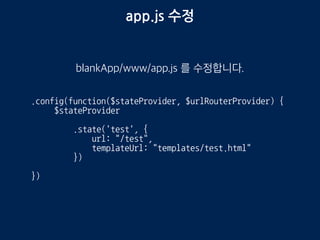
app.js 수정
blankApp/www/app.js 를 수정합니다.
.config(function($stateProvider, $urlRouterProvider) {
$stateProvider
.state('test', {
url: "/test",
templateUrl: "templates/test.html"
})
})
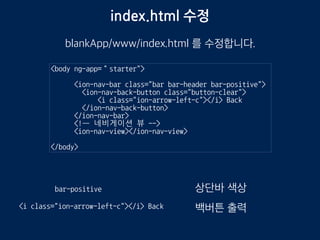
index.html 수정
blankApp/www/index.html 를 수정합니다.
<body ng-app=“starter">
<ion-nav-bar class="bar bar-header bar-positive">
<ion-nav-back-button class="button-clear">
<i class="ion-arrow-left-c"></i> Back
</ion-nav-back-button>
</ion-nav-bar>
<!— 네비게이션 뷰 -->
<ion-nav-view></ion-nav-view>
</body>
bar-positive 상단바 색상
<i class="ion-arrow-left-c"></i> Back 백버튼 출력
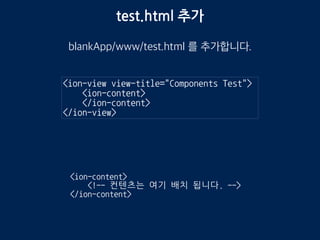
test.html 추가
blankApp/www/templates/test.html 를 추가합니다.
<ion-view view-title="Components Test">
<ion-content>
</ion-content>
</ion-view>
<ion-content>
<!-- 컨텐츠는 여기 배치 됩니다. -->
</ion-content>
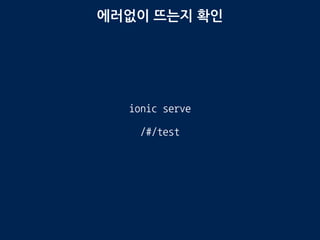
에러없이 뜨는지 확인
ionic serve
/#/test
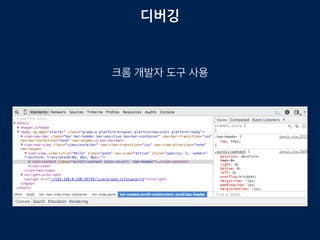
디버깅
크롬 개발자 도구 사용
3. 아이오닉 CSS 컴포넌트
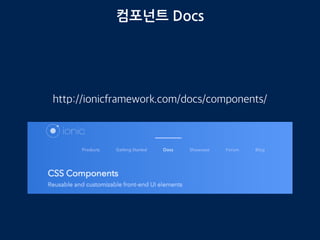
컴포넌트 Docs
http://ionicframework.com/docs/components/
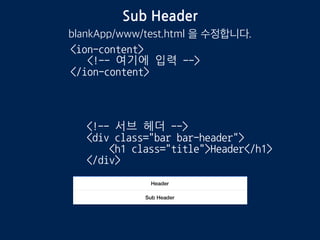
Sub Header
blankApp/www/templates/test.html 을 수정합니다.
<!-- 서브 헤더 -->
<div class="bar bar-header">
<h1 class="title">Header</h1>
</div>
<ion-content>
<!-- 여기에 입력 -->
</ion-content>
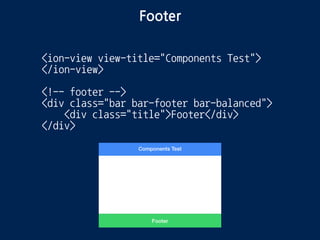
Footer
<ion-view view-title="Components Test">
</ion-view>
<!-- footer -->
<div class="bar bar-footer bar-balanced">
<div class="title">Footer</div>
</div>
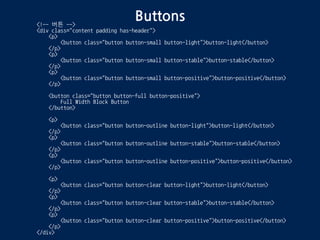
Buttons<!-- 버튼 -->
<div class="content padding has-header">
<p>
<button class="button button-small button-light">button-light</button>
</p>
<p>
<button class="button button-small button-stable">button-stable</button>
</p>
<p>
<button class="button button-small button-positive">button-positive</button>
</p>
<button class="button button-full button-positive">
Full Width Block Button
</button>
<p>
<button class="button button-outline button-light">button-light</button>
</p>
<p>
<button class="button button-outline button-stable">button-stable</button>
</p>
<p>
<button class="button button-outline button-positive">button-positive</button>
</p>
<p>
<button class="button button-clear button-light">button-light</button>
</p>
<p>
<button class="button button-clear button-stable">button-stable</button>
</p>
<p>
<button class="button button-clear button-positive">button-positive</button>
</p>
</div>
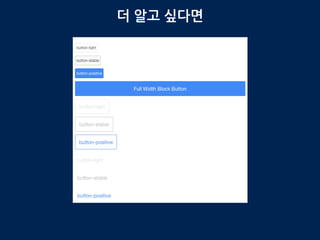
Buttons
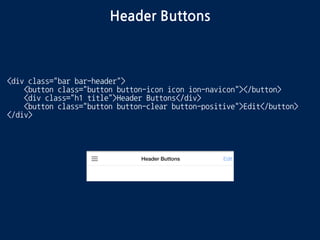
Header Buttons
<div class="bar bar-header">
<button class="button button-icon icon ion-navicon"></button>
<div class="h1 title">Header Buttons</div>
<button class="button button-clear button-positive">Edit</button>
</div>
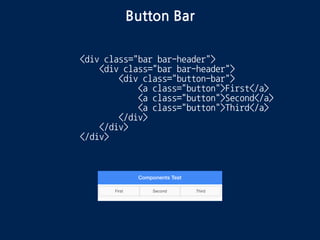
Button Bar
<div class="bar bar-header">
<div class="button-bar">
<a class="button">First</a>
<a class="button">Second</a>
<a class="button">Third</a>
</div>
</div>
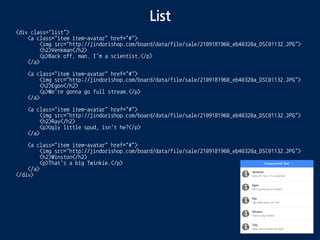
List
<div class="list">
<a class="item item-avatar" href="#">
<img src="http://jindorishop.com/board/data/file/sale/2109181960_eb40320a_DSC01132.JPG">
<h2>Venkman</h2>
<p>Back off, man. I'm a scientist.</p>
</a>
<a class="item item-avatar" href="#">
<img src="http://jindorishop.com/board/data/file/sale/2109181960_eb40320a_DSC01132.JPG">
<h2>Egon</h2>
<p>We're gonna go full stream.</p>
</a>
<a class="item item-avatar" href="#">
<img src="http://jindorishop.com/board/data/file/sale/2109181960_eb40320a_DSC01132.JPG">
<h2>Ray</h2>
<p>Ugly little spud, isn't he?</p>
</a>
<a class="item item-avatar" href="#">
<img src="http://jindorishop.com/board/data/file/sale/2109181960_eb40320a_DSC01132.JPG">
<h2>Winston</h2>
<p>That's a big Twinkie.</p>
</a>
</div>
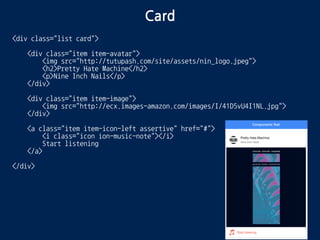
Card
<div class="list card">
<div class="item item-avatar">
<img src="http://tutupash.com/site/assets/nin_logo.jpeg">
<h2>Pretty Hate Machine</h2>
<p>Nine Inch Nails</p>
</div>
<div class="item item-image">
<img src="http://ecx.images-amazon.com/images/I/41D5vU4I1NL.jpg">
</div>
<a class="item item-icon-left assertive" href="#">
<i class="icon ion-music-note"></i>
Start listening
</a>
</div>
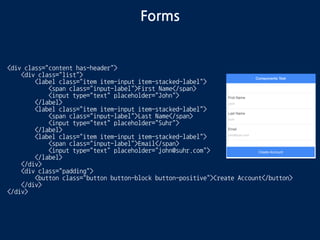
Forms
<div class="content has-header">
<div class="list">
<label class="item item-input item-stacked-label">
<span class="input-label">First Name</span>
<input type="text" placeholder="John">
</label>
<label class="item item-input item-stacked-label">
<span class="input-label">Last Name</span>
<input type="text" placeholder="Suhr">
</label>
<label class="item item-input item-stacked-label">
<span class="input-label">Email</span>
<input type="text" placeholder="john@suhr.com">
</label>
</div>
<div class="padding">
<button class="button button-block button-positive">Create Account</button>
</div>
</div>
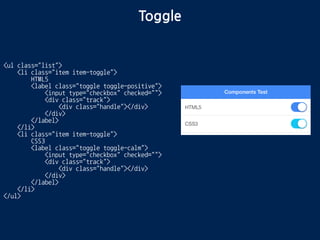
Toggle
<ul class="list">
<li class="item item-toggle">
HTML5
<label class="toggle toggle-positive">
<input type="checkbox" checked="">
<div class="track">
<div class="handle"></div>
</div>
</label>
</li>
<li class="item item-toggle">
CSS3
<label class="toggle toggle-calm">
<input type="checkbox" checked="">
<div class="track">
<div class="handle"></div>
</div>
</label>
</li>
</ul>
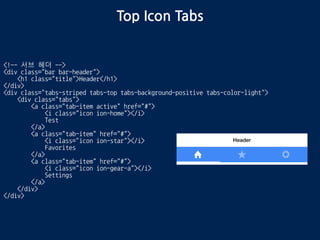
Top Icon Tabs
<!-- 서브 헤더 -->
<div class="bar bar-header">
<h1 class="title">Header</h1>
</div>
<div class="tabs-striped tabs-top tabs-background-positive tabs-color-light">
<div class="tabs">
<a class="tab-item active" href="#">
<i class="icon ion-home"></i>
Test
</a>
<a class="tab-item" href="#">
<i class="icon ion-star"></i>
Favorites
</a>
<a class="tab-item" href="#">
<i class="icon ion-gear-a"></i>
Settings
</a>
</div>
</div>
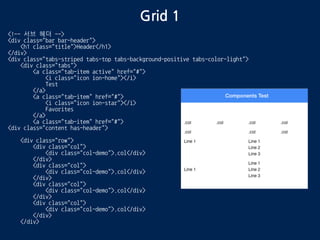
Grid 1
<!-- 서브 헤더 -->
<div class="bar bar-header">
<h1 class="title">Header</h1>
</div>
<div class="tabs-striped tabs-top tabs-background-positive tabs-color-light">
<div class="tabs">
<a class="tab-item active" href="#">
<i class="icon ion-home"></i>
Test
</a>
<a class="tab-item" href="#">
<i class="icon ion-star"></i>
Favorites
</a>
<a class="tab-item" href="#">
<div class="content has-header">
<div class="row">
<div class="col">
<div class="col-demo">.col</div>
</div>
<div class="col">
<div class="col-demo">.col</div>
</div>
<div class="col">
<div class="col-demo">.col</div>
</div>
<div class="col">
<div class="col-demo">.col</div>
</div>
</div>
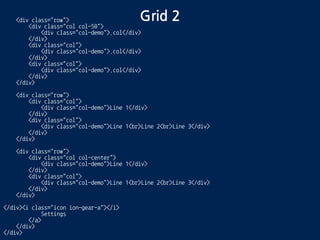
Grid 2<div class="row">
<div class="col col-50">
<div class="col-demo">.col</div>
</div>
<div class="col">
<div class="col-demo">.col</div>
</div>
<div class="col">
<div class="col-demo">.col</div>
</div>
</div>
<div class="row">
<div class="col">
<div class="col-demo">Line 1</div>
</div>
<div class="col">
<div class="col-demo">Line 1<br>Line 2<br>Line 3</div>
</div>
</div>
<div class="row">
<div class="col col-center">
<div class="col-demo">Line 1</div>
</div>
<div class="col">
<div class="col-demo">Line 1<br>Line 2<br>Line 3</div>
</div>
</div>
</div><i class="icon ion-gear-a"></i>
Settings
</a>
</div>
</div>
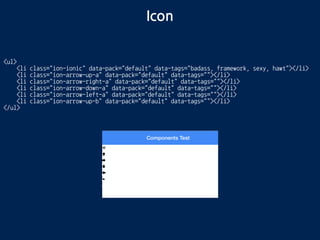
Icon
<ul>
<li class="ion-ionic"></li>
<li class="ion-arrow-up-a"></li>
<li class="ion-arrow-right-a"></li>
<li class="ion-arrow-down-a"></li>
<li class="ion-arrow-left-a"></li>
<li class="ion-arrow-up-b"></li>
</ul>
3. MVC 설정
MVC
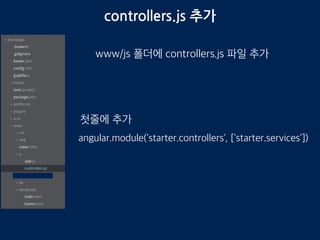
controllers.js 추가
www/js 폴더에 controllers.js 파일 추가
angular.module('starter.controllers', ['starter.services'])
첫줄에 추가
services.js 파일 추가
www/js 폴더에 services.js 파일 추가
angular.module('starter.services', [])
다음라인 추가
app.js 1
www/js app.js 수정
angular.module('starter', ['ionic', 'starter.controllers', 'starter.services'])
첫줄을 다음처럼 수정
app.js 2
www/js app.js 수정
.state('hello', {
url: "/hello",
templateUrl: "templates/hello.html"
})
.state("home", {
url: "/",
templateUrl: "templates/home.html"
})
내용 추가
index.html
www/templates/index.html 수정
<script src="js/controllers.js"></script>
<script src="js/services.js"></script>
<head>에 다음의 내용을 추가합니다.
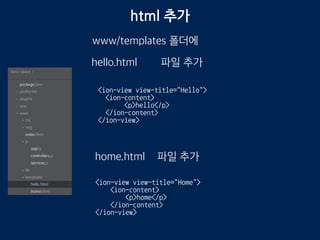
html 추가
www/templates/
hello.html
home.html
파일 추가
<ion-view view-title="Hello">
<ion-content>
<p>hello</p>
</ion-content>
</ion-view>
<ion-view view-title="Home">
<ion-content>
<p>home</p>
</ion-content>
</ion-view>
파일 추가
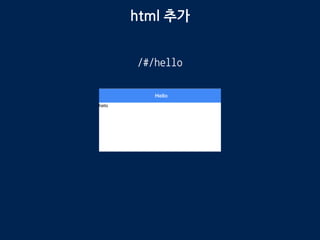
html 추가
http://localhost:8100/#/
http://localhost:8100/#/hello
테스트
4. MVC 사용
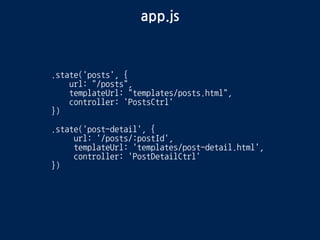
app.js
.state('posts', {
url: "/posts",
templateUrl: "templates/posts.html",
controller: 'PostsCtrl'
})
.state('post-detail', {
url: '/posts/:postId',
templateUrl: 'templates/post-detail.html',
controller: 'PostDetailCtrl'
})
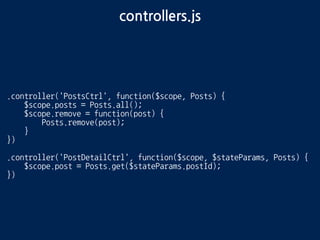
controllers.js
.controller('PostsCtrl', function($scope, Posts) {
$scope.posts = Posts.all();
})
.controller('PostDetailCtrl', function($scope, $stateParams, Posts) {
$scope.post = Posts.get($stateParams.postId);
})
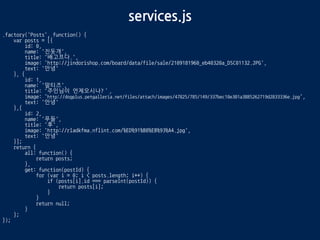
services.js
.factory('Posts', function() {
var posts = [{
id: 0,
name: '진돗개',
title: '배고프다.',
image: 'http://jindorishop.com/board/data/file/sale/2109181960_eb40320a_DSC01132.JPG',
text: '안녕'
}, {
id: 1,
name: '말티즈',
title: '주인님이 언제오시나?’,
image: 'http://dogplus.petgalleria.net/files/attach/images/47825/785/149/337bec10e301a3885262719d2833336e.jpg',
text: '안녕'
},{
id: 2,
name: '푸들',
title: '후',
image: 'http://rladkfma.nflint.com/%ED%91%B8%EB%93%A4.jpg',
text: '안녕'
}];
return {
all: function() {
return posts;
},
get: function(postId) {
for (var i = 0; i < posts.length; i++) {
if (posts[i].id === parseInt(postId)) {
return posts[i];
}
}
return null;
}
};
});
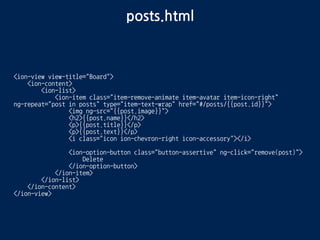
posts.html
<ion-view view-title="Board">
<ion-content>
<ion-list>
<ion-item class="item-remove-animate item-avatar item-icon-right"
ng-repeat="post in posts" type="item-text-wrap" href="#/posts/{{post.id}}">
<img ng-src="{{post.image}}">
<h2>{{post.name}}</h2>
<p>{{post.title}}</p>
<p>{{post.text}}</p>
<i class="icon ion-chevron-right icon-accessory"></i>
</ion-item>
</ion-list>
</ion-content>
</ion-view>
post-detail.html
<ion-view view-title="{{post.name}}">
<ion-content class="padding">
<img ng-src="{{post.image}}" style="width: 64px; height: 64px">
<p>
{{post.title}}
</p>
<p>
{{post.text}}
</p>
</ion-content>
</ion-view>
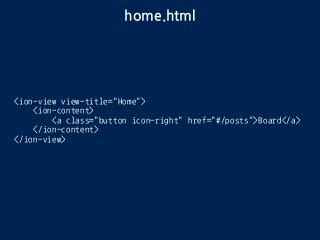
home.html
<ion-view view-title="Home">
<ion-content>
<a class="button icon-right" href="#/posts">Board</a>
</ion-content>
</ion-view>
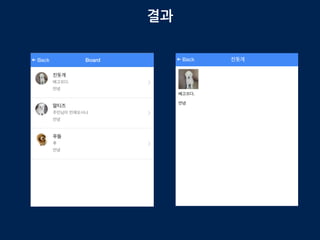
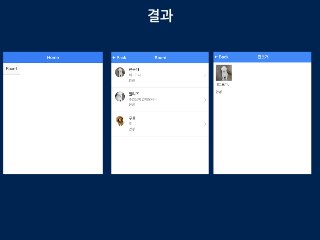
결과
수고하셨습니다. :)
ABCD
http://abcds.kr
https://www.facebook.com/groups/562787713823026/
한성일
https://www.facebook.com/jamie.han.16
iheart79@gmail.com

Ionic으로 모바일앱 만들기 #2

  • 1.
    Ionic 으로 모바일앱만들기 #2. MVC, Component(css) ABCD, 스노우키위 한성일
  • 2.
    1. 콘솔 사용방법(윈도우,맥) 2. 작업 환경 설정 3. 아이오닉 CSS 컴포넌트 4. MVC 사용 코스
  • 3.
  • 4.
    익숙치 않은 콘솔 알고나면어렵지 않아요. 전체는 너무 많고 지금 필요한 것들만 알아보죠.
  • 5.
    콘솔 사용 방법 1.시작 버튼 2. 프로그램 및 파일 검색 3. cmd cmd
  • 6.
  • 7.
    mkdir make directory 디렉토리를 생성하는명령어 $ mkdir ~/Documents/test mkdir C:test C드라이브 아래에 test 라는 폴더를 생성 ~ 자신의 홈디렉토리의 Document 폴더에 test 라는 폴더 생성
  • 8.
    cd 1 change directory cdc:ionic-space cd ~/Document/ionic-space C드라이브 test라는 폴더로 이동합니다. Document의 test 폴더로 이동합니다.
  • 9.
    cd 2 change directory cd.. 한칸 뒤로 나옵니다. 윈도우에서는 c: 로 맥에서는 Document 폴더로 이동합니다. ~ 자기의 홈 디렉토리를 나타냅니다. (리눅스에서는 /home/아이디) ex) /Users/자신의 아이디 하면 자신의 홈으로 이동합니다. cd ~

  • 10.
    ls list directory ls 현재경로의 모든 파일과 디렉토리 출력 유닉스(맥, 리눅스) 계열에서 사용
  • 11.
    dir directory 현재 경로의 모든파일과 디렉터로 출력 윈도우 계열에서 사용
  • 12.
    절대경로, 상대경로 절대경로 /Users/jamie/Document 상대경로 cd Document/test 만약/Users/jamie 경로에 위치하고 있다면.. 로 이동 가능
  • 13.
    tip cd /Use Use 까지만누리고 ‘tab’ 버튼을 눌르면 cd /Users 가 자동 완성됩니다. 폴더 파일명 모두 적용 됩니다.
  • 14.
  • 15.
  • 16.
    작업폴더 이동 cd ~/ionic-space cdc:ionic-space ionic start blankApp blank 작업 폴더로 이동 합시다. blankApp 이 없다면 프로젝트를 생성해줍니다.
  • 17.
    app.js 수정 blankApp/www/app.js 를수정합니다. .config(function($stateProvider, $urlRouterProvider) { $stateProvider .state('test', { url: "/test", templateUrl: "templates/test.html" }) })
  • 18.
    index.html 수정 blankApp/www/index.html 를수정합니다. <body ng-app=“starter"> <ion-nav-bar class="bar bar-header bar-positive"> <ion-nav-back-button class="button-clear"> <i class="ion-arrow-left-c"></i> Back </ion-nav-back-button> </ion-nav-bar> <!— 네비게이션 뷰 --> <ion-nav-view></ion-nav-view> </body> bar-positive 상단바 색상 <i class="ion-arrow-left-c"></i> Back 백버튼 출력
  • 19.
    test.html 추가 blankApp/www/templates/test.html 를추가합니다. <ion-view view-title="Components Test"> <ion-content> </ion-content> </ion-view> <ion-content> <!-- 컨텐츠는 여기 배치 됩니다. --> </ion-content>
  • 20.
  • 21.
  • 22.
    3. 아이오닉 CSS컴포넌트
  • 23.
  • 24.
    Sub Header blankApp/www/templates/test.html 을수정합니다. <!-- 서브 헤더 --> <div class="bar bar-header"> <h1 class="title">Header</h1> </div> <ion-content> <!-- 여기에 입력 --> </ion-content>
  • 25.
    Footer <ion-view view-title="Components Test"> </ion-view> <!--footer --> <div class="bar bar-footer bar-balanced"> <div class="title">Footer</div> </div>
  • 26.
    Buttons<!-- 버튼 --> <divclass="content padding has-header"> <p> <button class="button button-small button-light">button-light</button> </p> <p> <button class="button button-small button-stable">button-stable</button> </p> <p> <button class="button button-small button-positive">button-positive</button> </p> <button class="button button-full button-positive"> Full Width Block Button </button> <p> <button class="button button-outline button-light">button-light</button> </p> <p> <button class="button button-outline button-stable">button-stable</button> </p> <p> <button class="button button-outline button-positive">button-positive</button> </p> <p> <button class="button button-clear button-light">button-light</button> </p> <p> <button class="button button-clear button-stable">button-stable</button> </p> <p> <button class="button button-clear button-positive">button-positive</button> </p> </div>
  • 27.
  • 28.
    Header Buttons <div class="barbar-header"> <button class="button button-icon icon ion-navicon"></button> <div class="h1 title">Header Buttons</div> <button class="button button-clear button-positive">Edit</button> </div>
  • 29.
    Button Bar <div class="barbar-header"> <div class="button-bar"> <a class="button">First</a> <a class="button">Second</a> <a class="button">Third</a> </div> </div>
  • 30.
    List <div class="list"> <a class="itemitem-avatar" href="#"> <img src="http://jindorishop.com/board/data/file/sale/2109181960_eb40320a_DSC01132.JPG"> <h2>Venkman</h2> <p>Back off, man. I'm a scientist.</p> </a> <a class="item item-avatar" href="#"> <img src="http://jindorishop.com/board/data/file/sale/2109181960_eb40320a_DSC01132.JPG"> <h2>Egon</h2> <p>We're gonna go full stream.</p> </a> <a class="item item-avatar" href="#"> <img src="http://jindorishop.com/board/data/file/sale/2109181960_eb40320a_DSC01132.JPG"> <h2>Ray</h2> <p>Ugly little spud, isn't he?</p> </a> <a class="item item-avatar" href="#"> <img src="http://jindorishop.com/board/data/file/sale/2109181960_eb40320a_DSC01132.JPG"> <h2>Winston</h2> <p>That's a big Twinkie.</p> </a> </div>
  • 31.
    Card <div class="list card"> <divclass="item item-avatar"> <img src="http://tutupash.com/site/assets/nin_logo.jpeg"> <h2>Pretty Hate Machine</h2> <p>Nine Inch Nails</p> </div> <div class="item item-image"> <img src="http://ecx.images-amazon.com/images/I/41D5vU4I1NL.jpg"> </div> <a class="item item-icon-left assertive" href="#"> <i class="icon ion-music-note"></i> Start listening </a> </div>
  • 32.
    Forms <div class="content has-header"> <divclass="list"> <label class="item item-input item-stacked-label"> <span class="input-label">First Name</span> <input type="text" placeholder="John"> </label> <label class="item item-input item-stacked-label"> <span class="input-label">Last Name</span> <input type="text" placeholder="Suhr"> </label> <label class="item item-input item-stacked-label"> <span class="input-label">Email</span> <input type="text" placeholder="john@suhr.com"> </label> </div> <div class="padding"> <button class="button button-block button-positive">Create Account</button> </div> </div>
  • 33.
    Toggle <ul class="list"> <li class="itemitem-toggle"> HTML5 <label class="toggle toggle-positive"> <input type="checkbox" checked=""> <div class="track"> <div class="handle"></div> </div> </label> </li> <li class="item item-toggle"> CSS3 <label class="toggle toggle-calm"> <input type="checkbox" checked=""> <div class="track"> <div class="handle"></div> </div> </label> </li> </ul>
  • 34.
    Top Icon Tabs <!--서브 헤더 --> <div class="bar bar-header"> <h1 class="title">Header</h1> </div> <div class="tabs-striped tabs-top tabs-background-positive tabs-color-light"> <div class="tabs"> <a class="tab-item active" href="#"> <i class="icon ion-home"></i> Test </a> <a class="tab-item" href="#"> <i class="icon ion-star"></i> Favorites </a> <a class="tab-item" href="#"> <i class="icon ion-gear-a"></i> Settings </a> </div> </div>
  • 35.
    Grid 1 <!-- 서브헤더 --> <div class="bar bar-header"> <h1 class="title">Header</h1> </div> <div class="tabs-striped tabs-top tabs-background-positive tabs-color-light"> <div class="tabs"> <a class="tab-item active" href="#"> <i class="icon ion-home"></i> Test </a> <a class="tab-item" href="#"> <i class="icon ion-star"></i> Favorites </a> <a class="tab-item" href="#"> <div class="content has-header"> <div class="row"> <div class="col"> <div class="col-demo">.col</div> </div> <div class="col"> <div class="col-demo">.col</div> </div> <div class="col"> <div class="col-demo">.col</div> </div> <div class="col"> <div class="col-demo">.col</div> </div> </div>
  • 36.
    Grid 2<div class="row"> <divclass="col col-50"> <div class="col-demo">.col</div> </div> <div class="col"> <div class="col-demo">.col</div> </div> <div class="col"> <div class="col-demo">.col</div> </div> </div> <div class="row"> <div class="col"> <div class="col-demo">Line 1</div> </div> <div class="col"> <div class="col-demo">Line 1<br>Line 2<br>Line 3</div> </div> </div> <div class="row"> <div class="col col-center"> <div class="col-demo">Line 1</div> </div> <div class="col"> <div class="col-demo">Line 1<br>Line 2<br>Line 3</div> </div> </div> </div><i class="icon ion-gear-a"></i> Settings </a> </div> </div>
  • 37.
    Icon <ul> <li class="ion-ionic"></li> <li class="ion-arrow-up-a"></li> <liclass="ion-arrow-right-a"></li> <li class="ion-arrow-down-a"></li> <li class="ion-arrow-left-a"></li> <li class="ion-arrow-up-b"></li> </ul>
  • 38.
  • 39.
  • 40.
    controllers.js 추가 www/js 폴더에controllers.js 파일 추가 angular.module('starter.controllers', ['starter.services']) 첫줄에 추가
  • 41.
    services.js 파일 추가 www/js폴더에 services.js 파일 추가 angular.module('starter.services', []) 다음라인 추가
  • 42.
    app.js 1 www/js app.js수정 angular.module('starter', ['ionic', 'starter.controllers', 'starter.services']) 첫줄을 다음처럼 수정
  • 43.
    app.js 2 www/js app.js수정 .state('hello', { url: "/hello", templateUrl: "templates/hello.html" }) .state("home", { url: "/", templateUrl: "templates/home.html" }) 내용 추가
  • 44.
    index.html www/templates/index.html 수정 <script src="js/controllers.js"></script> <scriptsrc="js/services.js"></script> <head>에 다음의 내용을 추가합니다.
  • 45.
    html 추가 www/templates/ hello.html home.html 파일 추가 <ion-viewview-title="Hello"> <ion-content> <p>hello</p> </ion-content> </ion-view> <ion-view view-title="Home"> <ion-content> <p>home</p> </ion-content> </ion-view> 파일 추가
  • 46.
  • 47.
  • 48.
    app.js .state('posts', { url: "/posts", templateUrl:"templates/posts.html", controller: 'PostsCtrl' }) .state('post-detail', { url: '/posts/:postId', templateUrl: 'templates/post-detail.html', controller: 'PostDetailCtrl' })
  • 49.
    controllers.js .controller('PostsCtrl', function($scope, Posts){ $scope.posts = Posts.all(); }) .controller('PostDetailCtrl', function($scope, $stateParams, Posts) { $scope.post = Posts.get($stateParams.postId); })
  • 50.
    services.js .factory('Posts', function() { varposts = [{ id: 0, name: '진돗개', title: '배고프다.', image: 'http://jindorishop.com/board/data/file/sale/2109181960_eb40320a_DSC01132.JPG', text: '안녕' }, { id: 1, name: '말티즈', title: '주인님이 언제오시나?’, image: 'http://dogplus.petgalleria.net/files/attach/images/47825/785/149/337bec10e301a3885262719d2833336e.jpg', text: '안녕' },{ id: 2, name: '푸들', title: '후', image: 'http://rladkfma.nflint.com/%ED%91%B8%EB%93%A4.jpg', text: '안녕' }]; return { all: function() { return posts; }, get: function(postId) { for (var i = 0; i < posts.length; i++) { if (posts[i].id === parseInt(postId)) { return posts[i]; } } return null; } }; });
  • 51.
    posts.html <ion-view view-title="Board"> <ion-content> <ion-list> <ion-item class="item-remove-animateitem-avatar item-icon-right" ng-repeat="post in posts" type="item-text-wrap" href="#/posts/{{post.id}}"> <img ng-src="{{post.image}}"> <h2>{{post.name}}</h2> <p>{{post.title}}</p> <p>{{post.text}}</p> <i class="icon ion-chevron-right icon-accessory"></i> </ion-item> </ion-list> </ion-content> </ion-view>
  • 52.
    post-detail.html <ion-view view-title="{{post.name}}"> <ion-content class="padding"> <imgng-src="{{post.image}}" style="width: 64px; height: 64px"> <p> {{post.title}} </p> <p> {{post.text}} </p> </ion-content> </ion-view>
  • 53.
    home.html <ion-view view-title="Home"> <ion-content> <a class="buttonicon-right" href="#/posts">Board</a> </ion-content> </ion-view>
  • 54.
  • 55.