component-based development using Angular2
Angular2를 활용한 컴포넌트 중심의 개발
160514 대구개발자그룹 정진욱
• Google이 만든 open-source web application
MV* framework
• MEAN stack중 Frontend 파트에 해당
– MEAN = MongoDB + ExpressJS + AngularJS +
Node.JS
AngularJS?
• 2014년 10월
– ngEurope conference에서 첫소개
• 2015년 4월 30일 (Alpha Version)
• 2015년 12월 (Beta Version)
– https://angular.io/ 에서 다운로드 받을 수 있게됨
• 2016년 5월
– 첫 release candidate가 되어 출시함
Angular2의 History
• Angular 1의 주요 컨셉이 사라짐
– Deprecated : Controllers, Directive Definition Object,
$scope, angular.module, jqLite
• Angular 2는 쉽다.
– Angular1의 주요 컨셉은 사라졌지만, 2는 Javascript
Class 구축에만 집중할 수 있게 한다.
• TypeScript를 이용한다.
– JS의 상위집합업어 OOP 지원, 명확한 형정의 제공으
로 가독성의 장점, 프리컴파일이 필요
Angular2의 중요특징
• 브라우저 지원
– 크롬, 파폭, 오페라, 사파리, IE11, Android, iOS 6+
(PC보다는, 모바일 앱을 위한 프레임워크)
• 기타 눈여겨볼 특징
– Angular 1의 확장이 아닌, 2는 새로 만들었다.
– Angular 2는 모바일을 고려하여 적은 대역폭으로 이
용할 수 있도록 하였다.
– Angular 1에 비해 빠르다. (3~10배)
Angular2의 중요특징
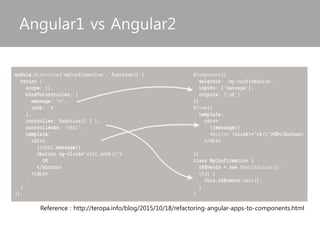
Angular1 vs Angular2
Reference : http://teropa.info/blog/2015/10/18/refactoring-angular-apps-to-components.html
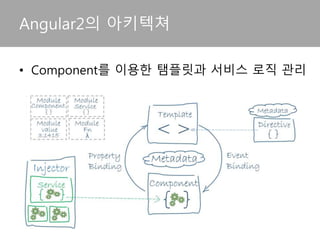
• Component를 이용한 탬플릿과 서비스 로직 관리
Angular2의 아키텍쳐
• Component 정의
– 기능 명세에 의한 개발
– 명세 따른 배포, 조립 가능한 독립 구성단위
– 컴포넌트는 인터페이스만을 통해서 접근 (예 : WSDL)
• Component 중심개발의 특징
– 관심사분리의 개발 방법으로 컴포넌트간 연결이 느슨
하다(loosely coupled).
– 컴포넌트 재활용에 초점을 맞춘다.
컴포넌트 중심의 개발
• Front-End에서의 컴포넌트
– 커스텀 엘리먼트(HTML5)로 볼 수 있다
– Angular2에서 컴포넌트는 특정 Element를 의미한다.
– 사용예 : <my-component></my-component>
• Angular 1의 컴포넌트
– directives, controllers, Scope에 의해 구현
– 컴포넌트에 해당하는 directive는 Angular1의 구성요
소의 일부였다.
Angular2의 컴포넌트
• 컴포넌트 중심의 Angular2
– Angular2는 컴포넌트 중심으로 개발을 진행한다.
– 컴포넌트는 Template과 Logic을 포함한다.
– component는 하나의 독립적인 모듈결합을 가진다.
– component는 다른 component나 service를 의존주입
받을 수 있다.
Angular2의 컴포넌트
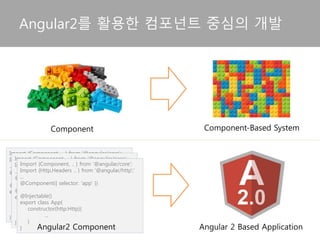
Angular2를 활용한 컴포넌트 중심의 개발
Component Component-Based System
Import {Component, .. } from ‘@angular/core’;
Import {Http,Headers .. } from ‘@angular/http’;’
...
@Component({ selector: 'app' })
@Injectable()
export class App{
constructor(http:Http){
...
}
}
Import {Component, .. } from ‘@angular/core’;
Import {Http,Headers .. } from ‘@angular/http’;’
...
@Component({ selector: 'app' })
@Injectable()
export class App{
constructor(http:Http){
...
}
}
Import {Component, .. } from ‘@angular/core’;
...
@Component({ selector: 'app' })
export class App{
constructor(){
...
}
} Component-Based
Angular2 Application
Angular2 Component
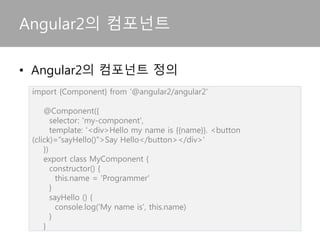
Angular2의 컴포넌트
import {Component} from ‘@angular2/angular2'
@Component({
selector: 'my-component',
template: '<div>Hello my name is {{name}}. <button
(click)=“sayHello()">Say Hello</button></div>'
})
export class MyComponent {
constructor() {
this.name = 'Programmer'
}
sayHello () {
console.log('My name is', this.name)
}
}
• Angular2의 컴포넌트 정의
• 아키텍쳐의 주요 구성단위는 다음과 같다.
– Module , Component, Template
– Metadata, Data Binding, Directive
– Service, Dependency Injection
Angular2의 주요 구성단위
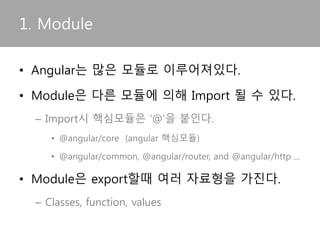
• Angular는 많은 모듈로 이루어져있다.
• Module은 다른 모듈에 의해 Import 될 수 있다.
– Import시 핵심모듈은 ‘@’을 붙인다.
• @angular/core (angular 핵심모듈)
• @angular/common, @angular/router, and @angular/http ...
• Module은 export할때 여러 자료형을 가진다.
– Classes, function, values
1. Module
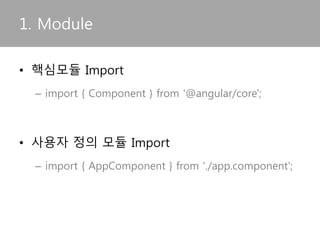
• 핵심모듈 Import
– import { Component } from '@angular/core';
• RC 버전이후에 반영
• 사용자 정의 모듈 Import
– import { AppComponent } from './app.component';
1. Module
• 컴포넌트는 함수를 통해 View를 바인딩 컨트롤
2. Component
import {Component} from 'angular2/core';
@Component({
selector: 'my-app',
template: ‘...’
})
export class AppComponent {
name ='';
district = ['namgu', 'bukgu', 'seogu', 'suseonggu'];
constructor() {
this.name = 'daegu'
}
sayCityName() {
alert('Our city name is '+this.name);
}
}
Module
=AppComponent
Metadata
To the Class
• Component가 Render하여 생성된다.
3. Template
<h2>Hero List</h2>
<p><i>Pick a hero from the list</i></p>
<div *ngFor="let hero of heroes" (click)="selectHero(hero)">
{{hero.name}}
</div>
<hero-detail *ngIf="selectedHero" [hero]="selectedHero"></hero-detail>
• Angular가 Class를 어떻게 처리해야 할지를 정의
4. Metadata
@Component({
selector: 'hero-list',
templateUrl: 'app/hero-list.component.html',
directives: [HeroDetailComponent],
providers: [HeroService]
})
export class HeroesComponent { ... }
5. Data Binding
• Component의 탬플릿은 모듈내 function에 의해
제어되고, Two Way Binding된 변수(model)를 통
해 rendering 된다.
<div>{{hero.name}}</div>
<hero-detail [hero]="selectedHero"></hero-detail>
<div (click)="selectHero(hero)"></div>
5. Data Binding
• Two way binding
– ngModel directive를 이용하여 모델은 Element에 연
결되고, 모듈이 이를 제어한다.
<input [(ngModel)]="hero.name">
6. Directive
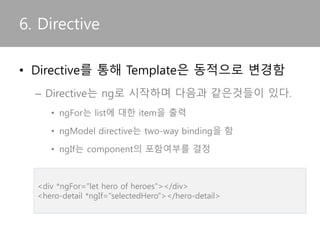
• Directive를 통해 Template은 동적으로 변경됨
– Angular에서 제공하는 대표적인 Directive
• ngFor는 list에 대한 item을 출력
• ngModel directive는 two-way binding을 함
• ngIf는 component의 포함여부를 결정
<div *ngFor="let hero of heroes"></div>
<hero-detail *ngIf="selectedHero"></hero-detail>
6. Directive
• 컴포넌트에서 사용자 Directive를 Import가능
import { Directive, ElementRef, Input } from '@angular/core';
@Directive({ selector: '[myHighlight]' })
export class HighlightDirective {
constructor(el: ElementRef) {
el.nativeElement.style.backgroundColor = 'yellow';
}
}
import { Component } from '@angular/core';
import { HighlightDirective } from './highlight.directive';
@Component({
selector: 'my-app',
templateUrl: 'app/app.component.html',
directives: [HighlightDirective]
})
export class AppComponent { }
directive definition
Using directive
• Template에서 attribute directive는 [Directive
명]=“string literals” 형태로 사용
6. Directive
<p [myHighlight]="color" [defaultColor]="'violet'">
Highlight me too!
</p>
import { Injectable } from '@angular/core';
import { HEROES } from './mock-heroes';
@Injectable() //서비스 클래스에 추가해야
하는 Injectable Decorator
export class HeroService {
getHeroes() {
return HEROES;
}
}
7. Service
• 재사용이 빈번한 기능을 서비스로 정의함
import { Hero } from './hero';
export var HEROES: Hero[] = [
{"id": 11, "name": "Mr. Nice"},
{"id": 12, "name": "Narco"},
{"id": 13, "name": "Bombasto"},
{"id": 14, "name": "Celeritas"},
{"id": 15, "name": "Magneta"},
{"id": 16, "name": "RubberMan"},
{"id": 17, "name": "Dynama"},
{"id": 18, "name": "Dr IQ"},
{"id": 19, "name": "Magma"},
{"id": 20, "name": "Tornado"}
];
Heroservice.ts
Return the mock hero
mock-heroes.ts
• 서비스가 의존성을 가지는 경우 constructor
injection pattern을 이용해 주입받는다.
7. Service
import { Injectable } from '@angular/core';
import { Hero } from './hero';
import { HEROES } from './mock-heroes';
import { Logger } from '../logger.service';
@Injectable()
export class HeroService {
constructor(private logger: Logger) { }
getHeroes() {
this.logger.log('Getting heroes ...')
return HEROES;
}
}
• Construct의 parameter를 통한 서비스 주입
8. Dependency Injection
import { Component } from '@angular/core';
import { Hero } from './hero';
import { HeroService } from './hero.service';
@Component({
selector: 'hero-list',
template: `<div *ngFor="let hero of heroes">{{hero.id}} - {{hero.name}}
</div>`,
})
export class HeroListComponent {
heroes: Hero[];
constructor(heroService: HeroService) {
this.heroes = heroService.getHeroes();
} }
With D.I
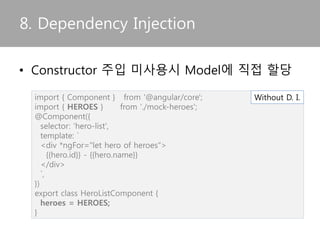
• Constructor 주입 미사용시 변수에 직접할당
8. Dependency Injection
import { Component } from '@angular/core';
import { HEROES } from './mock-heroes';
@Component({
selector: 'hero-list',
template: `
<div *ngFor="let hero of heroes">
{{hero.id}} - {{hero.name}}
</div>
`,
})
export class HeroListComponent {
heroes = HEROES;
}
Without D. I.
• Typescript는 JS의 상위집합(superset) 언어
– ES2016+ 특징을 가진다.
- Typescript = ES6 + TYpes + Annotaions
- Generics나 Lambdas를 이용할 수 있다.
• Javascript의 결점 보완
– OOP(상속, 인터페이스 등) 지원
– Primitive Type 지원 (num, string, boolean..) 으로 가
독성의 장점
Typescript의 특징
• 프리컴파일 언어
– coffescript, atscript, typescript
• Javascript의 미래버전인 Ecma Script 사용
– ECMA Script는 Ecma International의 기술규격에 정
의된 스크립트 언어
– Javascript는 ECMA Script를 따른다.
Typescript의 특징
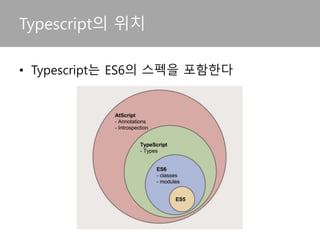
• Typescript는 ES6의 스펙을 포함한다
Typescript의 위치
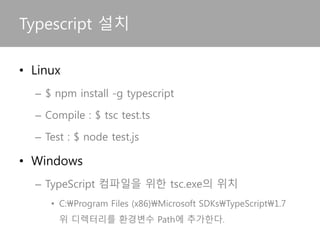
• Node.JS 설치후 npm 명령어를 이용하여 설치
– $ npm install -g typescript
– Compile : $ tsc test.ts
– Test : $ node test.js
• 설치후 Windows 에서 패스가 안잡히는 경우
– C:Program Files (x86)Microsoft
SDKsTypeScript1.7 디렉터리를 환경변수에 추가
Typescript 컴파일러 설치
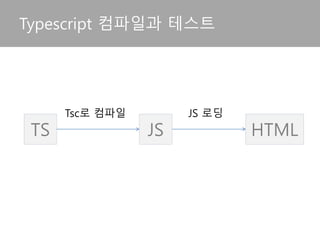
Typescript 컴파일과 테스트
TS JS HTML
Tsc로 컴파일 JS 로딩
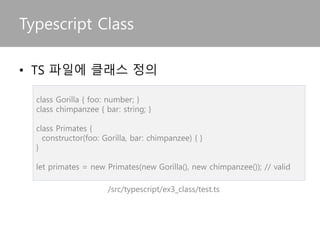
Typescript에서 Class 사용예
/src/typescript/ex3_class/test.ts
• TS파일에 클래스 정의
class Gorilla { foo: number; }
class chimpanzee { bar: string; }
class Primates {
constructor(foo: Gorilla, bar: chimpanzee) { }
}
let primates = new Primates(new Gorilla(), new chimpanzee()); // valid
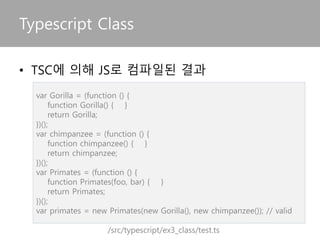
var Gorilla = (function () {
function Gorilla() { }
return Gorilla;
})();
var chimpanzee = (function () {
function chimpanzee() { }
return chimpanzee;
})();
var Primates = (function () {
function Primates(foo, bar) { }
return Primates;
})();
var primates = new Primates(new Gorilla(), new chimpanzee()); // valid
Typescript에서 Class 사용예
/src/typescript/ex3_class/test.ts
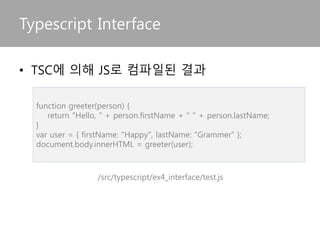
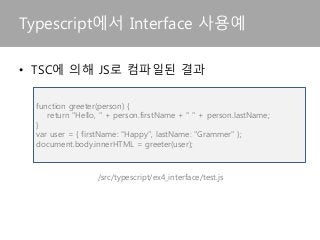
• TSC에 의해 JS로 컴파일된 결과
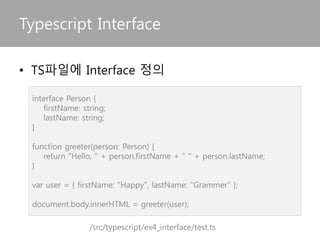
Typescript에서 Interface 사용예
/src/typescript/ex4_interface/test.ts
interface Person {
firstName: string;
lastName: string;
}
function greeter(person: Person) {
return "Hello, " + person.firstName + " " + person.lastName;
}
var user = { firstName: "Happy", lastName: "Grammer" };
document.body.innerHTML = greeter(user);
• TS파일에 Interface 정의
Typescript에서 Interface 사용예
/src/typescript/ex4_interface/test.js
• TSC에 의해 JS로 컴파일된 결과
function greeter(person) {
return "Hello, " + person.firstName + " " + person.lastName;
}
var user = { firstName: "Happy", lastName: "Grammer" };
document.body.innerHTML = greeter(user);
THANK YOU
https://github.com/DaeguDevGroup/angular2-bootstrap

Angular2를 활용한 컴포넌트 중심의 개발

  • 1.
    component-based development usingAngular2 Angular2를 활용한 컴포넌트 중심의 개발 160514 대구개발자그룹 정진욱
  • 2.
    • Google이 만든open-source web application MV* framework • MEAN stack중 Frontend 파트에 해당 – MEAN = MongoDB + ExpressJS + AngularJS + Node.JS AngularJS?
  • 3.
    • 2014년 10월 –ngEurope conference에서 첫소개 • 2015년 4월 30일 (Alpha Version) • 2015년 12월 (Beta Version) – https://angular.io/ 에서 다운로드 받을 수 있게됨 • 2016년 5월 – 첫 release candidate가 되어 출시함 Angular2의 History
  • 4.
    • Angular 1의주요 컨셉이 사라짐 – Deprecated : Controllers, Directive Definition Object, $scope, angular.module, jqLite • Angular 2는 쉽다. – Angular1의 주요 컨셉은 사라졌지만, 2는 Javascript Class 구축에만 집중할 수 있게 한다. • TypeScript를 이용한다. – JS의 상위집합업어 OOP 지원, 명확한 형정의 제공으 로 가독성의 장점, 프리컴파일이 필요 Angular2의 중요특징
  • 5.
    • 브라우저 지원 –크롬, 파폭, 오페라, 사파리, IE11, Android, iOS 6+ (PC보다는, 모바일 앱을 위한 프레임워크) • 기타 눈여겨볼 특징 – Angular 1의 확장이 아닌, 2는 새로 만들었다. – Angular 2는 모바일을 고려하여 적은 대역폭으로 이 용할 수 있도록 하였다. – Angular 1에 비해 빠르다. (3~10배) Angular2의 중요특징
  • 6.
    Angular1 vs Angular2 Reference: http://teropa.info/blog/2015/10/18/refactoring-angular-apps-to-components.html
  • 7.
    • Component를 이용한탬플릿과 서비스 로직 관리 Angular2의 아키텍쳐
  • 8.
    • Component 정의 –기능 명세에 의한 개발 – 명세 따른 배포, 조립 가능한 독립 구성단위 – 컴포넌트는 인터페이스만을 통해서 접근 (예 : WSDL) • Component 중심개발의 특징 – 관심사분리의 개발 방법으로 컴포넌트간 연결이 느슨 하다(loosely coupled). – 컴포넌트 재활용에 초점을 맞춘다. 컴포넌트 중심의 개발
  • 9.
    • Front-End에서의 컴포넌트 –커스텀 엘리먼트(HTML5)로 볼 수 있다 – Angular2에서 컴포넌트는 특정 Element를 의미한다. – 사용예 : <my-component></my-component> • Angular 1의 컴포넌트 – directives, controllers, Scope에 의해 구현 – 컴포넌트에 해당하는 directive는 Angular1의 구성요 소의 일부였다. Angular2의 컴포넌트
  • 10.
    • 컴포넌트 중심의Angular2 – Angular2는 컴포넌트 중심으로 개발을 진행한다. – 컴포넌트는 Template과 Logic을 포함한다. – component는 하나의 독립적인 모듈결합을 가진다. – component는 다른 component나 service를 의존주입 받을 수 있다. Angular2의 컴포넌트
  • 11.
    Angular2를 활용한 컴포넌트중심의 개발 Component Component-Based System Import {Component, .. } from ‘@angular/core’; Import {Http,Headers .. } from ‘@angular/http’;’ ... @Component({ selector: 'app' }) @Injectable() export class App{ constructor(http:Http){ ... } } Import {Component, .. } from ‘@angular/core’; Import {Http,Headers .. } from ‘@angular/http’;’ ... @Component({ selector: 'app' }) @Injectable() export class App{ constructor(http:Http){ ... } } Import {Component, .. } from ‘@angular/core’; ... @Component({ selector: 'app' }) export class App{ constructor(){ ... } } Component-Based Angular2 Application Angular2 Component
  • 12.
    Angular2의 컴포넌트 import {Component}from ‘@angular2/angular2' @Component({ selector: 'my-component', template: '<div>Hello my name is {{name}}. <button (click)=“sayHello()">Say Hello</button></div>' }) export class MyComponent { constructor() { this.name = 'Programmer' } sayHello () { console.log('My name is', this.name) } } • Angular2의 컴포넌트 정의
  • 13.
    • 아키텍쳐의 주요구성단위는 다음과 같다. – Module , Component, Template – Metadata, Data Binding, Directive – Service, Dependency Injection Angular2의 주요 구성단위
  • 14.
    • Angular는 많은모듈로 이루어져있다. • Module은 다른 모듈에 의해 Import 될 수 있다. – Import시 핵심모듈은 ‘@’을 붙인다. • @angular/core (angular 핵심모듈) • @angular/common, @angular/router, and @angular/http ... • Module은 export할때 여러 자료형을 가진다. – Classes, function, values 1. Module
  • 15.
    • 핵심모듈 Import –import { Component } from '@angular/core'; • RC 버전이후에 반영 • 사용자 정의 모듈 Import – import { AppComponent } from './app.component'; 1. Module
  • 16.
    • 컴포넌트는 함수를통해 View를 바인딩 컨트롤 2. Component import {Component} from 'angular2/core'; @Component({ selector: 'my-app', template: ‘...’ }) export class AppComponent { name =''; district = ['namgu', 'bukgu', 'seogu', 'suseonggu']; constructor() { this.name = 'daegu' } sayCityName() { alert('Our city name is '+this.name); } } Module =AppComponent Metadata To the Class
  • 17.
    • Component가 Render하여생성된다. 3. Template <h2>Hero List</h2> <p><i>Pick a hero from the list</i></p> <div *ngFor="let hero of heroes" (click)="selectHero(hero)"> {{hero.name}} </div> <hero-detail *ngIf="selectedHero" [hero]="selectedHero"></hero-detail>
  • 18.
    • Angular가 Class를어떻게 처리해야 할지를 정의 4. Metadata @Component({ selector: 'hero-list', templateUrl: 'app/hero-list.component.html', directives: [HeroDetailComponent], providers: [HeroService] }) export class HeroesComponent { ... }
  • 19.
    5. Data Binding •Component의 탬플릿은 모듈내 function에 의해 제어되고, Two Way Binding된 변수(model)를 통 해 rendering 된다. <div>{{hero.name}}</div> <hero-detail [hero]="selectedHero"></hero-detail> <div (click)="selectHero(hero)"></div>
  • 20.
    5. Data Binding •Two way binding – ngModel directive를 이용하여 모델은 Element에 연 결되고, 모듈이 이를 제어한다. <input [(ngModel)]="hero.name">
  • 21.
    6. Directive • Directive를통해 Template은 동적으로 변경됨 – Angular에서 제공하는 대표적인 Directive • ngFor는 list에 대한 item을 출력 • ngModel directive는 two-way binding을 함 • ngIf는 component의 포함여부를 결정 <div *ngFor="let hero of heroes"></div> <hero-detail *ngIf="selectedHero"></hero-detail>
  • 22.
    6. Directive • 컴포넌트에서사용자 Directive를 Import가능 import { Directive, ElementRef, Input } from '@angular/core'; @Directive({ selector: '[myHighlight]' }) export class HighlightDirective { constructor(el: ElementRef) { el.nativeElement.style.backgroundColor = 'yellow'; } } import { Component } from '@angular/core'; import { HighlightDirective } from './highlight.directive'; @Component({ selector: 'my-app', templateUrl: 'app/app.component.html', directives: [HighlightDirective] }) export class AppComponent { } directive definition Using directive
  • 23.
    • Template에서 attributedirective는 [Directive 명]=“string literals” 형태로 사용 6. Directive <p [myHighlight]="color" [defaultColor]="'violet'"> Highlight me too! </p>
  • 24.
    import { Injectable} from '@angular/core'; import { HEROES } from './mock-heroes'; @Injectable() //서비스 클래스에 추가해야 하는 Injectable Decorator export class HeroService { getHeroes() { return HEROES; } } 7. Service • 재사용이 빈번한 기능을 서비스로 정의함 import { Hero } from './hero'; export var HEROES: Hero[] = [ {"id": 11, "name": "Mr. Nice"}, {"id": 12, "name": "Narco"}, {"id": 13, "name": "Bombasto"}, {"id": 14, "name": "Celeritas"}, {"id": 15, "name": "Magneta"}, {"id": 16, "name": "RubberMan"}, {"id": 17, "name": "Dynama"}, {"id": 18, "name": "Dr IQ"}, {"id": 19, "name": "Magma"}, {"id": 20, "name": "Tornado"} ]; Heroservice.ts Return the mock hero mock-heroes.ts
  • 25.
    • 서비스가 의존성을가지는 경우 constructor injection pattern을 이용해 주입받는다. 7. Service import { Injectable } from '@angular/core'; import { Hero } from './hero'; import { HEROES } from './mock-heroes'; import { Logger } from '../logger.service'; @Injectable() export class HeroService { constructor(private logger: Logger) { } getHeroes() { this.logger.log('Getting heroes ...') return HEROES; } }
  • 26.
    • Construct의 parameter를통한 서비스 주입 8. Dependency Injection import { Component } from '@angular/core'; import { Hero } from './hero'; import { HeroService } from './hero.service'; @Component({ selector: 'hero-list', template: `<div *ngFor="let hero of heroes">{{hero.id}} - {{hero.name}} </div>`, }) export class HeroListComponent { heroes: Hero[]; constructor(heroService: HeroService) { this.heroes = heroService.getHeroes(); } } With D.I
  • 27.
    • Constructor 주입미사용시 변수에 직접할당 8. Dependency Injection import { Component } from '@angular/core'; import { HEROES } from './mock-heroes'; @Component({ selector: 'hero-list', template: ` <div *ngFor="let hero of heroes"> {{hero.id}} - {{hero.name}} </div> `, }) export class HeroListComponent { heroes = HEROES; } Without D. I.
  • 28.
    • Typescript는 JS의상위집합(superset) 언어 – ES2016+ 특징을 가진다. - Typescript = ES6 + TYpes + Annotaions - Generics나 Lambdas를 이용할 수 있다. • Javascript의 결점 보완 – OOP(상속, 인터페이스 등) 지원 – Primitive Type 지원 (num, string, boolean..) 으로 가 독성의 장점 Typescript의 특징
  • 29.
    • 프리컴파일 언어 –coffescript, atscript, typescript • Javascript의 미래버전인 Ecma Script 사용 – ECMA Script는 Ecma International의 기술규격에 정 의된 스크립트 언어 – Javascript는 ECMA Script를 따른다. Typescript의 특징
  • 30.
    • Typescript는 ES6의스펙을 포함한다 Typescript의 위치
  • 31.
    • Node.JS 설치후npm 명령어를 이용하여 설치 – $ npm install -g typescript – Compile : $ tsc test.ts – Test : $ node test.js • 설치후 Windows 에서 패스가 안잡히는 경우 – C:Program Files (x86)Microsoft SDKsTypeScript1.7 디렉터리를 환경변수에 추가 Typescript 컴파일러 설치
  • 32.
    Typescript 컴파일과 테스트 TSJS HTML Tsc로 컴파일 JS 로딩
  • 33.
    Typescript에서 Class 사용예 /src/typescript/ex3_class/test.ts •TS파일에 클래스 정의 class Gorilla { foo: number; } class chimpanzee { bar: string; } class Primates { constructor(foo: Gorilla, bar: chimpanzee) { } } let primates = new Primates(new Gorilla(), new chimpanzee()); // valid
  • 34.
    var Gorilla =(function () { function Gorilla() { } return Gorilla; })(); var chimpanzee = (function () { function chimpanzee() { } return chimpanzee; })(); var Primates = (function () { function Primates(foo, bar) { } return Primates; })(); var primates = new Primates(new Gorilla(), new chimpanzee()); // valid Typescript에서 Class 사용예 /src/typescript/ex3_class/test.ts • TSC에 의해 JS로 컴파일된 결과
  • 35.
    Typescript에서 Interface 사용예 /src/typescript/ex4_interface/test.ts interfacePerson { firstName: string; lastName: string; } function greeter(person: Person) { return "Hello, " + person.firstName + " " + person.lastName; } var user = { firstName: "Happy", lastName: "Grammer" }; document.body.innerHTML = greeter(user); • TS파일에 Interface 정의
  • 36.
    Typescript에서 Interface 사용예 /src/typescript/ex4_interface/test.js •TSC에 의해 JS로 컴파일된 결과 function greeter(person) { return "Hello, " + person.firstName + " " + person.lastName; } var user = { firstName: "Happy", lastName: "Grammer" }; document.body.innerHTML = greeter(user);
  • 37.

Editor's Notes

  • #9 WSDL은 서비스를 기술하는 언어이다. 주요 구성요는 다음과 같다. - Types - Operations Binding WSDL의 구조는 다음과 같다. <definitions> <types> definition of types........ </types> <message> definition of a message.... </message> <portType> <operation> definition of a operation....... </operation> </portType> <binding> definition of a binding.... </binding> <service> definition of a service.... </service> </definitions>
  • #17 모듈은 상위개념이며, 컴포넌트를 모듈로 보아도 무방하다.
  • #18 https://angular.io/docs/ts/latest/guide/architecture.html#!#template
  • #19 https://angular.io/docs/ts/latest/guide/architecture.html#!#metadata 클래스로 표현할 수 있는 대상은 컴포넌트, Directive, Service가 된다.
  • #20 https://angular.io/docs/ts/latest/guide/architecture.html#!#data-binding
  • #23 https://angular.io/docs/ts/latest/guide/attribute-directives.html
  • #25 https://angular.io/docs/ts/latest/guide/architecture.html#!#service https://angular.io/docs/ts/latest/guide/dependency-injection.html
  • #26 https://angular.io/docs/ts/latest/guide/dependency-injection.html
  • #27 https://angular.io/docs/ts/latest/guide/dependency-injection.html
  • #28 https://angular.io/docs/ts/latest/guide/dependency-injection.html