How to use BMW Scanner 1.4.0 PA Soft to do coding? 
Received my PA Soft BMW Scanner 1.4.0 today and decided to do some testing and 
coding. I chatted with the seller and successfully installed the PA Soft on Windows 7 
system. If you have any technical difficulties with the scanner itself, contact Careucar. 
The seller is great with questions and getting back to you on emails. 
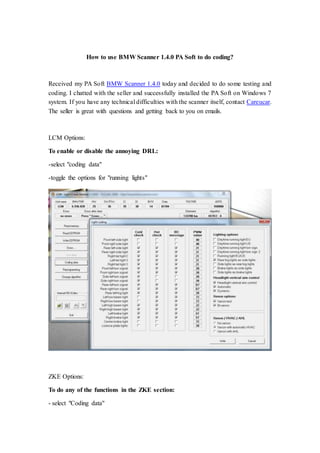
LCM Options: 
To enable or disable the annoying DRL: 
-select "coding data" 
-toggle the options for "running lights" 
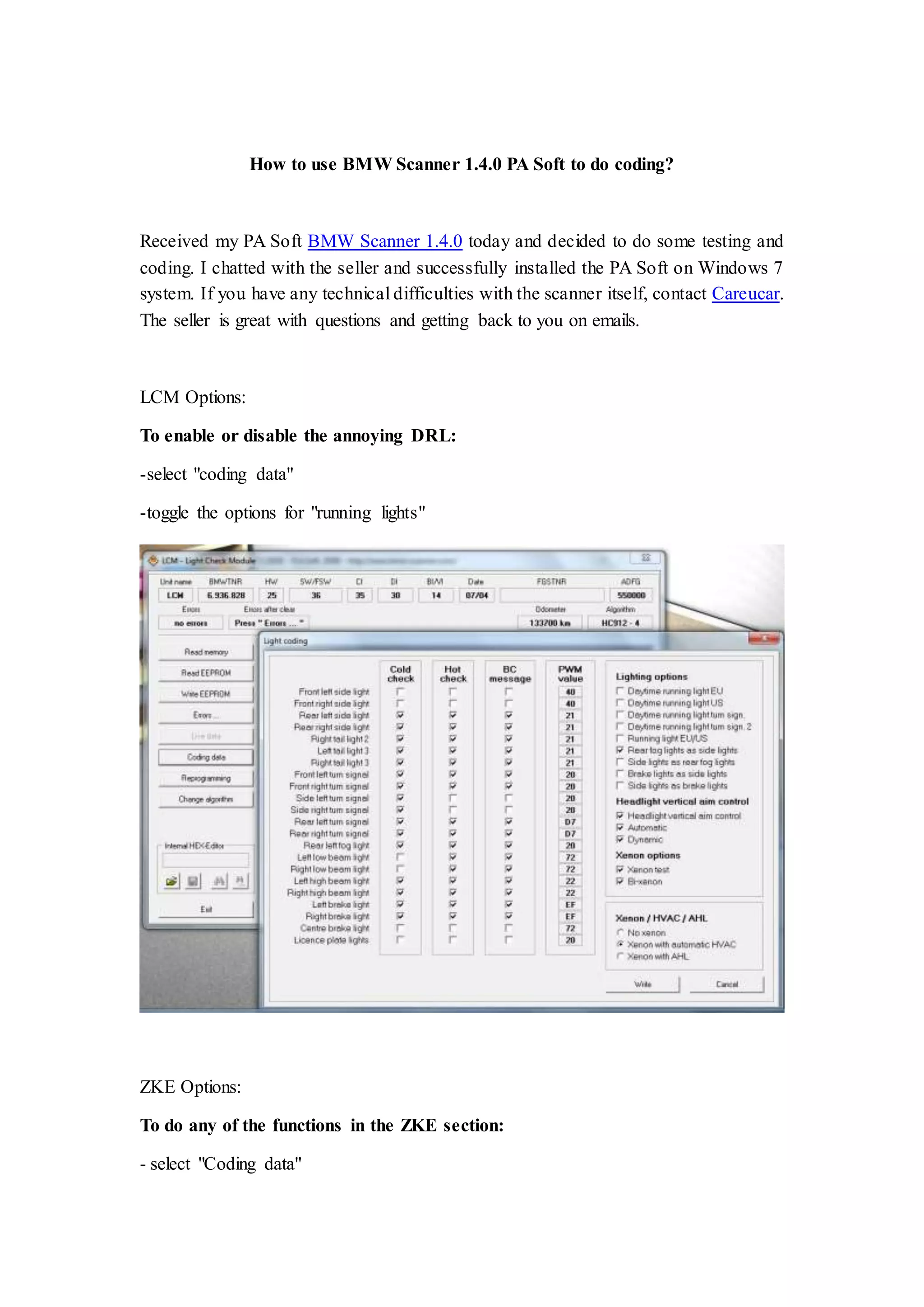
ZKE Options: 
To do any of the functions in the ZKE section: 
- select "Coding data"
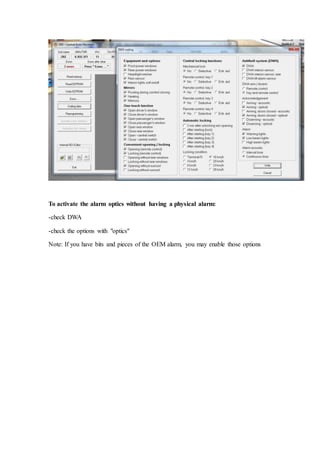
To activate the alarm optics without having a physical alarm: 
-check DWA 
-check the options with "optics" 
Note: If you have bits and pieces of the OEM alarm, you may enable those options
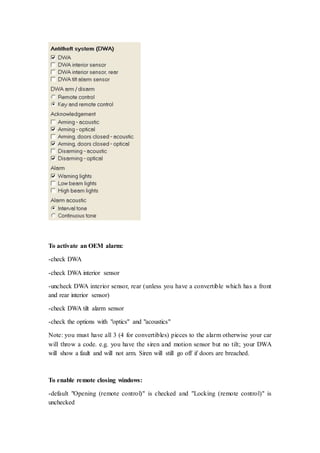
To activate an OEM alarm: 
-check DWA 
-check DWA interior sensor 
-uncheck DWA interior sensor, rear (unless you have a convertible which has a front 
and rear interior sensor) 
-check DWA tilt alarm sensor 
-check the options with "optics" and "acoustics" 
Note: you must have all 3 (4 for convertibles) pieces to the alarm otherwise your car 
will throw a code. e.g. you have the siren and motion sensor but no tilt; your DWA 
will show a fault and will not arm. Siren will still go off if doors are breached. 
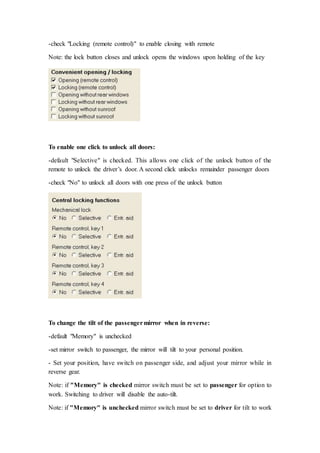
To enable remote closing windows: 
-default "Opening (remote control)" is checked and "Locking (remote control)" is 
unchecked
-check "Locking (remote control)" to enable closing with remote 
Note: the lock button closes and unlock opens the windows upon holding of the key 
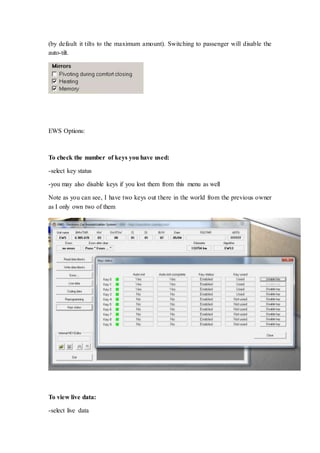
To enable one click to unlock all doors: 
-default "Selective" is checked. This allows one click of the unlock button of the 
remote to unlock the driver’s door. A second click unlocks remainder passenger doors 
-check "No" to unlock all doors with one press of the unlock button 
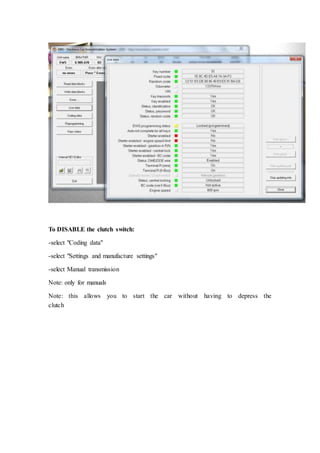
To change the tilt of the passenger mirror when in reverse: 
-default "Memory" is unchecked 
-set mirror switch to passenger, the mirror will tilt to your personal position. 
- Set your position, have switch on passenger side, and adjust your mirror while in 
reverse gear. 
Note: if "Memory" is checked mirror switch must be set to passenger for option to 
work. Switching to driver will disable the auto-tilt. 
Note: if "Memory" is unchecked mirror switch must be set to driver for tilt to work
(by default it tilts to the maximum amount). Switching to passenger will disable the 
auto-tilt. 
EWS Options: 
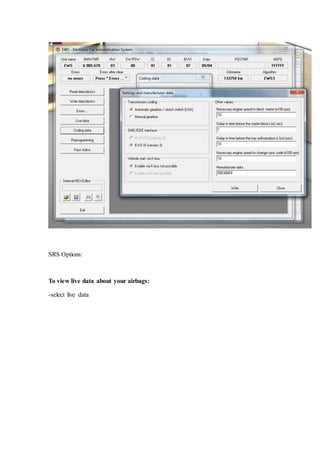
To check the number of keys you have used: 
-select key status 
-you may also disable keys if you lost them from this menu as well 
Note as you can see, I have two keys out there in the world from the previous owner 
as I only own two of them 
To view live data: 
-select live data
To DISABLE the clutch switch: 
-select "Coding data" 
-select "Settings and manufacture settings" 
-select Manual transmission 
Note: only for manuals 
Note: this allows you to start the car without having to depress the 
clutch
SRS Options: 
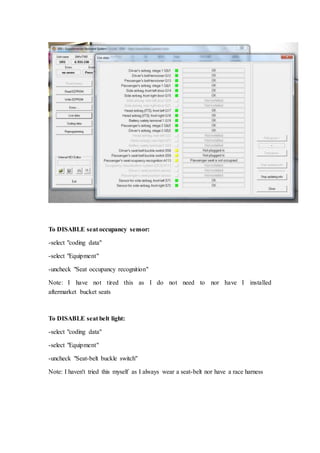
To view live data about your airbags: 
-select live data
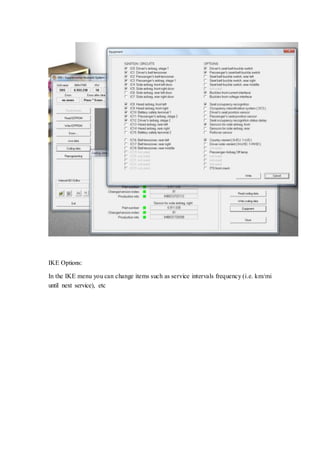
To DISABLE seat occupancy sensor: 
-select "coding data" 
-select "Equipment" 
-uncheck "Seat occupancy recognition" 
Note: I have not tired this as I do not need to nor have I installed 
aftermarket bucket seats 
To DISABLE seat belt light: 
-select "coding data" 
-select "Equipment" 
-uncheck "Seat-belt buckle switch" 
Note: I haven't tried this myself as I always wear a seat-belt nor have a race harness
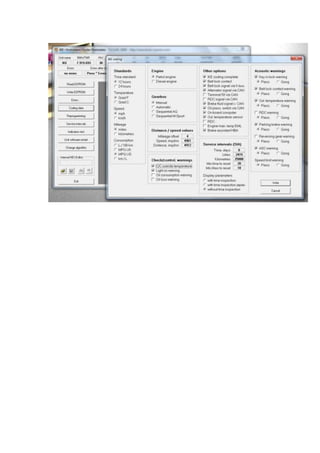
IKE Options: 
In the IKE menu you can change items such as service intervals frequency (i.e. km/mi 
until next service), etc
Introduction use bmw scanner 1.4.0 pa soft to do coding

Introduction use bmw scanner 1.4.0 pa soft to do coding

  • 1.
    How to useBMW Scanner 1.4.0 PA Soft to do coding? Received my PA Soft BMW Scanner 1.4.0 today and decided to do some testing and coding. I chatted with the seller and successfully installed the PA Soft on Windows 7 system. If you have any technical difficulties with the scanner itself, contact Careucar. The seller is great with questions and getting back to you on emails. LCM Options: To enable or disable the annoying DRL: -select "coding data" -toggle the options for "running lights" ZKE Options: To do any of the functions in the ZKE section: - select "Coding data"
  • 2.
    To activate thealarm optics without having a physical alarm: -check DWA -check the options with "optics" Note: If you have bits and pieces of the OEM alarm, you may enable those options
  • 3.
    To activate anOEM alarm: -check DWA -check DWA interior sensor -uncheck DWA interior sensor, rear (unless you have a convertible which has a front and rear interior sensor) -check DWA tilt alarm sensor -check the options with "optics" and "acoustics" Note: you must have all 3 (4 for convertibles) pieces to the alarm otherwise your car will throw a code. e.g. you have the siren and motion sensor but no tilt; your DWA will show a fault and will not arm. Siren will still go off if doors are breached. To enable remote closing windows: -default "Opening (remote control)" is checked and "Locking (remote control)" is unchecked
  • 4.
    -check "Locking (remotecontrol)" to enable closing with remote Note: the lock button closes and unlock opens the windows upon holding of the key To enable one click to unlock all doors: -default "Selective" is checked. This allows one click of the unlock button of the remote to unlock the driver’s door. A second click unlocks remainder passenger doors -check "No" to unlock all doors with one press of the unlock button To change the tilt of the passenger mirror when in reverse: -default "Memory" is unchecked -set mirror switch to passenger, the mirror will tilt to your personal position. - Set your position, have switch on passenger side, and adjust your mirror while in reverse gear. Note: if "Memory" is checked mirror switch must be set to passenger for option to work. Switching to driver will disable the auto-tilt. Note: if "Memory" is unchecked mirror switch must be set to driver for tilt to work
  • 5.
    (by default ittilts to the maximum amount). Switching to passenger will disable the auto-tilt. EWS Options: To check the number of keys you have used: -select key status -you may also disable keys if you lost them from this menu as well Note as you can see, I have two keys out there in the world from the previous owner as I only own two of them To view live data: -select live data
  • 6.
    To DISABLE theclutch switch: -select "Coding data" -select "Settings and manufacture settings" -select Manual transmission Note: only for manuals Note: this allows you to start the car without having to depress the clutch
  • 7.
    SRS Options: Toview live data about your airbags: -select live data
  • 8.
    To DISABLE seatoccupancy sensor: -select "coding data" -select "Equipment" -uncheck "Seat occupancy recognition" Note: I have not tired this as I do not need to nor have I installed aftermarket bucket seats To DISABLE seat belt light: -select "coding data" -select "Equipment" -uncheck "Seat-belt buckle switch" Note: I haven't tried this myself as I always wear a seat-belt nor have a race harness
  • 9.
    IKE Options: Inthe IKE menu you can change items such as service intervals frequency (i.e. km/mi until next service), etc