EASYCODING for BMW & Rolls-Royce Diagnosis, Car Personalized Setting
EASYCODING is a newly developed scan tool by VDMUCANDAS for BMW and
Rolls-Royce. It boasts fault code reading and erasing, as well as vehicle personalized
setting features, allowing you to activate hidden BMW and Rolls-Royce functions,
making it the first BMW scan tool that helps set personalized parameters.
BMW EASYCODING Scanner vehicle coverage: BMW and Rolls-Royce vehicle from
2010-2014 year. For its detailed vehicle list, please visit:
http://www.careucar.com/wholesale/easycoding-diagnosis-vehicle-personal-adjust.html
BMW EASYCODING Scanner O/S requirement: Windows XP SP3, Windows 7 and
Windows 8.
BMW EASYCODING Scanner installation: With software included in its USB Drive, there is
no need to install any driver on your computer, software easy installation and use.
BMW EASYCODING Scanner language support: English, Russian, German, French, Spanish,
Japanese, Italian, Korean, Dutch, Polish, Thai, Turkish, Czech, Portuguese, Indonesian, Swedish
and Greek.
BMW EASYCODING Scanner functions:
Numbe
r
Systems Function
1 HU
1. Add Select Sound Effects Of Lock/Unlock In I-drive
2. Operate Navigation Menu And Watch DVD During Driving
3. Enable Efficient Dynamics Sport CID (Added Sport Displays
The Vehicle Info Screen (Power & Torque Meters)).
4. Disable iDrive Legal Disclaimer During iDrive Startup
5. Select Sports Mode In I-drive
6. Turn On Gasoline Station Alert In Navigator
7. Allow PDC(Park Distance Control) To Indicate Park Distance
8. Disable Daytime Running Lamps
9. Convert kilometers To Miles
10. Increase The FM band
11. Disable Handbrake To Play Videos
12. Disable Reversing camera warning window
13. Video Playing With USB Are Avaliable In 2013 NTB
2 ACSM Set seat belt alarm to last 10 seconds
3 BDC
1. Allow Car Windows To Roll Up Without Being Disturbed By
Door Openings
2. Activate/Deactivate Headlight Washer
3. Set Car's Auto Start/Stop To Start In The Last Used Setting (e.g.
Off) When The Engine Is Started
4 CAS 1. Central Control Unlock Automatically When Engine Is Off
2. Shorten time to roll up or down car windows
3. Shorten The Time To Fold Down Rearview Mirrors
5
COMBO
X
1. Voice recognition
2. Play Videos
3. Add CIC stored addresses/messages from 25 to 50
4. Mircophone Settings
5. Change and Synchronize Incoming Call Ringtones On
Bluetooth Device
6 DWA8 Set lock alarm sound to the maximum
7 FEM
1.
Allow car windows to roll up without being disturbed by door
openings
2. Clean head lamps
3. Set Car's Auto Start/Stop To Start In The Last Used Setting (e.g.
Off) When The Engine Is Started
8 FKA AC Records Last Engine-off Statues
9 FRM
1. Remote Controller And Interior Button Turn Off Power Lift
Gate(Reset After Engine Is Off For 15 Minutes )
2. Remote Controller And Interior Button Turn Off Power Lift
Gate At Any Time(Reset After Engine Is Off For 15 Minutes )
3. Auto Control Of High Beams
4. Extend Foot To Open Rear Cover
10 FZD Set Lock Alarm Sound To The Maximum
11 IHKA
1. AC Records Last Engine-off Statues
2. AC Indoor Circulation Records its Engine-off Statues
12 TCU Mircophone Settings
13 JBBFE
1. Allow car windows to roll up without being disturbed by door
openings
2. Activate/Deactivate Headlight Washer
3. Wiper Resets Automatically
4. Disable Front Camera At Maximum Distance
5. Disable Back Camera At Maximum Distance
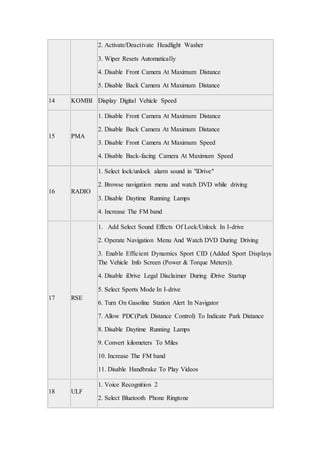
14 KOMBI Display Digital Vehicle Speed
15 PMA
1. Disable Front Camera At Maximum Distance
2. Disable Back Camera At Maximum Distance
3. Disable Front Camera At Maximum Speed
4. Disable Back-facing Camera At Maximum Speed
16 RADIO
1. Select lock/unlock alarm sound in "iDrive"
2. Browse navigation menu and watch DVD while driving
3. Disable Daytime Running Lamps
4. Increase The FM band
17 RSE
1. Add Select Sound Effects Of Lock/Unlock In I-drive
2. Operate Navigation Menu And Watch DVD During Driving
3. Enable Efficient Dynamics Sport CID (Added Sport Displays
The Vehicle Info Screen (Power & Torque Meters)).
4. Disable iDrive Legal Disclaimer During iDrive Startup
5. Select Sports Mode In I-drive
6. Turn On Gasoline Station Alert In Navigator
7. Allow PDC(Park Distance Control) To Indicate Park Distance
8. Disable Daytime Running Lamps
9. Convert kilometers To Miles
10. Increase The FM band
11. Disable Handbrake To Play Videos
18 ULF
1. Voice Recognition 2
2. Select Bluetooth Phone Ringtone
Note: After the coding, we provide "recovery" function for you to disable the changes.
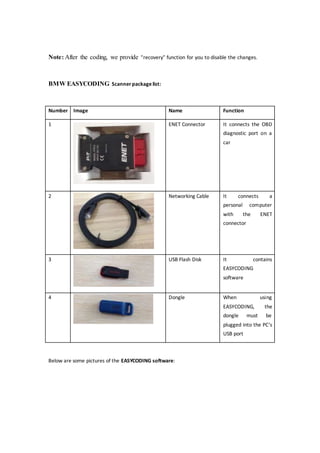
BMW EASYCODING Scanner packagelist:
Number Image Name Function
1 ENET Connector It connects the OBD
diagnostic port on a
car
2 Networking Cable It connects a
personal computer
with the ENET
connector
3 USB Flash Disk It contains
EASYCODING
software
4 Dongle When using
EASYCODING, the
dongle must be
plugged into the PC’s
USB port
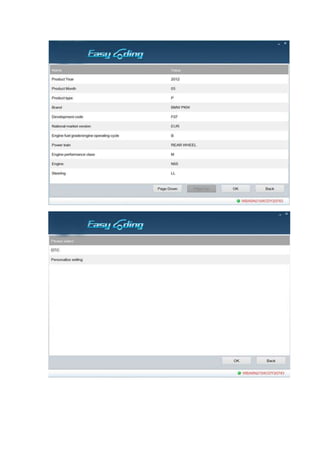
Below are some pictures of the EASYCODING software:
Product Link:
http://www.careucar.com/wholesale/easycoding-diagnosis-vehicle-personal-adjust.h
tml

Easycoding for bmw & rolls royce diagnosis,car personalized setting

  • 1.
    EASYCODING for BMW& Rolls-Royce Diagnosis, Car Personalized Setting EASYCODING is a newly developed scan tool by VDMUCANDAS for BMW and Rolls-Royce. It boasts fault code reading and erasing, as well as vehicle personalized setting features, allowing you to activate hidden BMW and Rolls-Royce functions, making it the first BMW scan tool that helps set personalized parameters. BMW EASYCODING Scanner vehicle coverage: BMW and Rolls-Royce vehicle from 2010-2014 year. For its detailed vehicle list, please visit: http://www.careucar.com/wholesale/easycoding-diagnosis-vehicle-personal-adjust.html BMW EASYCODING Scanner O/S requirement: Windows XP SP3, Windows 7 and Windows 8. BMW EASYCODING Scanner installation: With software included in its USB Drive, there is no need to install any driver on your computer, software easy installation and use. BMW EASYCODING Scanner language support: English, Russian, German, French, Spanish,
  • 2.
    Japanese, Italian, Korean,Dutch, Polish, Thai, Turkish, Czech, Portuguese, Indonesian, Swedish and Greek. BMW EASYCODING Scanner functions: Numbe r Systems Function 1 HU 1. Add Select Sound Effects Of Lock/Unlock In I-drive 2. Operate Navigation Menu And Watch DVD During Driving 3. Enable Efficient Dynamics Sport CID (Added Sport Displays The Vehicle Info Screen (Power & Torque Meters)). 4. Disable iDrive Legal Disclaimer During iDrive Startup 5. Select Sports Mode In I-drive 6. Turn On Gasoline Station Alert In Navigator 7. Allow PDC(Park Distance Control) To Indicate Park Distance 8. Disable Daytime Running Lamps 9. Convert kilometers To Miles 10. Increase The FM band 11. Disable Handbrake To Play Videos 12. Disable Reversing camera warning window 13. Video Playing With USB Are Avaliable In 2013 NTB 2 ACSM Set seat belt alarm to last 10 seconds 3 BDC 1. Allow Car Windows To Roll Up Without Being Disturbed By Door Openings 2. Activate/Deactivate Headlight Washer 3. Set Car's Auto Start/Stop To Start In The Last Used Setting (e.g. Off) When The Engine Is Started 4 CAS 1. Central Control Unlock Automatically When Engine Is Off
  • 3.
    2. Shorten timeto roll up or down car windows 3. Shorten The Time To Fold Down Rearview Mirrors 5 COMBO X 1. Voice recognition 2. Play Videos 3. Add CIC stored addresses/messages from 25 to 50 4. Mircophone Settings 5. Change and Synchronize Incoming Call Ringtones On Bluetooth Device 6 DWA8 Set lock alarm sound to the maximum 7 FEM 1. Allow car windows to roll up without being disturbed by door openings 2. Clean head lamps 3. Set Car's Auto Start/Stop To Start In The Last Used Setting (e.g. Off) When The Engine Is Started 8 FKA AC Records Last Engine-off Statues 9 FRM 1. Remote Controller And Interior Button Turn Off Power Lift Gate(Reset After Engine Is Off For 15 Minutes ) 2. Remote Controller And Interior Button Turn Off Power Lift Gate At Any Time(Reset After Engine Is Off For 15 Minutes ) 3. Auto Control Of High Beams 4. Extend Foot To Open Rear Cover 10 FZD Set Lock Alarm Sound To The Maximum 11 IHKA 1. AC Records Last Engine-off Statues 2. AC Indoor Circulation Records its Engine-off Statues 12 TCU Mircophone Settings 13 JBBFE 1. Allow car windows to roll up without being disturbed by door openings
  • 4.
    2. Activate/Deactivate HeadlightWasher 3. Wiper Resets Automatically 4. Disable Front Camera At Maximum Distance 5. Disable Back Camera At Maximum Distance 14 KOMBI Display Digital Vehicle Speed 15 PMA 1. Disable Front Camera At Maximum Distance 2. Disable Back Camera At Maximum Distance 3. Disable Front Camera At Maximum Speed 4. Disable Back-facing Camera At Maximum Speed 16 RADIO 1. Select lock/unlock alarm sound in "iDrive" 2. Browse navigation menu and watch DVD while driving 3. Disable Daytime Running Lamps 4. Increase The FM band 17 RSE 1. Add Select Sound Effects Of Lock/Unlock In I-drive 2. Operate Navigation Menu And Watch DVD During Driving 3. Enable Efficient Dynamics Sport CID (Added Sport Displays The Vehicle Info Screen (Power & Torque Meters)). 4. Disable iDrive Legal Disclaimer During iDrive Startup 5. Select Sports Mode In I-drive 6. Turn On Gasoline Station Alert In Navigator 7. Allow PDC(Park Distance Control) To Indicate Park Distance 8. Disable Daytime Running Lamps 9. Convert kilometers To Miles 10. Increase The FM band 11. Disable Handbrake To Play Videos 18 ULF 1. Voice Recognition 2 2. Select Bluetooth Phone Ringtone
  • 5.
    Note: After thecoding, we provide "recovery" function for you to disable the changes. BMW EASYCODING Scanner packagelist: Number Image Name Function 1 ENET Connector It connects the OBD diagnostic port on a car 2 Networking Cable It connects a personal computer with the ENET connector 3 USB Flash Disk It contains EASYCODING software 4 Dongle When using EASYCODING, the dongle must be plugged into the PC’s USB port Below are some pictures of the EASYCODING software:
  • 8.
  • 9.