build create W O R D C A M P G R A N D R A P I D S
W O R D P R E S S H O O K S
I N T R O D U C T I O N T O
build create W O R D C A M P C H I C A G O
H I .
Co-owner build/create studios
@buildcreate 

@wilsonography

buildcreate.com
I ’ M I A N , N I C E T O M E E T Y O U .
build create W O R D C A M P G R A N D R A P I D S
M Y S E L F I S H G O A L S F O R Y O U
I want you to walk away from this feeling a little less
hacky, a little more informed, and most of all inspired.
I want you to have an “Ah ha!” moment, where suddenly
your understanding of WordPress becomes that much
clearer, and you can’t wait to get out of this room to try
out your new knowledge.
Here goes nothing…
build create W O R D C A M P G R A N D R A P I D S
L E T ’ S TA L K A B O U T H O O K S
“Hooks enable us to literally hook into parts of the
WordPress page lifecycle to retrieve, insert, or modify
data, or they allow us to take certain actions behind the
scenes.”

- T O M M C FA R L I N @ T U T S P L U S
build create W O R D C A M P G R A N D R A P I D S
A W O R L D W I T H O U T H O O K S
build create W O R D C A M P C H I C A G O
I T ’ S P R E T T Y D A M N H A C K Y
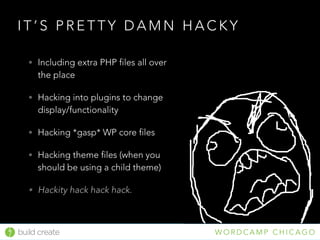
• Including extra PHP files all over
the place
• Hacking into plugins to change
display/functionality
• Hacking *gasp* WP core files
• Hacking theme files (when you
should be using a child theme)
• Hackity hack hack hack.
build create W O R D C A M P G R A N D R A P I D S
Filters and Actions are nearly the same thing in WordPress,
almost identical syntax, capabilities, and limitations.
The difference is how they’re used.
build create W O R D C A M P C H I C A G O
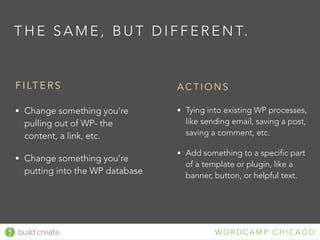
F I LT E R S
• Change something you’re
pulling out of WP- the
content, a link, etc.
• Change something you’re
putting into the WP database
A C T I O N S
• Tying into existing WP processes,
like sending email, saving a post,
saving a comment, etc.
• Add something to a specific part
of a template or plugin, like a
banner, button, or helpful text.
T H E S A M E , B U T D I F F E R E N T.
build create W O R D C A M P C H I C A G O
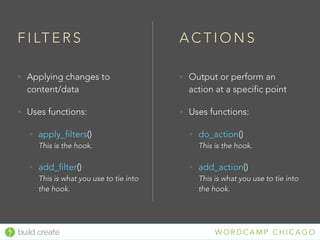
F I LT E R S
• Applying changes to
content/data
• Uses functions:
• apply_filters()

This is the hook.
• add_filter()

This is what you use to tie into
the hook.
A C T I O N S
• Output or perform an
action at a specific point
• Uses functions:
• do_action()

This is the hook.
• add_action()

This is what you use to tie into
the hook.
build create W O R D C A M P C H I C A G O
Curabitur Vulputate, Ligula Lacinia Scelerisque
Lorem ipsum dolor sit amet, consectetur adipiscing
elit. Nullam in dui mauris.
[some_cool_shortcode]
Est urna sit amet arcu. Class aptent taciti sociosqu ad
litora torquent per conubia nostra.
<p>Curabitur Vulputate, Ligula Lacinia Scelerisque</p>
<p>Lorem ipsum dolor sit amet, consectetur adipiscing
elit. Nullam in dui mauris.</p>
<div class=”shortcode-container”>*shortcode renders
here*</div>
<p>Est urna sit amet arcu. Class aptent taciti sociosqu
ad litora torquent per conubia nostra.</p>
What you entered What the_content returns
The journey of your content
This is the work of a few default WordPress filters.
build create W O R D C A M P C H I C A G O
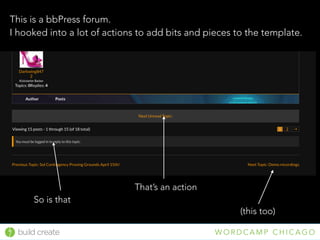
This is a bbPress forum. 

I hooked into a lot of actions to add bits and pieces to the template.
That’s an action
So is that
(this too)
build create W O R D C A M P G R A N D R A P I D S
N O W L E T S D E M Y S T I F Y.
build create W O R D C A M P G R A N D R A P I D S
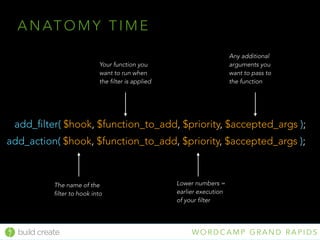
A N AT O M Y T I M E
add_filter( $hook, $function_to_add, $priority, $accepted_args );
The name of the
filter to hook into
Your function you
want to run when
the filter is applied
Lower numbers =
earlier execution
of your filter
Any additional
arguments you
want to pass to
the function
add_action( $hook, $function_to_add, $priority, $accepted_args );
build create W O R D C A M P G R A N D R A P I D S
S O M E N I T T Y G R I T T Y N O T E S
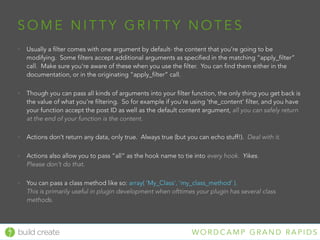
• Usually a filter comes with one argument by default- the content that you’re going to be
modifying. Some filters accept additional arguments as specified in the matching “apply_filter”
call. Make sure you’re aware of these when you use the filter. You can find them either in the
documentation, or in the originating “apply_filter” call.
• Though you can pass all kinds of arguments into your filter function, the only thing you get back is
the value of what you’re filtering. So for example if you’re using ‘the_content’ filter, and you have
your function accept the post ID as well as the default content argument, all you can safely return
at the end of your function is the content.
• Actions don’t return any data, only true. Always true (but you can echo stuff!). Deal with it.
• Actions also allow you to pass “all” as the hook name to tie into every hook. Yikes. 

Please don’t do that.
• You can pass a class method like so: array( 'My_Class', ‘my_class_method’ ).

This is primarily useful in plugin development when ofttimes your plugin has several class
methods.
build create W O R D C A M P G R A N D R A P I D S
U P N E X T: A S U P E R D U P E R S I M P L E E X A M P L E
build create W O R D C A M P G R A N D R A P I D S
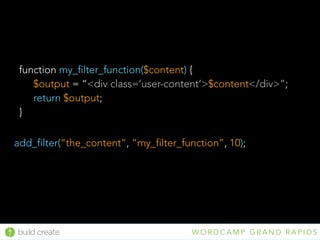
add_filter(“the_content”, “my_filter_function”, 10);
function my_filter_function($content) {
$output = “<div class=‘user-content’>$content</div>”;
return $output;
}
build create W O R D C A M P G R A N D R A P I D S
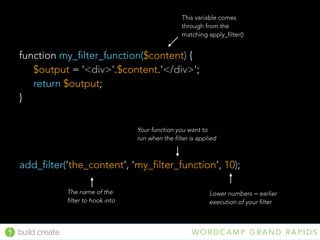
add_filter(‘the_content’, ‘my_filter_function’, 10);
function my_filter_function($content) {
$output = '<div>'.$content.'</div>';
return $output;
}
This variable comes
through from the
matching apply_filter()
The name of the
filter to hook into
Your function you want to
run when the filter is applied
Lower numbers = earlier
execution of your filter
build create W O R D C A M P G R A N D R A P I D S
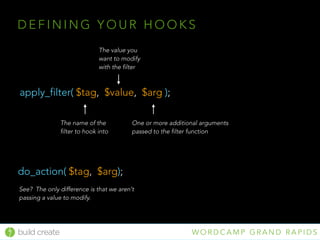
D E F I N I N G Y O U R H O O K S
apply_filter( $tag, $value, $arg );
The name of the
filter to hook into
The value you
want to modify
with the filter
One or more additional arguments
passed to the filter function
do_action( $tag, $arg);
See? The only difference is that we aren’t
passing a value to modify.
build create W O R D C A M P G R A N D R A P I D S
E X A M P L E H O O K S
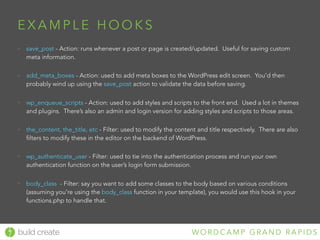
• save_post - Action: runs whenever a post or page is created/updated. Useful for saving custom
meta information.
• add_meta_boxes - Action: used to add meta boxes to the WordPress edit screen. You’d then
probably wind up using the save_post action to validate the data before saving.
• wp_enqueue_scripts - Action: used to add styles and scripts to the front end. Used a lot in themes
and plugins. There’s also an admin and login version for adding styles and scripts to those areas.
• the_content, the_title, etc - Filter: used to modify the content and title respectively. There are also
filters to modify these in the editor on the backend of WordPress.
• wp_authenticate_user - Filter: used to tie into the authentication process and run your own
authentication function on the user’s login form submission.
• body_class - Filter: say you want to add some classes to the body based on various conditions
(assuming you’re using the body_class function in your template), you would use this hook in your
functions.php to handle that.
build create W O R D C A M P C H I C A G O
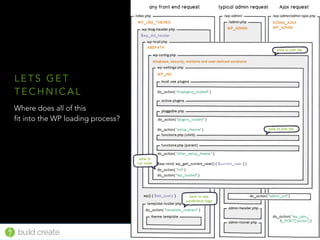
Where does all of this
fit into the WP loading process?
L E T S G E T
T E C H N I C A L
build create W O R D C A M P C H I C A G O
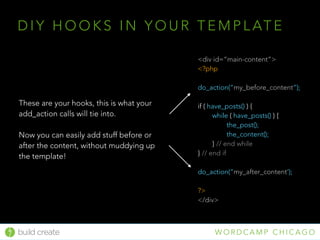
D I Y H O O K S I N Y O U R T E M P L AT E
<div id=“main-content”>
<?php
do_action(“my_before_content”);
if ( have_posts() ) {
while ( have_posts() ) {
the_post();
the_content();
} // end while
} // end if
do_action(“my_after_content’);
?>
</div>
These are your hooks, this is what your
add_action calls will tie into.
Now you can easily add stuff before or
after the content, without muddying up
the template!
build create W O R D C A M P G R A N D R A P I D S
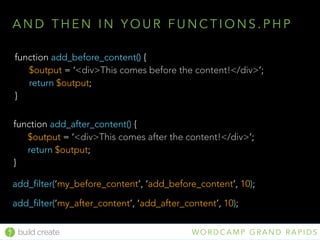
add_filter(‘my_before_content’, ‘add_before_content’, 10);
function add_before_content() {
$output = ‘<div>This comes before the content!</div>’;
return $output;
}
add_filter(‘my_after_content’, ‘add_after_content’, 10);
function add_after_content() {
$output = ‘<div>This comes after the content!</div>’;
return $output;
}
A N D T H E N I N Y O U R F U N C T I O N S . P H P
build create W O R D C A M P G R A N D R A P I D S
The best way to learn is to look at other people’s code and in the
WordPress Codex. See how they use it, how it comes together,
and of course try it yourself!
Experiment!
build create W O R D C A M P G R A N D R A P I D S
M E O W W E ’ R E TA L K I N !
build create W O R D C A M P C H I C A G O
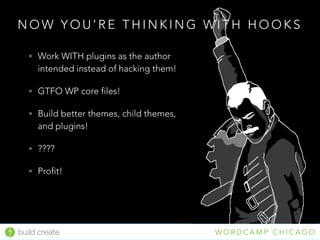
N O W Y O U ’ R E T H I N K I N G W I T H H O O K S
• Work WITH plugins as the author
intended instead of hacking them!
• GTFO WP core files!
• Build better themes, child themes,
and plugins!
• ????
• Profit!
build create W O R D C A M P G R A N D R A P I D S
Q U E S T I O N S ?
• http://codex.wordpress.org/Plugin_API/Action_Reference
• http://code.tutsplus.com/articles/the-beginners-guide-to-
wordpress-actions-and-filters--wp-27373
• http://www.zell-weekeat.com/wordpress-actions-and-filters/
• http://codex.wordpress.org/Plugin_API/Filter_Reference
• http://www.slideshare.net/wilsonography
R E S O U R C E S
build create W O R D C A M P C H I C A G O

Introduction to WordPress Hooks 2016

  • 1.
    build create WO R D C A M P G R A N D R A P I D S W O R D P R E S S H O O K S I N T R O D U C T I O N T O build create W O R D C A M P C H I C A G O
  • 2.
    build create WO R D C A M P C H I C A G O H I . Co-owner build/create studios @buildcreate 
 @wilsonography
 buildcreate.com I ’ M I A N , N I C E T O M E E T Y O U .
  • 3.
    build create WO R D C A M P G R A N D R A P I D S M Y S E L F I S H G O A L S F O R Y O U I want you to walk away from this feeling a little less hacky, a little more informed, and most of all inspired. I want you to have an “Ah ha!” moment, where suddenly your understanding of WordPress becomes that much clearer, and you can’t wait to get out of this room to try out your new knowledge. Here goes nothing…
  • 4.
    build create WO R D C A M P G R A N D R A P I D S L E T ’ S TA L K A B O U T H O O K S “Hooks enable us to literally hook into parts of the WordPress page lifecycle to retrieve, insert, or modify data, or they allow us to take certain actions behind the scenes.”
 - T O M M C FA R L I N @ T U T S P L U S
  • 5.
    build create WO R D C A M P G R A N D R A P I D S A W O R L D W I T H O U T H O O K S
  • 6.
    build create WO R D C A M P C H I C A G O I T ’ S P R E T T Y D A M N H A C K Y • Including extra PHP files all over the place • Hacking into plugins to change display/functionality • Hacking *gasp* WP core files • Hacking theme files (when you should be using a child theme) • Hackity hack hack hack.
  • 7.
    build create WO R D C A M P G R A N D R A P I D S Filters and Actions are nearly the same thing in WordPress, almost identical syntax, capabilities, and limitations. The difference is how they’re used.
  • 8.
    build create WO R D C A M P C H I C A G O F I LT E R S • Change something you’re pulling out of WP- the content, a link, etc. • Change something you’re putting into the WP database A C T I O N S • Tying into existing WP processes, like sending email, saving a post, saving a comment, etc. • Add something to a specific part of a template or plugin, like a banner, button, or helpful text. T H E S A M E , B U T D I F F E R E N T.
  • 9.
    build create WO R D C A M P C H I C A G O F I LT E R S • Applying changes to content/data • Uses functions: • apply_filters()
 This is the hook. • add_filter()
 This is what you use to tie into the hook. A C T I O N S • Output or perform an action at a specific point • Uses functions: • do_action()
 This is the hook. • add_action()
 This is what you use to tie into the hook.
  • 10.
    build create WO R D C A M P C H I C A G O Curabitur Vulputate, Ligula Lacinia Scelerisque Lorem ipsum dolor sit amet, consectetur adipiscing elit. Nullam in dui mauris. [some_cool_shortcode] Est urna sit amet arcu. Class aptent taciti sociosqu ad litora torquent per conubia nostra. <p>Curabitur Vulputate, Ligula Lacinia Scelerisque</p> <p>Lorem ipsum dolor sit amet, consectetur adipiscing elit. Nullam in dui mauris.</p> <div class=”shortcode-container”>*shortcode renders here*</div> <p>Est urna sit amet arcu. Class aptent taciti sociosqu ad litora torquent per conubia nostra.</p> What you entered What the_content returns The journey of your content This is the work of a few default WordPress filters.
  • 11.
    build create WO R D C A M P C H I C A G O This is a bbPress forum. 
 I hooked into a lot of actions to add bits and pieces to the template. That’s an action So is that (this too)
  • 12.
    build create WO R D C A M P G R A N D R A P I D S N O W L E T S D E M Y S T I F Y.
  • 13.
    build create WO R D C A M P G R A N D R A P I D S A N AT O M Y T I M E add_filter( $hook, $function_to_add, $priority, $accepted_args ); The name of the filter to hook into Your function you want to run when the filter is applied Lower numbers = earlier execution of your filter Any additional arguments you want to pass to the function add_action( $hook, $function_to_add, $priority, $accepted_args );
  • 14.
    build create WO R D C A M P G R A N D R A P I D S S O M E N I T T Y G R I T T Y N O T E S • Usually a filter comes with one argument by default- the content that you’re going to be modifying. Some filters accept additional arguments as specified in the matching “apply_filter” call. Make sure you’re aware of these when you use the filter. You can find them either in the documentation, or in the originating “apply_filter” call. • Though you can pass all kinds of arguments into your filter function, the only thing you get back is the value of what you’re filtering. So for example if you’re using ‘the_content’ filter, and you have your function accept the post ID as well as the default content argument, all you can safely return at the end of your function is the content. • Actions don’t return any data, only true. Always true (but you can echo stuff!). Deal with it. • Actions also allow you to pass “all” as the hook name to tie into every hook. Yikes. 
 Please don’t do that. • You can pass a class method like so: array( 'My_Class', ‘my_class_method’ ).
 This is primarily useful in plugin development when ofttimes your plugin has several class methods.
  • 15.
    build create WO R D C A M P G R A N D R A P I D S U P N E X T: A S U P E R D U P E R S I M P L E E X A M P L E
  • 16.
    build create WO R D C A M P G R A N D R A P I D S add_filter(“the_content”, “my_filter_function”, 10); function my_filter_function($content) { $output = “<div class=‘user-content’>$content</div>”; return $output; }
  • 17.
    build create WO R D C A M P G R A N D R A P I D S add_filter(‘the_content’, ‘my_filter_function’, 10); function my_filter_function($content) { $output = '<div>'.$content.'</div>'; return $output; } This variable comes through from the matching apply_filter() The name of the filter to hook into Your function you want to run when the filter is applied Lower numbers = earlier execution of your filter
  • 18.
    build create WO R D C A M P G R A N D R A P I D S D E F I N I N G Y O U R H O O K S apply_filter( $tag, $value, $arg ); The name of the filter to hook into The value you want to modify with the filter One or more additional arguments passed to the filter function do_action( $tag, $arg); See? The only difference is that we aren’t passing a value to modify.
  • 19.
    build create WO R D C A M P G R A N D R A P I D S E X A M P L E H O O K S • save_post - Action: runs whenever a post or page is created/updated. Useful for saving custom meta information. • add_meta_boxes - Action: used to add meta boxes to the WordPress edit screen. You’d then probably wind up using the save_post action to validate the data before saving. • wp_enqueue_scripts - Action: used to add styles and scripts to the front end. Used a lot in themes and plugins. There’s also an admin and login version for adding styles and scripts to those areas. • the_content, the_title, etc - Filter: used to modify the content and title respectively. There are also filters to modify these in the editor on the backend of WordPress. • wp_authenticate_user - Filter: used to tie into the authentication process and run your own authentication function on the user’s login form submission. • body_class - Filter: say you want to add some classes to the body based on various conditions (assuming you’re using the body_class function in your template), you would use this hook in your functions.php to handle that.
  • 20.
    build create WO R D C A M P C H I C A G O Where does all of this fit into the WP loading process? L E T S G E T T E C H N I C A L
  • 21.
    build create WO R D C A M P C H I C A G O D I Y H O O K S I N Y O U R T E M P L AT E <div id=“main-content”> <?php do_action(“my_before_content”); if ( have_posts() ) { while ( have_posts() ) { the_post(); the_content(); } // end while } // end if do_action(“my_after_content’); ?> </div> These are your hooks, this is what your add_action calls will tie into. Now you can easily add stuff before or after the content, without muddying up the template!
  • 22.
    build create WO R D C A M P G R A N D R A P I D S add_filter(‘my_before_content’, ‘add_before_content’, 10); function add_before_content() { $output = ‘<div>This comes before the content!</div>’; return $output; } add_filter(‘my_after_content’, ‘add_after_content’, 10); function add_after_content() { $output = ‘<div>This comes after the content!</div>’; return $output; } A N D T H E N I N Y O U R F U N C T I O N S . P H P
  • 23.
    build create WO R D C A M P G R A N D R A P I D S The best way to learn is to look at other people’s code and in the WordPress Codex. See how they use it, how it comes together, and of course try it yourself! Experiment!
  • 24.
    build create WO R D C A M P G R A N D R A P I D S M E O W W E ’ R E TA L K I N !
  • 25.
    build create WO R D C A M P C H I C A G O N O W Y O U ’ R E T H I N K I N G W I T H H O O K S • Work WITH plugins as the author intended instead of hacking them! • GTFO WP core files! • Build better themes, child themes, and plugins! • ???? • Profit!
  • 26.
    build create WO R D C A M P G R A N D R A P I D S Q U E S T I O N S ?
  • 27.
    • http://codex.wordpress.org/Plugin_API/Action_Reference • http://code.tutsplus.com/articles/the-beginners-guide-to- wordpress-actions-and-filters--wp-27373 •http://www.zell-weekeat.com/wordpress-actions-and-filters/ • http://codex.wordpress.org/Plugin_API/Filter_Reference • http://www.slideshare.net/wilsonography R E S O U R C E S build create W O R D C A M P C H I C A G O