Chapter 1
Introduction to
Visual Basic
Programming
and
Applications
1
Exploring Microsoft Visual Basic 6.0
Copyright © 1999 Prentice-Hall, Inc.
By Carlotta Eaton
Exploring MS Visual
Basic 6
Copyright 1999 Prentice-Hall, Inc. 2
Objectives
 Machine language vs.. High-level language
 Procedure-oriented, object-oriented, and
event-driven languages
 Background of Visual Basic
 VB Integrated Development Environment
 Online documentation and Help features
Exploring MS Visual
Basic 6
Copyright 1999 Prentice-Hall, Inc. 3
Application Programs
Program - detailed set of instructions for a
computer to execute
Application programs (applications or apps) -
self-contained collection of programs that
perform a task for the end user
Programming language - formal language used
to give instructions to computers
Exploring MS Visual
Basic 6
Copyright 1999 Prentice-Hall, Inc. 4
History of Programming
Languages
Machine language
Procedure-oriented languages
Object-oriented languages
Event-driven languages
Natural languages
Exploring MS Visual
Basic 6
Copyright 1999 Prentice-Hall, Inc. 5
History of Programming
Languages
Machine Language
 different for each computer processor
 Procedure-Oriented Languages
 FORTRAN
 COBOL
 Pascal
 C
 Ada
Exploring MS Visual
Basic 6
Copyright 1999 Prentice-Hall, Inc. 6
History of Programming
Languages
Object-oriented languages
 Smalltalk
 C++
 Ada 95
Event-driven languages
 Visual Basic
 most Visual languages
Exploring MS Visual
Basic 6
Copyright 1999 Prentice-Hall, Inc. 7
History of Programming
Languages
Natural languages
 computer will accept a user’s native or
natural language, such as English
 Researchers continue to work in this
area
Exploring MS Visual
Basic 6
Copyright 1999 Prentice-Hall, Inc. 8
Background of Visual Basic
BASIC
 Beginner’s All-purpose Symbolic
Instruction Code
 By John Kemeny and Thomas Kurtz
 Designed to teach programming to
beginners
 BASIC language interpreter, one of
Microsoft’s first products
Exploring MS Visual
Basic 6
Copyright 1999 Prentice-Hall, Inc. 9
Background of Visual Basic
BASIC
 Included with DOS
 QBASIC - included with DOS Version 5 -
subset of BASIC
Visual Basic
 1992 - Visual Basic 1 for Windows 3
 Visual Basic 4 - for Windows 95
 Visual Basic 5 - for Office 97
 Visual Basic 6 - for Windows 98 & Office 2000
Exploring MS Visual
Basic 6
Copyright 1999 Prentice-Hall, Inc. 10
Visual Basic Editions
Learning Edition
Professional Edition
Enterprise Edition
Included in Visual Studio suite
(analogy Office for programmers)
Exploring MS Visual
Basic 6
Copyright 1999 Prentice-Hall, Inc. 11
Visual Basic Editions
Other Visual Basic packaging options
 VBA (Visual Basic for Applications)
 Windows CE Toolkit for Visual Basic
 Visual Basic Scripting Edition
 Control Creation Edition
Exploring MS Visual
Basic 6
Copyright 1999 Prentice-Hall, Inc. 12
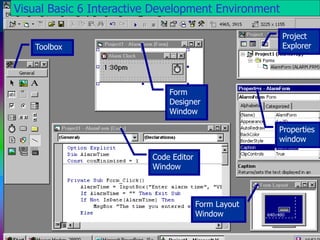
Toolbox
Form
Designer
Window
Code Editor
Window
Project
Explorer
Properties
window
Form Layout
Window
Visual Basic 6 Interactive Development Environment
Exploring MS Visual
Basic 6
Copyright 1999 Prentice-Hall, Inc. 13
Elements of the Integrated
Development Environment
 Application icon
 Application name
 Context menus
 Controls
 Current project
 Design view mode
 Title bar
 Major windows
 Form Designer
 Form Layout
 Toolbox
 Project Explorer
 Object Browser
 Properties
 Code Editor
 Immediate, Locals, Watch
Exploring MS Visual
Basic 6
Copyright 1999 Prentice-Hall, Inc. 14
Introduction to Visual Basic
Hands-On Exercise 1
 Start Microsoft Visual Basic 6.0
 Open the Welcome Project
 Open the Welcome Form
 Run the Welcome Project
 End the Welcome Project
 Exit Visual Basic
Exploring MS Visual
Basic 6
Copyright 1999 Prentice-Hall, Inc. 15
Get Help When You Need It
MSDN Library
Microsoft on the Web
Learning Edition of Visual Basic 6.0
 Visual Basic 6.0 in Action book
 Learn Visual Basic Now multimedia
tutorial
Exploring MS Visual
Basic 6
Copyright 1999 Prentice-Hall, Inc. 16
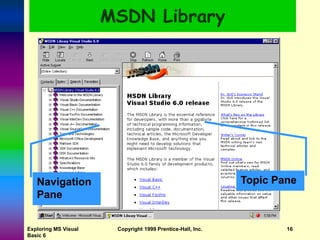
MSDN Library
Topic Pane
Navigation
Pane
Exploring MS Visual
Basic 6
Copyright 1999 Prentice-Hall, Inc. 17
MSDN Library
Visual Basic Documentation
 Documentation Map
 What’s New
 Programmer’s Guide
 Samples
 Reference Guidebooks
 Component Tools Guide
 Data Access Guide
Exploring MS Visual
Basic 6
Copyright 1999 Prentice-Hall, Inc. 18
Get Help from the CD
Hands-On Exercise 2
 Open the Calc Sample Application
 Run the Calc Sample Application
 Get Help from the MSDN Library
 Add a Topic to the Favorites List
 Search for a Definition
 Exit Help and Visual Basic
Exploring MS Visual
Basic 6
Copyright 1999 Prentice-Hall, Inc. 19
Help from the Web
Pull down Help menu
Select Help from the Web
 or www.microsoft.com/vbasic
Exploring MS Visual
Basic 6
Copyright 1999 Prentice-Hall, Inc. 20
Get Help from the Web
Hands-On Exercise 3
 Use the Free Stuff Page to Update VB
 Install the Update (optional)
 Product News
 Frequently Asked Questions
 Online Support
Exploring MS Visual
Basic 6
Copyright 1999 Prentice-Hall, Inc. 21
Use the Right Tool
for the Job
Microsoft Office Suite
 Word - word processing
 Excel - spreadsheet
 PowerPoint - presentation
 Access - database
OLE = Object Linking and Embedding
Use Visual Basic to create a
specialized, customized application
Exploring MS Visual
Basic 6
Copyright 1999 Prentice-Hall, Inc. 22
Summary ...
Event-driven languages is a major
improvement in programming
languages
Editions include Learning Edition,
Professional Edition, and Enterprise
Edition
CD-ROM includes the MSDN Library,
and many sample programs
Exploring MS Visual
Basic 6
Copyright 1999 Prentice-Hall, Inc. 23
Summary
Integrated Development Environment
includes
 Form Designer, Form Layout
 Code Edition, Project Explorer
 Properties and Object Browser
Choose the right tool for the job
Visual Basic is the glue that binds
Windows objects together
Exploring MS Visual
Basic 6
Copyright 1999 Prentice-Hall, Inc. 24
Practice with Visual Basic
1. Automated Teller Machine
2. Personal News Service
3. Getting Assistance While You Work
4. Pricing Information
Exploring MS Visual
Basic 6
Copyright 1999 Prentice-Hall, Inc. 25
Case Studies
I Wish I Could
Visual Basic Help on the Web
Quick Reference Manual
Planning for Disaster

Introduction to Visual Basic: Dive into the fundamental concepts of Visual Basic programming language. Explore its syntax, features, and applications, empowering you to create versatile software solutions with ease.

  • 1.
    Chapter 1 Introduction to VisualBasic Programming and Applications 1 Exploring Microsoft Visual Basic 6.0 Copyright © 1999 Prentice-Hall, Inc. By Carlotta Eaton
  • 2.
    Exploring MS Visual Basic6 Copyright 1999 Prentice-Hall, Inc. 2 Objectives  Machine language vs.. High-level language  Procedure-oriented, object-oriented, and event-driven languages  Background of Visual Basic  VB Integrated Development Environment  Online documentation and Help features
  • 3.
    Exploring MS Visual Basic6 Copyright 1999 Prentice-Hall, Inc. 3 Application Programs Program - detailed set of instructions for a computer to execute Application programs (applications or apps) - self-contained collection of programs that perform a task for the end user Programming language - formal language used to give instructions to computers
  • 4.
    Exploring MS Visual Basic6 Copyright 1999 Prentice-Hall, Inc. 4 History of Programming Languages Machine language Procedure-oriented languages Object-oriented languages Event-driven languages Natural languages
  • 5.
    Exploring MS Visual Basic6 Copyright 1999 Prentice-Hall, Inc. 5 History of Programming Languages Machine Language  different for each computer processor  Procedure-Oriented Languages  FORTRAN  COBOL  Pascal  C  Ada
  • 6.
    Exploring MS Visual Basic6 Copyright 1999 Prentice-Hall, Inc. 6 History of Programming Languages Object-oriented languages  Smalltalk  C++  Ada 95 Event-driven languages  Visual Basic  most Visual languages
  • 7.
    Exploring MS Visual Basic6 Copyright 1999 Prentice-Hall, Inc. 7 History of Programming Languages Natural languages  computer will accept a user’s native or natural language, such as English  Researchers continue to work in this area
  • 8.
    Exploring MS Visual Basic6 Copyright 1999 Prentice-Hall, Inc. 8 Background of Visual Basic BASIC  Beginner’s All-purpose Symbolic Instruction Code  By John Kemeny and Thomas Kurtz  Designed to teach programming to beginners  BASIC language interpreter, one of Microsoft’s first products
  • 9.
    Exploring MS Visual Basic6 Copyright 1999 Prentice-Hall, Inc. 9 Background of Visual Basic BASIC  Included with DOS  QBASIC - included with DOS Version 5 - subset of BASIC Visual Basic  1992 - Visual Basic 1 for Windows 3  Visual Basic 4 - for Windows 95  Visual Basic 5 - for Office 97  Visual Basic 6 - for Windows 98 & Office 2000
  • 10.
    Exploring MS Visual Basic6 Copyright 1999 Prentice-Hall, Inc. 10 Visual Basic Editions Learning Edition Professional Edition Enterprise Edition Included in Visual Studio suite (analogy Office for programmers)
  • 11.
    Exploring MS Visual Basic6 Copyright 1999 Prentice-Hall, Inc. 11 Visual Basic Editions Other Visual Basic packaging options  VBA (Visual Basic for Applications)  Windows CE Toolkit for Visual Basic  Visual Basic Scripting Edition  Control Creation Edition
  • 12.
    Exploring MS Visual Basic6 Copyright 1999 Prentice-Hall, Inc. 12 Toolbox Form Designer Window Code Editor Window Project Explorer Properties window Form Layout Window Visual Basic 6 Interactive Development Environment
  • 13.
    Exploring MS Visual Basic6 Copyright 1999 Prentice-Hall, Inc. 13 Elements of the Integrated Development Environment  Application icon  Application name  Context menus  Controls  Current project  Design view mode  Title bar  Major windows  Form Designer  Form Layout  Toolbox  Project Explorer  Object Browser  Properties  Code Editor  Immediate, Locals, Watch
  • 14.
    Exploring MS Visual Basic6 Copyright 1999 Prentice-Hall, Inc. 14 Introduction to Visual Basic Hands-On Exercise 1  Start Microsoft Visual Basic 6.0  Open the Welcome Project  Open the Welcome Form  Run the Welcome Project  End the Welcome Project  Exit Visual Basic
  • 15.
    Exploring MS Visual Basic6 Copyright 1999 Prentice-Hall, Inc. 15 Get Help When You Need It MSDN Library Microsoft on the Web Learning Edition of Visual Basic 6.0  Visual Basic 6.0 in Action book  Learn Visual Basic Now multimedia tutorial
  • 16.
    Exploring MS Visual Basic6 Copyright 1999 Prentice-Hall, Inc. 16 MSDN Library Topic Pane Navigation Pane
  • 17.
    Exploring MS Visual Basic6 Copyright 1999 Prentice-Hall, Inc. 17 MSDN Library Visual Basic Documentation  Documentation Map  What’s New  Programmer’s Guide  Samples  Reference Guidebooks  Component Tools Guide  Data Access Guide
  • 18.
    Exploring MS Visual Basic6 Copyright 1999 Prentice-Hall, Inc. 18 Get Help from the CD Hands-On Exercise 2  Open the Calc Sample Application  Run the Calc Sample Application  Get Help from the MSDN Library  Add a Topic to the Favorites List  Search for a Definition  Exit Help and Visual Basic
  • 19.
    Exploring MS Visual Basic6 Copyright 1999 Prentice-Hall, Inc. 19 Help from the Web Pull down Help menu Select Help from the Web  or www.microsoft.com/vbasic
  • 20.
    Exploring MS Visual Basic6 Copyright 1999 Prentice-Hall, Inc. 20 Get Help from the Web Hands-On Exercise 3  Use the Free Stuff Page to Update VB  Install the Update (optional)  Product News  Frequently Asked Questions  Online Support
  • 21.
    Exploring MS Visual Basic6 Copyright 1999 Prentice-Hall, Inc. 21 Use the Right Tool for the Job Microsoft Office Suite  Word - word processing  Excel - spreadsheet  PowerPoint - presentation  Access - database OLE = Object Linking and Embedding Use Visual Basic to create a specialized, customized application
  • 22.
    Exploring MS Visual Basic6 Copyright 1999 Prentice-Hall, Inc. 22 Summary ... Event-driven languages is a major improvement in programming languages Editions include Learning Edition, Professional Edition, and Enterprise Edition CD-ROM includes the MSDN Library, and many sample programs
  • 23.
    Exploring MS Visual Basic6 Copyright 1999 Prentice-Hall, Inc. 23 Summary Integrated Development Environment includes  Form Designer, Form Layout  Code Edition, Project Explorer  Properties and Object Browser Choose the right tool for the job Visual Basic is the glue that binds Windows objects together
  • 24.
    Exploring MS Visual Basic6 Copyright 1999 Prentice-Hall, Inc. 24 Practice with Visual Basic 1. Automated Teller Machine 2. Personal News Service 3. Getting Assistance While You Work 4. Pricing Information
  • 25.
    Exploring MS Visual Basic6 Copyright 1999 Prentice-Hall, Inc. 25 Case Studies I Wish I Could Visual Basic Help on the Web Quick Reference Manual Planning for Disaster

Editor's Notes

  • #2 Exploring Microsoft Visual Basic 6.0