copyright © 2009 Roger S. Pressman and David Lowe
May be reproduced ONLY for student use at the university level when used in conjunction with Web Engineering:
A Practitioner's Approach.
Any other reproduction or use is expressly prohibited.
This presentation, slides, or hardcopy may NOT be used for short courses, industry seminars, or consulting
purposes without the express written permission of the authors.
The WebE Process
The WebE
Process
• The process must be agile and adaptable, but it
must also be incremental
• Why incremental?
• Requirements evolve over time
• Changes will occur frequently (and always at
inconvenient times
• Timelines are short
• Incremental delivery allows you to manage this
change!
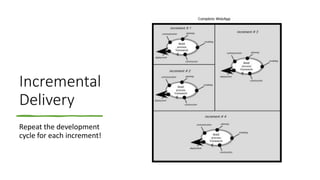
Incremental
Delivery
Repeat the development
cycle for each increment!
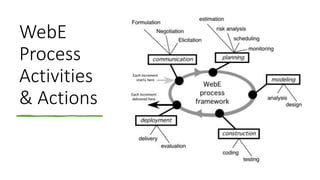
WebE
Process
Activities
& Actions
Conducting Framework Activities-I
• The first iteration
• define business context
• establish overall requirements
• create a set of usage scenarios
• negotiate conflicting needs among stakeholders, and
• from this information derive the set of WebApp increments that is to be delivered.
• Develop a broad outline of all components, recognizing that it will change
Conducting Framework Activities-II
• The second iteration
• You’ve learned that the first increment is
an informational WebApp and it must be
delivered in one week!
• You meet with stakeholders and later
review your notes:
• Logo and graphics—need aesthetic
design.
• One- or two-paragraph introduction.
• CPI mission statement (file exists)
• A word to visitors (someone will
write this tomorrow)
• Basic navigation bar will look like …
• About the company
• Our offerings
• Home security products (hierarchical
at next level)
• Monitoring services (a list)
• Our Technology (the new sensor)
• Contact us
• Other issues:
• Informational content will change
over time.
• This “home page” will be the
navigation starting point for
content and functions required
for subsequent increments.
Conducting Framework Activities-III
• The second iteration
• You spend a few minutes developing a plan
• Day 1: Create a prototype layout (a model) of the WebApp.
• Collect and review all existing CPI content and graphics.
• Get stakeholder feedback on prototype, if possible.
• Day 2: Using the prototype as a guide, begin construction of the increment.
• Build navigation bar.
• Lay out content areas.
• Integrate graphics, links, etc.
• Test all links for validity.
• Review all content for completeness and correctness.
• Day 3: FTP all files to (an existing) domain.
• Perform navigation tests.
• Deployment: Inform selected stakeholders that the increment is available.
• Day 4: Poll stakeholders for feedback.
• Make modifications based on stakeholder feedback.
Conducting Framework Activities-IV
• The next iteration
• You’ve deployed the informational WebApp
• the communication activity during this second iteration will identify the requirements
(including content and functionality)
• assume that the second increment delivers the capability to select and download
product specifications and related information
• the process flow is restarted at the beginning, performing the communication activity for
this increment.
• The tasks you select to populate each framework activity for the increment may differ
from the tasks performed for the preceding increment, but the overall process flow
remains the same
Generic Actions & Tasks
Communication
• Identify business stakeholders
• Identify user categories
• Formulate the business context
• Define key business goals and objectives
• Identify the problem
• Define informational and applicative goals
• Gather requirements
• Develop usage scenarios
Generic Actions & Tasks
Planning
• Refine description of the increment to be delivered.
• Select the increment to be delivered now.
• Estimate the effort and time required to develop the increment.
• Assess risks associated with the delivery of the increment.
• Define the development schedule for the increment.
• Establish work products to be produced as a consequence of each framework activity.
• Define approach to change control.
• Establish quality assurance approach.
Generic Actions & Tasks:
Analysis Modeling
• Decide whether a requirements model is needed.
• Classify and represent web application content
• Identify content relationships
• Refine and extend user scenarios
• Review usage scenarios
• Create an interaction model for complex scenarios
• Refine interface requirements
• Identify functions
• Define constrains and performance requirements
• Identify database requirements
Generic Actions & Tasks:
Design Modeling
• Design the interface
• Design the aesthetic
• Design the navigation scheme
• Design the architecture
• Design the content and the structure that supports it
• Design functional components
• Select appropriate design patterns
• Design appropriate security and privacy mechanisms
• Review the design
Generic Actions & Tasks
Construction
• Build and/or acquire all content, and integrate the content into the web application
architecture
• Select the appropriate tool for generation of HTML code
• Implement each page layout, function, form, and navigation capability
• Implement all computation functions
• Address configuration issues.
Generic Actions & Tasks
Testing
• Test all web application components (content and function)
• Test navigation
• Test usability
• Test security
• Test the web application increment for different configurations.
Generic Actions & Tasks
Deployment
• Deliver the web application increment to a server as a predefined domain.
• Establish an online feedback mechanism for end users.
• Evaluate end-user interaction
• Assess lessons learned and consider all end-user feedback.
• Make modifications to the web application increment as required.
Umbrella Activities
• Background activities which occur in parallel with
the main development activities
• Equally important to the success of a project
• And so should be considered explicitly.
• Many umbrella activities can be defined
• But only four are crucial for a successful Web
engineering project:
Umbrella Activities
• Change management. Manages the effects of change as each increment is engineered,
integrating tools that assist in the management of all WebApp content
• Quality assurance. Defines and conducts those tasks that help ensure that each work
product and the deployed increment exhibits quality
• Risk management. Considers project and technical risks as an increment is engineered
• Project management. Tracks and monitors progress as an increment is engineered
Any Questions?

Introduction to the web engineering Process.pdf

  • 1.
    copyright © 2009Roger S. Pressman and David Lowe May be reproduced ONLY for student use at the university level when used in conjunction with Web Engineering: A Practitioner's Approach. Any other reproduction or use is expressly prohibited. This presentation, slides, or hardcopy may NOT be used for short courses, industry seminars, or consulting purposes without the express written permission of the authors. The WebE Process
  • 2.
    The WebE Process • Theprocess must be agile and adaptable, but it must also be incremental • Why incremental? • Requirements evolve over time • Changes will occur frequently (and always at inconvenient times • Timelines are short • Incremental delivery allows you to manage this change!
  • 3.
  • 4.
  • 5.
    Conducting Framework Activities-I •The first iteration • define business context • establish overall requirements • create a set of usage scenarios • negotiate conflicting needs among stakeholders, and • from this information derive the set of WebApp increments that is to be delivered. • Develop a broad outline of all components, recognizing that it will change
  • 6.
    Conducting Framework Activities-II •The second iteration • You’ve learned that the first increment is an informational WebApp and it must be delivered in one week! • You meet with stakeholders and later review your notes: • Logo and graphics—need aesthetic design. • One- or two-paragraph introduction. • CPI mission statement (file exists) • A word to visitors (someone will write this tomorrow) • Basic navigation bar will look like … • About the company • Our offerings • Home security products (hierarchical at next level) • Monitoring services (a list) • Our Technology (the new sensor) • Contact us • Other issues: • Informational content will change over time. • This “home page” will be the navigation starting point for content and functions required for subsequent increments.
  • 7.
    Conducting Framework Activities-III •The second iteration • You spend a few minutes developing a plan • Day 1: Create a prototype layout (a model) of the WebApp. • Collect and review all existing CPI content and graphics. • Get stakeholder feedback on prototype, if possible. • Day 2: Using the prototype as a guide, begin construction of the increment. • Build navigation bar. • Lay out content areas. • Integrate graphics, links, etc. • Test all links for validity. • Review all content for completeness and correctness. • Day 3: FTP all files to (an existing) domain. • Perform navigation tests. • Deployment: Inform selected stakeholders that the increment is available. • Day 4: Poll stakeholders for feedback. • Make modifications based on stakeholder feedback.
  • 8.
    Conducting Framework Activities-IV •The next iteration • You’ve deployed the informational WebApp • the communication activity during this second iteration will identify the requirements (including content and functionality) • assume that the second increment delivers the capability to select and download product specifications and related information • the process flow is restarted at the beginning, performing the communication activity for this increment. • The tasks you select to populate each framework activity for the increment may differ from the tasks performed for the preceding increment, but the overall process flow remains the same
  • 9.
    Generic Actions &Tasks Communication • Identify business stakeholders • Identify user categories • Formulate the business context • Define key business goals and objectives • Identify the problem • Define informational and applicative goals • Gather requirements • Develop usage scenarios
  • 10.
    Generic Actions &Tasks Planning • Refine description of the increment to be delivered. • Select the increment to be delivered now. • Estimate the effort and time required to develop the increment. • Assess risks associated with the delivery of the increment. • Define the development schedule for the increment. • Establish work products to be produced as a consequence of each framework activity. • Define approach to change control. • Establish quality assurance approach.
  • 11.
    Generic Actions &Tasks: Analysis Modeling • Decide whether a requirements model is needed. • Classify and represent web application content • Identify content relationships • Refine and extend user scenarios • Review usage scenarios • Create an interaction model for complex scenarios • Refine interface requirements • Identify functions • Define constrains and performance requirements • Identify database requirements
  • 12.
    Generic Actions &Tasks: Design Modeling • Design the interface • Design the aesthetic • Design the navigation scheme • Design the architecture • Design the content and the structure that supports it • Design functional components • Select appropriate design patterns • Design appropriate security and privacy mechanisms • Review the design
  • 13.
    Generic Actions &Tasks Construction • Build and/or acquire all content, and integrate the content into the web application architecture • Select the appropriate tool for generation of HTML code • Implement each page layout, function, form, and navigation capability • Implement all computation functions • Address configuration issues.
  • 14.
    Generic Actions &Tasks Testing • Test all web application components (content and function) • Test navigation • Test usability • Test security • Test the web application increment for different configurations.
  • 15.
    Generic Actions &Tasks Deployment • Deliver the web application increment to a server as a predefined domain. • Establish an online feedback mechanism for end users. • Evaluate end-user interaction • Assess lessons learned and consider all end-user feedback. • Make modifications to the web application increment as required.
  • 16.
    Umbrella Activities • Backgroundactivities which occur in parallel with the main development activities • Equally important to the success of a project • And so should be considered explicitly. • Many umbrella activities can be defined • But only four are crucial for a successful Web engineering project:
  • 17.
    Umbrella Activities • Changemanagement. Manages the effects of change as each increment is engineered, integrating tools that assist in the management of all WebApp content • Quality assurance. Defines and conducts those tasks that help ensure that each work product and the deployed increment exhibits quality • Risk management. Considers project and technical risks as an increment is engineered • Project management. Tracks and monitors progress as an increment is engineered
  • 18.