Unit-1
Introduction to
Software &
Software Engineering
✓ Looping
Outline
▪ Software, Characteristics of Software, Software Application Domains
▪ Software Engineering, Software Engineering Layered Approach
▪ Software Process, Process Framework Activities , Umbrella Activities
▪ Software Myths
• Management Myth
• Customer Myth
• Practitioner's/Developer Myth)
▪ Software Process Models
• The Waterfall Model
• Incremental Process Model
• Prototyping Model, Spiral Model
• Spiral Model
• Rapid Application Development Model (RAD)
▪ Component based Development
3
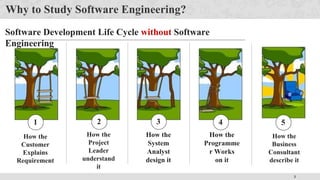
Why to Study Software Engineering?
How the
Customer
Explains
Requirement
Software Development Life Cycle without Software
Engineering
How the
Project
Leader
understand
it
How the
System
Analyst
design it
How the
Programme
r Works
on it
1 2 3 4
How the
Business
Consultant
describe it
5
4
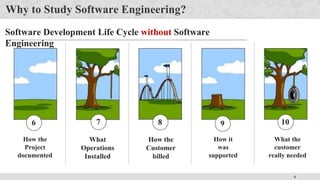
Why to Study Software Engineering?
Software Development Life Cycle without Software
Engineering
How the
Project
documented
What
Operations
Installed
How the
Customer
billed
6 7 8
How it
was
supported
What the
customer
really needed
9 10
5
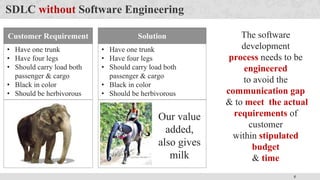
SDLC without Software Engineering
The software
development
process needs to be
engineered
to avoid the
communication gap
& to meet the actual
requirements of
customer
within stipulated
budget
& time
Customer Requirement
• Have one trunk
• Have four legs
• Should carry load both
passenger & cargo
• Black in color
• Should be herbivorous
Solution
• Have one trunk
• Have four legs
• Should carry load both
passenger & cargo
• Black in color
• Should be herbivorous
Our value
added,
also gives
milk
6
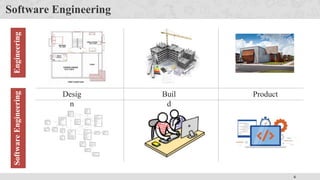
Software Engineering
Desig
n
Buil
d
Product
Engineering
Software
Engineering
7
Software is dead…..!
The old School view of Software
You buy it
You own it &
It’s your job to manage it
That is coming to an end
Because of web 2.0 & extensive computing
power, there is a different generation of software
It is delivered via Internet
It looks exactly like it’s residing on each user’s
computing device
Actually it reside on far away server
8
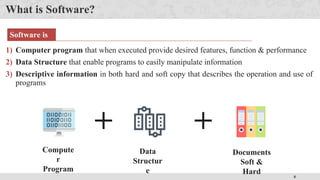
What is Software?
1) Computer program that when executed provide desired features, function & performance
2) Data Structure that enable programs to easily manipulate information
3) Descriptive information in both hard and soft copy that describes the operation and use of
programs
+ +
Compute
r
Program
Data
Structur
e
Documents
Soft &
Hard
Software is
9
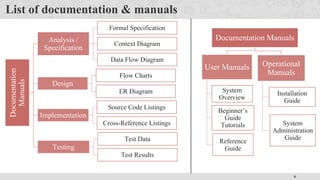
List of documentation & manuals
Documentation
Manuals
Analysis /
Specification
Formal Specification
Context Diagram
Data Flow Diagram
Design
Flow Charts
ER Diagram
Implementation
Source Code Listings
Cross-Reference Listings
Testing
Test Data
Test Results
Documentation Manuals
User Manuals
System
Overview
Beginner’s
Guide
Tutorials
Reference
Guide
Operational
Manuals
Installation
Guide
System
Administration
Guide
10
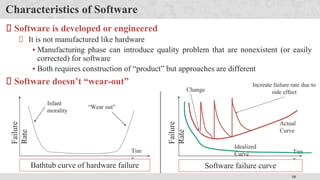
Characteristics of Software
Software is developed or engineered
It is not manufactured like hardware
▪ Manufacturing phase can introduce quality problem that are nonexistent (or easily
corrected) for software
▪ Both requires construction of “product” but approaches are different
Software doesn’t “wear-out”
Infant
morality
“Wear out”
Tim
e
Failure
Rate
Bathtub curve of hardware failure
Tim
e
Failure
Rate
Increate failure rate due to
side effect
Change
Idealized
Curve
Actual
Curve
Software failure curve
11
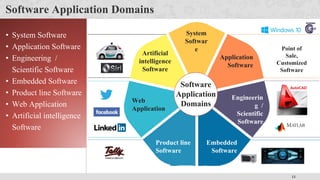
Software Application Domains
System
Softwar
e
Application
Software
Engineerin
g /
Scientific
Software
Embedded
Software
Product line
Software
Web
Application
Artificial
intelligence
Software
Software
Application
Domains
Point of
Sale,
Customized
Software
• System Software
• Application Software
• Engineering /
Scientific Software
• Embedded Software
• Product line Software
• Web Application
• Artificial intelligence
Software
12
Software Engineering
Software engineering is the establishment and use of sound
engineering principles in order to obtain economically
software that is reliable and works efficiently in real
machines.
Software Engineering is the science and art of building (designing and writing programs) a
software systems that are:
1) on time
2) on budget
3) with acceptable performance
4) with correct operation
13
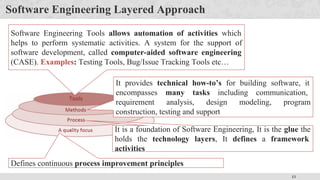
Software Engineering Layered Approach
Defines continuous process improvement principles
It is a foundation of Software Engineering, It is the glue the
holds the technology layers, It defines a framework
activities
It provides technical how-to’s for building software, it
encompasses many tasks including communication,
requirement analysis, design modeling, program
construction, testing and support
Software Engineering Tools allows automation of activities which
helps to perform systematic activities. A system for the support of
software development, called computer-aided software engineering
(CASE). Examples: Testing Tools, Bug/Issue Tracking Tools etc…
14
Software Engineering Layered Approach Cont.
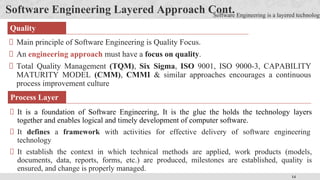
Main principle of Software Engineering is Quality Focus.
An engineering approach must have a focus on quality.
Total Quality Management (TQM), Six Sigma, ISO 9001, ISO 9000-3, CAPABILITY
MATURITY MODEL (CMM), CMMI & similar approaches encourages a continuous
process improvement culture
Quality
Software Engineering is a layered technology
It is a foundation of Software Engineering, It is the glue the holds the technology layers
together and enables logical and timely development of computer software.
It defines a framework with activities for effective delivery of software engineering
technology
It establish the context in which technical methods are applied, work products (models,
documents, data, reports, forms, etc.) are produced, milestones are established, quality is
ensured, and change is properly managed.
Process Layer
15
Software Engineering Layered Approach Cont.
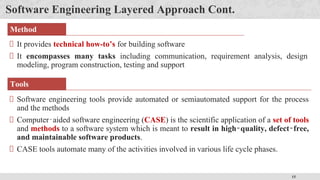
It provides technical how-to’s for building software
It encompasses many tasks including communication, requirement analysis, design
modeling, program construction, testing and support
Software engineering tools provide automated or semiautomated support for the process
and the methods
Computer‐aided software engineering (CASE) is the scientific application of a set of tools
and methods to a software system which is meant to result in high‐quality, defect‐free,
and maintainable software products.
CASE tools automate many of the activities involved in various life cycle phases.
Method
Tools
16
Software Process
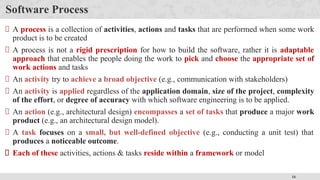
A process is a collection of activities, actions and tasks that are performed when some work
product is to be created
A process is not a rigid prescription for how to build the software, rather it is adaptable
approach that enables the people doing the work to pick and choose the appropriate set of
work actions and tasks
An activity try to achieve a broad objective (e.g., communication with stakeholders)
An activity is applied regardless of the application domain, size of the project, complexity
of the effort, or degree of accuracy with which software engineering is to be applied.
An action (e.g., architectural design) encompasses a set of tasks that produce a major work
product (e.g., an architectural design model).
A task focuses on a small, but well-defined objective (e.g., conducting a unit test) that
produces a noticeable outcome.
Each of these activities, actions & tasks reside within a framework or model
17
Software Process
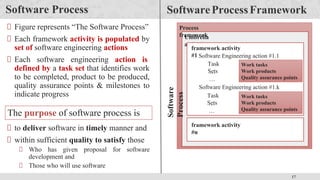
Figure represents “The Software Process”
Each framework activity is populated by
set of software engineering actions
Each software engineering action is
defined by a task set that identifies work
to be completed, product to be produced,
quality assurance points & milestones to
indicate progress
SoftwareProcessFramework
Software
Process
Process
framework
Umbrella
activities
framework activity
#1 Software Engineering action #1.1
Software Engineering action #1.k
Task
Sets
…
…
Task
Sets
…
…
Work tasks
Work products
Quality assurance points
Work tasks
Work products
Quality assurance points
framework activity
#n
The purpose of software process is
to deliver software in timely manner and
within sufficient quality to satisfy those
Who has given proposal for software
development and
Those who will use software
18
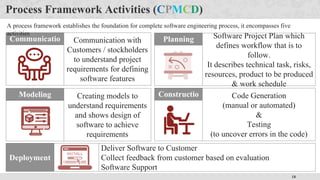
Process Framework Activities (CPMCD)
Communicatio
n
Communication with
Customers / stockholders
to understand project
requirements for defining
software features
Planning Software Project Plan which
defines workflow that is to
follow.
It describes technical task, risks,
resources, product to be produced
& work schedule
Modeling Creating models to
understand requirements
and shows design of
software to achieve
requirements
Constructio
n
Code Generation
(manual or automated)
&
Testing
(to uncover errors in the code)
Deployment
Deliver Software to Customer
Collect feedback from customer based on evaluation
Software Support
A process framework establishes the foundation for complete software engineering process, it encompasses five
activities
19
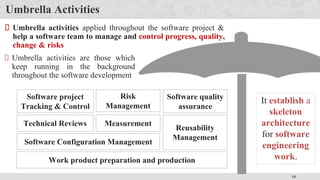
Umbrella Activities
Umbrella activities applied throughout the software project &
help a software team to manage and control progress, quality,
change & risks
It establish a
skeleton
architecture
for software
engineering
work.
Umbrella activities are those which
keep running in the background
throughout the software development
Software project
Tracking & Control
Risk
Management
Measurement
Technical Reviews
Software Configuration Management
Software quality
assurance
Reusability
Management
Work product preparation and production
20
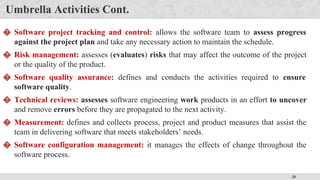
Umbrella Activities Cont.
� Software project tracking and control: allows the software team to assess progress
against the project plan and take any necessary action to maintain the schedule.
� Risk management: assesses (evaluates) risks that may affect the outcome of the project
or the quality of the product.
� Software quality assurance: defines and conducts the activities required to ensure
software quality.
� Technical reviews: assesses software engineering work products in an effort to uncover
and remove errors before they are propagated to the next activity.
� Measurement: defines and collects process, project and product measures that assist the
team in delivering software that meets stakeholders’ needs.
� Software configuration management: it manages the effects of change throughout the
software process.
21
Umbrella Activities Cont.
Reusability management: it defines criteria for work product reuse (including software
components) and establishes mechanisms to achieve reusable components.
Work product preparation and production: it encompasses (includes) the activities
required to create work products such as models, documents, logs, forms and lists.
22
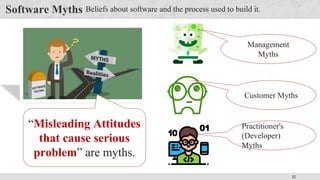
Software Myths Beliefs about software and the process used to build it.
“Misleading Attitudes
that cause serious
problem” are myths.
Management
Myths
Customer Myths
Practitioner's
(Developer)
Myths
23
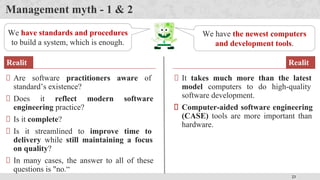
Management myth - 1 & 2
We have standards and procedures
to build a system, which is enough.
Are software practitioners aware of
standard’s existence?
Does it reflect modern software
engineering practice?
Is it complete?
Is it streamlined to improve time to
delivery while still maintaining a focus
on quality?
In many cases, the answer to all of these
questions is "no.“
Realit
y
We have the newest computers
and development tools.
It takes much more than the latest
model computers to do high-quality
software development.
Computer-aided software engineering
(CASE) tools are more important than
hardware.
Realit
y
24
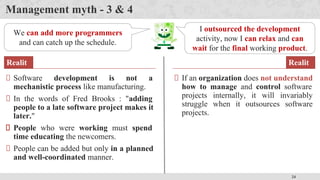
Management myth - 3 & 4
We can add more programmers
and can catch up the schedule.
Software development is not a
mechanistic process like manufacturing.
In the words of Fred Brooks : "adding
people to a late software project makes it
later."
People who were working must spend
time educating the newcomers.
People can be added but only in a planned
and well-coordinated manner.
Realit
y
I outsourced the development
activity, now I can relax and can
wait for the final working product.
If an organization does not understand
how to manage and control software
projects internally, it will invariably
struggle when it outsources software
projects.
Realit
y
25
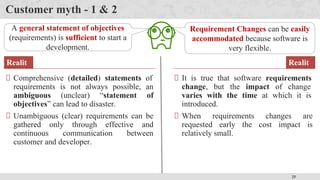
Customer myth - 1 & 2
A general statement of objectives
(requirements) is sufficient to start a
development.
Comprehensive (detailed) statements of
requirements is not always possible, an
ambiguous (unclear) “statement of
objectives” can lead to disaster.
Unambiguous (clear) requirements can be
gathered only through effective and
continuous communication between
customer and developer.
Realit
y
Requirement Changes can be easily
accommodated because software is
very flexible.
It is true that software requirements
change, but the impact of change
varies with the time at which it is
introduced.
When requirements changes are
requested early the cost impact is
relatively small.
Realit
y
26
Practitioner's (Developer) myth – 1 & 2
Once we write the program, our
job is done.
Experts say "the sooner you begin
'writing code', the longer it will take you
to get done."
Industry data indicates that 60 to 80 %
effort expended on software will be after it
is delivered to the customer for the first
time.
Realit
y
I can’t access quality until it is
running.
One of the most effective software
quality assurance mechanisms can be
applied from the beginning of a project
- the technical review.
Software reviews are more effective
“quality filter” than testing for finding
software defects.
Realit
y
27
Practitioner's (Developer) myth – 3 & 4
Working program is the only
deliverable work product.
A working program is only one part of a
software configuration.
A variety of work products (e.g., models,
documents, plans) provide a foundation
for successful engineering and, more
important, guidance for software support.
Realit
y
Software engineering is about
unnecessary documentation.
Software engineering is not about
creating documents. It is about creating
a quality product.
Better quality leads to reduced rework.
And reduced rework results in faster
delivery times.
Realit
y
28
Software Process Models
Also known as Software development life cycle
(SDLC) or Application development life cycle
Models
Process models prescribe a distinct set of
activities, actions, tasks and milestones
(deliverables) required to engineer high quality
software.
Process models are not perfect, but provide
roadmap for software engineering work.
Software models provide stability, control and
organization to a process that if not managed can
easily get out of control.
Software process models are adapted (adjusted)
to meet the needs of software engineers and
managers for a specific project.
Communicatio
n
Planni
ng
Modelin
g
Constructi
on
Deployme
nt
SDLC
Software
Developmen
t
Life
Cycle
The process model is the abstract representation of process.
SDLC
Phases
29
Different Process Models
Waterfall Model (Linear Sequential
Model)
Incremental Process Model
Prototyping Model
The Spiral Model
Rapid Application Development Model
Agile Model
Process model is selected based on
different parameters
Type of the project & people
Complexity of the project
Size of team
Expertise of people in team
Working environment of team
Software delivery deadline
Process Models
30
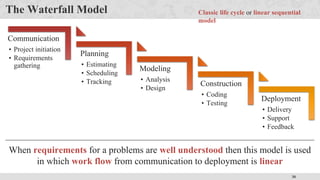
The Waterfall Model
Deployment
• Delivery
• Support
• Feedback
Construction
• Coding
• Testing
Modeling
• Analysis
• Design
Planning
• Estimating
• Scheduling
• Tracking
Communication
• Project initiation
• Requirements
gathering
Classic life cycle or linear sequential
model
When requirements for a problems are well understood then this model is used
in which work flow from communication to deployment is linear
31
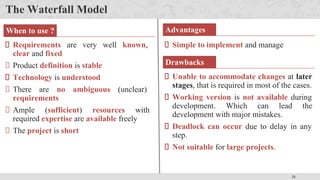
The Waterfall Model
Simple to implement and manage
Requirements are very well known,
clear and fixed
Product definition is stable
Technology is understood
There are no ambiguous (unclear)
requirements
Ample (sufficient) resources with
required expertise are available freely
The project is short
When to use ? Advantages
Drawbacks
Unable to accommodate changes at later
stages, that is required in most of the cases.
Working version is not available during
development. Which can lead the
development with major mistakes.
Deadlock can occur due to delay in any
step.
Not suitable for large projects.
32
Incremental Process Model
There are many situations in which initial software requirements are reasonably well
defined, but the overall scope of the development effort prevent a purely linear process.
In addition, there may be a compelling need to provide a limited set of software
functionality to users quickly and then refine and expand on that functionality in later
software releases.
In such cases, there is a need of a process model that is designed to produce the software in
increments.
33
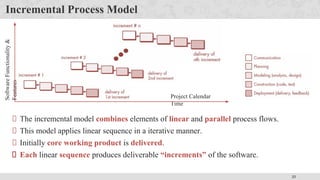
Incremental Process Model
Project Calendar
Time
Software
Functionality
&
Features
The incremental model combines elements of linear and parallel process flows.
This model applies linear sequence in a iterative manner.
Initially core working product is delivered.
Each linear sequence produces deliverable “increments” of the software.
34
Incremental Process Model
When to use ?
When the requirements of the complete system
are clearly defined and understood but staffing
is unavailable for a complete implementation
by the business deadline.
Advantages
Generates working software
quickly and early during the
software life cycle.
It is easier to test and debug during
a smaller iteration.
Customer can respond to each
built.
Lowers initial delivery cost.
Easier to manage risk because
risky pieces are identified and
handled during iteration.
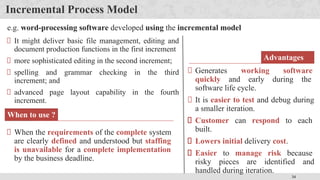
e.g. word-processing software developed using the incremental model
It might deliver basic file management, editing and
document production functions in the first increment
more sophisticated editing in the second increment;
spelling and grammar checking in the third
increment; and
advanced page layout capability in the fourth
increment.
35
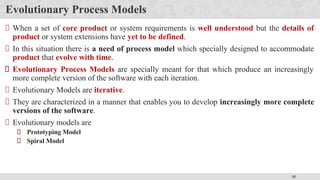
Evolutionary Process Models
When a set of core product or system requirements is well understood but the details of
product or system extensions have yet to be defined.
In this situation there is a need of process model which specially designed to accommodate
product that evolve with time.
Evolutionary Process Models are specially meant for that which produce an increasingly
more complete version of the software with each iteration.
Evolutionary Models are iterative.
They are characterized in a manner that enables you to develop increasingly more complete
versions of the software.
Evolutionary models are
Prototyping Model
Spiral Model
36
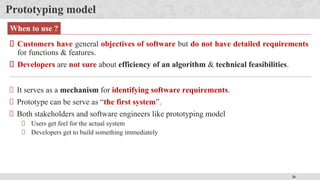
Prototyping model
Customers have general objectives of software but do not have detailed requirements
for functions & features.
Developers are not sure about efficiency of an algorithm & technical feasibilities.
It serves as a mechanism for identifying software requirements.
Prototype can be serve as “the first system”.
Both stakeholders and software engineers like prototyping model
Users get feel for the actual system
Developers get to build something immediately
When to use ?
37
Prototyping model cont.
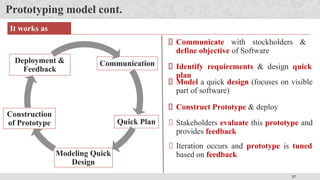
It works as
follow
Communication
Quick Plan
Modeling Quick
Design
Construction
of Prototype
Deployment &
Feedback
Communicate with stockholders &
define objective of Software
Iteration occurs and prototype is tuned
based on feedback
Identify requirements & design quick
plan
Model a quick design (focuses on visible
part of software)
Construct Prototype & deploy
Stakeholders evaluate this prototype and
provides feedback
38
Prototyping model cont.
Problem Areas
Customer demand that “a few fixes” be applied to make the prototype a working
product, due to that software quality suffers as a result
Developer often makes implementation in order to get a prototype working quickly;
without considering other factors in mind like OS, Programming language, etc.
Advantages
Users are actively involved in the development
Since in this methodology a working model of the system is provided, the users get a
better understanding of the system being developed
Errors can be detected much earlier
39
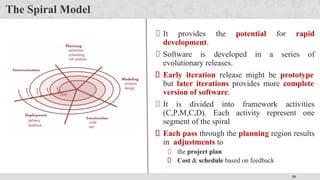
The Spiral Model
It provides the potential for rapid
development.
Software is developed in a series of
evolutionary releases.
Early iteration release might be prototype
but later iterations provides more complete
version of software.
It is divided into framework activities
(C,P,M,C,D). Each activity represent one
segment of the spiral
Each pass through the planning region results
in adjustments to
the project plan
Cost & schedule based on feedback
40
The Spiral Model Cont.
When to use Spiral
Model?
For development of large scale /
high-risk projects.
When costs and risk evaluation
is important.
Users are unsure of their needs.
Requirements are complex.
New product line.
Significant (considerable)
changes are expected.
Advantages
High amount of risk analysis hence, avoidance of
Risk is enhanced.
Strong approval and documentation control.
Additional functionality can be added at a later
date.
Software is produced early in the Software Life
Cycle.
Disadvantage
s
Can be a costly model to use.
Risk analysis requires highly specific expertise.
Project’s success is highly dependent on the risk
analysis phase.
Doesn’t work well for smaller projects.
41
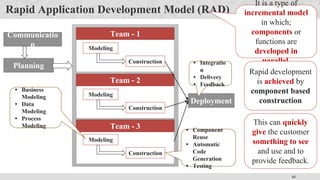
Rapid Application Development Model (RAD)
Communicatio
n
Planning
Deployment
Team - 1
Modeling
Construction
Team - 2
Modeling
Construction
Team - 3
Modeling
Construction
• Business
Modeling
• Data
Modeling
• Process
Modeling
• Component
Reuse
• Automatic
Code
Generation
• Testing
• Integratio
n
• Delivery
• Feedback
It is a type of
incremental model
in which;
components or
functions are
developed in
parallel.
Rapid development
is achieved by
component based
construction
This can quickly
give the customer
something to see
and use and to
provide feedback.
42
Rapid Application Development Model (RAD) Cont.
Communicatio
n
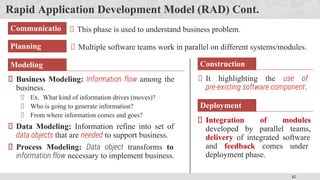
This phase is used to understand business problem.
Planning Multiple software teams work in parallel on different systems/modules.
Modeling
Business Modeling: Information flow among the
business.
Ex. What kind of information drives (moves)?
Who is going to generate information?
From where information comes and goes?
Data Modeling: Information refine into set of
data objects that are needed to support business.
Process Modeling: Data object transforms to
information flow necessary to implement business.
Construction
It highlighting the use of
pre-existing software component.
Deployment
Integration of modules
developed by parallel teams,
delivery of integrated software
and feedback comes under
deployment phase.
43
Rapid Application Development Model (RAD) Cont.
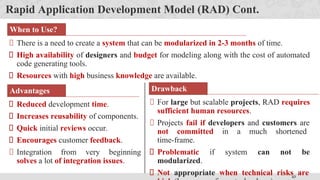
When to Use?
There is a need to create a system that can be modularized in 2-3 months of time.
High availability of designers and budget for modeling along with the cost of automated
code generating tools.
Resources with high business knowledge are available.
Advantages
Reduced development time.
Increases reusability of components.
Quick initial reviews occur.
Encourages customer feedback.
Integration from very beginning
solves a lot of integration issues.
Drawback
For large but scalable projects, RAD requires
sufficient human resources.
Projects fail if developers and customers are
not committed in a much shortened
time-frame.
Problematic if system can not be
modularized.
Not appropriate when technical risks are
44
Component based Development
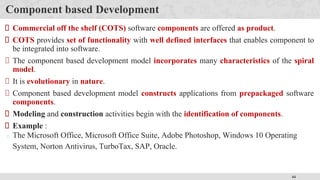
Commercial off the shelf (COTS) software components are offered as product.
COTS provides set of functionality with well defined interfaces that enables component to
be integrated into software.
The component based development model incorporates many characteristics of the spiral
model.
It is evolutionary in nature.
Component based development model constructs applications from prepackaged software
components.
Modeling and construction activities begin with the identification of components.
Example :
The Microsoft Office, Microsoft Office Suite, Adobe Photoshop, Windows 10 Operating
System, Norton Antivirus, TurboTax, SAP, Oracle.
45
Component based Development
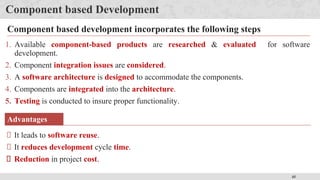
1. Available component-based products are researched & evaluated for software
development.
2. Component integration issues are considered.
3. A software architecture is designed to accommodate the components.
4. Components are integrated into the architecture.
5. Testing is conducted to insure proper functionality.
Component based development incorporates the following steps
Advantages
It leads to software reuse.
It reduces development cycle time.
Reduction in project cost.
46
Product & Process
If the process is weak, the end product will suffer. But more confidence on process is also
dangerous.
People gain more satisfaction from the creative process as they do from the end product.
Like an artist enjoys the brush strokes as much as the framed result.
A writer enjoys the search for the proper metaphor (comparison) as much as the finished book.
As software professional, you should also derive as much satisfaction from the process as
the end product.
The duality (contrast) of product and process is one important element in keeping creative
people engaged as software engineering continues to evolve.
Than
k
You

introduction to software engineering computer engineering

  • 1.
  • 2.
    ✓ Looping Outline ▪ Software,Characteristics of Software, Software Application Domains ▪ Software Engineering, Software Engineering Layered Approach ▪ Software Process, Process Framework Activities , Umbrella Activities ▪ Software Myths • Management Myth • Customer Myth • Practitioner's/Developer Myth) ▪ Software Process Models • The Waterfall Model • Incremental Process Model • Prototyping Model, Spiral Model • Spiral Model • Rapid Application Development Model (RAD) ▪ Component based Development
  • 3.
    3 Why to StudySoftware Engineering? How the Customer Explains Requirement Software Development Life Cycle without Software Engineering How the Project Leader understand it How the System Analyst design it How the Programme r Works on it 1 2 3 4 How the Business Consultant describe it 5
  • 4.
    4 Why to StudySoftware Engineering? Software Development Life Cycle without Software Engineering How the Project documented What Operations Installed How the Customer billed 6 7 8 How it was supported What the customer really needed 9 10
  • 5.
    5 SDLC without SoftwareEngineering The software development process needs to be engineered to avoid the communication gap & to meet the actual requirements of customer within stipulated budget & time Customer Requirement • Have one trunk • Have four legs • Should carry load both passenger & cargo • Black in color • Should be herbivorous Solution • Have one trunk • Have four legs • Should carry load both passenger & cargo • Black in color • Should be herbivorous Our value added, also gives milk
  • 6.
  • 7.
    7 Software is dead…..! Theold School view of Software You buy it You own it & It’s your job to manage it That is coming to an end Because of web 2.0 & extensive computing power, there is a different generation of software It is delivered via Internet It looks exactly like it’s residing on each user’s computing device Actually it reside on far away server
  • 8.
    8 What is Software? 1)Computer program that when executed provide desired features, function & performance 2) Data Structure that enable programs to easily manipulate information 3) Descriptive information in both hard and soft copy that describes the operation and use of programs + + Compute r Program Data Structur e Documents Soft & Hard Software is
  • 9.
    9 List of documentation& manuals Documentation Manuals Analysis / Specification Formal Specification Context Diagram Data Flow Diagram Design Flow Charts ER Diagram Implementation Source Code Listings Cross-Reference Listings Testing Test Data Test Results Documentation Manuals User Manuals System Overview Beginner’s Guide Tutorials Reference Guide Operational Manuals Installation Guide System Administration Guide
  • 10.
    10 Characteristics of Software Softwareis developed or engineered It is not manufactured like hardware ▪ Manufacturing phase can introduce quality problem that are nonexistent (or easily corrected) for software ▪ Both requires construction of “product” but approaches are different Software doesn’t “wear-out” Infant morality “Wear out” Tim e Failure Rate Bathtub curve of hardware failure Tim e Failure Rate Increate failure rate due to side effect Change Idealized Curve Actual Curve Software failure curve
  • 11.
    11 Software Application Domains System Softwar e Application Software Engineerin g/ Scientific Software Embedded Software Product line Software Web Application Artificial intelligence Software Software Application Domains Point of Sale, Customized Software • System Software • Application Software • Engineering / Scientific Software • Embedded Software • Product line Software • Web Application • Artificial intelligence Software
  • 12.
    12 Software Engineering Software engineeringis the establishment and use of sound engineering principles in order to obtain economically software that is reliable and works efficiently in real machines. Software Engineering is the science and art of building (designing and writing programs) a software systems that are: 1) on time 2) on budget 3) with acceptable performance 4) with correct operation
  • 13.
    13 Software Engineering LayeredApproach Defines continuous process improvement principles It is a foundation of Software Engineering, It is the glue the holds the technology layers, It defines a framework activities It provides technical how-to’s for building software, it encompasses many tasks including communication, requirement analysis, design modeling, program construction, testing and support Software Engineering Tools allows automation of activities which helps to perform systematic activities. A system for the support of software development, called computer-aided software engineering (CASE). Examples: Testing Tools, Bug/Issue Tracking Tools etc…
  • 14.
    14 Software Engineering LayeredApproach Cont. Main principle of Software Engineering is Quality Focus. An engineering approach must have a focus on quality. Total Quality Management (TQM), Six Sigma, ISO 9001, ISO 9000-3, CAPABILITY MATURITY MODEL (CMM), CMMI & similar approaches encourages a continuous process improvement culture Quality Software Engineering is a layered technology It is a foundation of Software Engineering, It is the glue the holds the technology layers together and enables logical and timely development of computer software. It defines a framework with activities for effective delivery of software engineering technology It establish the context in which technical methods are applied, work products (models, documents, data, reports, forms, etc.) are produced, milestones are established, quality is ensured, and change is properly managed. Process Layer
  • 15.
    15 Software Engineering LayeredApproach Cont. It provides technical how-to’s for building software It encompasses many tasks including communication, requirement analysis, design modeling, program construction, testing and support Software engineering tools provide automated or semiautomated support for the process and the methods Computer‐aided software engineering (CASE) is the scientific application of a set of tools and methods to a software system which is meant to result in high‐quality, defect‐free, and maintainable software products. CASE tools automate many of the activities involved in various life cycle phases. Method Tools
  • 16.
    16 Software Process A processis a collection of activities, actions and tasks that are performed when some work product is to be created A process is not a rigid prescription for how to build the software, rather it is adaptable approach that enables the people doing the work to pick and choose the appropriate set of work actions and tasks An activity try to achieve a broad objective (e.g., communication with stakeholders) An activity is applied regardless of the application domain, size of the project, complexity of the effort, or degree of accuracy with which software engineering is to be applied. An action (e.g., architectural design) encompasses a set of tasks that produce a major work product (e.g., an architectural design model). A task focuses on a small, but well-defined objective (e.g., conducting a unit test) that produces a noticeable outcome. Each of these activities, actions & tasks reside within a framework or model
  • 17.
    17 Software Process Figure represents“The Software Process” Each framework activity is populated by set of software engineering actions Each software engineering action is defined by a task set that identifies work to be completed, product to be produced, quality assurance points & milestones to indicate progress SoftwareProcessFramework Software Process Process framework Umbrella activities framework activity #1 Software Engineering action #1.1 Software Engineering action #1.k Task Sets … … Task Sets … … Work tasks Work products Quality assurance points Work tasks Work products Quality assurance points framework activity #n The purpose of software process is to deliver software in timely manner and within sufficient quality to satisfy those Who has given proposal for software development and Those who will use software
  • 18.
    18 Process Framework Activities(CPMCD) Communicatio n Communication with Customers / stockholders to understand project requirements for defining software features Planning Software Project Plan which defines workflow that is to follow. It describes technical task, risks, resources, product to be produced & work schedule Modeling Creating models to understand requirements and shows design of software to achieve requirements Constructio n Code Generation (manual or automated) & Testing (to uncover errors in the code) Deployment Deliver Software to Customer Collect feedback from customer based on evaluation Software Support A process framework establishes the foundation for complete software engineering process, it encompasses five activities
  • 19.
    19 Umbrella Activities Umbrella activitiesapplied throughout the software project & help a software team to manage and control progress, quality, change & risks It establish a skeleton architecture for software engineering work. Umbrella activities are those which keep running in the background throughout the software development Software project Tracking & Control Risk Management Measurement Technical Reviews Software Configuration Management Software quality assurance Reusability Management Work product preparation and production
  • 20.
    20 Umbrella Activities Cont. �Software project tracking and control: allows the software team to assess progress against the project plan and take any necessary action to maintain the schedule. � Risk management: assesses (evaluates) risks that may affect the outcome of the project or the quality of the product. � Software quality assurance: defines and conducts the activities required to ensure software quality. � Technical reviews: assesses software engineering work products in an effort to uncover and remove errors before they are propagated to the next activity. � Measurement: defines and collects process, project and product measures that assist the team in delivering software that meets stakeholders’ needs. � Software configuration management: it manages the effects of change throughout the software process.
  • 21.
    21 Umbrella Activities Cont. Reusabilitymanagement: it defines criteria for work product reuse (including software components) and establishes mechanisms to achieve reusable components. Work product preparation and production: it encompasses (includes) the activities required to create work products such as models, documents, logs, forms and lists.
  • 22.
    22 Software Myths Beliefsabout software and the process used to build it. “Misleading Attitudes that cause serious problem” are myths. Management Myths Customer Myths Practitioner's (Developer) Myths
  • 23.
    23 Management myth -1 & 2 We have standards and procedures to build a system, which is enough. Are software practitioners aware of standard’s existence? Does it reflect modern software engineering practice? Is it complete? Is it streamlined to improve time to delivery while still maintaining a focus on quality? In many cases, the answer to all of these questions is "no.“ Realit y We have the newest computers and development tools. It takes much more than the latest model computers to do high-quality software development. Computer-aided software engineering (CASE) tools are more important than hardware. Realit y
  • 24.
    24 Management myth -3 & 4 We can add more programmers and can catch up the schedule. Software development is not a mechanistic process like manufacturing. In the words of Fred Brooks : "adding people to a late software project makes it later." People who were working must spend time educating the newcomers. People can be added but only in a planned and well-coordinated manner. Realit y I outsourced the development activity, now I can relax and can wait for the final working product. If an organization does not understand how to manage and control software projects internally, it will invariably struggle when it outsources software projects. Realit y
  • 25.
    25 Customer myth -1 & 2 A general statement of objectives (requirements) is sufficient to start a development. Comprehensive (detailed) statements of requirements is not always possible, an ambiguous (unclear) “statement of objectives” can lead to disaster. Unambiguous (clear) requirements can be gathered only through effective and continuous communication between customer and developer. Realit y Requirement Changes can be easily accommodated because software is very flexible. It is true that software requirements change, but the impact of change varies with the time at which it is introduced. When requirements changes are requested early the cost impact is relatively small. Realit y
  • 26.
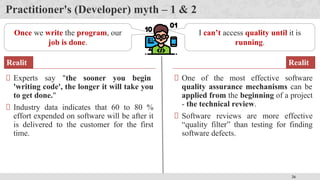
    26 Practitioner's (Developer) myth– 1 & 2 Once we write the program, our job is done. Experts say "the sooner you begin 'writing code', the longer it will take you to get done." Industry data indicates that 60 to 80 % effort expended on software will be after it is delivered to the customer for the first time. Realit y I can’t access quality until it is running. One of the most effective software quality assurance mechanisms can be applied from the beginning of a project - the technical review. Software reviews are more effective “quality filter” than testing for finding software defects. Realit y
  • 27.
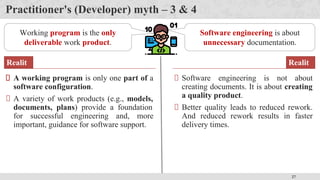
    27 Practitioner's (Developer) myth– 3 & 4 Working program is the only deliverable work product. A working program is only one part of a software configuration. A variety of work products (e.g., models, documents, plans) provide a foundation for successful engineering and, more important, guidance for software support. Realit y Software engineering is about unnecessary documentation. Software engineering is not about creating documents. It is about creating a quality product. Better quality leads to reduced rework. And reduced rework results in faster delivery times. Realit y
  • 28.
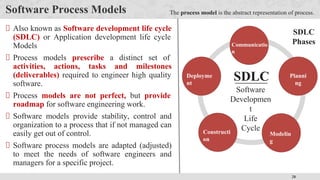
    28 Software Process Models Alsoknown as Software development life cycle (SDLC) or Application development life cycle Models Process models prescribe a distinct set of activities, actions, tasks and milestones (deliverables) required to engineer high quality software. Process models are not perfect, but provide roadmap for software engineering work. Software models provide stability, control and organization to a process that if not managed can easily get out of control. Software process models are adapted (adjusted) to meet the needs of software engineers and managers for a specific project. Communicatio n Planni ng Modelin g Constructi on Deployme nt SDLC Software Developmen t Life Cycle The process model is the abstract representation of process. SDLC Phases
  • 29.
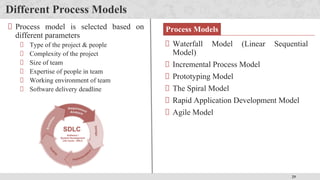
    29 Different Process Models WaterfallModel (Linear Sequential Model) Incremental Process Model Prototyping Model The Spiral Model Rapid Application Development Model Agile Model Process model is selected based on different parameters Type of the project & people Complexity of the project Size of team Expertise of people in team Working environment of team Software delivery deadline Process Models
  • 30.
    30 The Waterfall Model Deployment •Delivery • Support • Feedback Construction • Coding • Testing Modeling • Analysis • Design Planning • Estimating • Scheduling • Tracking Communication • Project initiation • Requirements gathering Classic life cycle or linear sequential model When requirements for a problems are well understood then this model is used in which work flow from communication to deployment is linear
  • 31.
    31 The Waterfall Model Simpleto implement and manage Requirements are very well known, clear and fixed Product definition is stable Technology is understood There are no ambiguous (unclear) requirements Ample (sufficient) resources with required expertise are available freely The project is short When to use ? Advantages Drawbacks Unable to accommodate changes at later stages, that is required in most of the cases. Working version is not available during development. Which can lead the development with major mistakes. Deadlock can occur due to delay in any step. Not suitable for large projects.
  • 32.
    32 Incremental Process Model Thereare many situations in which initial software requirements are reasonably well defined, but the overall scope of the development effort prevent a purely linear process. In addition, there may be a compelling need to provide a limited set of software functionality to users quickly and then refine and expand on that functionality in later software releases. In such cases, there is a need of a process model that is designed to produce the software in increments.
  • 33.
    33 Incremental Process Model ProjectCalendar Time Software Functionality & Features The incremental model combines elements of linear and parallel process flows. This model applies linear sequence in a iterative manner. Initially core working product is delivered. Each linear sequence produces deliverable “increments” of the software.
  • 34.
    34 Incremental Process Model Whento use ? When the requirements of the complete system are clearly defined and understood but staffing is unavailable for a complete implementation by the business deadline. Advantages Generates working software quickly and early during the software life cycle. It is easier to test and debug during a smaller iteration. Customer can respond to each built. Lowers initial delivery cost. Easier to manage risk because risky pieces are identified and handled during iteration. e.g. word-processing software developed using the incremental model It might deliver basic file management, editing and document production functions in the first increment more sophisticated editing in the second increment; spelling and grammar checking in the third increment; and advanced page layout capability in the fourth increment.
  • 35.
    35 Evolutionary Process Models Whena set of core product or system requirements is well understood but the details of product or system extensions have yet to be defined. In this situation there is a need of process model which specially designed to accommodate product that evolve with time. Evolutionary Process Models are specially meant for that which produce an increasingly more complete version of the software with each iteration. Evolutionary Models are iterative. They are characterized in a manner that enables you to develop increasingly more complete versions of the software. Evolutionary models are Prototyping Model Spiral Model
  • 36.
    36 Prototyping model Customers havegeneral objectives of software but do not have detailed requirements for functions & features. Developers are not sure about efficiency of an algorithm & technical feasibilities. It serves as a mechanism for identifying software requirements. Prototype can be serve as “the first system”. Both stakeholders and software engineers like prototyping model Users get feel for the actual system Developers get to build something immediately When to use ?
  • 37.
    37 Prototyping model cont. Itworks as follow Communication Quick Plan Modeling Quick Design Construction of Prototype Deployment & Feedback Communicate with stockholders & define objective of Software Iteration occurs and prototype is tuned based on feedback Identify requirements & design quick plan Model a quick design (focuses on visible part of software) Construct Prototype & deploy Stakeholders evaluate this prototype and provides feedback
  • 38.
    38 Prototyping model cont. ProblemAreas Customer demand that “a few fixes” be applied to make the prototype a working product, due to that software quality suffers as a result Developer often makes implementation in order to get a prototype working quickly; without considering other factors in mind like OS, Programming language, etc. Advantages Users are actively involved in the development Since in this methodology a working model of the system is provided, the users get a better understanding of the system being developed Errors can be detected much earlier
  • 39.
    39 The Spiral Model Itprovides the potential for rapid development. Software is developed in a series of evolutionary releases. Early iteration release might be prototype but later iterations provides more complete version of software. It is divided into framework activities (C,P,M,C,D). Each activity represent one segment of the spiral Each pass through the planning region results in adjustments to the project plan Cost & schedule based on feedback
  • 40.
    40 The Spiral ModelCont. When to use Spiral Model? For development of large scale / high-risk projects. When costs and risk evaluation is important. Users are unsure of their needs. Requirements are complex. New product line. Significant (considerable) changes are expected. Advantages High amount of risk analysis hence, avoidance of Risk is enhanced. Strong approval and documentation control. Additional functionality can be added at a later date. Software is produced early in the Software Life Cycle. Disadvantage s Can be a costly model to use. Risk analysis requires highly specific expertise. Project’s success is highly dependent on the risk analysis phase. Doesn’t work well for smaller projects.
  • 41.
    41 Rapid Application DevelopmentModel (RAD) Communicatio n Planning Deployment Team - 1 Modeling Construction Team - 2 Modeling Construction Team - 3 Modeling Construction • Business Modeling • Data Modeling • Process Modeling • Component Reuse • Automatic Code Generation • Testing • Integratio n • Delivery • Feedback It is a type of incremental model in which; components or functions are developed in parallel. Rapid development is achieved by component based construction This can quickly give the customer something to see and use and to provide feedback.
  • 42.
    42 Rapid Application DevelopmentModel (RAD) Cont. Communicatio n This phase is used to understand business problem. Planning Multiple software teams work in parallel on different systems/modules. Modeling Business Modeling: Information flow among the business. Ex. What kind of information drives (moves)? Who is going to generate information? From where information comes and goes? Data Modeling: Information refine into set of data objects that are needed to support business. Process Modeling: Data object transforms to information flow necessary to implement business. Construction It highlighting the use of pre-existing software component. Deployment Integration of modules developed by parallel teams, delivery of integrated software and feedback comes under deployment phase.
  • 43.
    43 Rapid Application DevelopmentModel (RAD) Cont. When to Use? There is a need to create a system that can be modularized in 2-3 months of time. High availability of designers and budget for modeling along with the cost of automated code generating tools. Resources with high business knowledge are available. Advantages Reduced development time. Increases reusability of components. Quick initial reviews occur. Encourages customer feedback. Integration from very beginning solves a lot of integration issues. Drawback For large but scalable projects, RAD requires sufficient human resources. Projects fail if developers and customers are not committed in a much shortened time-frame. Problematic if system can not be modularized. Not appropriate when technical risks are
  • 44.
    44 Component based Development Commercialoff the shelf (COTS) software components are offered as product. COTS provides set of functionality with well defined interfaces that enables component to be integrated into software. The component based development model incorporates many characteristics of the spiral model. It is evolutionary in nature. Component based development model constructs applications from prepackaged software components. Modeling and construction activities begin with the identification of components. Example : The Microsoft Office, Microsoft Office Suite, Adobe Photoshop, Windows 10 Operating System, Norton Antivirus, TurboTax, SAP, Oracle.
  • 45.
    45 Component based Development 1.Available component-based products are researched & evaluated for software development. 2. Component integration issues are considered. 3. A software architecture is designed to accommodate the components. 4. Components are integrated into the architecture. 5. Testing is conducted to insure proper functionality. Component based development incorporates the following steps Advantages It leads to software reuse. It reduces development cycle time. Reduction in project cost.
  • 46.
    46 Product & Process Ifthe process is weak, the end product will suffer. But more confidence on process is also dangerous. People gain more satisfaction from the creative process as they do from the end product. Like an artist enjoys the brush strokes as much as the framed result. A writer enjoys the search for the proper metaphor (comparison) as much as the finished book. As software professional, you should also derive as much satisfaction from the process as the end product. The duality (contrast) of product and process is one important element in keeping creative people engaged as software engineering continues to evolve.
  • 47.