INTRODUCTION TO PYTHON
AGENDA About Python How to run Python in Eclipse Basic data types, comments and assignments Sequence types: Tuples, Lists, and Strings String operations Dictionaries Operators Control of flow Functions
ABOUT PYTHON
PYTHON Python is an interpreted, general-purpose high-level programming language The code is automatically compiled to byte code and executed, Python is suitable for use as a scripting language, Web application implementation language, etc. Its use of indentation for block delimiters is unique among popular programming languages. Python supports multiple programming paradigms, primarily but not limited to object oriented, imperative and, to a lesser extent, functional programming styles.
COMPARISONS WITH OTHER PROGRAMMING LANGUAGES
FEATURES OF PYTHON Simple Easy to learn Free and Open Source High-level Language Portable Interpreted Object Oriented Extensible Embeddable Extensive Libraries
HOW TO RUN PYTHON IN ECLIPSE
WRITING FIRST PYTHON PROGRAM Step 1: Switch to the Python perspective Go to "Window > Open Perspective > Other..." and choose "Pydev", then click OK. If you look at the upper right corner you will see that the perspective has changed from "Java" to "Pydev".
Step 2: Create a new Python project Go to "File > New > Pydev Project" to start a wizard. In the next window that appears, enter the name of your project and select "python"  and 3.0"; as the type. Make sure "create default 'src' folder and add it to the pythonpath?" is selected. Click Finish.
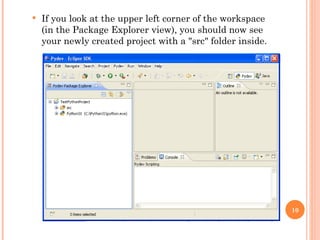
If you look at the upper left corner of the workspace (in the Package Explorer view), you should now see your newly created project with a "src" folder inside.
Step 3: Create a new module Select the project you just created and go to "File -> New -> Pydev Module". This will launch a new Pydev Module Wizard where you should enter a name for your module and make sure it is in the right location. Leave the Package field blank and select Finish.
Look in the Package Explorer view and you will see an icon of your new file inside the src folder, which Eclipse created when you made the new project before.
Step 4: Write and Run the Program Click on the new module created(HelloWorld.py) and type the one line code. print (‘Hello World!’)
COPY AND PASTE INTO ECLIPSE print( "hello world")
To run the python, select the module(HelloWorld.py). Right click on the module and select “Run as -> Python Run”
Look at the bottom of your screen at the Console view and you will see the message you told the computer to print. Congratulations! You have written your first program with Python.
BASIC DATA TYPES, COMMENTS AND ASSIGNMENTS
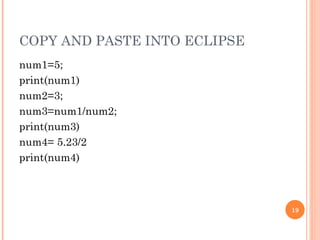
BASIC DATA TYPES Integers And Floats An integer in Python, also known as a ‘numeric literal’ Any numeric value can be assigned to it at any time, overwriting the previous value. To assign a value to an integer variable, one writes a statement after the following template:  <numeric literal name> = <numeric literal value>  Example: num1=5; print(num1) o/p: 5 num2=3; num3=num1/num2; print(num3)  o/p: 1.66666666667 num4= 5.23/2 print(num4) o/p: 2.615
COPY AND PASTE INTO ECLIPSE num1=5; print(num1)  num2=3; num3=num1/num2; print(num3)  num4= 5.23/2 print(num4)
CONTI… Strings A string literal, or  string , holds any combination of letters and numbers you would like it to hold.  To assign a value to a string, one uses the following template:  <name of string> = '<value of string>'  Examples: str1=  &quot;hello&quot; str2= 'hi'; str3= &quot;John's&quot; print(str1)  o/p: hello print(str2) o/p: hi print(str3) o/p: john’s
COPY AND PASTE INTO ECLIPSE str1=  &quot;hello&quot; str2= ' hi'; str3= &quot;John's&quot; print(str1)  print(str2)  print(str3)
CONTI… Some more examples on string…. Can use “ ” or ‘ ’ to specify.  “abc”  ‘abc’   (Same thing.) Unmatched can occur within the string.  “matt’s”   Use triple double-quotes for multi-line strings or  strings than contain both ‘ and “ inside of them:   &quot;&quot;&quot; string in multiple lines&quot;&quot;&quot;
COPY AND PASTE INTO ECLIPSE str4 =  &quot;&quot;&quot;string in multiple lines&quot;&quot;&quot; print(str4)
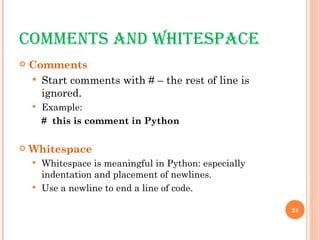
COMMENTS AND WHITESPACE Comments Start comments with # – the rest of line is ignored. Example: #  this is comment in Python Whitespace Whitespace is meaningful in Python: especially indentation and placement of newlines.  Use a newline to end a line of code.
CONTI… No braces { } to mark blocks of code in Python. Use  consistent  indentation instead.  The first line with  less  indentation is outside of the block. The first line with  more  indentation starts a nested block Often a colon appears at the start of a new block.
ASSIGNMENT Binding a variable  in Python means setting a  name  to hold a  reference  to some  object . Assignment creates references, not copies Names in Python do not have an intrinsic type.  Objects have types. Python determines the type of the reference automatically based on the data object assigned to it. You create a name the first time it appears on the left side of an assignment expression:  x = 3 A reference is deleted via garbage collection after any names bound to it have passed out of scope.
ACCESSING NON-EXISTENT NAMES If you try to access a name before it’s been properly created (by placing it on the left side of an assignment), you’ll get an error.  Example:    var Print(var) // undefined variable error var = 3 Print(var)  o/p: 3
MULTIPLE ASSIGNMENT You can also assign to multiple names at the same time.  Example:   x, y = 2, 3 print(x) o/p: 2 print(y) o/p: 3
COPY AND PASTE x, y = 2, 3 print(x) print(y)
NAMING RULES Names are case sensitive and cannot start with a number.  They can contain letters, numbers, and underscores. Example: Valid names: var, _var, _2var, var2 Invalid names: 2var, 3var_1 There are some reserved words: and, assert, break, class, continue, def, del, elif, else, except, exec, finally, for, from, global, if, import, in, is, lambda, not, or, pass, print, raise, return, try, while
SEQUENCE TYPES: TUPLES, LISTS, AND STRINGS AND OPERATIONS ON SEQUENCE TYPES
SEQUENCE TYPES Tuple A simple  immutable  ordered sequence of items Items can be of mixed types, including collection types Strings Immutable Conceptually very much like a tuple. List Mutable  ordered sequence of items of mixed types
SYNTAX All three sequence types (tuples, strings, and lists) share much of the same syntax and functionality. Key difference:  Tuples and strings are  immutable Lists are  mutable The operations shown in this section can be applied to  all  sequence types most examples will just show the operation performed on one
DEFINING SEQUENCE TYPES Tuples are defined using parentheses ( )and commas. tu = (23, ‘abc’, 4.56, (2,3), ‘def’) Lists are defined using square brackets [ ]and commas. li = [“abc”, [34,12], 4.34, 23] Strings are defined using quotes (“, ‘, or “““). st = “Hello World” st = ‘Hello World’ st = “““This is a multi-line string that uses triple quotes.”””
COPY AND PASTE tu = (23,  ' abc', 4.56, (2,3), 'def') li = [ &quot; abc&quot;, [34,12], 4.34, 23] st5 =  &quot;Hello World&quot; st6=  'Hello World' st7 =  &quot;&quot;&quot;This is a  multi-line string that uses triple quotes.&quot;&quot;&quot; print(tu) print(li) print(st5) print(st6) print(st7)
ACCESSING INDIVIDUAL MEMBERS We can access individual members of a tuple, list, or string using square bracket “array” notation.  Note that all are  0 based . tu = (23, ‘abc’, 4.56, (2,3), ‘def’) tu[1]  # Second item in the tuple. o/p: ‘abc’ li = [“abc”, [34,12], 4.34, 23]  li[1]  # Second item in the list.   o/p: [34,12] st = “Hello World” st[1]  # Second character in string.   o/p: ‘e’
COPY AND PASTE tu = (23,  ' abc', 4.56, (2,3), 'def') print(tu[1]) li = [ &quot; abc&quot;, [34,12], 4.34, 23] print(li[1]) st6 =  'Hello World' print (st6[6])
POSITIVE AND NEGATIVE INDICES tu = (23, ‘abc’, 4.56, (2,3), ‘def’) Positive index: count from the left, starting with 0. tu[1]  o/p: ‘abc’ Negative lookup: count from right, starting with –1.   tu[-3]  o/p: 4.56
COPY AND PASTE tu = (23,  ' abc', 4.56, (2,3), 'def') print(tu[1]) print(tu[-3])
SLICING tu = (23, ‘abc’, 4.56, (2,3), ‘def’) Return a copy of the container with a subset of the original members.  Start copying at the first index, and stop copying  before  the second index.  t[1:4] o/p: (‘abc’, 4.56, (2,3)) You can also use negative indices when slicing.    t[1:-2] o/p: (‘abc’, 4.56, )
COPY AND PASTE tu = (23,  ' abc', 4.56, (2,3), 'def') print(tu[1:4]) print(tu[1:-2])
SLICING CONTI… Omit the first index to make a copy starting from the beginning of the container.   tu[:2]  o/p: (23, ‘abc’) Omit the second index to make a copy starting at the first index and going to the end of the container.   tu[3:] o/p: ((2,3), ‘def’)
COPY AND PASTE print(tu[:2]) print(tu[3:])
COPYING WHOLE SEQUENCE To make a  copy  of an entire sequence, you can use [:]. tu[:]  o/p: (23, ‘abc’, 4.56, (2,3), ‘def’) Note the difference between these two lines for mutable sequences: list1=['abc', [34,12], 4.34, 23] list2 = list1   # 2 names refer to 1 ref   # Changing one affects both list2 = list1[:]   # Two independent copies, two refs
COPY AND PASTE list1=[ ' abc', [34,12], 4.34, 23] list2 = list1 list2[0] =  &quot; xyz&quot;  print(list1) print(list2) list2 = list1[:] list2[0] =  &quot; pqr&quot;  print(list1) print(list2)
THE ‘IN’ OPERATOR Boolean test whether a value is inside a container: >>>  t = [1, 2, 4, 5] >>>  3  in  t False >>>  4  in  t True >>>  4  not in  t False For strings, tests for substrings >>> strg= 'abcde' >>> 'c'  in  strg True >>> 'cd'  in  strg True >>> 'ac'  in  strg False Be careful: the   in   keyword is also used in the syntax of  for   loops   and  list comprehensions .
COPY AND PASTE t = [1, 2, 4, 5] if 1 in t: print( &quot;great&quot;)
THE + OPERATOR The + operator produces a  new   tuple, list, or string whose value is the concatenation of its arguments. (1, 2, 3) + (4, 5, 6) o/p: (1, 2, 3, 4, 5, 6) [1, 2, 3] + [4, 5, 6] o/p: [1, 2, 3, 4, 5, 6] “ Hello” + “ ” + “World” o/p: ‘Hello World’
THE * OPERATOR The * operator produces a  new  tuple, list, or string that “repeats” the original content. (1, 2, 3) * 3 (1, 2, 3, 1, 2, 3, 1, 2, 3) [1, 2, 3] * 3 [1, 2, 3, 1, 2, 3, 1, 2, 3] “ Hello” * 3 ‘ HelloHelloHello’
COPY AND PASTE tu=(1, 2, 3) + (4, 5, 6) print(tu) li=(1, 2, 3) + (4, 5, 6) print(li) st=( &quot;hello&quot;) + (&quot;world&quot;) print(st) tu=(1, 2, 3)* 3 print(tu) li=[1, 2, 3] * 3 print(li) st=( &quot;hello&quot;) * 3 print(st)
TUPLE VS LIST Tuples: Immutable tu = (23, ‘abc’, 4.56, (2,3), ‘def’) tu[2] = 3.14 o/p:  TypeError: 'tuple' object does not support item assignment You can’t change a tuple.  You can make a fresh tuple and assign its reference to a previously used name.   tu = (23, ‘abc’, 3.14, (2,3), ‘def’)
CONTI …  List: Mutable li = [‘abc’, 23, 4.34, 23] li[1] = 45  print(li) O/p: [‘abc’, 45, 4.34, 23] We can change lists  in place.   Name  li  still points to the same memory reference when we’re done.
COPY AND PASTE tu = (23,  &quot; abc&quot;, 4.56, (2,3), &quot;def&quot;) tu[2] = 3.14 li = [23,  &quot; abc&quot;, 4.56, (2,3), &quot;def&quot;] li[2] = 3.14 print(li)
CONTI… Tuple List Immutable Mutable Fast Comparatively slow Fewer operations Lot of handy operations
OPERATIONS ON LISTS Let us consider the list shown below and perform different operations on them li = ['abc',16, [34,12], 4.34, 23] append   appends the value to the end of list. li.append(‘a’) Print(li) o/p:  ['abc',16, [34,12], 4.34, 23,’a’] insert Insert the value at a mentioned position in the list li.insert(2,’i’) o/p: ['abc',16,i, [34,12], 4.34, 23]
COPY AND PASTE li = [ 'abc',16, [34,12], 4.34, 23] li.append( 'a') print(li) li.insert(2, 'i') print(li)
CONTI … Index    Gives the index of first occurrence of character in the list li=[a,b,c,b,d,e] li.index(‘b’)  o/P: 1 Count Returns   number of occurrences of the value li.count(‘b’)  o/p: 2 Remove Removes first occurrence of the value li.remove(‘b’)  o/p: [a,c,b,d,e]
COPY AND PASTE li = [ ' abc',16, [34,12], 4.34, 23] print(li.index( ' abc'))  print(li.count( ' abc')) li.remove( ' abc') print(li)
CONTI… Reverse   reverse the list    li= [30,20,40,10,70,50] li.reverse() o/p: [50,70,10,40,20,30] Sort   sort the list  li.sort() o/p:[10,20,30,40,50,70]
COPY AND PASTE li= [30,20,40,10,70,50] li.reverse() print(li) li.sort() print(li)
UNDERSTANDING REFERENCE SEMANTICS IN PYTHON
IMMUTABLE TYPE REFERENCES In Python, the datatypes integer, float, and string (and tuple) are “immutable.” This can be understood through the following example. x=1 # value 1 is created in memory and x refers to it y=x  # y now refers to value 1 y=2 # value 2 is created and y is made to refer to it print(x) # x still refers to 1, no effect on it by changing  value of y print(y) o/p: 1 2
IMMUTABLE : EXAMPLE x=1 y=x X reference Type Integer Data : 1 X reference Y reference Type  Integer Data: 1
CONTI… Y=2 X reference Y reference Type Integer Data: 1  Type Integer Data: 2
MUTABLE TYPE REFERENCES For other data types (lists, dictionaries, user-defined types), assignment works differently.  These data types are  “mutable.”   When we change these data, we do it  in place.  We don’t copy them into a new memory address each time.  If we type y=x and then modify y, both x and y are changed. Example:  li=[1,2,3,4] li2=li li2.append(5)  #value of li also changes  print(li)  o/p: [1,2,3,4,5] print(li2)  o/p: [1,2,3,4,5]
MUTABLE : EXAMPLE li=[1,2,3,4] li2 = li li reference li reference li2 reference 1 2 3 4 1 2 3 4
CONTI… li2.append(5) li reference li 2reference 1 2 3 4 5
STRING OPERATIONS AND CONVERSIONS
STRING OPERATIONS Upper str=“hello” str1 = str.upper  o/p: “HELLO” String format operator % The operator  %  allows strings to be built out of many data items in a “fill in the blanks” fashion. ex: x=34 y=“hello” z=“%sabc%d” % (y,x) o/p: helloabc34
COPY AND PASTE str= &quot;hello&quot; str1 = str.upper() print(str) print(str1) x=34 y= &quot;hello&quot; z= &quot;% sabc%d&quot; % (y,x) print (x) print (y) print (z)
WHY? >>> uid = &quot;sa&quot;  >>> pwd = &quot;secret&quot;  >>>  print  pwd + &quot; is not a good password for &quot; + uid  secret is not a good password for sa  >>>  print  &quot;%s is not a good password for %s&quot; % (pwd, uid)  secret is not a good password for sa  >>> userCount = 6  >>>  print  &quot;Users connected: %d&quot; % (userCount)  Users connected: 6  >>>  print  &quot;Users connected: &quot; + userCount  Traceback (innermost last): File &quot;<interactive input>&quot;, line 1, in ? TypeError: cannot concatenate 'str' and 'int' objects
STRING CONVERSION list to String   Join  turns a list of strings into one string format :   <separator_string>.join( <some_list> ) Example: li=[“abc”,”def”,”ghi”] str= ‘;’.join(li) print(str) o/p: abc;def;ghi
CONTI… String to list   Split  turns one string into a list of strings   Format: <some_string> .split(  <separator_string>  ) Example: str = ‘abc;def;ghi’ newLi = str.split(‘;’) print(newLi) o/p: [abc, def, ghi]
COPY AND PASTE li=[ &quot; abc&quot;,&quot;def&quot;,&quot;ghi&quot;] str=  ';'.join(li) print(str) str =  ' abc;def;ghi' newLi = str.split( ';') print(newLi)
DICTIONARIES
DICTIONARIES Dictionaries store a  mapping  between a set of keys and a set of values. Keys can be any  immutable  type. Values can be any type A single dictionary can store values of different types You can define, modify, view, lookup, and delete the key-value pairs in the dictionary.
CREATING AND ACCESSING DICTIONARIES Creating dict = { ‘name’:’john’ , ‘place’:’xyz’, ‘id’:1234 } Accessing dict[‘name’] o/p: ‘john’ dict o/p: { ‘name’:’john’ , ‘place’:’xyz’, ‘id’:1234 }
UPDATING Keys must be unique.  Assigning to an existing key replaces its value. Dictionaries are unordered New entry might appear anywhere in the output. Example: dict[‘name’] = ‘adam’ dict[‘gender’] = ‘male’
DELETING Deleting entry from dictionary del dict[‘name’] o/p: { place: xyz, id:1234 } Deleting entire dictionary dict.clear()
OPERATIONS ON DICTIONARIES Dict = { ‘name’:’john’, ‘place’:’xyz’, ‘id’:1234 } To access keys  dict.keys()  #returns list of keys o/p:  [name, place, id ] To access values dict.values()  # return list of values o/p: [ john, xyz,1234] To access items Dict.items()  # returns list of item tuples o/p: [(name,john),(place, xyz), (id, 1234)
COPY AND PASTE dict={ 'name':'john','place':' xyz','id':1234} print(dict) print(dict[ 'name']) del dict[ 'name'] print(dict) print(dict.keys()) print(dict.values()) print( dict.items())
BASIC OPERATIONS
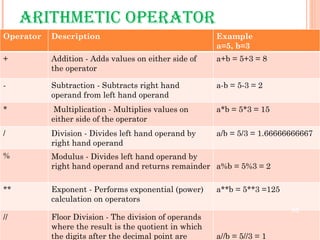
ARITHMETIC OPERATOR  Operator Description Example a=5, b=3 + Addition - Adds values on either side of the operator a+b = 5+3 = 8 - Subtraction - Subtracts right hand operand from left hand operand a-b = 5-3 = 2 * Multiplication - Multiplies values on either side of the operator a*b = 5*3 = 15 / Division - Divides left hand operand by right hand operand a/b = 5/3 = 1.66666666667 % Modulus - Divides left hand operand by right hand operand and returns remainder a%b = 5%3 = 2 ** Exponent - Performs exponential (power) calculation on operators a**b = 5**3 =125 // Floor Division - The division of operands where the result is the quotient in which the digits after the decimal point are removed. a//b = 5//3 = 1
COMPARISON OPERATORS Operator Description Example a=5, b=3 == Checks if the value of two operands are equal or not, if yes then condition becomes true. (a == b) is not true.  != Checks if the value of two operands are equal or not, if values are not equal then condition becomes true. (a != b) is true.  <> Checks if the value of two operands are equal or not, if values are not equal then condition becomes true. (a <> b) is true. This is similar to != operator. > Checks if the value of left operand is greater than the value of right operand, if yes then condition becomes true. (a > b) is not true.  < Checks if the value of left operand is less than the value of right operand, if yes then condition becomes true. (a < b) is true.
CONTI… Operator Description Example a=5, b=3 >= Checks if the value of left operand is greater than or equal to the value of right operand, if yes then condition becomes true. (a >= b) is not true.  <= Checks if the value of left operand is less than or equal to the value of right operand, if yes then condition becomes true. (a <= b) is true.
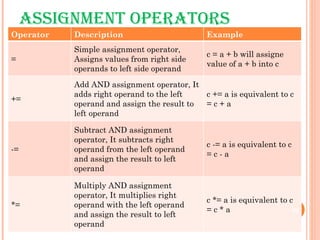
ASSIGNMENT OPERATORS Operator Description Example = Simple assignment operator, Assigns values from right side operands to left side operand c = a + b will assigne value of a + b into c += Add AND assignment operator, It adds right operand to the left operand and assign the result to left operand c += a is equivalent to c = c + a -= Subtract AND assignment operator, It subtracts right operand from the left operand and assign the result to left operand c -= a is equivalent to c = c - a *= Multiply AND assignment operator, It multiplies right operand with the left operand and assign the result to left operand c *= a is equivalent to c = c * a
CONTI…. Operator Description Example /= Divide AND assignment operator, It divides left operand with the right operand and assign the result to left operand c /= a is equivalent to c = c / a %= Modulus AND assignment operator, It takes modulus using two operands and assign the result to left operand c %= a is equivalent to c = c % a **= Exponent AND assignment operator, Performs exponential (power) calculation on operators and assign value to the left operand c **= a is equivalent to c = c ** a //= Floor Division and assigns a value, Performs floor division on operators and assign value to the left operand c //= a is equivalent to c = c // a
BITWISE OPERATORS Bitwise operator works on bits and perform bit by bit operation. Assume if a = 60; and b = 13; Now in binary format they will be as follows: a = 0011 1100 b = 0000 1101 a&b = 0000 1100 a|b = 0011 1101 a^b = 0011 0001 ~a  = 1100 0011
CONTI… Operator Description Example A=60(0011 1100) B=13(0000 1101) & Binary AND Operator copies a bit to the result if it exists in both operands.  (a & b) will give 12 which is 0000 1100 | Binary OR Operator copies a bit if it exists in eather operand.  (a | b) will give 61 which is 0011 1101 ^ Binary XOR Operator copies the bit if it is set in one operand but not both.  (a ^ b) will give 49 which is 0011 0001
CONTI…  Operator Description Example A=60(0011 1100) B=13(0000 1101) ~ Binary Ones Complement Operator is unary and has the effect of 'flipping' bits.  (~a ) will give -60 which is 1100 0011 << Binary Left Shift Operator. The left operands value is moved left by the number of bits specified by the right operand.  a << 2 will give 240 which is 1111 0000 >> Binary Right Shift Operator. The left operands value is moved right by the number of bits specified by the right operand.  a >> 2 will give 15 which is 0000 1111
LOGICAL OPERATORS Operator Description Example and Called Logical AND operator. If both the operands are true then then condition becomes true. (a and b) is true. or Called Logical OR Operator. If any of the two operands are non zero then then condition becomes true. (a or b) is true. not Called Logical NOT Operator. Use to reverses the logical state of its operand. If a condition is true then Logical NOT operator will make false. not(a and b) is false.
IDENTITY OPERATORS Identity operators compare the memory locations of two objects Operator Description Example is Evaluates to true if the variables on either side of the operator point to the same object and false otherwise. x is y, here  is  results in 1 if id(x) equals id(y). is not Evaluates to false if the variables on either side of the operator point to the same object and true otherwise. x is not y, here  is not  results in 1 if id(x) is not equal to id(y).
CONTROL FLOW
CONTROL OF FLOW Conditional constructs are used to incorporate decision making into programs. The result of this decision making determines the sequence in which a program will execute instructions. You can control the flow of a program by using conditional constructs.
IF STATEMENT The  if  statement of Python is similar to that of other languages. The  if  statement contains a logical expression using which data is compared, and a decision is made based on the result of the comparison. Syntax: if  expression :  statement(s)  Here  if  statement, condition is evaluated first. If condition is  true  that is, if its value is nonzero then the statement(s) block are executed. Otherwise, the next statement following the statement(s) block is executed.
EXAMPLE: IF STATEMENT Example 1: var1 = 100   if var1:    print &quot;1 - Got a true expression value&quot;    print var1  Output:  1 - Got a true expression value  100  Example 2: var2 = 0   if var2:    print “2 - Got a true expression value&quot;    print var2  print “Good bye!” Output Good bye!
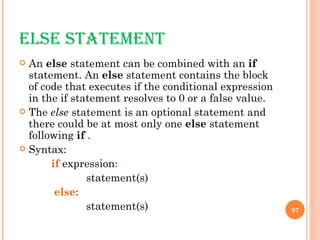
ELSE STATEMENT An  else  statement can be combined with an  if  statement. An  else  statement contains the block of code that executes if the conditional expression in the if statement resolves to 0 or a false value. The  else  statement is an optional statement and there could be at most only one  else  statement following  if  . Syntax: if  expression :   statement(s)   else:   statement(s)
EXAMPLE: ELSE STATEMENT Example: 1 var1 = 100  if var1:   print &quot;1 - Got a true expression value&quot;  print var1  else:   print &quot;1 - Got a false expression value&quot;  print var1  Output: 1 - Got a true expression value  100
COPY AND PASTE n=-500 if n < 0: print ( &quot;The absolute value of&quot;,n,&quot;is&quot;,-n) else: print ( &quot;The absolute value of&quot;,n,&quot;is&quot;,n) n=500 if n < 0: print ( &quot;The absolute value of&quot;,n,&quot;is&quot;,-n) else: print ( &quot;The absolute value of&quot;,n,&quot;is&quot;,n)
ELIF  STATEMENT The  elif  statement allows you to check multiple expressions for truth value and execute a block of code as soon as one of the conditions evaluates to true. Like the  else , the  elif  statement is optional. However, unlike  else , for which there can be at most one statement, there can be an arbitrary number of  elif  statements following an  if . Syntax: if expression1:   statement(s)  elif expression2:   statement(s)  elif expression3:   statement(s)   else: statement(s)
EXAMPLE:  ELIF  STATEMENT Example: var = 100  if var == 200:  print &quot;1 - Got a true expression value&quot;  print var  elif var == 150:  print &quot;2 - Got a true expression value&quot;  print var2  elif var == 100:  print &quot;3 - Got a true expression value&quot;  print var  else:  print &quot;4 - Got a false expression value&quot;  print var  print &quot;Good bye!&quot;  Output: 3 - Got a true expression value  100  Good bye!
NESTED  IF...ELIF...ELSE  CONSTRUCT There may be a situation when you want to check for another condition after a condition resolves to true. In such a situation, you can use the nested  if  construct. In a nested  if  construct, you can have an  if...elif...else  construct inside another  if...elif...else  construct. Syntax: if expression1:  statement(s)  if expression2:  statement(s) elif expression3:  statement(s)  else statement(s)   elif expression4:  statement(s)  else: statement(s)
EXAMPLE: NESTED  IF...ELIF...ELSE  CONSTRUCT var = 100 if var < 200:  print &quot;Expression value is less than 200&quot;  if var == 150:  print &quot;Which is 150&quot;  elif var == 100: print &quot;Which is 100&quot;  elif var == 50:  print &quot;Which is 50&quot;   elif var < 50:  print &quot;Expression value is less than 50&quot;  else:  print &quot;Could not find true expression&quot;  print &quot;Good bye!“  Output: Expression value is less than 200 Which is 100  Good bye!
WHILE LOOP The  while  loop is one of the looping constructs available in Python. The  while  loop continues until the expression becomes false. The expression has to be a logical expression and must return either a  true  or a  false  value Syntax: while expression: statement(s)  Here  expression  statement is evaluated first. If expression is  true  that is, then the statement(s) block is executed repeatedly until expression becomes  false . Otherwise, the next statement following the statement(s) block is executed.
EXAMPLE:WHILE LOOP count = 0  while (count < 4): print 'The count is:', count  count = count + 1  print &quot;Good bye!&quot;  Output: The count is: 0  The count is: 1  The count is: 2  The count is: 3 The count is: 4  Good bye!
COPY AND PASTE a = 0 while a < 10: a = a + 1 if a > 5: print (a, &quot;>&quot;,5) elif a <= 7: print (a, &quot;<=&quot;,7) else: print ( &quot;Neither test was true&quot;)
CONT… Infinite Loops You must use caution when using while loops because of the possibility that this condition never resolves to a false value. This results in a loop that never ends. Such a loop is called an infinite loop. An infinite loop might be useful in client/server programming where the server needs to run continuously so that client programs can communicate with it as and when required Example: var = 1  while var == 1 : # This constructs an infinite loop  num = raw_input(&quot;Enter a number :&quot;)  print &quot;You entered: &quot;, num  print &quot;Good bye!&quot;
FOR LOOP The  for  loop in Python has the ability to iterate over the items of any sequence, such as a list or a string. Syntax: for iterating_var in sequence:  statements(s)  If a sequence contains an expression list, it is evaluated first. Then, the first item in the sequence is assigned to the iterating variable  iterating_var . Next, the statements block is executed. Each item in the list is assigned to  iterating_var , and the statements(s) block is executed until the entire sequence is exhausted.
EXAMPLE: FOR LOOP Example 1: for letter in  ' Python': print ( 'Current Letter :', letter) Output: Current Letter : P  Current Letter : y  Current Letter : t  Current Letter : h  Current Letter : o  Current Letter : n
CONTI… Example 2 fruits = [ 'banana', 'apple',  ' mango'] for fruit in fruits:  # Second Example print ( 'Current fruit :', fruit) O utput: Current fruit : banana  Current fruit : apple  Current fruit : mango
CONTI… Iterating by Sequence Index An alternative way of iterating through each item is by index offset into the sequence itself Example: fruits = ['banana', 'apple', 'mango']  for index in range(len(fruits)): print ( 'Current fruit :', fruits[index]) print ( &quot;Good bye!&quot;) Output: Current fruit : banana Current fruit : apple Current fruit : mango Good bye!
CONTI… Since a variable often ranges over some sequence of numbers, the  range()   function returns a list of numbers from 0 up to but not including the number we pass to it. range(5) returns [0,1,2,3,4] So we could say: for x in range(5):   print x output: 1 2 3 4 5
LOOP CONTROL You might face a situation in which you need to exit a loop completely when an external condition is triggered or there may also be a situation when you want to skip a part of the loop and start next execution. provides  break  and  continue  statements to handle such situations and to have good control on your loop.
BREAK STATEMENT The  break  statement in Python terminates the current loop and resumes execution at the next statement, just like the traditional break found in C. The most common use for break is when some external condition is triggered requiring a hasty exit from a loop. The  break  statement can be used in both  while  and  for  loops.
EXAMPLE: BREAK Example 1: for letter in  'Python' :  if letter == 'h':  break   print ('Current Letter :', letter)  Example 2: var = 10 while var > 0:  print ('Current variable value :', var)  var = var -1  if var == 5:  break   print &quot;Good bye!&quot;
CONTINUE  STATEMENT The  continue  statement in Python returns the control to the beginning of the while loop. The  continue  statement rejects all the remaining statements in the current iteration of the loop and moves the control back to the top of the loop. The  continue  statement can be used in both  while  and  for  loops. Example 1: for letter in  'Python' : if letter == 'h':  continue   print 'Current Letter :', letter
CONTI ... Example 2 while var > 0:  print ( 'Current variable value :', var) var = var -1  if var == 2:  continue  print ( &quot;Good bye!&quot;)
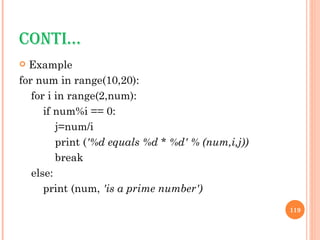
ELSE  STATEMENT USED WITH LOOPS Python supports to have an  else  statement associated with a loop statements. If the  else  statement is used with a  for  loop, the  else  statement is executed when the loop has exhausted iterating the list. If the  else  statement is used with a  while  loop, the  else  statement is executed when the condition becomes false. The  else  statement is not executed when the loop is terminated by  break .
CONTI… Example for num in range(10,20): for i in range(2,num):  if num%i == 0:  j=num/i  print ( '%d equals %d * %d' % (num,i,j))  break  else: print (num,  'is a prime number')
PASS  STATEMENT The  pass  statement in Python is used when a statement is required syntactically but you do not want any command or code to execute. The  pass  statement is a  null  operation; nothing happens when it executes. The  pass  is also useful in places where your code will eventually go, but has not been written yet (e.g., in stubs for example): Example: for letter in  ' Python': if letter ==  'h':  pass  print ( 'This is pass block') print ( 'Current Letter :', letter) print ( &quot;Good bye!&quot;)
FUNCTIONS IN PYTHON
FUNCTIONS A function is a block of organized, reusable code that is used to perform a single, related action. Functions provides better modularity for your application and a high degree of code reusing. As you already know, Python gives you many built-in functions like print() etc. but you can also create your own functions. These functions are called  user-defined functions.
DEFINING FUNCTIONS You can define functions to provide the required functionality. Here are simple rules to define a function in Python: Function blocks begin with the keyword  def  followed by the function name and parentheses ( ( ) ). Any input parameters or arguments should be placed within these parentheses. You can also define parameters inside these parentheses. The first statement of a function can be an optional statement - the documentation string of the function or  docstring . The code block within every function starts with a colon (:) and is indented. The statement return [expression] exits a function, optionally passing back an expression to the caller. A return statement with no arguments is the same as return None.
CONTI… Syntax: def functionname( parameters ):  &quot;function_docstring&quot;  function_suite  return [expression]  Example: def  printme( str ): &quot;This prints a passed string into this function&quot; print (str)  return
CALLING A FUNCTION Defining a function only gives it a name, specifies the parameters that are to be included in the function, and structures the blocks of code. Once the basic structure of a function is finalized, you can execute it by calling it from another function or directly from the Python prompt. Example: printme(&quot;I'm first call to user defined function!&quot;); printme(&quot;Again second call to the same function&quot;);
COPY AND PASTE def  printme( str ): &quot;This prints a passed string into this function&quot; print (str)  return  printme( &quot;I'm first call to user defined function!&quot;);  printme( &quot;Again second call to the same function&quot;);
FUNCTION ARGUMENTS You can call a function by using the following types of formal arguments:: Required arguments Keyword arguments Default arguments
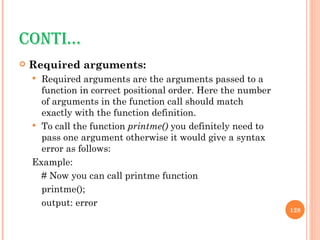
CONTI… Required arguments: Required arguments are the arguments passed to a function in correct positional order. Here the number of arguments in the function call should match exactly with the function definition. To call the function  printme()  you definitely need to pass one argument otherwise it would give a syntax error as follows: Example: # Now you can call printme function  printme(); output: error
CONTI … Keyword arguments Keyword arguments are related to the function calls. When you use keyword arguments in a function call, the caller identifies the arguments by the parameter name. This allows you to skip arguments or place them out of order because the Python interpreter is able to use the keywords provided to match the values with parameters. You can also make keyword calls to the  printme()  function in the following ways: # Now you can call printme function  printme( str = &quot;My string&quot;);
CONTI… Example 2: # Function definition is here  def  printinfo( name, age ):  &quot;This prints a passed info into this function&quot;  print ( &quot;Name: &quot;, name) print ( &quot;Age &quot;, age) return;  printinfo( age=50, name= &quot; miki&quot;  # Now you can call printinfo function  printinfo( age=50, name=&quot;miki&quot; );
CONTI… Default arguments A default argument is an argument that assumes a default value if a value is not provided in the function call for that argument. Following example gives idea on default arguments, it would print default age if it is not passed: # Function definition is here  def printinfo( name, age = 35 ):  &quot;This prints a passed info into this function&quot; print &quot;Name: &quot;, name   print &quot;Age &quot;, age return;
CONTI… # Now you can call printinfo function  printinfo( age=50, name=&quot;miki&quot; )  printinfo( name=&quot;miki&quot; )
THANK YOU
OTHER RESOURCES http://code.google.com/edu/languages/google-python-class/index.html
TEST 1   Write a program to check the speed.  If speed is greater than 80,  print 'License and registration please‘.  If mood == 'terrible' or speed >= 100, print 'You have the right to remain silent.‘  Otherwise, if mood == 'bad' or speed >= 90, print &quot;I'm going to have to write you a ticket.“, Otherwise, print &quot;Let's try to keep it under 80 ok?&quot;
TEST 2 Given a string s, return a string made of the first 2 and the last 2 chars of the original string, so 'spring' yields 'spng'. However, if the string length is less than 2, return instead the empty string.

Introduction To Python

  • 1.
  • 2.
    AGENDA About PythonHow to run Python in Eclipse Basic data types, comments and assignments Sequence types: Tuples, Lists, and Strings String operations Dictionaries Operators Control of flow Functions
  • 3.
  • 4.
    PYTHON Python isan interpreted, general-purpose high-level programming language The code is automatically compiled to byte code and executed, Python is suitable for use as a scripting language, Web application implementation language, etc. Its use of indentation for block delimiters is unique among popular programming languages. Python supports multiple programming paradigms, primarily but not limited to object oriented, imperative and, to a lesser extent, functional programming styles.
  • 5.
    COMPARISONS WITH OTHERPROGRAMMING LANGUAGES
  • 6.
    FEATURES OF PYTHONSimple Easy to learn Free and Open Source High-level Language Portable Interpreted Object Oriented Extensible Embeddable Extensive Libraries
  • 7.
    HOW TO RUNPYTHON IN ECLIPSE
  • 8.
    WRITING FIRST PYTHONPROGRAM Step 1: Switch to the Python perspective Go to &quot;Window > Open Perspective > Other...&quot; and choose &quot;Pydev&quot;, then click OK. If you look at the upper right corner you will see that the perspective has changed from &quot;Java&quot; to &quot;Pydev&quot;.
  • 9.
    Step 2: Createa new Python project Go to &quot;File > New > Pydev Project&quot; to start a wizard. In the next window that appears, enter the name of your project and select &quot;python&quot; and 3.0&quot;; as the type. Make sure &quot;create default 'src' folder and add it to the pythonpath?&quot; is selected. Click Finish.
  • 10.
    If you lookat the upper left corner of the workspace (in the Package Explorer view), you should now see your newly created project with a &quot;src&quot; folder inside.
  • 11.
    Step 3: Createa new module Select the project you just created and go to &quot;File -> New -> Pydev Module&quot;. This will launch a new Pydev Module Wizard where you should enter a name for your module and make sure it is in the right location. Leave the Package field blank and select Finish.
  • 12.
    Look in thePackage Explorer view and you will see an icon of your new file inside the src folder, which Eclipse created when you made the new project before.
  • 13.
    Step 4: Writeand Run the Program Click on the new module created(HelloWorld.py) and type the one line code. print (‘Hello World!’)
  • 14.
    COPY AND PASTEINTO ECLIPSE print( &quot;hello world&quot;)
  • 15.
    To run thepython, select the module(HelloWorld.py). Right click on the module and select “Run as -> Python Run”
  • 16.
    Look at thebottom of your screen at the Console view and you will see the message you told the computer to print. Congratulations! You have written your first program with Python.
  • 17.
    BASIC DATA TYPES,COMMENTS AND ASSIGNMENTS
  • 18.
    BASIC DATA TYPESIntegers And Floats An integer in Python, also known as a ‘numeric literal’ Any numeric value can be assigned to it at any time, overwriting the previous value. To assign a value to an integer variable, one writes a statement after the following template: <numeric literal name> = <numeric literal value> Example: num1=5; print(num1) o/p: 5 num2=3; num3=num1/num2; print(num3) o/p: 1.66666666667 num4= 5.23/2 print(num4) o/p: 2.615
  • 19.
    COPY AND PASTEINTO ECLIPSE num1=5; print(num1) num2=3; num3=num1/num2; print(num3) num4= 5.23/2 print(num4)
  • 20.
    CONTI… Strings Astring literal, or string , holds any combination of letters and numbers you would like it to hold. To assign a value to a string, one uses the following template: <name of string> = '<value of string>' Examples: str1= &quot;hello&quot; str2= 'hi'; str3= &quot;John's&quot; print(str1) o/p: hello print(str2) o/p: hi print(str3) o/p: john’s
  • 21.
    COPY AND PASTEINTO ECLIPSE str1= &quot;hello&quot; str2= ' hi'; str3= &quot;John's&quot; print(str1) print(str2) print(str3)
  • 22.
    CONTI… Some moreexamples on string…. Can use “ ” or ‘ ’ to specify. “abc” ‘abc’ (Same thing.) Unmatched can occur within the string. “matt’s” Use triple double-quotes for multi-line strings or strings than contain both ‘ and “ inside of them: &quot;&quot;&quot; string in multiple lines&quot;&quot;&quot;
  • 23.
    COPY AND PASTEINTO ECLIPSE str4 = &quot;&quot;&quot;string in multiple lines&quot;&quot;&quot; print(str4)
  • 24.
    COMMENTS AND WHITESPACEComments Start comments with # – the rest of line is ignored. Example: # this is comment in Python Whitespace Whitespace is meaningful in Python: especially indentation and placement of newlines. Use a newline to end a line of code.
  • 25.
    CONTI… No braces{ } to mark blocks of code in Python. Use consistent indentation instead. The first line with less indentation is outside of the block. The first line with more indentation starts a nested block Often a colon appears at the start of a new block.
  • 26.
    ASSIGNMENT Binding avariable in Python means setting a name to hold a reference to some object . Assignment creates references, not copies Names in Python do not have an intrinsic type. Objects have types. Python determines the type of the reference automatically based on the data object assigned to it. You create a name the first time it appears on the left side of an assignment expression: x = 3 A reference is deleted via garbage collection after any names bound to it have passed out of scope.
  • 27.
    ACCESSING NON-EXISTENT NAMESIf you try to access a name before it’s been properly created (by placing it on the left side of an assignment), you’ll get an error. Example: var Print(var) // undefined variable error var = 3 Print(var) o/p: 3
  • 28.
    MULTIPLE ASSIGNMENT Youcan also assign to multiple names at the same time. Example: x, y = 2, 3 print(x) o/p: 2 print(y) o/p: 3
  • 29.
    COPY AND PASTEx, y = 2, 3 print(x) print(y)
  • 30.
    NAMING RULES Namesare case sensitive and cannot start with a number. They can contain letters, numbers, and underscores. Example: Valid names: var, _var, _2var, var2 Invalid names: 2var, 3var_1 There are some reserved words: and, assert, break, class, continue, def, del, elif, else, except, exec, finally, for, from, global, if, import, in, is, lambda, not, or, pass, print, raise, return, try, while
  • 31.
    SEQUENCE TYPES: TUPLES,LISTS, AND STRINGS AND OPERATIONS ON SEQUENCE TYPES
  • 32.
    SEQUENCE TYPES TupleA simple immutable ordered sequence of items Items can be of mixed types, including collection types Strings Immutable Conceptually very much like a tuple. List Mutable ordered sequence of items of mixed types
  • 33.
    SYNTAX All threesequence types (tuples, strings, and lists) share much of the same syntax and functionality. Key difference: Tuples and strings are immutable Lists are mutable The operations shown in this section can be applied to all sequence types most examples will just show the operation performed on one
  • 34.
    DEFINING SEQUENCE TYPESTuples are defined using parentheses ( )and commas. tu = (23, ‘abc’, 4.56, (2,3), ‘def’) Lists are defined using square brackets [ ]and commas. li = [“abc”, [34,12], 4.34, 23] Strings are defined using quotes (“, ‘, or “““). st = “Hello World” st = ‘Hello World’ st = “““This is a multi-line string that uses triple quotes.”””
  • 35.
    COPY AND PASTEtu = (23, ' abc', 4.56, (2,3), 'def') li = [ &quot; abc&quot;, [34,12], 4.34, 23] st5 = &quot;Hello World&quot; st6= 'Hello World' st7 = &quot;&quot;&quot;This is a multi-line string that uses triple quotes.&quot;&quot;&quot; print(tu) print(li) print(st5) print(st6) print(st7)
  • 36.
    ACCESSING INDIVIDUAL MEMBERSWe can access individual members of a tuple, list, or string using square bracket “array” notation. Note that all are 0 based . tu = (23, ‘abc’, 4.56, (2,3), ‘def’) tu[1] # Second item in the tuple. o/p: ‘abc’ li = [“abc”, [34,12], 4.34, 23] li[1] # Second item in the list. o/p: [34,12] st = “Hello World” st[1] # Second character in string. o/p: ‘e’
  • 37.
    COPY AND PASTEtu = (23, ' abc', 4.56, (2,3), 'def') print(tu[1]) li = [ &quot; abc&quot;, [34,12], 4.34, 23] print(li[1]) st6 = 'Hello World' print (st6[6])
  • 38.
    POSITIVE AND NEGATIVEINDICES tu = (23, ‘abc’, 4.56, (2,3), ‘def’) Positive index: count from the left, starting with 0. tu[1] o/p: ‘abc’ Negative lookup: count from right, starting with –1. tu[-3] o/p: 4.56
  • 39.
    COPY AND PASTEtu = (23, ' abc', 4.56, (2,3), 'def') print(tu[1]) print(tu[-3])
  • 40.
    SLICING tu =(23, ‘abc’, 4.56, (2,3), ‘def’) Return a copy of the container with a subset of the original members. Start copying at the first index, and stop copying before the second index. t[1:4] o/p: (‘abc’, 4.56, (2,3)) You can also use negative indices when slicing. t[1:-2] o/p: (‘abc’, 4.56, )
  • 41.
    COPY AND PASTEtu = (23, ' abc', 4.56, (2,3), 'def') print(tu[1:4]) print(tu[1:-2])
  • 42.
    SLICING CONTI… Omitthe first index to make a copy starting from the beginning of the container. tu[:2] o/p: (23, ‘abc’) Omit the second index to make a copy starting at the first index and going to the end of the container. tu[3:] o/p: ((2,3), ‘def’)
  • 43.
    COPY AND PASTEprint(tu[:2]) print(tu[3:])
  • 44.
    COPYING WHOLE SEQUENCETo make a copy of an entire sequence, you can use [:]. tu[:] o/p: (23, ‘abc’, 4.56, (2,3), ‘def’) Note the difference between these two lines for mutable sequences: list1=['abc', [34,12], 4.34, 23] list2 = list1 # 2 names refer to 1 ref # Changing one affects both list2 = list1[:] # Two independent copies, two refs
  • 45.
    COPY AND PASTElist1=[ ' abc', [34,12], 4.34, 23] list2 = list1 list2[0] = &quot; xyz&quot; print(list1) print(list2) list2 = list1[:] list2[0] = &quot; pqr&quot; print(list1) print(list2)
  • 46.
    THE ‘IN’ OPERATORBoolean test whether a value is inside a container: >>> t = [1, 2, 4, 5] >>> 3 in t False >>> 4 in t True >>> 4 not in t False For strings, tests for substrings >>> strg= 'abcde' >>> 'c' in strg True >>> 'cd' in strg True >>> 'ac' in strg False Be careful: the in keyword is also used in the syntax of for loops and list comprehensions .
  • 47.
    COPY AND PASTEt = [1, 2, 4, 5] if 1 in t: print( &quot;great&quot;)
  • 48.
    THE + OPERATORThe + operator produces a new tuple, list, or string whose value is the concatenation of its arguments. (1, 2, 3) + (4, 5, 6) o/p: (1, 2, 3, 4, 5, 6) [1, 2, 3] + [4, 5, 6] o/p: [1, 2, 3, 4, 5, 6] “ Hello” + “ ” + “World” o/p: ‘Hello World’
  • 49.
    THE * OPERATORThe * operator produces a new tuple, list, or string that “repeats” the original content. (1, 2, 3) * 3 (1, 2, 3, 1, 2, 3, 1, 2, 3) [1, 2, 3] * 3 [1, 2, 3, 1, 2, 3, 1, 2, 3] “ Hello” * 3 ‘ HelloHelloHello’
  • 50.
    COPY AND PASTEtu=(1, 2, 3) + (4, 5, 6) print(tu) li=(1, 2, 3) + (4, 5, 6) print(li) st=( &quot;hello&quot;) + (&quot;world&quot;) print(st) tu=(1, 2, 3)* 3 print(tu) li=[1, 2, 3] * 3 print(li) st=( &quot;hello&quot;) * 3 print(st)
  • 51.
    TUPLE VS LISTTuples: Immutable tu = (23, ‘abc’, 4.56, (2,3), ‘def’) tu[2] = 3.14 o/p: TypeError: 'tuple' object does not support item assignment You can’t change a tuple. You can make a fresh tuple and assign its reference to a previously used name. tu = (23, ‘abc’, 3.14, (2,3), ‘def’)
  • 52.
    CONTI … List: Mutable li = [‘abc’, 23, 4.34, 23] li[1] = 45 print(li) O/p: [‘abc’, 45, 4.34, 23] We can change lists in place. Name li still points to the same memory reference when we’re done.
  • 53.
    COPY AND PASTEtu = (23, &quot; abc&quot;, 4.56, (2,3), &quot;def&quot;) tu[2] = 3.14 li = [23, &quot; abc&quot;, 4.56, (2,3), &quot;def&quot;] li[2] = 3.14 print(li)
  • 54.
    CONTI… Tuple ListImmutable Mutable Fast Comparatively slow Fewer operations Lot of handy operations
  • 55.
    OPERATIONS ON LISTSLet us consider the list shown below and perform different operations on them li = ['abc',16, [34,12], 4.34, 23] append appends the value to the end of list. li.append(‘a’) Print(li) o/p: ['abc',16, [34,12], 4.34, 23,’a’] insert Insert the value at a mentioned position in the list li.insert(2,’i’) o/p: ['abc',16,i, [34,12], 4.34, 23]
  • 56.
    COPY AND PASTEli = [ 'abc',16, [34,12], 4.34, 23] li.append( 'a') print(li) li.insert(2, 'i') print(li)
  • 57.
    CONTI … Index Gives the index of first occurrence of character in the list li=[a,b,c,b,d,e] li.index(‘b’) o/P: 1 Count Returns number of occurrences of the value li.count(‘b’) o/p: 2 Remove Removes first occurrence of the value li.remove(‘b’) o/p: [a,c,b,d,e]
  • 58.
    COPY AND PASTEli = [ ' abc',16, [34,12], 4.34, 23] print(li.index( ' abc')) print(li.count( ' abc')) li.remove( ' abc') print(li)
  • 59.
    CONTI… Reverse reverse the list li= [30,20,40,10,70,50] li.reverse() o/p: [50,70,10,40,20,30] Sort sort the list li.sort() o/p:[10,20,30,40,50,70]
  • 60.
    COPY AND PASTEli= [30,20,40,10,70,50] li.reverse() print(li) li.sort() print(li)
  • 61.
  • 62.
    IMMUTABLE TYPE REFERENCESIn Python, the datatypes integer, float, and string (and tuple) are “immutable.” This can be understood through the following example. x=1 # value 1 is created in memory and x refers to it y=x # y now refers to value 1 y=2 # value 2 is created and y is made to refer to it print(x) # x still refers to 1, no effect on it by changing value of y print(y) o/p: 1 2
  • 63.
    IMMUTABLE : EXAMPLEx=1 y=x X reference Type Integer Data : 1 X reference Y reference Type Integer Data: 1
  • 64.
    CONTI… Y=2 Xreference Y reference Type Integer Data: 1 Type Integer Data: 2
  • 65.
    MUTABLE TYPE REFERENCESFor other data types (lists, dictionaries, user-defined types), assignment works differently. These data types are “mutable.” When we change these data, we do it in place. We don’t copy them into a new memory address each time. If we type y=x and then modify y, both x and y are changed. Example: li=[1,2,3,4] li2=li li2.append(5) #value of li also changes print(li) o/p: [1,2,3,4,5] print(li2) o/p: [1,2,3,4,5]
  • 66.
    MUTABLE : EXAMPLEli=[1,2,3,4] li2 = li li reference li reference li2 reference 1 2 3 4 1 2 3 4
  • 67.
    CONTI… li2.append(5) lireference li 2reference 1 2 3 4 5
  • 68.
  • 69.
    STRING OPERATIONS Upperstr=“hello” str1 = str.upper o/p: “HELLO” String format operator % The operator % allows strings to be built out of many data items in a “fill in the blanks” fashion. ex: x=34 y=“hello” z=“%sabc%d” % (y,x) o/p: helloabc34
  • 70.
    COPY AND PASTEstr= &quot;hello&quot; str1 = str.upper() print(str) print(str1) x=34 y= &quot;hello&quot; z= &quot;% sabc%d&quot; % (y,x) print (x) print (y) print (z)
  • 71.
    WHY? >>> uid= &quot;sa&quot; >>> pwd = &quot;secret&quot; >>> print pwd + &quot; is not a good password for &quot; + uid secret is not a good password for sa >>> print &quot;%s is not a good password for %s&quot; % (pwd, uid) secret is not a good password for sa >>> userCount = 6 >>> print &quot;Users connected: %d&quot; % (userCount) Users connected: 6 >>> print &quot;Users connected: &quot; + userCount Traceback (innermost last): File &quot;<interactive input>&quot;, line 1, in ? TypeError: cannot concatenate 'str' and 'int' objects
  • 72.
    STRING CONVERSION listto String Join turns a list of strings into one string format : <separator_string>.join( <some_list> ) Example: li=[“abc”,”def”,”ghi”] str= ‘;’.join(li) print(str) o/p: abc;def;ghi
  • 73.
    CONTI… String tolist Split turns one string into a list of strings Format: <some_string> .split( <separator_string> ) Example: str = ‘abc;def;ghi’ newLi = str.split(‘;’) print(newLi) o/p: [abc, def, ghi]
  • 74.
    COPY AND PASTEli=[ &quot; abc&quot;,&quot;def&quot;,&quot;ghi&quot;] str= ';'.join(li) print(str) str = ' abc;def;ghi' newLi = str.split( ';') print(newLi)
  • 75.
  • 76.
    DICTIONARIES Dictionaries storea mapping between a set of keys and a set of values. Keys can be any immutable type. Values can be any type A single dictionary can store values of different types You can define, modify, view, lookup, and delete the key-value pairs in the dictionary.
  • 77.
    CREATING AND ACCESSINGDICTIONARIES Creating dict = { ‘name’:’john’ , ‘place’:’xyz’, ‘id’:1234 } Accessing dict[‘name’] o/p: ‘john’ dict o/p: { ‘name’:’john’ , ‘place’:’xyz’, ‘id’:1234 }
  • 78.
    UPDATING Keys mustbe unique. Assigning to an existing key replaces its value. Dictionaries are unordered New entry might appear anywhere in the output. Example: dict[‘name’] = ‘adam’ dict[‘gender’] = ‘male’
  • 79.
    DELETING Deleting entryfrom dictionary del dict[‘name’] o/p: { place: xyz, id:1234 } Deleting entire dictionary dict.clear()
  • 80.
    OPERATIONS ON DICTIONARIESDict = { ‘name’:’john’, ‘place’:’xyz’, ‘id’:1234 } To access keys dict.keys() #returns list of keys o/p: [name, place, id ] To access values dict.values() # return list of values o/p: [ john, xyz,1234] To access items Dict.items() # returns list of item tuples o/p: [(name,john),(place, xyz), (id, 1234)
  • 81.
    COPY AND PASTEdict={ 'name':'john','place':' xyz','id':1234} print(dict) print(dict[ 'name']) del dict[ 'name'] print(dict) print(dict.keys()) print(dict.values()) print( dict.items())
  • 82.
  • 83.
    ARITHMETIC OPERATOR Operator Description Example a=5, b=3 + Addition - Adds values on either side of the operator a+b = 5+3 = 8 - Subtraction - Subtracts right hand operand from left hand operand a-b = 5-3 = 2 * Multiplication - Multiplies values on either side of the operator a*b = 5*3 = 15 / Division - Divides left hand operand by right hand operand a/b = 5/3 = 1.66666666667 % Modulus - Divides left hand operand by right hand operand and returns remainder a%b = 5%3 = 2 ** Exponent - Performs exponential (power) calculation on operators a**b = 5**3 =125 // Floor Division - The division of operands where the result is the quotient in which the digits after the decimal point are removed. a//b = 5//3 = 1
  • 84.
    COMPARISON OPERATORS OperatorDescription Example a=5, b=3 == Checks if the value of two operands are equal or not, if yes then condition becomes true. (a == b) is not true. != Checks if the value of two operands are equal or not, if values are not equal then condition becomes true. (a != b) is true. <> Checks if the value of two operands are equal or not, if values are not equal then condition becomes true. (a <> b) is true. This is similar to != operator. > Checks if the value of left operand is greater than the value of right operand, if yes then condition becomes true. (a > b) is not true. < Checks if the value of left operand is less than the value of right operand, if yes then condition becomes true. (a < b) is true.
  • 85.
    CONTI… Operator DescriptionExample a=5, b=3 >= Checks if the value of left operand is greater than or equal to the value of right operand, if yes then condition becomes true. (a >= b) is not true. <= Checks if the value of left operand is less than or equal to the value of right operand, if yes then condition becomes true. (a <= b) is true.
  • 86.
    ASSIGNMENT OPERATORS OperatorDescription Example = Simple assignment operator, Assigns values from right side operands to left side operand c = a + b will assigne value of a + b into c += Add AND assignment operator, It adds right operand to the left operand and assign the result to left operand c += a is equivalent to c = c + a -= Subtract AND assignment operator, It subtracts right operand from the left operand and assign the result to left operand c -= a is equivalent to c = c - a *= Multiply AND assignment operator, It multiplies right operand with the left operand and assign the result to left operand c *= a is equivalent to c = c * a
  • 87.
    CONTI…. Operator DescriptionExample /= Divide AND assignment operator, It divides left operand with the right operand and assign the result to left operand c /= a is equivalent to c = c / a %= Modulus AND assignment operator, It takes modulus using two operands and assign the result to left operand c %= a is equivalent to c = c % a **= Exponent AND assignment operator, Performs exponential (power) calculation on operators and assign value to the left operand c **= a is equivalent to c = c ** a //= Floor Division and assigns a value, Performs floor division on operators and assign value to the left operand c //= a is equivalent to c = c // a
  • 88.
    BITWISE OPERATORS Bitwiseoperator works on bits and perform bit by bit operation. Assume if a = 60; and b = 13; Now in binary format they will be as follows: a = 0011 1100 b = 0000 1101 a&b = 0000 1100 a|b = 0011 1101 a^b = 0011 0001 ~a  = 1100 0011
  • 89.
    CONTI… Operator DescriptionExample A=60(0011 1100) B=13(0000 1101) & Binary AND Operator copies a bit to the result if it exists in both operands. (a & b) will give 12 which is 0000 1100 | Binary OR Operator copies a bit if it exists in eather operand. (a | b) will give 61 which is 0011 1101 ^ Binary XOR Operator copies the bit if it is set in one operand but not both. (a ^ b) will give 49 which is 0011 0001
  • 90.
    CONTI… OperatorDescription Example A=60(0011 1100) B=13(0000 1101) ~ Binary Ones Complement Operator is unary and has the effect of 'flipping' bits. (~a ) will give -60 which is 1100 0011 << Binary Left Shift Operator. The left operands value is moved left by the number of bits specified by the right operand. a << 2 will give 240 which is 1111 0000 >> Binary Right Shift Operator. The left operands value is moved right by the number of bits specified by the right operand. a >> 2 will give 15 which is 0000 1111
  • 91.
    LOGICAL OPERATORS OperatorDescription Example and Called Logical AND operator. If both the operands are true then then condition becomes true. (a and b) is true. or Called Logical OR Operator. If any of the two operands are non zero then then condition becomes true. (a or b) is true. not Called Logical NOT Operator. Use to reverses the logical state of its operand. If a condition is true then Logical NOT operator will make false. not(a and b) is false.
  • 92.
    IDENTITY OPERATORS Identityoperators compare the memory locations of two objects Operator Description Example is Evaluates to true if the variables on either side of the operator point to the same object and false otherwise. x is y, here is results in 1 if id(x) equals id(y). is not Evaluates to false if the variables on either side of the operator point to the same object and true otherwise. x is not y, here is not results in 1 if id(x) is not equal to id(y).
  • 93.
  • 94.
    CONTROL OF FLOWConditional constructs are used to incorporate decision making into programs. The result of this decision making determines the sequence in which a program will execute instructions. You can control the flow of a program by using conditional constructs.
  • 95.
    IF STATEMENT The if statement of Python is similar to that of other languages. The if statement contains a logical expression using which data is compared, and a decision is made based on the result of the comparison. Syntax: if expression : statement(s) Here if statement, condition is evaluated first. If condition is true that is, if its value is nonzero then the statement(s) block are executed. Otherwise, the next statement following the statement(s) block is executed.
  • 96.
    EXAMPLE: IF STATEMENTExample 1: var1 = 100 if var1: print &quot;1 - Got a true expression value&quot; print var1 Output: 1 - Got a true expression value 100 Example 2: var2 = 0 if var2: print “2 - Got a true expression value&quot; print var2 print “Good bye!” Output Good bye!
  • 97.
    ELSE STATEMENT An else statement can be combined with an if statement. An else statement contains the block of code that executes if the conditional expression in the if statement resolves to 0 or a false value. The else statement is an optional statement and there could be at most only one else statement following if . Syntax: if expression : statement(s) else: statement(s)
  • 98.
    EXAMPLE: ELSE STATEMENTExample: 1 var1 = 100 if var1: print &quot;1 - Got a true expression value&quot; print var1 else: print &quot;1 - Got a false expression value&quot; print var1 Output: 1 - Got a true expression value 100
  • 99.
    COPY AND PASTEn=-500 if n < 0: print ( &quot;The absolute value of&quot;,n,&quot;is&quot;,-n) else: print ( &quot;The absolute value of&quot;,n,&quot;is&quot;,n) n=500 if n < 0: print ( &quot;The absolute value of&quot;,n,&quot;is&quot;,-n) else: print ( &quot;The absolute value of&quot;,n,&quot;is&quot;,n)
  • 100.
    ELIF STATEMENTThe elif statement allows you to check multiple expressions for truth value and execute a block of code as soon as one of the conditions evaluates to true. Like the else , the elif statement is optional. However, unlike else , for which there can be at most one statement, there can be an arbitrary number of elif statements following an if . Syntax: if expression1: statement(s) elif expression2: statement(s) elif expression3: statement(s) else: statement(s)
  • 101.
    EXAMPLE: ELIF STATEMENT Example: var = 100 if var == 200: print &quot;1 - Got a true expression value&quot; print var elif var == 150: print &quot;2 - Got a true expression value&quot; print var2 elif var == 100: print &quot;3 - Got a true expression value&quot; print var else: print &quot;4 - Got a false expression value&quot; print var print &quot;Good bye!&quot; Output: 3 - Got a true expression value 100 Good bye!
  • 102.
    NESTED IF...ELIF...ELSE CONSTRUCT There may be a situation when you want to check for another condition after a condition resolves to true. In such a situation, you can use the nested if construct. In a nested if construct, you can have an if...elif...else construct inside another if...elif...else construct. Syntax: if expression1: statement(s) if expression2: statement(s) elif expression3: statement(s) else statement(s) elif expression4: statement(s) else: statement(s)
  • 103.
    EXAMPLE: NESTED IF...ELIF...ELSE CONSTRUCT var = 100 if var < 200: print &quot;Expression value is less than 200&quot; if var == 150: print &quot;Which is 150&quot; elif var == 100: print &quot;Which is 100&quot; elif var == 50: print &quot;Which is 50&quot; elif var < 50: print &quot;Expression value is less than 50&quot; else: print &quot;Could not find true expression&quot; print &quot;Good bye!“ Output: Expression value is less than 200 Which is 100 Good bye!
  • 104.
    WHILE LOOP The while loop is one of the looping constructs available in Python. The while loop continues until the expression becomes false. The expression has to be a logical expression and must return either a true or a false value Syntax: while expression: statement(s) Here expression statement is evaluated first. If expression is true that is, then the statement(s) block is executed repeatedly until expression becomes false . Otherwise, the next statement following the statement(s) block is executed.
  • 105.
    EXAMPLE:WHILE LOOP count= 0 while (count < 4): print 'The count is:', count count = count + 1 print &quot;Good bye!&quot; Output: The count is: 0 The count is: 1 The count is: 2 The count is: 3 The count is: 4 Good bye!
  • 106.
    COPY AND PASTEa = 0 while a < 10: a = a + 1 if a > 5: print (a, &quot;>&quot;,5) elif a <= 7: print (a, &quot;<=&quot;,7) else: print ( &quot;Neither test was true&quot;)
  • 107.
    CONT… Infinite LoopsYou must use caution when using while loops because of the possibility that this condition never resolves to a false value. This results in a loop that never ends. Such a loop is called an infinite loop. An infinite loop might be useful in client/server programming where the server needs to run continuously so that client programs can communicate with it as and when required Example: var = 1 while var == 1 : # This constructs an infinite loop num = raw_input(&quot;Enter a number :&quot;) print &quot;You entered: &quot;, num print &quot;Good bye!&quot;
  • 108.
    FOR LOOP The for loop in Python has the ability to iterate over the items of any sequence, such as a list or a string. Syntax: for iterating_var in sequence: statements(s) If a sequence contains an expression list, it is evaluated first. Then, the first item in the sequence is assigned to the iterating variable iterating_var . Next, the statements block is executed. Each item in the list is assigned to iterating_var , and the statements(s) block is executed until the entire sequence is exhausted.
  • 109.
    EXAMPLE: FOR LOOPExample 1: for letter in ' Python': print ( 'Current Letter :', letter) Output: Current Letter : P Current Letter : y Current Letter : t Current Letter : h Current Letter : o Current Letter : n
  • 110.
    CONTI… Example 2fruits = [ 'banana', 'apple', ' mango'] for fruit in fruits: # Second Example print ( 'Current fruit :', fruit) O utput: Current fruit : banana Current fruit : apple Current fruit : mango
  • 111.
    CONTI… Iterating bySequence Index An alternative way of iterating through each item is by index offset into the sequence itself Example: fruits = ['banana', 'apple', 'mango'] for index in range(len(fruits)): print ( 'Current fruit :', fruits[index]) print ( &quot;Good bye!&quot;) Output: Current fruit : banana Current fruit : apple Current fruit : mango Good bye!
  • 112.
    CONTI… Since avariable often ranges over some sequence of numbers, the range() function returns a list of numbers from 0 up to but not including the number we pass to it. range(5) returns [0,1,2,3,4] So we could say: for x in range(5): print x output: 1 2 3 4 5
  • 113.
    LOOP CONTROL Youmight face a situation in which you need to exit a loop completely when an external condition is triggered or there may also be a situation when you want to skip a part of the loop and start next execution. provides break and continue statements to handle such situations and to have good control on your loop.
  • 114.
    BREAK STATEMENT The break statement in Python terminates the current loop and resumes execution at the next statement, just like the traditional break found in C. The most common use for break is when some external condition is triggered requiring a hasty exit from a loop. The break statement can be used in both while and for loops.
  • 115.
    EXAMPLE: BREAK Example1: for letter in 'Python' : if letter == 'h': break print ('Current Letter :', letter) Example 2: var = 10 while var > 0: print ('Current variable value :', var) var = var -1 if var == 5: break print &quot;Good bye!&quot;
  • 116.
    CONTINUE STATEMENTThe continue statement in Python returns the control to the beginning of the while loop. The continue statement rejects all the remaining statements in the current iteration of the loop and moves the control back to the top of the loop. The continue statement can be used in both while and for loops. Example 1: for letter in 'Python' : if letter == 'h': continue print 'Current Letter :', letter
  • 117.
    CONTI ... Example2 while var > 0: print ( 'Current variable value :', var) var = var -1 if var == 2: continue print ( &quot;Good bye!&quot;)
  • 118.
    ELSE STATEMENTUSED WITH LOOPS Python supports to have an else statement associated with a loop statements. If the else statement is used with a for loop, the else statement is executed when the loop has exhausted iterating the list. If the else statement is used with a while loop, the else statement is executed when the condition becomes false. The else statement is not executed when the loop is terminated by break .
  • 119.
    CONTI… Example fornum in range(10,20): for i in range(2,num): if num%i == 0: j=num/i print ( '%d equals %d * %d' % (num,i,j)) break else: print (num, 'is a prime number')
  • 120.
    PASS STATEMENTThe pass statement in Python is used when a statement is required syntactically but you do not want any command or code to execute. The pass statement is a null operation; nothing happens when it executes. The pass is also useful in places where your code will eventually go, but has not been written yet (e.g., in stubs for example): Example: for letter in ' Python': if letter == 'h': pass print ( 'This is pass block') print ( 'Current Letter :', letter) print ( &quot;Good bye!&quot;)
  • 121.
  • 122.
    FUNCTIONS A functionis a block of organized, reusable code that is used to perform a single, related action. Functions provides better modularity for your application and a high degree of code reusing. As you already know, Python gives you many built-in functions like print() etc. but you can also create your own functions. These functions are called user-defined functions.
  • 123.
    DEFINING FUNCTIONS Youcan define functions to provide the required functionality. Here are simple rules to define a function in Python: Function blocks begin with the keyword def followed by the function name and parentheses ( ( ) ). Any input parameters or arguments should be placed within these parentheses. You can also define parameters inside these parentheses. The first statement of a function can be an optional statement - the documentation string of the function or docstring . The code block within every function starts with a colon (:) and is indented. The statement return [expression] exits a function, optionally passing back an expression to the caller. A return statement with no arguments is the same as return None.
  • 124.
    CONTI… Syntax: deffunctionname( parameters ): &quot;function_docstring&quot; function_suite return [expression] Example: def printme( str ): &quot;This prints a passed string into this function&quot; print (str) return
  • 125.
    CALLING A FUNCTIONDefining a function only gives it a name, specifies the parameters that are to be included in the function, and structures the blocks of code. Once the basic structure of a function is finalized, you can execute it by calling it from another function or directly from the Python prompt. Example: printme(&quot;I'm first call to user defined function!&quot;); printme(&quot;Again second call to the same function&quot;);
  • 126.
    COPY AND PASTEdef printme( str ): &quot;This prints a passed string into this function&quot; print (str) return printme( &quot;I'm first call to user defined function!&quot;); printme( &quot;Again second call to the same function&quot;);
  • 127.
    FUNCTION ARGUMENTS Youcan call a function by using the following types of formal arguments:: Required arguments Keyword arguments Default arguments
  • 128.
    CONTI… Required arguments:Required arguments are the arguments passed to a function in correct positional order. Here the number of arguments in the function call should match exactly with the function definition. To call the function printme() you definitely need to pass one argument otherwise it would give a syntax error as follows: Example: # Now you can call printme function printme(); output: error
  • 129.
    CONTI … Keywordarguments Keyword arguments are related to the function calls. When you use keyword arguments in a function call, the caller identifies the arguments by the parameter name. This allows you to skip arguments or place them out of order because the Python interpreter is able to use the keywords provided to match the values with parameters. You can also make keyword calls to the printme() function in the following ways: # Now you can call printme function printme( str = &quot;My string&quot;);
  • 130.
    CONTI… Example 2:# Function definition is here def printinfo( name, age ): &quot;This prints a passed info into this function&quot; print ( &quot;Name: &quot;, name) print ( &quot;Age &quot;, age) return; printinfo( age=50, name= &quot; miki&quot; # Now you can call printinfo function printinfo( age=50, name=&quot;miki&quot; );
  • 131.
    CONTI… Default argumentsA default argument is an argument that assumes a default value if a value is not provided in the function call for that argument. Following example gives idea on default arguments, it would print default age if it is not passed: # Function definition is here def printinfo( name, age = 35 ): &quot;This prints a passed info into this function&quot; print &quot;Name: &quot;, name print &quot;Age &quot;, age return;
  • 132.
    CONTI… # Nowyou can call printinfo function printinfo( age=50, name=&quot;miki&quot; ) printinfo( name=&quot;miki&quot; )
  • 133.
  • 134.
  • 135.
    TEST 1  Write a program to check the speed. If speed is greater than 80, print 'License and registration please‘. If mood == 'terrible' or speed >= 100, print 'You have the right to remain silent.‘ Otherwise, if mood == 'bad' or speed >= 90, print &quot;I'm going to have to write you a ticket.“, Otherwise, print &quot;Let's try to keep it under 80 ok?&quot;
  • 136.
    TEST 2 Givena string s, return a string made of the first 2 and the last 2 chars of the original string, so 'spring' yields 'spng'. However, if the string length is less than 2, return instead the empty string.

Editor's Notes

  • #6 Reference Link: http://www.jvoegele.com/software/langcomp.html Object-Orientation Many languages claim to be Object-Oriented. While the exact definition of the term is highly variable depending upon who you ask, there are several qualities that most will agree an Object-Oriented language should have: Encapsulation/Information Hiding Inheritance Polymorphism/Dynamic Binding All pre-defined types are Objects All operations performed by sending messages to Objects All user-defined types are Objects A language is considered to be a &amp;quot;pure&amp;quot; Object-Oriented languages if it satisfies all of these qualities. A &amp;quot;hybrid&amp;quot; language may support some of these qualities, but not all. In particular, many languages support the first three qualities, but not the final three. So how do our languages stack up?   Java claims to be a pure Object-Oriented language, but by its inclusion of &amp;quot;basic&amp;quot; types that are not objects, it fails to meet our fourth quality. It fails also to meet quality five by implementing basic arithmetic as built-in operators, rather than messages to objects. C++ is considered to be a multi-paradigm language, of which one paradigm it supports is Object-Orientation. Thus, C++ is not (nor does it contend to be) a pure Object-Oriented language. Python is often heralded as an Object-Oriented language, but its support for Object-Orientation seems to have been tacked on. Some operations are implemented as methods, while others are implemented as global functions. Also, the need for an explicit &amp;quot;self&amp;quot; parameter for methods is awkward. Some complain about Python&apos;s lack of &amp;quot;private&amp;quot; or &amp;quot;hidden&amp;quot; attributes, which goes against the Encapsulation/Information Hiding principle, while others feel that Python&apos;s &amp;quot;privateness is by convention&amp;quot; approach offers all of the practical benefits as language-enforced encapsulation without the hassle. Visual Basic and Perl are both procedural languages that have had some Object-Oriented support added on as the languages have matured. Static vs. Dynamic Typing The debate between static and dynamic typing has raged in Object-Oriented circles for many years with no clear conclusion. Proponents of dynamic typing contend that it is more flexible and allows for increased productivity. Those who prefer static typing argue that it enforces safer, more reliable code, and increases efficiency of the resulting product. It is futile to attempt to settle this debate here except to say that a statically-typed language requires a very well-defined type system in order to remain as flexible as its dynamically-typed counterparts. Without the presence of genericity (templates, to use the C++ patois) and multiple type inheritance (not necessarily the same as multiple implementation inheritance), a static type system may severely inhibit the flexibility of a language. In addition, the presence of &amp;quot;casts&amp;quot; in a language can undermine the ability of the compiler to enforce type constraints. A dynamic type system doesn&apos;t require variables to be declared as a specific type. Any variable can contain any value or object. Smalltalk and Ruby are two pure Object-Oriented languages that use dynamic typing. In many cases this can make the software more flexible and amenable to change. However, care must be taken that variables hold the expected kind of object. Typically, if a variable contains an object of a different type than a user of the object expects, some sort of &amp;quot;message not understood&amp;quot; error is raised at run-time. Users of dynamically-typed languages claim that this type of error is infrequent in practice. Statically-typed languages require that all variables are declared with a specific type. The compiler will then ensure that at any given time the variable contains only an object compatible with that type. (We say &amp;quot;compatible with that type&amp;quot; rather than &amp;quot;exactly that type&amp;quot; since the inheritance relationship enables subtyping, in which a class that inherits from another class is said to have an IS-A relationship with the class from which it inherits, meaning that instances of the inheriting class can be considered to be of a compatible type with instances of the inherited class.) By enforcing the type constraint on objects contained or referred to by the variable, the compiler can ensure a &amp;quot;message not understood&amp;quot; error can never occur at run-time. On the other hand, a static type system can hinder evolution of software in some circumstances. For example, if a method takes an object as a parameter, changing the type of the object requires changing the signature of the method so that it is compatible with the new type of the object being passed. If this same object is passed to many such methods, all of them must be updated accordingly, which could potentially be an arduous task. One must remember, though, that this ripple effect could occur even a dynamically-typed language. If the type of the object is not what it was originally expected to be, it may not understand the messages being sent to it. Perhaps even worse is that it could understand the message but interpret it in a way not compatible with the semantics of the calling method. A statically-typed language can flag these errors at compilation-time, pointing out the precise locations of potential errors. A user of a dynamically-typed language must rely on extensive testing to ensure that all improper uses of the object are tracked down. Eiffel is a statically-typed language that manages to remain nearly as flexible as its dynamic counterparts. Eiffel&apos;s generic classes and unprecedentedly flexible inheritance model allow it to achieve the safety and reliability of a static type system while still remaining nearly as flexible as a dynamic type system, all without requiring (nor allowing) the use of type casts. C++ also offers generic classes (known as &amp;quot;templates&amp;quot; in the C++ parlance), as well as multiple inheritance. Unfortunately, the presence of type casts and implicit type conversions can sometimes undermine the work of the compiler by allowing type errors to go undetected until run-time. Java is seriously hindered by a lack of generic classes. This is alleviated to a degree by Java&apos;s singly-rooted type hierarchy (i.e. every class descends directly or indirectly from from the class Object), but this scheme leaves much to be desired in terms of type-safety. Forthcoming versions of Java will address this shortcoming when generic classes are introduced in Java 1.5 or later. Java also allows type casting, but some rudimentary type checks can be made by the compiler, making casts in Java somewhat safer than in C++ and other languages. Higher Order Functions &amp; Lexical Closures Higher order functions are, in the simplest sense, functions that can be treated as if they were data objects. In other words, they can be bound to variables (including the ability to be stored in collections), they can be passed to other functions as parameters, and they can be returned as the result of other functions. Due to this ability, higher order functions may be viewed as a form of deferred execution, wherein a function may be defined in one context, passed to another context, and then later invoked by the second context. This is different from standard functions in that higher order functions represent anonymous lambda functions, so that the invoking context need not know the name of the function being invoked. Lexical closures (also known as static closures, or simply closures) take this one step further by bundling up the lexical (static) scope surrounding the function with the function itself, so that the function carries its surrounding environment around with it wherever it may be used. This means that the closure can access local variables or parameters, or attributes of the object in which it is defined, and will continue to have access to them even if it is passed to another module outside of its scope. Among the languages we&apos;re considering, Smalltalk and Ruby have supported both higher order functions and lexical closures from the beginning in the form of blocks. A block is an anonymous function that may be treated as any other data object, and is also a lexical closure. Eiffel has recently added support for higher order functions using the &amp;quot;agent&amp;quot; mechanism. The inline variant of Eiffel agents forms a lexical closure. Python, which has long supported higher order functions in the form of lambda expressions, has recently added support for closures using its improved support for nested static scopes. While neither Java nor C++ support higher order functions directly, both provide mechanisms for mimicking their behavior. Java&apos;s anonymous classes allow a function to be bundled with an object that can be treated much as a higher order function can. It can be bound to variables, passed to other functions as an argument, and can be returned as the result of a function. However, the function itself is named and thus cannot be treated in a generic fashion as true higher order functions can. C++ similarly provides partial support for higher order functions using function objects (or &amp;quot;functors&amp;quot;), and add the further benefit that the function call operator may be overloaded so that functors may be treated generically. Neither C++ nor Java, however, provide any support for lexical closures. Visual Basic provides no support for either higher order functions or lexical closures, nor is there any apparent mechanism for providing similar behavior. Language Integration For various reasons, including integration with existing systems, the need to interact with low level modules, or for sheer speed, it is important for a high level language (particularly interpreted languages) to be able to integrate seamlessly with other languages. Nearly every language to come along since C was first introduced provides such integration with C. This allows high level languages to remain free of the low level constructs that make C great for systems programming, but add much complexity. All of the languages under discussion integrate tightly with C, except for Visual Basic, which can only do so through DCOM. Eiffel and Ruby provide particularly easy-to-use interfaces to C as well as callbacks to the language runtime. Python, Perl, Java, and Smalltalk provide similar interfaces, though they aren&apos;t quite as easy to use. C++, naturally, integrates quite transparently with C. Access Control Access control refers to the ability for a modules implementation to remain hidden behind its public interface. Access control is closely related to the encapsulation/information hiding principle of object-oriented languages. For example, a class Person may have methods such as name and email, that return the person&apos;s name and e-mail address respectively. How these methods work is an implementation detail that should not be available to users of the Person class. These methods may, for example, connect to a database to retrieve the values. The database connection code that is used to do this is not relevant to client code and should not be exposed. Language-enforced access control allows us to enforce this. Most object-oriented languages provide at least two levels of access control: public and protected. Protected features are not available outside of the class in which they are contained, except for subclasses. This is the scheme supported by Smalltalk, in which all methods are public and all attributes are protected. There are no protected methods in Smalltalk, so Smalltalk programmers resort to the convention of placing methods that should be protected into a &amp;quot;private protocol&amp;quot; of the class. although since there is no inheritance in Visual Basic, protected features are effectively private to the class in which they are declared. Some languages, notably Java and C++, provide a third level of access control known as &amp;quot;private&amp;quot;. Private features are not available outside of the class in which they are declared, even for subclasses. Note, however, that this means that objects of a particular class can access the private features of other objects of that same class. Ruby also provides these three levels of access control, but they work slightly differently. Private in Ruby means that the feature cannot be accessed through a receiver, meaning that the feature will be available to subclasses, but not other instances of the same class. Java provides a fourth level of, known as &amp;quot;package private&amp;quot; access control which allows other classes in the same package to access such features. Eiffel provides the most powerful and flexible access control scheme of any of these languages with what is known as &amp;quot;selective export&amp;quot;. All features of an Eiffel class are by default public. However, any feature in an Eiffel class may specify an export clause which lists explicitly what other classes may access that feature. The special class NONE may be used to indicate that no other class may access that feature. This includes attributes, but even public attributes are read only so an attribute can never be written to directly in Eiffel. In order to better support the Open-Closed principle, all features of a class are always available to subclasses in Eiffel, so there is no notion of private as there is in Java and C++. Python, curiously, does not provide any enforced access control. Instead, it provides a mechanism of name mangling: any feature that begins with underscores will have its name mangled by the Python interpreter. Although this does not prevent client code from using such features, it is a clear indicator that the feature is not intended for use outside the class and convention dictates that these features are &amp;quot;use at your own risk&amp;quot;.
  • #7 Simple Python is a simple and minimalistic language. Reading a good Python program feels almost like reading English, although very strict English! This pseudo-code nature of Python is one of its greatest strengths. It allows you to concentrate on the solution to the problem rather than the language itself. Easy to Learn As you will see, Python is extremely easy to get started with. Python has an extraordinarily simple syntax, as already mentioned. Free and Open Source Python is an example of a FLOSS (Free/Libré and Open Source Software). In simple terms, you can freely distribute copies of this software, read it&apos;s source code, make changes to it, use pieces of it in new free programs, and that you know you can do these things. FLOSS is based on the concept of a community which shares knowledge. This is one of the reasons why Python is so good - it has been created and is constantly improved by a community who just want to see a better Python. High-level Language When you write programs in Python, you never need to bother about the low-level details such as managing the memory used by your program, etc. Portable Due to its open-source nature, Python has been ported (i.e. changed to make it work on) to many platforms. All your Python programs can work on any of these platforms without requiring any changes at all if you are careful enough to avoid any system-dependent features. You can use Python on Linux, Windows, FreeBSD, Macintosh, Solaris, OS/2, Amiga, AROS, AS/400, BeOS, OS/390, z/OS, Palm OS, QNX, VMS, Psion, Acorn RISC OS, VxWorks, PlayStation, Sharp Zaurus, Windows CE and even PocketPC ! Interpreted This requires a bit of explanation. A program written in a compiled language like C or C++ is converted from the source language i.e. C or C++ into a language that is spoken by your computer (binary code i.e. 0s and 1s) using a compiler with various flags and options. When you run the program, the linker/loader software copies the program from hard disk to memory and starts running it. Python, on the other hand, does not need compilation to binary. You just run the program directly from the source code. Internally, Python converts the source code into an intermediate form called bytecodes and then translates this into the native language of your computer and then runs it. All this, actually, makes using Python much easier since you don&apos;t have to worry about compiling the program, making sure that the proper libraries are linked and loaded, etc, etc. This also makes your Python programs much more portable, since you can just copy your Python program onto another computer and it just works! Object Oriented Python supports procedure-oriented programming as well as object-oriented programming. In procedure-oriented languages, the program is built around procedures or functions which are nothing but reusable pieces of programs. In object-oriented languages, the program is built around objects which combine data and functionality. Python has a very powerful but simplistic way of doing OOP, especially when compared to big languages like C++ or Java. Extensible If you need a critical piece of code to run very fast or want to have some piece of algorithm not to be open, you can code that part of your program in C or C++ and then use them from your Python program. Embeddable You can embed Python within your C/C++ programs to give &apos;scripting&apos; capabilities for your program&apos;s users. Extensive Libraries The Python Standard Library is huge indeed. It can help you do various things involving regular expressions, documentation generation, unit testing, threading, databases, web browsers, CGI, ftp, email, XML, XML-RPC, HTML, WAV files, cryptography, GUI (graphical user interfaces), Tk, and other system-dependent stuff. Remember, all this is always available wherever Python is installed. This is called the &apos;Batteries Included&apos; philosophy of Python. Besides, the standard library, there are various other high-quality libraries such as wxPython, Twisted, Python Imaging Library and many more.
  • #19 Numeric value = be it decimal or integer
  • #21 Python allows us to use single, double and also triple quotes. All Python asks is that you close the value with the same kind that you opened it (otherwise, Python will not know where you mean the quotes to be part of the value or to signify the end of the string). If you begin a value with double quotes, you must end it with double quotes.
  • #35 tu = (23, ‘abc’ , 4.56, (2,3), ‘def’ ) Here (2,3) is collection type