University Institute of Information Technology, PMAS-AAUR
Lecture 05: Programming Fundamentals
Introduction to Programming
Lecture No. 5
1
University Institute of Information Technology, PMAS-AAUR
Lecture 05: Programming Fundamentals
What is a Programming Language?
• A tool for instructing machines
• A notation for algorithms
• A means for communication among programmers
• A tool for experimentation
• A means for controlling computerized devices
• A way of expressing relationships among concepts
• A means for expressing high-level designs
• All of the above!
– And more
2Stroustrup/Programming
University Institute of Information Technology, PMAS-AAUR
Lecture 05: Programming Fundamentals
3
Programming Innovations
• Three major innovations in programming have
been devised to cope with the problem of
complexity. They are
– Object-oriented programming (OOP)
– The Unified Modeling Language (UML)
– Improved software development processes
University Institute of Information Technology, PMAS-AAUR
Lecture 05: Programming Fundamentals
Object Oriented Programming
• a programming methodology based on objects,
instead of just functions and procedures
• A computer language can be said to be Object
Oriented if it provides support for the following:
– Class
– Object
– Encapsulation
– Inheritance
– Polymorphism
4
University Institute of Information Technology, PMAS-AAUR
Lecture 05: Programming Fundamentals
Unified Modeling Language (UML)
• The Unified Modeling Language (UML) is a
graphical language consisting of many kinds of
diagrams.
• It helps program analysts figure out what a
program should do, and helps programmers
design and understand how a program works.
• The UML is a powerful tool that can make
programming easier and more effective.
5
University Institute of Information Technology, PMAS-AAUR
Lecture 05: Programming Fundamentals
6
History of C and C++
• History of C
– Evolved from two other programming languages
• BCPL and B
– “Typeless” languages
– Dennis Ritchie (Bell Laboratories)
• Added data typing, other features
– Development language of UNIX
– Hardware independent
• Portable programs
– 1989: ANSI standard
– 1990: ANSI and ISO standard published
• ANSI/ISO 9899: 1990
University Institute of Information Technology, PMAS-AAUR
Lecture 05: Programming Fundamentals
7
History of C and C++
• History of C++
– Extension of C
– Early 1980s: Bjarne Stroustrup (Bell Laboratories)
– “Spruces up” C
– Provides capabilities for object-oriented programming
• Objects: reusable software components
– Model items in real world
• Object-oriented programs
– Easy to understand, correct and modify
– Hybrid language
• C-like style
• Object-oriented style
• Both
University Institute of Information Technology, PMAS-AAUR
Lecture 05: Programming Fundamentals
C++
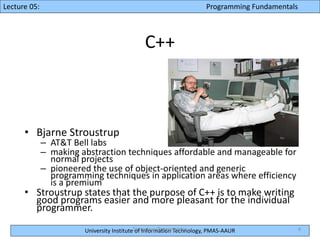
• Bjarne Stroustrup
– AT&T Bell labs
– making abstraction techniques affordable and manageable for
normal projects
– pioneered the use of object-oriented and generic
programming techniques in application areas where efficiency
is a premium
• Stroustrup states that the purpose of C++ is to make writing
good programs easier and more pleasant for the individual
programmer.
8Stroustrup/Programming
University Institute of Information Technology, PMAS-AAUR
Lecture 05: Programming Fundamentals
9
C++
• C++ programs
– Built from pieces called classes and functions
• C++ standard library
– Rich collections of existing classes and functions
• “Building block approach” to creating
programs
– “Software reuse”
University Institute of Information Technology, PMAS-AAUR
Lecture 05: Programming Fundamentals
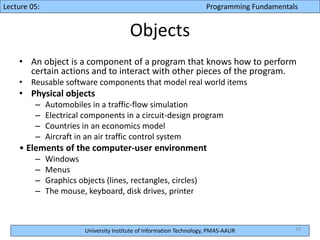
Objects
• An object is a component of a program that knows how to perform
certain actions and to interact with other pieces of the program.
• Reusable software components that model real world items
• Physical objects
– Automobiles in a traffic-flow simulation
– Electrical components in a circuit-design program
– Countries in an economics model
– Aircraft in an air traffic control system
• Elements of the computer-user environment
– Windows
– Menus
– Graphics objects (lines, rectangles, circles)
– The mouse, keyboard, disk drives, printer
10
University Institute of Information Technology, PMAS-AAUR
Lecture 05: Programming Fundamentals
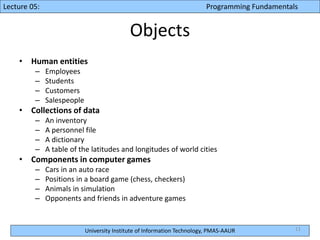
Objects
• Human entities
– Employees
– Students
– Customers
– Salespeople
• Collections of data
– An inventory
– A personnel file
– A dictionary
– A table of the latitudes and longitudes of world cities
• Components in computer games
– Cars in an auto race
– Positions in a board game (chess, checkers)
– Animals in simulation
– Opponents and friends in adventure games
11
University Institute of Information Technology, PMAS-AAUR
Lecture 05: Programming Fundamentals
12
Object Technology
• Objects
– More understandable, better organized and easier
to maintain than procedural programming
– Any noun can be represented as an object
University Institute of Information Technology, PMAS-AAUR
Lecture 05: Programming Fundamentals
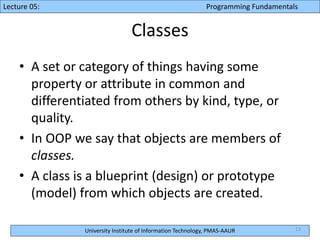
Classes
• A set or category of things having some
property or attribute in common and
differentiated from others by kind, type, or
quality.
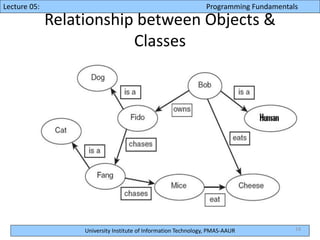
• In OOP we say that objects are members of
classes.
• A class is a blueprint (design) or prototype
(model) from which objects are created.
13
University Institute of Information Technology, PMAS-AAUR
Lecture 05: Programming Fundamentals
Relationship between Objects &
Classes
14
University Institute of Information Technology, PMAS-AAUR
Lecture 05: Programming Fundamentals
15
Basics of a Typical C++ Environment
Phases of C++ Programs:
1. Edit
2. Preprocess
3. Compile
4. Link
5. Load
6. Execute
Loader
Primary
Memory
Program is created in
the editor and stored
on disk.
Preprocessor program
processes the code.
Loader puts program
in memory.
CPU takes each
instruction and
executes it, possibly
storing new data
values as the program
executes.
Compiler
Compiler creates
object code and stores
it on disk.
Linker links the object
code with the libraries,
creates a.out and
stores it on disk
Editor
Preprocessor
Linker
CPU
Primary
Memory
.
.
.
.
.
.
.
.
.
.
.
.
Disk
Disk
Disk
Disk
Disk
University Institute of Information Technology, PMAS-AAUR
Lecture 05: Programming Fundamentals
16
ASK Question if don’t
understand
Jo samajh me na aae tuuuuu
pochoooooo
University Institute of Information Technology, PMAS-AAUR
Lecture 05: Programming Fundamentals
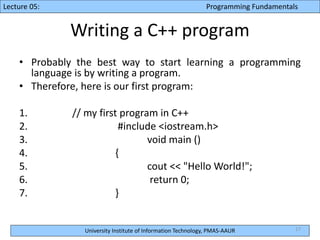
Writing a C++ program
• Probably the best way to start learning a programming
language is by writing a program.
• Therefore, here is our first program:
1. // my first program in C++
2. #include <iostream.h>
3. void main ()
4. {
5. cout << "Hello World!";
6. return 0;
7. }
17
University Institute of Information Technology, PMAS-AAUR
Lecture 05: Programming Fundamentals
Writing a C++ program
– // my first program in C++
• This is a comment line.
• All lines beginning with two slash signs (//) are
considered comments and do not have any effect
on the behavior of the program.
• The programmer can use them to include short
explanations or observations within the source
code itself.
• In this case, the line is a brief description of what
our program is.
18
University Institute of Information Technology, PMAS-AAUR
Lecture 05: Programming Fundamentals
19
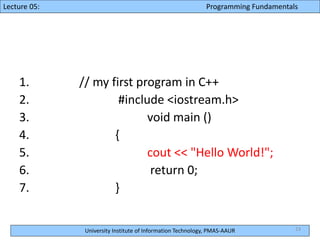
1. // my first program in C++
2. #include <iostream.h>
3. void main ()
4. {
5. cout << "Hello World!";
6. return 0;
7. }
University Institute of Information Technology, PMAS-AAUR
Lecture 05: Programming Fundamentals
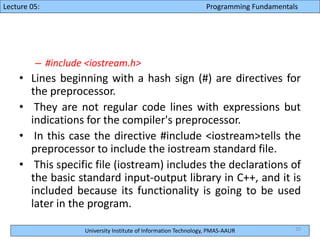
– #include <iostream.h>
• Lines beginning with a hash sign (#) are directives for
the preprocessor.
• They are not regular code lines with expressions but
indications for the compiler's preprocessor.
• In this case the directive #include <iostream>tells the
preprocessor to include the iostream standard file.
• This specific file (iostream) includes the declarations of
the basic standard input-output library in C++, and it is
included because its functionality is going to be used
later in the program.
20
University Institute of Information Technology, PMAS-AAUR
Lecture 05: Programming Fundamentals
21
1. // my first program in C++
2. #include <iostream.h>
3. void main ()
4. {
5. cout << "Hello World!";
6. return 0;
7. }
University Institute of Information Technology, PMAS-AAUR
Lecture 05: Programming Fundamentals
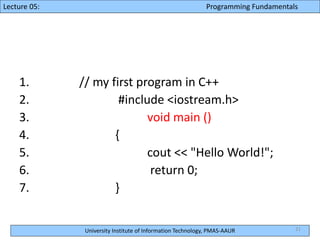
– int main ()
• This line corresponds to the beginning of the definition of
the main function.
• The main function is the point by where all C++ programs
start their execution, independently of its location within
the source code.
• It does not matter whether there are other functions with
other names defined before or after it - the instructions
contained within this function's definition will always be
the first ones to be executed in any C++ program.
• For that same reason, it is essential that all C++ programs
have a main function.
22
University Institute of Information Technology, PMAS-AAUR
Lecture 05: Programming Fundamentals
23
1. // my first program in C++
2. #include <iostream.h>
3. void main ()
4. {
5. cout << "Hello World!";
6. return 0;
7. }
University Institute of Information Technology, PMAS-AAUR
Lecture 05: Programming Fundamentals
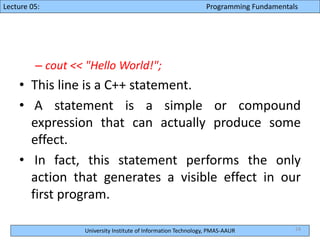
– cout << "Hello World!";
• This line is a C++ statement.
• A statement is a simple or compound
expression that can actually produce some
effect.
• In fact, this statement performs the only
action that generates a visible effect in our
first program.
24
University Institute of Information Technology, PMAS-AAUR
Lecture 05: Programming Fundamentals
25
1. // my first program in C++
2. #include <iostream.h>
3. void main ()
4. {
5. cout << "Hello World!";
6. return 0;
7. }
University Institute of Information Technology, PMAS-AAUR
Lecture 05: Programming Fundamentals
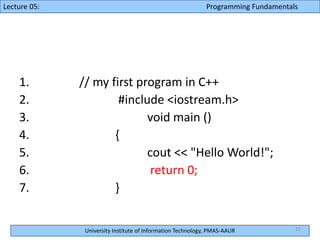
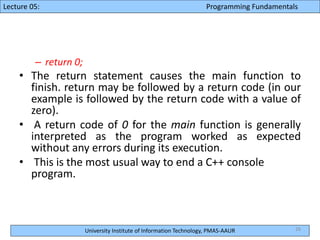
– return 0;
• The return statement causes the main function to
finish. return may be followed by a return code (in our
example is followed by the return code with a value of
zero).
• A return code of 0 for the main function is generally
interpreted as the program worked as expected
without any errors during its execution.
• This is the most usual way to end a C++ console
program.
26
University Institute of Information Technology, PMAS-AAUR
Lecture 05: Programming Fundamentals
27
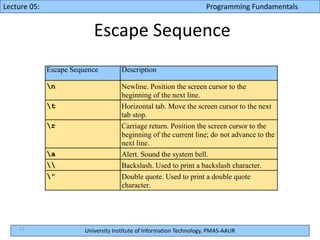
Escape Sequence
Escape Sequence Description
n Newline. Position the screen cursor to the
beginning of the next line.
t Horizontal tab. Move the screen cursor to the next
tab stop.
r Carriage return. Position the screen cursor to the
beginning of the current line; do not advance to the
next line.
a Alert. Sound the system bell.
 Backslash. Used to print a backslash character.
" Double quote. Used to print a double quote
character.
University Institute of Information Technology, PMAS-AAUR
Lecture 05: Programming Fundamentals
Programming Practice
• Write a simple program to Display your name
and Age.
28

Introduction to Programming

  • 1.
    University Institute ofInformation Technology, PMAS-AAUR Lecture 05: Programming Fundamentals Introduction to Programming Lecture No. 5 1
  • 2.
    University Institute ofInformation Technology, PMAS-AAUR Lecture 05: Programming Fundamentals What is a Programming Language? • A tool for instructing machines • A notation for algorithms • A means for communication among programmers • A tool for experimentation • A means for controlling computerized devices • A way of expressing relationships among concepts • A means for expressing high-level designs • All of the above! – And more 2Stroustrup/Programming
  • 3.
    University Institute ofInformation Technology, PMAS-AAUR Lecture 05: Programming Fundamentals 3 Programming Innovations • Three major innovations in programming have been devised to cope with the problem of complexity. They are – Object-oriented programming (OOP) – The Unified Modeling Language (UML) – Improved software development processes
  • 4.
    University Institute ofInformation Technology, PMAS-AAUR Lecture 05: Programming Fundamentals Object Oriented Programming • a programming methodology based on objects, instead of just functions and procedures • A computer language can be said to be Object Oriented if it provides support for the following: – Class – Object – Encapsulation – Inheritance – Polymorphism 4
  • 5.
    University Institute ofInformation Technology, PMAS-AAUR Lecture 05: Programming Fundamentals Unified Modeling Language (UML) • The Unified Modeling Language (UML) is a graphical language consisting of many kinds of diagrams. • It helps program analysts figure out what a program should do, and helps programmers design and understand how a program works. • The UML is a powerful tool that can make programming easier and more effective. 5
  • 6.
    University Institute ofInformation Technology, PMAS-AAUR Lecture 05: Programming Fundamentals 6 History of C and C++ • History of C – Evolved from two other programming languages • BCPL and B – “Typeless” languages – Dennis Ritchie (Bell Laboratories) • Added data typing, other features – Development language of UNIX – Hardware independent • Portable programs – 1989: ANSI standard – 1990: ANSI and ISO standard published • ANSI/ISO 9899: 1990
  • 7.
    University Institute ofInformation Technology, PMAS-AAUR Lecture 05: Programming Fundamentals 7 History of C and C++ • History of C++ – Extension of C – Early 1980s: Bjarne Stroustrup (Bell Laboratories) – “Spruces up” C – Provides capabilities for object-oriented programming • Objects: reusable software components – Model items in real world • Object-oriented programs – Easy to understand, correct and modify – Hybrid language • C-like style • Object-oriented style • Both
  • 8.
    University Institute ofInformation Technology, PMAS-AAUR Lecture 05: Programming Fundamentals C++ • Bjarne Stroustrup – AT&T Bell labs – making abstraction techniques affordable and manageable for normal projects – pioneered the use of object-oriented and generic programming techniques in application areas where efficiency is a premium • Stroustrup states that the purpose of C++ is to make writing good programs easier and more pleasant for the individual programmer. 8Stroustrup/Programming
  • 9.
    University Institute ofInformation Technology, PMAS-AAUR Lecture 05: Programming Fundamentals 9 C++ • C++ programs – Built from pieces called classes and functions • C++ standard library – Rich collections of existing classes and functions • “Building block approach” to creating programs – “Software reuse”
  • 10.
    University Institute ofInformation Technology, PMAS-AAUR Lecture 05: Programming Fundamentals Objects • An object is a component of a program that knows how to perform certain actions and to interact with other pieces of the program. • Reusable software components that model real world items • Physical objects – Automobiles in a traffic-flow simulation – Electrical components in a circuit-design program – Countries in an economics model – Aircraft in an air traffic control system • Elements of the computer-user environment – Windows – Menus – Graphics objects (lines, rectangles, circles) – The mouse, keyboard, disk drives, printer 10
  • 11.
    University Institute ofInformation Technology, PMAS-AAUR Lecture 05: Programming Fundamentals Objects • Human entities – Employees – Students – Customers – Salespeople • Collections of data – An inventory – A personnel file – A dictionary – A table of the latitudes and longitudes of world cities • Components in computer games – Cars in an auto race – Positions in a board game (chess, checkers) – Animals in simulation – Opponents and friends in adventure games 11
  • 12.
    University Institute ofInformation Technology, PMAS-AAUR Lecture 05: Programming Fundamentals 12 Object Technology • Objects – More understandable, better organized and easier to maintain than procedural programming – Any noun can be represented as an object
  • 13.
    University Institute ofInformation Technology, PMAS-AAUR Lecture 05: Programming Fundamentals Classes • A set or category of things having some property or attribute in common and differentiated from others by kind, type, or quality. • In OOP we say that objects are members of classes. • A class is a blueprint (design) or prototype (model) from which objects are created. 13
  • 14.
    University Institute ofInformation Technology, PMAS-AAUR Lecture 05: Programming Fundamentals Relationship between Objects & Classes 14
  • 15.
    University Institute ofInformation Technology, PMAS-AAUR Lecture 05: Programming Fundamentals 15 Basics of a Typical C++ Environment Phases of C++ Programs: 1. Edit 2. Preprocess 3. Compile 4. Link 5. Load 6. Execute Loader Primary Memory Program is created in the editor and stored on disk. Preprocessor program processes the code. Loader puts program in memory. CPU takes each instruction and executes it, possibly storing new data values as the program executes. Compiler Compiler creates object code and stores it on disk. Linker links the object code with the libraries, creates a.out and stores it on disk Editor Preprocessor Linker CPU Primary Memory . . . . . . . . . . . . Disk Disk Disk Disk Disk
  • 16.
    University Institute ofInformation Technology, PMAS-AAUR Lecture 05: Programming Fundamentals 16 ASK Question if don’t understand Jo samajh me na aae tuuuuu pochoooooo
  • 17.
    University Institute ofInformation Technology, PMAS-AAUR Lecture 05: Programming Fundamentals Writing a C++ program • Probably the best way to start learning a programming language is by writing a program. • Therefore, here is our first program: 1. // my first program in C++ 2. #include <iostream.h> 3. void main () 4. { 5. cout << "Hello World!"; 6. return 0; 7. } 17
  • 18.
    University Institute ofInformation Technology, PMAS-AAUR Lecture 05: Programming Fundamentals Writing a C++ program – // my first program in C++ • This is a comment line. • All lines beginning with two slash signs (//) are considered comments and do not have any effect on the behavior of the program. • The programmer can use them to include short explanations or observations within the source code itself. • In this case, the line is a brief description of what our program is. 18
  • 19.
    University Institute ofInformation Technology, PMAS-AAUR Lecture 05: Programming Fundamentals 19 1. // my first program in C++ 2. #include <iostream.h> 3. void main () 4. { 5. cout << "Hello World!"; 6. return 0; 7. }
  • 20.
    University Institute ofInformation Technology, PMAS-AAUR Lecture 05: Programming Fundamentals – #include <iostream.h> • Lines beginning with a hash sign (#) are directives for the preprocessor. • They are not regular code lines with expressions but indications for the compiler's preprocessor. • In this case the directive #include <iostream>tells the preprocessor to include the iostream standard file. • This specific file (iostream) includes the declarations of the basic standard input-output library in C++, and it is included because its functionality is going to be used later in the program. 20
  • 21.
    University Institute ofInformation Technology, PMAS-AAUR Lecture 05: Programming Fundamentals 21 1. // my first program in C++ 2. #include <iostream.h> 3. void main () 4. { 5. cout << "Hello World!"; 6. return 0; 7. }
  • 22.
    University Institute ofInformation Technology, PMAS-AAUR Lecture 05: Programming Fundamentals – int main () • This line corresponds to the beginning of the definition of the main function. • The main function is the point by where all C++ programs start their execution, independently of its location within the source code. • It does not matter whether there are other functions with other names defined before or after it - the instructions contained within this function's definition will always be the first ones to be executed in any C++ program. • For that same reason, it is essential that all C++ programs have a main function. 22
  • 23.
    University Institute ofInformation Technology, PMAS-AAUR Lecture 05: Programming Fundamentals 23 1. // my first program in C++ 2. #include <iostream.h> 3. void main () 4. { 5. cout << "Hello World!"; 6. return 0; 7. }
  • 24.
    University Institute ofInformation Technology, PMAS-AAUR Lecture 05: Programming Fundamentals – cout << "Hello World!"; • This line is a C++ statement. • A statement is a simple or compound expression that can actually produce some effect. • In fact, this statement performs the only action that generates a visible effect in our first program. 24
  • 25.
    University Institute ofInformation Technology, PMAS-AAUR Lecture 05: Programming Fundamentals 25 1. // my first program in C++ 2. #include <iostream.h> 3. void main () 4. { 5. cout << "Hello World!"; 6. return 0; 7. }
  • 26.
    University Institute ofInformation Technology, PMAS-AAUR Lecture 05: Programming Fundamentals – return 0; • The return statement causes the main function to finish. return may be followed by a return code (in our example is followed by the return code with a value of zero). • A return code of 0 for the main function is generally interpreted as the program worked as expected without any errors during its execution. • This is the most usual way to end a C++ console program. 26
  • 27.
    University Institute ofInformation Technology, PMAS-AAUR Lecture 05: Programming Fundamentals 27 Escape Sequence Escape Sequence Description n Newline. Position the screen cursor to the beginning of the next line. t Horizontal tab. Move the screen cursor to the next tab stop. r Carriage return. Position the screen cursor to the beginning of the current line; do not advance to the next line. a Alert. Sound the system bell. Backslash. Used to print a backslash character. " Double quote. Used to print a double quote character.
  • 28.
    University Institute ofInformation Technology, PMAS-AAUR Lecture 05: Programming Fundamentals Programming Practice • Write a simple program to Display your name and Age. 28