Java Virtual Machine
and
Runtime Environment
Basic Concept
 When you write a program in C++ it is known as
source code.
 The C++ compiler converts this source code into the
machine code of underlying system (e.g. Windows)
 If you want to run that code on Linux you need to
recompile it with a Linux based compiler.
 Due to the difference in compilers, sometimes you
need to modify your code.
The Concept of WORA
 Java introduced WORA: Write Once Run Anywhere
 When you write a java program it is known as the source code of
java.
 The java compiler compiles this source code for a software system
known as JVM
 This compiled code is known as ‘Byte Code’
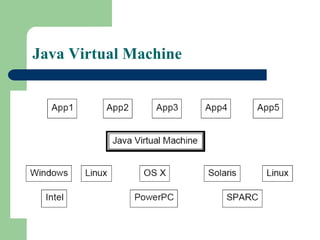
 We have different JVMs for different systems (such as JVM for
Windows , JVM for Linux etc).
 When we run our program the JVM interprets translates) the
compiled program into the language understood by the underlying
system.
 So we write our code once and the JVM runs it everywhere
according to the underlying system.
Byte Code
 Java programs (Source code) are compiled
into a form called Java bytecodes.
 The Java compiler reads Java language
source (.java) files, translates the source into
Java bytecodes, and places the bytecodes
into class (.class) files.
 The compiler generates one class file for
each class contained in java source file.
Java Virtual Machine
 The central part of java platform is java virtual
machine
 Java bytecode executes by special software known
as a "virtual machine".
 Most programming languages compile source code
directly into machine code, suitable for execution
 The difference with Java is that it uses bytecode - a
special type of machine code.
 The JVM executes Java bytecodes, so Java
bytecodes can be thought of as the machine
language of the JVM.
Java Virtual Machine
Java Runtime Environment(JRE)
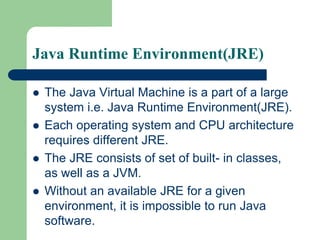
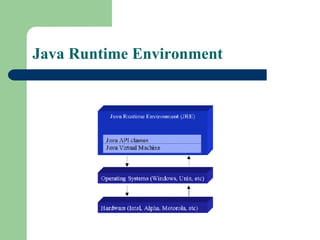
 The Java Virtual Machine is a part of a large
system i.e. Java Runtime Environment(JRE).
 Each operating system and CPU architecture
requires different JRE.
 The JRE consists of set of built- in classes,
as well as a JVM.
 Without an available JRE for a given
environment, it is impossible to run Java
software.
Java Runtime Environment
First Java Program
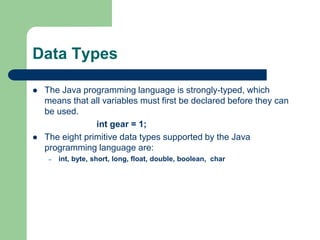
Data Types
 The Java programming language is strongly-typed, which
means that all variables must first be declared before they can
be used.
int gear = 1;
 The eight primitive data types supported by the Java
programming language are:
– int, byte, short, long, float, double, boolean, char
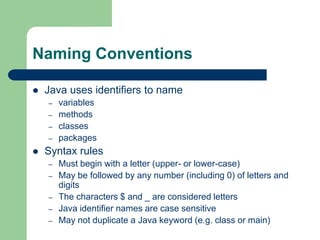
Naming Conventions
 Java uses identifiers to name
– variables
– methods
– classes
– packages
 Syntax rules
– Must begin with a letter (upper- or lower-case)
– May be followed by any number (including 0) of letters and
digits
– The characters $ and _ are considered letters
– Java identifier names are case sensitive
– May not duplicate a Java keyword (e.g. class or main)
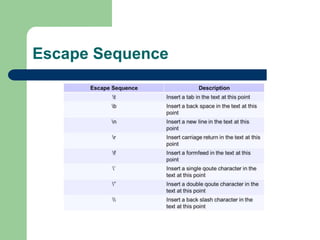
Escape Sequence
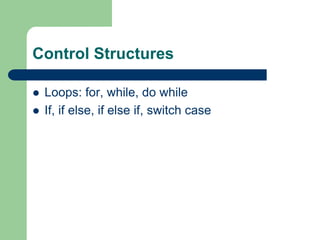
Control Structures
 Loops: for, while, do while
 If, if else, if else if, switch case
Class and object
 Class is a user defined data type.
 Object is variable of a class
– Data Members and Methods
 Constructor
 Method Overloading
 Inheritance
 Method Overriding

introduction to java

  • 1.
  • 2.
    Basic Concept  Whenyou write a program in C++ it is known as source code.  The C++ compiler converts this source code into the machine code of underlying system (e.g. Windows)  If you want to run that code on Linux you need to recompile it with a Linux based compiler.  Due to the difference in compilers, sometimes you need to modify your code.
  • 3.
    The Concept ofWORA  Java introduced WORA: Write Once Run Anywhere  When you write a java program it is known as the source code of java.  The java compiler compiles this source code for a software system known as JVM  This compiled code is known as ‘Byte Code’  We have different JVMs for different systems (such as JVM for Windows , JVM for Linux etc).  When we run our program the JVM interprets translates) the compiled program into the language understood by the underlying system.  So we write our code once and the JVM runs it everywhere according to the underlying system.
  • 5.
    Byte Code  Javaprograms (Source code) are compiled into a form called Java bytecodes.  The Java compiler reads Java language source (.java) files, translates the source into Java bytecodes, and places the bytecodes into class (.class) files.  The compiler generates one class file for each class contained in java source file.
  • 6.
    Java Virtual Machine The central part of java platform is java virtual machine  Java bytecode executes by special software known as a "virtual machine".  Most programming languages compile source code directly into machine code, suitable for execution  The difference with Java is that it uses bytecode - a special type of machine code.  The JVM executes Java bytecodes, so Java bytecodes can be thought of as the machine language of the JVM.
  • 7.
  • 8.
    Java Runtime Environment(JRE) The Java Virtual Machine is a part of a large system i.e. Java Runtime Environment(JRE).  Each operating system and CPU architecture requires different JRE.  The JRE consists of set of built- in classes, as well as a JVM.  Without an available JRE for a given environment, it is impossible to run Java software.
  • 9.
  • 10.
  • 11.
    Data Types  TheJava programming language is strongly-typed, which means that all variables must first be declared before they can be used. int gear = 1;  The eight primitive data types supported by the Java programming language are: – int, byte, short, long, float, double, boolean, char
  • 12.
    Naming Conventions  Javauses identifiers to name – variables – methods – classes – packages  Syntax rules – Must begin with a letter (upper- or lower-case) – May be followed by any number (including 0) of letters and digits – The characters $ and _ are considered letters – Java identifier names are case sensitive – May not duplicate a Java keyword (e.g. class or main)
  • 13.
  • 14.
    Control Structures  Loops:for, while, do while  If, if else, if else if, switch case
  • 15.
    Class and object Class is a user defined data type.  Object is variable of a class – Data Members and Methods  Constructor  Method Overloading  Inheritance  Method Overriding