Fundamentals of Web Development - 2nd Ed.Randy Connolly and Ricardo Hoar
Fundamentals of Web DevelopmentRandy Connolly and Ricardo Hoar
© 2017 Pearson
http://www.funwebdev.com
Introduction to
HTML
Chapter 3
Fundamentals of Web Development - 2nd Ed.Randy Connolly and Ricardo Hoar
Chapter 3
1 2
3 4
5 6
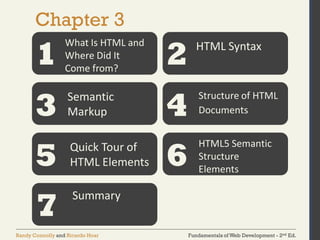
What Is HTML and
Where Did It
Come from?
HTML Syntax
Semantic
Markup
Structure of HTML
Documents
Quick Tour of
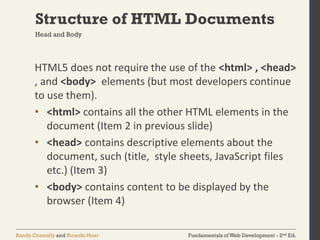
HTML Elements
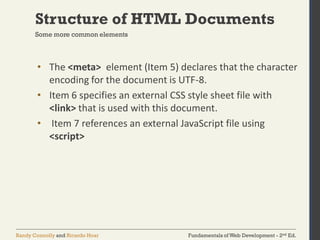
HTML5 Semantic
Structure
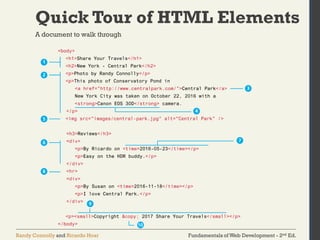
Elements
7
Summary
Fundamentals of Web Development - 2nd Ed.Randy Connolly and Ricardo Hoar
Chapter 3
1 2
3 4
5 6
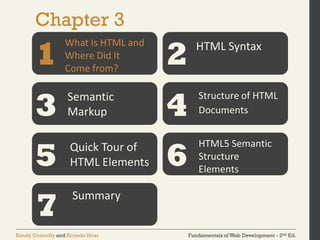
What Is HTML and
Where Did It
Come from?
HTML Syntax
Semantic
Markup
Structure of HTML
Documents
Quick Tour of
HTML Elements
HTML5 Semantic
Structure
Elements
7
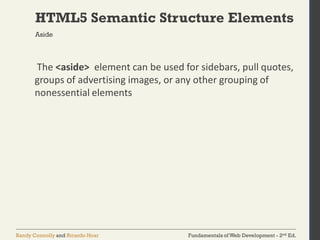
Summary
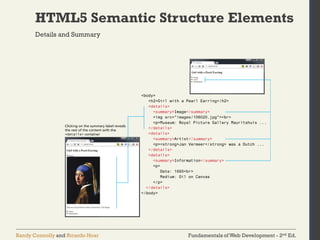
Fundamentals of Web Development - 2nd Ed.Randy Connolly and Ricardo Hoar
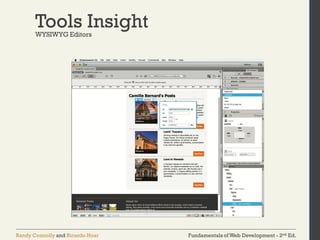
What Is HTML andWhere Did It Come from?
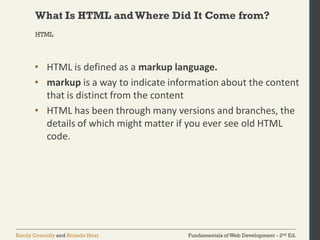
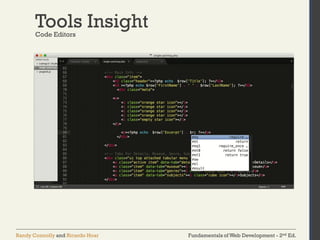
• HTML is defined as a markup language.
• markup is a way to indicate information about the content
that is distinct from the content
• HTML has been through many versions and branches, the
details of which might matter if you ever see old HTML
code.
HTML
Fundamentals of Web Development - 2nd Ed.Randy Connolly and Ricardo Hoar
What Is HTML andWhere Did It Come from?
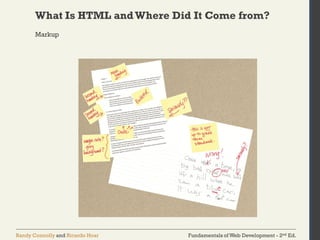
Markup
Fundamentals of Web Development - 2nd Ed.Randy Connolly and Ricardo Hoar
What Is HTML andWhere Did It Come from?
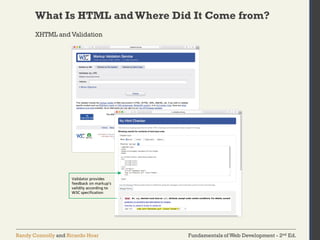
XHTML and Validation
Fundamentals of Web Development - 2nd Ed.Randy Connolly and Ricardo Hoar
What Is HTML andWhere Did It Come from?
• Widely implemented in modern browsers
• The current W3C recommendation for web development
• Still relatively new and not always taught.
HTML 5
Fundamentals of Web Development - 2nd Ed.Randy Connolly and Ricardo Hoar
Chapter 3
1 2
3 4
5 6
What Is HTML and
Where Did It
Come from?
HTML Syntax
Semantic
Markup
Structure of HTML
Documents
Quick Tour of
HTML Elements
HTML5 Semantic
Structure
Elements
7
Summary
Fundamentals of Web Development - 2nd Ed.Randy Connolly and Ricardo Hoar
HTML Syntax
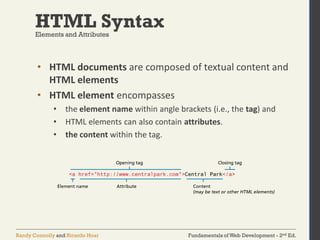
• HTML documents are composed of textual content and
HTML elements
• HTML element encompasses
• the element name within angle brackets (i.e., the tag) and
• HTML elements can also contain attributes.
• the content within the tag.
Elements and Attributes
Fundamentals of Web Development - 2nd Ed.Randy Connolly and Ricardo Hoar
HTML Syntax
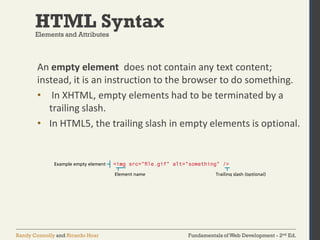
An empty element does not contain any text content;
instead, it is an instruction to the browser to do something.
• In XHTML, empty elements had to be terminated by a
trailing slash.
• In HTML5, the trailing slash in empty elements is optional.
Elements and Attributes
Fundamentals of Web Development - 2nd Ed.Randy Connolly and Ricardo Hoar
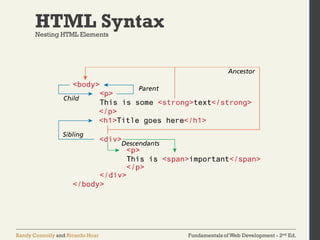
HTML SyntaxNesting HTML Elements
Fundamentals of Web Development - 2nd Ed.Randy Connolly and Ricardo Hoar
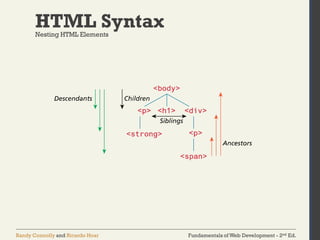
HTML SyntaxNesting HTML Elements
Fundamentals of Web Development - 2nd Ed.Randy Connolly and Ricardo Hoar
HTML SyntaxNesting HTML Elements
Fundamentals of Web Development - 2nd Ed.Randy Connolly and Ricardo Hoar
HTML SyntaxNesting HTML Elements
Fundamentals of Web Development - 2nd Ed.Randy Connolly and Ricardo Hoar
Chapter 3
1 2
3 4
5 6
What Is HTML and
Where Did It
Come from?
HTML Syntax
Semantic
Markup
Structure of HTML
Documents
Quick Tour of
HTML Elements
HTML5 Semantic
Structure
Elements
7
Summary
Fundamentals of Web Development - 2nd Ed.Randy Connolly and Ricardo Hoar
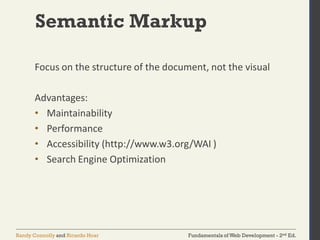
Semantic Markup
Focus on the structure of the document, not the visual
Advantages:
• Maintainability
• Performance
• Accessibility (http://www.w3.org/WAI )
• Search Engine Optimization
Fundamentals of Web Development - 2nd Ed.Randy Connolly and Ricardo Hoar
Chapter 3
1 2
3 4
5 6
What Is HTML and
Where Did It
Come from?
HTML Syntax
Semantic
Markup
Structure of HTML
Documents
Quick Tour of
HTML Elements
HTML5 Semantic
Structure
Elements
7
Summary
Fundamentals of Web Development - 2nd Ed.Randy Connolly and Ricardo Hoar
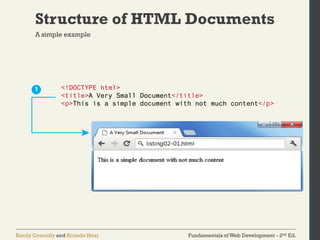
Structure of HTML Documents
A simple example
Fundamentals of Web Development - 2nd Ed.Randy Connolly and Ricardo Hoar
Structure of HTML Documents
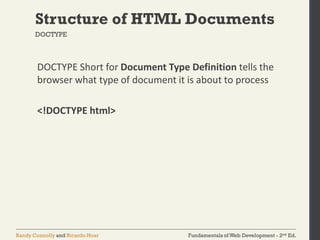
DOCTYPE Short for Document Type Definition tells the
browser what type of document it is about to process
<!DOCTYPE html>
DOCTYPE
Fundamentals of Web Development - 2nd Ed.Randy Connolly and Ricardo Hoar
Structure of HTML Documents
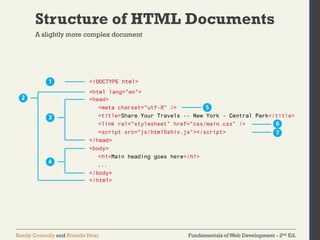
A slightly more complex document
Fundamentals of Web Development - 2nd Ed.Randy Connolly and Ricardo Hoar
Structure of HTML Documents
Head and Body
HTML5 does not require the use of the <html> , <head>
, and <body> elements (but most developers continue
to use them).
• <html> contains all the other HTML elements in the
document (Item 2 in previous slide)
• <head> contains descriptive elements about the
document, such (title, style sheets, JavaScript files
etc.) (Item 3)
• <body> contains content to be displayed by the
browser (Item 4)
Fundamentals of Web Development - 2nd Ed.Randy Connolly and Ricardo Hoar
Structure of HTML Documents
• The <meta> element (Item 5) declares that the character
encoding for the document is UTF-8.
• Item 6 specifies an external CSS style sheet file with
<link> that is used with this document.
• Item 7 references an external JavaScript file using
<script>
Some more common elements
Fundamentals of Web Development - 2nd Ed.Randy Connolly and Ricardo Hoar
Chapter 3
1 2
3 4
5 6
What Is HTML and
Where Did It
Come from?
HTML Syntax
Semantic
Markup
Structure of HTML
Documents
Quick Tour of
HTML Elements
HTML5 Semantic
Structure
Elements
7
Summary
Fundamentals of Web Development - 2nd Ed.Randy Connolly and Ricardo Hoar
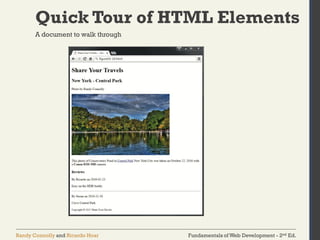
Quick Tour of HTML Elements
A document to walk through
Fundamentals of Web Development - 2nd Ed.Randy Connolly and Ricardo Hoar
Quick Tour of HTML Elements
A document to walk through
Fundamentals of Web Development - 2nd Ed.Randy Connolly and Ricardo Hoar
Quick Tour of HTML Elements
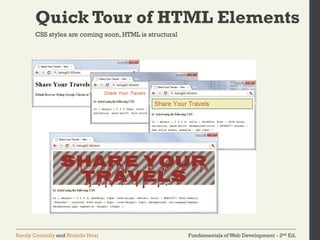
CSS styles are coming soon,HTML is structural
Fundamentals of Web Development - 2nd Ed.Randy Connolly and Ricardo Hoar
Quick Tour of HTML Elements
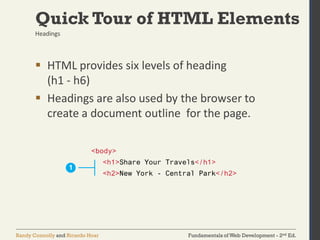
 HTML provides six levels of heading
(h1 - h6)
 Headings are also used by the browser to
create a document outline for the page.
Headings
Fundamentals of Web Development - 2nd Ed.Randy Connolly and Ricardo Hoar
Quick Tour of HTML Elements
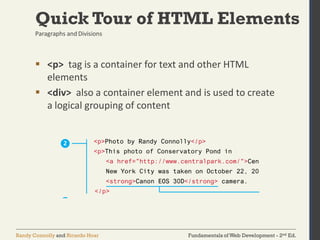
 <p> tag is a container for text and other HTML
elements
 <div> also a container element and is used to create
a logical grouping of content
Paragraphs and Divisions
Fundamentals of Web Development - 2nd Ed.Randy Connolly and Ricardo Hoar
Quick Tour of HTML Elements
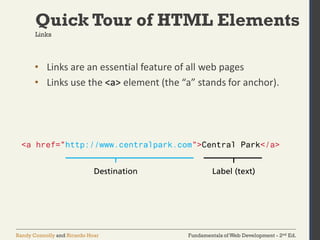
• Links are an essential feature of all web pages
• Links use the <a> element (the “a” stands for anchor).
Links
Fundamentals of Web Development - 2nd Ed.Randy Connolly and Ricardo Hoar
Quick Tour of HTML Elements
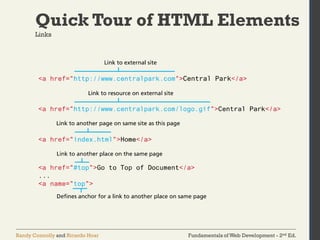
Links
Fundamentals of Web Development - 2nd Ed.Randy Connolly and Ricardo Hoar
Quick Tour of HTML Elements
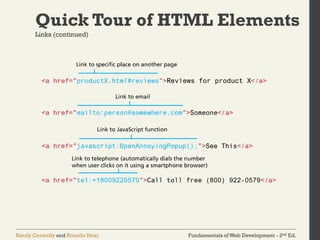
Links (continued)
Fundamentals of Web Development - 2nd Ed.Randy Connolly and Ricardo Hoar
Quick Tour of HTML Elements
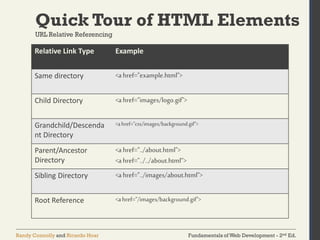
URL Relative Referencing
Relative Link Type Example
Same directory <ahref="example.html">
Child Directory <ahref="images/logo.gif">
Grandchild/Descenda
nt Directory
<ahref="css/images/background.gif">
Parent/Ancestor
Directory
<ahref="../about.html">
<ahref="../../about.html”>
Sibling Directory <ahref="../images/about.html">
Root Reference <ahref="/images/background.gif">
Fundamentals of Web Development - 2nd Ed.Randy Connolly and Ricardo Hoar
Quick Tour of HTML Elements
Inline Text Elements … they do not disrupt the flow
• <a>
• <abbr>
• <br>
• <cite>
• <code>
• <em>
• <mark>
• <small>
• <span>
• <strong>
• <time>
Fundamentals of Web Development - 2nd Ed.Randy Connolly and Ricardo Hoar
Quick Tour of HTML Elements
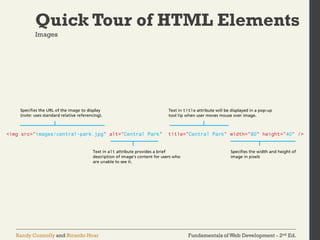
Images
Fundamentals of Web Development - 2nd Ed.Randy Connolly and Ricardo Hoar
Quick Tour of HTML Elements
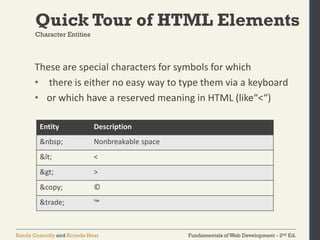
These are special characters for symbols for which
• there is either no easy way to type them via a keyboard
• or which have a reserved meaning in HTML (like“<“)
Character Entities
Entity Description
&nbsp; Nonbreakable space
&lt; <
&gt; >
&copy; ©
&trade; ™
Fundamentals of Web Development - 2nd Ed.Randy Connolly and Ricardo Hoar
Quick Tour of HTML Elements
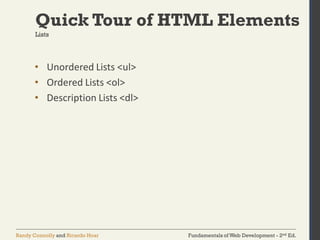
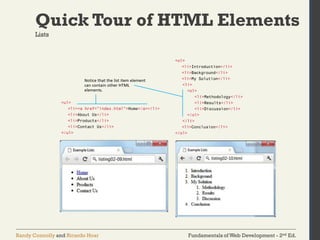
• Unordered Lists <ul>
• Ordered Lists <ol>
• Description Lists <dl>
Lists
Fundamentals of Web Development - 2nd Ed.Randy Connolly and Ricardo Hoar
Quick Tour of HTML Elements
Lists
Fundamentals of Web Development - 2nd Ed.Randy Connolly and Ricardo Hoar
Chapter 3
1 2
3 4
5 6
What Is HTML and
Where Did It
Come from?
HTML Syntax
Semantic
Markup
Structure of HTML
Documents
Quick Tour of
HTML Elements
HTML5 Semantic
Structure
Elements
7
Summary
Fundamentals of Web Development - 2nd Ed.Randy Connolly and Ricardo Hoar
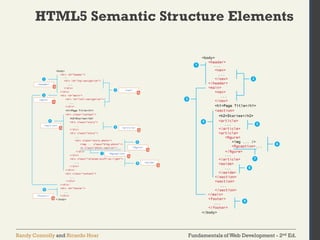
HTML5 Semantic Structure Elements
Fundamentals of Web Development - 2nd Ed.Randy Connolly and Ricardo Hoar
HTML5 Semantic Structure Elements
Header and Footer
Fundamentals of Web Development - 2nd Ed.Randy Connolly and Ricardo Hoar
HTML5 Semantic Structure Elements
Header and Footer
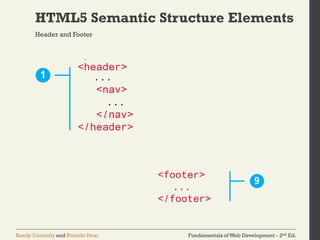
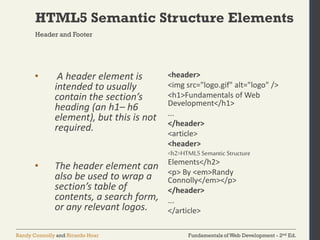
• A header element is
intended to usually
contain the section’s
heading (an h1– h6
element), but this is not
required.
• The header element can
also be used to wrap a
section’s table of
contents, a search form,
or any relevant logos.
<header>
<img src="logo.gif" alt="logo" />
<h1>Fundamentals of Web
Development</h1>
...
</header>
<article>
<header>
<h2>HTML5Semantic Structure
Elements</h2>
<p> By <em>Randy
Connolly</em></p>
</header>
...
</article>
Fundamentals of Web Development - 2nd Ed.Randy Connolly and Ricardo Hoar
HTML5 Semantic Structure Elements
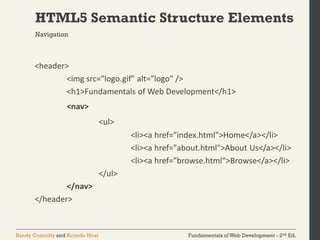
<header>
<img src="logo.gif" alt="logo" />
<h1>Fundamentals of Web Development</h1>
<nav>
<ul>
<li><a href="index.html">Home</a></li>
<li><a href="about.html">About Us</a></li>
<li><a href="browse.html">Browse</a></li>
</ul>
</nav>
</header>
Navigation
Fundamentals of Web Development - 2nd Ed.Randy Connolly and Ricardo Hoar
HTML5 Semantic Structure Elements
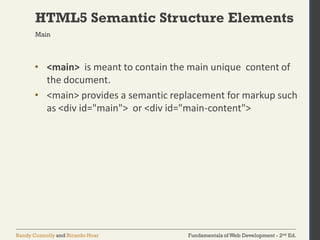
• <main> is meant to contain the main unique content of
the document.
• <main> provides a semantic replacement for markup such
as <div id="main"> or <div id="main-content">
Main
Fundamentals of Web Development - 2nd Ed.Randy Connolly and Ricardo Hoar
HTML5 Semantic Structure Elements
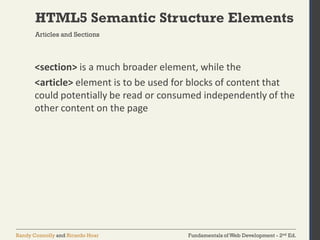
<section> is a much broader element, while the
<article> element is to be used for blocks of content that
could potentially be read or consumed independently of the
other content on the page
Articles and Sections
Fundamentals of Web Development - 2nd Ed.Randy Connolly and Ricardo Hoar
HTML5 Semantic Structure Elements
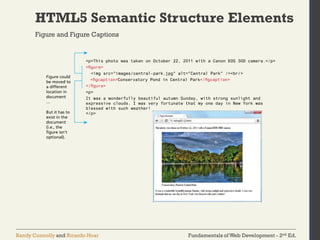
Figure and Figure Captions
Fundamentals of Web Development - 2nd Ed.Randy Connolly and Ricardo Hoar
HTML5 Semantic Structure Elements
The <aside> element can be used for sidebars, pull quotes,
groups of advertising images, or any other grouping of
nonessential elements
Aside
Fundamentals of Web Development - 2nd Ed.Randy Connolly and Ricardo Hoar
HTML5 Semantic Structure Elements
Details and Summary
Fundamentals of Web Development - 2nd Ed.Randy Connolly and Ricardo Hoar
Tools InsightWYSIWYG Editors
Fundamentals of Web Development - 2nd Ed.Randy Connolly and Ricardo Hoar
Tools InsightCode Editors
Fundamentals of Web Development - 2nd Ed.Randy Connolly and Ricardo Hoar
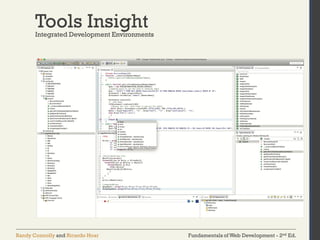
Tools InsightIntegrated Development Environments
Fundamentals of Web Development - 2nd Ed.Randy Connolly and Ricardo Hoar
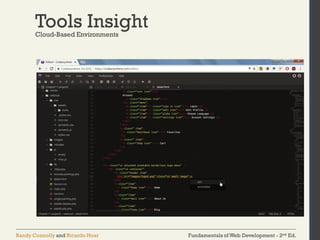
Tools InsightCloud-Based Environments
Fundamentals of Web Development - 2nd Ed.Randy Connolly and Ricardo Hoar
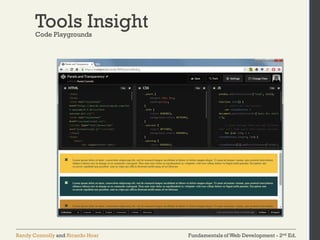
Tools InsightCode Playgrounds
Fundamentals of Web Development - 2nd Ed.Randy Connolly and Ricardo Hoar
Chapter 3
1 2
3 4
5 6
What Is HTML and
Where Did It
Come from?
HTML Syntax
Semantic
Markup
Structure of HTML
Documents
Quick Tour of
HTML Elements
HTML5 Semantic
Structure
Elements
7
Summary
Fundamentals of Web Development - 2nd Ed.Randy Connolly and Ricardo Hoar
Summary
absolute referencing
accessibility
ancestors
body
Cascading Style Sheets
(CSS)
character entity
description lists
descendants
directory
document outline
Document Object Model
Document Type
Definition
empty element
folder
head
HTML attribute
HTML validators
inline HTML elements
maintainability
markup
markup language
ordered lists
pathname
polyfill
quirks mode
Recommendations
relative referencing
root element
root reference
schemas
search engine optimization
semantic HTML
specifications
standards mode
syndication
syntax errors
tags
unordered lists
UTF-8
WHATWG
W3C
XHTML 1.0 Strict
XHTML 1.0 Transitional
Key Terms
Fundamentals of Web Development - 2nd Ed.Randy Connolly and Ricardo Hoar
Questions

Introduction to Html

  • 1.
    Fundamentals of WebDevelopment - 2nd Ed.Randy Connolly and Ricardo Hoar Fundamentals of Web DevelopmentRandy Connolly and Ricardo Hoar © 2017 Pearson http://www.funwebdev.com Introduction to HTML Chapter 3
  • 2.
    Fundamentals of WebDevelopment - 2nd Ed.Randy Connolly and Ricardo Hoar Chapter 3 1 2 3 4 5 6 What Is HTML and Where Did It Come from? HTML Syntax Semantic Markup Structure of HTML Documents Quick Tour of HTML Elements HTML5 Semantic Structure Elements 7 Summary
  • 3.
    Fundamentals of WebDevelopment - 2nd Ed.Randy Connolly and Ricardo Hoar Chapter 3 1 2 3 4 5 6 What Is HTML and Where Did It Come from? HTML Syntax Semantic Markup Structure of HTML Documents Quick Tour of HTML Elements HTML5 Semantic Structure Elements 7 Summary
  • 4.
    Fundamentals of WebDevelopment - 2nd Ed.Randy Connolly and Ricardo Hoar What Is HTML andWhere Did It Come from? • HTML is defined as a markup language. • markup is a way to indicate information about the content that is distinct from the content • HTML has been through many versions and branches, the details of which might matter if you ever see old HTML code. HTML
  • 5.
    Fundamentals of WebDevelopment - 2nd Ed.Randy Connolly and Ricardo Hoar What Is HTML andWhere Did It Come from? Markup
  • 6.
    Fundamentals of WebDevelopment - 2nd Ed.Randy Connolly and Ricardo Hoar What Is HTML andWhere Did It Come from? XHTML and Validation
  • 7.
    Fundamentals of WebDevelopment - 2nd Ed.Randy Connolly and Ricardo Hoar What Is HTML andWhere Did It Come from? • Widely implemented in modern browsers • The current W3C recommendation for web development • Still relatively new and not always taught. HTML 5
  • 8.
    Fundamentals of WebDevelopment - 2nd Ed.Randy Connolly and Ricardo Hoar Chapter 3 1 2 3 4 5 6 What Is HTML and Where Did It Come from? HTML Syntax Semantic Markup Structure of HTML Documents Quick Tour of HTML Elements HTML5 Semantic Structure Elements 7 Summary
  • 9.
    Fundamentals of WebDevelopment - 2nd Ed.Randy Connolly and Ricardo Hoar HTML Syntax • HTML documents are composed of textual content and HTML elements • HTML element encompasses • the element name within angle brackets (i.e., the tag) and • HTML elements can also contain attributes. • the content within the tag. Elements and Attributes
  • 10.
    Fundamentals of WebDevelopment - 2nd Ed.Randy Connolly and Ricardo Hoar HTML Syntax An empty element does not contain any text content; instead, it is an instruction to the browser to do something. • In XHTML, empty elements had to be terminated by a trailing slash. • In HTML5, the trailing slash in empty elements is optional. Elements and Attributes
  • 11.
    Fundamentals of WebDevelopment - 2nd Ed.Randy Connolly and Ricardo Hoar HTML SyntaxNesting HTML Elements
  • 12.
    Fundamentals of WebDevelopment - 2nd Ed.Randy Connolly and Ricardo Hoar HTML SyntaxNesting HTML Elements
  • 13.
    Fundamentals of WebDevelopment - 2nd Ed.Randy Connolly and Ricardo Hoar HTML SyntaxNesting HTML Elements
  • 14.
    Fundamentals of WebDevelopment - 2nd Ed.Randy Connolly and Ricardo Hoar HTML SyntaxNesting HTML Elements
  • 15.
    Fundamentals of WebDevelopment - 2nd Ed.Randy Connolly and Ricardo Hoar Chapter 3 1 2 3 4 5 6 What Is HTML and Where Did It Come from? HTML Syntax Semantic Markup Structure of HTML Documents Quick Tour of HTML Elements HTML5 Semantic Structure Elements 7 Summary
  • 16.
    Fundamentals of WebDevelopment - 2nd Ed.Randy Connolly and Ricardo Hoar Semantic Markup Focus on the structure of the document, not the visual Advantages: • Maintainability • Performance • Accessibility (http://www.w3.org/WAI ) • Search Engine Optimization
  • 17.
    Fundamentals of WebDevelopment - 2nd Ed.Randy Connolly and Ricardo Hoar Chapter 3 1 2 3 4 5 6 What Is HTML and Where Did It Come from? HTML Syntax Semantic Markup Structure of HTML Documents Quick Tour of HTML Elements HTML5 Semantic Structure Elements 7 Summary
  • 18.
    Fundamentals of WebDevelopment - 2nd Ed.Randy Connolly and Ricardo Hoar Structure of HTML Documents A simple example
  • 19.
    Fundamentals of WebDevelopment - 2nd Ed.Randy Connolly and Ricardo Hoar Structure of HTML Documents DOCTYPE Short for Document Type Definition tells the browser what type of document it is about to process <!DOCTYPE html> DOCTYPE
  • 20.
    Fundamentals of WebDevelopment - 2nd Ed.Randy Connolly and Ricardo Hoar Structure of HTML Documents A slightly more complex document
  • 21.
    Fundamentals of WebDevelopment - 2nd Ed.Randy Connolly and Ricardo Hoar Structure of HTML Documents Head and Body HTML5 does not require the use of the <html> , <head> , and <body> elements (but most developers continue to use them). • <html> contains all the other HTML elements in the document (Item 2 in previous slide) • <head> contains descriptive elements about the document, such (title, style sheets, JavaScript files etc.) (Item 3) • <body> contains content to be displayed by the browser (Item 4)
  • 22.
    Fundamentals of WebDevelopment - 2nd Ed.Randy Connolly and Ricardo Hoar Structure of HTML Documents • The <meta> element (Item 5) declares that the character encoding for the document is UTF-8. • Item 6 specifies an external CSS style sheet file with <link> that is used with this document. • Item 7 references an external JavaScript file using <script> Some more common elements
  • 23.
    Fundamentals of WebDevelopment - 2nd Ed.Randy Connolly and Ricardo Hoar Chapter 3 1 2 3 4 5 6 What Is HTML and Where Did It Come from? HTML Syntax Semantic Markup Structure of HTML Documents Quick Tour of HTML Elements HTML5 Semantic Structure Elements 7 Summary
  • 24.
    Fundamentals of WebDevelopment - 2nd Ed.Randy Connolly and Ricardo Hoar Quick Tour of HTML Elements A document to walk through
  • 25.
    Fundamentals of WebDevelopment - 2nd Ed.Randy Connolly and Ricardo Hoar Quick Tour of HTML Elements A document to walk through
  • 26.
    Fundamentals of WebDevelopment - 2nd Ed.Randy Connolly and Ricardo Hoar Quick Tour of HTML Elements CSS styles are coming soon,HTML is structural
  • 27.
    Fundamentals of WebDevelopment - 2nd Ed.Randy Connolly and Ricardo Hoar Quick Tour of HTML Elements  HTML provides six levels of heading (h1 - h6)  Headings are also used by the browser to create a document outline for the page. Headings
  • 28.
    Fundamentals of WebDevelopment - 2nd Ed.Randy Connolly and Ricardo Hoar Quick Tour of HTML Elements  <p> tag is a container for text and other HTML elements  <div> also a container element and is used to create a logical grouping of content Paragraphs and Divisions
  • 29.
    Fundamentals of WebDevelopment - 2nd Ed.Randy Connolly and Ricardo Hoar Quick Tour of HTML Elements • Links are an essential feature of all web pages • Links use the <a> element (the “a” stands for anchor). Links
  • 30.
    Fundamentals of WebDevelopment - 2nd Ed.Randy Connolly and Ricardo Hoar Quick Tour of HTML Elements Links
  • 31.
    Fundamentals of WebDevelopment - 2nd Ed.Randy Connolly and Ricardo Hoar Quick Tour of HTML Elements Links (continued)
  • 32.
    Fundamentals of WebDevelopment - 2nd Ed.Randy Connolly and Ricardo Hoar Quick Tour of HTML Elements URL Relative Referencing Relative Link Type Example Same directory <ahref="example.html"> Child Directory <ahref="images/logo.gif"> Grandchild/Descenda nt Directory <ahref="css/images/background.gif"> Parent/Ancestor Directory <ahref="../about.html"> <ahref="../../about.html”> Sibling Directory <ahref="../images/about.html"> Root Reference <ahref="/images/background.gif">
  • 33.
    Fundamentals of WebDevelopment - 2nd Ed.Randy Connolly and Ricardo Hoar Quick Tour of HTML Elements Inline Text Elements … they do not disrupt the flow • <a> • <abbr> • <br> • <cite> • <code> • <em> • <mark> • <small> • <span> • <strong> • <time>
  • 34.
    Fundamentals of WebDevelopment - 2nd Ed.Randy Connolly and Ricardo Hoar Quick Tour of HTML Elements Images
  • 35.
    Fundamentals of WebDevelopment - 2nd Ed.Randy Connolly and Ricardo Hoar Quick Tour of HTML Elements These are special characters for symbols for which • there is either no easy way to type them via a keyboard • or which have a reserved meaning in HTML (like“<“) Character Entities Entity Description &nbsp; Nonbreakable space &lt; < &gt; > &copy; © &trade; ™
  • 36.
    Fundamentals of WebDevelopment - 2nd Ed.Randy Connolly and Ricardo Hoar Quick Tour of HTML Elements • Unordered Lists <ul> • Ordered Lists <ol> • Description Lists <dl> Lists
  • 37.
    Fundamentals of WebDevelopment - 2nd Ed.Randy Connolly and Ricardo Hoar Quick Tour of HTML Elements Lists
  • 38.
    Fundamentals of WebDevelopment - 2nd Ed.Randy Connolly and Ricardo Hoar Chapter 3 1 2 3 4 5 6 What Is HTML and Where Did It Come from? HTML Syntax Semantic Markup Structure of HTML Documents Quick Tour of HTML Elements HTML5 Semantic Structure Elements 7 Summary
  • 39.
    Fundamentals of WebDevelopment - 2nd Ed.Randy Connolly and Ricardo Hoar HTML5 Semantic Structure Elements
  • 40.
    Fundamentals of WebDevelopment - 2nd Ed.Randy Connolly and Ricardo Hoar HTML5 Semantic Structure Elements Header and Footer
  • 41.
    Fundamentals of WebDevelopment - 2nd Ed.Randy Connolly and Ricardo Hoar HTML5 Semantic Structure Elements Header and Footer • A header element is intended to usually contain the section’s heading (an h1– h6 element), but this is not required. • The header element can also be used to wrap a section’s table of contents, a search form, or any relevant logos. <header> <img src="logo.gif" alt="logo" /> <h1>Fundamentals of Web Development</h1> ... </header> <article> <header> <h2>HTML5Semantic Structure Elements</h2> <p> By <em>Randy Connolly</em></p> </header> ... </article>
  • 42.
    Fundamentals of WebDevelopment - 2nd Ed.Randy Connolly and Ricardo Hoar HTML5 Semantic Structure Elements <header> <img src="logo.gif" alt="logo" /> <h1>Fundamentals of Web Development</h1> <nav> <ul> <li><a href="index.html">Home</a></li> <li><a href="about.html">About Us</a></li> <li><a href="browse.html">Browse</a></li> </ul> </nav> </header> Navigation
  • 43.
    Fundamentals of WebDevelopment - 2nd Ed.Randy Connolly and Ricardo Hoar HTML5 Semantic Structure Elements • <main> is meant to contain the main unique content of the document. • <main> provides a semantic replacement for markup such as <div id="main"> or <div id="main-content"> Main
  • 44.
    Fundamentals of WebDevelopment - 2nd Ed.Randy Connolly and Ricardo Hoar HTML5 Semantic Structure Elements <section> is a much broader element, while the <article> element is to be used for blocks of content that could potentially be read or consumed independently of the other content on the page Articles and Sections
  • 45.
    Fundamentals of WebDevelopment - 2nd Ed.Randy Connolly and Ricardo Hoar HTML5 Semantic Structure Elements Figure and Figure Captions
  • 46.
    Fundamentals of WebDevelopment - 2nd Ed.Randy Connolly and Ricardo Hoar HTML5 Semantic Structure Elements The <aside> element can be used for sidebars, pull quotes, groups of advertising images, or any other grouping of nonessential elements Aside
  • 47.
    Fundamentals of WebDevelopment - 2nd Ed.Randy Connolly and Ricardo Hoar HTML5 Semantic Structure Elements Details and Summary
  • 48.
    Fundamentals of WebDevelopment - 2nd Ed.Randy Connolly and Ricardo Hoar Tools InsightWYSIWYG Editors
  • 49.
    Fundamentals of WebDevelopment - 2nd Ed.Randy Connolly and Ricardo Hoar Tools InsightCode Editors
  • 50.
    Fundamentals of WebDevelopment - 2nd Ed.Randy Connolly and Ricardo Hoar Tools InsightIntegrated Development Environments
  • 51.
    Fundamentals of WebDevelopment - 2nd Ed.Randy Connolly and Ricardo Hoar Tools InsightCloud-Based Environments
  • 52.
    Fundamentals of WebDevelopment - 2nd Ed.Randy Connolly and Ricardo Hoar Tools InsightCode Playgrounds
  • 53.
    Fundamentals of WebDevelopment - 2nd Ed.Randy Connolly and Ricardo Hoar Chapter 3 1 2 3 4 5 6 What Is HTML and Where Did It Come from? HTML Syntax Semantic Markup Structure of HTML Documents Quick Tour of HTML Elements HTML5 Semantic Structure Elements 7 Summary
  • 54.
    Fundamentals of WebDevelopment - 2nd Ed.Randy Connolly and Ricardo Hoar Summary absolute referencing accessibility ancestors body Cascading Style Sheets (CSS) character entity description lists descendants directory document outline Document Object Model Document Type Definition empty element folder head HTML attribute HTML validators inline HTML elements maintainability markup markup language ordered lists pathname polyfill quirks mode Recommendations relative referencing root element root reference schemas search engine optimization semantic HTML specifications standards mode syndication syntax errors tags unordered lists UTF-8 WHATWG W3C XHTML 1.0 Strict XHTML 1.0 Transitional Key Terms
  • 55.
    Fundamentals of WebDevelopment - 2nd Ed.Randy Connolly and Ricardo Hoar Questions