DNS
DOMAIN NAME SYSTEM
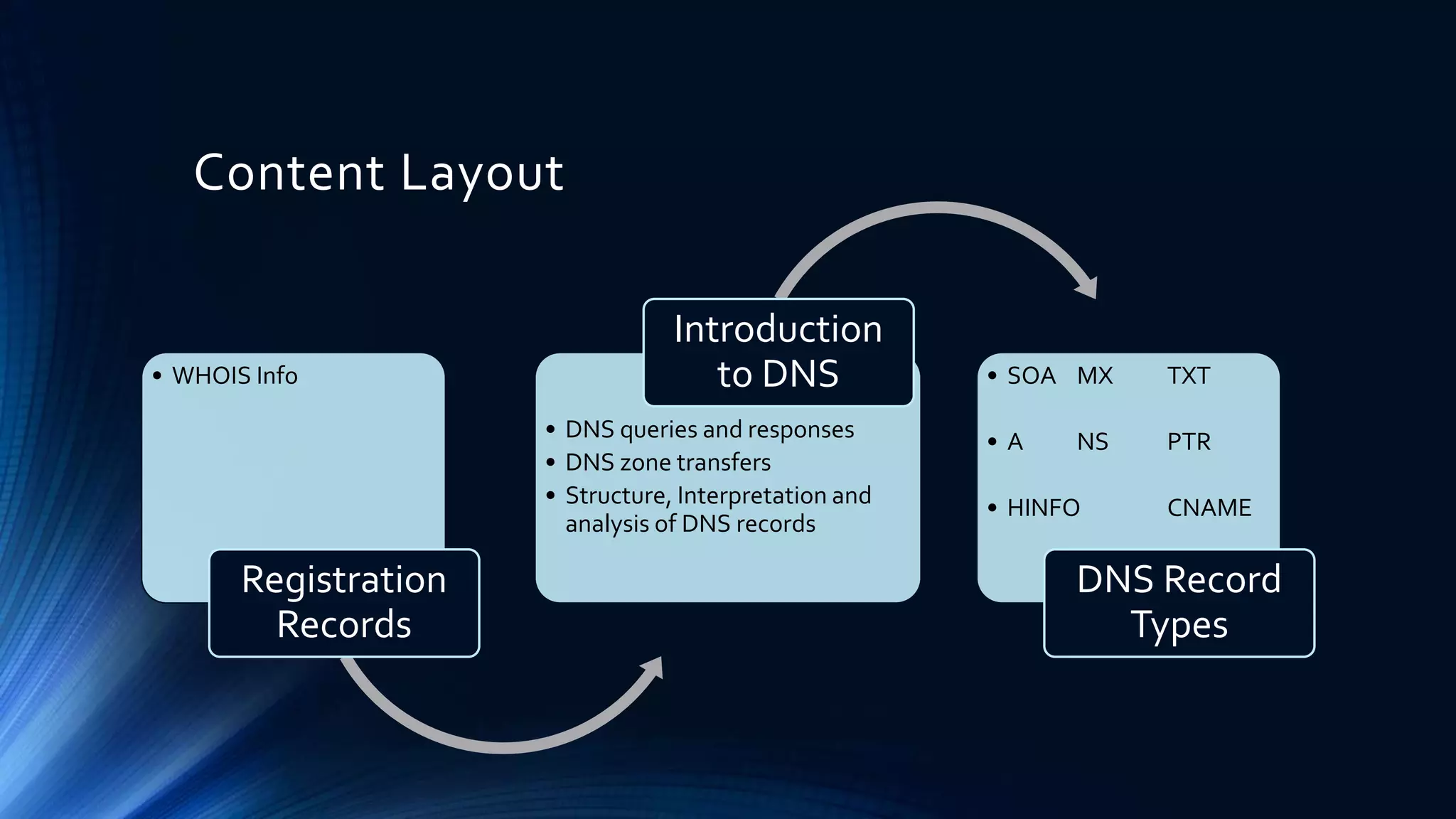
Content Layout
• Registration Records
• Introduction to DNS
• DNS RecordTypes
Content Layout
• WHOIS Info
Registration
Records
• DNS queries and responses
• DNS zone transfers
• Structure, Interpretation and
analysis of DNS records
Introduction
to DNS • SOA MX TXT
• A NS PTR
• HINFO CNAME
DNS Record
Types
Registration Records
WHOIS INFO
 WHOIS Sites
• https://www.whois.com
• https://whois.arin.net
• https://www.ultratools.com/tools/ipWhoisLookupResult
• https://dig.whois.com.au
• https://www.whatismyip.com/ip-whois-lookup/
Sample Output
 Domain Details
• Registrant
Person or organization who owns the domain
• Registrar
The company that keeps the domain registration or record
• Domain/ Name Servers
Servers which maintains a directory of domain names and their matching IP
addresses.
 Network Details
• NetRange/ IP Network Block
IP range that belongs/ allocated to OrgName
• CIDR/ IP Network
Classless Inter-Domain Routing (Sub netting) - Another way to express NetRange
• NetName
The registered network name for the IP addresses
• NetHandle/ Handle
A unique name that identify the network
• Parent
Net Handle of the parent network
A parent is an organization that has been allocated address space from RIR or another ISP, with
the intention of sub-delegating that space.

 Network Details
• NetType
Type of IP Addresses assignment. It can be,
Direct Assignment - IP addresses are registered to an organization for use within the Internet infrastructure it
operates, not for sub-delegation of those addresses.
Reallocated - Allocated to an organization for use in their internal networks or for further sub-delegation.
Reassigned - Assigned to an organization from a parent organization for use in their internal networks.
• Class-Name
The type of information to which the record belongs. (ex: network)
• Auth-Area
The name of the authority area to which the network belongs
• ID
The identifier of the network. It consists of Net Handle and Authority-Area name.
Introduction to
DNS
Domain Name System
DNS Server
Facebook Server (IP:31.13.78.35)
User with
Web Browser
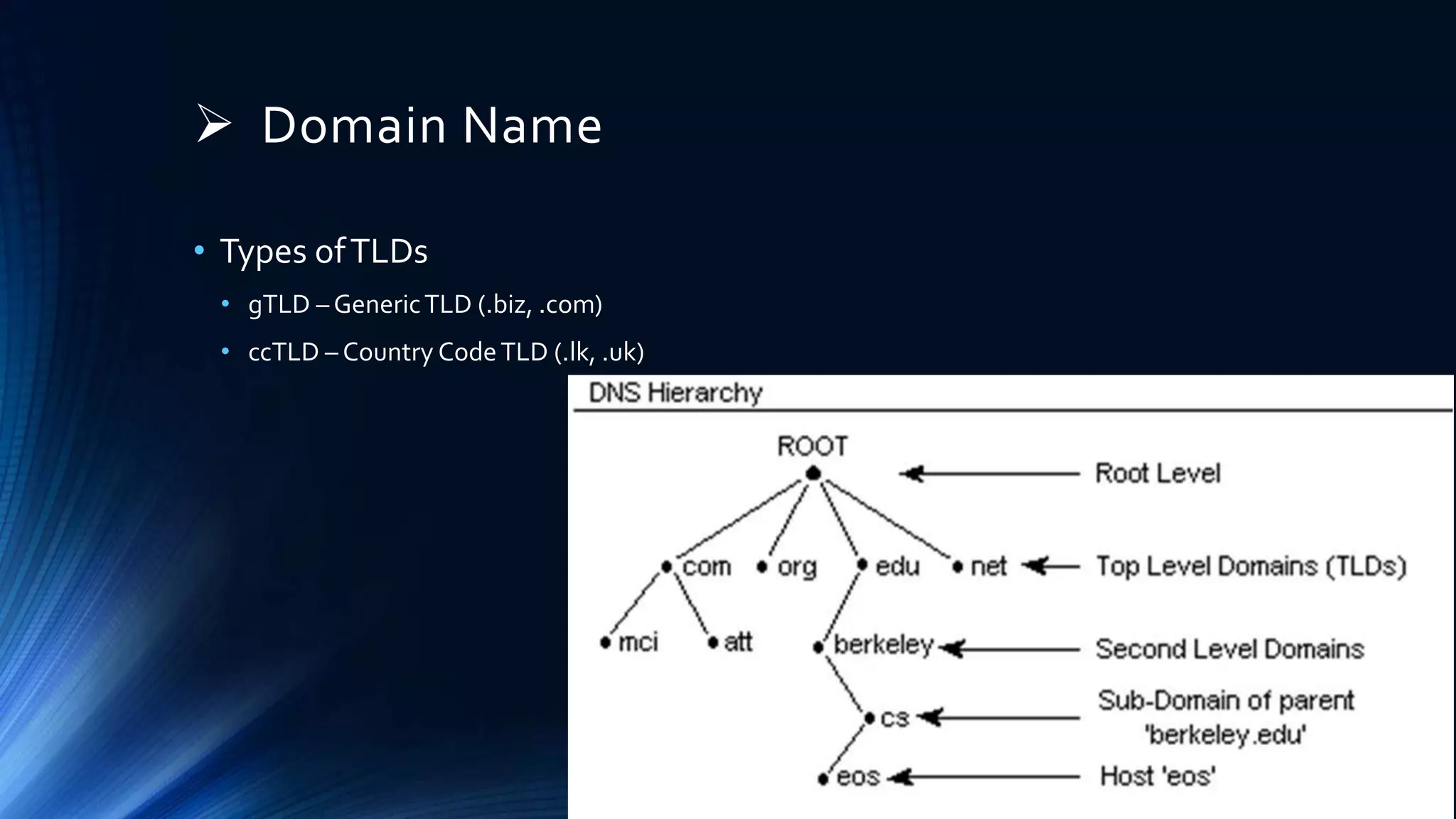
 Domain Name
• Types ofTLDs
• gTLD – GenericTLD (.biz, .com)
• ccTLD – Country CodeTLD (.lk, .uk)
 URL – Uniform Resource Locator
 FQDN – Fully Qualified Domain Name
• Complete domain name for a specific computer or host on the Internet
• FQDN = Host Name + Domain Name
• Examples
• FQDN for a Mail Server : mymail.somecollege.edu
• Hostname : mymail
• Domain : somecollege.edu
• FQDN on theWeb : www.google.com
• Hostname : www
• Domain : google.com
 DNS – Queries and Responses
Query
Response
DNS Server
Client
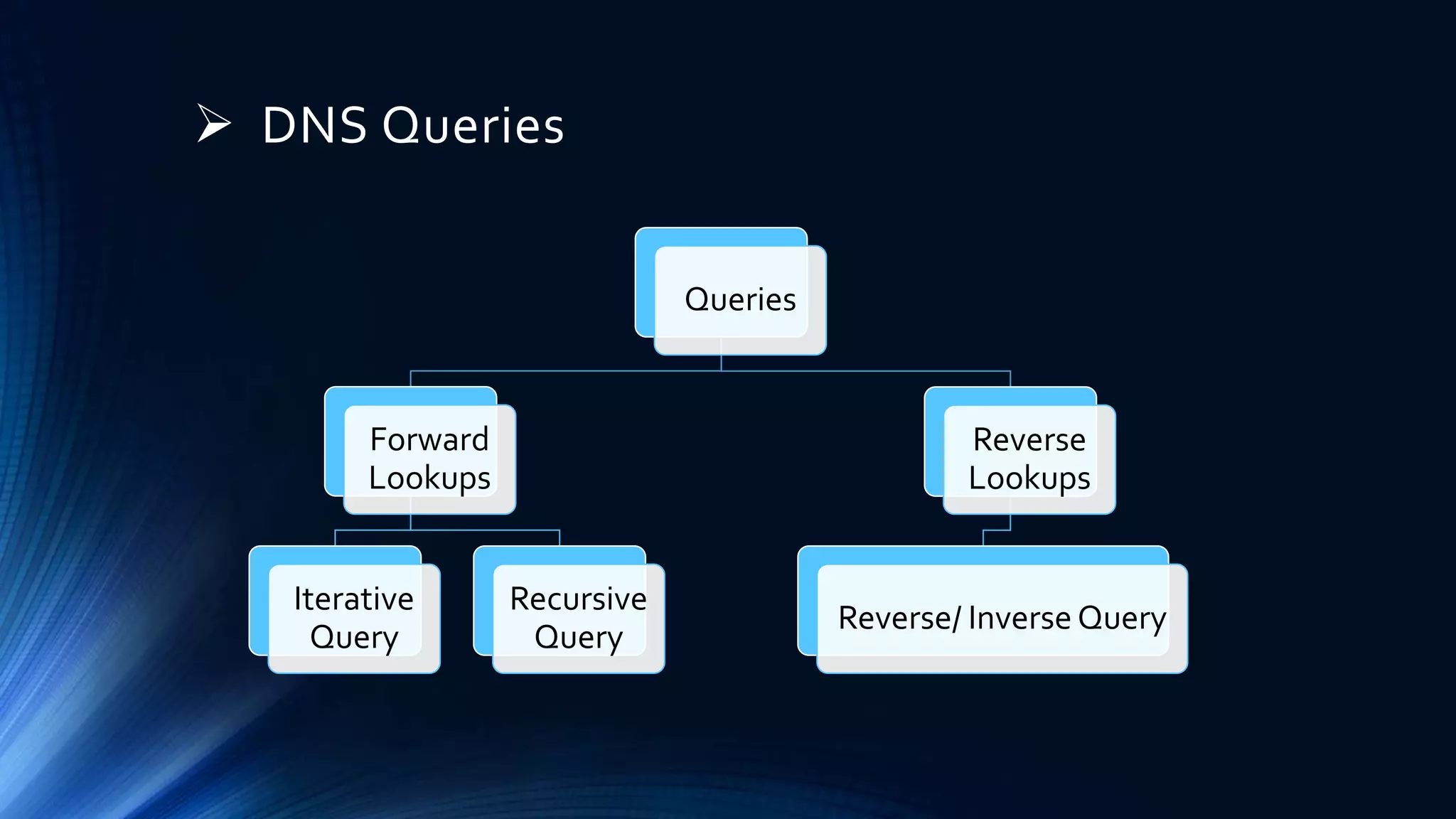
 DNS Queries
Queries
Forward
Lookups
Iterative
Query
Recursive
Query
Reverse
Lookups
Reverse/ Inverse Query
1. Iterative Query
• DNS server returns the best
answer which it can to the client
• The response can be
• The requested resolved name
• A referral to a different DNS server that
could provide the information which the
client requested
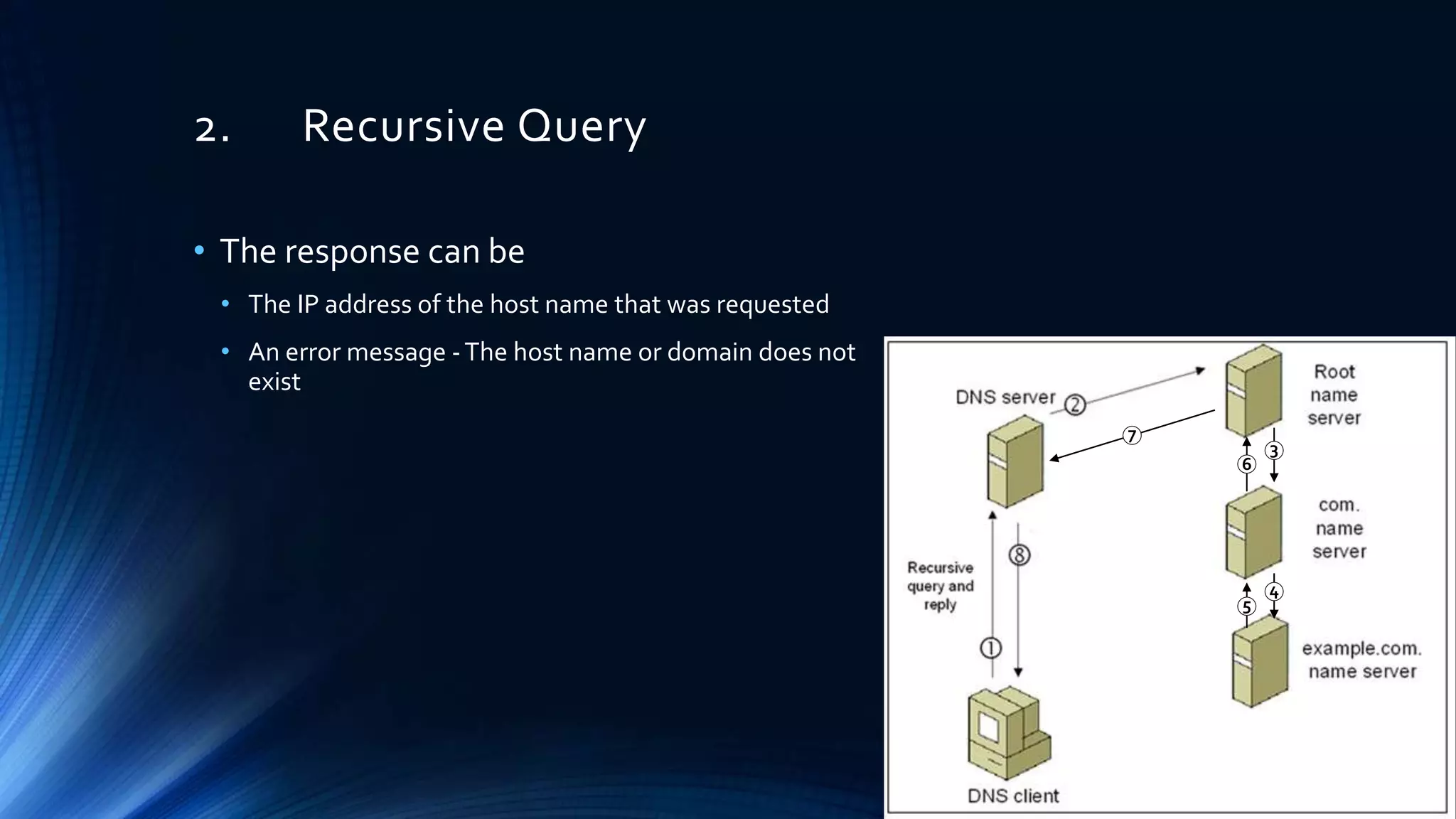
2. Recursive Query
• The response can be
• The IP address of the host name that was requested
• An error message -The host name or domain does not
exist
6
5
4
3
7
3. Inverse Query
• The DNS resolver sends a request to a DNS server to resolve the host
name associated with a known IP address
• Only a thorough search of all domains would provide the correct
answer
 DNS Responses
Responses
Positive
answer
Authoritative
answer
Non
Authoritative
answer
Referral
answer
Negative
answer
NXDOMAIN NODATA
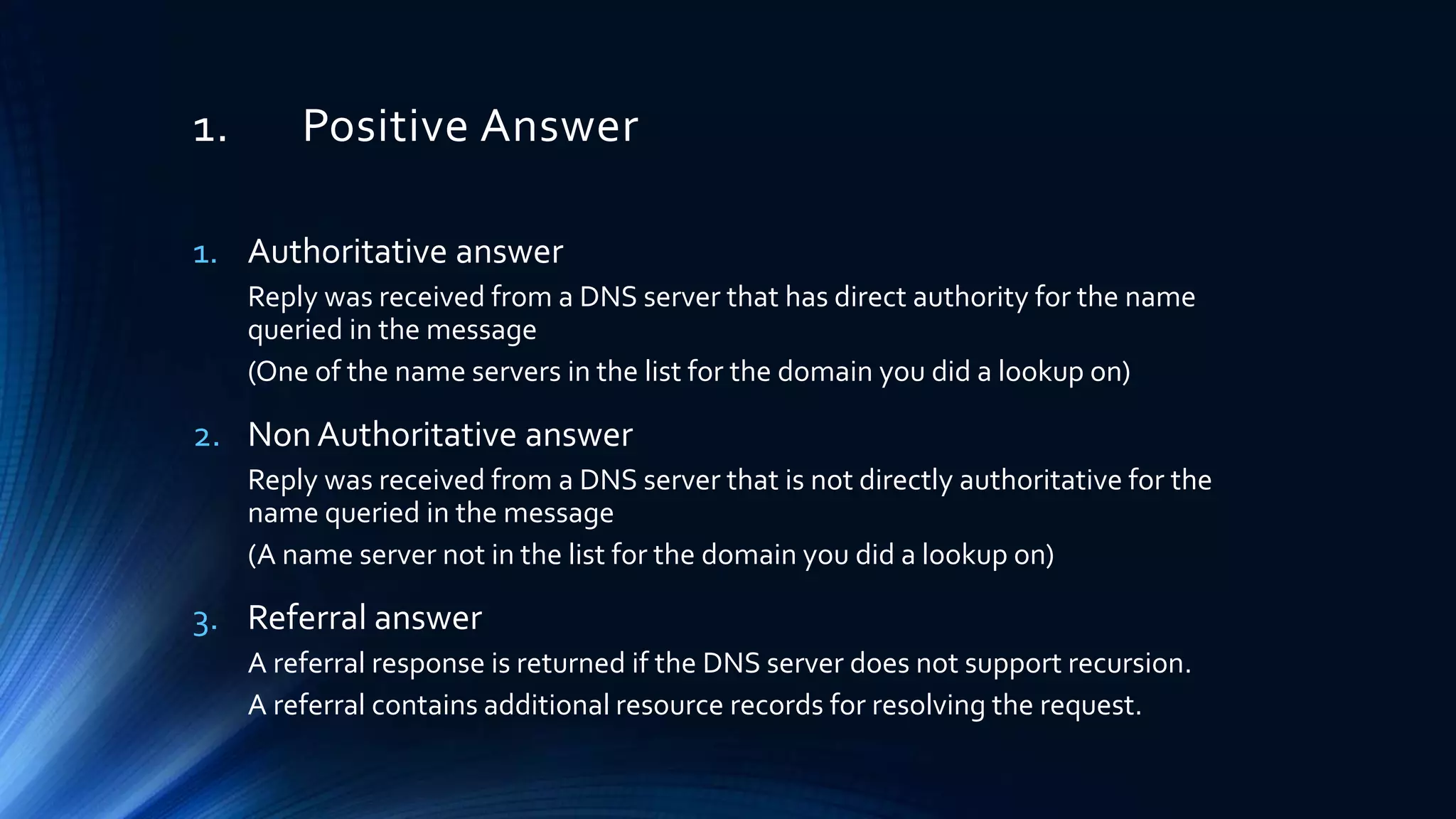
1. Positive Answer
1. Authoritative answer
Reply was received from a DNS server that has direct authority for the name
queried in the message
(One of the name servers in the list for the domain you did a lookup on)
2. Non Authoritative answer
Reply was received from a DNS server that is not directly authoritative for the
name queried in the message
(A name server not in the list for the domain you did a lookup on)
3. Referral answer
A referral response is returned if the DNS server does not support recursion.
A referral contains additional resource records for resolving the request.
2. Negative Answer
1. NXDOMAIN – Non-Existent Domain
There are no records, of any DNS type, for the requested domain name.
2. NODATA
There are records for the requested domain name, but none of them match the
record type in your request
DNS Response Codes
• NOERROR no error
• FORMERR format error
• SERVFAIL server failure
• NXDOMAIN name error
• YXDOMAIN domain name should not exist
• YXRRSET resource record set should not exist
• NOTAUTH not authoritative for zone
• BADVERS bad extension mechanism for version
• REFUSED connection refused
• NOTIMPL not implemented
• NXRRSET rrset does not exist
• NOTZONE name not in zone
• BADSIG bad signature
• BADKEY bad key
• BADTIME bad timestamp
dig DNS Response - Header
• OPCODE
• 0 – Query
• 1 – IQUERY (Inverse Query)
• 2 – STATUS
• RCODE – Response Code (Status)
• Flags
• qr – Query (0) or Response (1)
• aa – authoritative answer (Valid in
response)
• tc – truncated
• rd – recursion desired (set in query -
copied to response)
• ra – recursion available (set in
response)
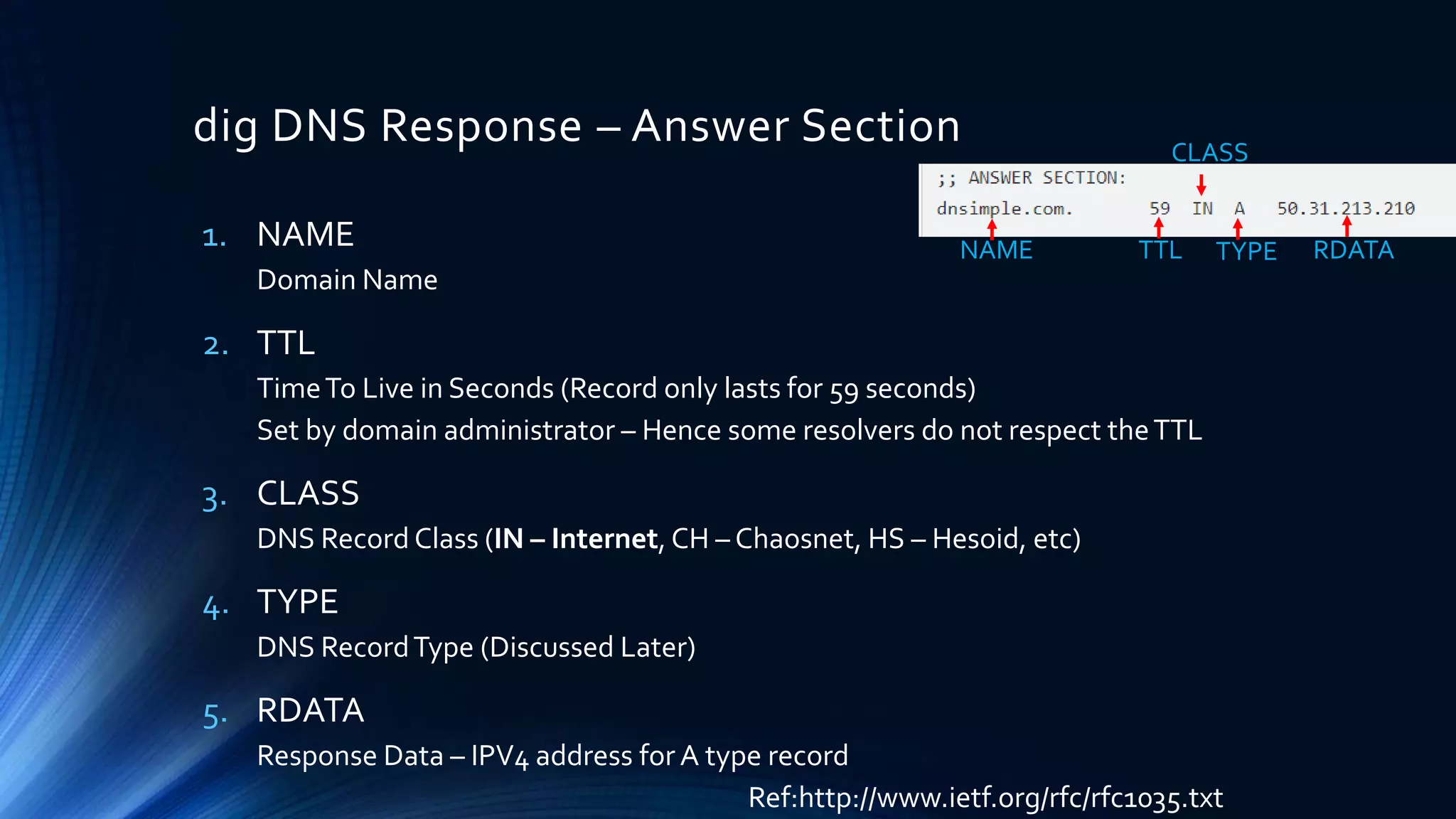
dig DNS Response – Answer Section
1. NAME
Domain Name
2. TTL
TimeTo Live in Seconds (Record only lasts for 59 seconds)
Set by domain administrator – Hence some resolvers do not respect theTTL
3. CLASS
DNS Record Class (IN – Internet, CH – Chaosnet, HS – Hesoid, etc)
4. TYPE
DNS RecordType (Discussed Later)
5. RDATA
Response Data – IPV4 address for A type record
Ref:http://www.ietf.org/rfc/rfc1035.txt
NAME TTL TYPE
CLASS
RDATA
 DNS – Zone Transfers
• DNS Zone transfer - DNS server passes a copy of part of it's database (which is
called a "zone") to another DNS server
• More than one DNS server able to answer queries about a particular zone
• There is a Master DNS server, and one or more Slave DNS servers, and the
slaves ask the master for a copy of the records for that zone
• A basic DNS ZoneTransfer Attack:
you just pretend you are a slave and ask the master for a copy of the zone records. And it sends
you them
Prevent:
Tell the master what the IP addresses of the slaves are and not to transfer to anyone else
Sign the transfers (TSIG – Extension to the DNS protocol where a cryptographic signature is added to
DNS packets)
 DNS – Zone Transfers Cont..
• The zone serial number increments when the zone receives an update
• Zone transfers are automatically triggered when the zone serial number
increments
• AXFR – Entire zone file is copied
• IXFR – Only the records that were changed are sent
ZoneTransfers
FullTransfer
AXFR
Incremental
Transfer
IXFR
 Structure, interpretation and analysis of
DNS records
• DNS – Bind Server Implementation
DNS Records
Types
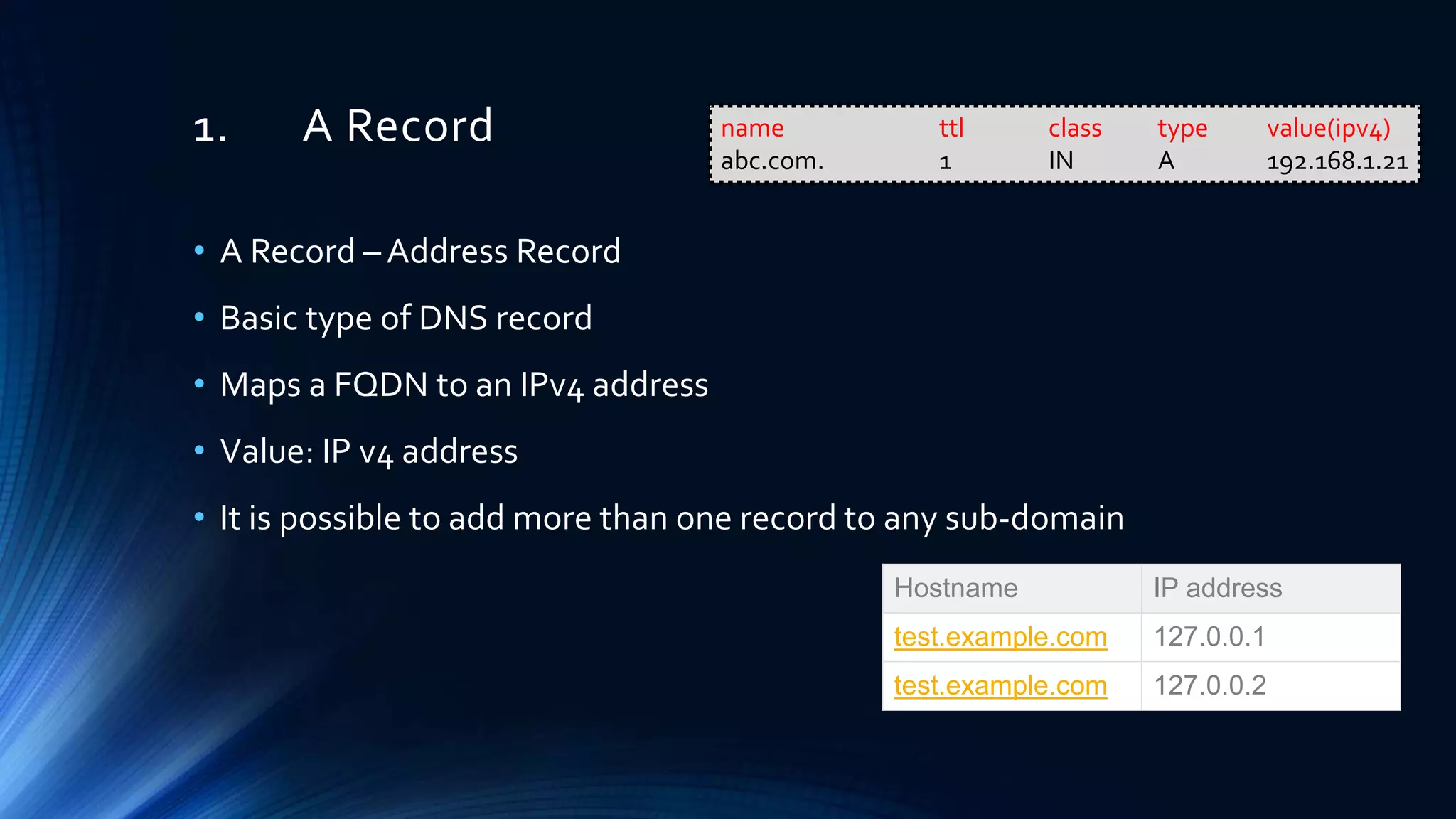
1. A Record
• A Record – Address Record
• Basic type of DNS record
• Maps a FQDN to an IPv4 address
• Value: IP v4 address
• It is possible to add more than one record to any sub-domain
Hostname IP address
test.example.com 127.0.0.1
test.example.com 127.0.0.2
name ttl class type value(ipv4)
abc.com. 1 IN A 192.168.1.21
2. AAAA Record
• Maps a FQDN to an IPv6 address
• Value: IP v6 address
name ttl class type value(ipv6)
abc.com. IN AAAA 2600:1800:5::10
3. CNAME Record
• CNAME – Canonical Name
• Maps a FQDN to another FQDN
• Value: FQDN/ Unqualified Name
• CNAME is not a redirect. It will point the CNAME record to the IP
listed at the original record
• A CNAME must always be a sub-domain record
name ttl class type value(fqdn/host)
joe.example.com. IN A 192.168.10.5
mail.abc.com. IN CNAME joe.example.com.
$ORIGIN example.com.
joe IN A 192.168.10.5
mail IN CNAME joe.example.com.
4. SAO Record
• SOA – Start ofAuthority
• SOA records are part of the DNS infrastructure.They are generated
automatically and are not editable.
• SOA record is the Information stored in a DNS zone about that zone
• A DNS zone is the part of a domain for which an individual DNS server
is responsible
• Each zone contains a single SOA record.
• SOA Records stores the following information about a zone
• Administrator of the zone
• Current version of the data file
• Default number of seconds for theTime to Live (TTL) file on resource records
example.com. IN SOA ns.example.com. admin.example.com. (
2003080800 ; sn = serial number
172800 ; ref = refresh = 2d
900 ; ret = update retry = 15m
1209600 ; ex = expiry = 2w
3600 ; nx = nxdomain ttl = 1h
)
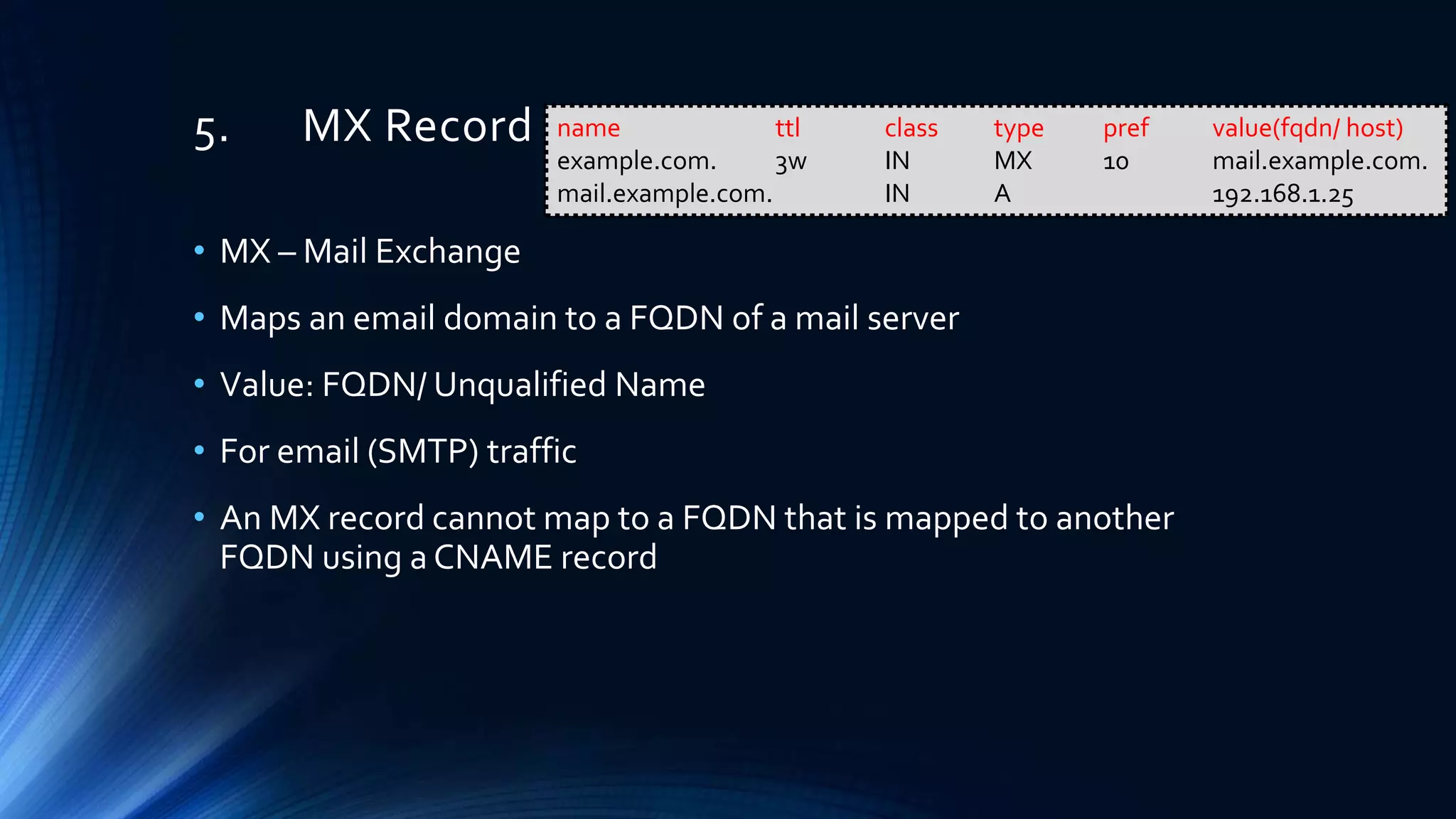
5. MX Record
• MX – Mail Exchange
• Maps an email domain to a FQDN of a mail server
• Value: FQDN/ Unqualified Name
• For email (SMTP) traffic
• An MX record cannot map to a FQDN that is mapped to another
FQDN using a CNAME record
name ttl class type pref value(fqdn/ host)
example.com. 3w IN MX 10 mail.example.com.
mail.example.com. IN A 192.168.1.25
6. TXT Record
• Used often with other protocols or systems
Ex:
• Sender Policy Framework (SPF), Domain Keys (DK)
• Holds free form text of any type
Ex:
• To validate the owner of a domain, they ask the owner to create aTXT record with
some information in it. It is then checked, and if the correct record is found, the
domain owner can be verified.
name ttl class type value(text)
egs IN TXT “Cyber Security"
7. NS Record
• NS – Name Server
• Maps a subdomain to a FQDN of a name server
• Value: FQDN/ Host
name ttl class type value(fqdn/ host)
IN NS ns1.example.com.
ns1.example.com. IN A 192.168.100.20
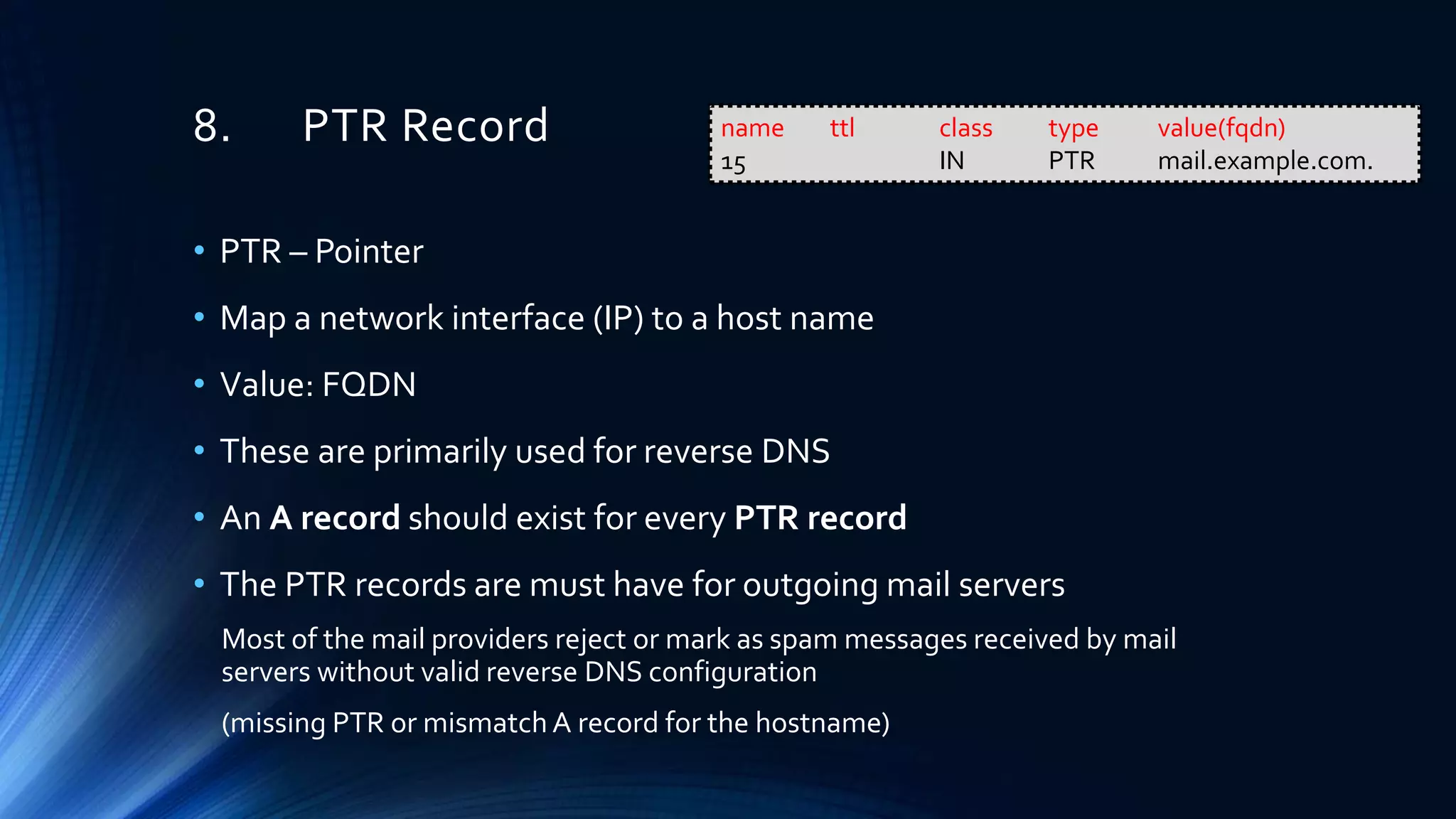
8. PTR Record
• PTR – Pointer
• Map a network interface (IP) to a host name
• Value: FQDN
• These are primarily used for reverse DNS
• An A record should exist for every PTR record
• The PTR records are must have for outgoing mail servers
Most of the mail providers reject or mark as spam messages received by mail
servers without valid reverse DNS configuration
(missing PTR or mismatch A record for the hostname)
name ttl class type value(fqdn)
15 IN PTR mail.example.com.
8. PTR Record Cont..
• Ex 1: 192.168.100.0/24 Block
• Mail Server : 192.168.100.30
• Zone : 100.168.192.in-addr.arpa
• Entry : 30.100.168.192.in-addr.arpa
• Ex 2: 10.128.0.0/16 Block
• Mail Server : 10.128.0.15
• Zone : 128.10.in-addr.arpa
• Entry : 15.0.128.10.in-addr.arpa
name ttl class type value(fqdn)
30 IN PTR mail.example.com.
name ttl class type value(fqdn)
15.0 IN PTR mail.example.com.
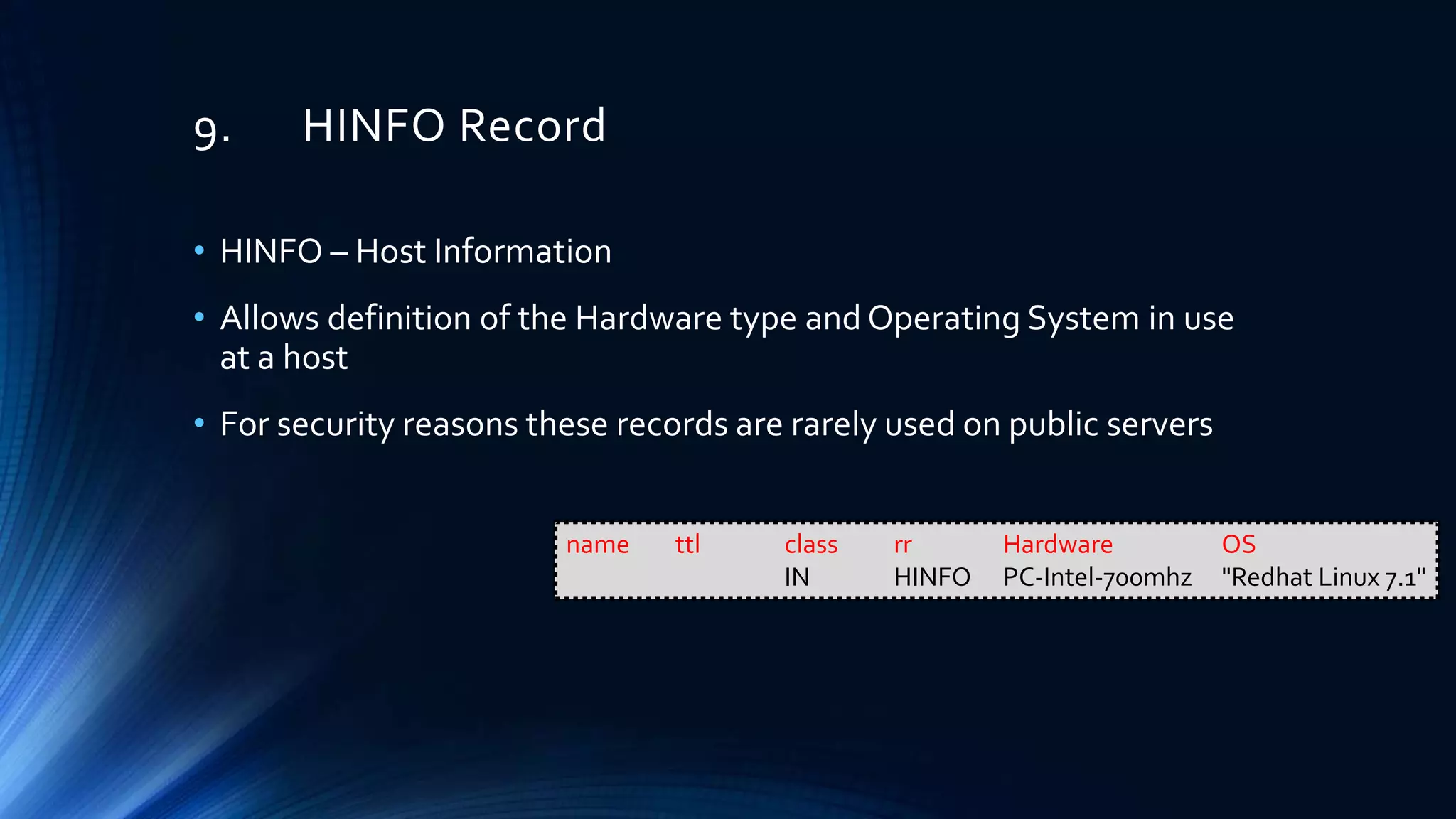
9. HINFO Record
• HINFO – Host Information
• Allows definition of the Hardware type and Operating System in use
at a host
• For security reasons these records are rarely used on public servers
name ttl class rr Hardware OS
IN HINFO PC-Intel-700mhz "Redhat Linux 7.1"
THE END
ThankYou!

Introduction to DNS

  • 1.
  • 2.
    Content Layout • RegistrationRecords • Introduction to DNS • DNS RecordTypes
  • 3.
    Content Layout • WHOISInfo Registration Records • DNS queries and responses • DNS zone transfers • Structure, Interpretation and analysis of DNS records Introduction to DNS • SOA MX TXT • A NS PTR • HINFO CNAME DNS Record Types
  • 4.
  • 5.
     WHOIS Sites •https://www.whois.com • https://whois.arin.net • https://www.ultratools.com/tools/ipWhoisLookupResult • https://dig.whois.com.au • https://www.whatismyip.com/ip-whois-lookup/
  • 6.
  • 7.
     Domain Details •Registrant Person or organization who owns the domain • Registrar The company that keeps the domain registration or record • Domain/ Name Servers Servers which maintains a directory of domain names and their matching IP addresses.
  • 8.
     Network Details •NetRange/ IP Network Block IP range that belongs/ allocated to OrgName • CIDR/ IP Network Classless Inter-Domain Routing (Sub netting) - Another way to express NetRange • NetName The registered network name for the IP addresses • NetHandle/ Handle A unique name that identify the network • Parent Net Handle of the parent network A parent is an organization that has been allocated address space from RIR or another ISP, with the intention of sub-delegating that space.
  • 9.
     Network Details •NetType Type of IP Addresses assignment. It can be, Direct Assignment - IP addresses are registered to an organization for use within the Internet infrastructure it operates, not for sub-delegation of those addresses. Reallocated - Allocated to an organization for use in their internal networks or for further sub-delegation. Reassigned - Assigned to an organization from a parent organization for use in their internal networks. • Class-Name The type of information to which the record belongs. (ex: network) • Auth-Area The name of the authority area to which the network belongs • ID The identifier of the network. It consists of Net Handle and Authority-Area name.
  • 10.
    Introduction to DNS Domain NameSystem DNS Server Facebook Server (IP:31.13.78.35) User with Web Browser
  • 11.
     Domain Name •Types ofTLDs • gTLD – GenericTLD (.biz, .com) • ccTLD – Country CodeTLD (.lk, .uk)
  • 12.
     URL –Uniform Resource Locator
  • 13.
     FQDN –Fully Qualified Domain Name • Complete domain name for a specific computer or host on the Internet • FQDN = Host Name + Domain Name • Examples • FQDN for a Mail Server : mymail.somecollege.edu • Hostname : mymail • Domain : somecollege.edu • FQDN on theWeb : www.google.com • Hostname : www • Domain : google.com
  • 14.
     DNS –Queries and Responses Query Response DNS Server Client
  • 15.
  • 16.
    1. Iterative Query •DNS server returns the best answer which it can to the client • The response can be • The requested resolved name • A referral to a different DNS server that could provide the information which the client requested
  • 17.
    2. Recursive Query •The response can be • The IP address of the host name that was requested • An error message -The host name or domain does not exist 6 5 4 3 7
  • 18.
    3. Inverse Query •The DNS resolver sends a request to a DNS server to resolve the host name associated with a known IP address • Only a thorough search of all domains would provide the correct answer
  • 19.
  • 20.
    1. Positive Answer 1.Authoritative answer Reply was received from a DNS server that has direct authority for the name queried in the message (One of the name servers in the list for the domain you did a lookup on) 2. Non Authoritative answer Reply was received from a DNS server that is not directly authoritative for the name queried in the message (A name server not in the list for the domain you did a lookup on) 3. Referral answer A referral response is returned if the DNS server does not support recursion. A referral contains additional resource records for resolving the request.
  • 21.
    2. Negative Answer 1.NXDOMAIN – Non-Existent Domain There are no records, of any DNS type, for the requested domain name. 2. NODATA There are records for the requested domain name, but none of them match the record type in your request
  • 22.
    DNS Response Codes •NOERROR no error • FORMERR format error • SERVFAIL server failure • NXDOMAIN name error • YXDOMAIN domain name should not exist • YXRRSET resource record set should not exist • NOTAUTH not authoritative for zone • BADVERS bad extension mechanism for version • REFUSED connection refused • NOTIMPL not implemented • NXRRSET rrset does not exist • NOTZONE name not in zone • BADSIG bad signature • BADKEY bad key • BADTIME bad timestamp
  • 23.
    dig DNS Response- Header • OPCODE • 0 – Query • 1 – IQUERY (Inverse Query) • 2 – STATUS • RCODE – Response Code (Status) • Flags • qr – Query (0) or Response (1) • aa – authoritative answer (Valid in response) • tc – truncated • rd – recursion desired (set in query - copied to response) • ra – recursion available (set in response)
  • 24.
    dig DNS Response– Answer Section 1. NAME Domain Name 2. TTL TimeTo Live in Seconds (Record only lasts for 59 seconds) Set by domain administrator – Hence some resolvers do not respect theTTL 3. CLASS DNS Record Class (IN – Internet, CH – Chaosnet, HS – Hesoid, etc) 4. TYPE DNS RecordType (Discussed Later) 5. RDATA Response Data – IPV4 address for A type record Ref:http://www.ietf.org/rfc/rfc1035.txt NAME TTL TYPE CLASS RDATA
  • 25.
     DNS –Zone Transfers • DNS Zone transfer - DNS server passes a copy of part of it's database (which is called a "zone") to another DNS server • More than one DNS server able to answer queries about a particular zone • There is a Master DNS server, and one or more Slave DNS servers, and the slaves ask the master for a copy of the records for that zone • A basic DNS ZoneTransfer Attack: you just pretend you are a slave and ask the master for a copy of the zone records. And it sends you them Prevent: Tell the master what the IP addresses of the slaves are and not to transfer to anyone else Sign the transfers (TSIG – Extension to the DNS protocol where a cryptographic signature is added to DNS packets)
  • 26.
     DNS –Zone Transfers Cont.. • The zone serial number increments when the zone receives an update • Zone transfers are automatically triggered when the zone serial number increments • AXFR – Entire zone file is copied • IXFR – Only the records that were changed are sent ZoneTransfers FullTransfer AXFR Incremental Transfer IXFR
  • 27.
     Structure, interpretationand analysis of DNS records • DNS – Bind Server Implementation
  • 28.
  • 29.
    1. A Record •A Record – Address Record • Basic type of DNS record • Maps a FQDN to an IPv4 address • Value: IP v4 address • It is possible to add more than one record to any sub-domain Hostname IP address test.example.com 127.0.0.1 test.example.com 127.0.0.2 name ttl class type value(ipv4) abc.com. 1 IN A 192.168.1.21
  • 30.
    2. AAAA Record •Maps a FQDN to an IPv6 address • Value: IP v6 address name ttl class type value(ipv6) abc.com. IN AAAA 2600:1800:5::10
  • 31.
    3. CNAME Record •CNAME – Canonical Name • Maps a FQDN to another FQDN • Value: FQDN/ Unqualified Name • CNAME is not a redirect. It will point the CNAME record to the IP listed at the original record • A CNAME must always be a sub-domain record name ttl class type value(fqdn/host) joe.example.com. IN A 192.168.10.5 mail.abc.com. IN CNAME joe.example.com. $ORIGIN example.com. joe IN A 192.168.10.5 mail IN CNAME joe.example.com.
  • 32.
    4. SAO Record •SOA – Start ofAuthority • SOA records are part of the DNS infrastructure.They are generated automatically and are not editable. • SOA record is the Information stored in a DNS zone about that zone • A DNS zone is the part of a domain for which an individual DNS server is responsible • Each zone contains a single SOA record. • SOA Records stores the following information about a zone • Administrator of the zone • Current version of the data file • Default number of seconds for theTime to Live (TTL) file on resource records example.com. IN SOA ns.example.com. admin.example.com. ( 2003080800 ; sn = serial number 172800 ; ref = refresh = 2d 900 ; ret = update retry = 15m 1209600 ; ex = expiry = 2w 3600 ; nx = nxdomain ttl = 1h )
  • 33.
    5. MX Record •MX – Mail Exchange • Maps an email domain to a FQDN of a mail server • Value: FQDN/ Unqualified Name • For email (SMTP) traffic • An MX record cannot map to a FQDN that is mapped to another FQDN using a CNAME record name ttl class type pref value(fqdn/ host) example.com. 3w IN MX 10 mail.example.com. mail.example.com. IN A 192.168.1.25
  • 34.
    6. TXT Record •Used often with other protocols or systems Ex: • Sender Policy Framework (SPF), Domain Keys (DK) • Holds free form text of any type Ex: • To validate the owner of a domain, they ask the owner to create aTXT record with some information in it. It is then checked, and if the correct record is found, the domain owner can be verified. name ttl class type value(text) egs IN TXT “Cyber Security"
  • 35.
    7. NS Record •NS – Name Server • Maps a subdomain to a FQDN of a name server • Value: FQDN/ Host name ttl class type value(fqdn/ host) IN NS ns1.example.com. ns1.example.com. IN A 192.168.100.20
  • 36.
    8. PTR Record •PTR – Pointer • Map a network interface (IP) to a host name • Value: FQDN • These are primarily used for reverse DNS • An A record should exist for every PTR record • The PTR records are must have for outgoing mail servers Most of the mail providers reject or mark as spam messages received by mail servers without valid reverse DNS configuration (missing PTR or mismatch A record for the hostname) name ttl class type value(fqdn) 15 IN PTR mail.example.com.
  • 37.
    8. PTR RecordCont.. • Ex 1: 192.168.100.0/24 Block • Mail Server : 192.168.100.30 • Zone : 100.168.192.in-addr.arpa • Entry : 30.100.168.192.in-addr.arpa • Ex 2: 10.128.0.0/16 Block • Mail Server : 10.128.0.15 • Zone : 128.10.in-addr.arpa • Entry : 15.0.128.10.in-addr.arpa name ttl class type value(fqdn) 30 IN PTR mail.example.com. name ttl class type value(fqdn) 15.0 IN PTR mail.example.com.
  • 38.
    9. HINFO Record •HINFO – Host Information • Allows definition of the Hardware type and Operating System in use at a host • For security reasons these records are rarely used on public servers name ttl class rr Hardware OS IN HINFO PC-Intel-700mhz "Redhat Linux 7.1"
  • 39.