1
© 2010 Cengage Learning
Engineering. All Rights Reserved.
1
Introduction to Digital Image Processing with MATLAB®
Asia Edition
McAndrew‧Wang‧Tseng
Chapter 1:
Introduction
2
© 2010 Cengage Learning
Engineering. All Rights Reserved.
1.1 Images and Pictures
• Human have evolved very precise visual skills:
We can identify a face in an instant
We can differentiate colors
We can process a large amount of visual
information very quickly
Ch1-p.1
3
© 2010 Cengage Learning
Engineering. All Rights Reserved.
• Image processing involves changing the nature
of an image in order to either
1. improve its pictorial information for human
interpretation, or
2. render it more suitable for autonomous
machine perception
1.2 What Is Image Processing?
Ch1-p.1
4
1.2 What Is Image Processing?
© 2010 Cengage Learning
Engineering. All Rights Reserved.
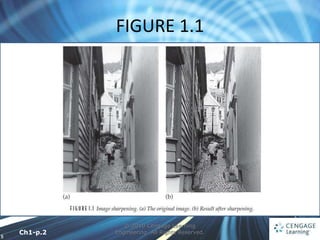
• Enhancing the edges of an image to make it
appear sharper (Figure 1.1)
• Note how the second image appears cleaner; it is
a more pleasant image
• Sharpening edges is a vital component of printing
Condition 1.
Ch1-p.2
5
FIGURE 1.1
© 2010 Cengage Learning
Engineering. All Rights Reserved.
Ch1-p.2
6
1.2 What Is Image Processing?
© 2010 Cengage Learning
Engineering. All Rights Reserved.
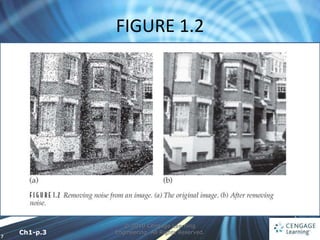
• removing noise from an image, noise being
random errors in the image (Figure 1.2)
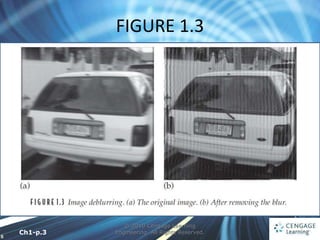
• removing motion blur from an image. An
example is given in Figure 1.3
• In Figure 1.3(b), it is easier to read the number
plate and to see the spikes on the fence behind
the car, as well as other details not at all clear in
the original image Figure 1.3(a).
Ch1-p.2-3
7
FIGURE 1.2
© 2010 Cengage Learning
Engineering. All Rights Reserved.
Ch1-p.3
8
FIGURE 1.3
© 2010 Cengage Learning
Engineering. All Rights Reserved.
Ch1-p.3
9
1.2 What Is Image Processing?
© 2010 Cengage Learning
Engineering. All Rights Reserved.
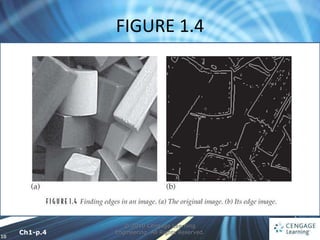
• Obtaining the edges of an image (Figure 1.4)
• Once we have the edges we can measure their
spread and the area contained within them
• We can also use edge-detection algorithms as a
first step in edge enhancement
Condition 2.
Ch1-p.3-4
10
FIGURE 1.4
© 2010 Cengage Learning
Engineering. All Rights Reserved.
Ch1-p.4
11
1.2 What Is Image Processing?
© 2010 Cengage Learning
Engineering. All Rights Reserved.
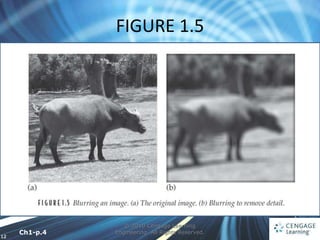
• For measurement or counting purposes, we may
not be interested in all the detail in an image
(Figure 1.5)
• We could, for example, measure the size and
shape of the animal without being distracted by
unnecessary detail
Ch1-p.4-5
12
FIGURE 1.5
© 2010 Cengage Learning
Engineering. All Rights Reserved.
Ch1-p.4
13
© 2010 Cengage Learning
Engineering. All Rights Reserved.
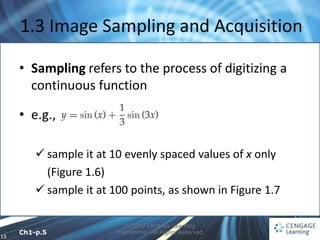
1.3 Image Sampling and Acquisition
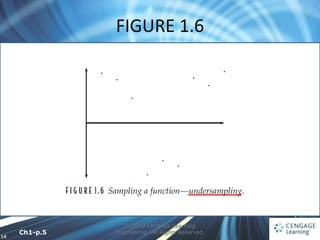
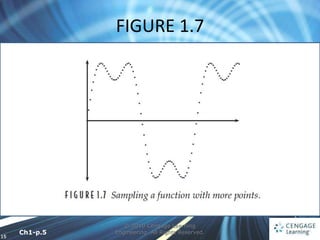
• Sampling refers to the process of digitizing a
continuous function
• e.g.,
 sample it at 10 evenly spaced values of x only
(Figure 1.6)
 sample it at 100 points, as shown in Figure 1.7
Ch1-p.5
14
FIGURE 1.6
© 2010 Cengage Learning
Engineering. All Rights Reserved.
Ch1-p.5
15
FIGURE 1.7
© 2010 Cengage Learning
Engineering. All Rights Reserved.
Ch1-p.5
16
1.3 Image Sampling and Acquisition
© 2010 Cengage Learning
Engineering. All Rights Reserved.
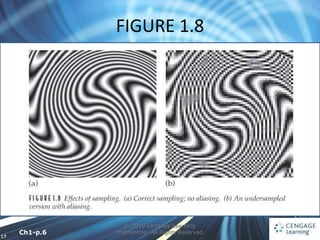
• Nyquist criterion which says, in effect, that a
continuous function can be reconstructed from
its samples provided that the sampling frequency
is at least twice the maxi-mum frequency in the
function
Ch1-p.5
17
FIGURE 1.8
© 2010 Cengage Learning
Engineering. All Rights Reserved.
Ch1-p.6
18
© 2010 Cengage Learning
Engineering. All Rights Reserved.
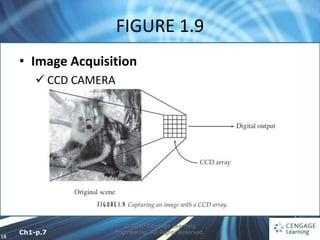
• Image Acquisition
 CCD CAMERA
FIGURE 1.9
Ch1-p.7
19
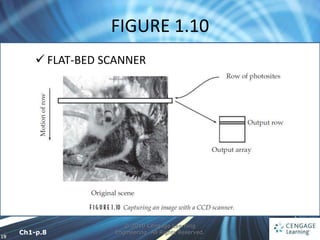
FIGURE 1.10
© 2010 Cengage Learning
Engineering. All Rights Reserved.
 FLAT-BED SCANNER
Ch1-p.8
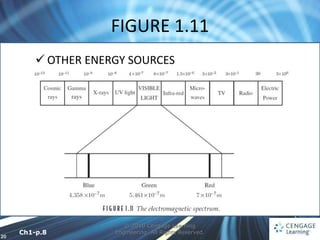
20
FIGURE 1.11
© 2010 Cengage Learning
Engineering. All Rights Reserved.
 OTHER ENERGY SOURCES
Ch1-p.8
21
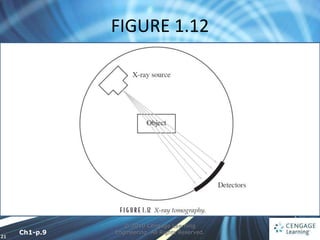
FIGURE 1.12
© 2010 Cengage Learning
Engineering. All Rights Reserved.
Ch1-p.9
22
1.4 Images and Digital Images
© 2010 Cengage Learning
Engineering. All Rights Reserved.
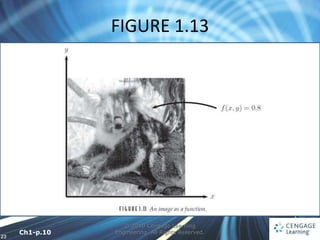
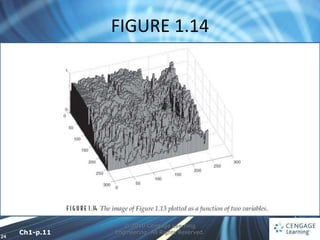
• We may consider this image as being a two-
dimensional function f (x, y)
• We may assume that in such an image, brightness
values can be any real numbers in the range 0.0 (black)
to 1.0 (white)
• The f (x, y) values in a digital image take only integer
values ranging from 1 to 256 each and the brightness
values ranging from 0 (black) to 255 (white)
Ch1-p.9-10
23
FIGURE 1.13
© 2010 Cengage Learning
Engineering. All Rights Reserved.
Ch1-p.10
24
FIGURE 1.14
© 2010 Cengage Learning
Engineering. All Rights Reserved.
Ch1-p.11
25
1.4 Images and Digital Images
© 2010 Cengage Learning
Engineering. All Rights Reserved.
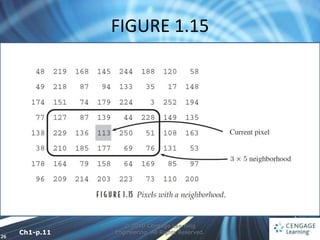
• A digital image can be considered as a large array
of sampled points from the continuous image
• These points are the pixels, which constitute the
digital image
• The pixels surrounding a given pixel constitute its
neighborhood.
Ch1-p.10
26
FIGURE 1.15
© 2010 Cengage Learning
Engineering. All Rights Reserved.
Ch1-p.11
27
1.5 Some Applications
© 2010 Cengage Learning
Engineering. All Rights Reserved.
• Medicine
• Agriculture
• Industry
• Law enforcement
Ch1-p.11-12
28
1.6 Aspects of Image Processing
© 2010 Cengage Learning
Engineering. All Rights Reserved.
• IMAGE ENHANCEMENT
 sharpening or deblurring an out-of-focus image
 highlighting edges,
 improving image contrast or brightening an image, and
 removing noise
• IMAGE RESTORATION
 removing of blur caused by linear motion,
 removal of optical distortions, and
 removing periodic interference
Ch1-p.12
29
1.6 Aspects of Image Processing
© 2010 Cengage Learning
Engineering. All Rights Reserved.
• IMAGE SEGMENTATION
 finding lines, circles, or particular shapes in an image, and
 identifying cars, trees, buildings, or roads in an aerial
photograph
• A given algorithm may be used for both image
enhancement or for image restoration
Ch1-p.12-13
30
1.7 An Image-Processing Task
© 2010 Cengage Learning
Engineering. All Rights Reserved.
• Acquiring the image
• Preprocessing
• Segmentation
• Representation and description
• Recognition and interpretation
Ch1-p.13
31
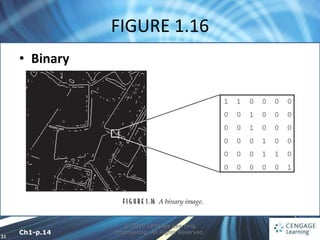
FIGURE 1.16
© 2010 Cengage Learning
Engineering. All Rights Reserved.
• Binary
Ch1-p.14
32
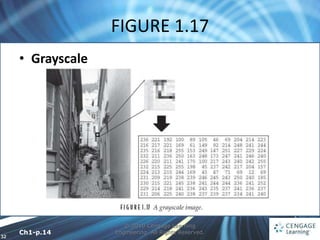
FIGURE 1.17
© 2010 Cengage Learning
Engineering. All Rights Reserved.
• Grayscale
Ch1-p.14
33
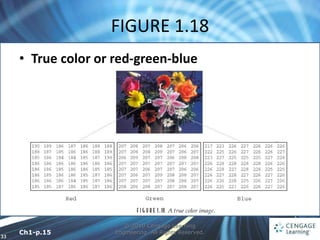
FIGURE 1.18
© 2010 Cengage Learning
Engineering. All Rights Reserved.
• True color or red-green-blue
Ch1-p.15
34
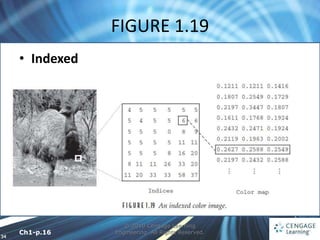
FIGURE 1.19
© 2010 Cengage Learning
Engineering. All Rights Reserved.
• Indexed
Ch1-p.16
35
1.9 Image File Sizes
© 2010 Cengage Learning
Engineering. All Rights Reserved.
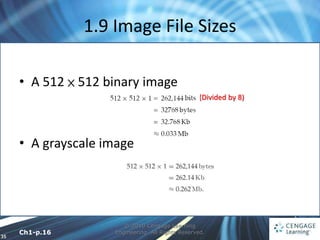
• A 512 × 512 binary image
• A grayscale image
(Divided by 8)
Ch1-p.16
36
1.9 Image File Sizes
© 2010 Cengage Learning
Engineering. All Rights Reserved.
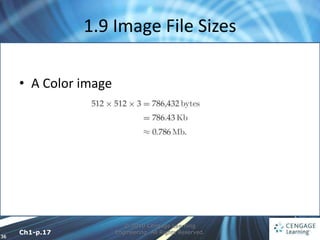
• A Color image
Ch1-p.17
37
1.10 Image Perception
© 2010 Cengage Learning
Engineering. All Rights Reserved.
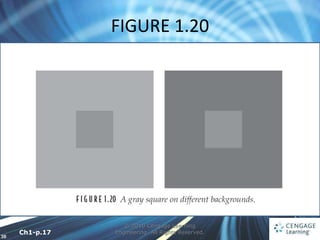
• We should be aware of the limitations of the
human visual system
 Observed intensities vary as to the background
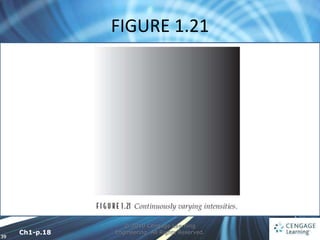
 We may observe nonexistent intensities as bars in
continuously varying gray levels
 Our visual system tends to undershoot or overshoot
around the boundary of regions of different
intensities
Ch1-p.17-18
38
FIGURE 1.20
© 2010 Cengage Learning
Engineering. All Rights Reserved.
Ch1-p.17
39
FIGURE 1.21
© 2010 Cengage Learning
Engineering. All Rights Reserved.
Ch1-p.18
40
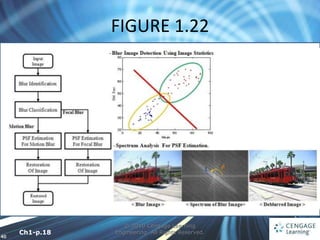
FIGURE 1.22
© 2010 Cengage Learning
Engineering. All Rights Reserved.
Ch1-p.18

Introduction to Digital Image Processing with MATLAB Asia Edition.ppt

  • 1.
    1 © 2010 CengageLearning Engineering. All Rights Reserved. 1 Introduction to Digital Image Processing with MATLAB® Asia Edition McAndrew‧Wang‧Tseng Chapter 1: Introduction
  • 2.
    2 © 2010 CengageLearning Engineering. All Rights Reserved. 1.1 Images and Pictures • Human have evolved very precise visual skills: We can identify a face in an instant We can differentiate colors We can process a large amount of visual information very quickly Ch1-p.1
  • 3.
    3 © 2010 CengageLearning Engineering. All Rights Reserved. • Image processing involves changing the nature of an image in order to either 1. improve its pictorial information for human interpretation, or 2. render it more suitable for autonomous machine perception 1.2 What Is Image Processing? Ch1-p.1
  • 4.
    4 1.2 What IsImage Processing? © 2010 Cengage Learning Engineering. All Rights Reserved. • Enhancing the edges of an image to make it appear sharper (Figure 1.1) • Note how the second image appears cleaner; it is a more pleasant image • Sharpening edges is a vital component of printing Condition 1. Ch1-p.2
  • 5.
    5 FIGURE 1.1 © 2010Cengage Learning Engineering. All Rights Reserved. Ch1-p.2
  • 6.
    6 1.2 What IsImage Processing? © 2010 Cengage Learning Engineering. All Rights Reserved. • removing noise from an image, noise being random errors in the image (Figure 1.2) • removing motion blur from an image. An example is given in Figure 1.3 • In Figure 1.3(b), it is easier to read the number plate and to see the spikes on the fence behind the car, as well as other details not at all clear in the original image Figure 1.3(a). Ch1-p.2-3
  • 7.
    7 FIGURE 1.2 © 2010Cengage Learning Engineering. All Rights Reserved. Ch1-p.3
  • 8.
    8 FIGURE 1.3 © 2010Cengage Learning Engineering. All Rights Reserved. Ch1-p.3
  • 9.
    9 1.2 What IsImage Processing? © 2010 Cengage Learning Engineering. All Rights Reserved. • Obtaining the edges of an image (Figure 1.4) • Once we have the edges we can measure their spread and the area contained within them • We can also use edge-detection algorithms as a first step in edge enhancement Condition 2. Ch1-p.3-4
  • 10.
    10 FIGURE 1.4 © 2010Cengage Learning Engineering. All Rights Reserved. Ch1-p.4
  • 11.
    11 1.2 What IsImage Processing? © 2010 Cengage Learning Engineering. All Rights Reserved. • For measurement or counting purposes, we may not be interested in all the detail in an image (Figure 1.5) • We could, for example, measure the size and shape of the animal without being distracted by unnecessary detail Ch1-p.4-5
  • 12.
    12 FIGURE 1.5 © 2010Cengage Learning Engineering. All Rights Reserved. Ch1-p.4
  • 13.
    13 © 2010 CengageLearning Engineering. All Rights Reserved. 1.3 Image Sampling and Acquisition • Sampling refers to the process of digitizing a continuous function • e.g.,  sample it at 10 evenly spaced values of x only (Figure 1.6)  sample it at 100 points, as shown in Figure 1.7 Ch1-p.5
  • 14.
    14 FIGURE 1.6 © 2010Cengage Learning Engineering. All Rights Reserved. Ch1-p.5
  • 15.
    15 FIGURE 1.7 © 2010Cengage Learning Engineering. All Rights Reserved. Ch1-p.5
  • 16.
    16 1.3 Image Samplingand Acquisition © 2010 Cengage Learning Engineering. All Rights Reserved. • Nyquist criterion which says, in effect, that a continuous function can be reconstructed from its samples provided that the sampling frequency is at least twice the maxi-mum frequency in the function Ch1-p.5
  • 17.
    17 FIGURE 1.8 © 2010Cengage Learning Engineering. All Rights Reserved. Ch1-p.6
  • 18.
    18 © 2010 CengageLearning Engineering. All Rights Reserved. • Image Acquisition  CCD CAMERA FIGURE 1.9 Ch1-p.7
  • 19.
    19 FIGURE 1.10 © 2010Cengage Learning Engineering. All Rights Reserved.  FLAT-BED SCANNER Ch1-p.8
  • 20.
    20 FIGURE 1.11 © 2010Cengage Learning Engineering. All Rights Reserved.  OTHER ENERGY SOURCES Ch1-p.8
  • 21.
    21 FIGURE 1.12 © 2010Cengage Learning Engineering. All Rights Reserved. Ch1-p.9
  • 22.
    22 1.4 Images andDigital Images © 2010 Cengage Learning Engineering. All Rights Reserved. • We may consider this image as being a two- dimensional function f (x, y) • We may assume that in such an image, brightness values can be any real numbers in the range 0.0 (black) to 1.0 (white) • The f (x, y) values in a digital image take only integer values ranging from 1 to 256 each and the brightness values ranging from 0 (black) to 255 (white) Ch1-p.9-10
  • 23.
    23 FIGURE 1.13 © 2010Cengage Learning Engineering. All Rights Reserved. Ch1-p.10
  • 24.
    24 FIGURE 1.14 © 2010Cengage Learning Engineering. All Rights Reserved. Ch1-p.11
  • 25.
    25 1.4 Images andDigital Images © 2010 Cengage Learning Engineering. All Rights Reserved. • A digital image can be considered as a large array of sampled points from the continuous image • These points are the pixels, which constitute the digital image • The pixels surrounding a given pixel constitute its neighborhood. Ch1-p.10
  • 26.
    26 FIGURE 1.15 © 2010Cengage Learning Engineering. All Rights Reserved. Ch1-p.11
  • 27.
    27 1.5 Some Applications ©2010 Cengage Learning Engineering. All Rights Reserved. • Medicine • Agriculture • Industry • Law enforcement Ch1-p.11-12
  • 28.
    28 1.6 Aspects ofImage Processing © 2010 Cengage Learning Engineering. All Rights Reserved. • IMAGE ENHANCEMENT  sharpening or deblurring an out-of-focus image  highlighting edges,  improving image contrast or brightening an image, and  removing noise • IMAGE RESTORATION  removing of blur caused by linear motion,  removal of optical distortions, and  removing periodic interference Ch1-p.12
  • 29.
    29 1.6 Aspects ofImage Processing © 2010 Cengage Learning Engineering. All Rights Reserved. • IMAGE SEGMENTATION  finding lines, circles, or particular shapes in an image, and  identifying cars, trees, buildings, or roads in an aerial photograph • A given algorithm may be used for both image enhancement or for image restoration Ch1-p.12-13
  • 30.
    30 1.7 An Image-ProcessingTask © 2010 Cengage Learning Engineering. All Rights Reserved. • Acquiring the image • Preprocessing • Segmentation • Representation and description • Recognition and interpretation Ch1-p.13
  • 31.
    31 FIGURE 1.16 © 2010Cengage Learning Engineering. All Rights Reserved. • Binary Ch1-p.14
  • 32.
    32 FIGURE 1.17 © 2010Cengage Learning Engineering. All Rights Reserved. • Grayscale Ch1-p.14
  • 33.
    33 FIGURE 1.18 © 2010Cengage Learning Engineering. All Rights Reserved. • True color or red-green-blue Ch1-p.15
  • 34.
    34 FIGURE 1.19 © 2010Cengage Learning Engineering. All Rights Reserved. • Indexed Ch1-p.16
  • 35.
    35 1.9 Image FileSizes © 2010 Cengage Learning Engineering. All Rights Reserved. • A 512 × 512 binary image • A grayscale image (Divided by 8) Ch1-p.16
  • 36.
    36 1.9 Image FileSizes © 2010 Cengage Learning Engineering. All Rights Reserved. • A Color image Ch1-p.17
  • 37.
    37 1.10 Image Perception ©2010 Cengage Learning Engineering. All Rights Reserved. • We should be aware of the limitations of the human visual system  Observed intensities vary as to the background  We may observe nonexistent intensities as bars in continuously varying gray levels  Our visual system tends to undershoot or overshoot around the boundary of regions of different intensities Ch1-p.17-18
  • 38.
    38 FIGURE 1.20 © 2010Cengage Learning Engineering. All Rights Reserved. Ch1-p.17
  • 39.
    39 FIGURE 1.21 © 2010Cengage Learning Engineering. All Rights Reserved. Ch1-p.18
  • 40.
    40 FIGURE 1.22 © 2010Cengage Learning Engineering. All Rights Reserved. Ch1-p.18