

The way how Experts do things…

Prepared & Presented by :-
    Prageeth Sandakalum, Microsoft Student Champ,
    Faculty of IT, University of Moratuwa.
What are Design Patterns
     Development Issues and introduction of Design Patterns
     A brief history on design patters
     What are design patterns?
     Types of Design Patterns
     Has your code been improved ?

Implementing Design Patterns in C#
     Singleton Pattern
     Prototype Pattern
     Façade Pattern
     Decorator pattern
What are Design Patterns ?
              Lets begin with it…
 “Designing object-oriented software is hard and designing
  reusable object-oriented software is even harder.”
                                              – Erich Gamma -

 Dependency Handling - Open and Close method…
   Open for Extension and Closed for Modification

 Immobility of the existing libraries.

 Knowledge of the patterns that have worked in the past, makes
  the developers lives much easier in designing newer systems.
1987 - Cunningham and Beck used Alexander’s ideas to develop
        a small pattern language for Smalltalk
1990 - The Gang of Four (Gamma, Helm, Johnson and Vlissides)
        begin work compiling a catalog of design patterns
1991 - Bruce Anderson gives first Patterns Workshop at OOPSLA
1993 - Kent Beck and Grady Booch sponsor the first meeting of
        what is now known as the Hillside Group
1994 - First Pattern Languages of Programs (PLoP) conference
1995 - The Gang of Four (GoF) publish the Design Patterns book
“A design pattern is a general and reusable solution to a commonly
occurring problem in software.”
                                - Microsoft Developer Network (MSDN) -

 It is not a code that can be directly use in your application thus
  We can call a pattern a template to design classes or objects in a
  way that is proven to be optimized in the past

 Design patterns help to develop the high-level Solutions and to
  implement the Object Oriented principals
    Open Close Principal :- Open for extension and closed for modifications
    Dependency Inversion Principle :- Depend upon Abstractions, Not
                                          On concretions.
OO Design Patterns


        Creational             Structural           Behavioral

Behavioral Patterns
  Abstract Factory Creates an instance of several families of classes
  Builder Separates object construction from its representation
  Factory Method Creates an instance of several derived classes
  Prototype A fully initialized instance to be copied or cloned
  Singleton A class of which only a single instance can exist
Structural Patterns
  Adapter Match interfaces of different classes
  Bridge Separates an object’s interface from its implementation
  Composite A tree structure of simple and composite objects
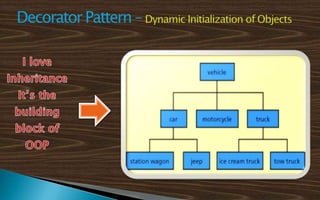
  Decorator Add responsibilities to objects dynamically
  Facade A single class that represents an entire subsystem
  Flyweight A fine-grained instance used for efficient sharing
  Proxy An object representing another object
Behavioral Patterns
  Chain of Responsibility passing a request between a set of objects
  Command Encapsulate a command request as an object
  Interpreter A way to include language elements in a program
  Iterator Sequentially access the elements of a collection
  Mediator Defines simplified communication between classes
  Memento Capture and restore an object's internal state
  Observer A way of notifying change to a number of classes
  State Alter an object's behavior when its state changes
  Strategy Encapsulates an algorithm inside a class
  Template Method Defer the steps of an algorithm to a subclass
  Visitor Defines a new operation to a class without change
These are some of the Common advantages in Design patterns.
   Capture expertise and make it more accessible to non-experts in
    a standard form
   Facilitate communication among the developers by providing a
    common language
   Make it easier to reuse successful designs and avoid alternatives
    that diminish reusability
   Facilitate design modifications
   Improve design documentation
   Improve design understandability
Design Pattern..!!
Easier said than done hah?


            Implementing Design Patterns
                             How to make better codes…
◦ Concept
              Ensures that a particular class has only one object
              provide a central access point to invoke that object

            ◦ Motivation and Problem addresses
              Make sure that the client is not allowed to create
               additional objects
                 The “User” Object
UML Class     Try out Microsoft Windows basic applications
 Diagram         The Calculator and the Run window
Implementation Steps…
  Create the class with public modifier
  Make the constructor private… So that no body outside, can create
   objects
  Define a static method GetInstance() to retrieve the Object
  Inside the method, use conditional statements to check whether the
   object exists
  If not create an object and return it
  Otherwise just return the object
  Then instantiate the object (make it static)
Some hints for advanced development

  Make the GetInstance() method thread safe
     Use locks, Double check the instances
        Create a “readonly” object to use as the locking variable

  Initialize the object on 1st declaration
      private static Singleton instance=new Singleton();

  Avoid sub-classing by using sealed class
    public sealed class Singleton
◦ Concept
  Avoid repeatedly assigning same value to the
   similar objects.
  Allow independent behavior after the cloning ???

◦ Motivation and Problem addresses
  When creating objects (i.e. employee), we need to
   specify the same value repeatedly for objects
      employeeObj1.CompanyName = “IFS”;
      employeeObj1.CompanyPhone = “011-2845564”;
      EmployeeObj2.CompanyName = “IFS”;
      employeeObj2.CompanyPhone = “011-2845564”;
Implementation Steps…
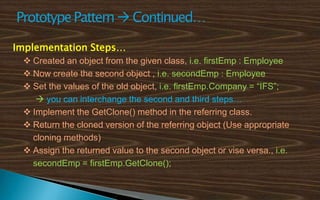
  Created an object from the given class, i.e. firstEmp : Employee
  Now create the second object , i.e. secondEmp : Employee
  Set the values of the old object, i.e. firstEmp.Company = “IFS”;
     you can interchange the second and third steps…
  Implement the GetClone() method in the referring class.
  Return the cloned version of the referring object (Use appropriate
   cloning methods)
  Assign the returned value to the second object or vise versa., i.e.
   secondEmp = firstEmp.GetClone();
◦ Concept
              •   Wrap complicated subsystems with simpler interfaces
              •   Delegates client requests to appropriate subsystems

             ◦ Motivation and Problem addresses
               The Client code become complicated with so many
                objects
How Façade     The client need not to know the complex architecture
  Works         of the sub system
                     Banking Applications
Implementation Steps…
  Create the Façade class with public modifier
  Define object references of all the types in the sub system
  Initialize all the objects “On Demand”
  Create simple methods and handle multiple subsystem methods
   inside that method
        Withdraw() in Façade class handles DailyWithdrowalLimitExceeded(),
         GetBalance(), IssueReceipt() etc.. Methods
Some hints for advanced development

  Encapsulate the subsystem, So that it can only be accessed through
   Façade interface.
     Use internal modifiers

  Make the Façade Object SINGLETON ???
     Most of the time only one façade object is needed

  Use multiple Sub Systems within the same dll.
     If the sub system is too complex… use multiple facades.
See the Restaurant Problem explained here
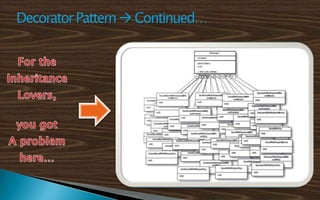
  You create a beverage super class and all the beverages inherit from it
  But it will have too much sub classes implementing the same cost
   method in the super class.
    Tea, PlainTea, TeaWithoutSugar, IcedTea, VanilaTea, ChocoTea etc
  But each of them have very little difference on Ingredients…
     Adding Milk, Adding Sugar, Adding Chocolate
  To avoid unwanted sub-classing create methods in the super class for
   the extra changes
    AddMilk(), AddSugar(), AddChocolate()

              Has the problem been Solved?
Still we got some problems

  OCP… Open for Extension, Closed for Modification… Then how to
   handle the price changes ?
  More methods needed, more problems created.
  What if the new ingredients were introduced ?

Concept of Decorator Pattern

  Take the initial Object and decorate it in the Run time
    Take the Tea Object and decorate it with Sugar Object, then the
      Choco / Vanilla Objects…
Implementation Steps…
 Create the abstract class for the Main Classes, i.e. class Main
 Create the abstract class for the Decorator Classes extending the
   above class, i.e. class Decorator : Main
 Create the sub classes of the Main class
 Create the Decorator sub classes and let the Constructor to receive
   a “Main” type object
 Do the operation with the received object
 When ever creating an object in the client code, Use the “Main”
   class as the reference
Thank You !!!
References
  Notes from Aruna Wickrama, Teamwork @ Asharp Power Camp
  Head First Design Patterns By Eric Freeman, Elisabeth Robson,
   Kathy Sierra, Bert Bates.
  Design Principles and Design Patterns Robert C. Martin
  Software Architecture Interview Questions By Shivprasad Koirala,
   Sham Sheikh
  Articles from GoF (Gang of Four)

Introduction to Design Patterns

  • 1.
    The way howExperts do things… Prepared & Presented by :- Prageeth Sandakalum, Microsoft Student Champ, Faculty of IT, University of Moratuwa.
  • 2.
    What are DesignPatterns  Development Issues and introduction of Design Patterns  A brief history on design patters  What are design patterns?  Types of Design Patterns  Has your code been improved ? Implementing Design Patterns in C#  Singleton Pattern  Prototype Pattern  Façade Pattern  Decorator pattern
  • 3.
    What are DesignPatterns ? Lets begin with it…
  • 4.
     “Designing object-orientedsoftware is hard and designing reusable object-oriented software is even harder.” – Erich Gamma -  Dependency Handling - Open and Close method… Open for Extension and Closed for Modification  Immobility of the existing libraries.  Knowledge of the patterns that have worked in the past, makes the developers lives much easier in designing newer systems.
  • 5.
    1987 - Cunninghamand Beck used Alexander’s ideas to develop a small pattern language for Smalltalk 1990 - The Gang of Four (Gamma, Helm, Johnson and Vlissides) begin work compiling a catalog of design patterns 1991 - Bruce Anderson gives first Patterns Workshop at OOPSLA 1993 - Kent Beck and Grady Booch sponsor the first meeting of what is now known as the Hillside Group 1994 - First Pattern Languages of Programs (PLoP) conference 1995 - The Gang of Four (GoF) publish the Design Patterns book
  • 6.
    “A design patternis a general and reusable solution to a commonly occurring problem in software.” - Microsoft Developer Network (MSDN) -  It is not a code that can be directly use in your application thus We can call a pattern a template to design classes or objects in a way that is proven to be optimized in the past  Design patterns help to develop the high-level Solutions and to implement the Object Oriented principals  Open Close Principal :- Open for extension and closed for modifications  Dependency Inversion Principle :- Depend upon Abstractions, Not On concretions.
  • 7.
    OO Design Patterns Creational Structural Behavioral Behavioral Patterns  Abstract Factory Creates an instance of several families of classes  Builder Separates object construction from its representation  Factory Method Creates an instance of several derived classes  Prototype A fully initialized instance to be copied or cloned  Singleton A class of which only a single instance can exist
  • 8.
    Structural Patterns Adapter Match interfaces of different classes  Bridge Separates an object’s interface from its implementation  Composite A tree structure of simple and composite objects  Decorator Add responsibilities to objects dynamically  Facade A single class that represents an entire subsystem  Flyweight A fine-grained instance used for efficient sharing  Proxy An object representing another object
  • 9.
    Behavioral Patterns Chain of Responsibility passing a request between a set of objects  Command Encapsulate a command request as an object  Interpreter A way to include language elements in a program  Iterator Sequentially access the elements of a collection  Mediator Defines simplified communication between classes  Memento Capture and restore an object's internal state  Observer A way of notifying change to a number of classes  State Alter an object's behavior when its state changes  Strategy Encapsulates an algorithm inside a class  Template Method Defer the steps of an algorithm to a subclass  Visitor Defines a new operation to a class without change
  • 10.
    These are someof the Common advantages in Design patterns.  Capture expertise and make it more accessible to non-experts in a standard form  Facilitate communication among the developers by providing a common language  Make it easier to reuse successful designs and avoid alternatives that diminish reusability  Facilitate design modifications  Improve design documentation  Improve design understandability
  • 11.
    Design Pattern..!! Easier saidthan done hah? Implementing Design Patterns How to make better codes…
  • 12.
    ◦ Concept  Ensures that a particular class has only one object  provide a central access point to invoke that object ◦ Motivation and Problem addresses  Make sure that the client is not allowed to create additional objects   The “User” Object UML Class  Try out Microsoft Windows basic applications Diagram   The Calculator and the Run window
  • 13.
    Implementation Steps… Create the class with public modifier  Make the constructor private… So that no body outside, can create objects  Define a static method GetInstance() to retrieve the Object  Inside the method, use conditional statements to check whether the object exists  If not create an object and return it  Otherwise just return the object  Then instantiate the object (make it static)
  • 14.
    Some hints foradvanced development  Make the GetInstance() method thread safe  Use locks, Double check the instances  Create a “readonly” object to use as the locking variable  Initialize the object on 1st declaration  private static Singleton instance=new Singleton();  Avoid sub-classing by using sealed class public sealed class Singleton
  • 15.
    ◦ Concept Avoid repeatedly assigning same value to the similar objects.  Allow independent behavior after the cloning ??? ◦ Motivation and Problem addresses  When creating objects (i.e. employee), we need to specify the same value repeatedly for objects  employeeObj1.CompanyName = “IFS”;  employeeObj1.CompanyPhone = “011-2845564”;  EmployeeObj2.CompanyName = “IFS”;  employeeObj2.CompanyPhone = “011-2845564”;
  • 16.
    Implementation Steps… Created an object from the given class, i.e. firstEmp : Employee  Now create the second object , i.e. secondEmp : Employee  Set the values of the old object, i.e. firstEmp.Company = “IFS”;  you can interchange the second and third steps…  Implement the GetClone() method in the referring class.  Return the cloned version of the referring object (Use appropriate cloning methods)  Assign the returned value to the second object or vise versa., i.e. secondEmp = firstEmp.GetClone();
  • 17.
    ◦ Concept • Wrap complicated subsystems with simpler interfaces • Delegates client requests to appropriate subsystems ◦ Motivation and Problem addresses  The Client code become complicated with so many objects How Façade  The client need not to know the complex architecture Works of the sub system  Banking Applications
  • 18.
    Implementation Steps… Create the Façade class with public modifier  Define object references of all the types in the sub system  Initialize all the objects “On Demand”  Create simple methods and handle multiple subsystem methods inside that method  Withdraw() in Façade class handles DailyWithdrowalLimitExceeded(), GetBalance(), IssueReceipt() etc.. Methods
  • 19.
    Some hints foradvanced development  Encapsulate the subsystem, So that it can only be accessed through Façade interface.  Use internal modifiers  Make the Façade Object SINGLETON ???  Most of the time only one façade object is needed  Use multiple Sub Systems within the same dll.  If the sub system is too complex… use multiple facades.
  • 22.
    See the RestaurantProblem explained here  You create a beverage super class and all the beverages inherit from it  But it will have too much sub classes implementing the same cost method in the super class.  Tea, PlainTea, TeaWithoutSugar, IcedTea, VanilaTea, ChocoTea etc  But each of them have very little difference on Ingredients…  Adding Milk, Adding Sugar, Adding Chocolate  To avoid unwanted sub-classing create methods in the super class for the extra changes  AddMilk(), AddSugar(), AddChocolate()  Has the problem been Solved?
  • 23.
    Still we gotsome problems  OCP… Open for Extension, Closed for Modification… Then how to handle the price changes ?  More methods needed, more problems created.  What if the new ingredients were introduced ? Concept of Decorator Pattern  Take the initial Object and decorate it in the Run time  Take the Tea Object and decorate it with Sugar Object, then the Choco / Vanilla Objects…
  • 24.
    Implementation Steps…  Createthe abstract class for the Main Classes, i.e. class Main  Create the abstract class for the Decorator Classes extending the above class, i.e. class Decorator : Main  Create the sub classes of the Main class  Create the Decorator sub classes and let the Constructor to receive a “Main” type object  Do the operation with the received object  When ever creating an object in the client code, Use the “Main” class as the reference
  • 25.
    Thank You !!! References  Notes from Aruna Wickrama, Teamwork @ Asharp Power Camp  Head First Design Patterns By Eric Freeman, Elisabeth Robson, Kathy Sierra, Bert Bates.  Design Principles and Design Patterns Robert C. Martin  Software Architecture Interview Questions By Shivprasad Koirala, Sham Sheikh  Articles from GoF (Gang of Four)