01- Database Introduction &
Architectures
School of Computer Science
University of Windsor
Dr. Shafaq Khan
Agenda
• Course Introduction
• Team Introduction
• Project hand-out
• Lecture
2
Project Intro
3
Deadline
Forming Groups: 18th Jan 2024 [11:59 PM]
• Section 5 – Mo 2:30 PM: Section5_Project_Groups.docx
• Section 2 – Tu 8:30 AM: Section2_Project_Groups.docx
• Section 1 – Tu 2:30 PM: Section1_Project_Groups.docx
• Section 3 – We 2:30 PM: Section3_Project_Groups.docx
• Section 4 – Th 2:30 PM: Section4_Project_Groups.docx
4
Introductory Questions
What is a database
What is the history of databases?
What are the different database system architectures?
What is a data warehouse?
5
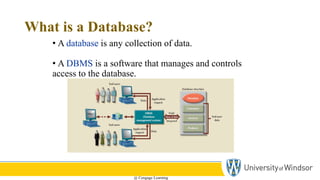
What is a Database?
• A database is any collection of data.
• A DBMS is a software that manages and controls
access to the database.
@ Cengage Learning
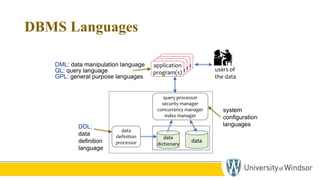
DBMS Languages
users of
the data
application
program(s)
application
program(s)
application
program(s)
application
program(s)
data
data
dictionary
data
definition
processor
query processor
security manager
concurrency manager
index manager
DDL:
data
definition
language
system
configuration
languages
QL: query language
DML: data manipulation language
GPL: general purpose languages
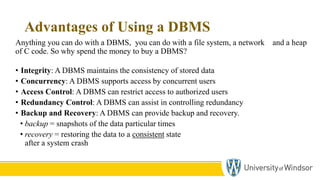
Advantages of Using a DBMS
Anything you can do with a DBMS, you can do with a file system, a network and a heap
of C code. So why spend the money to buy a DBMS?
• Integrity: A DBMS maintains the consistency of stored data
• Concurrency: A DBMS supports access by concurrent users
• Access Control: A DBMS can restrict access to authorized users
• Redundancy Control: A DBMS can assist in controlling redundancy
• Backup and Recovery: A DBMS can provide backup and recovery.
• backup = snapshots of the data particular times
• recovery = restoring the data to a consistent state
after a system crash
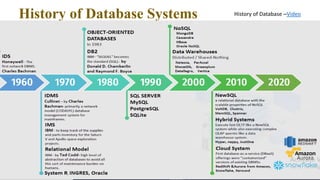
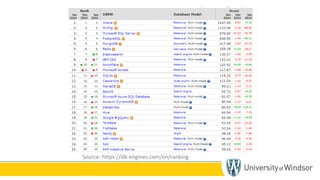
History of Database Systems History of Database –Video
26
Source: https://db-engines.com/en/ranking
Multi-user DBMS Architectures
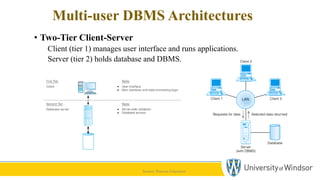
• Two-Tier Client-Server
Client (tier 1) manages user interface and runs applications.
Server (tier 2) holds database and DBMS.
Source: Pearson Education
Multi-user DBMS Architectures
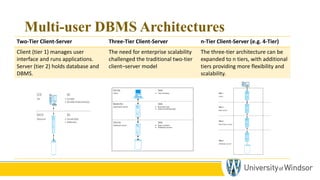
Two-Tier Client-Server Three-Tier Client-Server n-Tier Client-Server (e.g. 4-Tier)
Client (tier 1) manages user
interface and runs applications.
Server (tier 2) holds database and
DBMS.
The need for enterprise scalability
challenged the traditional two-tier
client–server model
The three-tier architecture can be
expanded to n tiers, with additional
tiers providing more flexibility and
scalability.
28
Multi-user DBMS Architectures
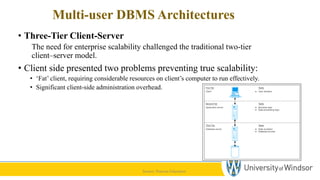
• Three-Tier Client-Server
The need for enterprise scalability challenged the traditional two-tier
client–server model.
• Client side presented two problems preventing true scalability:
• ‘Fat’ client, requiring considerable resources on client’s computer to run effectively.
• Significant client-side administration overhead.
Source: Pearson Education
Multi-user DBMS Architectures
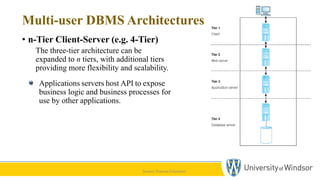
• n-Tier Client-Server (e.g. 4-Tier)
The three-tier architecture can be
expanded to n tiers, with additional tiers
providing more flexibility and scalability.
Applications servers host API to expose
business logic and business processes for
use by other applications.
Source: Pearson Education
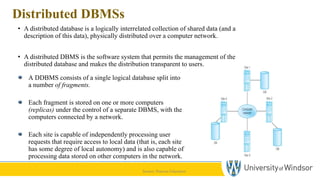
Distributed DBMSs
• A distributed database is a logically interrelated collection of shared data (and a
description of this data), physically distributed over a computer network.
• A distributed DBMS is the software system that permits the management of the
distributed database and makes the distribution transparent to users.
Source: Pearson Education
A DDBMS consists of a single logical database split into
a number of fragments.
Each fragment is stored on one or more computers
(replicas) under the control of a separate DBMS, with the
computers connected by a network.
Each site is capable of independently processing user
requests that require access to local data (that is, each site
has some degree of local autonomy) and is also capable of
processing data stored on other computers in the network.
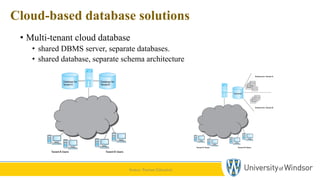
Cloud-based database solutions
• Multi-tenant cloud database
• shared DBMS server, separate databases.
• shared database, separate schema architecture
Source: Pearson Education
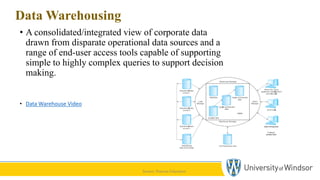
Data Warehousing
• A consolidated/integrated view of corporate data
drawn from disparate operational data sources and a
range of end-user access tools capable of supporting
simple to highly complex queries to support decision
making.
• Data Warehouse Video
Source: Pearson Education
Recap and Conclusion
• Introduction
• Database Structure
• Advantages of the Database Approach
• History of Database Systems
• Multi-User DBMS Architecture
• Cloud-based Database Architecture
• Data Warehousing
40
Any Questions

Introduction to databasecasmfnbskdfjnfkjsdnsjkdfn

  • 1.
    01- Database Introduction& Architectures School of Computer Science University of Windsor Dr. Shafaq Khan
  • 2.
    Agenda • Course Introduction •Team Introduction • Project hand-out • Lecture 2
  • 3.
  • 4.
    Deadline Forming Groups: 18thJan 2024 [11:59 PM] • Section 5 – Mo 2:30 PM: Section5_Project_Groups.docx • Section 2 – Tu 8:30 AM: Section2_Project_Groups.docx • Section 1 – Tu 2:30 PM: Section1_Project_Groups.docx • Section 3 – We 2:30 PM: Section3_Project_Groups.docx • Section 4 – Th 2:30 PM: Section4_Project_Groups.docx 4
  • 5.
    Introductory Questions What isa database What is the history of databases? What are the different database system architectures? What is a data warehouse? 5
  • 6.
    What is aDatabase? • A database is any collection of data. • A DBMS is a software that manages and controls access to the database. @ Cengage Learning
  • 7.
    DBMS Languages users of thedata application program(s) application program(s) application program(s) application program(s) data data dictionary data definition processor query processor security manager concurrency manager index manager DDL: data definition language system configuration languages QL: query language DML: data manipulation language GPL: general purpose languages
  • 8.
    Advantages of Usinga DBMS Anything you can do with a DBMS, you can do with a file system, a network and a heap of C code. So why spend the money to buy a DBMS? • Integrity: A DBMS maintains the consistency of stored data • Concurrency: A DBMS supports access by concurrent users • Access Control: A DBMS can restrict access to authorized users • Redundancy Control: A DBMS can assist in controlling redundancy • Backup and Recovery: A DBMS can provide backup and recovery. • backup = snapshots of the data particular times • recovery = restoring the data to a consistent state after a system crash
  • 9.
    History of DatabaseSystems History of Database –Video
  • 10.
  • 11.
    Multi-user DBMS Architectures •Two-Tier Client-Server Client (tier 1) manages user interface and runs applications. Server (tier 2) holds database and DBMS. Source: Pearson Education
  • 12.
    Multi-user DBMS Architectures Two-TierClient-Server Three-Tier Client-Server n-Tier Client-Server (e.g. 4-Tier) Client (tier 1) manages user interface and runs applications. Server (tier 2) holds database and DBMS. The need for enterprise scalability challenged the traditional two-tier client–server model The three-tier architecture can be expanded to n tiers, with additional tiers providing more flexibility and scalability. 28
  • 13.
    Multi-user DBMS Architectures •Three-Tier Client-Server The need for enterprise scalability challenged the traditional two-tier client–server model. • Client side presented two problems preventing true scalability: • ‘Fat’ client, requiring considerable resources on client’s computer to run effectively. • Significant client-side administration overhead. Source: Pearson Education
  • 14.
    Multi-user DBMS Architectures •n-Tier Client-Server (e.g. 4-Tier) The three-tier architecture can be expanded to n tiers, with additional tiers providing more flexibility and scalability. Applications servers host API to expose business logic and business processes for use by other applications. Source: Pearson Education
  • 15.
    Distributed DBMSs • Adistributed database is a logically interrelated collection of shared data (and a description of this data), physically distributed over a computer network. • A distributed DBMS is the software system that permits the management of the distributed database and makes the distribution transparent to users. Source: Pearson Education A DDBMS consists of a single logical database split into a number of fragments. Each fragment is stored on one or more computers (replicas) under the control of a separate DBMS, with the computers connected by a network. Each site is capable of independently processing user requests that require access to local data (that is, each site has some degree of local autonomy) and is also capable of processing data stored on other computers in the network.
  • 16.
    Cloud-based database solutions •Multi-tenant cloud database • shared DBMS server, separate databases. • shared database, separate schema architecture Source: Pearson Education
  • 17.
    Data Warehousing • Aconsolidated/integrated view of corporate data drawn from disparate operational data sources and a range of end-user access tools capable of supporting simple to highly complex queries to support decision making. • Data Warehouse Video Source: Pearson Education
  • 18.
    Recap and Conclusion •Introduction • Database Structure • Advantages of the Database Approach • History of Database Systems • Multi-User DBMS Architecture • Cloud-based Database Architecture • Data Warehousing
  • 19.