Release 10/10/2011 1
Introduction to
Computer Networks
Chapter 1
Jetking Infotrain Ltd.
Release 10/10/2011 2
Chapter Objectives
 Explain the concept of a computer network
 Explain the need of a computer network
 Define the various types of network
 Explain different applications of a computer
network
 Define and explain the working of the Internet
 Explain about email
Jetking Infotrain Ltd.
Release 10/10/2011 3
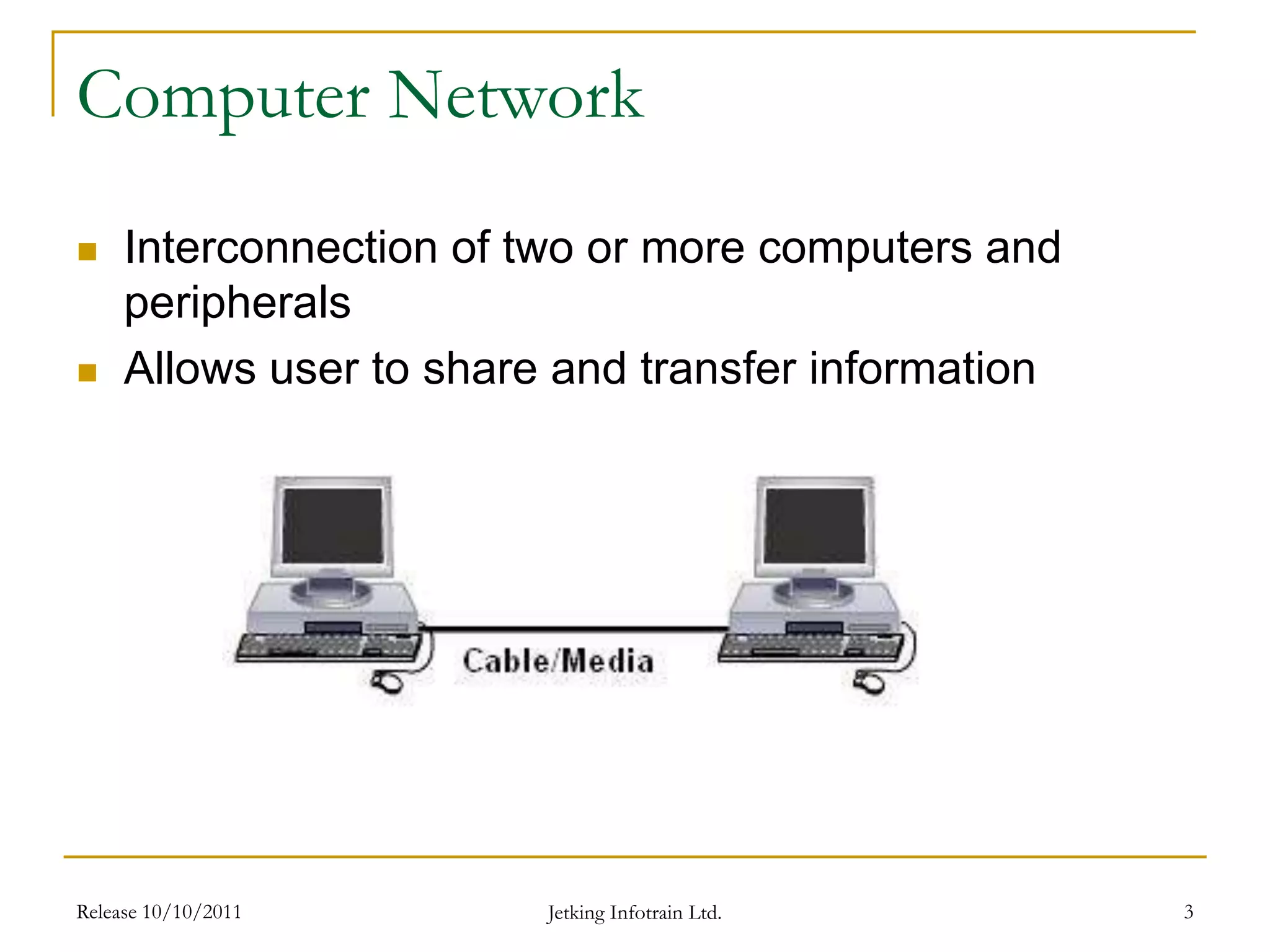
Computer Network
 Interconnection of two or more computers and
peripherals
 Allows user to share and transfer information
Jetking Infotrain Ltd.
Release 10/10/2011 4
Need of Computer Networks
 Sharing Files, folders, data and information
 Sharing hardware resources such as a
network printer
 Sharing software, as many users connected
to the network can run the same application
program
Jetking Infotrain Ltd.
Types of Network Configuration
 Client-Server Model
 Peer-to-Peer Model
Release 10/10/2011 5
Jetking Infotrain Ltd.
Question for GD Time Limit – 3 Mins
 What are the needs of a computer network?
Release 10/10/2011 Jetking Infotrain Ltd. 6
Client Server Model
 Is a configuration of the computer network that includes
a server and one or more clients.
 Client manages the local resources that are used by the
user such as monitor, keyboard, CPU and peripherals.
 Server is a more powerful system which manages
shared resources such as databases, printers,
communication links and handles all the incoming
requests for its shared resources.
Release 10/10/2011 7
Jetking Infotrain Ltd.
Peer to Peer Model
 A communications model in which each party has the
same capabilities and either party can initiate a
communication session.
 In recent usage, peer-to-peer has come to describe
applications in which users can use the Internet to
exchange files with each other directly.
Release 10/10/2011 8
Jetking Infotrain Ltd.
Release 10/10/2011 9
Types of Computer Networks
 Networks are classified depending on the
geographical area covered by the network
Computer
Networks
Local
Area Network
(LAN)
Campus
Area Network
(CAN)
Metropolitan
Area Network
(MAN)
Wide
Area Network
(WAN)
Jetking Infotrain Ltd.
Question for GD Time Limit – 3 Mins
 Name the different types of network
configuration.
Release 10/10/2011 Jetking Infotrain Ltd. 10
Release 10/10/2011 11
Local Area Network (LAN)
 Covers a small area
 Connects computers and workstations covering a
local area like, office or home
Jetking Infotrain Ltd.
Release 10/10/2011 12
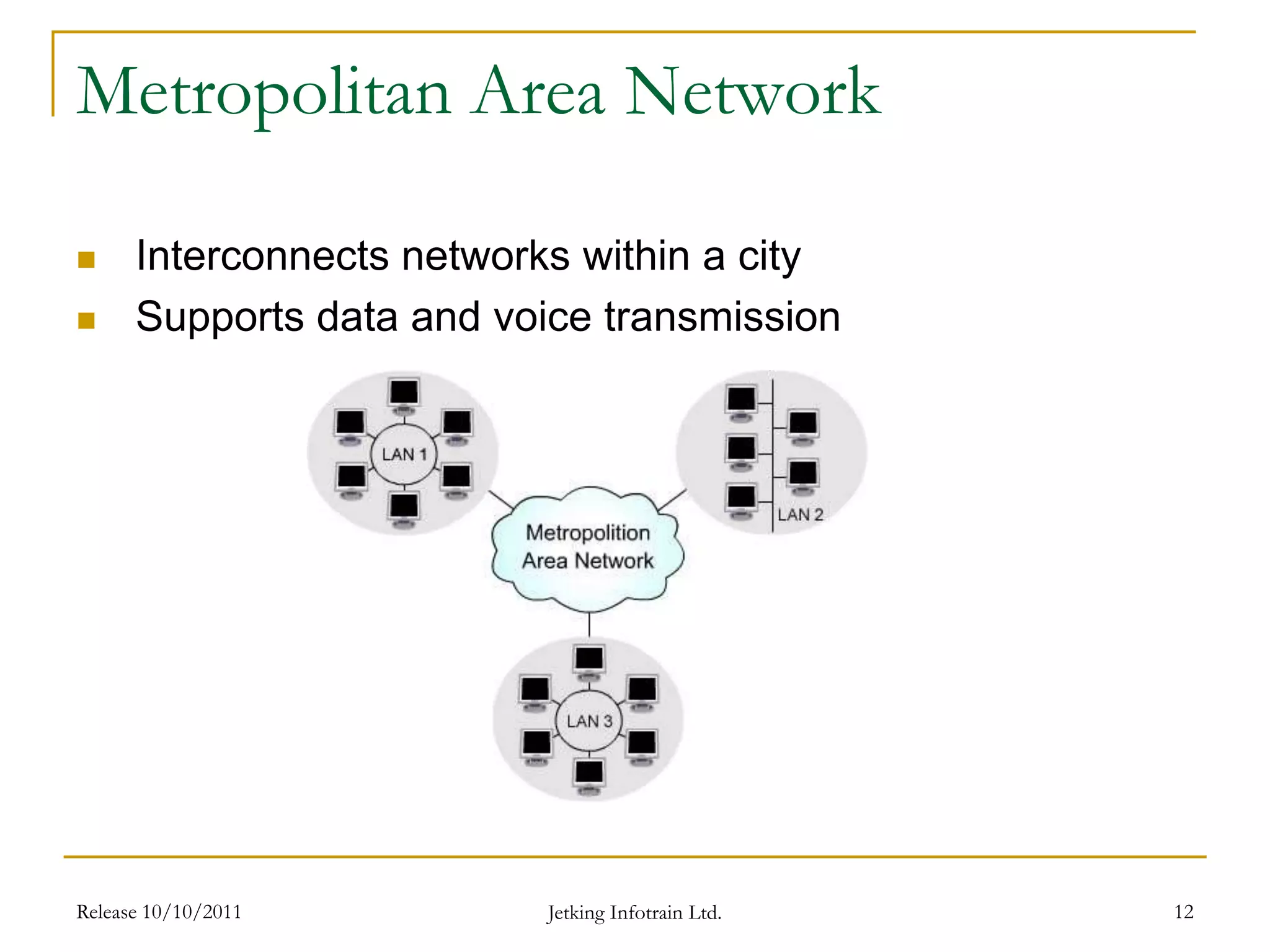
Metropolitan Area Network
 Interconnects networks within a city
 Supports data and voice transmission
Jetking Infotrain Ltd.
Release 10/10/2011 13
Wide Area Network
 Covers a wide geographical area which includes
multiple computers or LANs e.g. Internet
Jetking Infotrain Ltd.
Difference between LAN and WAN
LAN WAN
Connects computers and workstations in office
or home
Connects geographically separated LANs
Covers a local area of 1 Km. Spans large geographical area more than 100
Km.
Data Transmission Rate – 10/100/1000 Mbps Data Transmission Rate – 64 Kbps to 10 Mbps
Follows IEEE 802 standard Follows ITU standard
Low cost High cost (Repetitive)
Release 10/10/2011 14
Jetking Infotrain Ltd.
Question for GD Time Limit – 3 Mins
 List the different types of computer networks.
Release 10/10/2011 Jetking Infotrain Ltd. 15
Release 10/10/2011 16
Network Applications
 Financial Institution (Banking Sector)
 Communication Services (Telecom Industry)
 Internet Service (WWW, ISP)
Jetking Infotrain Ltd.
Internet
 Is one of the network applications.
 A global communication system where computer
networks are interconnected which uses TCP/IP
(Transmission Control Protocol/Internet
Protocol).
 Is a hardware and software infrastructure that
provides connectivity between computers.
 Carries large set of information that is shared
and used by millions of people worldwide.
Release 10/10/2011 17
Jetking Infotrain Ltd.
Working on Internet
Release 10/10/2011 18
Jetking Infotrain Ltd.
Email - I
 Stands for electronic mail, which is a method of
communication.
 Is just like a letter. Unlike letter, email exchanges
messages from one computer to another computer
over an electronic network like internet or Internet
service provider.
 Email address structure
 For example design@jetkinginfotrain.com, where
design is the user name and jetkinginfotrain.com is the
domain name. The sign @ is there in every email
address to separate the username and domain name.
Release 10/10/2011 19
Jetking Infotrain Ltd.
Email - II
 An email message consists of two components:
 Message header – The message header
contains control information like the email
address of the person who sends mail, recipient
email address, subject of the mail message, time
and date of the message and message size.
 Message body – The message body contains
the content of message.
Release 10/10/2011 20
Jetking Infotrain Ltd.
Question for GD Time Limit – 3 Mins
 What is the difference between Internet and
E-mail?
Release 10/10/2011 Jetking Infotrain Ltd. 21
Working with email
 Perform activity mentioned in Lab no.1 at the
end of this chapter.
 To create an e-mail account in Gmail.
Release 10/10/2011 22
Jetking Infotrain Ltd.
Practical - II
 Perform activity mentioned in Lab no.2 at the
end of this chapter.
 To send an e-mail message.
Release 10/10/2011 23
Jetking Infotrain Ltd.
Practical - III
 Perform activity mentioned in Lab no.3 at the
end of this chapter.
 To read an e-mail message.
Release 10/10/2011 24
Jetking Infotrain Ltd.
Release 10/10/2011 25
Summary - I
 Computer Network consists of group (or number of
individual computers) of computer and devices which are
connected with each other.
 Computer Networks can be used for many purposes:
 Sharing Files and folders, data and information.
 Sharing hardware resources such as network printer.
 Sharing software as many users connected to network run
the same application program.
 Network can be divided into two main types:
 Client-Server Model
 Peer-to-Peer Model
Jetking Infotrain Ltd.
Release 10/10/2011 26
Summary – II
 Client/Server is a configuration of the computer network
that includes a server and one or more clients.
 Peer-to-peer is a communications model in which each
party has the same capabilities and either party can
initiate a communication session.
 Computer networks are divided into LAN, MAN and
WAN depending on the geographical coverage area.
 LAN is a small network and easy to create.
 WAN covers a wide geographical area which includes
multiple computers or LANs.
Jetking Infotrain Ltd.
Release 10/10/2011 27
Summary - III
 Networks are widely used in different fields like financial
institutions, communication services and Internet services
like E-mails.
 Internet is a global communication system where
computer networks are interconnected which uses TCP/IP
(Transmission Control Protocol/Internet Protocol).
 Electronic mail is a computer based method of
sending/receiving messages form one computer user to
another.
 To exchange information through email, you need an
email client and an email server to which the client is
connected.
Jetking Infotrain Ltd.
Mind Map
 Draw a mind map to summarize the session
Release 10/10/2011 28
Jetking Infotrain Ltd.

Introduction to computer network.ppt

  • 1.
    Release 10/10/2011 1 Introductionto Computer Networks Chapter 1 Jetking Infotrain Ltd.
  • 2.
    Release 10/10/2011 2 ChapterObjectives  Explain the concept of a computer network  Explain the need of a computer network  Define the various types of network  Explain different applications of a computer network  Define and explain the working of the Internet  Explain about email Jetking Infotrain Ltd.
  • 3.
    Release 10/10/2011 3 ComputerNetwork  Interconnection of two or more computers and peripherals  Allows user to share and transfer information Jetking Infotrain Ltd.
  • 4.
    Release 10/10/2011 4 Needof Computer Networks  Sharing Files, folders, data and information  Sharing hardware resources such as a network printer  Sharing software, as many users connected to the network can run the same application program Jetking Infotrain Ltd.
  • 5.
    Types of NetworkConfiguration  Client-Server Model  Peer-to-Peer Model Release 10/10/2011 5 Jetking Infotrain Ltd.
  • 6.
    Question for GDTime Limit – 3 Mins  What are the needs of a computer network? Release 10/10/2011 Jetking Infotrain Ltd. 6
  • 7.
    Client Server Model Is a configuration of the computer network that includes a server and one or more clients.  Client manages the local resources that are used by the user such as monitor, keyboard, CPU and peripherals.  Server is a more powerful system which manages shared resources such as databases, printers, communication links and handles all the incoming requests for its shared resources. Release 10/10/2011 7 Jetking Infotrain Ltd.
  • 8.
    Peer to PeerModel  A communications model in which each party has the same capabilities and either party can initiate a communication session.  In recent usage, peer-to-peer has come to describe applications in which users can use the Internet to exchange files with each other directly. Release 10/10/2011 8 Jetking Infotrain Ltd.
  • 9.
    Release 10/10/2011 9 Typesof Computer Networks  Networks are classified depending on the geographical area covered by the network Computer Networks Local Area Network (LAN) Campus Area Network (CAN) Metropolitan Area Network (MAN) Wide Area Network (WAN) Jetking Infotrain Ltd.
  • 10.
    Question for GDTime Limit – 3 Mins  Name the different types of network configuration. Release 10/10/2011 Jetking Infotrain Ltd. 10
  • 11.
    Release 10/10/2011 11 LocalArea Network (LAN)  Covers a small area  Connects computers and workstations covering a local area like, office or home Jetking Infotrain Ltd.
  • 12.
    Release 10/10/2011 12 MetropolitanArea Network  Interconnects networks within a city  Supports data and voice transmission Jetking Infotrain Ltd.
  • 13.
    Release 10/10/2011 13 WideArea Network  Covers a wide geographical area which includes multiple computers or LANs e.g. Internet Jetking Infotrain Ltd.
  • 14.
    Difference between LANand WAN LAN WAN Connects computers and workstations in office or home Connects geographically separated LANs Covers a local area of 1 Km. Spans large geographical area more than 100 Km. Data Transmission Rate – 10/100/1000 Mbps Data Transmission Rate – 64 Kbps to 10 Mbps Follows IEEE 802 standard Follows ITU standard Low cost High cost (Repetitive) Release 10/10/2011 14 Jetking Infotrain Ltd.
  • 15.
    Question for GDTime Limit – 3 Mins  List the different types of computer networks. Release 10/10/2011 Jetking Infotrain Ltd. 15
  • 16.
    Release 10/10/2011 16 NetworkApplications  Financial Institution (Banking Sector)  Communication Services (Telecom Industry)  Internet Service (WWW, ISP) Jetking Infotrain Ltd.
  • 17.
    Internet  Is oneof the network applications.  A global communication system where computer networks are interconnected which uses TCP/IP (Transmission Control Protocol/Internet Protocol).  Is a hardware and software infrastructure that provides connectivity between computers.  Carries large set of information that is shared and used by millions of people worldwide. Release 10/10/2011 17 Jetking Infotrain Ltd.
  • 18.
    Working on Internet Release10/10/2011 18 Jetking Infotrain Ltd.
  • 19.
    Email - I Stands for electronic mail, which is a method of communication.  Is just like a letter. Unlike letter, email exchanges messages from one computer to another computer over an electronic network like internet or Internet service provider.  Email address structure  For example design@jetkinginfotrain.com, where design is the user name and jetkinginfotrain.com is the domain name. The sign @ is there in every email address to separate the username and domain name. Release 10/10/2011 19 Jetking Infotrain Ltd.
  • 20.
    Email - II An email message consists of two components:  Message header – The message header contains control information like the email address of the person who sends mail, recipient email address, subject of the mail message, time and date of the message and message size.  Message body – The message body contains the content of message. Release 10/10/2011 20 Jetking Infotrain Ltd.
  • 21.
    Question for GDTime Limit – 3 Mins  What is the difference between Internet and E-mail? Release 10/10/2011 Jetking Infotrain Ltd. 21
  • 22.
    Working with email Perform activity mentioned in Lab no.1 at the end of this chapter.  To create an e-mail account in Gmail. Release 10/10/2011 22 Jetking Infotrain Ltd.
  • 23.
    Practical - II Perform activity mentioned in Lab no.2 at the end of this chapter.  To send an e-mail message. Release 10/10/2011 23 Jetking Infotrain Ltd.
  • 24.
    Practical - III Perform activity mentioned in Lab no.3 at the end of this chapter.  To read an e-mail message. Release 10/10/2011 24 Jetking Infotrain Ltd.
  • 25.
    Release 10/10/2011 25 Summary- I  Computer Network consists of group (or number of individual computers) of computer and devices which are connected with each other.  Computer Networks can be used for many purposes:  Sharing Files and folders, data and information.  Sharing hardware resources such as network printer.  Sharing software as many users connected to network run the same application program.  Network can be divided into two main types:  Client-Server Model  Peer-to-Peer Model Jetking Infotrain Ltd.
  • 26.
    Release 10/10/2011 26 Summary– II  Client/Server is a configuration of the computer network that includes a server and one or more clients.  Peer-to-peer is a communications model in which each party has the same capabilities and either party can initiate a communication session.  Computer networks are divided into LAN, MAN and WAN depending on the geographical coverage area.  LAN is a small network and easy to create.  WAN covers a wide geographical area which includes multiple computers or LANs. Jetking Infotrain Ltd.
  • 27.
    Release 10/10/2011 27 Summary- III  Networks are widely used in different fields like financial institutions, communication services and Internet services like E-mails.  Internet is a global communication system where computer networks are interconnected which uses TCP/IP (Transmission Control Protocol/Internet Protocol).  Electronic mail is a computer based method of sending/receiving messages form one computer user to another.  To exchange information through email, you need an email client and an email server to which the client is connected. Jetking Infotrain Ltd.
  • 28.
    Mind Map  Drawa mind map to summarize the session Release 10/10/2011 28 Jetking Infotrain Ltd.