Textbook and ReferenceMaterial
Cloud Computing, by Kris Jamsa, Jones & Bartlett learning, 2023
Cloud Computing, by Sandeep Bhowmik, Cambridge University Press 2017.
Cloud Computing: Concepts, Technology & Architecture by Zaigham Mahmood, Thomas
Erl, Ricardo Puttini, Prentice Hall 2013.
Stanford University Lectures on Cloud Computing by Christos Kozyrakis and Matei Zaharia,
Autumn 2018
Cloud Computing for Dummies, by Daniel Kirsch and Judith Hurwitz, Wiley 2020.
Cloud Computing Principles, Systems and Applications, edited by Nick Antonopoulos and Lee
Gillam, Springer 2017.
Hadoop: The Definitive Guide, by Tom White, O’Reilly 2015.
Cassandra: The Definitive Guide, by Jefferey Carpenter & Eben Hewitt, O-Reilly 2010.
Cloud Computing Bible by Barrie Sosinsky, 2011.
4.
Course Information
Pre-requisites: DatabaseManagement Systems
Three hour lectures per Week
Typically, there are 18 weeks in a semester which include:
◦ 16 Lecture weeks and 2 exam weeks
◦ Week 9 and 18 are reserved for exams
5.
Course Withdrawal
Full feewill be adjusted/ transferred to the next semester if the course is
withdrawn within the first week of commencement of the semester
Half the fee will be adjusted/ transferred to the next semester if withdrawn
within the first 15 days of the commencement of the semester.
No fee shall be adjusted/ transferred if the course is withdrawn after the 15th
day of the semester.
Course(s) withdrawn after the second week but within seven weeks of the
commencement of the semester shall be recorded on the transcript with the ‘W’
grade. After that, withdrawal of the course shall not be allowed.
6.
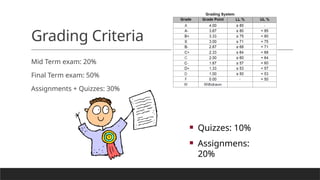
Grading Criteria
Mid Termexam: 20%
Final Term exam: 50%
Assignments + Quizzes: 30%
Quizzes: 10%
Assignmens:
20%
7.
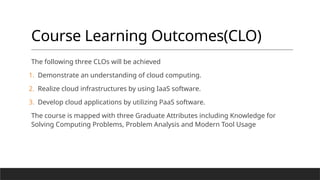
Course Learning Outcomes(CLO)
Thefollowing three CLOs will be achieved
1. Demonstrate an understanding of cloud computing.
2. Realize cloud infrastructures by using IaaS software.
3. Develop cloud applications by utilizing PaaS software.
The course is mapped with three Graduate Attributes including Knowledge for
Solving Computing Problems, Problem Analysis and Modern Tool Usage
8.
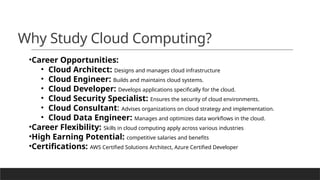
Why Study CloudComputing?
•Career Opportunities:
• Cloud Architect: Designs and manages cloud infrastructure
• Cloud Engineer: Builds and maintains cloud systems.
• Cloud Developer: Develops applications specifically for the cloud.
• Cloud Security Specialist: Ensures the security of cloud environments.
• Cloud Consultant: Advises organizations on cloud strategy and implementation.
• Cloud Data Engineer: Manages and optimizes data workflows in the cloud.
•Career Flexibility: Skills in cloud computing apply across various industries
•High Earning Potential: competitive salaries and benefits
•Certifications: AWS Certified Solutions Architect, Azure Certified Developer
9.
9
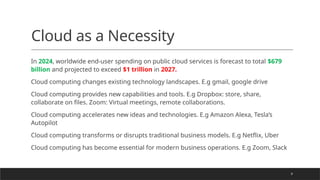
Cloud as aNecessity
In 2024, worldwide end-user spending on public cloud services is forecast to total $679
billion and projected to exceed $1 trillion in 2027.
Cloud computing changes existing technology landscapes. E.g gmail, google drive
Cloud computing provides new capabilities and tools. E.g Dropbox: store, share,
collaborate on files. Zoom: Virtual meetings, remote collaborations.
Cloud computing accelerates new ideas and technologies. E.g Amazon Alexa, Tesla’s
Autopilot
Cloud computing transforms or disrupts traditional business models. E.g Netflix, Uber
Cloud computing has become essential for modern business operations. E.g Zoom, Slack
10.
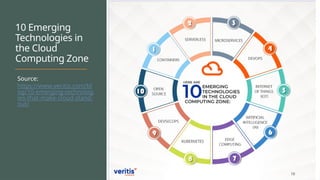
10 Emerging
Technologies in
theCloud
Computing Zone
Source:
https://www.veritis.com/bl
og/10-emerging-technolog
ies-that-make-cloud-stand-
out/
10
11.
In the worldof Cloud Computing…
You sign up for a service from a cloud provider, for instance AWS
EC2
Your cloud instance is accessible over network, is highly scalable,
you can request resources on demand and pay-as-you-go.
In simple words, cloud computing is a refinement of the rental
model, with shorter timescales for resource rental.
12.
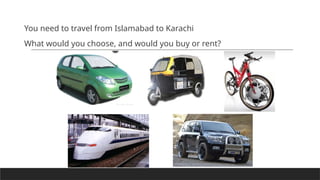
You need totravel from Islamabad to Karachi
What would you choose, and would you buy or rent?
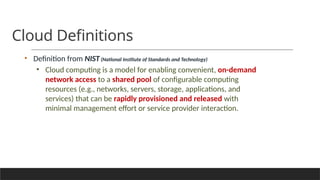
Cloud Definitions
• Definitionfrom NIST(National Institute of Standards and Technology)
• Cloud computing is a model for enabling convenient, on-demand
network access to a shared pool of configurable computing
resources (e.g., networks, servers, storage, applications, and
services) that can be rapidly provisioned and released with
minimal management effort or service provider interaction.
15.
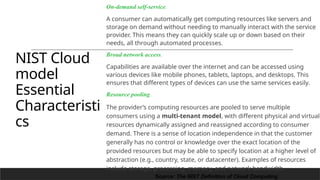
NIST Cloud
model
Essential
Characteristi
cs
On-demand self-service.
Aconsumer can automatically get computing resources like servers and
storage on demand without needing to manually interact with the service
provider. This means they can quickly scale up or down based on their
needs, all through automated processes.
Broad network access.
Capabilities are available over the internet and can be accessed using
various devices like mobile phones, tablets, laptops, and desktops. This
ensures that different types of devices can use the same services easily.
Resource pooling.
The provider’s computing resources are pooled to serve multiple
consumers using a multi-tenant model, with different physical and virtual
resources dynamically assigned and reassigned according to consumer
demand. There is a sense of location independence in that the customer
generally has no control or knowledge over the exact location of the
provided resources but may be able to specify location at a higher level of
abstraction (e.g., country, state, or datacenter). Examples of resources
include storage, processing, memory, and network bandwidth.
15
Source: The NIST Definition of Cloud Computing
16.
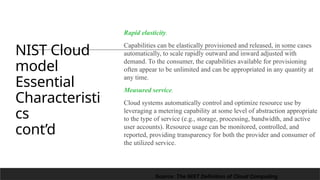
NIST Cloud
model
Essential
Characteristi
cs
cont’d
Rapid elasticity.
Capabilitiescan be elastically provisioned and released, in some cases
automatically, to scale rapidly outward and inward adjusted with
demand. To the consumer, the capabilities available for provisioning
often appear to be unlimited and can be appropriated in any quantity at
any time.
Measured service.
Cloud systems automatically control and optimize resource use by
leveraging a metering capability at some level of abstraction appropriate
to the type of service (e.g., storage, processing, bandwidth, and active
user accounts). Resource usage can be monitored, controlled, and
reported, providing transparency for both the provider and consumer of
the utilized service.
16
Source: The NIST Definition of Cloud Computing
Big Data
1. Volume(Size of Data) – Big data means huge amounts of data generated every second. This data can include
social media feeds, click streams from websites or mobile apps, and sensor-enabled equipment. Some organizations
deal with tens of terabytes of data, while others may handle hundreds of petabytes.
o Example: Facebook stores petabytes of user posts, photos, and videos.
2. Velocity (Speed of Data) – Data is created and processed very fast in real time.
o Example: Stock market data changes every second and needs instant analysis.
3. Variety (Different Types of Data) – Data comes in many formats, such as text, images, videos, and numbers.
Traditional data types are structured and fit well into relational databases. However, with the rise of big data, new
unstructured data types such as text, audio, and video have emerged, requiring additional pre-processing to derive
meaning.
o Example: A hospital stores X-rays (images), patient records (text), and heart rate logs (numbers).
27
28.
28
Relationship Between CloudComputing and Big Data
Big Data refers to extremely large datasets that cannot be handled using traditional computing methods.
Cloud Computing provides scalable resources (storage, processing power, and networking) to handle big data efficiently.
How They Work Together:
1. Storage: Big data needs a lot of space, and cloud storage (e.g., Amazon S3, Google Cloud Storage) provides a cost-
effective solution.
2. Processing: Cloud computing services (e.g., AWS EMR, Google BigQuery) help process big data quickly using
distributed computing.
3. Scalability: Big data workloads change over time; cloud computing allows automatic scaling to handle varying loads.
4. Cost-Effectiveness: Instead of investing in expensive on-premise servers, companies use cloud-based pay-as-you-go
models.
30
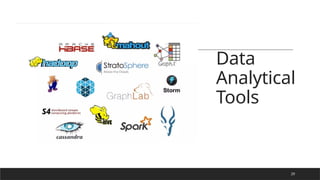
Two main typesof tools
•Data store
• How to store and access files? File system
Tools : e.g Hadoop HDFS, Amazon S3
•Data processing
Tools: eg Hadoop MapReduce, Google Dataflow
What is aServer?
Servers are computers that provide “services” to “clients”
They are typically designed for reliability and to service a large number of
requests
Organizations typically require many physical servers to provide various
services (Web, Email, Database, etc.) to ensure better performance, isolation,
and management.
virtualization is preferred as it allows you to create isolated environments for
each server, improving security, management, and resource allocation
Server hardware is becoming more powerful and compact
33.
Compact Servers
Organizations wouldlike to conserve the amount of floor
space dedicated to their computer infrastructure
For large-scale installations, compact servers are used.
This helps with:
• Floor Space
• Manageability
• Scalability
• Power and Cooling
35.
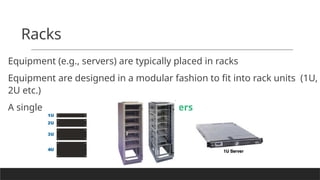
Racks
Equipment (e.g., servers)are typically placed in racks
Equipment are designed in a modular fashion to fit into rack units (1U,
2U etc.)
A single rack can hold up to 42 1U servers
36.
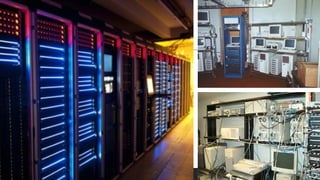
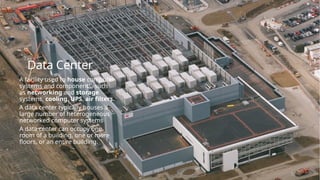
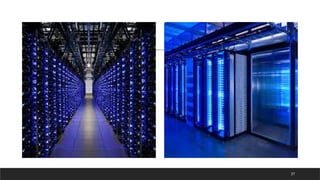
Data Center
A facilityused to house computer
systems and components, such
as networking and storage
systems, cooling, UPS, air filters.
A data center typically houses a
large number of heterogeneous
networked computer systems
A data center can occupy one
room of a building, one or more
floors, or an entire building.
36
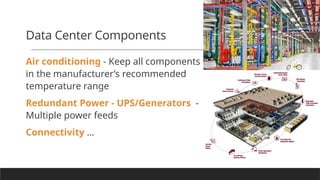
Data Center Components
Airconditioning - Keep all components
in the manufacturer’s recommended
temperature range
Redundant Power - UPS/Generators -
Multiple power feeds
Connectivity …
39.
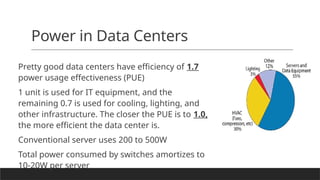
Power in DataCenters
Pretty good data centers have efficiency of 1.7
power usage effectiveness (PUE)
1 unit is used for IT equipment, and the
remaining 0.7 is used for cooling, lighting, and
other infrastructure. The closer the PUE is to 1.0,
the more efficient the data center is.
Conventional server uses 200 to 500W
Total power consumed by switches amortizes to
10-20W per server
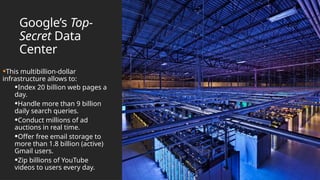
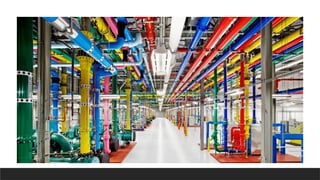
Google’s Top-
Secret Data
Center
•Thismultibillion-dollar
infrastructure allows to:
•Index 20 billion web pages a
day.
•Handle more than 9 billion
daily search queries.
•Conduct millions of ad
auctions in real time.
•Offer free email storage to
more than 1.8 billion (active)
Gmail users.
•Zip billions of YouTube
videos to users every day.
42.
The mission Willpower
Backin 1999: The system often took a full 3.5 seconds to deliver search results
and tended to crash on Mondays.
Build and operate own data centers.
AND innovate to reduce setup and operational costs.
Google has probably more server machines than any other company.
Several other factors contribute to Google's success:
Eg :Efficiency and optimization, Network infrastructure, Software and
algorithms, Data center design, Distributed computing
43.
43
Electricity Management
Traditionally, datacenters cool them off
with giant computer room air
conditioners.
That requires massive amounts of energy.
Workers could wear shorts and T-shirts.
In data centers, an aisle refers to the
space between rows of server racks.
The “hot aisle,” could be allowed up to 120
degrees.
Hot Aisle: Where hot air expelled from the
back of servers is collected.
Cold Aisle: Where cold air is supplied to cool
the servers from the front.
This arrangement optimizes cooling efficiency
by separating hot and cold airflow.
That heat could be absorbed by coils filled with
water, which would then be pumped out of the
building and cooled before being circulated
back.
44.
Electricity
Managemen
t
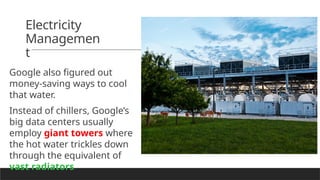
Google also figuredout
money-saving ways to cool
that water.
Instead of chillers, Google’s
big data centers usually
employ giant towers where
the hot water trickles down
through the equivalent of
vast radiators.
45.
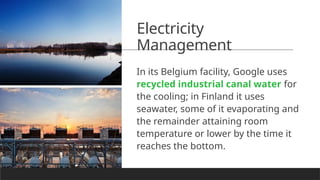
Electricity
Management
In its Belgiumfacility, Google uses
recycled industrial canal water for
the cooling; in Finland it uses
seawater, some of it evaporating and
the remainder attaining room
temperature or lower by the time it
reaches the bottom.
47.
…. even the
wateris recycled
The idea is simple: instead of using
potable (or drinking) water for
cooling, use non-drinkable sources
of water and clean it just enough so
we can use it for cooling.
Douglas County facility treats city
waste water, while Belgium facility
pulls water from an industrial canal.
To make it even more remarkable,
the rainwater is captured
48.
48
Electricity Management
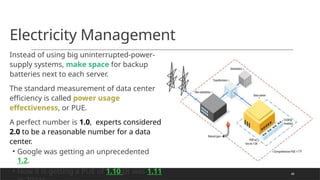
Instead ofusing big uninterrupted-power-
supply systems, make space for backup
batteries next to each server.
The standard measurement of data center
efficiency is called power usage
effectiveness, or PUE.
A perfect number is 1.0, experts considered
2.0 to be a reasonable number for a data
center.
• Google was getting an unprecedented
1.2.
• Now it is getting a PUE of 1.10 (It was 1.11
Google
Hardware
Google is stillthought of as an Internet company
It is also one of the world’s largest hardware manufacturers,
thanks to the fact that it builds much of its own equipment.
•Google knows exactly what it needs inside its rigorously
controlled data centers
• speed, power, and good connections—
• No graphics cards, for instance, since these machines never
power a screen.
• If the machines in a data center are general-purpose servers not
used for tasks like graphics rendering or parallel computing, they
typically don't need graphics cards (GPUs) because they aren't
driving displays.
• Many modern data centers do use GPUs, but not for powering
screens. Instead, GPUs are employed for high-performance
computing tasks like machine learning, AI, and scientific
simulations, which benefit from GPU's parallel processing
capabilities.
• No enclosures, because the motherboards go straight into the
racks.
• The same principle applies to its networking equipment
51.
What about
Software?
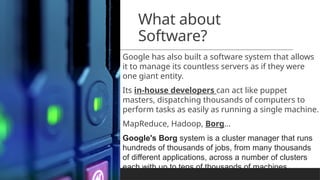
Google hasalso built a software system that allows
it to manage its countless servers as if they were
one giant entity.
Its in-house developers can act like puppet
masters, dispatching thousands of computers to
perform tasks as easily as running a single machine.
MapReduce, Hadoop, Borg…
Google's Borg system is a cluster manager that runs
hundreds of thousands of jobs, from many thousands
of different applications, across a number of clusters
each with up to tens of thousands of machines.
52.
What about reliability?
SiteReliability Engineering team (SRE).
SREs are not merely troubleshooters but engineers.
Every year, the SREs run this simulated war—called DiRT
(disaster recovery testing)—on Google’s infrastructure.
53.
but bad thingsdo happen
On April 17, 2012, for 1.4 percent of users (a large
number of people), Gmail was down.
One of the Gmail SREs admitted, “I pushed a
change on Friday that might have affected this.”
54.
How many serversdoes Google
employ?
There are 49,923 operating in the Lenoir facility (North Carolina,
USA).
JULY 9, 2008. GOOGLE’S MILLIONTH SERVER.
Google’s intention was to render this data center, OBSOLETE!!!
The magic number of servers, if it is even obtainable, is basically
meaningless. Today’s machines, with multicore processors and
other advances, have many times the power and utility of earlier
versions. A single Google server circa 2012 may be the equivalent of
20 servers from a previous generation.
#9 Gartner is a leading research and advisory company that provides insights, advice, and tools for IT and business leaders to make informed decisions about technology and business strategies.
Amazon Alexa: Uses cloud-based AI to continuously improve its voice recognition and smart home integration, facilitating innovation in the smart home ecosystem.
Tesla's Autopilot: Utilizes cloud computing to process vast amounts of driving data, enabling the continuous development and improvement of self-driving technology.
#10 "10 Emerging Technologies in the Cloud Computing Zone" means new and developing technologies in the field of cloud computing that are shaping how we use and manage cloud services. These innovations impact how businesses and individuals store, process, and manage data online.
#11 Amazon Elastic Compute Cloud (Amazon EC2)
Services:
Amazon EC2 EBS (Elastic Block Store):
Amazon EC2 Instance Store:
Description: Provides temporary block-level storage for EC2 instances, ideal for storing data that changes frequently and does not need to be retained long-term.
#14 Convenient, on-demand network access:
Explanation: You can access computing resources whenever you need them, without waiting.
Example: Imagine you need extra storage for a few days to store files for a project. You can quickly get more storage from a cloud service like Google Drive or Dropbox.
Shared pool of configurable computing resources:
Explanation: Resources (like servers or storage) are pooled together and can be adjusted to fit your needs.
Example: Think of a large, flexible storage unit where you can easily add or remove space as needed. AWS S3 (simple storage services) allows you to store files and adjust the amount of storage dynamically.
Networks, servers, storage, applications, and services:
Explanation: Cloud computing provides all types of resources you might need.
Examples:
Networks:. Eg Amazon VPC. Amazon VPC (Virtual Private Cloud): Allows you to create a private network within the Amazon Web Services (AWS) cloud. You can configure your own IP address range, subnets, route tables, and network gateways.
Servers: Virtual machines in Azure or AWS that run your applications.
Storage: eg Amazon S3 where you can save files.
Applications: Software like Google Docs or Microsoft Office 365 that you access over the internet.
Services: Consider Amazon RDS (Relational Database Service). It’s a cloud service that manages and scales databases for you. Instead of setting up and maintaining a database server yourself, you use RDS to handle database operations, backups, and scaling.
Rapidly provisioned and released:
Explanation: Resources can be quickly set up or removed as needed.
Example: If you’re hosting a website and anticipate a lot of visitors, you can quickly add more server capacity with a service like AWS EC2. Once the traffic decreases, you can scale down the servers.
Minimal management effort or service provider interaction:
Explanation: You don’t need to handle the detailed management of the resources yourself.
Example: When you use a cloud service like Netflix, you don’t manage the servers or storage that holds the movies. Netflix does this for you, and you just use the service.
This approach makes cloud computing flexible, scalable, and user-friendly.
#15 Processing: Amazon EC2 (virtual servers)
Storage: Amazon S3 (object storage), Google Cloud Storage (object storage)
Memory: Amazon RDS (managed database services with memory allocation)
Network Bandwidth: AWS Direct Connect (dedicated network connections), Google Cloud Interconnect (high-speed network connections)
#16 In the context of cloud computing, the term "elastic" refers to the ability to automatically scale resources up or down based on demand.
#23 PTCL Data Centers – Pakistan Telecommunication Company Limited (PTCL) operates multiple data centers across the country, offering services like cloud hosting, managed services, and disaster recovery.
Fiberlink Data Center – Fiberlink operates in Lahore and offers cloud and hosting solutions with a focus on providing high availability and security.
Systems Limited Data Center – Systems Limited, a major IT services company, has a data center in Pakistan offering cloud and managed hosting solutions.
QuickStart Data Center – Located in Karachi, QuickStart offers data center services with a strong focus on security and business continuity.
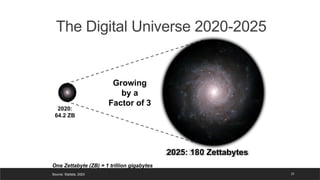
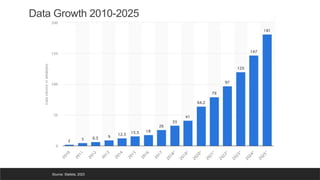
#25 Over the years, data volumes have exploded, driven not only by human-generated data but also by IoT (Internet of Things) devices collecting customer usage patterns and product performance data. The advancements in machine learning have further contributed to the increase in data generation.
#28 Examples:
Netflix: Stores and processes massive amounts of user data in the cloud to recommend movies.
Google Maps: Uses big data stored in the cloud to analyze traffic patterns in real time.
E-commerce (Amazon, Alibaba): Analyzes customer buying habits using cloud-based big data tools to offer personalized recommendations.
#32 in traditional setups, organizations often dedicated separate physical servers for each type of service to ensure better performance, isolation, and management. For example:
One server would host the web server (e.g., Apache or Nginx),
Another physical server would manage email services (e.g., Microsoft Exchange),
A separate one would handle the database (e.g., SQL Server, MySQL).
However, with advances in virtualization and cloud computing, one physical server can host multiple services by running multiple server software (e.g., web server, email server, database server) using virtual machines or containers.
So, in modern infrastructures, instead of many physical servers, a single powerful server may run many services efficiently.
#38 Physical security - CCTV/Access Control
Multiple ISPs/Leased Lines
#50 so far, though, there’s one area where Google hasn’t ventured: designing its own chips.
many data centers have GPUs (Graphics Processing Unit) to handle tasks requiring high parallel processing power, such as AI, machine learning, data analysis, and graphics rendering. Cloud providers like AWS, Google Cloud, and Azure offer GPU-based instances for such workloads.
#51 This is tremendously empowering for the people who write Google code. Just as your computer is a single device that runs different programs simultaneously—and you don’t have to worry about which part is running which application—Google engineers can treat seas of servers like a single unit. They just write their production code, and the system distributes it across a server.
Google's Borg system is a cluster manager that runs hundreds of thousands of jobs, from many thousands of different applications, across a number of clusters each with up to tens of thousands of machines.






![Cloud-Computing-32-40[1].pptx...,..........](https://cdn.slidesharecdn.com/ss_thumbnails/cloud-computing-32-401-241120164825-adcc70bb-thumbnail.jpg?width=640&height=640&fit=bounds)


