

INTRODUCTION TO CHAT BOT
DEVELOPMENT
By Opencube Labs
What are chat bots?
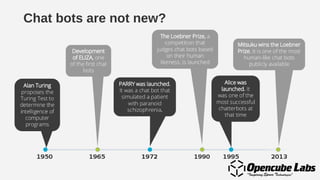
Chat bots are not new?
Conceptual Introduction
Chatbot’s allow us to have a new way to automate
our audience engagement in a more efficient way
that is always in line with our strategy or pre
defined goal.
What ever our objective, be it delivery of news,
updates, events information, information about your
business, services, knowledge base, FAQs, product
showcase, campaigns, contest tools.
Chatbot’s can be described as small pieces of software follow a
dialogue script in order to grant a sort off interaction with brands.
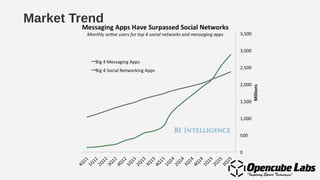
Market Trend
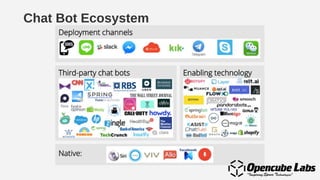
Chat Bot Ecosystem
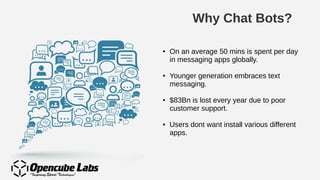
Why Chat Bots?
● On an average 50 mins is spent per day
in messaging apps globally.
● Younger generation embraces text
messaging.
● $83Bn is lost every year due to poor
customer support.
● Users dont want install various different
apps.
Possibilities with Chat Bots
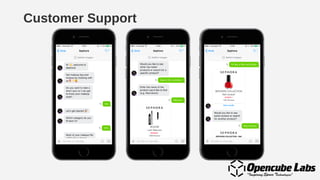
Customer Support
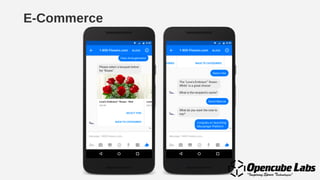
E-Commerce
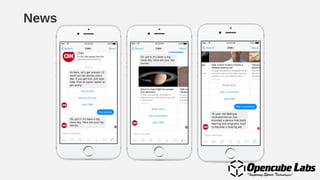
News
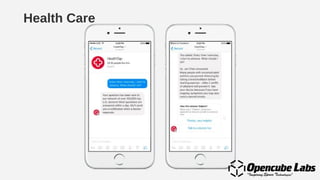
Health Care
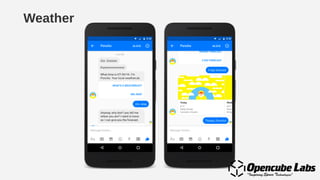
Weather
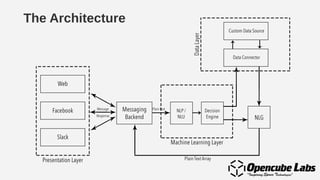
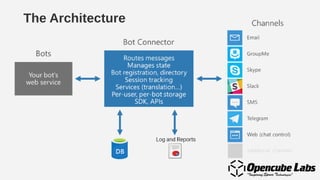
The Architecture
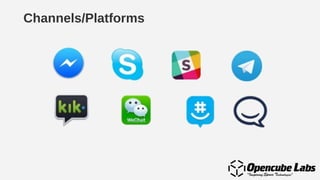
Channels/Platforms
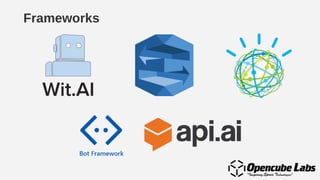
Frameworks
The Design
Expectations
Expectations
Expectations
Expectations
“Ask me anything”
The stupidest thing bot could say :-P
NLP
NLU
NLG
> Get me tickets for <movie_name>
NLU Output:
[{
"intent": "event_search_by_name",
"entities": [
{
"name": "event_name",
"value": "<movie_name>"
}
]
}]
The Architecture
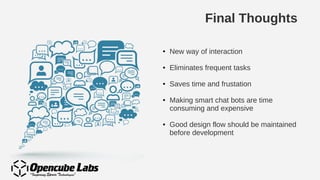
Final Thoughts
● New way of interaction
● Eliminates frequent tasks
● Saves time and frustation
● Making smart chat bots are time
consuming and expensive
● Good design flow should be maintained
before development
Telegram Bot Flow
● Install and create account on Telegram
● Search for @botfather
● Use command /newbot to create a
new bot and follow the steps to get
the bot token
● Clone this repo:
https://github.com/opencubelabs/
telegram_bot_sample
● Update the bot token
● Create a Heroku App and deploy the code
● Setup webhook
curl -F "url=<heroku_app_link>"
https://api.telegram.org/bot<your_api_token>/setWebhook
Messenger Bot Flow
● Clone github.com/opencubelabs/echo_bot
● Create heroku.com account
● Create a Heroku App
● Create a Facebook Page
● Create a Facebook App on
developers.facebook.com
● Change Fb Apps messenger settings
● Update page token
● Change the Fb Apps webhook
Thank You

Introduction to Chatbot Development

  • 1.
    INTRODUCTION TO CHATBOT DEVELOPMENT By Opencube Labs
  • 2.
  • 3.
    Chat bots arenot new?
  • 4.
    Conceptual Introduction Chatbot’s allowus to have a new way to automate our audience engagement in a more efficient way that is always in line with our strategy or pre defined goal. What ever our objective, be it delivery of news, updates, events information, information about your business, services, knowledge base, FAQs, product showcase, campaigns, contest tools. Chatbot’s can be described as small pieces of software follow a dialogue script in order to grant a sort off interaction with brands.
  • 5.
  • 6.
  • 7.
    Why Chat Bots? ●On an average 50 mins is spent per day in messaging apps globally. ● Younger generation embraces text messaging. ● $83Bn is lost every year due to poor customer support. ● Users dont want install various different apps.
  • 8.
  • 9.
  • 10.
  • 11.
  • 12.
  • 13.
  • 14.
  • 15.
  • 16.
  • 17.
  • 18.
  • 19.
    “Ask me anything” Thestupidest thing bot could say :-P
  • 24.
  • 25.
    > Get metickets for <movie_name> NLU Output: [{ "intent": "event_search_by_name", "entities": [ { "name": "event_name", "value": "<movie_name>" } ] }]
  • 26.
  • 27.
    Final Thoughts ● Newway of interaction ● Eliminates frequent tasks ● Saves time and frustation ● Making smart chat bots are time consuming and expensive ● Good design flow should be maintained before development
  • 28.
    Telegram Bot Flow ●Install and create account on Telegram ● Search for @botfather ● Use command /newbot to create a new bot and follow the steps to get the bot token ● Clone this repo: https://github.com/opencubelabs/ telegram_bot_sample ● Update the bot token ● Create a Heroku App and deploy the code ● Setup webhook curl -F "url=<heroku_app_link>" https://api.telegram.org/bot<your_api_token>/setWebhook
  • 29.
    Messenger Bot Flow ●Clone github.com/opencubelabs/echo_bot ● Create heroku.com account ● Create a Heroku App ● Create a Facebook Page ● Create a Facebook App on developers.facebook.com ● Change Fb Apps messenger settings ● Update page token ● Change the Fb Apps webhook
  • 30.