CE141 : COMPUTER CONCEPTS AND PROGRAMMING
INTRODUCTION TO C
Prepared by :
Ms.Trusha Patel
Assistant Professor
https://sites.google.com/view/mrstrusha
Chandubhai S Patel Intitute ofTechnology(CSPIT), CHARUSAT
HISTORY OF C
Chandubhai S Patel Intitute ofTechnology(CSPIT), CHARUSAT
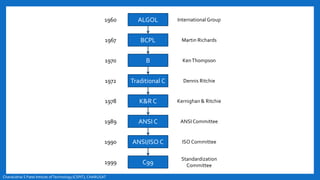
ALGOL
B
BCPL
Traditional C
K&R C
ANSI C
ANSI/ISO C
C99
International Group
KenThompson
Martin Richards
Dennis Ritchie
Kernighan & Ritchie
ANSICommittee
ISO Committee
Standardization
Committee
1960
1970
1967
1972
1978
1989
1990
1999
History of C
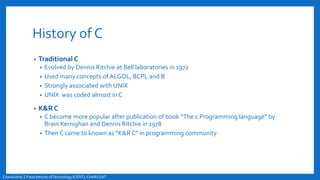
• ALGOL
• Root of all modern language
• Introduced in early 1960s
• First computer language use a block structure
• Not popular in USA, widely used in Europe
• Gave concept of structure programming to computer science society
• BCPL
• BCPL : Basic Combined Programming Language
• Martin Richards developed in 1967
• Developed to write system software
• B
• KenThompson developed in 1970
• Used to create early version of UNIX operating system at Bell laboratories
Chandubhai S Patel Intitute ofTechnology(CSPIT), CHARUSAT
History of C
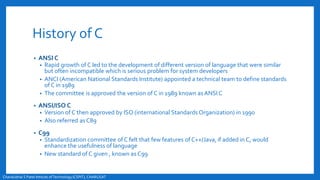
• Traditional C
• Evolved by Dennis Ritchie at Bell laboratories in 1972
• Used many concepts of ALGOL, BCPL and B
• Strongly associated with UNIX
• UNIX was coded almost in C
• K&R C
• C become more popular after publication of book “The c Programming language” by
Brain Kernighan and Dennis Ritchie in 1978
• Then C came to known as “K&R C” in programming community
Chandubhai S Patel Intitute ofTechnology(CSPIT), CHARUSAT
History of C
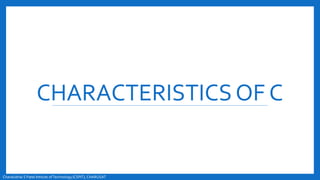
• ANSI C
• Rapid growth of C led to the development of different version of language that were similar
but often incompatible which is serious problem for system developers
• ANCI (American National Standards Institute) appointed a technical team to define standards
of C in 1989
• The committee is approved the version of C in 1989 known asANSI C
• ANSI/ISO C
• Version of C then approved by ISO (international Standards Organization) in 1990
• Also referred asC89
• C99
• Standardization committee of C felt that few features of C++/Java, if added in C, would
enhance the usefulness of language
• New standard of C given , known as C99
Chandubhai S Patel Intitute ofTechnology(CSPIT), CHARUSAT
CHARACTERISTICSOF C
Chandubhai S Patel Intitute ofTechnology(CSPIT), CHARUSAT
Characteristics of C
• Robust language
• Rich set of built-in functions, operators, data types, keywords
• Combines capabilities of assembly language and hi-level language both
so well suited for writing both system software and business packages
• Highly portable
• Well suited for structured programming
• Ability to extend itself
Chandubhai S Patel Intitute ofTechnology(CSPIT), CHARUSAT
BASIC STRUCTURE
Chandubhai S Patel Intitute ofTechnology(CSPIT), CHARUSAT
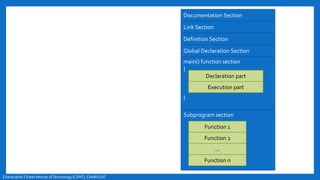
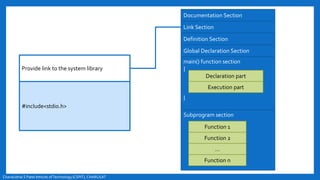
Documentation Section
Link Section
Definition Section
Global Declaration Section
main() function section
{
}
Subprogram section
Declaration part
Execution part
Function 1
Function 2
…
Function n
Chandubhai S Patel Intitute ofTechnology(CSPIT), CHARUSAT
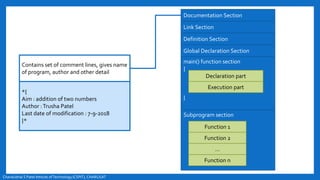
Contains set of comment lines, gives name
of program, author and other detail
*{
Aim : addition of two numbers
Author :Trusha Patel
Last date of modification : 7-9-2018
}*
Documentation Section
Link Section
Definition Section
Global Declaration Section
main() function section
{
}
Subprogram section
Declaration part
Execution part
Function 1
Function 2
…
Function n
Chandubhai S Patel Intitute ofTechnology(CSPIT), CHARUSAT
Provide link to the system library
#include<stdio.h>
Documentation Section
Link Section
Definition Section
Global Declaration Section
main() function section
{
}
Subprogram section
Declaration part
Execution part
Function 1
Function 2
…
Function n
Chandubhai S Patel Intitute ofTechnology(CSPIT), CHARUSAT
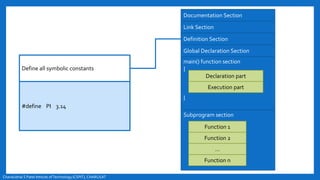
Define all symbolic constants
#define PI 3.14
Documentation Section
Link Section
Definition Section
Global Declaration Section
main() function section
{
}
Subprogram section
Declaration part
Execution part
Function 1
Function 2
…
Function n
Chandubhai S Patel Intitute ofTechnology(CSPIT), CHARUSAT
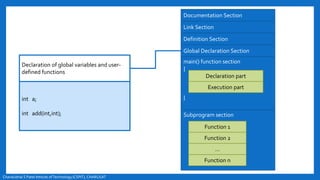
Declaration of global variables and user-
defined functions
int a;
int add(int,int);
Documentation Section
Link Section
Definition Section
Global Declaration Section
main() function section
{
}
Subprogram section
Declaration part
Execution part
Function 1
Function 2
…
Function n
Chandubhai S Patel Intitute ofTechnology(CSPIT), CHARUSAT
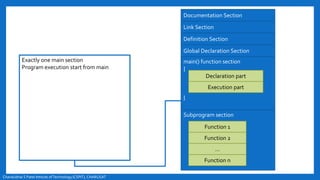
Exactly one main section
Program execution start from main
Documentation Section
Link Section
Definition Section
Global Declaration Section
main() function section
{
}
Subprogram section
Declaration part
Execution part
Function 1
Function 2
…
Function n
Chandubhai S Patel Intitute ofTechnology(CSPIT), CHARUSAT
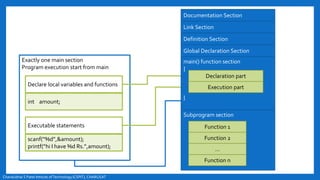
Exactly one main section
Program execution start from main
Declare local variables and functions
int amount;
Executable statements
scanf(“%d”,&amount);
printf(“hi I have %d Rs.”,amount);
Documentation Section
Link Section
Definition Section
Global Declaration Section
main() function section
{
}
Subprogram section
Declaration part
Execution part
Function 1
Function 2
…
Function n
Chandubhai S Patel Intitute ofTechnology(CSPIT), CHARUSAT
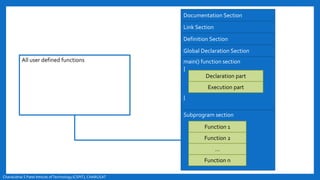
All user defined functions
Documentation Section
Link Section
Definition Section
Global Declaration Section
main() function section
{
}
Subprogram section
Declaration part
Execution part
Function 1
Function 2
…
Function n
Chandubhai S Patel Intitute ofTechnology(CSPIT), CHARUSAT
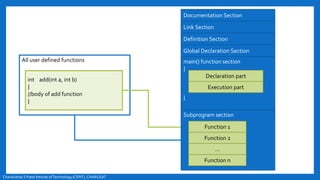
All user defined functions
int add(int a, int b)
{
//body of add function
}
Documentation Section
Link Section
Definition Section
Global Declaration Section
main() function section
{
}
Subprogram section
Declaration part
Execution part
Function 1
Function 2
…
Function n
COMPILATION PROCESS
Chandubhai S Patel Intitute ofTechnology(CSPIT), CHARUSAT
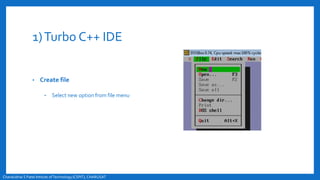
1)Turbo C++ IDE
• Create file
• Select new option from file menu
Chandubhai S Patel Intitute ofTechnology(CSPIT), CHARUSAT
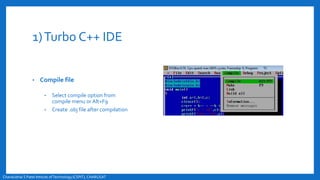
1)Turbo C++ IDE
• Compile file
• Select compile option from
compile menu or Alt+F9
• Create .obj file after compilation
Chandubhai S Patel Intitute ofTechnology(CSPIT), CHARUSAT
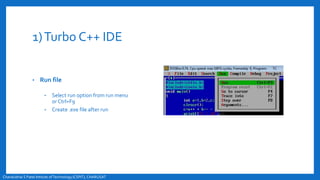
1)Turbo C++ IDE
• Run file
• Select run option from run menu
or Ctrl+F9
• Create .exe file after run
Chandubhai S Patel Intitute ofTechnology(CSPIT), CHARUSAT
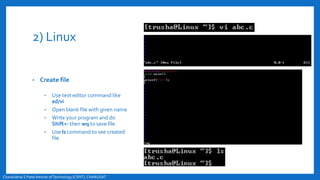
2) Linux
• Create file
• Use text editor command like
ed/vi
• Open blank file with given name
• Write your program and do
Shift+: then wq to save file
• Use ls command to see created
file
Chandubhai S Patel Intitute ofTechnology(CSPIT), CHARUSAT
2) Linux
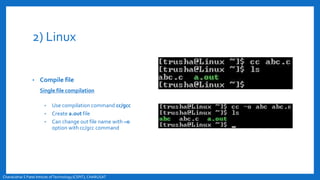
• Compile file
Single file compilation
• Use compilation command cc/gcc
• Create a.out file
• Can change out file name with –o
option with cc/gcc command
Chandubhai S Patel Intitute ofTechnology(CSPIT), CHARUSAT
2) Linux
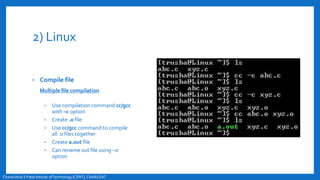
• Compile file
Multiple file compilation
• Use compilation command cc/gcc
with –c option
• Create .o file
• Use cc/gcc command to compile
all .o files together
• Create a.out file
• Can rename out file using –o
option
Chandubhai S Patel Intitute ofTechnology(CSPIT), CHARUSAT
2) Linux
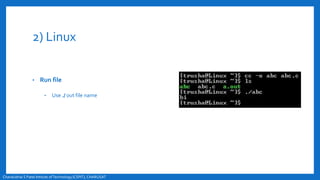
• Run file
• Use ./ out file name
Chandubhai S Patel Intitute ofTechnology(CSPIT), CHARUSAT

Introduction to c

  • 1.
    CE141 : COMPUTERCONCEPTS AND PROGRAMMING INTRODUCTION TO C Prepared by : Ms.Trusha Patel Assistant Professor https://sites.google.com/view/mrstrusha Chandubhai S Patel Intitute ofTechnology(CSPIT), CHARUSAT
  • 2.
    HISTORY OF C ChandubhaiS Patel Intitute ofTechnology(CSPIT), CHARUSAT
  • 3.
    Chandubhai S PatelIntitute ofTechnology(CSPIT), CHARUSAT ALGOL B BCPL Traditional C K&R C ANSI C ANSI/ISO C C99 International Group KenThompson Martin Richards Dennis Ritchie Kernighan & Ritchie ANSICommittee ISO Committee Standardization Committee 1960 1970 1967 1972 1978 1989 1990 1999
  • 4.
    History of C •ALGOL • Root of all modern language • Introduced in early 1960s • First computer language use a block structure • Not popular in USA, widely used in Europe • Gave concept of structure programming to computer science society • BCPL • BCPL : Basic Combined Programming Language • Martin Richards developed in 1967 • Developed to write system software • B • KenThompson developed in 1970 • Used to create early version of UNIX operating system at Bell laboratories Chandubhai S Patel Intitute ofTechnology(CSPIT), CHARUSAT
  • 5.
    History of C •Traditional C • Evolved by Dennis Ritchie at Bell laboratories in 1972 • Used many concepts of ALGOL, BCPL and B • Strongly associated with UNIX • UNIX was coded almost in C • K&R C • C become more popular after publication of book “The c Programming language” by Brain Kernighan and Dennis Ritchie in 1978 • Then C came to known as “K&R C” in programming community Chandubhai S Patel Intitute ofTechnology(CSPIT), CHARUSAT
  • 6.
    History of C •ANSI C • Rapid growth of C led to the development of different version of language that were similar but often incompatible which is serious problem for system developers • ANCI (American National Standards Institute) appointed a technical team to define standards of C in 1989 • The committee is approved the version of C in 1989 known asANSI C • ANSI/ISO C • Version of C then approved by ISO (international Standards Organization) in 1990 • Also referred asC89 • C99 • Standardization committee of C felt that few features of C++/Java, if added in C, would enhance the usefulness of language • New standard of C given , known as C99 Chandubhai S Patel Intitute ofTechnology(CSPIT), CHARUSAT
  • 7.
    CHARACTERISTICSOF C Chandubhai SPatel Intitute ofTechnology(CSPIT), CHARUSAT
  • 8.
    Characteristics of C •Robust language • Rich set of built-in functions, operators, data types, keywords • Combines capabilities of assembly language and hi-level language both so well suited for writing both system software and business packages • Highly portable • Well suited for structured programming • Ability to extend itself Chandubhai S Patel Intitute ofTechnology(CSPIT), CHARUSAT
  • 9.
    BASIC STRUCTURE Chandubhai SPatel Intitute ofTechnology(CSPIT), CHARUSAT
  • 10.
    Chandubhai S PatelIntitute ofTechnology(CSPIT), CHARUSAT Documentation Section Link Section Definition Section Global Declaration Section main() function section { } Subprogram section Declaration part Execution part Function 1 Function 2 … Function n
  • 11.
    Chandubhai S PatelIntitute ofTechnology(CSPIT), CHARUSAT Contains set of comment lines, gives name of program, author and other detail *{ Aim : addition of two numbers Author :Trusha Patel Last date of modification : 7-9-2018 }* Documentation Section Link Section Definition Section Global Declaration Section main() function section { } Subprogram section Declaration part Execution part Function 1 Function 2 … Function n
  • 12.
    Chandubhai S PatelIntitute ofTechnology(CSPIT), CHARUSAT Provide link to the system library #include<stdio.h> Documentation Section Link Section Definition Section Global Declaration Section main() function section { } Subprogram section Declaration part Execution part Function 1 Function 2 … Function n
  • 13.
    Chandubhai S PatelIntitute ofTechnology(CSPIT), CHARUSAT Define all symbolic constants #define PI 3.14 Documentation Section Link Section Definition Section Global Declaration Section main() function section { } Subprogram section Declaration part Execution part Function 1 Function 2 … Function n
  • 14.
    Chandubhai S PatelIntitute ofTechnology(CSPIT), CHARUSAT Declaration of global variables and user- defined functions int a; int add(int,int); Documentation Section Link Section Definition Section Global Declaration Section main() function section { } Subprogram section Declaration part Execution part Function 1 Function 2 … Function n
  • 15.
    Chandubhai S PatelIntitute ofTechnology(CSPIT), CHARUSAT Exactly one main section Program execution start from main Documentation Section Link Section Definition Section Global Declaration Section main() function section { } Subprogram section Declaration part Execution part Function 1 Function 2 … Function n
  • 16.
    Chandubhai S PatelIntitute ofTechnology(CSPIT), CHARUSAT Exactly one main section Program execution start from main Declare local variables and functions int amount; Executable statements scanf(“%d”,&amount); printf(“hi I have %d Rs.”,amount); Documentation Section Link Section Definition Section Global Declaration Section main() function section { } Subprogram section Declaration part Execution part Function 1 Function 2 … Function n
  • 17.
    Chandubhai S PatelIntitute ofTechnology(CSPIT), CHARUSAT All user defined functions Documentation Section Link Section Definition Section Global Declaration Section main() function section { } Subprogram section Declaration part Execution part Function 1 Function 2 … Function n
  • 18.
    Chandubhai S PatelIntitute ofTechnology(CSPIT), CHARUSAT All user defined functions int add(int a, int b) { //body of add function } Documentation Section Link Section Definition Section Global Declaration Section main() function section { } Subprogram section Declaration part Execution part Function 1 Function 2 … Function n
  • 19.
    COMPILATION PROCESS Chandubhai SPatel Intitute ofTechnology(CSPIT), CHARUSAT
  • 20.
    1)Turbo C++ IDE •Create file • Select new option from file menu Chandubhai S Patel Intitute ofTechnology(CSPIT), CHARUSAT
  • 21.
    1)Turbo C++ IDE •Compile file • Select compile option from compile menu or Alt+F9 • Create .obj file after compilation Chandubhai S Patel Intitute ofTechnology(CSPIT), CHARUSAT
  • 22.
    1)Turbo C++ IDE •Run file • Select run option from run menu or Ctrl+F9 • Create .exe file after run Chandubhai S Patel Intitute ofTechnology(CSPIT), CHARUSAT
  • 23.
    2) Linux • Createfile • Use text editor command like ed/vi • Open blank file with given name • Write your program and do Shift+: then wq to save file • Use ls command to see created file Chandubhai S Patel Intitute ofTechnology(CSPIT), CHARUSAT
  • 24.
    2) Linux • Compilefile Single file compilation • Use compilation command cc/gcc • Create a.out file • Can change out file name with –o option with cc/gcc command Chandubhai S Patel Intitute ofTechnology(CSPIT), CHARUSAT
  • 25.
    2) Linux • Compilefile Multiple file compilation • Use compilation command cc/gcc with –c option • Create .o file • Use cc/gcc command to compile all .o files together • Create a.out file • Can rename out file using –o option Chandubhai S Patel Intitute ofTechnology(CSPIT), CHARUSAT
  • 26.
    2) Linux • Runfile • Use ./ out file name Chandubhai S Patel Intitute ofTechnology(CSPIT), CHARUSAT