

Introducing
Swagger
AMR ALI
SENIOR ARCHITECT
What is Swagger
 Swagger is a simple yet powerful representation of your RESTful
API.
 With the largest ecosystem of API tooling on the planet,
thousands of developers are supporting Swagger in almost every
modern programming language and deployment environment.
 With a Swagger-enabled API, you get interactive documentation,
client SDK generation and discoverability.
 Swagger helps companies like Apigee, Getty Images, Intuit,
LivingSocial, McKesson, Microsoft, Morningstar, and PayPal build
the best possible services with RESTful APIs.
 Now in version 2.0, Swagger is more enabling than ever. And it's
100% open source software.
 Has a formal specifications: http://swagger.io/specification/
2
Why should we use
Swagger
 Widely accepted standard for defining REST API
 Supported by our integration tools
 IIB (version 10)
 SoapUI
 Simple, self defining document for REST APIs
3
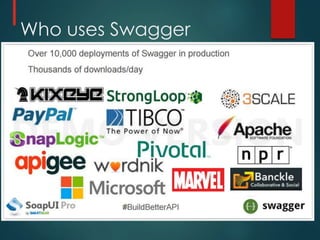
Who uses Swagger
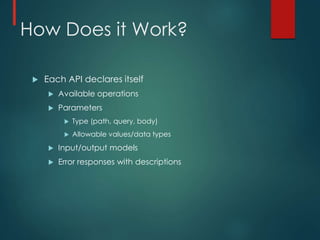
How Does it Work?
 Each API declares itself
 Available operations
 Parameters
 Type (path, query, body)
 Allowable values/data types
 Input/output models
 Error responses with descriptions
Authoring Swagger
 Swagger can be defined using either JSON notations
or YAML notations
 YAML: http://yaml.org/
 YAML™ (rhymes with “camel”) is a human-friendly,
cross language, Unicode based data serialization
language designed around the common native data
types of agile programming languages.
 It is broadly useful for programming needs ranging from
configuration files to Internet messaging to object
persistence to data auditing.
 Is 1-1 convertible to JSON
 Depends on indentation
 n YAML block styles, structure is determined by indentation.
 Quick Tutorial on YAML
 http://learn.getgrav.org/advanced/yaml
Demo Simple API
 We need to host a REST API on www.test.com that
displays a product given its id
 It should support http get operations
 Returns 200 success for successful execution
 Returns 404 when the product is not found
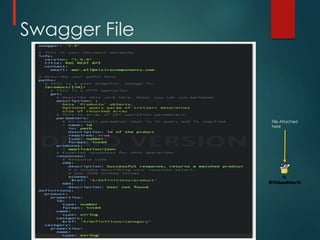
Swagger File
File Attached
here
Swagger Schema Types
 Types within Swagger can be defined using JSON
Schema
 http://json-schema.org/latest/json-schema-
core.html
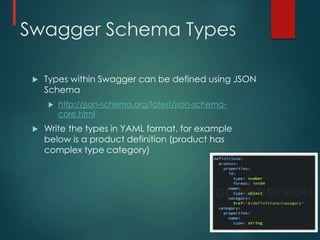
 Write the types in YAML format, for example
below is a product definition (product has
complex type category)
Demo
HTTP://EDITOR.SWAGGER.IO/#/
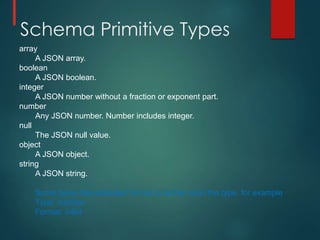
Schema Primitive Types
array
A JSON array.
boolean
A JSON boolean.
integer
A JSON number without a fraction or exponent part.
number
Any JSON number. Number includes integer.
null
The JSON null value.
object
A JSON object.
string
A JSON string.
Some types has extended format to further strict the type, for example
Type: number
Format: int64
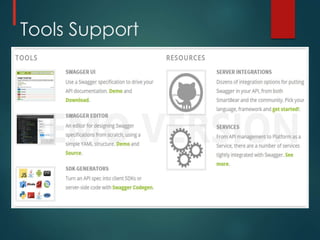
Tools Support
IIB Support
 In the release of IIB v10, IBM has recognized and
closed a gap in terms of support for REST services.
 Previously you were able to create your own REST
services using HTTPInput, HTTPRequest, and HTTPReply
nodes, but there wasn’t any structure within the tool
to manage that, so you had to roll most of that on
your own.
 IBM has chosen to implement Swagger in IIB v10 and
will allow you to import a Swagger configuration and
it will build out the flows for you.
 leaving a series of subflows in order to implement
custom logic. This is like a quick-start to a REST API
implementation within IIB which also then gives you
access to all other resources in your Integration
Node (like schemas, shared and static libraries, etc.)
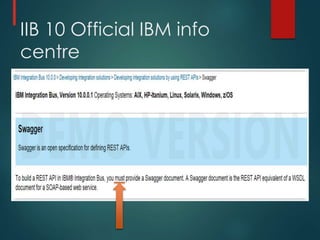
IIB 10 Official IBM info
centre
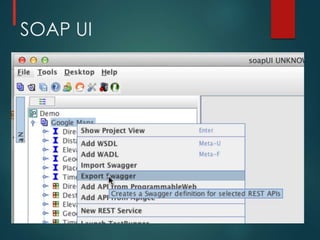
SOAP UI

Introducing swagger

  • 1.
  • 2.
    What is Swagger Swagger is a simple yet powerful representation of your RESTful API.  With the largest ecosystem of API tooling on the planet, thousands of developers are supporting Swagger in almost every modern programming language and deployment environment.  With a Swagger-enabled API, you get interactive documentation, client SDK generation and discoverability.  Swagger helps companies like Apigee, Getty Images, Intuit, LivingSocial, McKesson, Microsoft, Morningstar, and PayPal build the best possible services with RESTful APIs.  Now in version 2.0, Swagger is more enabling than ever. And it's 100% open source software.  Has a formal specifications: http://swagger.io/specification/ 2
  • 3.
    Why should weuse Swagger  Widely accepted standard for defining REST API  Supported by our integration tools  IIB (version 10)  SoapUI  Simple, self defining document for REST APIs 3
  • 4.
  • 5.
    How Does itWork?  Each API declares itself  Available operations  Parameters  Type (path, query, body)  Allowable values/data types  Input/output models  Error responses with descriptions
  • 6.
    Authoring Swagger  Swaggercan be defined using either JSON notations or YAML notations  YAML: http://yaml.org/  YAML™ (rhymes with “camel”) is a human-friendly, cross language, Unicode based data serialization language designed around the common native data types of agile programming languages.  It is broadly useful for programming needs ranging from configuration files to Internet messaging to object persistence to data auditing.  Is 1-1 convertible to JSON  Depends on indentation  n YAML block styles, structure is determined by indentation.  Quick Tutorial on YAML  http://learn.getgrav.org/advanced/yaml
  • 7.
    Demo Simple API We need to host a REST API on www.test.com that displays a product given its id  It should support http get operations  Returns 200 success for successful execution  Returns 404 when the product is not found
  • 8.
  • 9.
    Swagger Schema Types Types within Swagger can be defined using JSON Schema  http://json-schema.org/latest/json-schema- core.html  Write the types in YAML format, for example below is a product definition (product has complex type category)
  • 10.
  • 11.
    Schema Primitive Types array AJSON array. boolean A JSON boolean. integer A JSON number without a fraction or exponent part. number Any JSON number. Number includes integer. null The JSON null value. object A JSON object. string A JSON string. Some types has extended format to further strict the type, for example Type: number Format: int64
  • 12.
  • 13.
    IIB Support  Inthe release of IIB v10, IBM has recognized and closed a gap in terms of support for REST services.  Previously you were able to create your own REST services using HTTPInput, HTTPRequest, and HTTPReply nodes, but there wasn’t any structure within the tool to manage that, so you had to roll most of that on your own.  IBM has chosen to implement Swagger in IIB v10 and will allow you to import a Swagger configuration and it will build out the flows for you.  leaving a series of subflows in order to implement custom logic. This is like a quick-start to a REST API implementation within IIB which also then gives you access to all other resources in your Integration Node (like schemas, shared and static libraries, etc.)
  • 14.
    IIB 10 OfficialIBM info centre
  • 15.