Introducing OpenText™ TeamSite 8.2
OpenText. ©2016 All Rights Reserved. 2
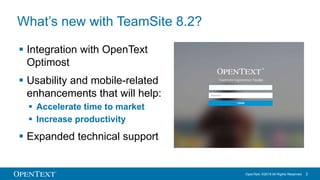
What’s new with TeamSite 8.2?
 Integration with OpenText
Optimost
 Usability and mobile-related
enhancements that will help:
 Accelerate time to market
 Increase productivity
 Expanded technical support
OpenText. ©2016 All Rights Reserved. 3
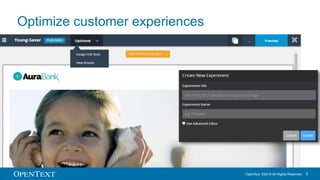
Optimize customer experiences
OpenText. ©2016 All Rights Reserved. 4
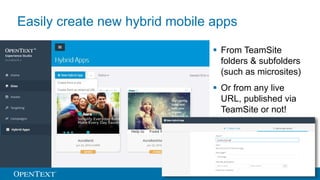
Easily create new hybrid mobile apps
 From TeamSite
folders & subfolders
(such as microsites)
 Or from any live
URL, published via
TeamSite or not!
OpenText. ©2016 All Rights Reserved. 5
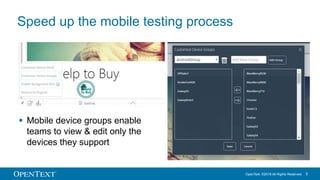
Speed up the mobile testing process
 Mobile device groups enable
teams to view & edit only the
devices they support
OpenText. ©2016 All Rights Reserved. 6
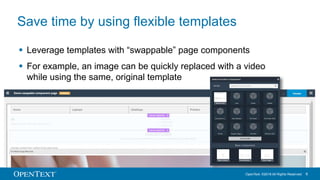
Save time by using flexible templates
 Leverage templates with “swappable” page components
 For example, an image can be quickly replaced with a video
while using the same, original template
OpenText. ©2016 All Rights Reserved. 7
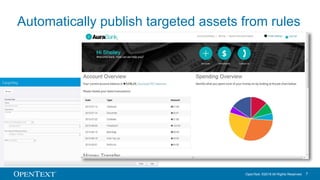
Automatically publish targeted assets from rules
OpenText. ©2016 All Rights Reserved. 8
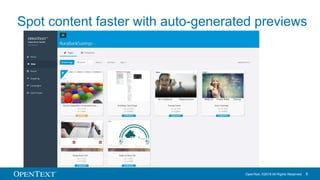
Spot content faster with auto-generated previews
OpenText. ©2016 All Rights Reserved. 9
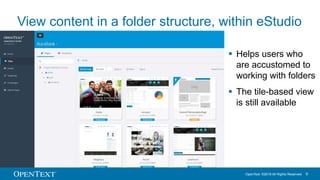
View content in a folder structure, within eStudio
 Helps users who
are accustomed to
working with folders
 The tile-based view
is still available
OpenText. ©2016 All Rights Reserved. 10
View version history within Experience Studio
OpenText. ©2016 All Rights Reserved. 11
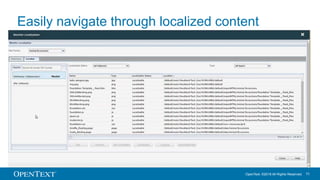
Easily navigate through localized content
OpenText. ©2016 All Rights Reserved. 12
Other enhancements
 Launch existing custom workflows and
customize new ones in eStudio to map to
business processes
 Support multiple stores in Experience Studio
 Documentation shares how to run TeamSite
processes as a non-root user
 Select sections, rows, and columns via CSS3
OpenText. ©2016 All Rights Reserved. 13
Expanded technical support includes:
 Java
 Support for Java 8 runtime added to TeamSite, LiveSite,
OpenDeploy, and Search
 Tomcat
 Support for Tomcat 8.0.36 added to LiveSite
 OpenSSL
 TeamSite 8.2 components will link to OpenSSL 1.0.1e on Linux
 OpenSSL 1.0.x is supported
 Windows will link to OpenSSL 1.0.2e
Thank you for taking a look the new
features included in TeamSite 8.2!
For more information, email
teamsite.mediabin@opentext.com.
www.opentext.com
twitter.com/opentext
facebook.com/opentext
linkedin.com/company/opentext

Introducing OpenText TeamSite 8.2

  • 1.
  • 2.
    OpenText. ©2016 AllRights Reserved. 2 What’s new with TeamSite 8.2?  Integration with OpenText Optimost  Usability and mobile-related enhancements that will help:  Accelerate time to market  Increase productivity  Expanded technical support
  • 3.
    OpenText. ©2016 AllRights Reserved. 3 Optimize customer experiences
  • 4.
    OpenText. ©2016 AllRights Reserved. 4 Easily create new hybrid mobile apps  From TeamSite folders & subfolders (such as microsites)  Or from any live URL, published via TeamSite or not!
  • 5.
    OpenText. ©2016 AllRights Reserved. 5 Speed up the mobile testing process  Mobile device groups enable teams to view & edit only the devices they support
  • 6.
    OpenText. ©2016 AllRights Reserved. 6 Save time by using flexible templates  Leverage templates with “swappable” page components  For example, an image can be quickly replaced with a video while using the same, original template
  • 7.
    OpenText. ©2016 AllRights Reserved. 7 Automatically publish targeted assets from rules
  • 8.
    OpenText. ©2016 AllRights Reserved. 8 Spot content faster with auto-generated previews
  • 9.
    OpenText. ©2016 AllRights Reserved. 9 View content in a folder structure, within eStudio  Helps users who are accustomed to working with folders  The tile-based view is still available
  • 10.
    OpenText. ©2016 AllRights Reserved. 10 View version history within Experience Studio
  • 11.
    OpenText. ©2016 AllRights Reserved. 11 Easily navigate through localized content
  • 12.
    OpenText. ©2016 AllRights Reserved. 12 Other enhancements  Launch existing custom workflows and customize new ones in eStudio to map to business processes  Support multiple stores in Experience Studio  Documentation shares how to run TeamSite processes as a non-root user  Select sections, rows, and columns via CSS3
  • 13.
    OpenText. ©2016 AllRights Reserved. 13 Expanded technical support includes:  Java  Support for Java 8 runtime added to TeamSite, LiveSite, OpenDeploy, and Search  Tomcat  Support for Tomcat 8.0.36 added to LiveSite  OpenSSL  TeamSite 8.2 components will link to OpenSSL 1.0.1e on Linux  OpenSSL 1.0.x is supported  Windows will link to OpenSSL 1.0.2e
  • 14.
    Thank you fortaking a look the new features included in TeamSite 8.2! For more information, email teamsite.mediabin@opentext.com.
  • 15.

Editor's Notes

  • #3 We’re continuing the effort to transform OpenText TeamSite into an even more marketer-friendly digital experience management platform that helps companies boost revenue while also increasing productivity. Our latest version of TeamSite – TeamSite 8.2 – helps digital teams optimize customer experiences and further simplifies tasks for content editors, authors and web designers.
  • #4 Integrated Optimization Integrated optimization gives marketers an edge. TeamSite 8.2 eStudio is now integrated with OpenText Optimost, our premier product for comprehensive testing, targeting and personalization. Now, you can easily create experiments with published TeamSite content, adjust creative elements and text, and view reports that show which variations engage your customers best and bring the most success.
  • #5 Generate hybrid mobile apps directly from TeamSite-generated sites or subfolders and from any live URL, regardless of whether it was created through TeamSite.
  • #6 Speed up the mobile testing process by creating device groups in mobile emulator so that your team only tests the devices it supports.
  • #7 Replace page components without the need to create a new template every time a minor layout change is made.
  • #8 Eliminate manual work associated with publishing targeted content. Now, when a page or template containing a rule is published, any targeted content that could be returned from the rule will be published, too, which saves time and prevents errors.
  • #9 Quickly locate sites, apps, pages, and templates using thumbnail image previews.
  • #10 Experience Studio now offers additional view and search options to locate content. With TeamSite 8.2, you are still able to view the visually appealing, tile-based format that you are accustomed to seeing in TeamSite 8.0 and 8.1 to quickly search for sites, pages, apps, and assets. Now, you have the option to view the same content in a folder-based structure that is searchable.
  • #11 Version History shows all the versions of a selected file or page to help differentiate them in their draft, submitted, and published states. Versions can be previewed, and changes can be reverted. When selected, each version reveals several details including version number, date and time submitted or published, and who modified the draft files.
  • #12 The Monitor Localization dashboard is clean, easily searchable, and can be launched from eStudio. The number of tabs have been reduced, making it easier for your team to navigate and find the assets they are looking for.
  • #13 There are several other enhancements included in TeamSite 8.2. eStudio now offers the functionality to customize workflows, according to your organization’s business processes. Now, organizations can segregate user access to certain areas of their websites and access multiple stores in Experience Studio. Our TeamSite 8.2 documentation shares the procedure for changing processes to run Linux installations as a non-root user. Customers can refer to the TeamSite Administration Guide for more information. There have been some additional enhancements to layout capabilities. Now, users can select sections, rows, columns via standard CSS3 index-based pseudo selectors. Any associated styles will be reflected in edit and preview mode. And this feature also provides a page/body wrapper for users to add styles for the entire page.
  • #14 Expanded technical support includes: Java 8: Support for Java 8 runtime is now added to TeamSite, OpenDeploy, LiveSite, and Search. Tomcat: Support for Tomcat 8.0.36 has been added to LiveSite. OpenSSL: TeamSite 8.2 components will link to OpenSSL 1.0.1e on the Linux platform. However, OpenSSL 1.0.x is supported. Windows will link to OpenSSL 1.0.2e.