1A-2
The Computer Defined
•Electronic device
• Converts data into information
• Modern computers are digital
– Two digits combine to make data
• Older computers were analog
– A range of values made data
3.
Analog Computer:
• AnalogComputer:
• It works with continuous values, i.e they process
continuous data.
• The speed of such computers is less than that of
digital computers.
• It has very less memory and can store limited
amount of data.
• The results given by analog computers have very
less accuracy.
• Examples includes analog clock and thermometer.
1A-3
4.
Digital Computer:
• DigitalComputer:
• They work with discrete values, i.e they process
discrete data.
• The speed of digital computers is more in
comparison to analog computers.
• It has more memory space, hence stores large
amounts of data.
• It has two steps: On and Off.
• It is more reliable.
• It provides great performance.
• Its processing speed is high.
• Examples include laptop, digital camera, digital
watches.
1A-4
5.
1A-5
Computers For IndividualUse
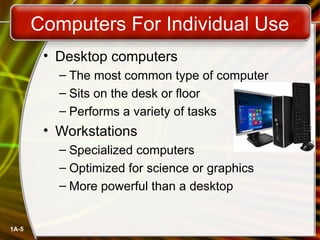
• Desktop computers
– The most common type of computer
– Sits on the desk or floor
– Performs a variety of tasks
• Workstations
– Specialized computers
– Optimized for science or graphics
– More powerful than a desktop
6.
1A-6
Computers For IndividualUse
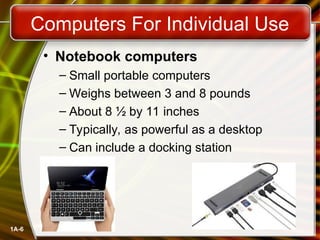
• Notebook computers
– Small portable computers
– Weighs between 3 and 8 pounds
– About 8 ½ by 11 inches
– Typically, as powerful as a desktop
– Can include a docking station
7.
1A-7
Computers For IndividualUse
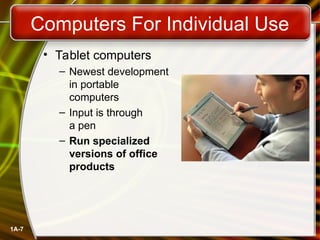
• Tablet computers
– Newest development
in portable
computers
– Input is through
a pen
– Run specialized
versions of office
products
8.
1A-8
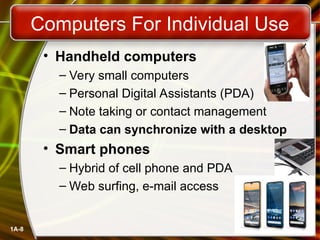
• Handheld computers
–Very small computers
– Personal Digital Assistants (PDA)
– Note taking or contact management
– Data can synchronize with a desktop
• Smart phones
– Hybrid of cell phone and PDA
– Web surfing, e-mail access
Computers For Individual Use
9.
1A-9
Computers For Organizations
•Network servers
– Centralized computer
– All other computers connect
– Provides access to network resources
– Multiple servers are called server farms
– Often simply a powerful desktop
1A-13
Computers In Society
•More impact than any other invention
– Changed work and freedom activities
– Used by all demographic groups
• Computers are important because:
– Provide information to users
– Information is critical to our society
– Managing information is difficult
14.
1A-14
Computers In Society
•Computers at home
– Many homes have multiple computers
– Most homes have Internet
– Computers are used for
• Business
• Entertainment
• Communication
• Education
15.
1A-15
Computers In Society
•Computers in education
– Computer literacy required at all levels
• E.g., LMS, Hybrid Mode Education
• Computers in small business
– Makes businesses more profitable
– Allows owners to manage
• Computers in industry
– Computers are used to design products
– Assembly lines are automated
16.
1A-16
Computers In Society
•Computers in government
– Necessary to track data for population
• Police officers
• Tax calculation and collection
– Eg MTMIS
– Governments were the first computer users
17.
1A-17
Computers In Society
•Computers in health care
– Revolutionized health care
– New treatments possible
– Scheduling of patients has improved
– Delivery of medicine is safer
Editor's Notes
#3 It can take on any value in an interval
E.g. [1,10] Means any value between 1 and 10
Example:
Temperature-- we can measure temperature any given day.
83.6 F, 99.46 F
Speed of Car:-- That can be measured like, 25.6 mph, 30.12 mph, 42.56 mph
#4 Discrete Data: It can have only specific value: 1, 2, 3, 4-----------
Whole numbers or Natural Numbers
Example: The number of Cats in a neighborhoods
5, 12, 18
#5 Definition Workstation: A workstation is a special computer designed for technical or scientific applications.
Intended primarily to be used by a single user, they are commonly connected to a local area network and run multi-user operating systems.
#6 Assignment question- What are the pros and cons of each type of computer?
#7
Windows Apps.
OneDrive.
Outlook.
Skype.
OneNote.
Microsoft Teams.
Microsoft Edge.
#8 Web Surfing:
Browsing is done using web browser.
Browsing is targeted on websites, as user knows where to look what is required.
Surfing is done using a search engine.
Surfing is random and most popular/relevant searches shows the user the website he/she need to visit.
Jumping from page to page on the Web. Just as in "TV channel surfing," where one clicks the remote to go from channel to channel,
the hyperlinks on Web pages make Web surfing a snap to go from one page to another or one website to another.
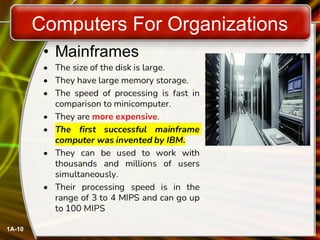
#10 Processing Speed is: 3-4 Million instructions per second (MIPS) to 100 MIPS
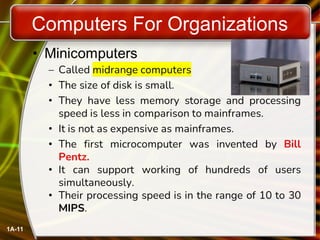
#11 Definition: A minicomputer is also called as a mid-range computer. Minicomputers are mainly multi-users systems where more than one user can work simultaneously. Minicomputer examples: IBM's AS/400e, Honeywell200, TI-990
minicomputer is a multiprocessing system.
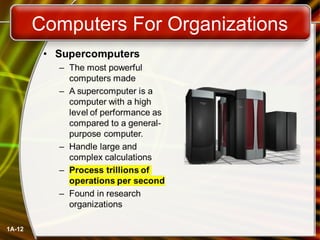
#12 Traditionally, supercomputers have been used for scientific and engineering applications that must handle very large databases or do a great amount of computation (or both).
Examples of supercomputer
Summit Supercomputer.
Sierra Supercomputer.
Sunway Taihu Light Supercomputer.
Tianhe-2 Supercomputer.
Frontera Supercomputer.
Cray-1.
Fugaku.
PARAM-Siddhi.
#13 Demographic Demography is the statistical study of populations, especially human beings.