 INTERNET SECURITY
 Professor name: Ing. Petr Banda, Ph.D,

 Maria Persenkiya
 Nastassia Makarava
OUTLINE:
 What is hacking?
 Who is a hacker and what do Hackers do ?
 Methods of Hacking
 Statistics/Examples of Attacks
 Types of viruses, malware, Trojan horses
 Measures for internet security
 Conclusion
HELLO! I AM A HACKER!
 Hacker - Person who gains
authorized/unauthorized access to a
computer WITHOUT seeming of causing
damage.
 Hacking is the gaining of access to a
computer and viewing, copying, or creating
data(leaving a trace) without the intention of
destroying data or maliciously harming the
computer.
WHAT DO HACKERS DO ?
 The passes the systems and Passwords.
Taking advantage of weaknesses left in the
system by developers. This person knows
computer programming and Access
confidential information to Broadcast
confidential documents.
e.g. Name, address, etc. Espionage
GROWING COMPLICATED THREATS
 “Love Letter” worm May 2000;
more than 650 individual sites indicating more than
500,000 individual systems are affected
 “SQL Slammer” worm January 2003
crashed the Internet and infected roughly “75,000
systems within 15 minutes” on all systems running
Microsoft Windows, considerable network degradation
huge amount of damages and clean up costs
METHODS OF HACKING
 Over the internet
 Over Lan
 Locally Offline
 Theft
 Deception
 Ip Addresses
 Telephone
 Email
TYPES OF HACKERS!
 Black Hat Hackers ( The bad guy Violates computers)
 White Hat Hackers (The Hero Breaks security for good reasons)
 Blue Hat Hacker (consults firms, system tested before launch)
 Grey Hacker(Mixture of white and Black offers their service to improve for a
small fee)
 Hacktivist (Utilizes Technology)
 Script Kiddie (Skiddie)Kid- Child lacking knowledge, Immature
 Elite Hacker (The most skilled Hacker)(Masters of deception)
 Ethical Hacker(employee and authorised Hacker)
 Bots ( software tools the hackers use )
BLACK HAT HACKER
 Malicious Hackers
 Villain
 Violates Computer Security
WHITE HAT HACKER
 Computer Security
 A Computer Hacker intending to improve
security.
 The Hero
TYPES OF HACKING.
 Password Cracking-Attempting to guess a password using a
program.
 Brute Forcing-A program that guesses a password by inputting
as many randomly generated passwords using the computer’s
processing power.
 Dictionary Hack- A program that guesses passwords based on
words in a dictionary or the program’s vocabulary.
 Packet Sniffing- Sniffing packets sent over the internet to gain
security details over unsecured connections.
 Phishing-Legitimate looking sites designed to farm information
inputted by the user.
WAYS OF HACKING!
 SQL INJECTION
 DDOS ATTACKS
 SOCIAL ENGINEERING
SQL INJECTION
 SQL injection is a type of attack often used
against data driven applications.
 It is a technique that exploits an applications
security weaknesses.
 Used to steal databases full of credit card
information, passwords, or personal details
DDOS ATTACKS
 Distributed Denial of Service.
 Used to make a machine or network
resource inaccessible to users.
 DDOS attacks usually utilise botnets.
SOCIAL ENGINEERING
 Social engineering is the art of manipulating
people into divulging personal and
confidential information.
 Requires very little technical skill. Relies
heavily on human interaction to get results.
 Most often used in tandem with other
exploits.
MALWARE AND VIRUSES
 Malicious Software.
 Used by an attacker to steal data, disrupt
operations or access a private network.
 Used to describe many different types of
software including viruses, worms, Trojans,
keyloggers, spyware and others.
COMPUTER VIRUSES
 Any computer program that can replicate
itself and spread from one computer to
another without input from its creator.
 Needs to attach itself to an existing program
in order for it to work.
 They are used to deliver many different
payloads.
COMPUTER WORM
 A program similar to a virus; it can replicate
itself and spread from one computer to another.
 Unlike a virus a worm does not need to be
attached to an existing program in order to
function.
 Always cause harm to the network, even if it is
just increased bandwidth consumption, where
as a virus will always corrupt and/or modify files
on a computer.
TROJAN HORSE
 A program that pretends to do one thing, but
in reality does something else.
 Used to record keystrokes input by a user
 Can be used to steal usernames, passwords,
credit card information, personal details and
soon.
 Usually employ a form of social engineering.
HOW TO PROTECT?
 Firewall
 Program used to monitor network traffic.
 Have a set of rules that they use to filter
packets trying to enter the network.
 Usually placed between a trusted network
andone that is less trusted.
ANTIVIRUS
 Used to prevent access to computer systems
by unwanted programs.
 Utilises many different methods to protect the
computer.
 Often search for signs of viruses on every
website that is visited and do regular scans
of the computer to check for infections.
HOW ANTIVIRUS WORKS?
 Scanning -- Allows user to analyze all the files one at a time and
to check them in order to see if they contain a virus.
 Real-time monitoring -- This antivirus feature is constantly active,
constantly monitoring to keep any suspect file at bay. Express
repair – Once it detects an infected virus, an antivirus will first
quarantine it in order to prevent it from multiplying .
 File scanning – scan all files on computer .
 Download scanning – scan all files that are being download form
a ftp site .Heuristic scanning – scan all usual files .Email scanning
– scan all received email
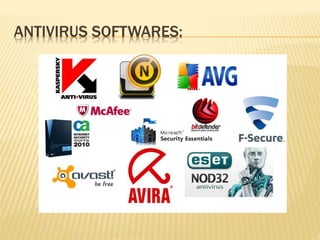
ANTIVIRUS SOFTWARES:
SKILLS TO PREVENT CYBERCRIME
 Spam blocker
 Anti Virus software
 Firewall protection
 Encryption software
 Caution in providing personal information
Secure Shopping
 Avoidance of scans
 Monitoring of your child’s computer activities
CONCLUSION
 Employ more skilled individuals
 Pros: Eliminates the need on relying on a small number of people
 Cons: Very costly
 Improve education on internet security and/or
lower costs for fees
 Job Awareness-people are not aware certain
jobs are available
 Higher starting wages to give potential
employees an incentive
Internet Security in Web 2.0

Internet Security in Web 2.0

  • 1.
     INTERNET SECURITY Professor name: Ing. Petr Banda, Ph.D,   Maria Persenkiya  Nastassia Makarava
  • 2.
    OUTLINE:  What ishacking?  Who is a hacker and what do Hackers do ?  Methods of Hacking  Statistics/Examples of Attacks  Types of viruses, malware, Trojan horses  Measures for internet security  Conclusion
  • 3.
    HELLO! I AMA HACKER!  Hacker - Person who gains authorized/unauthorized access to a computer WITHOUT seeming of causing damage.  Hacking is the gaining of access to a computer and viewing, copying, or creating data(leaving a trace) without the intention of destroying data or maliciously harming the computer.
  • 4.
    WHAT DO HACKERSDO ?  The passes the systems and Passwords. Taking advantage of weaknesses left in the system by developers. This person knows computer programming and Access confidential information to Broadcast confidential documents. e.g. Name, address, etc. Espionage
  • 5.
    GROWING COMPLICATED THREATS “Love Letter” worm May 2000; more than 650 individual sites indicating more than 500,000 individual systems are affected  “SQL Slammer” worm January 2003 crashed the Internet and infected roughly “75,000 systems within 15 minutes” on all systems running Microsoft Windows, considerable network degradation huge amount of damages and clean up costs
  • 6.
    METHODS OF HACKING Over the internet  Over Lan  Locally Offline  Theft  Deception  Ip Addresses  Telephone  Email
  • 7.
    TYPES OF HACKERS! Black Hat Hackers ( The bad guy Violates computers)  White Hat Hackers (The Hero Breaks security for good reasons)  Blue Hat Hacker (consults firms, system tested before launch)  Grey Hacker(Mixture of white and Black offers their service to improve for a small fee)  Hacktivist (Utilizes Technology)  Script Kiddie (Skiddie)Kid- Child lacking knowledge, Immature  Elite Hacker (The most skilled Hacker)(Masters of deception)  Ethical Hacker(employee and authorised Hacker)  Bots ( software tools the hackers use )
  • 8.
    BLACK HAT HACKER Malicious Hackers  Villain  Violates Computer Security
  • 9.
    WHITE HAT HACKER Computer Security  A Computer Hacker intending to improve security.  The Hero
  • 10.
    TYPES OF HACKING. Password Cracking-Attempting to guess a password using a program.  Brute Forcing-A program that guesses a password by inputting as many randomly generated passwords using the computer’s processing power.  Dictionary Hack- A program that guesses passwords based on words in a dictionary or the program’s vocabulary.  Packet Sniffing- Sniffing packets sent over the internet to gain security details over unsecured connections.  Phishing-Legitimate looking sites designed to farm information inputted by the user.
  • 11.
    WAYS OF HACKING! SQL INJECTION  DDOS ATTACKS  SOCIAL ENGINEERING
  • 12.
    SQL INJECTION  SQLinjection is a type of attack often used against data driven applications.  It is a technique that exploits an applications security weaknesses.  Used to steal databases full of credit card information, passwords, or personal details
  • 13.
    DDOS ATTACKS  DistributedDenial of Service.  Used to make a machine or network resource inaccessible to users.  DDOS attacks usually utilise botnets.
  • 14.
    SOCIAL ENGINEERING  Socialengineering is the art of manipulating people into divulging personal and confidential information.  Requires very little technical skill. Relies heavily on human interaction to get results.  Most often used in tandem with other exploits.
  • 15.
    MALWARE AND VIRUSES Malicious Software.  Used by an attacker to steal data, disrupt operations or access a private network.  Used to describe many different types of software including viruses, worms, Trojans, keyloggers, spyware and others.
  • 16.
    COMPUTER VIRUSES  Anycomputer program that can replicate itself and spread from one computer to another without input from its creator.  Needs to attach itself to an existing program in order for it to work.  They are used to deliver many different payloads.
  • 17.
    COMPUTER WORM  Aprogram similar to a virus; it can replicate itself and spread from one computer to another.  Unlike a virus a worm does not need to be attached to an existing program in order to function.  Always cause harm to the network, even if it is just increased bandwidth consumption, where as a virus will always corrupt and/or modify files on a computer.
  • 18.
    TROJAN HORSE  Aprogram that pretends to do one thing, but in reality does something else.  Used to record keystrokes input by a user  Can be used to steal usernames, passwords, credit card information, personal details and soon.  Usually employ a form of social engineering.
  • 19.
    HOW TO PROTECT? Firewall  Program used to monitor network traffic.  Have a set of rules that they use to filter packets trying to enter the network.  Usually placed between a trusted network andone that is less trusted.
  • 20.
    ANTIVIRUS  Used toprevent access to computer systems by unwanted programs.  Utilises many different methods to protect the computer.  Often search for signs of viruses on every website that is visited and do regular scans of the computer to check for infections.
  • 21.
    HOW ANTIVIRUS WORKS? Scanning -- Allows user to analyze all the files one at a time and to check them in order to see if they contain a virus.  Real-time monitoring -- This antivirus feature is constantly active, constantly monitoring to keep any suspect file at bay. Express repair – Once it detects an infected virus, an antivirus will first quarantine it in order to prevent it from multiplying .  File scanning – scan all files on computer .  Download scanning – scan all files that are being download form a ftp site .Heuristic scanning – scan all usual files .Email scanning – scan all received email
  • 22.
  • 23.
    SKILLS TO PREVENTCYBERCRIME  Spam blocker  Anti Virus software  Firewall protection  Encryption software  Caution in providing personal information Secure Shopping  Avoidance of scans  Monitoring of your child’s computer activities
  • 24.
    CONCLUSION  Employ moreskilled individuals  Pros: Eliminates the need on relying on a small number of people  Cons: Very costly  Improve education on internet security and/or lower costs for fees  Job Awareness-people are not aware certain jobs are available  Higher starting wages to give potential employees an incentive